
Tired of Website Downtime? How ICO WebTech Ensures 99.9% Uptime
Your website is often the first place prospects, customers, and partners engage with your business. When it’s unavailable, even briefly, the impact can extend beyond lost traffic to missed opportunities, disrupted customer experiences, and reduced trust in your brand.
Yet website downtime remains one of the most overlooked operational risks. Whether caused by server issues, security incidents, software conflicts, or unexpected traffic spikes, outages can affect revenue, lead generation, and business continuity.
In this guide, we’ll explore the true cost of website downtime, the most common causes behind it, and the strategies businesses use to maintain reliable performance. We’ll also look at how ICO WebTech’s hosting, monitoring, and maintenance services help clients achieve 99.9% uptime, supported by a real-world client success story.
Table of Contents
The Real Cost of Website Downtime
Why Do Websites Go Down? Common Causes
99.9% Uptime, Decoded: What the Number Actually Means
How Downtime Quietly Damages Your SEO and Brand
How ICO WebTech Keeps You at 99.9% Uptime
Success Story: Sonic Badminton Academy
How to Choose a Hosting Partner You Can Actually Trust
The Real Cost of Website Downtime
Website downtime is any period when your site is unreachable or fails to function correctly for visitors and search engines alike. It sounds like a minor technical hiccup until you put a number next to it. Industry research tracking IT outages has shown the average cost of downtime climbing sharply over the past decade — large enterprises now estimate losses well into the tens of thousands of dollars per hour, and analysts tracking Global 2000 companies have linked unplanned outages to hundreds of billions of dollars in lost revenue every year.
Smaller businesses are not exempt — they simply feel it differently. A modest e-commerce store or lead-generation site can lose 100% of its digital revenue for the entire duration of an outage. Even a conservative calculation for a micro-SMB puts hourly downtime costs in the thousands of dollars once you add idle staff time and emergency recovery work. The financial hit is only the visible part of the iceberg.
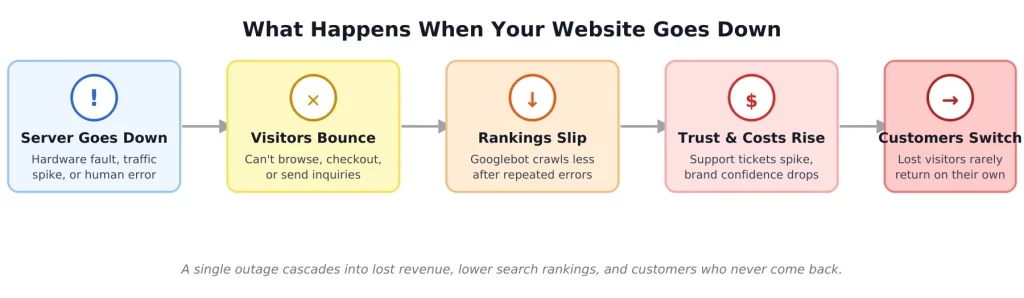
That cascading effect is why downtime is rarely “just an IT problem.” It touches sales, marketing spend, support headcount, and long-term brand trust all at once — which is exactly why hosting reliability deserves the same strategic attention as your website design or SEO strategy.
Why Do Websites Go Down? Common Causes
Most outages trace back to a short, predictable list of culprits. Understanding them is the first step toward preventing them:
- Server & hardware failures — ageing infrastructure, disk failures, or overloaded shared servers buckling under load.
- Unplanned traffic spikes — a viral post, a successful ad campaign, or a flash sale that overwhelms under-provisioned resources.
- Security incidents — DDoS attacks, malware infections, or brute-force login attempts that destabilise a server or trigger a provider-side suspension.
- Software & plugin conflicts — especially common on WordPress sites where an untested theme or plugin update breaks core functionality.
- DNS, domain, or SSL issues — an expired certificate or a missed domain renewal can take an otherwise healthy site fully offline.
- Human error — a misconfigured setting or an untested deployment pushed straight to a live server.
- Third-party service outages — payment gateways, CDNs, or external APIs failing and dragging dependent features down with them.
Almost every item on that list is preventable with disciplined hosting practices: redundant infrastructure, proactive monitoring, regular backups, and a team that tests changes before pushing them live. That discipline is the difference between a generic hosting provider and a true managed web hosting partner.
99.9% Uptime, Decoded: What the Number Actually Means
“99.9% uptime” sounds close enough to perfect that it’s easy to gloss over — but the gap between uptime tiers is larger than it looks, and chasing the next decimal point gets exponentially more expensive. Here is what each commonly advertised tier allows in actual downtime over a full year:
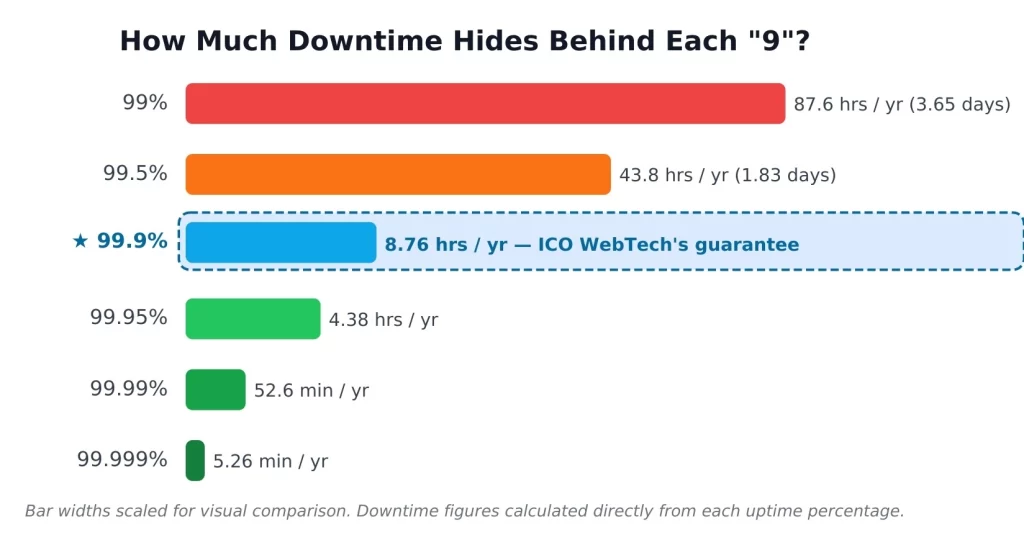
Notice how dramatically the curve flattens after 99.9%. Moving from 99% to 99.9% eliminates roughly 79 hours of potential downtime per year — a massive, business-changing improvement. Going all the way to “five nines” (99.999%) only removes another 8.7 hours, at a hosting cost reserved for global enterprises running mission-critical infrastructure across multiple data centres. For the vast majority of business websites, e-commerce stores, and lead-generation sites, 99.9% is the realistic, sustainable, well-engineered benchmark — which is exactly the figure ICO WebTech documents as its track record across all hosted client sites.
Also read: Shared Hosting vs VPS: Time to Upgrade Your Server?
How Downtime Quietly Damages Your SEO and Brand
Downtime does not just frustrate the humans who land on your site mid-outage — it is visible to Google too. When Googlebot crawls a page and receives a server error instead of content, it treats that the same way a real visitor would: as a bad experience.
Google’s John Mueller has publicly confirmed that a brief, isolated outage is unlikely to dent your rankings, Googlebot simply retries the next day.
[Source: Search Engine Journal]
But repeated server errors, or an outage stretching across several days, can lead Google to reduce how often it crawls your site — and in extended cases, to begin dropping affected pages from its index entirely.
Recovering lost rankings and re-establishing crawl frequency after that kind of event can take weeks, which is a costly, avoidable detour if your hosting had simply stayed online.
The brand-side damage compounds the SEO damage. A visitor who hits an error page during a purchase or inquiry rarely files a complaint — they simply leave, often for a competitor, and the loss shows up later as a quiet dip in retention rather than an obvious support ticket. That is precisely why uptime, site speed, and search visibility should be treated as one connected discipline rather than three separate line items.
How ICO WebTech Keeps You at 99.9% Uptime
ICO WebTech approaches uptime as an engineering commitment, not a marketing slogan. Here is what is actually behind the number:
Verified, Enterprise-Grade Hosting Infrastructure
As a verified reseller of GoDaddy, ICO WebTech hosts client websites on a genuine, secure, high-speed network — not the overloaded budget shared servers that quietly throttle performance at the worst possible times. Hosting is available across India, the USA, Australia, and Canada, and clients can choose between Windows-based and Linux-based servers depending on their technology stack. Full details live on the web hosting services page.
A Documented 99.9% Uptime Track Record
ICO WebTech maintains a publicly stated record of 99.9% uptime across every website it hosts. Even short outages put a meaningful share of potential customers at risk, which is why uptime is treated as a core deliverable rather than a background consideration.
Proactive Monitoring & Always-On Support
An in-house support team actively monitors hosted sites and is on call for emergencies — including incidents that occur on national holidays when many budget providers go dark. The faster an issue is caught, the shorter the outage, and the smaller the business impact.
Maintenance, Security & Performance, Bundled In
Hosting alone is not enough. Outages are just as often caused by outdated plugins, unpatched vulnerabilities, or bloated, slow-loading pages as they are by server hardware. ICO WebTech pairs hosting with ongoing website maintenance — security patching, regular updates, and backups — alongside dedicated website speed optimisation, so reliability and performance are managed together rather than treated as separate problems billed separately.
Professional Email Hosting, Included
Hosting plans include email hosting with industry-standard spam and virus filtering, full compatibility with Outlook, Thunderbird, and webmail clients, and IMAP support so your mailbox stays in sync across every device. A branded address such as inquiry@yourcompany.com also presents considerably more credibility to prospects than a free webmail account.
Built on a Solid Foundation From Day One
Reliability starts before launch. Sites built through ICO WebTech’s WordPress development and website design services are engineered with clean code and current best practices, reducing the odds of plugin conflicts, bloat, and technical debt that cause downtime down the line — whether the project is a fresh build, a website redesign, or an e-commerce platform handling live transactions.
The bottom line: 99.9% uptime is not one feature — it is the combined result of solid infrastructure, active monitoring, disciplined maintenance, and a support team that actually answers when something goes wrong. That is the model ICO WebTech runs for every hosted client.
Success Story
How to Choose a Hosting Partner You Can Actually Trust
Most hosting providers claim “reliable hosting” somewhere on their homepage — the language alone tells you very little. Before signing a contract, look for evidence of each of these specifics:
- A documented uptime track record the provider is willing to state in writing, not just a vague promise in the footer.
- Redundant infrastructure across data centres or regions, so a single point of failure does not take your whole site down.
- Active, ongoing monitoring rather than a “set it and forget it” server that is only checked when something breaks.
- Maintenance and security bundled in — updates, patches, and backups handled proactively, not billed as a costly emergency afterthought.
- Real human support that responds quickly during an actual incident, including outside standard business hours.
- Room to scale as your traffic grows, so a successful campaign does not become the thing that crashes your own site.
- Transparent, predictable pricing with no surprise charges for basics like email hosting or SSL certificates.
That is the standard ICO WebTech holds its own hosting plans to. You can see how the agency positions itself more broadly on the why choose us page, or browse the full client portfolio for real examples across industries.
FAQs About Website Uptime & Hosting
What does “99.9% uptime” actually mean in practice?
It means a website is expected to be accessible for all but roughly 8.76 hours across an entire year. That is a far stricter standard than it sounds — most of those allowed minutes are typically used for brief, planned maintenance rather than unplanned failures.
Can a short period of downtime really hurt my Google rankings?
A brief, one-off outage of a few hours is unlikely to cause lasting ranking damage, since Google’s crawler simply retries the next day. The risk grows meaningfully with repeated or extended outages, which can reduce crawl frequency and, in severe cases, lead to pages being temporarily removed from the index.
What is the difference between web hosting and website maintenance?
Hosting is the infrastructure that keeps your site physically online — the servers, bandwidth, and network. Website maintenance is the ongoing work that keeps it secure and functional over time: software updates, security patches, backups, and performance monitoring. ICO WebTech bundles both so neither is left as a gap.
How quickly does ICO WebTech respond to an outage?
An in-house support team monitors hosted sites and is available for emergencies — including incidents that occur on national holidays, a level of responsiveness most budget hosting providers simply do not offer.
Is 99.9% uptime sufficient for an e-commerce website?
For the large majority of e-commerce stores and lead-generation sites, yes. “Five nines” (99.999%) hosting is engineered for mission-critical, global-scale infrastructure and carries a cost most businesses do not need to justify. 99.9%, combined with proactive monitoring and fast incident response, covers the realistic risk profile of most online businesses reliably and cost-effectively.
Final Thoughts: Stop Losing Business to Downtime
Downtime is rarely dramatic in the moment — a few error pages, a handful of abandoned carts — but its real cost shows up later in dented search rankings, support backlogs, and customers who quietly never come back. The good news is that almost all of it is preventable with the right combination of infrastructure, monitoring, and maintenance working together.
That is the model ICO WebTech has built its hosting plans around: a documented 99.9% uptime track record, proactive monitoring, bundled maintenance and security, and a support team that actually answers when something goes wrong. It is the same setup that has kept Sonic Badminton Academy‘s website fast, secure, and online since its March 2026 launch.
Tired of crossing your fingers every time your site gets real traffic?
Let ICO WebTech’s hosting, monitoring & maintenance team take it off your plate.


Is Your Website a Legal Liability? Mastering ADA Web Accessibility Compliance
Imagine a modern, multi-story corporate headquarters located in the heart of a major financial district. The building features an elegant glass facade, state-of-the-art security systems, and beautifully designed presentation rooms. Now imagine that the front entrance only features a steep flight of concrete stairs, with absolutely no wheelchair ramp, no automated doors, and no tactile paving for visually impaired visitors.
In the physical world, this scenario would instantly trigger public outrage, massive regulatory fines, and immediate legal action under civil rights legislation. Yet, in the digital landscape, thousands of corporate enterprises launch beautifully designed, multi-million dollar web platforms every single day that contain the exact digital equivalent of those concrete stairs. They build websites that completely shut out individuals with visual, auditory, motor, or cognitive disabilities, leaving their organizations wide open to devastating legal consequences.
For a long time, web accessibility was treated by corporate leadership as a minor, optional checkbox—a niche project left entirely to the discretion of junior developers. Those days are officially over. In the modern digital economy, digital accessibility has evolved into a critical legal and operational battleground. Organizations that neglect accessibility are finding themselves caught in a high-stakes web of legal liabilities, facing expensive class-action lawsuits, suffering brand damage, and alienating a massive, highly loyal segment of the global consumer market.
The High Cost of Exclusion: Lawsuits, Liabilities, and Lost Markets
To understand the urgency behind web accessibility, one must look closely at the rapidly shifting legal climate. Regulatory frameworks worldwide—such as the Americans with Disabilities Act (ADA) Title III in the United States, the European Accessibility Act (EAA) in Europe, and corresponding civil rights mandates internationally—have made it clear that public websites, mobile applications, and digital portals are considered “places of public accommodation.”
The legal risk is no longer a theoretical threat; it is a booming industry for specialized litigation firms. Tens of thousands of website accessibility lawsuits are filed annually against businesses of all sizes, from small e-commerce shops to Fortune 500 giants. What makes these legal threats particularly challenging is that intent does not matter. You cannot defend your organization by claiming you didn’t mean to exclude disabled users, or that your internal engineering team was simply unaware of the guidelines. If a user with a disability cannot navigate your online catalog, submit a contact form, or download an invoice, your platform is a documented legal liability.
However, focusing exclusively on the fear of litigation misses a profound commercial opportunity. Beyond the legal risk lies a massive case of market alienation. According to global health metrics, approximately 15% of the world’s population lives with some form of disability. This represents more than one billion people globally who control billions of dollars in disposable income. When your website fails to accommodate screen readers, lacks proper keyboard controls, or features inaccessible checkout flows, you aren’t just protecting yourself from a lawsuit by fixing it—you are actively turning away 15% of your potential customer base directly into the arms of your compliant competitors.
From an engineering perspective, this systemic exclusion can be traced back to a failure to meet the globally recognized benchmark for digital inclusion: the Web Content Accessibility Guidelines (WCAG). These technical guidelines are organized around four core principles, often abbreviated as POUR:
- Perceivable: Information and user interface components must be presented to users in ways they can perceive (it cannot be invisible to all their senses).
- Operable: User interface components and navigation must be operable (the interface cannot require interaction that a user cannot perform).
- Understandable: Information and the operation of the user interface must be understandable (the content or operation cannot be beyond their comprehension).
- Robust: Content must be robust enough that it can be interpreted reliably by a wide variety of user agents, including assistive technologies like screen readers.
Four Technical Pillars of an Accessible Web Infrastructure
Transitioning an enterprise digital platform from a compliance hazard into an inclusive, high-performing asset requires a systematic engineering approach. True accessibility cannot be achieved by dropping a cheap, third-party JavaScript “accessibility widget” onto your site. These superficial overlays often worsen the user experience for disabled individuals and fail to protect companies from legal scrutiny. Instead, compliance must be woven directly into the core code architecture through four foundational pillars.
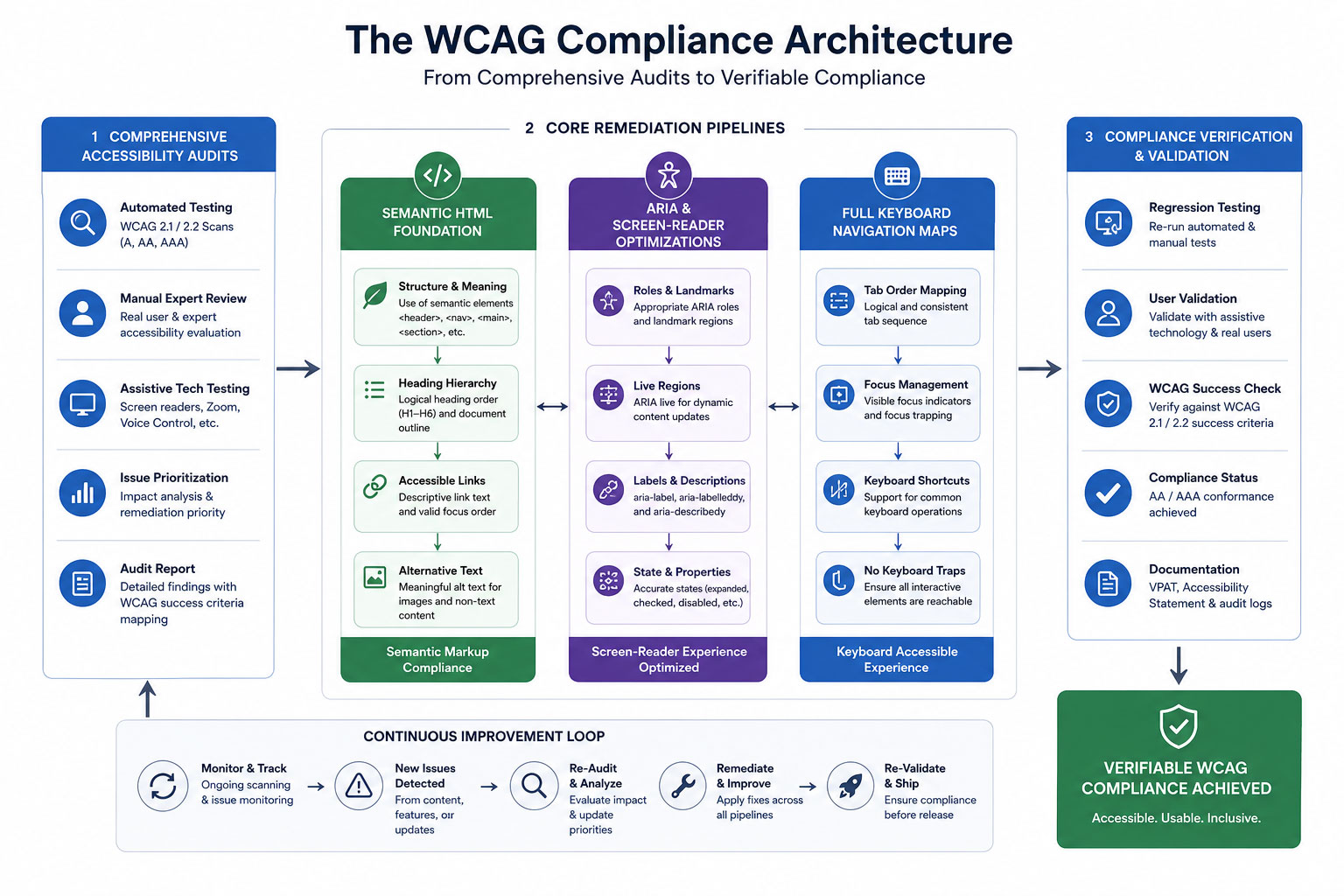
A structured flowchart demonstrating how Comprehensive Accessibility Audits feed directly into core remediation pipelines: combining Semantic HTML, ARIA Screen-Reader Optimizations, and Full Keyboard Navigation Maps to achieve verifiable compliance status.
1. Comprehensive Accessibility Audits
You cannot fix what you do not know is broken. The remediation process begins with an exhaustive, dual-layered accessibility audit. This involves pairing automated testing software with real-world manual testing. Automated scanners are excellent for catching high-volume technical errors, such as missing form labels, broken link structures, and incorrect color contrast ratios.
However, automated tools can only catch roughly 30% to 40% of accessibility barriers. The critical remaining errors must be uncovered through manual testing conducted by experienced QA engineers who navigate your platform using actual assistive tools, simulating the exact lived experiences of users with diverse physical and cognitive challenges.
2. Screen-Reader Optimizations via Semantic HTML and ARIA
Visually impaired users rely heavily on sophisticated software called screen readers (such as NVDA, JAWS, or VoiceOver) to translate visual on-screen layouts into spoken words. If your web application code consists of unstructured, non-semantic building blocks, a screen reader will voice a confusing jumble of meaningless elements.
To solve this, developers must build platforms using semantic HTML tags (such as <main>, <nav>, <header>, and <article>) that naturally define the structural hierarchy of a page. For complex, dynamic interface components like interactive dropdown menus, modal windows, or live data charts, engineers must deploy Accessible Rich Internet Applications (ARIA) attributes. These specialized code attributes act as invisible road signs, explicitly telling the screen reader software what a component does, what state it is currently in (e.g., `aria-expanded=”true”`), and how it relates to the rest of the layout.
3. Full Keyboard Navigation Setups
Many users with motor disabilities, tremors, or paralysis cannot operate a traditional computer mouse. Instead, they navigate the web exclusively using a keyboard, relying on the Tab key to move forward, Shift+Tab to move backward, and the Enter key to activate links and buttons.
An accessible website must feature a completely seamless, logical keyboard navigation map. This means ensuring that a visible, highly distinct “focus indicator” bounding box appears around any element a user highlights. Furthermore, code must be engineered to prevent “keyboard traps”—errors where a user tabs into a specific field or pop-up window but cannot tab back out without using a mouse. A compliant platform also features a hidden “Skip to Main Content” shortcut at the very top of the DOM structure, allowing keyboard users to bypass bloated header navigation links on every page refresh.
4. Accurate Alternative Text (Alt-Text) Frameworks
Images, infographics, and graphical banners play a major role in modern web storytelling. For a screen-reader user, however, an image without alternative text is completely blank, or worse, read aloud as a messy, unoptimized file name like “IMG_98432_FINAL.png.”
Implementing an accurate alt-text framework requires editorial discipline and structural standards. Alt-text shouldn’t be treated as a dump for SEO keyword stuffing. Instead, it must offer a concise, highly descriptive summary of the visual information or functional purpose of the image. If an infographic contains a chart mapping market trends, the alt-text or surrounding body copy must outline those specific data insights. Conversely, purely decorative elements like background shapes or design flourishes should be explicitly hidden from assistive tools using an empty `alt=””` attribute, preventing unnecessary audio clutter.
The Role of Technical Partners: Sourcing Expertise From a Website Development Company in India
Re-engineering an enterprise-grade digital ecosystem to meet strict WCAG 2.1 or 2.2 AA compliance standards is a highly technical challenge. It touches every layer of your digital stack, from raw backend server architecture and API data delivery to front-end layout styling and content entry systems. For organizations running vast product catalogs, complex client dashboards, or continuous content feeds, executing this remediation internally without specialized talent can quickly turn into an expensive, trial-and-error nightmare.
To navigate these complexities efficiently, global enterprises frequently look to establish strategic technical partnerships with an experienced website development company in India. The Indian tech ecosystem has matured into a powerhouse of certified accessibility specialists, front-end engineers, and compliance experts who understand the nuances of international digital law. By collaborating with an offshore development partner, enterprises can deploy scalable engineering teams dedicated to systematically cleaning up legacy source code, writing robust ARIA matrices, and running continuous integration accessibility testing. This strategic approach allows brands to completely eliminate their legal liability vulnerabilities swiftly and securely, while maintaining highly efficient capital allocation.
Comparative Strategy: The Structural Shift to Compliance
To fully understand why proper code remediation is essential for protecting your organization and improving usability, let’s contrast a non-compliant, high-risk web ecosystem against a fully accessible, compliance-first architecture:
Case Study: Eliminating Liability and Unlocking Market Potential
To evaluate the clear, measurable business returns of digital inclusion, let’s examine the operational transformation of a prominent multi-national financial services corporation. This institution operated a wide array of digital portals, customer dashboards, and online application channels. Over time, their various platforms had grown highly fragmented, built by multiple internal teams and external freelancers without unified code standards.
The turning point arrived when the firm received a formal legal demand letter from a civil rights law firm, detailing multiple severe WCAG violations that prevented blind users from completing loan applications. Recognizing the immense legal, financial, and reputational risk, the corporate leadership paused all standard product updates and authorized a complete accessibility overhaul of their entire digital infrastructure.
The remediation strategy was structured into a rigorous execution roadmap:
- The Core Rebuild: The development team systematically replaced complex, non-semantic custom scripts with native semantic HTML architectures.
- Assistive Mapping: They built complete ARIA navigation maps across their customer account dashboards, ensuring complex data tables were fully readable by assistive tools.
- Quality Assurance Expansion: They integrated automated accessibility testing scripts directly into their code deployment pipeline, preventing non-compliant updates from ever reaching the live production server.
The Operational Results: The impact of this architectural transformation went far beyond simply resolving the initial legal dispute. By implementing a fully compliant, highly accessible digital environment, the institution completely eliminated its exposure to regulatory fines and predatory web accessibility lawsuits.
More impressively, the brand observed a sudden, sustained surge in user engagement metrics across all entry funnels. Within two quarters post-launch, their digital application completion rate climbed sharply, effectively expanding their active market reach to an additional 15% of the digital population that had previously been locked out by structural code barriers. The brand transformation was absolute: a system that was once a dangerous legal liability had been re-engineered into a highly inclusive, market-expanding asset.
The Long-Game Advantage: Future-Proofing and Sustainable Inclusion
In a rapidly changing digital landscape, accessibility is no longer a static milestone you can reach once and forget about. Technology evolves continuously—new operating systems roll out, browsers update their rendering engines, and assistive devices become more sophisticated. At the same time, user expectations continue to rise, and international accessibility regulations are steadily growing stricter and more comprehensive.
Treating web accessibility as a foundational, core engineering requirement is the ultimate way to future-proof your digital presence. When you construct platforms using clean, semantic HTML code patterns, strict keyboard layouts, and verified ARIA matrices, you aren’t just protecting your business from current legal trends. You are building a flexible, highly stable digital infrastructure that effortlessly adapts to future technological shifts, voice search interfaces, and screen configurations without needing expensive, emergency redesigns.
Ultimately, making your website fully accessible is simply the right thing to do—both for your brand’s ethical integrity and its bottom-line performance. By prioritizing digital accessibility, your organization actively chooses to build a more equitable, open internet. You respect the autonomy of all users, welcome a massive community of loyal consumers, and turn your digital home into a secure, risk-free asset that drives sustainable corporate growth for decades to come.
Is Your Corporate Platform Holding Secret Legal Risks?
Hidden code issues, unlabelled forms, and low-contrast elements can leave your enterprise exposed to major web accessibility lawsuits. Our expert development and certified compliance teams can run an exhaustive WCAG audit to pinpoint and fix your digital accessibility gaps before they cause legal headaches.


Why 70% of Shoppers Leave Before Buying: Fixing E-commerce Cart Abandonment
Imagine running a physical, brick-and-mortar retail store in a bustling metropolitan district. Your storefront looks exceptional, your window displays pull in hundreds of eager shoppers every hour, and your aisles are filled with customers picking up items, reading labels, and filling their shopping baskets to the brim. But as they approach the cash register, something bizarre happens: seven out of every ten shoppers suddenly drop their baskets right on the floor, turn around, and walk out the door without saying a word.
In the physical world, this would be an operational emergency. Store managers would scramble, security would investigate, and the business would halt everything to figure out why the final transaction point was causing a mass exodus. Yet, in the digital realm of e-commerce, this exact scenario plays out every single second. Brand owners celebrate skyrocketing traffic numbers, high click-through rates on social ads, and healthy “Add to Cart” metrics, all while quietly tolerating a staggering, industry-wide average cart abandonment rate that hovers stubbornly around 70%.
This is the ultimate leaky bucket of digital retail. You have already won the hardest battles: you captured the user’s short attention span, convinced them of your product’s value, outcompeted alternative brands, and motivated them to take action. Losing them during the final checkout steps isn’t just a missed sales opportunity; it is an incredibly expensive drain on your marketing budget, drastically driving up your Customer Acquisition Cost (CAC) and eroding your net profit margins. To fix this leak, e-commerce brands must stop looking at checkout as a mere administrative formality and start treating it as a critical psychological gateway that requires elite user experience engineering.
The Psychology of the Exit: Why Digital Shoppers Flee at the Finish Line
To systematically eliminate checkout friction, we have to understand the emotional state of a shopper as they enter the final transaction phase. Up until the moment they click “Proceed to Checkout,” the buyer’s journey is driven largely by desire, inspiration, and dopamine. However, the second they face the checkout layout, their mental state shifts from emotional excitement to cold, analytical logic. They are no longer thinking about how wonderful the item will look; they are calculating their financial risk, evaluating the trustworthiness of your platform, and measuring the time commitment required to complete the forms.
Any unexpected element encountered during this psychological pivot acts as a massive point of cognitive friction. The primary triggers that cause an immediate exit include:
- Forced Account Creation: Forcing a user to create a username, verify an email address, and select a password before they can give you money is the digital equivalent of demanding a background check for a cash transaction. It breaks the momentum of the purchase.
- Surprise Costs: Nothing destroys conversion velocity faster than hidden fees, unexpected processing surcharges, or bloated shipping costs revealed only on the final screen. This shatters trust instantly.
- Complex Form Fields: A long, multi-column form asking for unnecessary data (such as an obligatory fax number or multiple phone fields) triggers immediate cognitive fatigue.
- System Slowdown and Visual Instability: If the checkout pages take more than two seconds to load, or if the layout shifts unexpectedly while a user is typing, their risk-aversion instincts spike, leading them to abandon the purchase out of caution.
Mathematically, the impact of this final-stage drop-off can be quantified by tracking the exact relationship between intent and final execution. E-commerce directors use the standard Abandonment Rate formula to evaluate this vulnerability:
$$\text{Cart Abandonment Rate} = \left(1 – \frac{\text{Completed Purchases}}{\text{Created Carts}}\right) \times 100$$
When this metric climbs above the 60% threshold, it is a definitive sign that your user interface is actively working against your business goals, alienating highly motivated buyers right when they are ready to buy.
Four Pillars of a High-Conversion Checkout Architecture
Fixing the leaky bucket demands a deliberate transition toward an intentional, hyper-optimized checkout architecture. Top-tier brands don’t rely on generic, out-of-the-box platform settings. They restructure the user journey around four specific UI/UX pillars designed to minimize cognitive load, streamline data entry, and instill unshakeable buyer confidence.
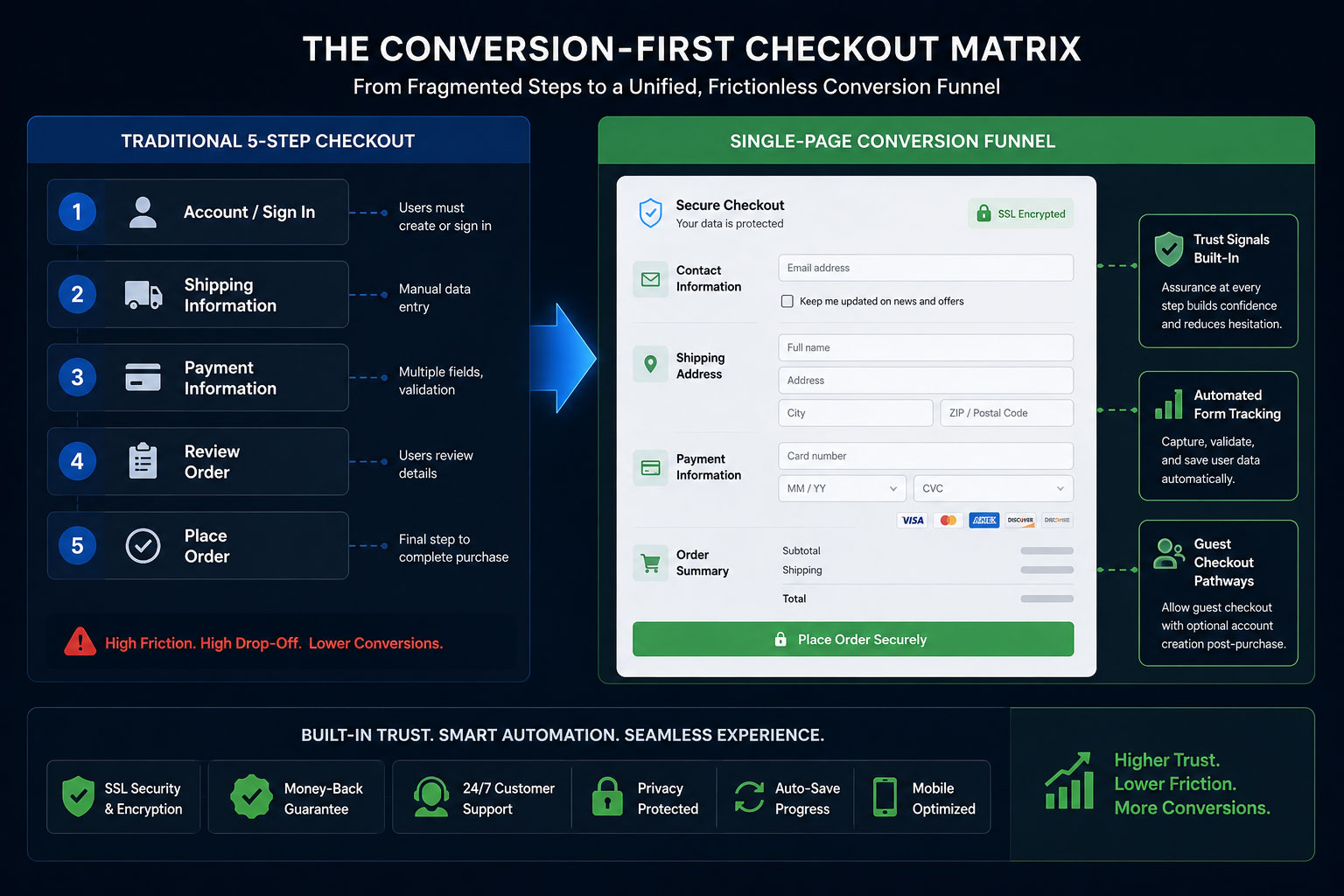
A structural map showcasing the transformation from a traditional 5-step checkout sequence into a unified, frictionless Single-Page Conversion Funnel where trust signals, automated form tracking, and guest pathways co-exist seamlessly.
1. Streamlined Single-Page Checkout Architectures
The traditional multi-step checkout—where a user must input data on page one, click next, fill in shipping details on page two, click next, choose a payment method on page three, and review on page four—is a relic of early web development. Every page load represents a point of failure where a connection can lag, a browser can crash, or a user can simply rethink their purchase decision.
Replacing this fragmented path with a clean, single-page checkout architecture changes the entire dynamic. By displaying all fields—shipping, billing, delivery options, and payment methods—on a single, intuitively organized layout, you remove the anxiety of the unknown. The shopper can clearly see the finish line from the moment they enter the checkout zone, eliminating the frustration of feeling trapped in an endless loop of form validation screens.
2. Persistent Guest Checkouts (Eliminating the Wall)
The numbers do not lie: mandatory account registration is consistently cited as one of the top reasons for cart abandonment worldwide. Consumers value their time and data privacy above all else. They do not want to become part of your database just to purchase a single commodity item.
A persistent guest checkout option serves as a wide-open doorway for your customers. By making the guest pathway the prominent, default choice, you remove a massive psychological barrier. The smart strategy is to flip the script: allow them to complete the purchase as an anonymous guest first, and then, on the final “Thank You” confirmation page, offer a one-click account creation button (“Save your details for faster tracking next time”). By delaying the ask until *after* value has been delivered, conversion rates jump dramatically.
3. Strategic Trust-Badge Placement and Security Affirmation
When a customer inputs credit card numbers or banking passwords into an online form, they are performing an act of significant digital trust. If your checkout environment looks visually inconsistent with the rest of your brand, lacks clear security iconography, or looks generic, the customer’s subconscious mind flags it as a high-risk scenario.
To overcome this, place recognized trust badges (such as SSL certification markers, payment processor logos, and data protection guarantees) exactly where the friction occurs: right next to the credit card input fields and directly underneath the primary “Complete Purchase” button. These visual security affirmations reassure the user’s subconscious exactly when they are making their final, high-stakes decision.
4. Micro-Copy Optimizations and Inline Field Validation
Micro-copy refers to the small pieces of explanatory text found inside form fields, on buttons, and within error messages. Standard, harsh micro-copy like “INVALID INPUT” or generic placeholders can frustrate users. Optimizing these small touchpoints with helpful, humanized text makes a major difference.
For example, instead of leaving a field label as “Billing Address,” add small sub-text that notes: *”Matches the address on your bank statement.”* Additionally, use inline validation—where a field turns green with a checkmark the moment a valid entry is completed, or displays a gentle, constructive tip instantly if a character is missed. This real-time feedback loop prevents the user from typing out an entire page only to be greeted by a frustrating page reload and a list of generic errors.
The Role of Technical Engineering: Choosing an Ecommerce Website Development Company in India
While the principles of UI/UX design can be easily sketched out on a whiteboard, executing them flawlessly within a live production environment requires deep technical expertise. A checkout page is a complex hub of real-world integrations, linking database logic, shipping calculator APIs, localized payment processors, tax engines, and tracking pixels simultaneously. If these integrations are poorly coded, they manifest as layout shifts, slow processing speeds, or security warnings that scare buyers away.
This is why sophisticated international brands don’t rely on amateur setups. Partnering with a specialized ecommerce website development company in India allows enterprises to access world-class engineering talent capable of building high-performance, custom checkout modules. These development firms specialize in trimming down heavy JavaScript code, optimizing server-side processing speeds, and ensuring absolute mobile responsiveness. In an environment where a mere 100-millisecond delay can slash conversion rates by 7%, working with technical experts ensures that your creative UX strategy is fully backed by powerful, robust web architecture.
Comparative Strategy: High-Friction Checkouts vs. Conversion-First Frameworks
To fully grasp why technical and visual optimization is the ultimate lever for recovering lost revenue, let’s contrast a standard checkout setup against an optimized, conversion-driven architecture:
Case Study: The 24% Recovery Matrix
To understand the massive revenue potential locked inside a broken checkout flow, we can analyze the real-world performance of a rapidly growing online apparel retailer. This brand was doing everything right on the marketing front: their social media campaigns were highly optimized, their product pages featured high-definition photography, and their unique value propositions drove high numbers of motivated buyers to click “Add to Cart.”
However, despite generating healthy traffic, their actual revenue numbers were lagging. An analytics review revealed a massive bottleneck: 74% of users who entered the checkout flow left before completing their transaction. The drop-offs peaked sharply at the shipping selection screen and the account registration wall.
The brand underwent a complete checkout redesign, executing a sequence of highly strategic UI/UX adjustments:
- The Registration Overhaul: The mandatory signup screen was removed entirely, replaced with a streamlined guest checkout option that reduced initial data-entry steps down to just an email address.
- Address Automation: They integrated the Google Maps Autofill API, allowing shoppers to simply start typing their street number and select their full address in one click, eliminating three separate input fields.
- Visual Transparency: They brought the shipping cost calculator forward into the cart drawer view, ensuring absolute transparency long before the final step.
The Operational Results: The impact was almost instantaneous. Within 30 days of deploying the optimized checkout architecture, the brand’s cart abandonment rate dropped by 24%. By simply making it incredibly easy for existing traffic to buy, the retailer captured an additional $15,000 in monthly sales almost immediately. This extra revenue was pure profit, secured without spending a single additional dollar on marketing, retargeting ads, or top-of-funnel acquisition campaigns.
The Long-Game Advantage: The Compounding Value of Frictionless Retail
In a hyper-competitive digital marketplace where ad costs rise year after year, brands cannot afford to treat their website architecture as a static brochure. Your checkout page is the engine room of your entire e-commerce enterprise. Every bit of friction you remove from this critical area doesn’t just recover a single sale; it sets off a positive chain reaction throughout your entire business model.
When you optimize your checkout flow, your Return on Ad Spend (ROAS) instantly climbs. Your marketing teams become more efficient because the traffic they generate actually converts into paying customers. Your customer support teams see fewer tickets regarding payment errors or broken forms. Most importantly, you create an exceptional first-purchase experience that builds trust, setting the stage for long-term customer loyalty and high repeat-purchase behavior.
Stop watching your hard-earned revenue slip away at the final hurdle. Prioritize your checkout UX. Streamline your forms, respect your users’ time with guest pathways, and back your design with elite engineering. When you build an effortless bridge between desire and ownership, your bottom line will naturally transform.
Is Your Checkout Process Silently Slaying Your Sales?
A single misplaced field or hidden fee can silently drain your digital storefront’s profits. Our specialized engineering and UI/UX design teams can conduct a deep-dive architecture audit to find and fix your checkout bottlenecks.


The AI Data Blackout Ends: Google Unveils Dedicated AI Tracking inside Search Console
Search engine optimization is entering a new era of transparency. Google has officially launched dedicated AI visibility reports within Google Search Console, alongside new AI blocking controls—marking the most significant shift in search analytics since the advent of mobile tracking.
For over a year, webmasters, publishers, and SEO professionals have operated in the dark. Content surfaced inside Google’s AI Overviews and AI Mode was completely bundled into traditional organic search metrics. There was no clear way to separate standard “blue link” traffic from AI-driven citations.
This data blackout ends today. The new Search Generative AI performance report introduces a standalone measurement layer, giving creators clear insights into exactly how Google’s AI models choose, display, and interact with their content.
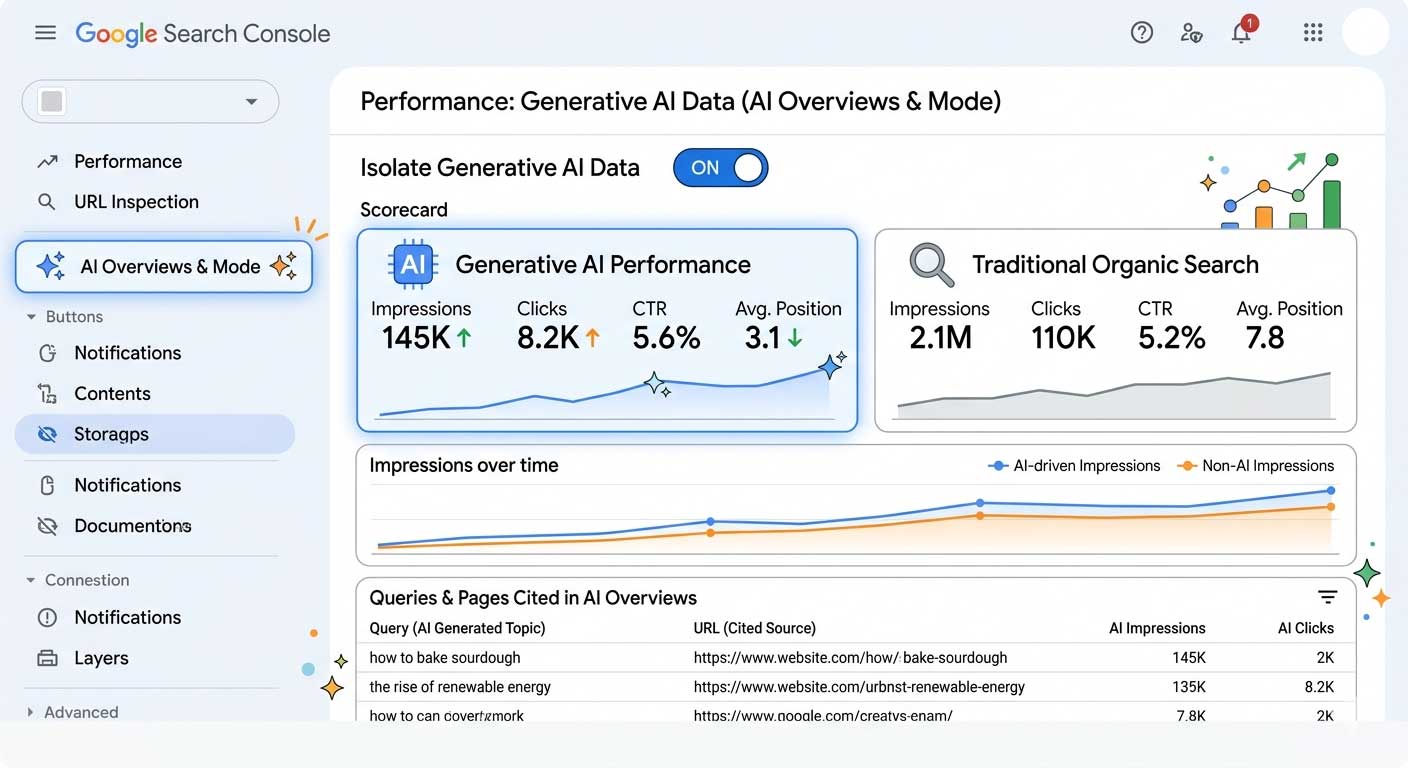
Google’s new Search Console dashboard isolates generative AI metrics from traditional organic data.
Inside the AI Visibility Report: What Metrics Are Tracked?
The new dashboard isolates exposure data across AI-powered search environments, including Google Search and Google Discover. In its launch state, the report focuses heavily on top-of-funnel exposure. While query-level keywords and click data are noticeably absent, webmasters can analyze performance using a structured set of metrics and dimensions:
| Metric / Dimension | Granular Data Tracked |
|---|---|
| Impressions | Tracks how often URLs from your domain are cited as foundational sources or “grounding data” within generative AI elements. |
| Pages | Identifies the exact URLs selected by Google’s algorithms to back up AI-generated responses. |
| Countries | Provides a geographical breakdown to trace where your AI presence is strongest globally. |
| Devices | Categorizes exposure by Mobile, Desktop, and Tablet to pinpoint user environments. |
| Dates | Offers historical timeline trends, with precision data available down to the hour. |
Addressing the lack of click data, Google clarified that the initial release is optimized for visibility tracking. However, the company plans to introduce deeper engagement metrics, including user clicks, in upcoming iterations based on direct publisher feedback.
The AI Opt-Out Switch: Granular Control for Site Owners
Simultaneously, Google is introducing a major infrastructure update: a dedicated Search Generative AI control toggle directly inside Search Console settings.
This feature functions as a master kill-switch for AI inclusion. Flipping the toggle completely blocks Google’s large language models from sourcing, summarizing, or citing your content within live generative features like AI Overviews.
“Opting out of Search Generative AI features will have zero impact on your traditional organic search rankings.”
— Official Google Documentation Summary
Crucially, Google confirmed that choosing to opt out will not harm your traditional organic SEO rankings. If you turn off AI accessibility, your pages will still rank normally in the standard “blue link” organic results. However, your site will immediately stop receiving any impressions or downstream referral traffic generated by Google’s AI interface.
Why Now? Regulatory Pressures Force Google’s Hand
This structural change wasn’t purely an internal product upgrade; it was driven by global regulators. The rollout stems from a direct mandate by the UK’s Competition and Markets Authority (CMA). Regulators have increasingly pushed for tech giants to give publishers explicit, granular choices regarding how their intellectual property is handled for AI fine-tuning and real-time summaries.
Due to the targeted nature of this regulatory framework, Google is testing both the report and the opt-out toggle with a limited subset of UK website owners first. This localized rollout gives Google time to monitor publisher response, optimize data processing, and iron out bugs before deploying the features to a broader global audience.
Strategic Takeaways: How SEOs Should Adapt
The introduction of separate AI analytics demands a shift in content strategy. The industry is rapidly moving from purely optimizing for traditional CTR (Click-Through Rate) to optimizing for LLM Grounding Authority.
For creators and brands, a high volume of AI impressions combined with low baseline clicks should no longer be viewed as a failure. Instead, it indicates that Google’s models view your domain as a primary source of truth. The strategy must adapt: treat highly-cited informational pages as top-of-funnel conversion mechanisms. By strategically inserting high-value internal links and distinct call-to-actions (CTAs) within those heavily-cited informational hubs, you can capitalize on the visibility, routing that authority directly into your conversion funnels.


High SaaS Churn? Fix the Leaky Bucket with Better User Onboarding UI/UX
The Invisible Leaky Bucket: Why Your SaaS Acquisition Strategy is Flawed
You are pouring millions of dollars, thousands of engineering hours, and endless creative energy into the top of your marketing funnel. Your SEO strategies are ranking, your paid ad campaigns are driving targeted traffic, and your sign-up charts are curling upward in a beautiful, venture-capital-pleasing hockey stick curve. On paper, your SaaS company is winning.
But behind the dashboard graphics lies a sobering, cash-burning reality. When you look at your product analytics for week two and week three, the drop-off is staggering. The users who enthusiastically input their email addresses and created passwords just days ago are quietly slipping out the back door. They log in once, look around a chaotic interface, get overwhelmed by a lack of direction, and log out—never to return.
This is the classic SaaS Leaky Bucket Syndrome. Across the software-as-a-service industry, the first 30 days are a brutal proving ground. Studies consistently show that the average SaaS platform loses up to 40% to 60% of its newly registered users within the first month. They aren’t leaving because your core technology is bad or because your pricing is too high. They are leaving because your user onboarding UI/UX failed to guide them to their first meaningful breakthrough moment before their patience ran out.
In an era where alternative software platforms are just a Google search away, cognitive friction is an absolute growth killer. If your interface feels like an unmapped labyrinth, users won’t spend hours trying to figure it out; they will simply cancel their trial and find a competitor who respects their time. To plug the leak, you must transition from an *acquisition-first* mindset to an *activation-first* framework. Let’s dissect the mechanics of 30-day user churn and explore the exact UI/UX design components required to build an elite onboarding engine.
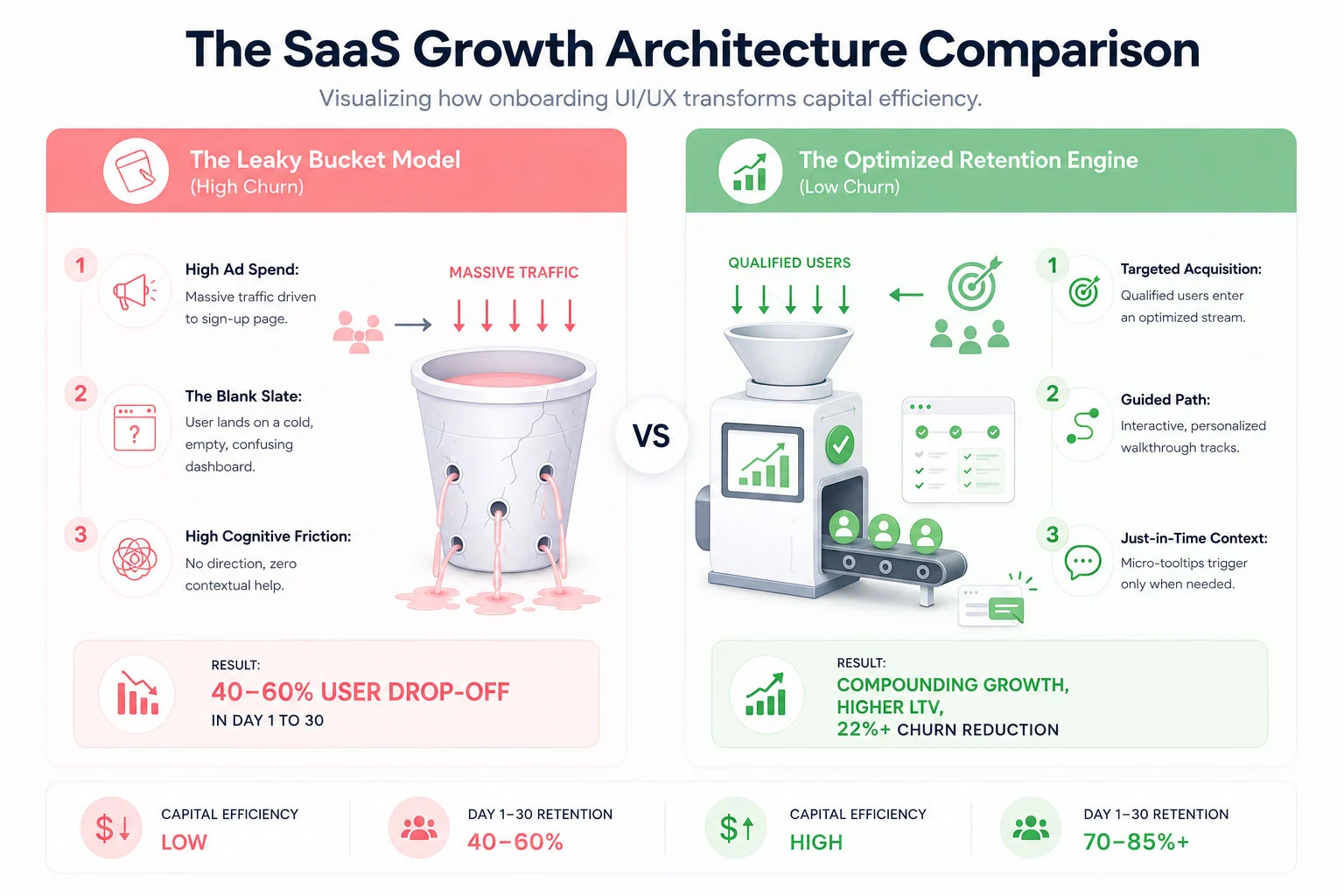 The Psychology of the First 30 Days: Why New Users Abandon Ship
To fix a broken onboarding experience, you must look at your software interface through the eyes of an anxious, easily distracted new user. When someone signs up for your SaaS app, they are at peak motivation. They have a problem they are desperate to solve, and your marketing materials have convinced them that your platform holds the key.
However, that motivation is a highly volatile resource. The second they step past the login wall, a ticking clock begins. This is what product designers call the race to **Time to Value (TTV)**. Time to Value is the precise duration it takes for a user to realize the product’s core promise—often called the “Aha! Moment.”
If a user signs up for an invoicing tool, the Aha! Moment isn’t setting up a profile or uploading a brand logo; it is sending their very first sleek, professional invoice and seeing how easy the process is. If your UI/UX forces them to fill out 15 form fields, verify three distinct sub-accounts, and read a text-heavy manual before they can even preview an invoice, you are artificially extending your TTV. With every added layer of friction, motivation drops while frustration climbs. By day 14, when the initial excitement has completely withered away, the user quietly deletes their account or lets their trial expire without using a single advanced feature.
The Core UX Principle: Onboarding is not an administrative orientation process; it is an active continuation of your marketing department’s value proposition.
The primary driver of early-stage SaaS churn is cognitive overload. When confronted with an overwhelming array of navigation menus, charts with zero data lines, and generic multi-step product tours that point out every button on the screen without providing actual context, the human brain short-circuits. To counteract this paralysis, your onboarding UI/UX layout must be designed with extreme intentionality, using progressive disclosure to show users exactly what they need to see, precisely when they need to see it.
Architecting the Onboarding Solution: The 4 Core UI/UX Pillars
Plugging the leaks in your 30-day retention bucket requires a systemic restructuring of your platform’s interactive touchpoints. ICO WebTech approaches this problem by deploying four integrated UI/UX pillars designed to minimize friction and flatten the user learning curve.
1. Tailored Interactive In-App Walkthroughs
The days of the unskippable, linear 10-step product tour are dead. Modern enterprise and consumer SaaS users expect an interactive experience that adapts to their specific professional goals. Instead of showing every single user the exact same generic welcome tour, your UI should kick off with a brief, high-value segmentation window. Ask the user simple, goal-oriented questions: *”What are you looking to achieve today?”* or *”What is your primary job role?”*
Based on their selection, the interface should launch a tailored, branching interactive walkthrough. If a manager signs up for a project management tool to track team timelines, they should not be walked through the billing configuration suite. Their interactive tour should guide them exclusively through creating a project board and assigning their first task. By making the walkthrough an active, hands-on exercise rather than a passive slideshow, you dramatically accelerate product adoption and empower users through immediate action.
2. Contextual, Just-In-Time Tooltips
Nothing disrupts a user’s flow quite like an unexpected pop-up window block that hijacks the entire screen to explain a feature they aren’t ready to use yet. To build a truly humanized onboarding experience, you must replace aggressive, interruptive notifications with subtle, contextual tooltips.
Contextual tooltips are reactive design elements that trigger based on specific real-time user behavior. For instance, if a user hovers their cursor over an advanced analytics icon for more than two seconds, a micro-tooltip appears with a single clear sentence explaining what that chart tracks. If they are filling out a complex data formatting line, a small helper bubble appears with an example input style. By serving educational context in small, manageable pieces right at the point of action, you reduce the user’s reliance on external help documentation and keep them deeply immersed within your application workflow.
3. Simplified Dashboard Interfaces & Empty-State Optimization
An overlooked danger zone in SaaS UI design is the “Empty-State Dashboard.” When a user logs into a brand new account, they are often greeted by a sea of blank charts, empty folders, and confusing 0% progress tracking stats. This lack of data makes the application look dead, uninviting, and intimidating.
An elite onboarding experience treats the empty state as a prime educational landscape. Instead of a blank white box, fill that screen space with beautiful, mock-data templates that demonstrate what the product looks like when fully optimized. Insert clear, highly visible action elements directly into the empty space. For example, instead of a blank table, show an illustration with a clean button that reads: “You haven’t imported any contacts yet. click here to sync your list in 30 seconds.” By simplifying the dashboard view and removing secondary features until the primary setup actions are complete, you keep the user’s cognitive eye locked onto the critical path.
4. Frictionless, Multi-Stage Setup Steps
Requiring an exhausting configuration routine right at registration is the absolute fastest way to sink your activation rates. While your engineering team might prefer to have all database connections, API keys, and team invitations configured upfront, your UX team must advocate for the psychological comfort of the user.
Break your configuration cycle down into a frictionless, multi-stage progression. Utilize single sign-on (SSO) protocols through trusted ecosystems like Google or Microsoft to turn registration into a single-click event. Defer non-essential tasks—such as updating billing profiles, configuring advanced notifications, or customizing aesthetic themes—to later in the user lifecycle. Give users a clear visual progress indicator (e.g., a progress tracker showing 25%, 50%, or 75% completion) to gamify the setup process and leverage the human psychological urge to complete uncompleted tasks.
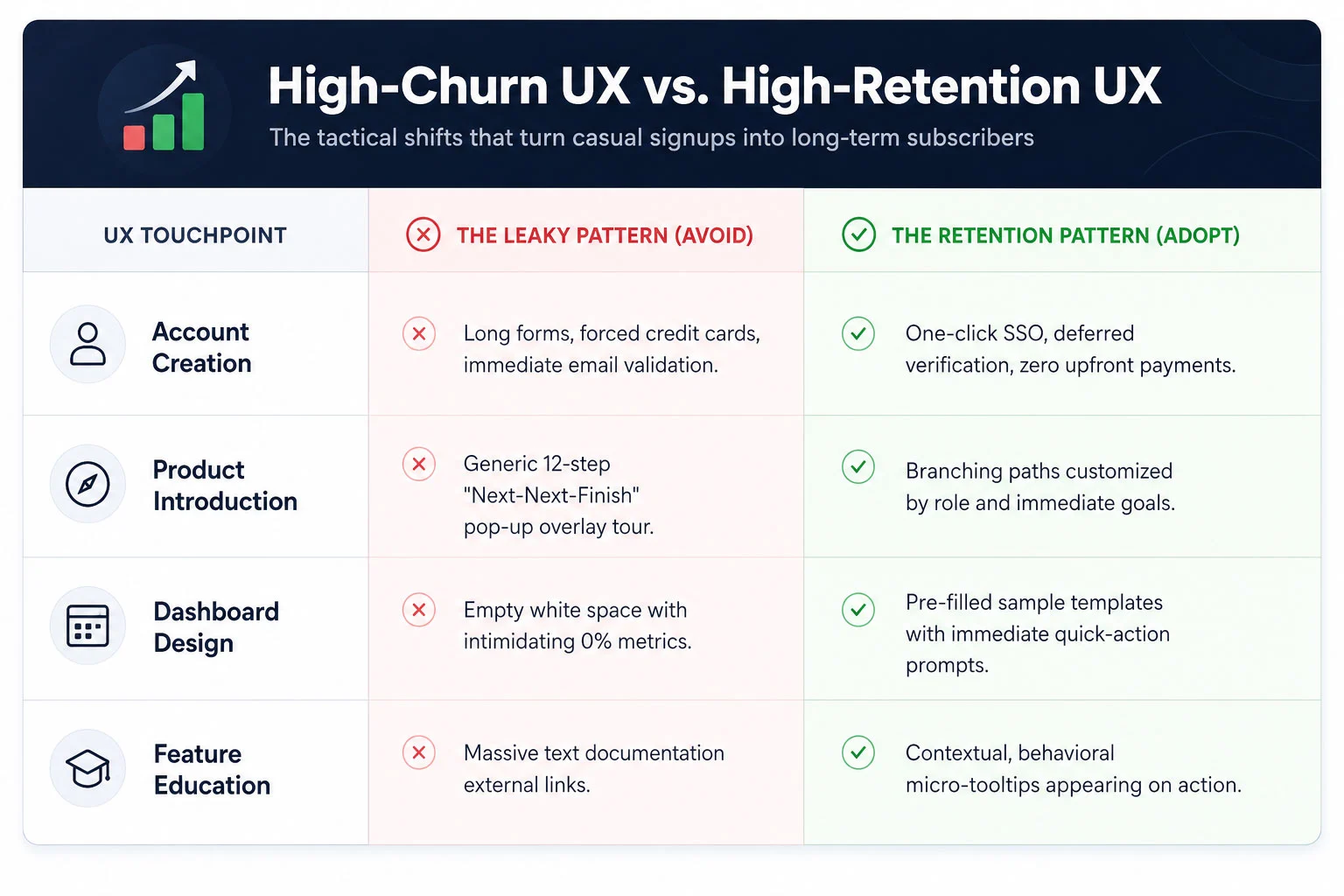 Case Study: How a Fintech App Lowered 30-Day Churn by 22%
To fully grasp the financial impact of intentional onboarding design, let’s examine a real-world digital restructuring executed for a high-growth business fintech application. This platform was built to help small-to-medium business owners sync their corporate bank accounts, categorize operational expenses, and project real-time tax liabilities.
The platform possessed an incredibly powerful backend engineering architecture, but its early metrics were highly alarming. Over 45% of users who successfully linked a bank account abandoned the application before their 30-day trial period concluded. The marketing team was forced to continually scale up paid spending budgets just to replace the users they were shedding week after week.
ICO WebTech initiated a deep-dive programmatic analysis of user clickstreams and interface behavior. The insights uncovered three major UX bottlenecks:
- The Initial Shock: Immediately upon linking their accounts, users were dropped into a hyper-complex financial dashboard tracking over forty different ledger data variables simultaneously. They had no idea where to start.
- The Content Dead-End: Essential data categorization steps required users to navigating through manual filter settings nested deep within a hidden sub-menu layout.
- The Interruption Factor: A rigid, generic welcome tour kept popping up to explain advanced multi-currency features that were completely irrelevant to 85% of their domestic user base.
The Strategic Redesign Strategy
Our UI/UX design teams executed a radical overhaul of the application’s entry sequence. First, we implemented an interactive segmentation card on screen one, splitting users into two distinct onboarding tracks: *”I want to estimate my upcoming quarterly taxes”* and *”I want to cut down my weekly expense tracking time.”*
Second, we applied a progressive disclosure pattern to the main dashboard. We hid the complex, secondary analytics panels entirely during the first week of use. Instead, the interface morphed into a clean, action-oriented workspace highlighting a clear step-by-step interactive configuration checklist. When a user completed a step, a satisfying animation fired, and the next logical action was illuminated with a soft glowing tooltip block.
Finally, we introduced contextual helper micro-tips over complex financial terms. Instead of sending users off-platform to search a knowledge base for definitions, they could simply tap an interactive tool icon to see a plain-English explanation directly in line with their workflow.
The Compounding Financial Impact
The operational results surpassed all initial forecasts. Within ninety days of deploying the optimized onboarding interface, the fintech app’s 30-day user churn rate dropped by a definitive 22%. By helping users reach their financial “Aha! Moment” within the first four minutes of account creation, customer lifetime value surged, client acquisition costs stabilized, and the company transformed its product into a highly efficient, self-sustaining revenue engine.
—
Measuring What Matters: Onboarding Metrics for Product Teams
You cannot optimize what you do not measure. To build a highly effective user onboarding system, your engineering, design, and marketing product groups must align around a unified set of onboarding-focused Key Performance Indicators (KPIs). Traditional business metrics like “Total Monthly Registrations” or “Daily Active Users” are too broad to diagnose specific UI bottlenecks. Instead, focus your tracking tools on these three precise indicators:
1. The Product Activation Rate
The activation rate is the percentage of registered users who successfully execute a predetermined set of core actions that deliver initial product value. For an email marketing SaaS, this might be uploading a subscriber list and sending a test broadcast. For a design app, it might be exporting a completed canvas asset. Your product data analytics should track exactly how many users hit this activation milestone. If your signups are rising but your activation rate is flatlining, your onboarding interface is actively blocking the door.
2. Time to Value (TTV) Velocity
Track the exact number of minutes or hours that elapse between a user’s initial account creation and their realization of the product’s value. Your ongoing UI/UX updates should constantly look to compress this duration. Every form field removed, every page redirect eliminated, and every automated database integration added serves to accelerate your TTV velocity, securing a psychological win for the user before distraction sets in.
3. Drop-off Step Attribution
Utilize modern behavioral funnel mapping tools to chart every single step of your onboarding walkthrough. Analyze where the visual leaks are concentrated. Do 15% of your users abandon the process when forced to verify their phone numbers? Does a massive drop occur when they reach the team member invitation page? Pinpointing the exact interactive component where users lose momentum allows you to make targeted, data-backed design adjustments rather than relying on qualitative guesswork.
—
Plugging the Leak: Prioritizing UI/UX for Sustainable Scaling
In the highly competitive modern SaaS ecosystem, code features can be replicated, pricing models can be undercut, and marketing strategies can be copied. Your ultimate, sustainable competitive moat is the sheer quality of your user experience. The brands that win the long game are the ones that eliminate friction entirely and make using their software an absolute joy from minute one.
Continuing to fund an aggressive marketing acquisition pipeline while ignoring a confusing, high-churn user onboarding sequence is the economic equivalent of trying to fill a leaky bucket with a high-pressure firehose. It is an incredibly inefficient, deeply stressful way to build an enterprise business.
By investing in tailored interactive walkthroughs, contextual inline guidance, and simplified dashboard environments, you respect your users’ time and lower their cognitive load. You build a digital bridge that guides them securely past early friction points directly to undeniable product value. Stop letting your valuable, hard-won traffic slip away into the dark. Optimize your onboarding UI/UX architecture, plug the month-one retention leaks, and transform your platform into a compounding growth engine that retains every single user it catches.

Are ChatGPT results and Google rankings related?
Every digital marketer is asking the same question right now: if I rank #1 on Google, does that mean ChatGPT will recommend my brand? The answer — backed by multiple large-scale studies — is nuanced, surprising, and strategically important for every business investing in online visibility.
In this deep-dive, we break down what the data actually says about the relationship (or lack thereof) between Google rankings and ChatGPT citations, what factors ChatGPT uses instead, and what it means for your digital marketing strategy going into the second half of 2026.
Table of Contents
- The Scale Gap: Google vs ChatGPT in Numbers
- What the Studies Actually Found: Correlation Data
- How Google and ChatGPT Work Differently
- What Signals Does ChatGPT Actually Use?
- Where Google Rankings DO Help
- The Rise of GEO: Generative Engine Optimization
- How ICO WebTech Can Help You Win Both
- Conclusion
1. The Scale Gap: Google vs ChatGPT in Numbers
Before diving into correlation, it helps to understand where both platforms stand in terms of reach. The difference is enormous — but ChatGPT’s growth curve is equally striking.
Google’s global search market share (2025)
Source: Datos / SparkToro, March 2025
Google searches processed per day
Source: Datos / SparkToro, March 2025
ChatGPT monthly visits (August 2025)
Source: Similarweb, 2025
ChatGPT year-over-year growth (late 2024)
Source: Similarweb, 2024
Sources: Advanced Web Ranking · OneLittleWeb 24-Month Study
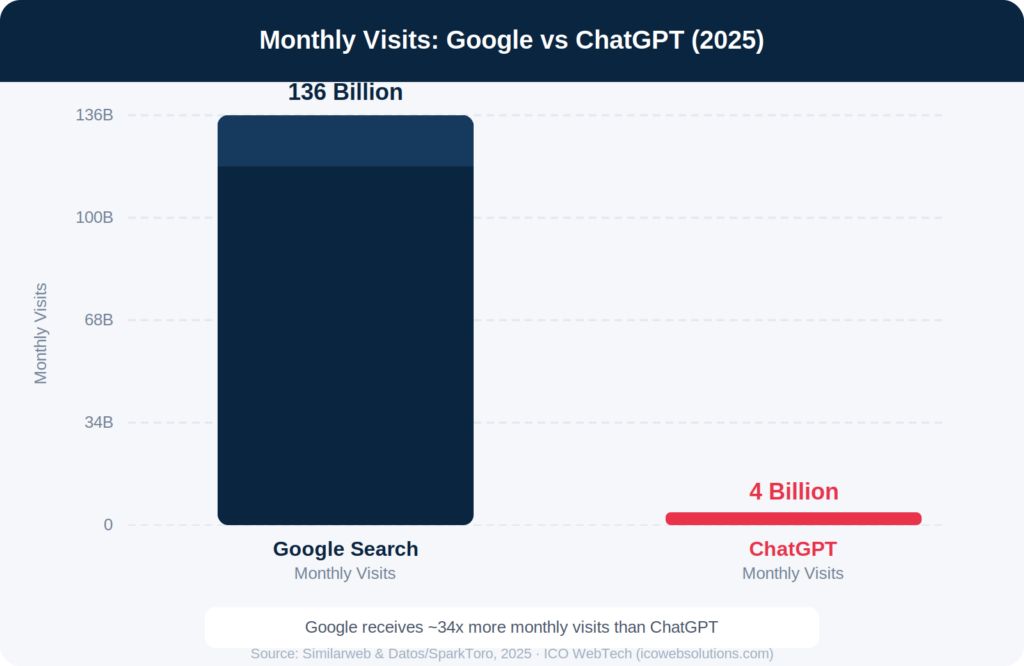
Despite ChatGPT’s explosive growth, Google remains overwhelmingly dominant. Yet the important insight is that 95% of ChatGPT users still also use Google — meaning both platforms are complementary, not competing, in how your audience discovers information.
“ChatGPT functions as a complement rather than a substitute for Google — but being invisible in either one is a strategic blind spot your competitors will exploit.”
— Advanced Web Ranking, 2025
2. What the Studies Actually Found: The Correlation Data
Multiple independent research organisations have now studied whether Google rankings predict ChatGPT citations. The results are surprising — and game-changing for SEO strategy.
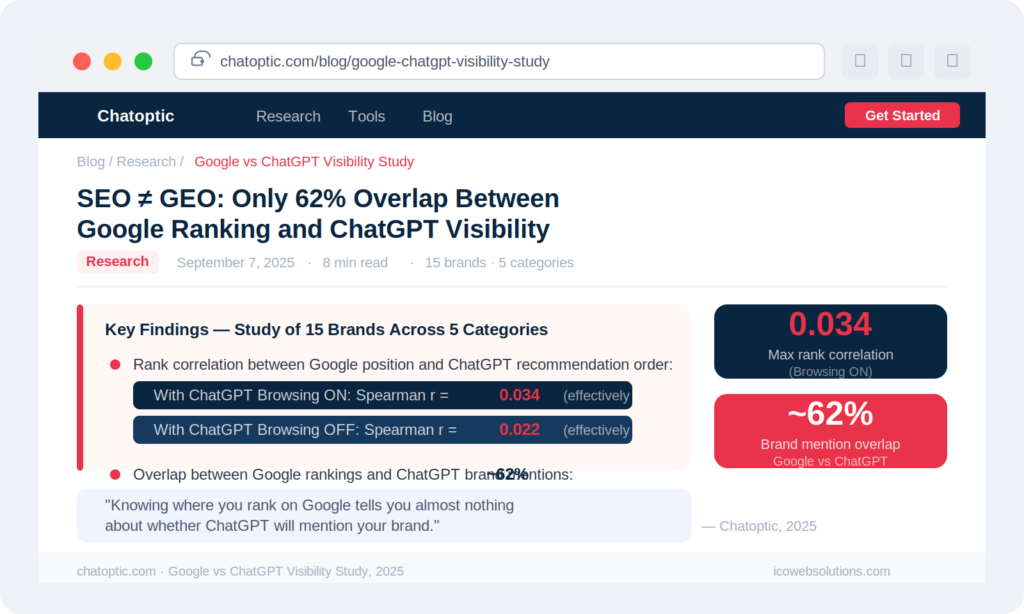
Key Finding from Chatoptic’s 2025 Study (15 brands, 5 categories):
Rank correlation between Google position and ChatGPT recommendation order:
- With ChatGPT Browsing ON: Spearman r = 0.034
- With ChatGPT Browsing OFF: Spearman r = 0.022
- Overlap between Google rankings and ChatGPT mentions: ~62%
In statistical terms, a correlation of ~0.03 is essentially zero — knowing your Google rank tells you almost nothing about your ChatGPT visibility.
Source: Chatoptic.com — SEO ≠ GEO Study, 2025
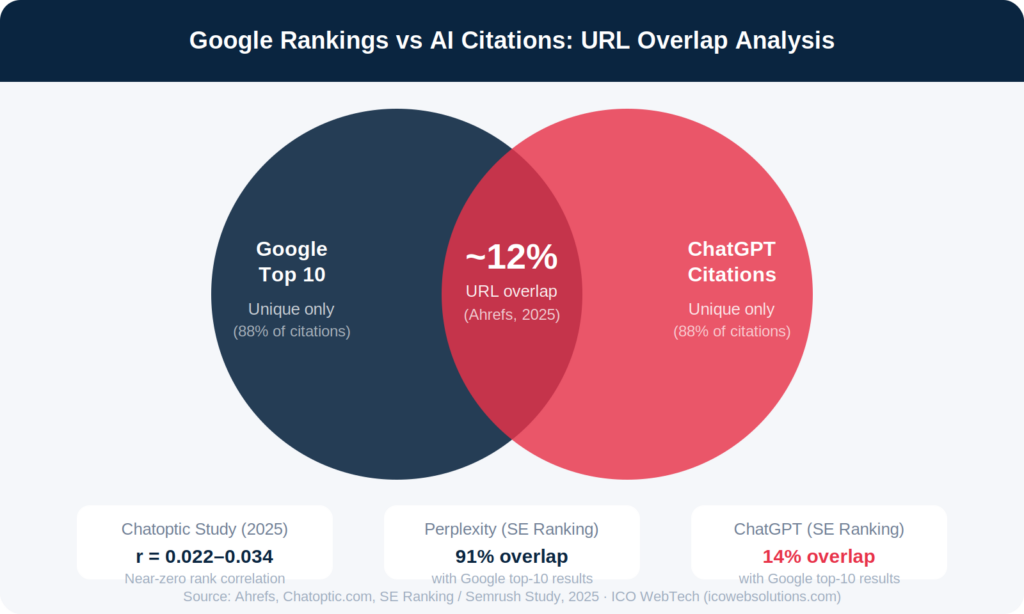
Note: Perplexity overlaps with Google top-10 rankings 91% of the time vs. ChatGPT at ~12–14%
Source: Ahrefs, SE Ranking / Semrush Study, 2025
Key Research Findings at a Glance
| Study | Key Finding | Source |
|---|---|---|
| Ahrefs Analysis (2025) | Only 12% of links cited by AI assistants (ChatGPT, Gemini, Copilot, Perplexity) appear in Google’s top 10 for the same query | Ahrefs via Beamtrace |
| Chatoptic Study (2025) | Rank correlation between Google position & ChatGPT order: r = 0.022–0.034 (effectively zero) | Chatoptic.com |
| BrightEdge Research (Oct 2025) | 54.5% of AI Overview citations match top organic URLs (up from 32% in 2024) — Google’s own AI leans on its index | PragoMedia / BrightEdge |
| SE Ranking / Semrush (2025) | Perplexity cites Google top-10 results 91% of the time; ChatGPT only 14% | PragoMedia |
| SE Ranking (2025) | Sites with 32,000+ referring domains are 3.5x more likely to be cited by ChatGPT | Yotpo / SE Ranking |
⚡ ICO WebTech Insight
The data is clear: ranking #1 on Google does not guarantee visibility in ChatGPT. But completely separate strategy isn’t the answer either — the two platforms share foundational trust signals. The winning approach is an integrated SEO + GEO strategy.
3. How Google and ChatGPT Work Differently
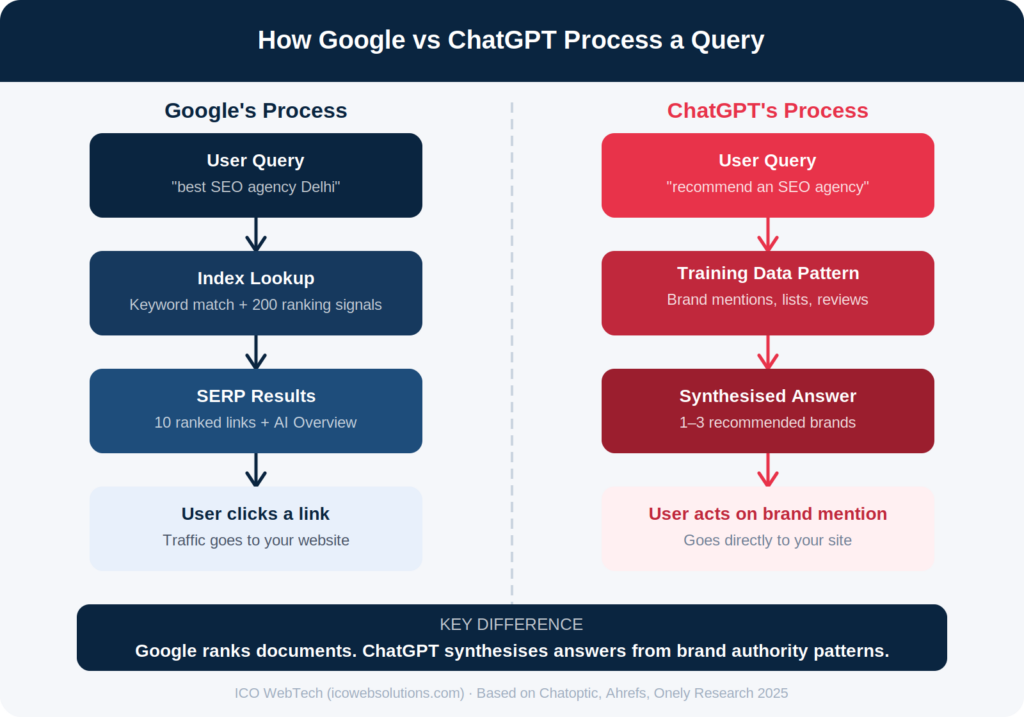
The root cause of the divergence is architectural. These two systems have fundamentally different goals and processes.
| Aspect | Google Search | ChatGPT |
|---|---|---|
| Core Task | Match your query to existing web documents and rank them by relevance | Generate a synthesised, conversational answer by predicting the most likely response |
| Primary Signal | 200+ ranking factors: backlinks, keywords, page speed, E-E-A-T | Brand authority patterns in training data, authoritative list mentions, and third-party citations |
| Output | A ranked list of 10 blue links (plus AI Overviews) | One synthesised answer mentioning a smaller “aristocracy” of sources |
| Freshness | Near real-time index crawling | Training data cutoff + optional Bing/web search plugin (when browsing is ON) |
| Citation Logic | Keyword + authority match for each document | Pattern recognition: brands consistently mentioned by trusted sources in training data |
| Risk Aversion | Long-tail content can still rank with moderate authority | Strongly prefers high-authority domains; “trust cliff” around 32,000+ referring domains |
How Each System Processes a Query
4. What Signals Does ChatGPT Actually Use?
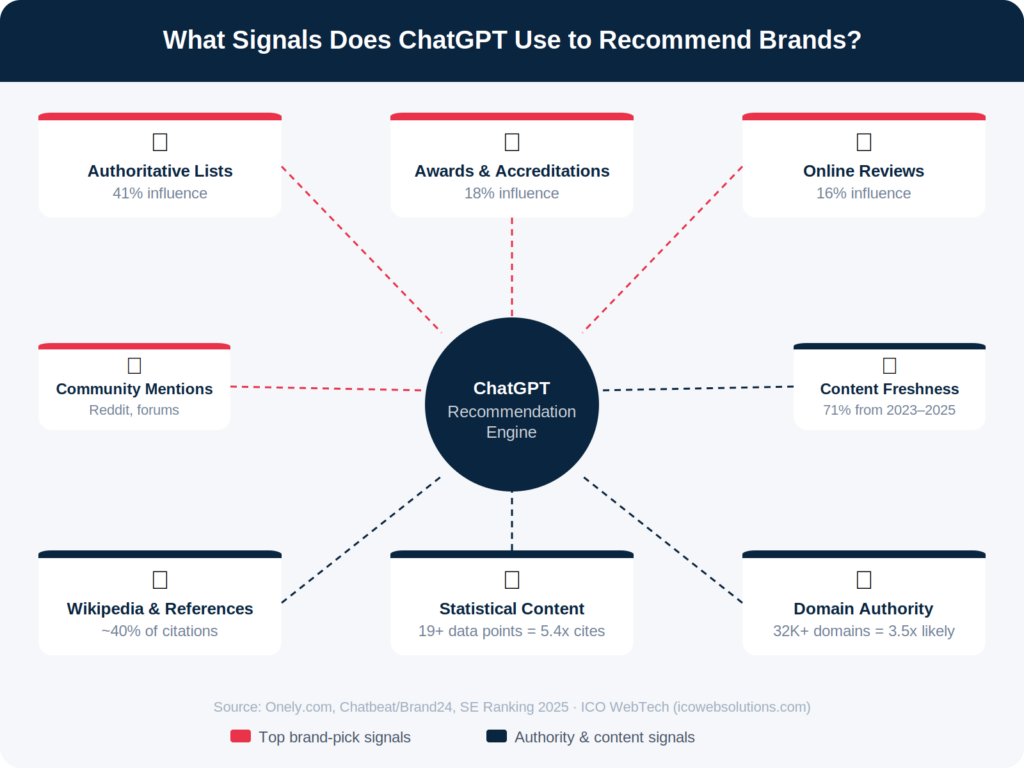
If Google rankings barely predict ChatGPT citations, what does ChatGPT actually use to decide which brands to recommend? Research from Onely, SE Ranking, and Brand24 has reverse-engineered the key factors:
Authoritative List Mentions (41%)
Being featured in industry “best of” lists, expert roundups, and rankings is the single biggest driver. Think Forbes lists, G2 comparisons, Clutch.co rankings.
Awards & Accreditations (18%)
Recognition from established institutions signals credibility. Industry awards, certifications, and verified partnerships all contribute to ChatGPT’s trust model.
Online Reviews (16%)
Third-party validation from customers on platforms like Google, Trustpilot, and Clutch. Brands with an online review score below 70% are significantly less likely to be recommended.
Wikipedia & Reference Sites
Wikipedia accounts for approximately 40% of ChatGPT citations. Crunchbase, LinkedIn, and other authoritative reference platforms matter enormously.
Statistical & Data-Rich Content
Articles with 19+ statistical data points averaged 5.4 citations vs. low-data articles. ChatGPT prefers content it can confidently attribute to a clear source.
Domain Authority (Trust Cliff)
Sites with 32,000+ referring domains are 3.5x more likely to be cited. There is a non-linear trust threshold — authority matters, but differently to Google.
Reddit & Community Mentions
Domains with over 10 million Reddit mentions average 7 ChatGPT citations vs. 1.8 for brands with minimal Reddit presence. Community discussion matters.
Content Freshness
71% of ChatGPT citations come from 2023–2025 content. Regularly publishing authoritative, date-stamped content keeps your brand in the training and retrieval window.
Sources: Onely.com · Chatbeat / Brand24 · Medium / GEO Report
5. Where Google Rankings DO Help
It’s not a zero-sum game. There is meaningful overlap — especially when looking at Google’s own AI features and foundational authority signals.
76% of Google AI Overview cited pages rank in Google’s own top 10Ahrefs, 2025
54.5% AI Overview citations now match top organic URLs (up from 32% in 2024)BrightEdge, Oct 2025
0.664 Spearman correlation — brand mentions & Google AI Overview citationsAhrefs GAIO Study, 2025
Sources: Chatbeat.com · PragoMedia
The key insight: Google’s own AI Overviews DO correlate strongly with top organic rankings — but third-party AI platforms like ChatGPT operate on separate logic. This creates a two-tier AI visibility landscape:
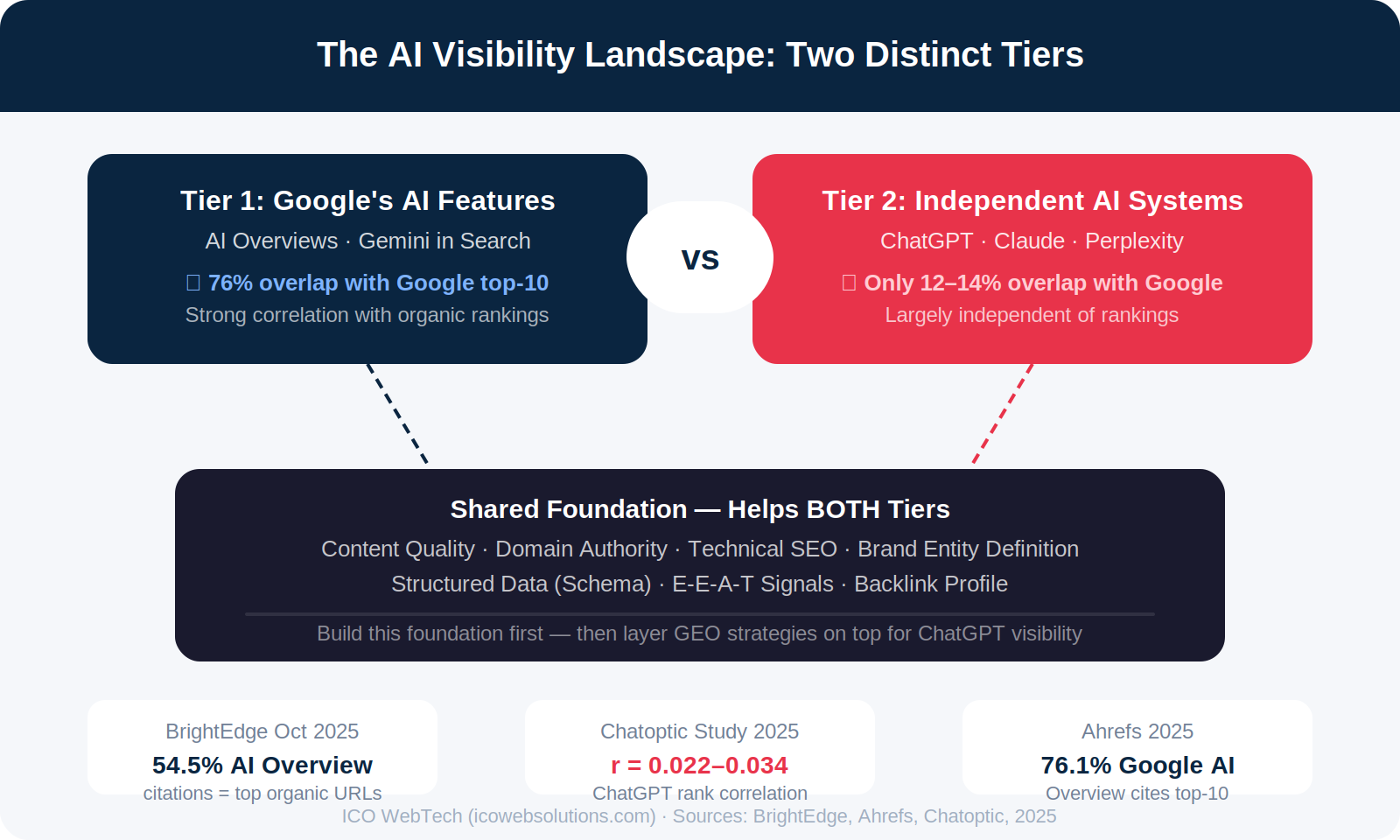
Strong SEO still matters — but it’s the foundation, not the ceiling. Winning in ChatGPT requires additional, targeted strategies beyond traditional rank-building.
6. The Rise of GEO: Generative Engine Optimization
The emerging discipline designed to address this gap is Generative Engine Optimization (GEO) — formally defined in academic research from Princeton, Georgia Tech, and IIT Delhi in 2024, and now entering mainstream marketing practice.
“I care less about Google rankings and more about whether AI tools like ChatGPT or Perplexity mention the brands I work with.”
— Relato’s 2026 GEO Analysis: the new operating reality for performance-driven marketers
SEO vs GEO: Key Differences
| Dimension | Traditional SEO | GEO (Generative Engine Optimization) |
|---|---|---|
| Goal | Rank in top 10 Google results | Get cited/recommended by AI systems |
| Primary Currency | Backlinks + keyword relevance | Authoritative brand mentions + entity recognition |
| Content Focus | Target keywords, search intent pages | Conversational Q&A, statistical content, entity-rich articles |
| Measurement | Rankings, organic traffic, CTR | AI citation rate, brand mention frequency, AI referral traffic |
| Key Platforms | Google Search Console, Ahrefs, Semrush | Conductor, Profound, Semrush AI Toolkit, Search Party |
| Timeline | 3–12 months typically | Ongoing — AI models re-train and update citation patterns |
Source: Enrich Labs — GEO Complete Guide 2026 · ALM Corp — ChatGPT Conversion Study
💡 Why GEO Matters for Conversions
ChatGPT referral traffic converts 31% higher than non-branded organic search — because users who arrive via an AI recommendation have already been pre-sold on your brand’s credibility. The volume is smaller, but the quality is exceptional.
Source: ALM Corp, 2025 Data Analysis — ChatGPT Traffic Converts 31% Higher
7 Steps to Improve ChatGPT Visibility (GEO Checklist)
- Get Listed in Authoritative “Best Of” Lists
Target Clutch, G2, Capterra, Forbes, and industry-specific directories. List placement is the #1 factor (41%) in ChatGPT recommendations. - Publish Data-Rich, Citable Content
Create original studies, surveys, and statistics. Aim for 19+ data points per article. Give AI something concrete to attribute to your brand. - Build Your Brand’s Wikipedia & Knowledge Graph Presence
Wikipedia drives ~40% of ChatGPT citations. Update entries on Wikipedia, Crunchbase, and Wikidata without self-promotion. Ensure NAP consistency everywhere. - Earn Third-Party Media Coverage
Digital PR, podcast appearances, and contributions to industry publications. AI models treat a Forbes mention as far more credible than your own blog. - Maintain Structured Data (Schema Markup)
Implement FAQ, HowTo, Review, and Organization schema. AI crawlers rely heavily on structured data to understand entity relationships. - Build Genuine Reviews on Trusted Platforms
Brands below a 70% positive review rate are significantly less likely to be recommended by ChatGPT. Focus on Google, Trustpilot, and niche review sites. - Track AI Visibility as a Separate KPI
Use tools like Semrush AI Toolkit, Conductor, or Profound to monitor your brand’s citation rate in ChatGPT, Gemini, and Perplexity. Rankings alone no longer tell the full story.
How ICO WebTech Can Help You Win Both Google & ChatGPT
Since 2011, we’ve helped businesses grow through every major algorithm shift. The AI visibility era is the most significant change since Google’s inception — and we’re ready to help you lead it.
AI Visibility (GEO) Service
We audit your current ChatGPT & Gemini citation footprint, identify gaps, and build a systematic GEO strategy covering authoritative mentions, structured data, and entity optimisation.
SEO + GEO Integration
We don’t treat SEO and GEO as separate silos. Our integrated approach builds domain authority and brand entity signals that strengthen your visibility across Google rankings AND AI recommendations simultaneously.
AI Visibility Reporting
We track your brand’s mention frequency in ChatGPT, Perplexity, and Google AI Overviews — giving you a complete picture of your digital visibility beyond traditional rank tracking.
Authoritative Content Creation
Our content team creates data-rich, citable articles, original research, and expert guides designed specifically to meet the citation criteria used by large language models.
Conclusion: Two Rankings, One Integrated Strategy
The data is unambiguous: Google rankings and ChatGPT citations operate largely independently. A rank correlation of near zero (r = 0.022–0.034) means your position on Google’s search results tells ChatGPT almost nothing about whether to recommend your brand. Only 12% of URLs cited by ChatGPT appear in Google’s top 10 for the same query.
But this doesn’t mean SEO is dead. Strong technical SEO, content quality, and domain authority remain the foundation — they’re just no longer the ceiling for AI visibility. Google’s own AI Overviews strongly favour top-ranking pages (76% correlation), making SEO essential for Tier 1 AI visibility.
Winning in 2026 and beyond requires a dual approach:
| To Win in Google Rankings | To Win in ChatGPT / AI Answers |
|---|---|
| Technical SEO excellence | Authoritative “best of” list placements |
| Keyword-targeted content | Data-rich, citable content with clear attribution |
| Quality backlink acquisition | Third-party brand mentions & digital PR |
| Page speed & Core Web Vitals | Wikipedia, Crunchbase & knowledge graph presence |
| E-E-A-T signals | Verified reviews & reputation management |
| Schema markup | Structured data & FAQ schema for AI parsing |

Cracking the B2B Market: How ICO WebTech Builds High-ROI Content Engines
Imagine your sales team sitting down every morning, opening up a fresh list of scraped enterprise leads, and firing off hundreds of personalized emails into the digital abyss. They adjust the subject lines, test the value propositions, and follow up with religious persistence. Yet, the response rate hovers at a depressing, near-invisible fraction of a percent. The phone lines are no better; gatekeepers have evolved into ironclad fortresses, and corporate decision-makers have developed a psychological blindness to uninvited pitches.
This is the grueling reality of the modern B2B sales pipeline. For decades, the standard playbook for business-to-business growth relied heavily on sheer outbound volume. If you knocked on enough virtual doors, someone would eventually open. But in today’s sophisticated enterprise landscape, that engine isn’t just sputtering—it is completely broken. B2B companies are finding themselves caught in a vicious cycle: they struggle to build genuine industry authority, consistently fail to educate key stakeholders during long procurement cycles, and find themselves entirely dependent on hyper-expensive cold outreach or soaring paid ad platforms just to keep their pipelines on life support.
The core of the issue lies in a fundamental shift in how modern enterprise buyers make decisions. A modern B2B buying committee now averages between six and ten stakeholders. These individuals are highly risk-averse, technically literate, and intensely busy. They don’t want to be “sold” to through an aggressive slide deck or an unexpected phone call. Instead, they conduct up to 70% of their research independently online before they ever agree to speak with a sales representative. If your brand doesn’t show up during that silent research phase with undeniable intellectual depth, you don’t just lose the deal—you aren’t even invited to the table.
Cracking the B2B market requires a radical departure from volume-based noise. It demands the construction of an intentional, data-driven High-ROI Content Engine. This isn’t about churning out generic 500-word blog posts or superficial top-10 lists to appease search engine crawlers. It is about building an automated, authoritative content asset ecosystem that systematically educates buyers, dismantles objections, and turns anonymous traffic into qualified inbound enterprise leads. Let’s explore how ICO WebTech architects these high-converting engines to transition your brand from an aggressive hunter to an irresistible market authority.
—
The Trust Deficit: Decoding the Enterprise Buyer’s Mindset
To build a marketing framework that actually converts corporate buyers, you must first empathize with the intense pressure felt by a B2B decision-maker. Unlike consumer purchases, where a bad buying decision results in a minor personal inconvenience, an incorrect enterprise procurement move can paralyze an entire department, waste millions in corporate capital, or even cost someone their career. “Nobody ever got fired for buying IBM” remains one of the most profound truths in business history because it underscores a universal truth: enterprise buyers choose the safest, most authoritative option available.
When a B2B company relies solely on outward sales pitches, they encounter a massive trust deficit. A cold email inherently carries a transactional bias—the recipient knows you want their money. To bypass this defense mechanism, your digital presence must shift from a pitch to a masterclass. Your content needs to demonstrate that you understand their operational bottlenecks, their regulatory compliance headaches, and their industry’s macroeconomic pressures better than anyone else on the market.
The Golden Rule of Enterprise Marketing: He who defines the problem most accurately in the mind of the buyer is automatically perceived as the one most qualified to solve it.
If your digital channels are filled with shallow, self-promotional content, you actively signal to the market that you lack deep technical expertise. Conversely, when you systematically break down complex industry challenges through data-backed insights, you build an invisible bridge of credibility. ICO WebTech’s approach focuses on dismantling this trust deficit by replacing superficial marketing copy with authoritative, highly educational material that speaks directly to the c-suite, the procurement specialist, and the technical end-user simultaneously.
—
The Anatomy of a High-ROI Content Engine: The ICO WebTech Framework
A successful content engine cannot operate on guesswork or creative whims. It must be treated as a rigorous piece of software architecture. At ICO WebTech, we build these engines around three core content pillars, each meticulously engineered to serve a distinct phase of the complex enterprise buying journey.
1. Deep-Dive Industry Whitepapers: The Ultimate Authority Builders
If you want to capture the attention of a Chief Information Officer or a VP of Operations, standard marketing material will not cut it. These stakeholders require intellectual rigor. Deep-dive industry whitepapers serve as the crown jewels of your content engine. They are comprehensive, research-heavy documents that address overarching industry shifts, emerging regulatory threats, or complex structural changes.
ICO WebTech avoids the trap of aggregating easily found public knowledge. Instead, our research methodology uncovers proprietary insights, interviews internal subject matter experts, and incorporates hard market data. A well-constructed whitepaper doesn’t just state what your product does; it maps out the future of your entire sector. When an enterprise executive downloads a 15-page manual that perfectly diagnoses their operational inefficiencies and provides a clear, vendor-neutral framework for the future, your brand stops being a mere software vendor. You become a trusted advisor.
2. SEO-Optimized Case Studies: The Empirical Proof Engines
Every B2B software or service company claims they can save time, reduce costs, and increase efficiency. To an enterprise buyer, these claims quickly blend into a background noise of marketing fluff. To cut through this skepticism, you need hard, indisputable evidence. This is where SEO-optimized case studies come into play.
A classic mistake in B2B case studies is writing them like dry, self-congratulatory press releases. ICO WebTech transforms these assets into cinematic, narrative-driven problem-solving templates. We utilize a highly effective “Before-After-Bridge” storytelling structure. We detail the exact messy operational reality the client faced, quantify the negative business impacts, and then systematically break down how your solution served as the bridge to success. Crucially, these are heavily optimized for search engines based on specific bottom-of-funnel keyword variants (e.g., “[Competitor Name] alternatives for enterprise” or “[Industry] inventory management implementation strategy”), ensuring you catch buyers when their intent to purchase is highest.
3. High-Value Educational Blog Hubs: The Continuous Catchment Area
While whitepapers capture executive attention and case studies close the deal, your educational blog hub is the foundational net that captures daily industry search volume. Modern search engines like Google no longer rank websites based on isolated, keyword-stuffed articles. They evaluate your platform’s holistic Topical Authority—meaning you must comprehensively cover a topic from every conceivable angle to be deemed a reliable search result.
ICO WebTech designs educational blog hubs as structured, intuitively organized content ecosystems. We map out high-value content clusters that answer every foundational, intermediate, and advanced question your buyers might type into a search bar. By providing clear, actionable answers completely devoid of aggressive sales pitches, these hubs build continuous engagement, pulling organic web traffic into your ecosystem and subtly directing them toward deeper, gated assets like whitepapers and live product demonstrations.
—
The Blueprint: How ICO WebTech Constructs a High-ROI Content Engine
Building a scalable, revenue-generating content pipeline is an exact science that requires deep integration between data analysis, technical SEO, and elite-level editorial production. Here is the step-by-step methodology ICO WebTech deploys to turn your digital footprint into an automated inbound sales channel:
Step 1: Deep Stakeholder and Intent Mapping
We do not begin by looking at a keyword research tool. We begin by interviewing your sales team, your customer success managers, and your existing clients. We map out every single friction point, common sales objection, and recurring misunderstanding that occurs in the real world. We then translate these real-world insights into search intent vectors, categorizing keywords based on whether the searcher is seeking basic education, actively evaluating solutions, or ready to execute a purchase contract.
Step 2: Technical SEO Architecture and Topical Graph Alignment
Even the most brilliant article will fail to generate an ROI if your target audience cannot find it. Our engineering teams review your website’s core technical infrastructure. We ensure impeccable site architecture, clean schema markup, ultra-fast mobile loading metrics, and a logical internal linking strategy that distributes PageRank smoothly across your entire content ecosystem. We build clear semantic connections between your articles so search engines recognize your site as an undisputed industry authority.
Step 3: Elite SME-Infused Editorial Production
B2B audiences can spot generic, shallow copywriting from a mile away. ICO WebTech pairs professional enterprise journalists with your internal Subject Matter Experts (SMEs). We extract your company’s unique, hard-earned operational insights through structured, efficient interviews and translate that raw technical brilliance into highly readable, humanized, and compelling narratives. Every piece of content is engineered to feature a distinct brand voice—polished, authoritative, yet approachable and engaging.
Step 4: Omni-Channel Amplification and Distribution
The “build it and they will come” philosophy is a guaranteed recipe for digital silence. A high-ROI content engine requires an assertive distribution strategy. We systematically repurpose every major content asset into multi-channel campaigns. A single comprehensive whitepaper is carefully dismantled and transformed into a 5-part educational blog series, a sequence of high-engagement LinkedIn thought-leadership native text posts for your executives, and targeted nurture emails for your marketing automation workflows.
—
Realized Success: The 40% Ad Spend Reduction Blueprint
To understand the transformative financial power of this approach, look no further than a real-world execution engineered by ICO WebTech for an enterprise B2B technology firm. This organization was trapped in a common tech-sector bottleneck: they were spending tens of thousands of dollars every month on highly competitive Google and LinkedIn paid ads to secure demo bookings. The moment they paused their ad budgets, their inbound lead volume dropped straight to zero. Furthermore, their sales team was burning valuable hours executing cold outreach campaigns that yielded microscopic conversion rates.
ICO WebTech stepped in to completely redesign their digital growth strategy from the ground up, implementing our data-driven B2B content framework over a meticulous 9-month roadmap:
- The Diagnostic Phase: We discovered that while their competitors were targeting broad, hyper-expensive industry keywords, nobody was providing concrete, step-by-step guides addressing the complex backend migration issues their target technical directors faced daily.
- The Execution: We built three comprehensive, highly technical industry whitepapers that directly addressed these migration bottlenecks. Simultaneously, we deployed twenty SEO-optimized, deeply detailed customer case studies and launched an educational blog hub containing over fifty tightly clustered, high-intent articles.
- The Semantic Network: We hyper-linked these blog clusters directly to the whitepapers, creating a seamless, natural progression from raw informational curiosity to high-value lead capture.
The operational results were staggering. Within two quarters, the company established absolute topical authority across their core niche categories. Their domain began ranking on the first page of Google for hundreds of high-value, highly commercial search phrases completely organically. The steady, predictable stream of inbound enterprise leads allowed them to safely reduce their paid advertising spend by a massive 40% without sacrificing their monthly revenue growth. More importantly, the leads coming through the organic content engine were fundamentally pre-educated; they arrived at sales conversations already understanding the firm’s unique methodology, reducing the corporate sales cycle duration by over 30%.
—
Measuring What Matters: Content Engine Metrics vs. Outbound Noise
When shifting from an outbound sales model to an inbound content engine, your internal tracking metrics must evolve accordingly. Traditional sales teams look purely at activity metrics: dials made, emails sent, and pitches delivered. A high-ROI content engine focuses squarely on long-term capital efficiency and compounding brand equity. Let’s look at how the two models contrast across critical operational indicators:
—
The Long-Game Advantage: Owning Your Audience and Market Space
Every dollar you spend on paid search platforms or cold database lists is a temporary rental. The moment you stop feeding those platforms with cash, your visibility disappears, your lead pipelines freeze up, and your sales team is left stranded. Relying entirely on rented attention is an incredibly risky, highly stressful way to scale an enterprise brand.
Investing in a custom content marketing engine built by ICO WebTech is the digital equivalent of moving out of a rented apartment and purchasing prime commercial real estate. You are creating permanent, intellectual property assets that sit on your balance sheet, continuously appreciating in economic value. Every authoritative whitepaper, every conversion-optimized case study, and every strategically linked blog post adds another layer of defense around your market share, making it increasingly difficult for newer competitors to displace you.
The modern B2B buyer has made their preferences undeniably clear: they will buy from the brands that educate them, respect their autonomy, and prove their operational value transparently online. By pairing deep technical SEO execution with elite, humanized thought-leadership production, ICO WebTech provides your brand with the architecture required to dominate search results, earn executive trust, and build a highly predictable inbound growth engine that fuels your corporate revenue for years to come.

Shared Hosting vs VPS: Time to Upgrade Your Server?
Imagine launching a gorgeous brick-and-mortar retail storefront in the heart of a bustling commercial district. You spend months perfecting the interior design, sourcing premium inventory, and hiring a highly trained sales staff. But there is a massive catch: you accidentally leased a building with a decaying foundation, a front door that randomly jams shut, and an electrical grid that cuts out entirely whenever the restaurant next door runs its industrial blenders. No matter how incredible your products are or how hard your staff works, customers will walk out the moment they encounter physical resistance.
In the digital realm, your web hosting provider is that foundational building. It is the invisible infrastructure supporting your entire online presence. Every line of code, every high-resolution product image, every secure payment gateway, and every single customer interaction relies entirely on the server hardware you choose to rent. Yet, all too often, businesses treat hosting as a minor utility expense—a tiny technical checkbox to be ticked as cheaply as possible during launch week.
This structural oversight quickly catches up to growing brands. As your digital marketing strategies take root and begin to deliver organic traffic, your site can suddenly buckle under the weight of its own success. Pages slow down to a sluggish crawl, checkout forms hang indefinitely, and visitors bounce back to Google before your homepage even finishes rendering. When a website goes down or stalls out, it isn’t just a minor technical glitch; it is an active destruction of your marketing ROI, your brand equity, and your daily corporate revenue.
If you are currently evaluating your website setup or preparing for a new digital deployment, you will inevitably find yourself standing at a classic infrastructure crossroads: Shared Hosting vs. Virtual Private Server (VPS) Hosting. Both options serve vital functions in the modern web ecosystem, but they are engineered for completely different business realities, scaling thresholds, and technical capacities. Choosing incorrectly can either drain your startup capital on unnecessary resources or bottleneck your brand’s growth potential. Let’s pull back the curtain on server architecture and explore exactly which option aligns with your commercial objectives.
Demystifying Shared Hosting: The Digital Apartment Complex
To understand Shared Hosting, look no further than a traditional, high-density apartment complex. When you sign up for a shared hosting plan, you are renting a single room inside a massive building. You share the overall framework, the central plumbing, the electrical grid, the entrance hallways, and the main lobby with hundreds of other tenants—which, in this scenario, are completely unrelated websites owned by other individuals and companies.
From a resource standpoint, all websites residing on a shared server draw from the exact same central pool of Central Processing Unit (CPU) cores, Random Access Memory (RAM), and physical Solid-State Drive (SSD) storage space. The system operating system allocates these resources dynamically as requests come in from across the globe.
The Advantages of Shared Hosting
- Unmatched Cost Efficiency: Because the overall operating, maintenance, and hardware expenses of the server are split among hundreds of distinct clients, the cost per individual user is remarkably low. You can easily host a starter website for the price of a couple of premium coffees per month. This makes it a fantastic sandbox for testing new concepts without financial risk.
- Zero Server Administration Overhead: Shared environments are fully managed by the hosting provider’s internal system engineers. You don’t need to know how to configure a Linux terminal, patch server-side security vulnerabilities, or manage Apache or Nginx web servers. The hosting company takes care of the backend maintenance, giving you a clean, user-friendly control panel (like cPanel) to manage your domain and files.
- Instant, One-Click Deployments: Most modern shared environments come tightly integrated with automated script installers. Deploying a fresh instance of WordPress, Joomla, or a standard content management system takes less than two minutes, requiring absolute zero coding proficiency.
The Disadvantages: The “Bad Neighbor” Effect
While the apartment lifestyle is highly affordable, it comes with inherent structural vulnerabilities. The most prominent risk is known in technical engineering circles as the “Bad Neighbor” effect. Because resources are not strictly isolated, if a completely unrelated website on your shared server experiences a massive, unexpected traffic surge, or runs a poorly optimized database script that creates an endless loop, it can consume 95% of the entire server’s processing power.
The consequence? Your website—which did absolutely nothing wrong—suddenly runs out of memory and crashes. Furthermore, if a neighbor’s site gets compromised by malware or flags the server’s shared IP address for spamming operations, your business emails might start getting blacklisted by global email providers, destroying your daily corporate communication pipelines.
Demystifying VPS Hosting: The Digital Condominium
Virtual Private Server (VPS) hosting represents a massive evolutionary step forward in digital infrastructure. To maintain our structural analogy, moving from shared hosting to a VPS is the exact equivalent of moving out of a crowded apartment room and purchasing your own private condominium or townhouse.
Physically, your site is still technically sharing a physical server machine with a few other tenants. However, the architectural magic lies in a specialized technology layer called a Hypervisor. The hypervisor executes advanced hardware-level virtualization, slicing the massive physical server into completely distinct, strictly isolated virtual compartments. When you buy a VPS plan that promises 4 CPU cores and 8GB of RAM, those resources are digitally locked down exclusively for your website. Even if every other tenant on the server experiences a monumental traffic surge, your resources remain completely untouched, pristine, and ready to serve your visitors instantly.
The Advantages of VPS Hosting
- Guaranteed Resource Allocation: Your baseline performance remains incredibly stable. You no longer have to worry about the resource consumption of external entities. Your site enjoys consistent Time to First Byte (TTFB) metrics, fast database lookups, and incredibly snappy page render speeds.
- Absolute Root Control and Customization: A VPS grants you full root access to the virtual server instance. You can select your exact preferred operating system flavor (Ubuntu, CentOS, Debian), install custom server-side caching systems (like Redis, Memcached, or Varnish), alter execution limits, and optimize server firewalls to match the precise operational blueprints of your application.
- Isolated Security Environment: Because your virtual environment is completely containerized, its file system is invisible to other users on the machine. If another tenant’s site on the physical rack falls victim to a catastrophic SQL injection attack or a ransomware script, the infection cannot breach the hypervisor wall to compromise your business data.
- Seamless Scalability: Scaling a VPS is incredibly clean. If your brand is preparing for a major television feature or a massive Black Friday marketing blitz, you don’t need to physically migrate your files to a new machine. With a simple click inside your cloud console, you can dynamically scale up your allocated RAM and CPU allocations on the fly to process incoming customer volume.
The Disadvantages of VPS Hosting
The principal tradeoff of a VPS centers around cost and technical complexity. A VPS commands a higher monthly financial commitment than a basic shared package. Additionally, if you select an unmanaged VPS plan, you are fully responsible for the health of the operating system. If a server update breaks a critical database dependency, or if you misconfigure an Nginx configuration file, your site will drop offline, and it is entirely up to your technical staff to log in via SSH and fix the issue manually. (Though many hosts offer “Managed VPS” plans to mitigate this, they do come at a premium).
The Technical Head-to-Head: A Five-Point Comparison
To make an informed choice for your enterprise capital, we must examine how these two hosting paradigms execute under core operational stress. Let’s evaluate their performance across five foundational performance vectors.
1. Raw Performance, Processing Power, and Speed
Website load speed directly dictates your digital survival. Google treats mobile page performance as a primary organic ranking signal, and consumers systematically abandon platforms that exhibit even minor rendering lag. In a shared framework, your page delivery speeds fluctuate constantly throughout the day depending on global server load. During peak hours, your site can feel heavy and unresponsive. A VPS delivers consistent execution speed. Because its processing cycles are dedicated solely to your database execution, your site processes modern dynamic applications, complex product filters, and interactive media modules instantly.
2. Security Defenses and Threat Isolation
A breach of customer information can trigger profound legal vulnerabilities and permanently destroy consumer trust in your brand. In shared setups, the risk of cross-contamination is always present. If an amateur user on your server uploads an unpatched, vulnerable WordPress plugin, hackers can gain unauthorized access to the shared directory layer. A VPS provides robust containerization. Your file system, data structures, and incoming traffic pathways are heavily shielded from the rest of the physical infrastructure, providing an enterprise-grade posture for brands handling sensitive client credentials or payment details.
3. Server Administration and Operational Control
If your digital roadmap only requires a basic, standard blogging platform or a simple informational landing page, the automated, plug-and-play nature of shared hosting is exceptionally convenient. You don’t want to spend your weekends updating Linux kernels. However, if your business model features custom web software, specialized APIs, or proprietary databases, the configuration limitations of shared hosting will rapidly become a restrictive bottleneck. A VPS treats you as the absolute master of your operating system, granting you the architectural freedom to build custom server environments.
4. Scaling Capability Under Traffic Surges
Imagine your marketing team successfully orchestrates a viral campaign, causing thousands of eager buyers to flood your platform simultaneously. On a shared plan, this sudden spike will trigger automated resource-limiter alarms. To protect the other tenants, the hosting provider’s automated firewalls will temporarily throttle your bandwidth or serve your visitors a frustrating “503 Service Unavailable” error page. A VPS is designed to handle elasticity. It absorbs traffic spikes gracefully, and if you approach your threshold, cloud resources can be instantly expanded with near-zero service downtime.
5. Total Cost of Ownership (TCO) and Return on Investment
While shared hosting wins the upfront cost battle, it can cost you significantly more in lost conversions if your business model demands high performance. If a cheaper hosting plan causes your e-commerce checkout page to lag, resulting in a 5% drop in completed transactions, that cheap plan is actually draining your corporate profits. A VPS requires a larger upfront line item in your monthly operational budget, but it protects your marketing investments by ensuring your user experience remains fast, reliable, and secure under commercial pressure.
The Hosting Architecture Matrix
To summarize the core differences between these two solutions, let’s look at a side-by-side technical matrix comparing their operational boundaries:
Making the Final Decision: Which Model Fits Your Business?
Now that we have stripped away the marketing jargon, it’s time to map these hosting tiers directly to your current operational reality. There is no single universal “winner” in this matchup; the right choice is a direct reflection of your business stage, internal technical capability, and growth velocity.
When Shared Hosting Is Genuinely the Smarter Move
Shared hosting shouldn’t be dismissed as a substandard product; it is a highly engineered, exceptionally convenient solution when deployed for the right use case. It is the optimal choice for:
- Early-Stage Solopreneurs and Local Small Businesses: If you are launching a local service brand (like a plumbing business, a boutique consulting firm, or a neighborhood bakery) where your site primarily serves as a digital business card, shared hosting is ideal. Your traffic patterns will be modest, predictable, and easily sustained by a shared environment.
- Personal Portfolios and Creative Showcases: If you are a graphic designer, portrait artist, or writer seeking a polished online space to showcase your historical work, shared hosting provides a frictionless, highly economical foundation.
- Concept Testing and Content Blogs: If you are launching a brand-new content publication or testing a business hypothesis, shared hosting allows you to validate your idea with absolute minimal financial exposure. You can always migrate to higher tiers once your community expands.
When VPS Hosting Becomes an Absolute Business Imperative
Conversely, under-investing in server architecture can severely bottleneck an enterprise that is ready to scale. You should immediately prioritize a VPS if your brand falls into any of the following categories:
- Active E-Commerce Platforms: If your website utilizes WooCommerce, Magento, or any dynamic shopping cart system, shared hosting is a massive gamble. Processing credit card transactions, maintaining real-time inventory counts, and serving thousands of concurrent product query variants requires high processing power. A VPS ensures your checkout funnel stays fast, protecting your transaction completion rates.
- B2B Lead Generation and High-Traffic Media Portals: If your revenue engine relies heavily on constant inbound paid traffic, inbound landing pages, or high-volume publishing schedules, a single instance of server downtime can waste thousands of dollars in active ad spend. A VPS provides the stable runtime environment needed to capture every single lead safely.
- Custom Web Applications and SaaS Startups: If you are launching a proprietary web application, a secure member portal, or a customer software dashboard, you will require unique script packages, custom server daemons, and strict data containerization. A VPS provides the foundational framework and root configuration authority required to power custom digital products.
The Strategic Takeaway: Invest in Your Digital Future
When finalizing your operating decisions, try to avoid viewing web hosting merely as a dry, technical line-item expense. Instead, view it as a critical strategic asset within your broader customer experience apparatus. Your digital infrastructure directly influences your site speed, your search engine optimization authority, your data defenses, and your ultimate consumer retention metrics.
If you are just getting started, keeping costs low with a premium shared hosting plan is a perfectly rational, highly practical strategy. But as your brand builds momentum, expands its digital footprint, and accelerates its audience acquisition pipelines, do not hesitate to upgrade to a robust Virtual Private Server. Providing your business with dedicated cloud computing muscle ensures your digital storefront remains accessible, safe, and lightning-fast for every single customer who taps on your link.
Stop letting a slow server cost you customers.
If your business is growing, your website needs room to breathe. Switch to a lightning-fast, secure Virtual Private Server today and experience guaranteed resource allocation, ironclad data protection, and seamless scaling.


Failing Google’s New INP Metric? How to Fix Laggy Mobile Interactions
We have all been there as mobile internet users. You are browsing a website on your smartphone, looking to expand a drop-down accordion menu, open a mobile navigation drawer, or click a “Buy Now” button. You tap the screen with your thumb. Nothing happens.
You wait a fraction of a second. Still, the screen is frozen. Frustrated, you tap the button three more times, thinking your initial touch wasn’t registered. Suddenly, the website jolts into motion all at once, registering every single tap in a chaotic, broken sequence of layout shifts. Annoyed and impatient, you hit the back button, leave the site, and head straight to a competitor’s platform.
For years, website owners assumed that if their pages loaded fast initially, their user experience was flawless. Google’s core metrics historically favored initial loading benchmarks like Largest Contentful Paint (LCP). However, the modern mobile web has evolved. Users don’t just consume static pages; they interact with complex, JavaScript-heavy applications directly inside their mobile browsers. When those interactions feel heavy, sluggish, or unresponsive, users leave.
Recognizing this shift, Google officially introduced a major ranking metric paradigm shift: Interaction to Next Paint (INP). INP has formally replaced First Input Delay (FID) as a core pillar of Core Web Vitals. The implications have been swift and uncompromising. Across the globe, websites with gorgeous visual layouts are experiencing sudden, severe drops in mobile search rankings. Why? Because while their sites look incredible, their user interface feedback is fundamentally sluggish under the hood.
If your business is currently watching its hard-earned mobile search traffic slip away due to poor interaction scores, you are not alone. Fortunately, fixing this issue doesn’t require stripping your site down to bare-bones text. By deploying advanced JavaScript optimizations, minimizing main-thread blocking, and streamlining your CSS rendering paths, you can transform your mobile experience into an instant, snappy asset. Whether you operate a high-volume e-commerce store or a massive corporate portal, understanding INP is critical to digital survival. Let’s unpack exactly how to diagnose, fix, and master this complex performance metric.
The Anatomy of INP: Why Your Old Performance Metrics Lied to You
To solve an interaction problem, you must first understand how Google measures it. For a long time, the industry relied heavily on First Input Delay (FID) to quantify site responsiveness. But FID possessed a massive technical loophole: it only measured the delay *before* the browser began processing the very first interaction on a page. It completely ignored the time it took to actually run the JavaScript event handlers, and it ignored every single subsequent tap, click, or scroll action a user performed during their entire session.
INP closes that loophole permanently. It observes *all* interactions that occur during the entire lifespan of a user’s visit. It measures the comprehensive duration from the exact millisecond a user touches the screen to the precise moment the mobile browser renders the very next visual frame on the display. This total duration is broken down into three distinct operational phases:
- Input Delay: The time elapsed between the user executing the physical interaction and the browser’s main thread being completely free to accept and begin processing that interaction. This is usually caused by long-running background scripts.
- Processing Time: The duration required to execute the active JavaScript event listeners attached to that specific button, link, or component.
- Presentation Delay: The time it takes for the browser to recalculate the visual layout, repaint the altered pixels on the screen, and visually display the new framework to the user.
Google classifies an INP score under **200 milliseconds** as “Good” or Excellent. Anything between 200ms and 500ms needs substantial improvement, and any score exceeding **500 milliseconds** is flagged as “Poor,” triggering direct ranking penalties within mobile search algorithms.
This means your site could have an incredible 1.5-second initial load speed, but if your mobile navigation menu takes 600ms to open when a user clicks it, Google views your page as broken. To achieve a modern, fully compliant digital framework, brands are increasingly seeking specialized assistance from a premium Website designing company in Delhi India to overhaul their code environments from the ground up.
Phase 1: Advanced JavaScript Optimization – Taming the Event Loop
JavaScript is almost always the prime suspect behind a failing INP score. Modern frameworks pack massive script packages down to mobile devices, forcing low-tier mobile processors to work overtime just to parse and execute code. When a user interacts with a page, their action is queued up behind whatever JavaScript is currently dominating the engine.
1. Yielding to the Main Thread via Tactical Code Splitting
The single most effective way to eliminate input delay is to ensure that your JavaScript functions never block the main thread for longer than 50 milliseconds at a time. Tasks that take longer than 50ms are classified by Google as “Long Tasks.” If a user taps a mobile menu while a 300ms long task is running, the browser cannot respond until that task finishes completely.
To combat this, developers must break massive, monolithic code blocks into small, asynchronous chunks. By shifting non-essential steps out of the immediate execution path and utilizing API methods like setTimeout() or the modern scheduler.yield() native function, you allow the browser to safely pause script execution, look at the user interaction queue, process the tap immediately, and then resume the background script right where it left off.
2. Throttling and Debouncing High-Frequency Events
Interactive features like real-time search auto-suggestions, dynamic filter sidebars, or endless scroll trackers can flood the browser’s execution engine with hundreds of event fires every single second. If your site attempts to recalculate layouts on every single micro-movement or keypress, your mobile processing time will skyrocket.
By implementing strict debouncing patterns, you guarantee that a resource-heavy script will only execute after a specific pause in action (for instance, waiting 250ms until a user stops typing their search query). Similarly, throttling ensures an event function fires only once per specific time interval, dramatically reducing total CPU strain and keeping your application light and responsive.
Phase 2: Eradicating Main-Thread Blocking Tasks
The browser’s main thread is a single-lane highway. It handles layout styling, HTML parsing, script execution, and user interaction handling all at the same time. If a massive pileup occurs on that highway, the entire mobile interface freezes completely.
1. Auditing and Offloading Third-Party Bloat
On many modern corporate websites, the heaviest blocking tasks do not come from internal code; they originate from third-party tracking scripts, advertising tags, marketing automation software, and heat-mapping analytics tools. When multiple platforms attempt to inject tracking events simultaneously upon a mobile click, interaction responsiveness collapses.
To fix this, execute a brutal tag audit inside Google Tag Manager. Defer all non-essential third-party scripts so they do not execute during the critical interactive windows of your site. If an analytics tracker does not directly contribute to the immediate visual experience of the user, wrap its initiation in a requestIdleCallback() block, ensuring it only populates when the mobile CPU is completely resting.
2. Leveraging Web Workers for Heavy Computations
If your website relies on complex data calculations, heavy filtering algorithms, or client-side data sorting (common in enterprise-grade web applications), you should never force the primary UI layer to process that data. Doing so causes immediate visual freezing.
Instead, look to offload those complex, data-heavy operations entirely to a **Web Worker**. Web Workers allow you to spin up a completely independent background thread separate from the primary UI stream. The worker processes the raw data silently in the background and shoots a clean message back to the main thread only when the final result is ready. This keeps the primary mobile user interface perfectly agile, maintaining an instantaneous 60fps frame rate regardless of what calculations are occurring under the hood.
Phase 3: Streamlining the CSS Rendering and Painting Path
Once your JavaScript executes quickly, you face the final hurdle: Presentation Delay. The browser must calculate how the visual structural tree changes, figure out exactly where the layout components fit, and physically paint the updated colors onto the glass display of the phone.
1. Eliminating Forced Synchronous Layouts (Layout Thrashing)
Layout thrashing occurs when your JavaScript event handlers read a visual layout property from the DOM (like checking an element’s offset height) and immediately turn around and write a style adjustment to the DOM, over and over in a tight loop. This forces the mobile browser to run full layout calculations prematurely inside the script loop, creating a massive rendering bottleneck.
To eliminate this presentation lag, always separate your DOM reads from your DOM writes. Read all necessary visual values collectively first, then perform your style modifications in batch phases. Better yet, wrap your visual rendering updates inside a requestAnimationFrame() loop to align your styling adjustments perfectly with the native refresh rate cycle of the mobile screen.
2. Utilizing CSS Hardware Acceleration
When creating interactive components like sliding mobile menus, modal popups, or expanding filters, how you write your CSS styles matters immensely. If you animate a mobile sidebar layout using the left or top directional styling properties, the browser is forced to trigger full geometric layout calculations across the entire DOM tree for every single pixel shift.
Instead, utilize hardware-accelerated CSS properties like transform: translateX() and opacity. These specific properties completely bypass the browser’s layout and paint phases. Instead, they hand the visual adjustments directly to the device’s GPU (Graphics Processing Unit). This ensures that complex visual animations slide, fade, and interact at a flawless, ultra-responsive pace even on older, budget-friendly smartphones.
The Operational Imperative: A Comprehensive Look at INP Metrics
When tracking your mobile user experience, optimization can quickly feel abstract. To bring absolute clarity to your development pipeline, it is essential to look at the concrete operational targets required to pass Google’s rigorous performance guidelines.
| INP Performance Tier | Latency Window | Google Core Ranking Impact | Primary Remediation Action Required |
|---|---|---|---|
| Excellent / Passed | < 200 Milliseconds | Maximum ranking benefit; perfect mobile health status. | Maintain consistent code hygiene; continuous monitoring via CrUX dashboard. |
| Needs Improvement | 200ms – 500ms | Volatile mobile visibility; early ranking degradation warnings. | De-bloat third-party scripts; introduce asynchronous JavaScript yielding blocks. |
| Poor / Failed | > 500 Milliseconds | Direct algorithm penalties; severe drop in global mobile search exposure. | Complete code architecture overhaul; move styling animations to GPU layers. |
By mapping out your current interaction metrics against this framework, your technical team can pinpoint exactly how aggressively your site is losing ground and establish clear sprint priorities to salvage your organic search traffic.
Real-World Case Study: Saving an Enterprise Media Portal from Mobile Extinction
To contextualize these principles, look at the dramatic recovery of a leading global enterprise media portal. Generating millions of monthly pageviews from breaking news, editorial features, and interactive multimedia, this media powerhouse relied on high-volume mobile search visibility for over 70% of its total digital advertising revenue.
Following a massive layout expansion featuring infinite scroll modules, live-updating financial tickers, and auto-refreshing comment sections, their technical health scores began to fall. While the desktop experience remained relatively stable, their mobile interaction latency skyrocketed. Their INP metrics surged into a highly dangerous zone, averaging an abysmal 680 milliseconds across entry-tier mobile devices.
The ranking consequences were immediate and catastrophic. Within eight weeks, their mobile organic search rankings fell by nearly 25% across key informational head terms. This structural drop-off triggered a severe decline in monthly advertising impressions, threatening their quarterly corporate bottom line.
They realized that their existing infrastructure was structurally broken. Rather than putting temporary patches over bad code, they invested in comprehensive website redesigning services designed specifically to re-architect their mobile rendering ecosystem.
The engineering team executed a strict performance optimization blueprint:
- They decoupled the live financial data widgets from the primary visual rendering flow, offloading the real-time websocket data parsing to background Web Workers.
- They completely restructured their event delegation patterns, removing thousands of redundant event listeners across the infinite scroll containers and replacing them with a single, highly efficient parent listener.
- They audited their third-party advertising partners, implementing strict execution block rules that prevented ads from initializing until the page achieved absolute interactive readiness.
- They leveraged advanced CSS properties like
content-visibility: auto, ensuring that elements far below the fold were completely skipped by the browser’s layout engine until the exact moment they approached the viewport.
The operational transformation was spectacular. Within weeks of rolling out the optimized code framework, their mobile Interaction to Next Paint metric plummeted from a failing 680ms down to a stunning, lightning-fast 140 milliseconds, earning an “Excellent” rating from Google’s testing clusters. As Google’s web crawlers re-indexed the optimized framework, the media portal fully restored its dropped mobile search rankings, reclaimed its top-tier positions, and grew its overall mobile ad monetization metrics by an unprecedented 18% quarter-over-quarter.
Why Core Technical Engineering Dictates Search Dominance
The days when digital design only encompassed selecting beautiful color palettes, arranging grids, and drafting slogans are completely over. In the modern, mobile-first ecosystem of 2026, real performance *is* design. A website cannot be considered truly well-designed if its code engine frustrates its visitors and actively alienates search algorithms.
Fixing complex core vitals like Interaction to Next Paint requires a deep, uncompromising marriage between forward-thinking creative visual arts and technical web engineering. This reality is why ambitious global brands turn away from generic freelance template builders and establish strategic partnerships with a high-caliber Website designing company in Delhi India that builds with technical compliance as an absolute prerequisite.
When you focus deeply on building optimized code pathways, clean database interactions, and streamlined client-side scripts, you naturally build a digital footprint that both your target audience and Google’s search bots adore. Do not wait for a devastating ranking penalty to highlight the hidden code flaws within your mobile layout. Prioritize interaction engineering today, modernize your framework with elite technical redesign services, and make sure every tap your customers make delivers an instant, satisfying response.


Planning a Website Redesign? How ICO WebTech Prevents a Post-Launch SEO Nightmare
Imagine spending six months, thousands of dollars, and endless late-night meetings collaborating with top-tier designers to overhaul your brand’s digital storefront. The typography is elegant, the user interface is butter-smooth, and the checkout process feels like magic. With immense pride, your team flips the switch and launches the new site. You pop the champagne, celebrate the stunning visual upgrade, and wait for the compliments to roll in.
Then, day three hits. Your customer service team notes a drop in inbound leads. By day seven, your organic traffic analytics show a terrifying, vertical cliff-style dropoff. Keywords that your business spent five years climbing to the top of page one for have vanished entirely. Your hard-earned backlinks are suddenly pointing to digital dead ends, and your organic revenue plummets by 40% in a single week.
This is the post-launch SEO nightmare, and it happens far more often than most brands realize. The paradox of the modern internet is that Google’s search algorithms do not care how “pretty” your website looks if they can no longer find the roads, signs, and foundations that made your site authoritative in the first place.
When brands migrate to a new domain, restructure their content categories, or switch content management systems (CMS) without an airtight search strategy, they are effectively demolishing an old house and building a new one without telling the post office where to deliver the mail. Fortunately, this catastrophe is completely preventable. By leveraging professional website redesigning services backed by strategic technical execution, brands can modernize their online presence while preserving—and even accelerating—their organic search equity. As an experienced SEO company in India, ICO WebTech has perfected the art of the zero-loss migration. Here is an in-depth breakdown of how we protect your brand’s digital legacy during a website overhaul.
The Hidden Friction Between Creative UX and Technical SEO
To understand how to prevent an SEO disaster, it is vital to understand why it happens. Website redesigns are usually driven by creative, marketing, or product teams focused on visual identity, conversion rate optimization (CRO), and modernizing brand aesthetics. While these are critical goals, creative design and technical SEO often pull in opposite directions if not properly coordinated.
- The Minimalist Trap: Designers love clean layouts with minimal text. However, removing long-form copy from key landing pages to achieve a “clean look” frequently strips away the contextual semantic signals and keyword density that allowed those pages to rank on Google.
- Altering the URL Blueprint: Changing a URL from
example.com/services/digital-marketingtoexample.com/our-work/marketingwithout telling search engines causes immediate link breakage. Every external website pointing to your old link now delivers a frustrating 404 error, destroying your link equity overnight. - JavaScript-Heavy Frameworks: Modern websites often rely on complex client-side JavaScript frameworks (like React or Vue) to create dynamic, smooth transitions. If these frameworks are implemented incorrectly, search engine crawlers may see nothing but a blank page, failing to index your primary text.
- Disrupting Content Hierarchy: Replacing structured, keyword-optimized Heading tags (H1, H2, H3) with generic styled CSS classes to make text look a certain size completely blinds search engines to the informational hierarchy of your content.
At ICO WebTech, we bridge this gap. We ensure that your design evolution does not result in search engine devolution, treating SEO not as an afterthought to be sprinkled on post-launch, but as the very scaffolding upon which the new design is built.
Phase 1: Pre-Launch Prep and the Sacred Legacy Crawl
The secret to a flawless website launch lies entirely in the preparation. Before a single line of code is rewritten for the new site, ICO WebTech establishes a rigorous baseline data map of the existing website. Think of this as taking an exact structural inventory of a museum before moving its artifacts to a new gallery.
1. Mapping the Complete URL Inventory
We don’t just export a basic sitemap; we execute a comprehensive deep crawl of the live website using advanced data extraction tools. This captures every single URL that has ever been indexed, including hidden landing pages, old blog posts, and auxiliary resource files. We cross-reference this crawl with Google Search Console and Google Analytics data from the past 24 months to identify the “heroes”—the exact pages driving your organic impressions, clicks, and conversions.
2. Extracting the Backlink Database
Your domain authority is largely dictated by your backlink profile—the ecosystem of external websites linking to your content. We run extensive link audits via tools like Ahrefs and Majestic to catalog every high-authority backlink your site possesses. If a page has 50 premium editorial backlinks pointing to it, that page is flagged as a high-value asset that must either maintain its exact URL structure or be flawlessly redirected to preserve its incoming authority.
3. Benchmarking Current Rankings
We document your current keyword rankings across different geographic regions and device types. By knowing exactly where you stand for your primary head terms and long-tail variants, we establish a crystal-clear benchmark. If a specific keyword starts fluctuating post-launch, we immediately pinpoint the exact page responsible and deploy targeted adjustments.
Phase 2: The Core of Migration Strategy—Structured 301 Redirect Mapping
If there is one technical failure that destroys rankings faster than any other during a website redesign, it is faulty or missing redirect management. A 301 redirect is a permanent directive that tells search engine crawlers and human visitors: “This page has permanently moved to a new home. Please pass all our historical trust, authority, and ranking weight to the new URL.”
Many amateur teams make the catastrophic mistake of redirecting all old URLs to the new homepage out of sheer laziness. To Google, routing hundreds of distinct, topic-specific legacy pages to a single generic homepage is a major red flag, often treated as a “Soft 404.” This completely wipes out the individual ranking signals of those specific pages.
ICO WebTech avoids this via a highly structured, row-by-row 301 Redirect Mapping Matrix. Here is an illustrative look at how we systematically manage your link architecture during a redesign:
| Legacy URL (Old Site) | New Target URL (Redesign) | SEO Priority Status | Action & Rationale |
|---|---|---|---|
/about-us.html |
/about/ |
Medium | Standardize URL structure; remove outdated .html extension. |
/services/bulk-sms-marketing |
/services/sms-solutions/ |
CRITICAL | High-revenue landing page. Exact content and metadata migrated to prevent drop. |
/blog/article-v1-2021 |
/blog/modern-sms-strategies/ |
High | Maintains 45 external backlinks. Redirect preserves link equity completely. |
/category/old-products-2019 |
/shop/ |
Low | Discontinued line. Redirected to main shop category to capture traffic. |
By mapping out every single legacy path to its most relevant, contextually identical counterpart on the new site, we ensure that search engine bots experience a seamless transition without hitting a single broken link or encountering confusing semantic dead-ends.
Phase 3: Ironclad Protection on the Staging Environment
While developers build and refine your gorgeous new website, they work on what is known as a staging or development server. This environment is an exact working clone of what your new site will look like. However, if this sandbox environment is left exposed, it can trigger severe search engine issues before your site even launches.
If Google’s automated web crawlers discover your staging site (which frequently happens if a developer accidentally links to it or leaves it unprotected), Google will begin indexing your unpolished, incomplete development pages. This leads to severe internal keyword cannibalization and duplicate content penalties, as search engines find two distinct versions of your brand’s website competing against each other.
ICO WebTech prevents this early exposure through strict access protocols. We isolate the development environment behind robust HTTP basic authentication passwords, strict server-side IP address whitelisting, and specialized robots.txt directives that command search engine crawlers to stay away. This keeps your redesign completely under wraps until it is technically flawless and ready for public deployment.
Phase 4: Content Preservation and On-Page Equity Integrity
A website redesign often prompts brands to rewrite their corporate copy, refresh their messaging, or update their product descriptions. While evolving your brand voice is fantastic, blindly replacing historical content can inadvertently destroy the semantic phrases and keyword patterns that Google relies on to understand your topical authority.
If a specific service page currently ranks #1 for a competitive search query, it ranks there because the exact combination of body copy, heading hierarchies, alt text, and semantic context satisfies Google’s intent metrics. If your copywriter replaces that detailed, keyword-rich paragraph with a brief, punchy three-word marketing slogan, your rankings will collapse.
Our optimization experts audit every line of code on the new layout to guarantee that high-performing copy is structurally integrated into the new design. We ensure that:
- Title Tags and Meta Descriptions: High-performing meta tags are carefully preserved or strategically optimized rather than wiped clean.
- Heading Architectures: The primary H1 remains focused on the core topic, followed by structured H2s and H3s that maintain absolute clarity for search crawlers.
- Internal Link Ecosystems: The deep internal links within your blog posts and core pages—which distribute domain authority down to your deepest product pages—are systematically re-established on the new site layout.
The Mechanics of Launch Day: Executing a Flawless Switch
When the day arrives to go live, flipping the switch requires precise, military-style execution. A chaotic launch day can result in prolonged site downtime, during which search engines might drop your site from temporary indexes due to server unresponsiveness.
ICO WebTech executes website launches during off-peak traffic hours to ensure absolute safety and minimal consumer disruption. We carefully coordinate DNS propagation, monitor server responses, and immediately verify that the live environment is completely accessible to search crawlers by stripping away the staging site blocks.
The moment the domain goes live, we instantly generate and upload clean, optimized XML sitemaps directly to Google Search Console and Bing Webmaster Tools. This explicitly tells search engine crawlers: “The transition is complete. Here is the exact blueprint of our new architecture. Please come crawl and index our updated pages immediately.”
Phase 5: The Post-Launch Technical SEO Audit—Our Digital Safety Net
Even with meticulous planning, the first 48 hours following a live launch are critical. The web is a dynamic environment, and post-launch technical audits act as the ultimate safety net to ensure everything functions perfectly under real-world conditions.
The moment the site is live, the technical engineering team at ICO WebTech launches a rigorous, multi-point post-launch audit, focusing intensely on several key operational pillars:
1. Rapid Crawl Error and 404 Detection
We execute an immediate post-launch crawl of the live environment to catch any accidental broken links, misconfigured internal paths, or unmapped assets before Google’s standard automated bots encounter them. If any stray 404 errors appear, they are corrected and patched in real-time.
2. Verification of Canonical Tags
Canonical tags act as a website’s internal compass, telling search engines which exact version of a page is the definitive master copy. We audit the new CMS architecture to guarantee that canonicalization rules are dynamic and correctly configured, preventing massive duplicate content issues often caused by automated tracking parameters or alternative URL tracking paths.
3. Core Web Vitals and Page Speed Optimization
Google places immense ranking weight on user experience through its Core Web Vitals metrics. A gorgeous new website that takes five seconds to load on a mobile device due to unoptimized, uncompressed images or bloated design scripts will rapidly lose organic visibility. We optimize server configurations, leverage browser caching, compress image weights, and clean up asset code to ensure your new site loads blazing fast across all global devices.
Real-World Proof: How We Saved an E-Commerce Brand From the Brink
To see these technical principles in action, look no further than a recent website migration managed by ICO WebTech for a prominent mid-sized e-commerce retailer. Operating in a highly competitive consumer goods vertical, the client possessed over 15,000 active product SKUs and relied on organic search for more than 65% of their total monthly corporate revenue. Their legacy website looked outdated, performed poorly on mobile devices, and suffered from a rigid, counter-intuitive checkout funnel that hurt conversions.
The brand desperately needed comprehensive website redesigning services, but leadership was deeply terrified. Their internal teams knew that losing their keyword footprint for even a single week would derail their annual revenue goals and cause massive inventory bottlenecks.
They brought in ICO WebTech to manage the entire migration. Our technical teams collaborated directly with their creative agency from day one. We constructed a meticulous migration matrix mapping all 15,000 legacy product URLs, category structures, and filter parameters into a streamlined, high-performance architecture. We cleaned up years of legacy redirect loops and preserved the internal link equity of their top-performing transactional blog articles.
The results were flawless. During launch week, the brand experienced zero loss in keyword rankings and zero drop in organic revenue. In fact, because the new design was incredibly fast and optimized for mobile devices, their keyword footprints expanded. Within 30 days post-launch, their overall conversion rate spiked by 22%, and organic search revenue grew by 14% year-over-year—completely defying the industry myth that website redesigns must always suffer a temporary loss in organic traffic.
Why Partnering with a Specialized SEO Company in India Matters
A website redesign should always be an exciting catalyst for business acceleration, never a stressful gamble with your digital survival. Managing the intricate nuances of server configurations, complex database migrations, database structure changes, and metadata preservation requires deep technical expertise that general creative design agencies rarely possess internally.
By partnering with an established SEO company in India like ICO WebTech, you secure a dedicated team of technical web engineers, structural architects, and search optimization specialists who treat your organic search traffic as a high-value corporate asset. We establish absolute alignment between visual beauty and technical excellence, ensuring your modern website ranks beautifully, loads instantly, and converts visitors into loyal customers.
Do not leave your hard-earned search rankings to chance during your upcoming digital evolution. Contact ICO WebTech today to discover how our comprehensive website migration and technical search strategies can turn your next website redesign into a powerful, risk-free growth engine for your brand.
