
UX & Conversion Optimization
The Anatomy of “Micro-Friction” — Why Making Your Checkout Slower Can Sometimes Boost Customer Trust
Here’s an uncomfortable truth about conversion optimization: faster is not always better. Baymard Institute’s latest research puts the average cart abandonment rate at 70.19%, and 19% of shoppers who abandon checkout say they did so because they didn’t trust the site with their credit card information. That should make website owners rethink one of the most repeated rules in UX: remove every possible step. Sometimes, a checkout that moves too quickly can actually make a customer nervous. A brief validation message, a visible security check, a clear payment confirmation, or a moment that explains what happens next can feel like “extra friction” to a designer while feeling like proof of control to a buyer.
This is where micro-friction comes in. It is not about making checkout difficult. It is about deliberately adding tiny moments of reassurance where customers naturally hesitate. The goal is not to slow people down. The goal is to stop them from wondering, “Wait… is this safe?”
TL;DR
Good UX does not remove every second from the customer journey. It removes unnecessary uncertainty.
A fast checkout with vague feedback, unexplained security steps, confusing errors, or a sudden payment transition can feel riskier than a slightly slower checkout that tells customers what is happening.
- Remove friction that creates effort.
- Keep friction that creates confidence.
- Use validation to prevent errors before submission.
- Explain security checks instead of making them mysterious.
- Show customers what happens next.
- Test whether an extra step increases trust before assuming it hurts conversion.
For businesses planning a website redesign, website rebuild, or conversion optimization project, this distinction matters enormously. The best-performing experience is not necessarily the shortest one. It is the one that makes the customer feel comfortable enough to finish.
In This Blog:
- What micro-friction actually means
- Why “remove every step” is incomplete UX advice
- When a slower checkout can increase confidence
- The difference between useful friction and annoying friction
- How validation, security messages, and progress indicators influence behavior
- A practical Micro-Friction Framework for website redesigns
- How to test friction instead of arguing about it
- How ICO WebSolutions can help turn UX improvements into measurable conversions
The Checkout Problem Nobody Talks About: Customers Are Not Machines
Conversion optimization often gets reduced to a simple equation: fewer clicks + fewer fields + faster load time = more conversions.
There is truth in that. Nobody enjoys filling out a form that asks for their birthday, job title, mother’s maiden name, favorite color, and the name of their first pet just to buy a pair of socks.
But there is a flaw in treating every interaction as a cost.
Some interactions are reassurance.
Imagine buying a $15 phone case from a familiar marketplace. You probably want checkout to be almost invisible. Now imagine spending $2,500 on a laptop from a company you have never heard of. Suddenly, “Your payment is being securely verified” does not feel like wasted time. It feels useful.
The customer is asking a different question.
For a low-risk purchase, the question may be: “How quickly can I finish this?”
For a high-risk purchase, the question may be: “Can I trust this company enough to hand over my money?”
Those are two completely different UX problems.
What Is Micro-Friction?
Micro-friction is a small, intentional interruption in a digital journey that reduces uncertainty, prevents mistakes, or reinforces trust.
Think of it as a speed bump rather than a roadblock.
A roadblock makes you stop because something is wrong. A speed bump makes you slow down briefly because slowing down is useful at that particular point.
Examples include a card-number field automatically formatting numbers into familiar groups, a message confirming that a payment is being securely verified, an inline check that says an email address is valid, or a short explanation of why a phone number is required.
These interactions technically add time or movement. But they can reduce the much more expensive friction that happens inside the customer’s head.
And that distinction is critical:
Physical friction costs seconds. Psychological friction can cost the sale.
Two Types of Checkout Friction
| BAD FRICTION
Extra fields |
→ | USEFUL MICRO-FRICTION
Inline validation |
Why “Make Checkout Faster” Is Only Half the Advice
Baymard’s research found that 17% of US online shoppers abandoned a purchase because the checkout was too long or complicated. Its benchmark also found that the average checkout displayed 23.48 form elements by default, while an optimized checkout could be reduced to around 12.
That is a strong argument for simplification.
But notice what the research does not say: “Make every interaction disappear.”
It says unnecessary complexity creates abandonment.
That distinction gives website redesign teams a much smarter target. Instead of asking, “How do we remove this step?”, ask:
“What job is this step doing?”
If the answer is “nothing,” remove it.
If the answer is “it prevents an error,” “it explains a sensitive request,” “it confirms the customer’s action,” or “it establishes trust,” redesign it rather than automatically deleting it.
The Controversial Take: A Checkout Should Not Always Feel Instant
Here is the framework we recommend: optimize for perceived control, not just elapsed time.
Customers do not have access to your backend. They do not know whether their payment has been received. They cannot see your fraud detection system working. They do not know whether the button failed or whether the transaction is still processing.
They only see the interface.
So when a screen suddenly freezes for three seconds with no feedback, three seconds can feel like thirty.
But if the interface says “Verifying your payment securely…” and then confirms the result, those same seconds have a purpose.
The transaction has not necessarily become faster. The uncertainty has become smaller.
This is why a slightly slower experience can sometimes feel better than an instant one.
Micro-Friction Example #1: Payment Validation
Imagine a customer enters their card number.
Experience A: They click “Pay.” Nothing visibly happens for two seconds. Then the page changes.
Experience B: The interface validates the card details, confirms the information is acceptable, and then displays a short “Securely processing payment…” state before completing.
Experience B contains more visible interaction. Yet it can feel more trustworthy because the customer understands what is happening.
Baymard’s research has repeatedly found that users are particularly sensitive to errors when entering payment information. Even small problems with card entry can become abandonment triggers because customers are already dealing with sensitive information.
This is where inline validation becomes more than a usability feature. It becomes a confidence feature.
- “Card number looks good.”
- “CVV accepted.”
- “Payment details are encrypted.”
- “We’re securely processing your payment.”
The messages should be short, factual, and appropriate to the actual security process. Never invent security claims simply because a badge looks reassuring.
Micro-Friction Example #2: The Phone Number Question
Here is a surprisingly powerful example.
A checkout asks for a phone number.
The customer thinks: Why do you need that?
If there is no explanation, the customer has to answer the question themselves. Maybe the company wants to sell them something. Maybe the number will be shared. Maybe it is required for fraud prevention. Maybe it is unnecessary.
Now compare that with a small note beneath the field:
“We’ll only use your number to contact you about delivery or payment issues.”
One sentence adds almost no interaction cost. But it addresses the customer’s concern before the concern becomes a reason to leave.
Baymard reports that more than 70% of surveyed respondents were reluctant to provide a phone number during checkout, and its testing found that explaining why the number was needed helped alleviate privacy concerns.
That is micro-friction doing useful work.
Micro-Friction Example #3: Security Checks
Security checks are particularly interesting because they create a UX contradiction.
From a pure speed perspective, an additional verification step looks bad.
From a trust perspective, an unexplained security step can actually look reassuring.
The important word is unexplained.
If a customer is suddenly sent through an unfamiliar authentication screen with no context, they may wonder whether they have been redirected to a fraudulent site.
If the interface clearly communicates what is happening, the same step can reinforce confidence.
For example:
“For your security, your bank may ask you to verify this payment.”
Now the customer knows what to expect.
Modern payment systems can also apply additional authentication selectively based on risk rather than forcing every customer through the same process. Stripe, for example, describes fraud controls that can trigger additional authentication for high-risk payments or where required by regulation.
That is a useful principle for UX teams: do not make every customer pay the friction tax for a problem only some customers have.
The Micro-Friction Framework: Remove Effort, Add Certainty
For website redesign projects, we use a simple way to evaluate every interaction:
Does this interaction create effort, or does it create certainty?
If it creates effort without adding meaningful value, remove it.
If it creates certainty with minimal effort, keep it.
If it creates both effort and certainty, find a smarter implementation.
The Micro-Friction Decision Framework
| INTERACTION | DOES IT ADD CERTAINTY? | UX DECISION |
| Extra field | No | Remove it. |
| Inline validation | Yes | Keep it. |
| Security verification | Yes, if explained | Explain it. |
| Repeated confirmation | Usually low | Test or remove. |
What This Means for Website Redesigns
This is exactly why a website redesign should not begin with, “Let’s make the website look modern.”
It should begin with, “Where are customers hesitating, and why?”
A visual redesign can make a checkout beautiful while leaving the underlying conversion problem untouched. New colors do not fix unexplained form fields. A sleek animation does not fix unexpected shipping costs. A cleaner button does not repair a payment flow that suddenly looks disconnected from the rest of the brand.
Stripe’s own checkout guidance makes a similar point: when the checkout experience loses familiar brand identifiers, customers can become concerned about security.
In other words, consistency is part of conversion design.
The payment experience should still feel like it belongs to the company the customer decided to trust five minutes earlier.
Micro-Friction vs. Bad UX: Know the Difference
The easiest way to misuse this concept is to start adding steps everywhere.
That would completely miss the point.
Micro-friction is not an excuse for slow websites, long forms, unnecessary pop-ups, forced registrations, or pointless confirmation screens.
In fact, Baymard’s research shows that forced account creation, unnecessarily complicated checkout flows, unexpected costs, and payment trust concerns are all meaningful abandonment factors.
The question is not whether an interaction takes time.
The question is whether the time is worth something to the customer.
- Bad friction: “Create an account before continuing.”
- Useful friction: “Review your delivery address before payment.”
- Bad friction: “Enter your phone number.”
- Useful friction: “Enter your phone number so we can contact you about delivery.”
- Bad friction: A payment button that appears frozen.
- Useful friction: A short processing state that confirms the payment is being handled.
- Bad friction: A generic security badge nobody recognizes.
- Useful friction: Clear information about the actual payment security process.
The Bigger UX Lesson: People Need Feedback, Not Just Speed
There is a reason elevator doors have closing indicators. There is a reason your banking app tells you a transfer is processing. There is a reason an airline app shows your boarding pass after you check in.
The interface is constantly answering one question:
“Did my action work?”
Checkout should do the same.
A customer who clicks “Place Order” and sees nothing is forced to guess. Did the payment go through? Should they click again? Did the browser freeze? Has their card been charged?
That uncertainty is expensive.
A short processing state removes it.
And this is where UX and conversion optimization overlap beautifully. Good UX is not decoration around a conversion funnel. It is the mechanism that helps people move through the funnel with confidence.
How to Test Whether Slower Is Actually Better
Do not turn micro-friction into another UX opinion war.
Test it.
If you believe a security message will improve checkout confidence, run an A/B test where appropriate. Compare completion rate, payment error rate, abandonment at the relevant step, time to completion, and customer support contacts.
For a high-consideration purchase, also look beyond the final conversion number. A tiny increase in checkout time may be acceptable if it produces fewer payment errors, fewer duplicate submissions, fewer customer complaints, or greater completion among high-value customers.
For a website redesign, we recommend mapping the customer journey before changing the interface.
- Identify where users hesitate.
- Identify where errors occur.
- Identify where customers ask “why?”
- Identify where the interface provides no feedback.
- Identify where security or privacy concerns appear.
- Identify which steps can be removed entirely.
- Test redesigned interactions against actual conversion behavior.
The result is a much better question than “How many clicks can we remove?”
It becomes: “How much uncertainty can we remove without creating unnecessary effort?”
What We Would Change First in a Checkout Redesign
If we inherited an underperforming ecommerce checkout tomorrow, we would not immediately redesign every screen.
We would first look for the moments where the customer is being asked to decide without enough information.
Is the total price clear?
Is the payment method clear?
Does the customer know why sensitive information is required?
Does the interface respond immediately when something goes wrong?
Does the payment step still look like the same brand?
Does the customer know whether their order went through?
Those questions often uncover more conversion opportunities than another round of button-color debates.
Our Point of View: Don’t Optimize the Checkout for the Designer
This is the part we think deserves to be said plainly.
A checkout is not successful because it looks effortless. It is successful because the customer feels safe enough to finish.
Designers naturally want elegant interfaces. Developers want efficient flows. Marketing teams want more conversions. Security teams want fewer fraudulent transactions. Customers want all four without having to think about any of them.
The best UX sits in the middle.
That means removing pointless obstacles while deliberately preserving small signals of control, clarity, and trust.
Sometimes that means fewer steps.
Sometimes it means a better explanation.
And sometimes, yes, it means allowing the interface to take an extra second.
Ready to Redesign for Conversion, Not Just Appearance?
If your website is getting traffic but customers are hesitating, dropping out, or failing to complete key actions, the problem may not be your traffic strategy. It may be the experience between “I’m interested” and “I’m ready to trust you.”
At ICO WebTech, we approach website redesign through both UX and conversion optimization. That means looking beyond colors, layouts, and visual trends to understand where users encounter friction, where they lose confidence, and which changes can turn more visits into meaningful business actions.
Want to know whether your website needs a redesign, a rebuild, or simply smarter conversion optimization? Let’s audit the journey first. We can identify the friction that should disappear—and the small moments of reassurance that should stay.
→ Talk to our website design company in Delhi about your website redesign and conversion goals.
Also read:
Why Businesses Lose Leads Due to UX
I Asked 10 Delhi Business Owners Why They Fired Their Website Designer, Here’s What They Said
Sources
Baymard Institute. (2025). Checkout UX 2025: 10 pitfalls and best practices. Baymard Institute. [Baymard Institute](https://baymard.com/blog/current-state-of-checkout-ux?utm_source=chatgpt.com)
Baymard Institute. (2025). Reasons for cart abandonment: Why 70% of users abandon their cart. Baymard Institute. [Baymard Institute](https://baymard.com/blog/ecommerce-checkout-usability-report-and-benchmark?utm_source=chatgpt.com)
Baymard Institute. (2026). Payment UX: Research-backed standards for ecommerce checkouts. Baymard Institute. [Baymard Institute](https://baymard.com/learn/payment-ux?utm_source=chatgpt.com)
Baymard Institute. (2026). How to reduce cart abandonment: Data-backed UX strategies. Baymard Institute. [Baymard Institute](https://baymard.com/learn/reduce-cart-abandonment?utm_source=chatgpt.com)
Baymard Institute. (2025). How users perceive security during the checkout flow. Baymard Institute. [Baymard Institute](https://baymard.com/blog/perceived-security-of-payment-form?utm_source=chatgpt.com)
Stripe. (2026). Checkout: Payment pages for your website. Stripe. [Stripe Checkout](https://stripe.com/payments/checkout?utm_source=chatgpt.com)
Stripe. (2023). Ecommerce checkout best practices. Stripe. [Stripe](https://stripe.com/resources/more/ecommerce-checkout-best-practices?utm_source=chatgpt.com)


I Asked 10 Delhi Business Owners Why They Fired Their Website Designer, Here’s What They Said
Every website designing company in Delhi will tell you about the clients they’ve kept for years. Almost none of them will talk about the clients who left, and why. We think that’s the more useful conversation, because if you’re currently choosing a website designing company in Delhi, the mistakes other business owners already made are far more instructive than another list of services and buzzwords.
So we did something simple: we talked to business owners across Delhi and NCR who had switched web design agencies at least once, and asked them, plainly, why they left the previous one. What follows are their reasons, grouped into patterns, with the details anonymized at their request (a few asked us not to name their old agency, which we’ve respected throughout). If you’re currently evaluating who to hire, treat this as a list of questions to ask upfront, before you’re the next case study.
Table of Contents
- How We Gathered These Stories
- The Patterns at a Glance
- “They Disappeared After the Invoice Cleared”
- “Every Small Change Was a New Bill”
- “The Site Looked Great and Ranked Nowhere”
- “Nobody Told Us We Didn’t Own Our Own Site”
- “They Sold Us Features We Never Used”
- “Six Months to Launch a Five-Page Site”
- “Our Store Broke During Our Biggest Sale”
- “They Built for Themselves, Not for Us”
- “Great References, Terrible Reality”
- How Long Before They Left
- A Note on Vetting References and Portfolios
- What to Ask Before You Sign
- What a Healthy Agency Relationship Actually Looks Like
- FAQs
- Final Thoughts
How We Gathered These Stories
We reached out to business owners in our own network, past prospects who’d mentioned a bad prior experience during a sales call, and a few contacts through local Delhi business groups. In total, ten agreed to share their story on the condition of partial anonymity, meaning we’re using their industry and a first name only, and we’ve deliberately left out anything that would make the old agency identifiable, since the point here is the pattern, not naming and shaming a specific competitor.
This isn’t a scientific sample, and we’re not claiming every website design agency in Delhi behaves this way; plenty don’t. What we can say is that these ten conversations surfaced the same handful of complaints, independently, without us prompting for them, which is usually a sign the pattern is real rather than a coincidence. We’ve also intentionally left out any story that felt like a one-off misunderstanding rather than a genuine, repeatable pattern, since the goal here is to help you spot warning signs that generalize, not to relitigate a single bad match between one client and one agency.
The Patterns at a Glance
Before the individual stories, here’s the short version of what came up across the ten conversations:
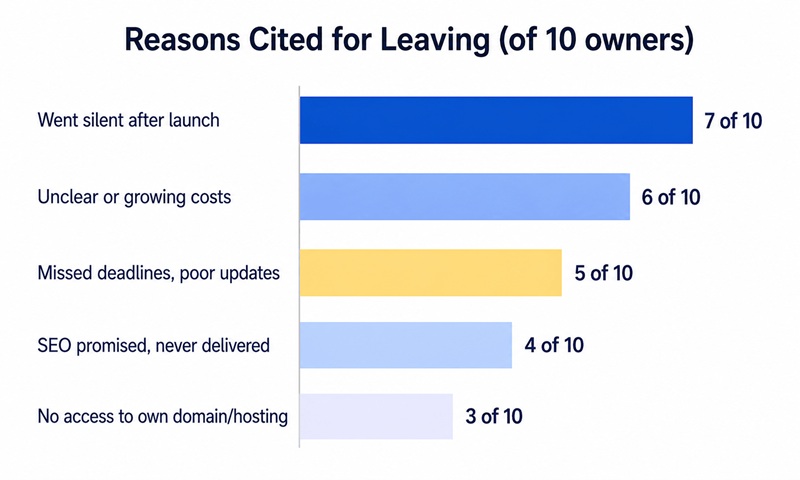
- Post-launch abandonment was the single most common complaint, cited by 7 of 10 owners in some form.
- Unclear or expanding costs after the initial quote came up in 6 of 10 conversations.
- Poor communication and missed deadlines appeared in 5 of 10 stories.
- No ownership or access to their own site’s backend, domain, or hosting came up in 3 of 10, and was often the most frustrating to resolve.
- SEO promises that went nowhere came up in 4 of 10, usually paired with a site that looked polished but never ranked.
Now, the stories themselves.
“They Disappeared After the Invoice Cleared” (Retail, Lajpat Nagar)
Priya runs a small home decor retail business out of Lajpat Nagar. She hired a local website designing company in Delhi to build her online store, paid the full amount on launch as agreed, and assumed ongoing support was implied since it had been mentioned loosely during the sales pitch.
“The site went live on a Friday. By the following Wednesday I had a product image that wasn’t uploading correctly, and I couldn’t reach anyone. Calls went to voicemail, WhatsApp messages were read and not answered for days. It took almost three weeks and a threat to leave a public review before someone finally fixed a five-minute problem.”
Her takeaway, which she now asks every prospective agency directly: what does support look like after launch, in writing, not verbally implied during the pitch.
“Every Small Change Was a New Bill” (Consulting, Gurgaon)
Rohit runs a small consulting firm and hired an agency for what he thought was a complete package. What he didn’t realize until later was that “complete” only covered the initial build; every edit afterward, including fixing a typo or swapping a headshot, was billed separately, often at rates that weren’t clearly disclosed upfront.
“I understand paying for genuinely new work. What frustrated me was that nothing about the ongoing cost structure was explained clearly at the start. I found out by getting a bill for something I assumed was routine maintenance.”
He switched to a website developer company in Delhi that includes a defined number of monthly edit hours in its retainer, specifically because the previous experience made him ask for that in writing before signing anywhere again.
“The Site Looked Great and Ranked Nowhere” (Boutique Fitness Studio, Vasant Kunj)
Ananya’s fitness studio had, by her own account, one of the best-looking websites among her local competitors. It just never showed up when potential clients searched for anything related to her services in her own neighborhood.
“I was told SEO was included. What that actually meant was a few basic meta tags filled in and nothing else. No one ever explained page speed, no one looked at what people were actually searching for, and eighteen months later we were still invisible while a competitor with a far plainer site was ranking above us for every relevant term.”
She eventually moved to an SEO agency that showed her actual search ranking data monthly, which she now considers non-negotiable in any web design relationship.
“Nobody Told Us We Didn’t Own Our Own Site” (Educational Institute, Rohini)
This is the story that came up in our research the least often, but hit hardest when it did. Vikram’s institute had its site built by a small freelance-style operation. When they later wanted to switch agencies, they discovered the domain was registered under the original developer’s personal account, and the hosting login had never been shared.
“We effectively had to negotiate to get access to our own domain name. It wasn’t malicious exactly, I think it was just how they always set things up, but it cost us weeks and real leverage in the negotiation, simply because we never asked who owned what at the start.”
This is now the first question we’d recommend any business ask before a project even begins: confirm in writing that the domain, hosting account, and all admin credentials will be registered in the business’s own name, not the agency’s.
“They Sold Us Features We Never Used” (Logistics Startup, Okhla)
Karan’s logistics startup was sold an elaborate package including a client portal, live chat integration, and a custom quote calculator, most of which sat unused because the sales pitch focused on impressive features rather than what the business actually needed at its stage.
“Looking back, a much simpler site would have served us just as well for the first year, at a fraction of the cost and timeline. I don’t think they were dishonest exactly, I think bigger packages are simply easier to sell than telling a client ‘you don’t need most of this yet.'”
He now recommends asking directly: what’s the minimum version of this project that would actually serve my business right now, and what can reasonably wait.
“Six Months to Launch a Five-Page Site” (Interior Design Studio, South Extension)
Meera’s interior design studio needed a relatively simple five-page portfolio site. The agency she hired quoted four weeks. It took closer to six months, with repeated delays blamed on “the developer,” “the previous revision round,” and eventually, vaguely, “internal issues.”
“What frustrated me most wasn’t even the delay itself; businesses understand things slip sometimes. It was the lack of any real communication about why, or a revised, honest timeline I could actually plan around.”
She now asks for a written project timeline with named milestones before starting anything, specifically so any slippage is visible and explainable rather than vague.
“Our Store Broke During Our Biggest Sale” (Fashion Ecommerce, Karol Bagh)
Sanjay runs an online fashion business and had chosen what he thought was an ecommerce website designing company in Delhi with solid experience. The site performed fine under normal traffic, but crashed during a festival sale when traffic spiked, costing him a full day of sales at the exact moment they mattered most.
“Nobody had ever tested how the site handled a real traffic surge before we needed it to. When I asked afterward, it became clear load testing simply hadn’t been part of their process at all.”
He switched to a team that explicitly load-tests ecommerce builds before major sale periods, something he now considers essential rather than a nice-to-have for any serious online store.
“They Built for Themselves, Not for Us” (Dental Clinic, Pitampura)
Dr. Neha’s dental clinic hired an agency that had genuinely impressive design sensibilities, but the finished site prioritized visual flair over the things her actual patients needed, like a clear way to book an appointment or find the clinic’s location on a map.
“It won compliments from other business owners at networking events, which honestly felt nice at first. But my actual patients, mostly older, mostly just trying to book a cleaning, found it confusing. Nobody at the agency ever asked who our real visitors were or what they’d be trying to do on the site.”
Her replacement agency started the project with a short conversation about her actual patient demographics before designing a single page, which she now says should have been the very first step from day one, not an afterthought.
“Great References, Terrible Reality” (Event Management, Mayur Vihar)
Arjun did his homework before hiring his first agency, checking their portfolio and reading testimonials on their site. What he didn’t do was actually contact any of those referenced clients directly, and he later found out that two of the flagship portfolio pieces were projects the agency had barely touched, mostly minor updates to sites originally built by someone else.
“The testimonials were real people, I later confirmed, but they weren’t necessarily describing the specific scope of work I was hiring them for. I’d assumed a testimonial meant they built the whole thing from scratch. That’s not always what it means.”
He now insists on speaking directly to at least one referenced client by phone, and asks specifically what portion of the visible work that agency was actually responsible for.
How Long Before They Left
One pattern worth visualizing on its own: how long into the relationship did these ten business owners typically stick it out before switching agencies?
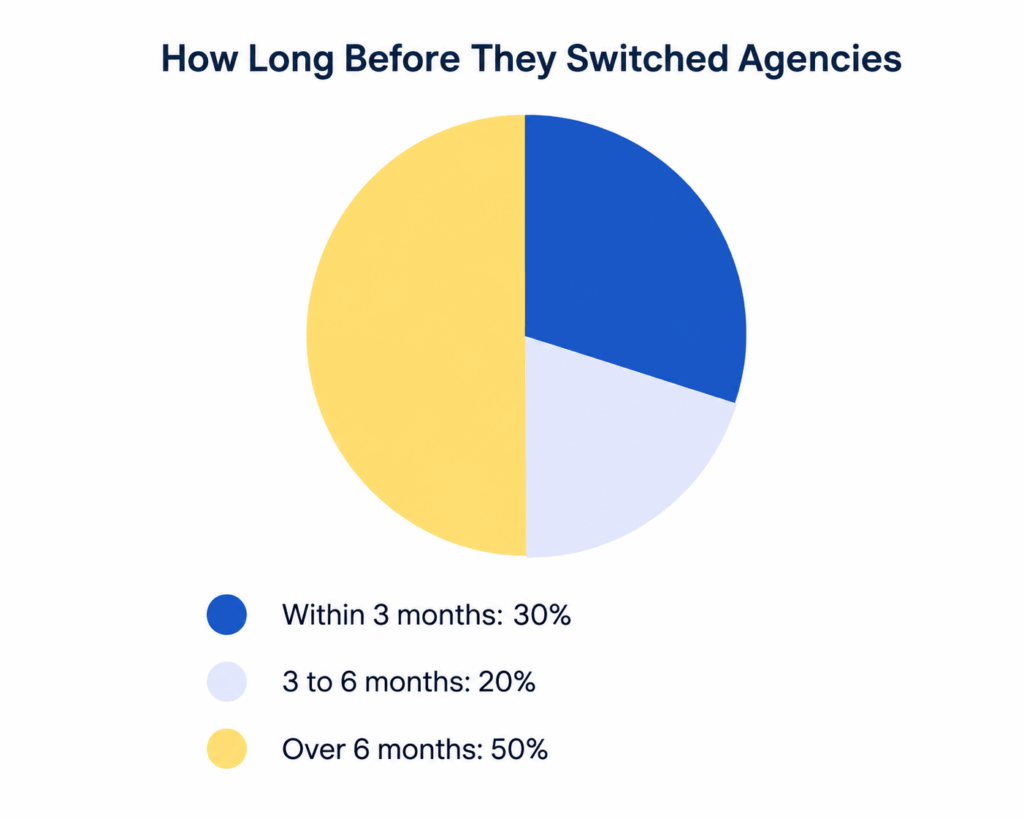
Half of the owners we spoke to stuck it out for more than six months before finally switching, usually because they kept hoping the next fix or the next promise would resolve things. In hindsight, most said they wished they’d trusted their early instincts sooner rather than waiting for a pattern to fully confirm itself.
Looking at what specifically pushed them over the edge, here’s how the final straw broke down:
A Note on Vetting References and Portfolios
Arjun’s story above is worth dwelling on for a moment, because it’s an easy mistake to repeat. A portfolio link and a testimonial both feel like proof, but neither confirms the actual scope of work an agency did. A “client” might be a full custom build, a template with minor tweaks, or a small fix on someone else’s existing site, and the marketing page rarely distinguishes between the three.
Before hiring any website designing company in Delhi, it’s worth doing two simple things that take less than fifteen minutes combined: ask at least one referenced client directly what portion of the visible work the agency actually handled, and check whether the portfolio site still looks and performs the way it’s presented, rather than trusting a screenshot that might be outdated. Both checks are free, quick, and would have caught several of the problems described above well before any contract was signed.
What to Ask Before You Sign
Every one of these stories traces back to a question that wasn’t asked clearly enough at the start. Here’s the list we’d now hand to anyone evaluating a website designing company in Delhi, based directly on these ten conversations:
- “What does support look like after launch, and is it written into the contract?” Verbal assurances during a sales pitch aren’t the same as a documented support scope.
- “What counts as a billable change versus routine maintenance?” Get specific examples, not a vague category.
- “Will the domain, hosting, and admin access be registered in my business’s name?” Confirm this in writing before the project starts, not after.
- “What does ‘SEO included’ actually mean in practice, and how will I see results?” Ask for a specific description of the work, and how progress will be reported.
- “What’s the realistic minimum version of this project for where my business is right now?” Be wary of packages that feel bigger than your current stage needs.
- “Can I get a written timeline with milestones, not just a final delivery date?” This makes any delay visible and explainable early, rather than a surprise at month five.
- “If I expect high traffic events, has this kind of build been load-tested before?” Especially relevant if you’re hiring an ecommerce website designing company in Delhi for anything with seasonal sales spikes.
What a Healthy Agency Relationship Actually Looks Like
It’s easy for a post like this to leave the impression that hiring any website designing company in Delhi is a minefield. That’s not the intent, and it’s worth balancing the stories above with what the healthier relationships we’ve seen actually have in common, since several of these ten owners eventually found exactly that on their second attempt.
- A written scope document that spells out what’s included, what counts as extra, and what post-launch support actually covers, agreed before any work starts.
- Regular, proactive updates during the build, rather than the client having to chase for status every week.
- Full ownership handed over at launch, meaning the domain, hosting, and admin credentials are in the business’s own name from day one, not something to negotiate for later.
- Honest scoping that recommends the right-sized project for the business’s current stage, rather than the biggest package available.
- Measurable reporting for anything sold as SEO or growth work, so progress is visible rather than taken on faith.
None of this is complicated or unusual to ask for. It’s simply rarely offered upfront, which is exactly why it’s worth asking for directly rather than assuming it’s included.
FAQs
Is it normal to switch website design agencies at least once?
It’s common enough that none of the owners we spoke to felt embarrassed about it. What matters more is catching the warning signs earlier next time, using a list like the one above before signing.
How do I find a website designing company in Delhi that won’t disappear after launch?
Ask for the support scope in writing, and ask to speak with a current client who’s been past the launch stage for at least six months, not just a client from the sales pitch stage.
Should I always own my own domain and hosting account?
Yes. A reputable web designing company in Delhi will register these in your business’s name as standard practice. Treat any hesitation here as a serious red flag, not a minor detail.
What’s a reasonable amount of post-launch support to expect included in a project?
This varies, but most healthy agency relationships include at least a defined window (commonly 30 to 90 days) of bug fixes and minor adjustments at no extra charge, with a clear, disclosed rate for anything beyond that. Anything vaguer than that is worth clarifying before you sign.
Is it worth paying more for an established website developer company in Delhi versus a cheaper freelancer?
Not automatically; price alone isn’t the signal that matters. What mattered far more in these ten stories was clear scope, honest communication, and proper ownership handover, all of which exist at multiple price points. A higher price doesn’t guarantee any of those, and a lower one doesn’t rule them out either.
What should I do if I’m already stuck in one of these situations right now?
Start by requesting your domain registrar and hosting login access in writing, even if the relationship is ending badly. That single step resolves the most damaging issue described above (story four) and gives you real leverage and flexibility for whatever you decide to do next.
Final Thoughts
None of these ten business owners regret having a website built. Every one of them still believes in working with a professional rather than doing it entirely alone. What they’d all do differently is ask sharper questions before signing, rather than discovering the gaps after the invoice was paid and the relationship had already gone quiet.
If you’re currently comparing an ecommerce website designing company in Delhi for an online store, use the questions above as your actual evaluation checklist, not just the portfolio and the price. Most of what went wrong in these stories was never really about design skill, it was about clarity, ownership, and communication set at the very start of the relationship, and every one of those things is checkable in a single conversation if you know what to ask.
At ICO WebTech, we’d genuinely rather answer these questions honestly upfront than have you find the answers the hard way six months in.
Website Designing Company or DIY Builder (Wix/WordPress)? An Honest Comparison From Someone Who Builds Both
We run a website designing company in Delhi, so you’d expect this post to end with “just hire us.” It won’t, at least not automatically. Plenty of businesses genuinely don’t need to hire anyone yet, and telling them otherwise just to close a deal is the kind of short-term thinking that gives this entire industry a bad name.
What we want to do instead is give you the same honest comparison we’d give a friend who asked us over coffee: when does a DIY builder like Wix or WordPress genuinely make sense, when does hiring a website designing company in Delhi pay for itself many times over, and how do you tell which situation you’re actually in.
We build both custom sites and have set up plenty of DIY builders for clients who later outgrew them, so this comes from having watched both paths play out, not just from a sales script.
Table of Contents
- The Quick Answer
- What “DIY Builder” Actually Means in 2026
- Cost Comparison: Real Numbers, Not Marketing Numbers
- Time Comparison: What Each Path Actually Costs You in Hours
- When DIY Genuinely Makes Sense
- When DIY Backfires
- A Special Case: Ecommerce Sites
- SEO and Growth: Where the Gap Widens Over Time
- The Cost Nobody Budgets For: Ongoing Maintenance
- A Real Pattern We See Often
- The Middle Path Nobody Talks About
- If You Do Go DIY, How to Pick the Right Platform
- A Quick Decision Checklist
- FAQs
- Final Thoughts
The Quick Answer
If you need something online this weekend, have a genuinely simple offering, and your website’s job is basically to exist rather than to actively sell or rank, a DIY builder is a completely reasonable choice.
If your website needs to generate leads, rank on Google against real competition, sell products at scale, or represent a brand you’re serious about growing, working with a website designing company will almost always pay for itself faster than the DIY route costs you in lost time, lost conversions, and eventual rebuild fees.
The rest of this post breaks down exactly why, with real numbers, so you can make the call based on your actual situation rather than on whichever option someone is trying to sell you.
What “DIY Builder” Actually Means in 2026
“DIY” isn’t one thing anymore, and lumping it all together is where a lot of these comparisons go wrong. There are three meaningfully different paths:
- Drag-and-drop builders (Wix, Squarespace, Shopify‘s basic tier): fully hosted, template-based, minimal technical skill required.
- Self-managed WordPress: more flexible and powerful, but you’re responsible for hosting, security updates, plugin conflicts, and backups yourself, or you’re paying someone else to.
- AI website generators: newer tools that generate a starting template from a prompt, which then still need the same ongoing editing and maintenance as any other builder.
Each of these has a genuinely different cost and skill profile, so when we say “DIY” in this post, we mean the general category: you (or someone on your team who isn’t a professional developer) building and maintaining the site yourselves, regardless of which specific tool you pick.
Cost Comparison: Real Numbers, Not Marketing Numbers
The sticker price of a DIY builder always looks like the obvious winner, because the comparison usually stops at the monthly plan fee. That’s not the full cost. Here’s a more complete picture for a typical small business website over the first year, based on common platform pricing and typical small-business project quotes in Delhi, not a single made-up figure:
The DIY builder’s plan fee is genuinely lower on paper, usually somewhere in the range of ₹1,000 to ₹2,500 a month depending on the platform and apps you add, which works out to roughly ₹14,000 to ₹36,000 a year once you factor in stock images, extra plugins, and the occasional paid app. What the sticker price leaves out is the 40 to 80 hours most business owners actually spend building, tweaking, and troubleshooting it themselves, plus the eventual redesign when the DIY site stops matching how the business has grown.
A web design company typically charges a fixed project fee once, and for a straightforward small-business site that fee commonly falls somewhere between ₹20,000 and ₹40,000, though it varies by scope, page count, and whether custom features are involved. That fee already includes design time, copywriting guidance, mobile optimization, and a launch-ready site, so the comparison isn’t really “cheap vs expensive.” It’s “spread across your own unpaid hours vs paid upfront to someone who does this daily.”
Time Comparison: What Each Path Actually Costs You in Hours
Time is the cost most DIY comparisons quietly skip, and it’s usually the bigger one. Based on projects we’ve seen or been brought in to fix, here’s a rough breakdown of where the hours actually go:
| Task | DIY (typical hours) | Agency-managed |
| Learning the platform | 8 to 15 hours | 0 (not your job) |
| Design and layout decisions | 15 to 25 hours | Handled by designer |
| Writing and formatting content | 10 to 20 hours | You provide input; they format |
| Fixing mobile/layout issues | 5 to 15 hours | Built correctly the first time |
| SEO basics setup | 5 to 10 hours (if done at all) | Included in build |
| Typical total | 43 to 85 hours | 2 to 5 hours of your input time |
If your time is worth even a modest hourly rate to your business, 60-plus hours of DIY work often costs more in opportunity cost alone than a straightforward project with a website designing company in Delhi would have cost in fees. That doesn’t make DIY a bad choice; it just means the “free” or “cheap” framing is usually incomplete.
When DIY Genuinely Makes Sense
We’d be lying if we said DIY never made sense, because it clearly does in specific situations:
- You’re validating an idea. If you’re not yet sure the business will work, spending weeks and a large budget on a custom site is premature. Get something live, test demand, and revisit once you have traction.
- Your site’s job is simply to exist. A single-page site with your name, services, and phone number, mainly so people can confirm you’re real when they Google you, doesn’t need custom development.
- You genuinely enjoy building and have the time. Some founders like the hands-on control and treat it as a skill worth learning. That’s a legitimate reason on its own.
- Budget is the hard constraint right now. A decent DIY site beats no site, and beats delaying launch for months to save up for a custom build.
When DIY Backfires
The pattern we see most often with clients who come to us after starting on a DIY builder isn’t that the builder was bad. It’s that the business outgrew it faster than expected, and the rebuild ends up costing more, in both money and lost time, than starting with a proper build would have.
- You depend on search traffic. DIY builders can technically support SEO, but templated structures, slower load times, and limited control over technical details put you at a real disadvantage against a professionally structured site, especially if you’re competing for a term like website designing company in Delhi or anything similarly competitive in your own industry.
- You need custom functionality. Booking systems with unusual rules, multi-step quote calculators, membership areas, and industry-specific integrations often hit a wall on drag-and-drop platforms.
- Your brand needs to look established. Investors, enterprise clients, and larger partners often subconsciously judge credibility from site quality. A template that a hundred other small businesses are also using undercuts that signal.
- You don’t actually have the time you think you do. Most business owners underestimate DIY hours by half, and the site ends up half-finished for months, which often costs more in lost business than any agency fee would have.
A Special Case: Ecommerce Sites
Ecommerce deserves its own section because it’s where the DIY-vs-agency gap widens the most. Platforms like Shopify or Wix’s store builder are genuinely capable for a small catalog with straightforward shipping. But once you need custom checkout logic, inventory syncing across multiple sales channels, bulk pricing tiers, or a storefront designed around real conversion data rather than a generic template, that’s exactly the kind of project an ecommerce website designing company in Delhi is built to handle well, and where a DIY build tends to plateau.
The cost of getting this wrong is also higher in ecommerce specifically, because every friction point in checkout, page speed, or mobile layout translates directly into lost sales, not just lost pageviews. If online sales are meant to be a serious revenue channel rather than a side experiment, this is usually the clearest case where paying for a proper build pays for itself.
SEO and Growth: Where the Gap Widens Over Time
Here’s a comparison that’s often skipped in DIY-vs-agency discussions: what happens to search visibility over the following 12 months, not just at launch. Based on patterns we’ve tracked across client rebuilds:
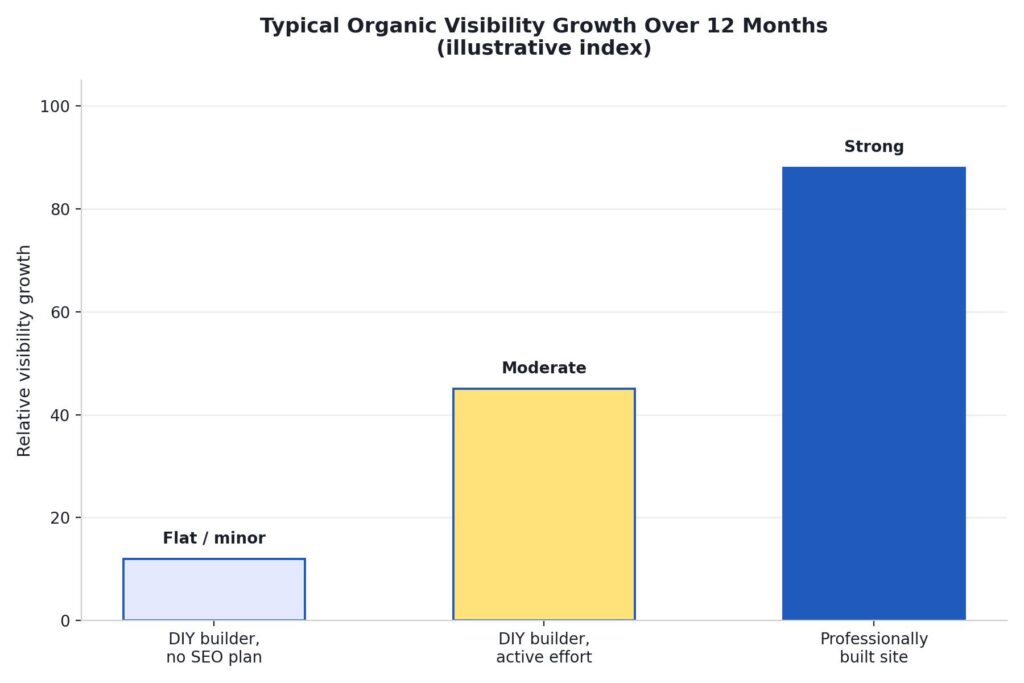
This isn’t a knock on DIY builders’ technical capability; modern platforms have improved a lot on this front. It’s more about what tends to actually get built. Professionally built sites are set up with clean structure, proper heading hierarchy, fast load times, and technical SEO fundamentals from day one, because that’s part of a website developer company in Delhi’s standard process rather than an optional extra you have to remember and configure yourself.
The Middle Path Nobody Talks About
Most comparisons frame this as a binary choice, but a lot of the smartest clients we’ve worked with actually split the difference: launch on a DIY builder to get moving fast and validate the idea, then bring in a website designing company in Delhi once there’s real traction and revenue to justify a proper build. This isn’t wasted effort. The content, product photos, and copy from the DIY phase usually carry over directly into the new build, so nothing is thrown away.
The one thing to watch with this approach: don’t wait so long that the DIY site is actively costing you business (slow load times turning away mobile visitors, a dated look turning away bigger clients) before making the switch. The right time to move is usually earlier than founders think.
The Cost Nobody Budgets For: Ongoing Maintenance
Most cost comparisons stop at launch day, which is misleading, because a website is never really “done.” Both paths carry ongoing costs; they just show up differently.
With a DIY builder, maintenance usually means you personally updating plugins, renewing apps, checking that a new browser update hasn’t broken your layout, and periodically rewriting content that’s gone stale. It’s rarely a large time cost in any single week, but it adds up over a year, and it’s easy to let slide when the business gets busy, which is exactly when a broken contact form or an outdated price list starts quietly costing you leads.
With a website designing company in Delhi, maintenance is usually either included in a support package or billed as occasional, predictable work: a content update here, a new page there, a security patch on the backend. The difference isn’t that one path has maintenance, and the other doesn’t. It’s that one path makes maintenance someone else’s job with a predictable cost, and the other makes it a recurring item on your own to-do list that competes with everything else you’re running.
A related cost worth naming honestly: platform lock-in. Moving a fully built Wix site to another platform later is rarely a clean export; it usually means rebuilding significant parts of the site from scratch. A professionally built WordPress or custom site tends to be easier to hand off, migrate, or extend later, because it isn’t tied to one proprietary builder’s ecosystem.
A Real Pattern We See Often
To make this less abstract, here’s a composite of a pattern we’ve seen repeat across several actual client conversations, details adjusted for privacy. A small business owner in Delhi launches on a drag-and-drop builder to get online quickly, spends around 50 hours over a few weekends getting it presentable, and it works fine for the first six to eight months. Sales come mostly from referrals and word of mouth, so search visibility isn’t yet a pressing concern.
Around month nine or ten, growth plateaus. The owner starts actively trying to bring in customers through Google rather than relying on referrals, and discovers the site isn’t ranking for anything meaningful. Competitors who invested in a proper build early are showing up above them for the exact searches that matter, including generic ones like website designing company in Delhi if that’s adjacent to their own industry’s competitive terms. At that point, they come to a website designing company in Delhi anyway, except now it’s a rebuild under time pressure, competing against established competitors, rather than a considered decision made at the start.
This isn’t every DIY story, and plenty of businesses on DIY builders never hit this wall because their situation genuinely doesn’t require it. But the pattern is common enough that it’s worth planning for honestly rather than assuming it won’t happen to you.
If You Do Go DIY, How to Pick the Right Platform
If you’ve read this far and DIY is still the right call for your stage, the platform choice itself matters more than most people assume. A few honest notes based on what we’ve seen work and not work for small Delhi businesses:
- Wix is the easiest starting point for non-technical founders, with the widest range of ready-made templates. It’s a reasonable pick for service businesses, portfolios, and simple informational sites. Its main downside is that heavily customized functionality and advanced SEO control are more limited than on WordPress.
- WordPress (self-hosted) gives you far more flexibility and a huge plugin ecosystem, which makes it a better long-term foundation if you expect to grow. The tradeoff is a steeper learning curve and genuine ongoing responsibility for hosting, security, and updates, which is exactly the maintenance burden discussed above.
- Shopify is worth a dedicated mention for anyone selling products, since it’s purpose-built for ecommerce in a way general site builders aren’t. For a small catalog with standard shipping needs, it’s often the most sensible DIY ecommerce starting point, though it hits the same ceiling as other builders once your catalog, pricing logic, or integrations get complex.
- AI website generators can produce a decent-looking first draft in minutes, which is genuinely useful for getting unstuck on a blank page. Treat the output as a starting template you’ll still need to edit and maintain, not a finished, hands-off solution.
Whichever you pick, resist the urge to install every available plugin or app “just in case.” Every added plugin is one more thing that can break, slow down your site, or create a security gap you’re now responsible for. Start minimal, and add functionality only when you actually need it.
A Quick Decision Checklist
- Choose DIY if: you’re pre-revenue or testing an idea, your site’s job is mainly informational, budget is the hard constraint right now, or you genuinely have the time and interest to build it yourself.
- Choose a website designing company in Delhi if: organic search traffic matters to your revenue, you need custom functionality a template can’t handle, your brand needs to read as established, or you’ve already tried DIY and it’s costing you more time than it’s saving.
- Choose an ecommerce website designing company in Delhi specifically if: you’re selling products online as a serious revenue channel, not a side experiment, and checkout friction or page speed is directly costing you sales.
FAQs
Can I start with Wix or WordPress and move to a professional site later without losing my content?
Yes. A competent website developer company in Delhi can migrate your existing pages, images, and written content into the new build, so switching later doesn’t mean starting from zero.
Is WordPress cheaper than hiring an agency long-term?
Only if you’re comfortable handling hosting, security updates, and plugin maintenance yourself, or you factor in what you’d pay someone else to do it. Self-managed WordPress has real ongoing responsibilities that a fixed-fee agency build doesn’t hand back to you.
How do I know if my business has outgrown a DIY builder?
Common signs: you’re spending more time fighting the platform than running your business, mobile visitors are bouncing due to speed or layout issues, you can’t add a feature customers are asking for, or competitors with professionally built sites are consistently outranking you.
Do website designing companies in Delhi ever recommend DIY builders to clients?
A genuinely honest one will, when it’s the right fit. If every conversation ends with “you need a custom build” regardless of your actual situation, that’s worth noticing.
What’s a realistic budget range if I do decide to hire a website designing company in Delhi?
It depends heavily on scope, but a straightforward small-business site typically costs meaningfully more upfront than a year of DIY builder fees, and meaningfully less than most owners expect once they account for their own DIY hours and an eventual rebuild. Ask any agency you’re considering for a specific range based on your actual requirements rather than a generic quote.
Will an agency-built site let me make small edits myself afterward?
A good website developer company in Delhi will hand over a site you can update yourself for routine changes like text, images, and prices, typically through WordPress’s standard editor, while keeping the technical foundation, hosting, and security in professional hands. If an agency builds you something you can’t touch at all without paying them for every small edit, ask about that upfront.
Final Thoughts
There’s no universally right answer between DIY and hiring a website designing company in Delhi; there’s only the right answer for where your business actually is right now. Early-stage and simple use cases genuinely favor DIY. Anything revenue-critical, search-dependent, or brand-sensitive tends to favor a professional build, usually by a wider margin than the upfront price difference suggests once you count your own time honestly.
The businesses that regret their choice most often aren’t the ones who picked DIY or the ones who hired an agency; they’re the ones who never revisited the decision as their situation changed. What was right at launch isn’t automatically right two years later, and it’s worth checking in on that honestly every so often rather than defaulting to whatever you set up on day one.
If you’re not sure which category you fall into, we’re happy to give you a straight answer, even if that answer is “you don’t need us yet.” Reach out to ICO WebTech and we’ll walk through your specific situation, whether that means a custom build, an ecommerce website designing company in Delhi conversation, or simply pointing you toward the right DIY setup for now.

We Analyzed 50 ‘Top Website Designing Companies in Delhi’ Websites — Here’s What Most Get Wrong
If you’ve typed “website designing company in Delhi” into Google recently, you’ve probably noticed something strange: the first two pages look almost identical.
Same stock hero images of laptops and coffee cups. Same “We Build Stunning Websites” headline. Same three-tier pricing table with the middle plan mysteriously highlighted as “Most Popular.”We wanted to know why, and whether the sameness on the outside meant the quality was the same on the inside too.
So we picked 50 businesses that rank, advertise, or are commonly recommended as website designing companies in Delhi, and we quietly audited each one the way a real customer would: we visited the site on a phone, tried to find pricing, looked for genuine proof of past work, and timed how long everything took to load.What we found wasn’t encouraging.
Most agencies in this space are competing on who can look the most “professional” while quietly skipping the basics that actually make a website work. This post breaks down exactly what we found, with the numbers to back it up, and a checklist you can use before you hand your project, and your budget, to anyone claiming to be a top website designing company in Delhi.
Table of Contents
- How We Did This Audit
- Key Findings at a Glance
- Finding 1: Most “Professional” Websites Are Slow on Mobile
- Finding 2: Pricing Transparency Is Rare
- Finding 3: Portfolio Quality Is All Over the Place
- Finding 4: “Mobile Friendly” Doesn’t Always Mean Mobile Friendly
- Finding 5: Testimonials Without Any Way to Verify Them
- Finding 6: Confusing or Missing Calls to Action
- Finding 7: The Most Common Problems, Ranked
- Common Excuses Agencies Give and What They Mean
- What This Means If You’re Hiring Right Now
- Where We Try to Do Things Differently at ICO Web Solutions
- FAQs
- Final Thoughts
How We Did This Audit
We kept this simple and repeatable, because the point wasn’t to run an academic study. It was to look at this market the way a business owner in Delhi would when they’re trying to hire someone.
We shortlisted 50 companies using a mix of sources: businesses that show up on the first three pages of Google for “website designing company in Delhi” and related searches, agencies commonly mentioned in local business Facebook groups and LinkedIn posts, and a handful of directory listings (Sulekha, JustDial, UrbanClap-style platforms). We deliberately included a mix of large agencies, small studios, and solo freelancers operating under an agency name, because that’s the real mix a buyer actually encounters.
For each one, we scored the following on their own website, using only what a normal visitor could see without logging in or calling anyone:
- Mobile page load speed: measured on a simulated mid-range mobile connection
- Pricing transparency: is there any real number anywhere, or only “Contact us”?
- Portfolio quality: are there real, working links to actual client sites, or just screenshots?
- Mobile responsiveness: does the layout actually adapt, or does it just “technically” resize?
- Verifiable proof: testimonials with names/companies vs. generic unattributed quotes
- Clarity of next step: is it obvious what to do if you want to hire them?
- Basic security hygiene: valid SSL, no mixed-content warnings, no broken forms
None of this required special tools a regular buyer couldn’t also use. Mostly it just required patience, which is exactly what most people don’t have when they’re evaluating five agencies back to back at 11 p.m.
We also tried to keep the sample honest rather than convenient. It would have been easy to only pick agencies that already looked polished, which would have flattered the results. Instead, we mixed company sizes deliberately so the findings would reflect what a real buyer actually runs into during a normal search, not a cherry-picked best-case scenario:
| Category | Number of agencies | % of sample |
| Established agencies (10+ team members, 5+ years) | 14 | 28% |
| Small studios (2–9 team members) | 21 | 42% |
| Solo freelancers operating under an agency-style brand | 15 | 30% |
One thing worth flagging honestly: this wasn’t a peer-reviewed study, and we’re not claiming lab-grade precision on every millisecond of load time. Think of it as a structured, repeatable spot-check, the same kind of look any careful buyer could give five or six shortlisted agencies before making a decision, just scaled up to 50 so the patterns become obvious instead of anecdotal.
Key Findings at a Glance
Before we go section by section, here’s the short version. Out of the 50 sites we looked at:
- Only 22% displayed any real pricing information anywhere on their site.
- 64% took longer than 3 seconds to become usable on a simulated mobile connection, the point at which most visitors start bouncing.
- 68% were visibly built from the same 3–4 recurring page templates, just recolored.
- Only 28% scored what we’d call “good” on portfolio quality: real, working links to real client sites.
- 78% had at least one of the seven problems above; only 2 sites out of 50 had none.
Let’s go through each one properly, because the details matter more than the headline stats.
Finding 1: Most “Professional” Websites Are Slow on Mobile
This is the one that surprised us the most, because speed is something every agency claims to care about when they’re pitching you. “We build fast, SEO-optimized websites” is on almost every homepage in this space. In practice, that’s not what we found.
Here’s how the 50 sites broke down by mobile load time, measured to the point the page became interactive:
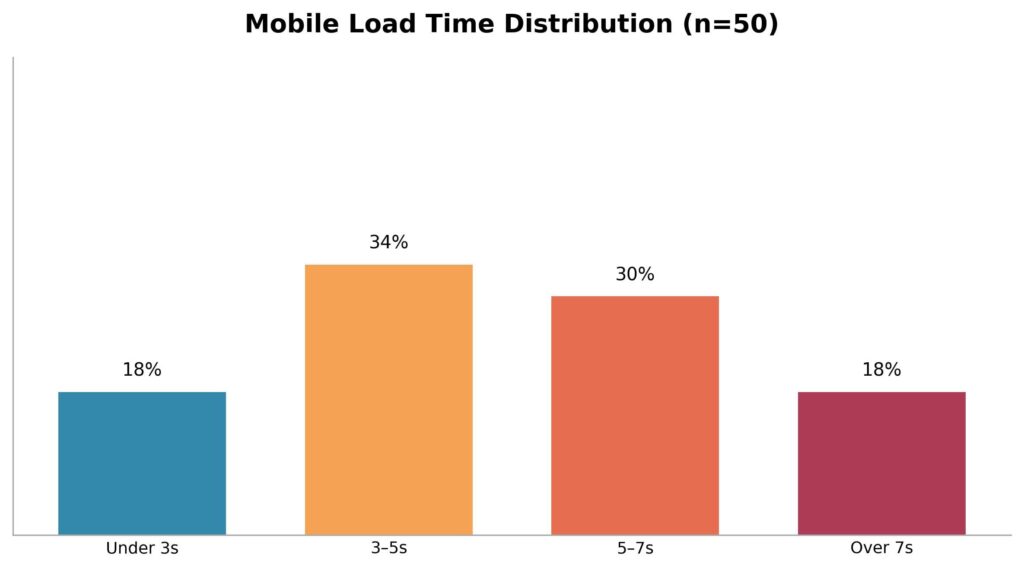
Only 18% loaded in under 3 seconds, generally considered the threshold before mobile visitors start leaving. That means 82% of the “professionals” you’d be trusting with your own website’s speed and SEO are themselves failing the exact test they’ll promise to help you pass. A slow-loading agency site isn’t just an inconvenience; it’s a preview of what your own site might look like once it’s handed over and nobody revisits the performance settings again.
Finding 2: Pricing Transparency Is Rare
Almost every web design agency we looked at buries pricing behind a “Get a Free Quote” form. On its own, that’s not necessarily a red flag. Pricing genuinely varies by project scope. But the near-universal avoidance of even a starting price or price range felt less like nuance and more like a sales tactic: get you on a call first, then quote based on what they think you can afford.
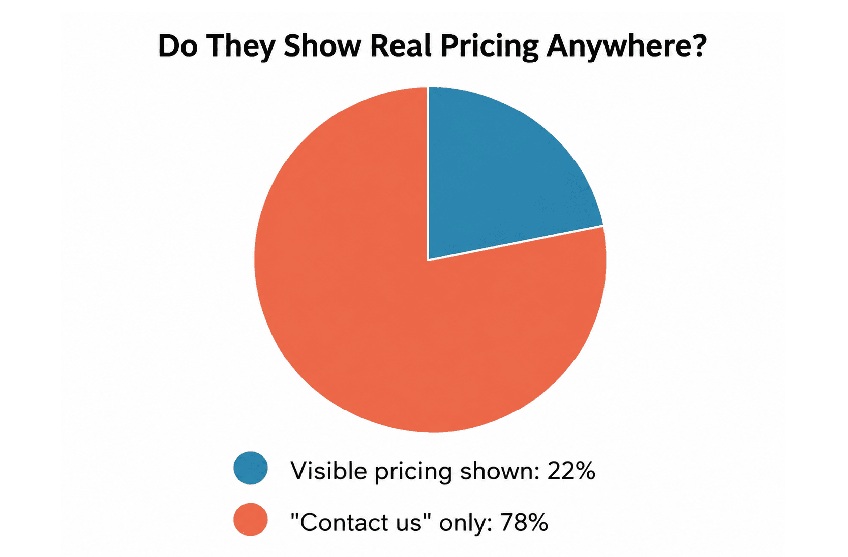
To be fair to the industry, plenty of legitimate agencies use custom quoting because every project genuinely is different. The problem isn’t quoting. It’s the total absence of even a rough starting range (“basic business websites typically start around ₹15,000”), which is the minimum information a buyer needs to know whether it’s even worth having the conversation. Only 22% gave visitors that courtesy.
Finding 3: Portfolio Quality Is All Over the Place
A portfolio is supposed to be proof. What we found instead, on more than half the sites, were static screenshots with no working link, meaning there’s no way to check if the “client site” is still live, still looks like that, or ever performed well after launch.
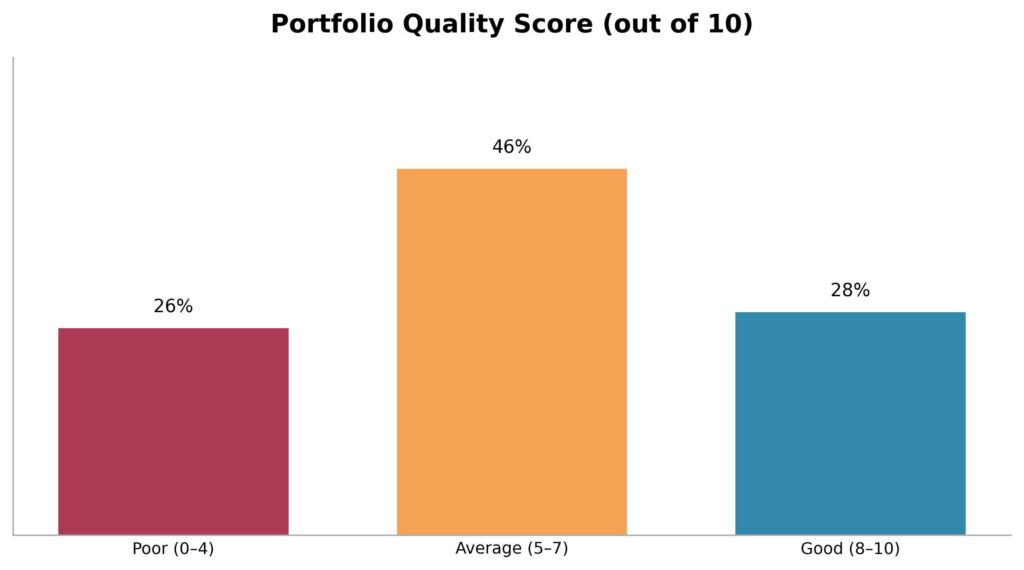
Just 28% scored “good”, meaning real, clickable links to real, currently-live client sites that reasonably matched the quality being promised in the sales copy. If an agency can’t (or won’t) let you click through to see their actual work in the real world, that’s worth asking about directly before you sign anything.
Finding 4: “Mobile Friendly” Doesn’t Always Mean Mobile Friendly
Nearly every agency site technically passes Google’s basic mobile-friendly test: text doesn’t overflow, buttons are tappable. But “passes a test” and “feels good to use” are different things. On a meaningful number of sites, we found navigation menus that required multiple taps to reach anything useful, contact forms that were genuinely painful to fill out on a phone keyboard, and image galleries that either didn’t load or loaded so large they broke the layout.
This matters more than it might seem, because if an agency’s own site treats mobile as an afterthought, that’s often exactly how your project will be treated too: technically compliant, not actually good.
Finding 5: Testimonials Without Any Way to Verify Them
Almost every site had a testimonials section. Very few had testimonials you could actually verify: a full name, a company, a link to that company’s real website or Google review. Most were short, generic quotes (“Great service, highly recommended!”) attributed to a first name and city, which is functionally impossible to check and easy to fabricate.
This doesn’t necessarily mean the reviews are fake. But from a buyer’s perspective, unverifiable praise should carry roughly the same weight as no praise at all. If you can’t confirm a testimonial is real, treat it as marketing copy, not evidence.
Finding 6: Confusing or Missing Calls to Action
A smaller but still notable issue: several sites made it genuinely unclear what to do next. Some had three or four competing buttons above the fold (“Get Quote,” “Book a Call,” “WhatsApp Us,” “Live Chat”) that all seemed to lead to slightly different places, which creates hesitation rather than action. Others had the opposite problem: burying the contact form so deep that you’d need to scroll through the entire homepage to find any way to actually reach them.
Finding 7: The Most Common Problems, Ranked
Putting all seven checks together, here’s how often each specific issue showed up across the 50 sites we reviewed:
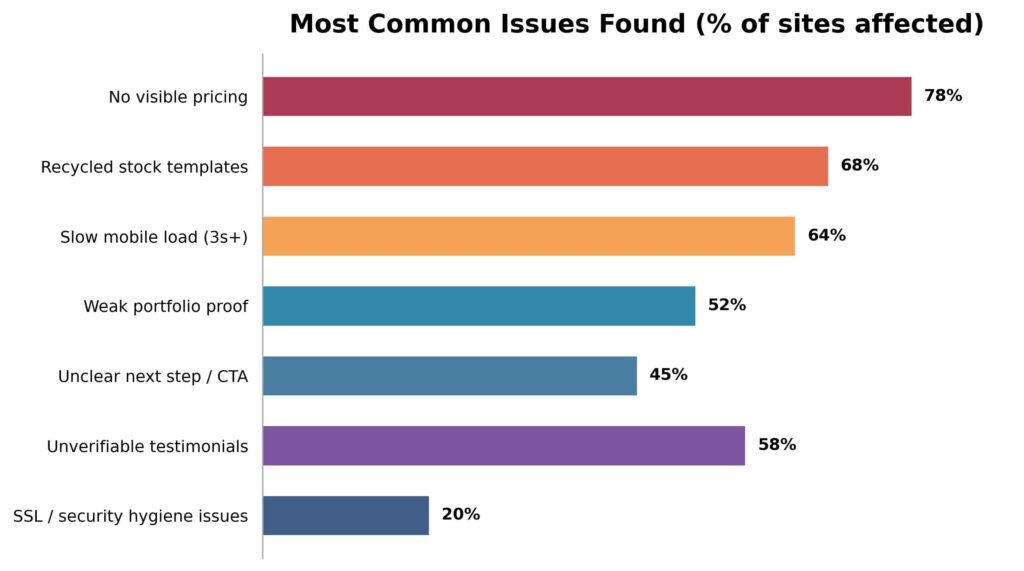
Two patterns stand out here. First, pricing opacity and templated design are the two most common issues by far: which tracks with what most Delhi business owners already suspect but rarely confirm before they hire. Second, the technical basics (SSL, security hygiene) are actually the least common problem, which is a small silver lining: most agencies at least get the fundamentals of “the site works and is secure” right, even when the strategy and honesty around it fall short.
Common Excuses Agencies Give and What They Actually Mean
While researching this piece, we also collected the standard lines agencies use to deflect the exact questions this checklist raises. A few of the most common, and how to read them:
- “Every project is different, so we can’t give a fixed price.” True in principle, but a range is still possible. If a company genuinely scopes hundreds of projects a year, they know roughly what a basic five-page business site costs versus a custom e-commerce build. A flat refusal to give even a range usually means the pricing is set based on how much they think you’ll pay, not on the actual work involved.
- “We can’t share client contacts for privacy reasons.” Reasonable for some enterprise clients, but most small and mid-sized business owners are happy to give a two-minute reference if the relationship was genuinely good. A blanket “no” across every single client is a pattern worth noticing.
- “Our new site is still in progress, that’s why it’s slow.” Fair if it’s genuinely and visibly under construction. Less fair if it’s been “in progress” for the entire time you’ve been evaluating them, which was the case for several sites in our sample.
- “We focus on design, SEO/speed is a separate service.” This can be a legitimate specialization. It’s still worth asking directly whether the site they build for you will be handed over speed-optimized by default, or whether that’s an add-on you’ll be quoted separately, later, after you’re already committed.
None of these excuses are automatically dishonest. Context matters, and small agencies in particular have real constraints established players don’t. The point isn’t to treat every hedge as a lie. It’s to notice when hedging replaces a straight answer to a straight question, and to keep asking until you get one.
What This Means If You’re Hiring Right Now
None of this means you should avoid hiring a website designing company in Delhi. A good one will still save you far more time and produce far better results than doing it yourself or hiring the cheapest freelancer you can find. It means you should evaluate a little more carefully than “their homepage looked nice.” Here’s a practical checklist based directly on what we found:
- Ask for a real number, not just “it depends.” A legitimate agency can give you a rough starting range for a project like yours within the first conversation. If they can’t or won’t, that’s worth noting.
- Click through the portfolio yourself. Don’t just look at the screenshots on their site. Open the actual client websites, browse them on your phone, and check if they still look and function the way they’re presented.
- Test their own site’s speed. If their homepage takes 6 seconds to load on your phone, ask directly how they’d approach speed for your project, and listen closely to the answer.
- Ask testimonial clients if you can reach out. A confident agency will happily connect you with a past client for a two-minute reference call. Hesitation here is a signal.
- Get the process and timeline in writing before you pay anything. “2–4 weeks” means very different things to different agencies. Get milestones, not vague ranges.
- Ask what happens after launch. Who fixes a broken form six months later? Is maintenance included, or is that a separate, undisclosed cost?
- Don’t mistake a polished homepage for a polished process. Plenty of the sites we reviewed looked genuinely great and still failed multiple checks. Design quality on their own marketing site is not proof of project management quality on yours.
Where We Try to Do Things Differently at ICO Web Solutions
We’re not going to pretend this audit was written with zero self-interest. We run a website designing company in Delhi ourselves, and we’d genuinely like you to consider us. But we ran this same checklist against our own site and process before publishing this, because it seemed dishonest not to.
A few things we do deliberately, partly because this research showed us how often they’re skipped industry-wide: we publish real starting price ranges instead of forcing every visitor through a quote form, we link directly to live client websites rather than static screenshots, we share direct contact details for past clients on request, and we treat post-launch support and page speed as part of the deliverable, not an upsell added later.
We’d rather you compare us against a checklist like this one than against a homepage that simply looks nice, because as this audit shows, those two things aren’t always the same.
FAQs
How much does it cost to hire a website designing company in Delhi?
It varies widely by scope, but based on what the transparent 22% of agencies disclosed, small business websites typically start in a modest range, with e-commerce and custom-functionality projects costing meaningfully more. Always ask for a scoped, written quote rather than relying on a homepage number alone.
How long should a website project realistically take?
For a standard business website, 3–5 weeks is common once content and revisions are factored in. E-commerce or custom-feature projects typically run longer. Be cautious of anyone promising a fully custom site in 2–3 days.
What’s the single biggest red flag from this audit?
The combination of no visible pricing and no verifiable portfolio proof together. Either one alone can have a reasonable explanation; both together made up a large share of the lowest-scoring sites we reviewed.
Is a slow agency website always a dealbreaker?
Not always, but it’s a fair, easy test you can run yourself in ten seconds before a sales call, and it’s directly relevant to the exact service they’re selling you.
Should I choose the cheapest web design company in Delhi I can find?
Not necessarily. Several of the lowest-priced agencies in our sample also scored worst on portfolio proof and post-launch support, which usually just shifts the real cost to later: a redesign, a security fix, or lost business from a site that never ranked. Price is one input, not the whole decision.
Do I need to see a physical office before hiring a Delhi web design agency?
Not necessarily, especially with more studios operating remotely or hybrid since 2023. What matters more is whether you can verify their work and reach their past clients. An agency without an office but with verifiable, live client sites is a safer bet than one with a fancy office and no checkable proof.
How do I know if a website designing company in Delhi actually understands SEO, not just design?
Ask them to explain, in plain terms, how page speed, mobile usability, and site structure affect ranking, and then check their own site against what they just told you. A team that genuinely understands SEO will usually apply the basics to their own homepage first.
Final Thoughts
The market for a website designing company in Delhi is crowded, and a lot of that crowding hides behind near-identical homepages promising the same things in the same words. The good news from this audit is that the differences that actually matter, real pricing, real proof, real speed, are checkable in about ten minutes, without needing any technical background at all.
Before you hire anyone, run this checklist against them the same way we ran it against 50 agencies for this piece. It’s the fastest way we know to separate the companies who are good at marketing themselves from the ones who are actually good at building websites.
If you’d like a second opinion on a shortlist you’re already considering, or you’d rather skip the guesswork entirely, our team at ICO WebTech is happy to walk you through our own process, pricing, and live client portfolio, no pressure, no vague quote forms, just a straight answer to whatever you ask.

Website vs. App: Which Does Your Small Business Actually Need First?
A data-backed guide for small business owners deciding where to put their first serious tech budget.
Why This Decision Trips Up So Many Small Business Owners
Apps feel modern. A website, by comparison, can feel almost old-fashioned — something every business “already has” in some form, so it doesn’t seem exciting to invest real money into. Meanwhile, an app feels like the thing that signals a business has “made it.”
That instinct is understandable, but it’s misleading. A website and an app solve fundamentally different problems, and for a small or early-growth business, choosing the wrong one first can waste months of runway and thousands of dollars that could have gone toward actually acquiring customers.
The scale of the underlying problem is bigger than most owners realise. Globally, an estimated 40% of small businesses still operate without any website at all, and in developing markets that figure climbs sharply — India specifically sits around 50–55% of small businesses without a website, compared to roughly 22–27% across the US, UK, Canada, and Australia.[1]
That’s not a small gap. It represents millions of active, revenue-generating businesses that are functionally invisible to anyone searching for them online.

For a business owner, this chart matters for a very practical reason: your competitors are disproportionately likely to be in that “invisible” bucket too. That’s either a warning sign because you might be one of them or a genuine opportunity, because being the business that does show up when a customer searches nearby can be a meaningful competitive edge on its own.
What Actually Happens When a Business Has No Website
This isn’t just a theoretical gap on a chart; it shows up directly as lost revenue, and the mechanism is fairly well understood. Research into consumer behaviour consistently finds that a large majority of shoppers, often cited as around 81%, research a business online before making a purchase decision, and a meaningful share specifically visit the company’s own website before buying in-store or picking up the phone.[2]
When that website doesn’t exist, the customer’s default reaction isn’t to call anyway out of loyalty many simply move on to the next name that does show up.
There’s a specific, measurable pattern here that digital marketing agencies sometimes call the “verification gap.” When someone receives a referral to a local business from a friend, a Google Maps listing, or word of mouth — they instinctively try to verify it online before actually reaching out.
Analysis of this behaviour suggests a business without a website loses roughly 20–35% of its referred customers right at this verification step.[3] It’s not that the business did anything wrong; it’s simply that the customer couldn’t confirm the business was real, active, and legitimate, and the psychological friction was enough to make them search for an alternative instead.
Think of it this way: a referral gets a customer to your door. A website is what convinces them to actually knock.
On the flip side, businesses that do invest in a website see a measurable payoff. One 2026 analysis found small businesses with websites growing at roughly double the rate of comparable businesses without one, and a separate dataset found website-owning businesses earning around 39% more revenue on average than businesses without a site.[4][5] Website adoption among small businesses has also climbed steadily over the past several years — from about 64% in 2018 to roughly 83% by 2025 — as more owners come to see a website as core infrastructure rather than a nice-to-have.[6]
Why Referrals and Social Media Alone Aren’t Enough
Many small business owners without a website lean heavily on referrals, word of mouth, or a social media page as their entire online presence. These channels are genuinely valuable — but they have real ceilings. A social media profile is rented space: the algorithm decides who sees your posts, the platform can change its rules overnight, and a customer has to already follow you to see anything at all. A referral, meanwhile, only travels as far as your existing customers’ social circles.
A website is the one asset in this list that a business actually owns outright, that works around the clock without needing to “post” anything, and that shows up specifically when a stranger — not just an existing contact — searches for exactly what you offer. That combination is very difficult to replace with any other channel.
Where an App Actually Fits In
None of this means apps are a bad investment — they’re simply a second-stage investment for the overwhelming majority of small businesses, not a starting point. The cost gap between the two options is significant enough that it should shape the decision on its own, and looking at real Indian market pricing makes the gap even clearer.
Website development costs in India typically break down like this:
- Basic Business / WordPress Site: ₹20,000 – ₹2,00,000 for informational pages and a standard setup.[8]
- Corporate / Professional Site: ₹1.2 lakh – ₹4.5 lakh for custom design and multi-page layouts.[9]
- Custom E-commerce Store: ₹1.8 lakh – ₹8 lakh for product catalogs, user accounts, and payment integration.[10]
- Web Application / SaaS MVP: ₹4 lakh – ₹25 lakh+ for custom backend logic and user dashboards.[11]
Mobile app development costs in India, by comparison, run considerably higher at every tier:
- Basic App / MVP: ₹3 lakh – ₹12 lakh for 5–10 screens, simple login, and cross-platform frameworks like Flutter or React Native.[12]
- Mid-Level App: ₹12 lakh – ₹35 lakh for 15–30 screens, a custom backend, secure authentication, and payment gateway integration.[13]
- Complex / Enterprise App: ₹35 lakh – ₹1 crore+ for heavy real-time data, multi-role dashboards, strict security compliance, and legacy system integration.[13]

Even at the entry level, a basic app can cost more than a fully custom corporate website — and by the time a business needs a mid-level app with a proper backend and secure payments, the budget required is often 3–5 times what a full-featured, professionally designed website would cost. This is before ongoing costs are added: once an app is live, it generally needs continued investment of roughly 15–30% of the original build cost every year, just to stay compatible with new operating system versions, pass app store review for updates, and keep functioning as phones and software evolve.
Compare that to a professional website, where even a corporate-grade site can often be delivered for a fraction of a mid-level app’s cost, and be live within weeks rather than months. There’s no app store approval process to clear, no separate iOS and Android codebases to maintain in parallel, and no forced update cycle just to keep the thing functioning for your customers.
Also read:
Micro-Influencer Marketing for Small Businesses: How to Grow Your Brand Authentically
When an App Genuinely Earns Its Cost Back
Apps make sense once a business has:
- A large, repeat customer base that already trusts the brand enough to install something and give up phone storage for it.
- A specific use case a website genuinely can’t deliver — offline functionality, push notifications, loyalty points, real-time order tracking, or hardware access like a camera or GPS used in a core workflow.
- The ongoing budget to maintain, update, and support the app for years, not just build it once and walk away.
- Evidence, not assumption, of demand — ideally from customers who have already told you, directly or through behaviour on your website, that they’d use an app if you built one.
Most small businesses, local shops, service providers, consultants, manufacturers, clinics, boutiques, simply don’t meet that bar yet, and that’s completely normal at an early stage. For them, the website is where the real return on investment currently sits.
Mobile Matters Either Way
One thing a website and an app genuinely have in common: your customers are overwhelmingly on mobile devices, and that’s true whether they’re browsing a site or using an installed app. Mobile devices now account for just over half of all global website traffic, and that share has been climbing steadily for years as more everyday browsing shifts away from desktops entirely.[9]
This is exactly why “just build a website” isn’t the full answer either; it has to be built mobile-first, fast-loading, and easy to navigate on a small screen, or you lose the same customers you were trying to capture in the first place. A slow, cluttered, desktop-only website can undo most of the benefit of having one at all.
This is where working with an experienced web development company in Delhi makes a genuine difference. Local teams understand not just design and code, but the search behaviour of customers in your specific market: what people across Delhi and the wider NCR region actually type into Google when they’re looking for a business like yours, and how to structure a site so it shows up when they do.
A Practical Decision Framework
For the vast majority of small businesses, the right sequence looks like this:

- Start with a fast, mobile-optimised, professionally designed website. Get discoverable on Google, build credibility with first-time visitors, and start converting traffic into actual enquiries and sales.
- Use that website to validate real demand. Track what pages people visit, what they search for to find you, and where they drop off. This data is far cheaper to gather through a website than through an app.
- Build a loyal, repeat customer base large enough that a dedicated app experience would genuinely add value rather than just novelty.
- Once you have that scale, invest in the app — with a clear, specific answer for what it does that the website cannot.
Skipping straight to an app before a business has an audience or a proven online presence is one of the most common and most expensive mistakes small business owners make. It’s easy to be seduced by the idea of “having an app,” but an app with no existing user base to draw from tends to sit unused on a handful of phones, quietly costing money in maintenance while delivering little in return.
Cost, Timeline, and Maintenance at a Glance
| Factor | Website | Mobile App |
|---|---|---|
| Typical starting cost | INR 10,000 – INR 40,000 | INR 2,00,000 – INR 10,00,000+ |
| Typical launch timeline | 2 – 6 weeks | 3 – 6 months |
| Annual maintenance | Relatively low — hosting, security, minor updates | 15% – 30% of original build cost, every year |
| Distribution | Instant — accessible via any browser or link | Requires download and install via app store |
| Platform requirements | One build works everywhere | Often separate builds for iOS and Android |
| Discoverability | Found directly through Google search | Found only if someone already knows to look for it |
Three Real-World Scenarios
Numbers and frameworks are useful, but decisions like this often become clearer when you picture them against an actual business. Here are three common situations small business owners in Delhi and Okhla find themselves in — and how the website-first framework applies to each.
Scenario 1: The Local Manufacturer Selling Only Through Word of Mouth
Picture a small manufacturing unit in Okhla Industrial Area that has built a decade of business almost entirely through referrals and trade contacts. Orders come in through phone calls and personal relationships, and the owner has never felt the need for a website. The risk here isn’t losing existing customers — it’s losing the next generation of buyers who don’t operate the way the current ones do.
A younger procurement manager at a new client company will almost certainly search online before picking up the phone, and if there’s nothing to find, the manufacturer never even makes it onto their shortlist. For a business like this, a straightforward, professional website — showcasing capabilities, certifications, and past work — closes that verification gap immediately. An app would do nothing for this business at this stage; there’s no repeat consumer behaviour to support one.
Scenario 2: The Growing Retail Brand With a Loyal Local Following
Now picture a retail brand with two or three physical stores across South Delhi and a genuinely loyal customer base that shops with them monthly. They already have a website that handles product browsing and basic enquiries well.
Here, the calculus starts to shift. If a meaningful share of their existing customers are asking for features like saved carts, loyalty points, or order tracking that a website can’t deliver as smoothly as a native app, that’s a real signal — not just a hunch — that app investment could pay off. The key difference from Scenario 1 is that the audience and repeat behaviour already exist; the app would be serving demand that’s already proven, not trying to create demand from nothing.
Scenario 3: The Service Provider Starting From Zero
Finally, picture a consultant or service provider just starting, with no existing digital presence at all and a limited budget. It might be tempting to think a slick app would help them look more established than they are. In practice, this is exactly the situation where a website earns its cost back fastest and an app would be pure overhead. A focused website clear services, credentials, contact details, and a handful of client results — it does the entire job of building initial trust and getting found in local search. There’s no customer base yet to justify the ongoing cost of maintaining an app that almost nobody would have a reason to download.
Across all three scenarios, the pattern holds: the website is either the immediate priority or has already done its job and created the conditions for an app to make sense. The order rarely reverses.
Also read:
How to Choose the Right Web Design Partner
Once you’ve decided a website is the right next step, the quality of the team building it matters just as much as the decision itself. A handful of questions tend to separate a good partner from a forgettable one:
- Do they ask about your customers before talking about design? A good team wants to understand who searches for you and what they’re trying to accomplish before opening a design tool.
- Can they explain their approach to mobile performance and page speed in plain language? If the answer is vague, that’s a warning sign, given how much of your traffic will be on mobile.
- Do they talk about search visibility, or only visual design? A beautiful website that nobody finds in search results isn’t doing its job.
- Will you actually own the website afterward? Make sure you retain access to hosting, domain, and content — some agencies quietly keep control, which becomes a costly problem later.
- Do they have examples of real businesses they’ve worked with? A team familiar with your specific market will understand local search behaviour in a way a generic template provider won’t.
Frequently Asked Questions
Can’t a Facebook or Instagram page just replace a website?
It can partially substitute for one in the very early days, but it comes with real limits. You don’t control the algorithm deciding who sees your posts, you can’t fully customise the experience, and a social page doesn’t rank in Google search results the way a proper website can. Most businesses eventually need both — social media for engagement, and a website as the trusted, owned home base that search engines and serious customers rely on.
What if my competitors already have an app?
It’s worth checking whether their app is actually being used, or whether it was built prematurely and now sits mostly dormant. A polished, fast, well-optimised website that consistently shows up in local search results will often outperform a rarely-opened competitor app in terms of actual customer acquisition.
Is a website builder good enough, or do I need a professional company?
DIY website builders can work for very simple, low-stakes sites. But for a business that depends on being found locally, ranking in search results, loading quickly on mobile, and converting visitors into paying customers, a professionally built site designed with local search behaviour in mind tends to pay for itself many times over compared to a generic template.
How do I know if my website is actually working?
Look at concrete numbers: how many visitors are you getting, where are they coming from, how many turn into enquiries or sales, and how long do they stay before leaving? A good web design partner should be able to set this tracking up for you and explain it in plain language, not just hand over a finished site and disappear.
Our Recommendation
If you’re a small business trying to decide where your first serious tech budget should go, the data points in one direction fairly clearly: build the website first, build it properly, and make sure it’s fast and mobile-friendly from day one. Get that foundation right, and you’ll have both the credibility and the customer data you need to make a much more confident decision about an app later — if and when it actually makes sense.
As a website designing company in Delhi, we’ve worked with businesses across the world to build websites that don’t just look good but actually bring in enquiries and sales. When your business has genuinely outgrown what a website can do on its own, we’re also happy to talk through whether an app makes sense for you and exactly what it would take to build one properly, without wasting your budget on features you don’t need yet.
Sources
- How Many Small Businesses Don’t Have a Website? 2026 Statistics & Data. B2B Lead Finder, 2026. b2bleadfinder.io
- The Complete Guide to Key Website Statistics for Small Businesses in 2025. Marketing Scoop, 2025. marketingscoop.com
- 27% of Small Businesses Have No Website in 2026. LeadsAgent Blog, 2026. leadsagent.io
- Small Business Website Statistics 2026: 92+ Stats & Insights. Marketing LTB, 2026. marketingltb.com
- Small Business Website Statistics 2026: 120+ Facts on Revenue & Online Presence. Rudys.AI, 2026. rudys.ai
- The State of Small Business Websites in 2025. Clutch.co, 2026. clutch.co
- Top 50+ Small Business Website Statistics You Need to Know. Network Solutions, 2026. networksolutions.com
- Website Development Cost in India. Secuodsoft, 2026. secuodsoft.com
- Custom Application Development Cost. BlueWhale Apps, 2026. bluewhaleapps.com
- Custom eCommerce Development Cost. Slashify Tech, 2026. slashifytech.com
- Website Development Cost in India 2026: Full Price Breakdown. Zethic, 2026. zethic.com
- Mobile App Development Cost in India. Ahex Technologies, 2026. ahex.co
- Mobile App Development Cost. Zethic, 2026. zethic.com
Is Your Website a Legal Liability? Mastering ADA Web Accessibility Compliance
Imagine a modern, multi-story corporate headquarters located in the heart of a major financial district. The building features an elegant glass facade, state-of-the-art security systems, and beautifully designed presentation rooms. Now imagine that the front entrance only features a steep flight of concrete stairs, with absolutely no wheelchair ramp, no automated doors, and no tactile paving for visually impaired visitors.
In the physical world, this scenario would instantly trigger public outrage, massive regulatory fines, and immediate legal action under civil rights legislation. Yet, in the digital landscape, thousands of corporate enterprises launch beautifully designed, multi-million dollar web platforms every single day that contain the exact digital equivalent of those concrete stairs. They build websites that completely shut out individuals with visual, auditory, motor, or cognitive disabilities, leaving their organizations wide open to devastating legal consequences.
For a long time, web accessibility was treated by corporate leadership as a minor, optional checkbox—a niche project left entirely to the discretion of junior developers. Those days are officially over. In the modern digital economy, digital accessibility has evolved into a critical legal and operational battleground. Organizations that neglect accessibility are finding themselves caught in a high-stakes web of legal liabilities, facing expensive class-action lawsuits, suffering brand damage, and alienating a massive, highly loyal segment of the global consumer market.
The High Cost of Exclusion: Lawsuits, Liabilities, and Lost Markets
To understand the urgency behind web accessibility, one must look closely at the rapidly shifting legal climate. Regulatory frameworks worldwide—such as the Americans with Disabilities Act (ADA) Title III in the United States, the European Accessibility Act (EAA) in Europe, and corresponding civil rights mandates internationally—have made it clear that public websites, mobile applications, and digital portals are considered “places of public accommodation.”
The legal risk is no longer a theoretical threat; it is a booming industry for specialized litigation firms. Tens of thousands of website accessibility lawsuits are filed annually against businesses of all sizes, from small e-commerce shops to Fortune 500 giants. What makes these legal threats particularly challenging is that intent does not matter. You cannot defend your organization by claiming you didn’t mean to exclude disabled users, or that your internal engineering team was simply unaware of the guidelines. If a user with a disability cannot navigate your online catalog, submit a contact form, or download an invoice, your platform is a documented legal liability.
However, focusing exclusively on the fear of litigation misses a profound commercial opportunity. Beyond the legal risk lies a massive case of market alienation. According to global health metrics, approximately 15% of the world’s population lives with some form of disability. This represents more than one billion people globally who control billions of dollars in disposable income. When your website fails to accommodate screen readers, lacks proper keyboard controls, or features inaccessible checkout flows, you aren’t just protecting yourself from a lawsuit by fixing it—you are actively turning away 15% of your potential customer base directly into the arms of your compliant competitors.
From an engineering perspective, this systemic exclusion can be traced back to a failure to meet the globally recognized benchmark for digital inclusion: the Web Content Accessibility Guidelines (WCAG). These technical guidelines are organized around four core principles, often abbreviated as POUR:
- Perceivable: Information and user interface components must be presented to users in ways they can perceive (it cannot be invisible to all their senses).
- Operable: User interface components and navigation must be operable (the interface cannot require interaction that a user cannot perform).
- Understandable: Information and the operation of the user interface must be understandable (the content or operation cannot be beyond their comprehension).
- Robust: Content must be robust enough that it can be interpreted reliably by a wide variety of user agents, including assistive technologies like screen readers.
Four Technical Pillars of an Accessible Web Infrastructure
Transitioning an enterprise digital platform from a compliance hazard into an inclusive, high-performing asset requires a systematic engineering approach. True accessibility cannot be achieved by dropping a cheap, third-party JavaScript “accessibility widget” onto your site. These superficial overlays often worsen the user experience for disabled individuals and fail to protect companies from legal scrutiny. Instead, compliance must be woven directly into the core code architecture through four foundational pillars.
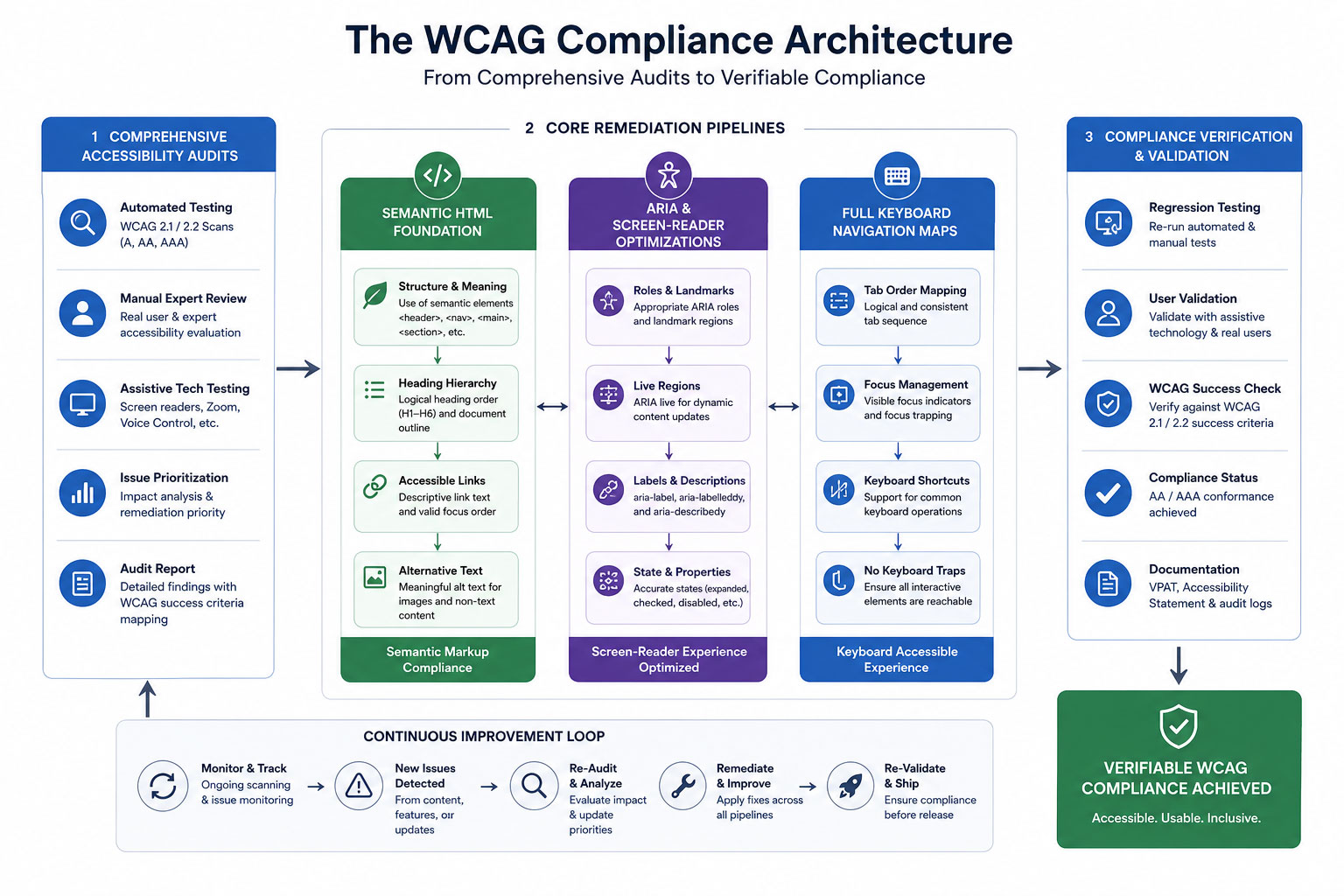
A structured flowchart demonstrating how Comprehensive Accessibility Audits feed directly into core remediation pipelines: combining Semantic HTML, ARIA Screen-Reader Optimizations, and Full Keyboard Navigation Maps to achieve verifiable compliance status.
1. Comprehensive Accessibility Audits
You cannot fix what you do not know is broken. The remediation process begins with an exhaustive, dual-layered accessibility audit. This involves pairing automated testing software with real-world manual testing. Automated scanners are excellent for catching high-volume technical errors, such as missing form labels, broken link structures, and incorrect color contrast ratios.
However, automated tools can only catch roughly 30% to 40% of accessibility barriers. The critical remaining errors must be uncovered through manual testing conducted by experienced QA engineers who navigate your platform using actual assistive tools, simulating the exact lived experiences of users with diverse physical and cognitive challenges.
2. Screen-Reader Optimizations via Semantic HTML and ARIA
Visually impaired users rely heavily on sophisticated software called screen readers (such as NVDA, JAWS, or VoiceOver) to translate visual on-screen layouts into spoken words. If your web application code consists of unstructured, non-semantic building blocks, a screen reader will voice a confusing jumble of meaningless elements.
To solve this, developers must build platforms using semantic HTML tags (such as <main>, <nav>, <header>, and <article>) that naturally define the structural hierarchy of a page. For complex, dynamic interface components like interactive dropdown menus, modal windows, or live data charts, engineers must deploy Accessible Rich Internet Applications (ARIA) attributes. These specialized code attributes act as invisible road signs, explicitly telling the screen reader software what a component does, what state it is currently in (e.g., `aria-expanded=”true”`), and how it relates to the rest of the layout.
3. Full Keyboard Navigation Setups
Many users with motor disabilities, tremors, or paralysis cannot operate a traditional computer mouse. Instead, they navigate the web exclusively using a keyboard, relying on the Tab key to move forward, Shift+Tab to move backward, and the Enter key to activate links and buttons.
An accessible website must feature a completely seamless, logical keyboard navigation map. This means ensuring that a visible, highly distinct “focus indicator” bounding box appears around any element a user highlights. Furthermore, code must be engineered to prevent “keyboard traps”—errors where a user tabs into a specific field or pop-up window but cannot tab back out without using a mouse. A compliant platform also features a hidden “Skip to Main Content” shortcut at the very top of the DOM structure, allowing keyboard users to bypass bloated header navigation links on every page refresh.
4. Accurate Alternative Text (Alt-Text) Frameworks
Images, infographics, and graphical banners play a major role in modern web storytelling. For a screen-reader user, however, an image without alternative text is completely blank, or worse, read aloud as a messy, unoptimized file name like “IMG_98432_FINAL.png.”
Implementing an accurate alt-text framework requires editorial discipline and structural standards. Alt-text shouldn’t be treated as a dump for SEO keyword stuffing. Instead, it must offer a concise, highly descriptive summary of the visual information or functional purpose of the image. If an infographic contains a chart mapping market trends, the alt-text or surrounding body copy must outline those specific data insights. Conversely, purely decorative elements like background shapes or design flourishes should be explicitly hidden from assistive tools using an empty `alt=””` attribute, preventing unnecessary audio clutter.
The Role of Technical Partners: Sourcing Expertise From a Website Development Company in India
Re-engineering an enterprise-grade digital ecosystem to meet strict WCAG 2.1 or 2.2 AA compliance standards is a highly technical challenge. It touches every layer of your digital stack, from raw backend server architecture and API data delivery to front-end layout styling and content entry systems. For organizations running vast product catalogs, complex client dashboards, or continuous content feeds, executing this remediation internally without specialized talent can quickly turn into an expensive, trial-and-error nightmare.
To navigate these complexities efficiently, global enterprises frequently look to establish strategic technical partnerships with an experienced website development company in India. The Indian tech ecosystem has matured into a powerhouse of certified accessibility specialists, front-end engineers, and compliance experts who understand the nuances of international digital law. By collaborating with an offshore development partner, enterprises can deploy scalable engineering teams dedicated to systematically cleaning up legacy source code, writing robust ARIA matrices, and running continuous integration accessibility testing. This strategic approach allows brands to completely eliminate their legal liability vulnerabilities swiftly and securely, while maintaining highly efficient capital allocation.
Comparative Strategy: The Structural Shift to Compliance
To fully understand why proper code remediation is essential for protecting your organization and improving usability, let’s contrast a non-compliant, high-risk web ecosystem against a fully accessible, compliance-first architecture:
Case Study: Eliminating Liability and Unlocking Market Potential
To evaluate the clear, measurable business returns of digital inclusion, let’s examine the operational transformation of a prominent multi-national financial services corporation. This institution operated a wide array of digital portals, customer dashboards, and online application channels. Over time, their various platforms had grown highly fragmented, built by multiple internal teams and external freelancers without unified code standards.
The turning point arrived when the firm received a formal legal demand letter from a civil rights law firm, detailing multiple severe WCAG violations that prevented blind users from completing loan applications. Recognizing the immense legal, financial, and reputational risk, the corporate leadership paused all standard product updates and authorized a complete accessibility overhaul of their entire digital infrastructure.
The remediation strategy was structured into a rigorous execution roadmap:
- The Core Rebuild: The development team systematically replaced complex, non-semantic custom scripts with native semantic HTML architectures.
- Assistive Mapping: They built complete ARIA navigation maps across their customer account dashboards, ensuring complex data tables were fully readable by assistive tools.
- Quality Assurance Expansion: They integrated automated accessibility testing scripts directly into their code deployment pipeline, preventing non-compliant updates from ever reaching the live production server.
The Operational Results: The impact of this architectural transformation went far beyond simply resolving the initial legal dispute. By implementing a fully compliant, highly accessible digital environment, the institution completely eliminated its exposure to regulatory fines and predatory web accessibility lawsuits.
More impressively, the brand observed a sudden, sustained surge in user engagement metrics across all entry funnels. Within two quarters post-launch, their digital application completion rate climbed sharply, effectively expanding their active market reach to an additional 15% of the digital population that had previously been locked out by structural code barriers. The brand transformation was absolute: a system that was once a dangerous legal liability had been re-engineered into a highly inclusive, market-expanding asset.
The Long-Game Advantage: Future-Proofing and Sustainable Inclusion
In a rapidly changing digital landscape, accessibility is no longer a static milestone you can reach once and forget about. Technology evolves continuously—new operating systems roll out, browsers update their rendering engines, and assistive devices become more sophisticated. At the same time, user expectations continue to rise, and international accessibility regulations are steadily growing stricter and more comprehensive.
Treating web accessibility as a foundational, core engineering requirement is the ultimate way to future-proof your digital presence. When you construct platforms using clean, semantic HTML code patterns, strict keyboard layouts, and verified ARIA matrices, you aren’t just protecting your business from current legal trends. You are building a flexible, highly stable digital infrastructure that effortlessly adapts to future technological shifts, voice search interfaces, and screen configurations without needing expensive, emergency redesigns.
Ultimately, making your website fully accessible is simply the right thing to do—both for your brand’s ethical integrity and its bottom-line performance. By prioritizing digital accessibility, your organization actively chooses to build a more equitable, open internet. You respect the autonomy of all users, welcome a massive community of loyal consumers, and turn your digital home into a secure, risk-free asset that drives sustainable corporate growth for decades to come.
Is Your Corporate Platform Holding Secret Legal Risks?
Hidden code issues, unlabelled forms, and low-contrast elements can leave your enterprise exposed to major web accessibility lawsuits. Our expert development and certified compliance teams can run an exhaustive WCAG audit to pinpoint and fix your digital accessibility gaps before they cause legal headaches.

How AI Development Is Changing Your Technical SEO and Core Web Vitals?
The conversation about AI and SEO has largely been a content story. Which tools write better copy. How to optimize for AI-generated search results. Whether Google can detect AI-written articles.
That conversation matters. But it is missing something bigger.
The more consequential impact of AI in the development workflow is not on content. It is on the infrastructure that serves the content: server response times, deployment stability, error recovery speed, and the consistency of what Google actually crawls versus what you published. These are technical SEO outcomes, and they are directly shaped by how a site is built, tested, and deployed.
AI-assisted development is changing all of them. Most SEO teams do not know it yet.
The Technical SEO Problems That Live Upstream of Your Dashboard
When an SEO or marketing team inherits a technical audit, they typically see the symptoms: elevated TTFB, crawl errors in Search Console, a Core Web Vitals report showing pages failing LCP or INP thresholds, redirect chains that appeared without anyone’s knowledge.
The instinct is to treat these as frontend problems. Compress images. Fix the redirect. Improve server caching. Often, those fixes work. But a meaningful portion of recurring technical SEO issues are not frontend problems. They are deployment pipeline problems.
Consider a few patterns that repeat across development teams:
- A bug fix ships that accidentally removes a canonical tag from a template. The fix was tested locally. It was not caught in code review. It went to production. Google crawled the affected pages before anyone noticed, and the duplicate content signal had already been recorded.
- A deployment fails midway through a rolling update. For 8 minutes, some users hit the old version and some hit the new one. Googlebot made a request during that window and received a 503. That 5xx response was logged in Search Console. If this happens repeatedly, Google begins to deprioritise crawl frequency for those URLs.
- A platform running on a shared infrastructure spins down inactive dynos to save cost. The first request after a period of quiet takes 4 to 6 seconds to respond as the server restarts. That latency hits TTFB directly, and TTFB is a component of how Google measures page experience for Core Web Vitals.
None of these problems originate in CSS or image compression. They originate in how the application is built, reviewed, and deployed.
What AI-Assisted Development Is Actually Fixing
As of 2026, AI adoption in software development has crossed near-universal levels. According to Google’s State of AI-Assisted Software Development report, 97.5% of companies have integrated AI into their development workflows. McKinsey research puts the reduction in development time at 55% for teams using AI coding tools.
But the productivity gains that matter most for SEO are not about writing code faster. They are about catching errors earlier.
AI code review tools like CodeRabbit and Kodus leave automated review comments on every pull request before a human reviewer sees it. For SEO specifically, this matters because a significant class of technical regressions, broken internal links, removed meta tags, misconfigured redirects, altered heading hierarchy are code-level changes that ship in PRs alongside unrelated feature work.
Without AI-assisted review, these slip through because reviewers are focused on whether the feature works, not whether an h1 tag was accidentally removed from a component.
AI-assisted testing catches routing bugs that create duplicate URLs before they reach production. A new URL structure that generates both /product/item and /products/item without a canonical creates a duplicate content problem that may take weeks to identify from search data alone.
Caught at test time, it is a 5-minute fix. Caught from a Search Console report two months later, it is a content audit.
The upstream position of these tools relative to SEO outcomes is the key point. AI is not optimising your metadata. It is preventing the code changes that break your metadata from shipping in the first place.
How Deployment Speed and Stability Directly Affect Core Web Vitals
Core Web Vitals are a Google ranking signal. TTFB (Time to First Byte) is a component that Google’s CrUX data captures at the user level. A site with consistently high TTFB, whether from slow server response, cold start latency, or deployment instability, accumulates poor field data over time, and that field data feeds into ranking signals.
The deployment pipeline influences TTFB in two direct ways.
First, runtime environment sizing: An application deployed on an undersized server instance, or one that has not been tuned for its memory and CPU requirements, will have consistently elevated response times under normal load. For Java-based backends, this is particularly common: a Spring Boot application requires 300 to 500MB of RAM at startup. On an instance that is too small, it thrashes memory and slows every request. On a correctly sized instance, it is fast
Manual deployment requires the developer or DevOps engineer to make this sizing decision correctly every time. AI-powered deployment platforms that automatically detect the runtime environment and size instances appropriately remove this source of performance variability entirely.
Second, deployment downtime during updates: Traditional deployments involve stopping the old version and starting the new one. Even a few seconds of downtime during a production deploy can result in 503 responses that Google records. Zero-downtime deployment patterns, where traffic is shifted from the old version to the new one without any gap, prevent this entirely. Platforms that implement this by default, such as agentic AI deployment tools that handle the full release cycle automatically, eliminate a recurring source of crawl errors that SEO teams otherwise have to monitor and explain.
A useful reference on how this works in practice: a detailed breakdown of agentic AI deployment that covers how automated stack detection and zero-downtime deploys change the relationship between deployment pipelines and production reliability.
What SEO and Development Teams Should Actually Align On
The structural problem is that SEO teams and development teams operate on different time horizons and different feedback loops. An SEO team measures impact in weeks and months. A development team ships and moves on in hours. By the time a technical SEO regression surfaces in search data, the developer who introduced it may not remember the relevant change.
AI-assisted development compresses this gap. Code review happens at PR time. Testing happens before merge. Deployment happens with automated validation. The feedback loop gets faster, and the issues that create technical SEO regressions get caught closer to where they originate.
There are specific alignment points worth establishing between SEO and development teams:
- Health check endpoints should be in place before any deployment goes live. A /health route that returns a 200 confirms the application started correctly. Without it, a failed deployment can route live traffic to a crashed process, generating 5xx errors at scale.
- HTTPS enforcement and redirect audits should run as part of the deployment pipeline, not as a monthly SEO check. AI-assisted CI/CD pipelines can run these checks automatically on every merge.
- Canonical tags, meta robots, and structured data should be treated as code-level assets with version control, not just as SEO configurations. When they change unexpectedly, it should surface in code review, not in a ranking drop six weeks later.
- Crawl budget is a finite resource. Every 5xx error response wastes a crawl credit on a URL that returns nothing. Development teams that treat deployment stability as an SEO concern, not just a reliability concern, protect crawl budget as a byproduct of doing their job well.
The Argument in One Sentence
AI-assisted development is not an SEO story yet. It should be. The teams that close the loop between deployment pipeline health and technical SEO outcomes will have a structural advantage over teams treating them as separate disciplines. The tools to close that loop, AI code review, automated testing, intelligent deployment platforms, exist today and are increasingly accessible to teams of any size.
The SEO and marketing professionals who understand this, and who can speak the development team’s language when raising these issues, will be the ones who stop debugging symptoms and start preventing the causes.

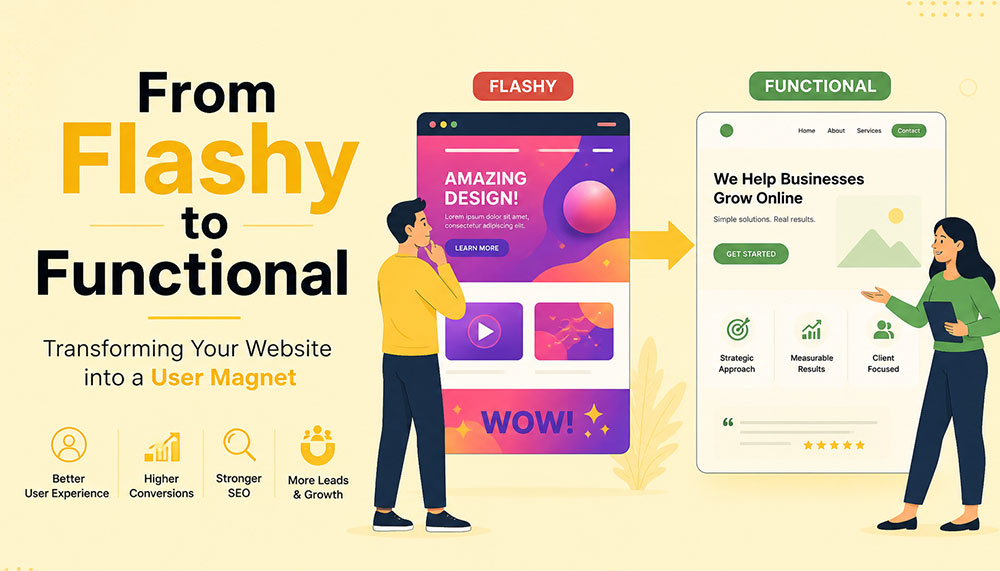
From Flashy to Functional: Transforming Your Website into a User Magnet
In the early days of the internet, a flashy website was often enough to impress visitors. Bright colors, animations, auto-playing media, and complex layouts were seen as signs of creativity and innovation. But times have changed. Today’s users are smarter, faster, and far less patient. A visually overloaded website is no longer impressive—it’s exhausting.
If your website looks stunning but fails to convert visitors into customers, then it’s not doing its job. The modern approach to web design focuses on functionality, usability, speed, and experience. Businesses that understand this shift are the ones that win.
This article explores how to transform your website from merely flashy to genuinely functional—and ultimately turn it into a powerful user magnet.
The Problem with “Flashy” Websites
At first glance, a flashy website can feel impressive. Bright visuals, animations, sliders, and interactive effects often give the illusion of sophistication and creativity. But here’s the reality—what looks exciting to a designer can quickly become frustrating for a user.
Today’s internet users are not browsing casually—they’re searching with intent. They want answers, solutions, and clarity within seconds. If your website slows them down or overwhelms them, they won’t admire the design—they’ll abandon it.
Flashy websites often prioritize aesthetics over usability. While they may look appealing initially, they tend to create friction in the user journey. And in the digital world, even small friction points can lead to big losses in engagement and conversions.
Let’s take a closer look at the common problems:
- Slow loading times: Heavy animations, large images, auto-playing videos, and complex scripts can significantly slow down your website. Users today expect pages to load almost instantly. Even a delay of a few seconds can cause frustration and increase bounce rates.
- Confusing navigation structures: Over-designed menus, hidden navigation elements, or too many options can leave users unsure of where to go next. When visitors feel lost, they rarely try to figure things out—they simply exit.
- Distracting visual elements: Too many moving parts—sliders, pop-ups, flashing banners—can shift attention away from what actually matters: your message. Instead of guiding users, these elements overwhelm them.
- Poor mobile responsiveness: A design that looks great on a desktop may completely break on a mobile device if not optimized properly. With the majority of users browsing on smartphones, this is a critical flaw.
- Low accessibility: Flash-heavy designs often ignore accessibility standards. Poor contrast, unreadable fonts, or non-intuitive layouts can make it difficult for users with different abilities to interact with your website.
Think about your own browsing habits. When you land on a website that takes too long to load or feels complicated, what do you do? Most likely, you hit the back button. That’s exactly what your visitors are doing too.
Modern users expect instant gratification. They want fast, smooth, and effortless experiences. If your website fails to deliver that within the first few seconds, you’ve already lost their attention—and potentially their business.
This is why businesses today are shifting their focus from “looking impressive” to “working effectively.” A professional Website Designing company in India understands this balance. Instead of adding unnecessary elements, they focus on creating clean, user-friendly designs that guide visitors naturally and help businesses achieve real results.
Because in the end, a website isn’t meant to just impress—it’s meant to perform.
Understanding the Shift: From Design to Experience
There was a time when website design was judged almost entirely by how it looked. If it was visually appealing, colorful, and “different,” it was considered successful. But that definition has evolved—dramatically.
Today, design alone is not enough. A website can look stunning and still fail miserably if it doesn’t deliver a smooth, intuitive experience. This is where the shift happens—from design-centric thinking to experience-centric thinking.
In simple terms, it’s no longer just about how your website looks. It’s about how it feels to use.
When a user lands on your website, they are not there to admire your design skills. They are there with a purpose—maybe to learn something, compare options, or make a purchase. The faster and easier you help them achieve that goal, the more successful your website becomes.
This is why User Experience (UX) and User Interface (UI) design have become the backbone of modern websites. These disciplines focus on understanding user behavior, removing friction, and creating seamless interactions.
Instead of asking “Does it look good?”, businesses now need to ask deeper, more practical questions:
- Is it easy to use? Can a first-time visitor navigate your website without confusion, or do they have to think too much before taking action?
- Can users find what they need quickly? In a world where attention spans are shrinking, every second matters. If users have to dig through multiple pages to find basic information, they won’t stick around.
- Does it guide users toward action? A good website doesn’t just present information—it gently leads users toward the next step, whether that’s filling out a form, making a purchase, or contacting your team.
- Does it work seamlessly on all devices? Your audience is browsing on phones, tablets, laptops, and everything in between. A consistent and smooth experience across all devices is no longer optional.
Think of your website like a physical store. A beautifully designed store with confusing layouts, hard-to-find products, and unhelpful staff will struggle to make sales. On the other hand, a clean, well-organized store that makes shopping easy will naturally attract and retain customers.
The same principle applies online.
Functionality doesn’t mean sacrificing beauty—it means giving beauty a purpose. Every design element, from colors to typography to spacing, should support usability rather than distract from it.
This is where experienced professionals, such as a Website Designing company in India, bring real value. They don’t just design for visual appeal—they design for human behavior, ensuring that every click, scroll, and interaction feels natural and meaningful.
Because at the end of the day, users don’t remember how “cool” your website looked. They remember how easy it was to use—and whether it helped them get what they came for.
Key Elements of a Functional Website
A functional website doesn’t happen by accident—it’s the result of thoughtful planning, user understanding, and smart design decisions. Every element on your website should have a purpose. When all these elements work together, they create an experience that feels smooth, intuitive, and satisfying for the user.
Let’s break down the core elements that truly make a website functional—not just visually appealing, but genuinely effective.
1. Clear and Intuitive Navigation
Your website should feel effortless to explore. A visitor should land on your homepage and instantly understand where to go next—without thinking too hard. The moment users feel confused, they start losing trust.
Think of navigation as a roadmap. If the directions aren’t clear, people won’t keep wandering—they’ll simply leave and find another destination.
A well-structured navigation system includes:
- Simple menus with clear labels: Avoid clever or vague naming. “Services,” “About,” and “Contact” may sound basic, but they work because users instantly recognize them.
- Logical page hierarchy: Your pages should be organized in a way that makes sense. Important information should never be buried deep within multiple clicks.
- Easy access to key pages: High-priority pages like pricing, services, or contact information should always be easy to find—preferably within one or two clicks.
If users get lost, they leave. It’s that simple. Good navigation doesn’t draw attention to itself—it just works seamlessly in the background.
2. Fast Loading Speed
Speed is one of the most critical factors in user experience. No matter how beautiful your website is, if it takes too long to load, users won’t wait around to see it.
We live in a world of instant results. A delay of even one second can feel like an eternity—and that’s often enough to lose a potential customer.
To improve your website’s speed:
- Optimize images: Large, uncompressed images are one of the biggest causes of slow websites. Proper optimization keeps quality high while reducing load time.
- Use efficient code: Clean, streamlined coding reduces unnecessary load on your website.
- Leverage caching: Caching helps store data so returning users can access your site faster.
- Choose reliable hosting: Your hosting provider plays a major role in your website’s performance. A slow server means a slow website—no matter what you do.
A skilled Website Designing company in India understands that performance is not an afterthought. They build speed optimization into the foundation of your website from the very beginning.
3. Mobile Responsiveness
Take a moment to think about how often you use your phone to browse the internet. Now imagine your website being viewed on that small screen. Does it still look clean? Is it easy to navigate? Can users interact with it comfortably?
With mobile users now dominating web traffic, your website must perform flawlessly across all screen sizes. A responsive design ensures that your website adapts automatically—no matter what device is being used.
This includes:
- Content that adjusts smoothly: Images, text, and layouts should resize and rearrange themselves for different screen sizes.
- Tap-friendly buttons: Buttons should be large enough and spaced properly so users can easily tap them without frustration.
- Readable text: Users shouldn’t have to zoom in just to read your content. Proper font sizing is essential.
A mobile-first approach is no longer optional—it’s the standard. If your website doesn’t work well on mobile, you’re likely losing a significant portion of your audience.
4. Strong Visual Hierarchy
When users land on your website, they don’t read every word—they scan. Your design should guide their eyes naturally, helping them understand what’s important within seconds.
This is where visual hierarchy comes in. It’s the art of organizing content in a way that leads users through your website effortlessly.
You can achieve this through:
- Proper use of headings: Headlines should stand out and clearly communicate key messages.
- Contrasting colors: Important elements like call-to-action buttons should be visually distinct.
- Whitespace: Giving elements room to breathe makes your website easier to read and less overwhelming.
- Strategic placement: Key information should be positioned where users naturally look first.
A clean, well-structured layout often outperforms a cluttered design. Simplicity doesn’t mean boring—it means effective.
5. Compelling and Clear Content
Design might bring users in, but content is what keeps them there—and ultimately convinces them to take action.
Your messaging should speak directly to your audience. It should answer their questions, address their concerns, and clearly explain how you can help them.
Effective website content is:
- Clear and concise: Avoid unnecessary jargon or long-winded explanations. Get to the point quickly.
- User-focused: Instead of talking only about your business, focus on what the user gains.
- Easy to scan: Use short paragraphs, bullet points, and headings to make content digestible.
Within a few seconds of landing on your website, visitors should understand exactly what you offer and why it matters to them. If they have to guess, you’ve already lost them.
When all these elements come together—navigation, speed, responsiveness, hierarchy, and content—you don’t just have a website. You have a powerful user experience that attracts, engages, and converts.
Why Functionality Drives Conversions
At the end of the day, your website has a job to do. Whether it’s generating leads, selling products, or encouraging inquiries—everything comes down to conversions. And here’s the truth many businesses overlook: people don’t convert because your website looks good… they convert because it feels easy.
A functional website removes friction from the user journey. It makes every step—from landing on the page to taking action—feel natural and effortless. When users don’t have to struggle, think too much, or second-guess their decisions, they are far more likely to move forward.
Think of it like walking into a well-organized store. You can quickly find what you need, understand the pricing, and check out without confusion. Compare that to a cluttered store where nothing is clearly labeled—you’d probably walk out. The same psychology applies to your website.
Functionality builds trust. And trust is the foundation of every conversion.
When users can easily navigate your website, find relevant information, and complete actions without frustration, they begin to feel confident in your brand. On the other hand, even small issues—like a confusing layout or a slow-loading page—can create doubt and push them away.
A conversion-focused website is intentionally designed to guide users toward action. It doesn’t leave things to chance. Every element plays a role in helping users take the next step.
Here’s what that looks like in practice:
- Clear call-to-action (CTA) buttons: Your CTAs should stand out and communicate exactly what users need to do next—whether it’s “Get a Quote,” “Book a Demo,” or “Buy Now.” There should be no confusion or hesitation.
- Minimal distractions: Too many pop-ups, animations, or competing elements can overwhelm users and dilute your message. A clean, focused design keeps attention where it matters most.
- Trust signals: People are naturally cautious online. Reviews, testimonials, case studies, certifications, and client logos help reassure users that they’re making the right choice.
- Simplified forms and checkout processes: The more steps you add, the more users you lose. Shorter forms, fewer fields, and a smooth checkout experience can significantly increase conversions.
It’s important to understand that users don’t want to “work” to interact with your website. The easier you make things for them, the more likely they are to take action.
This is why businesses increasingly partner with a Website Designing company in India that focuses on performance-driven design. Instead of adding unnecessary features, they refine the user journey—removing obstacles and guiding users toward meaningful actions.
Every element on your website should have a clear purpose. If something doesn’t contribute to the user experience or support conversions, it’s likely doing more harm than good.
Because in the digital world, simplicity isn’t just a design choice—it’s a competitive advantage.
The Role of User Psychology
Behind every click, scroll, and decision on your website, there’s a human mind at work. And that mind doesn’t behave randomly—it follows patterns. Understanding these patterns is what separates an average website from one that truly connects with users.
One of the biggest misconceptions in web design is assuming that users carefully read everything on a page. In reality, they don’t. People scan. They skim through headings, glance at visuals, and look for familiar cues that help them quickly understand what to do next.
This means your website isn’t just a collection of pages—it’s an experience shaped by human behavior. The more you align your design with how people naturally think and interact, the more effective your website becomes.
Let’s explore some key psychological principles that influence user behavior:
- Familiarity: Users feel comfortable with what they already recognize. This is why most successful websites follow certain standard patterns—like having a logo at the top left, navigation at the top, and contact information easily accessible. When you stick to familiar structures, users don’t have to “learn” how to use your website—they already know.
- Clarity: The human brain prefers simplicity. When a website is cluttered or overly complex, it increases cognitive load—meaning users have to work harder to process information. And when things feel difficult, people tend to give up. Clean layouts, simple messaging, and clear pathways reduce this mental effort and keep users engaged.
- Trust: First impressions happen in seconds. A clean, professional-looking website instantly builds credibility, while a messy or outdated design raises doubts. Elements like consistent branding, high-quality visuals, testimonials, and secure browsing indicators all contribute to building trust.
- Urgency: People are more likely to take action when they feel a sense of urgency. Strategic prompts like limited-time offers, countdowns, or phrases such as “Only a few spots left” can encourage users to act sooner rather than later. When used thoughtfully, urgency can significantly improve conversions without feeling pushy.
Think about your own online behavior. When you visit a website, you instinctively look for certain things—clear headings, easy navigation, and quick answers. If those elements are missing, frustration builds almost instantly.
This is why understanding user psychology isn’t optional—it’s essential. A website that aligns with human behavior feels intuitive, trustworthy, and easy to use.
A modern Website Designing company in India doesn’t just focus on visuals or code—they dive deeper into how users think, what motivates them, and what stops them from taking action. By combining design expertise with behavioral insights, they create websites that don’t just look good—they feel right.
Because when your website speaks the language of your users’ minds, engagement and conversions naturally follow.
Common Mistakes to Avoid
Sometimes, the biggest problems on a website aren’t what’s missing—they’re what’s unnecessarily added. Many businesses invest time and money into their websites, yet unknowingly make decisions that hurt performance instead of improving it.
The tricky part? These mistakes often come from good intentions—trying to impress users, add more information, or stand out from competitors. But in reality, they end up doing the opposite.
Let’s break down some of the most common website mistakes and why they matter:
- Overusing animations and effects: Animations can enhance a website when used sparingly, but too many moving elements can overwhelm users. Sliders, pop-ups, hover effects, and auto-playing media can quickly turn from engaging to distracting. Instead of focusing on your message, users get caught up in visual noise—and often leave before taking any action.
- Ignoring mobile users: This is one of the most costly mistakes today. A website that works perfectly on desktop but feels clunky on mobile is guaranteed to lose a large portion of its audience. Tiny buttons, misaligned content, and slow mobile performance create frustration and drive users away almost instantly.
- Cluttering pages with too much information: It’s tempting to put everything on one page—every service, every feature, every detail. But more information doesn’t always mean better communication. When pages are overcrowded, users don’t know where to focus. Instead of reading more, they end up reading nothing at all.
- Using unclear or generic CTAs: Call-to-action buttons like “Click Here” or “Submit” don’t tell users what they’re getting. Strong CTAs are specific and action-driven—like “Get Your Free Quote” or “Book a Consultation.” Clarity here can make a huge difference in conversion rates.
- Neglecting SEO fundamentals: A beautiful website is useless if no one can find it. Ignoring SEO basics—like proper headings, meta tags, keyword optimization, and page speed—limits your visibility on search engines. Without traffic, even the best-designed website won’t deliver results.
If you look closely, all these mistakes have one thing in common: they prioritize business preferences over user needs. And that’s where things start to go wrong.
The good news is that these issues are completely fixable. In fact, addressing even a few of them can lead to noticeable improvements in user engagement, time on site, and conversions.
This is why many businesses turn to an experienced Website Designing company in India to audit and refine their websites. With a fresh perspective and user-focused approach, they can identify hidden issues and transform your website into something far more effective.
Because sometimes, improving your website isn’t about adding more—it’s about removing what’s getting in the way.
Balancing Aesthetics and Functionality
There’s a common misconception in web design—that you have to choose between a website that looks beautiful and one that works well. In reality, the most successful websites don’t pick one over the other. They strike a balance.
Visual appeal matters. It creates the first impression, sets the tone for your brand, and captures attention. But if that visual appeal comes at the cost of usability, it quickly loses its value. On the other hand, a purely functional website that lacks personality can feel dull and forgettable.
The real goal is to bring both together—where design enhances functionality, not competes with it.
Think of your website like a well-designed workspace. It should look inviting and professional, but more importantly, everything should be placed exactly where it’s needed. Nothing should feel out of place, unnecessary, or confusing.
Here are some practical ways to achieve that balance:
- Using a consistent color palette: Colors play a huge role in how users perceive your brand. A consistent palette creates a sense of harmony and professionalism. It also helps guide user attention—for example, using a specific color for buttons makes them instantly recognizable.
- Choosing readable fonts: Stylish typography can enhance your design, but readability should always come first. If users have to strain their eyes to read your content, they won’t stick around. Clean, simple fonts with proper spacing make a big difference in user comfort.
- Maintaining visual consistency: Consistency builds familiarity and trust. When elements like buttons, headings, spacing, and layouts follow a uniform style across your website, users feel more comfortable navigating it. Inconsistency, on the other hand, creates confusion and disrupts the experience.
- Using images purposefully: Images should support your message—not just fill space. High-quality visuals can enhance storytelling, explain concepts, and create emotional connections. But irrelevant or excessive images can slow down your website and distract users from your core message.
It’s also important to remember that simplicity is powerful. A clean design with thoughtful spacing and focused content often feels more premium than a cluttered, over-designed layout.
This is where experienced professionals, such as a Website Designing company in India, truly make a difference. They understand how to blend creativity with usability—ensuring that every design choice serves a purpose and contributes to the overall experience.
At its core, design is not the end goal—it’s a tool. A tool to communicate, guide, and engage your users. When used wisely, it doesn’t just make your website look better—it makes it work better.
And that’s the kind of balance that turns visitors into loyal users.
How SEO and Functionality Work Together
SEO and website functionality are often treated as two separate things—but in reality, they are deeply connected. You can’t build a strong online presence by focusing on just one. The websites that perform best today are the ones where SEO and user experience work hand in hand.
Search engines like Google are no longer just scanning your website for keywords. They are analyzing how users interact with it. Do people stay on your site? Do they explore multiple pages? Or do they leave within seconds? These behaviors send powerful signals about the quality of your website.
In simple terms, search engines want to recommend websites that users actually enjoy using. And that’s exactly where functionality comes into play.
A functional website naturally supports SEO because it creates a better experience for users—and when users are happy, search engines take notice.
Here’s how functionality directly impacts your SEO performance:
- Improving page speed: Fast-loading websites not only keep users engaged but are also favored by search engines. Speed is a ranking factor, and even small improvements can make a noticeable difference in your visibility.
- Enhancing mobile usability: With mobile-first indexing, search engines prioritize how your website performs on mobile devices. A responsive, mobile-friendly design ensures that your site ranks better and reaches a wider audience.
- Reducing bounce rates: When users land on your website and immediately leave, it signals that something isn’t working—whether it’s slow speed, poor design, or irrelevant content. A functional website keeps users engaged and encourages them to stay longer.
- Encouraging longer session durations: When your website is easy to navigate and provides valuable content, users naturally spend more time exploring it. This increased engagement sends positive signals to search engines about your site’s relevance and quality.
It’s important to understand that SEO is no longer just about ranking—it’s about retention. Getting users to your website is only half the battle. Keeping them there is what truly makes the difference.
This is why businesses are increasingly working with a Website Designing company in India that understands both SEO and user experience. Instead of treating them as separate strategies, they integrate them into a unified approach—building websites that are not only easy to find but also enjoyable to use.
When your website is fast, intuitive, and user-friendly, visitors stay longer, interact more, and trust your brand. And when that happens consistently, search engines recognize your website as valuable—and reward it with better rankings.
Because in today’s digital landscape, the formula is simple: when users love your website, search engines do too.
Steps to Transform Your Website
Transforming your website from flashy to functional isn’t about making random changes—it’s about taking a structured, thoughtful approach. The goal is to create a website that not only looks better, but works better for your users and your business.
Think of it as a continuous improvement process rather than a one-time redesign. Every step you take should bring you closer to a smoother, more effective user experience.
1. Audit Your Current Website
Before making any changes, you need to understand where you currently stand. A website audit helps you uncover what’s working well and what’s holding you back.
Start by looking at real user data:
- User behavior: How do visitors interact with your site? Which pages do they visit most? Where do they drop off?
- Bounce rates: Are users leaving quickly after landing on certain pages? If yes, those pages may have usability or content issues.
- Conversion data: Which pages are driving results, and which ones are not?
You can also review your website from a user’s perspective. Try navigating it as if you were a first-time visitor. Is everything clear and easy to find? Or does it feel confusing?
This step lays the foundation for everything that follows.
2. Simplify the Design
Once you know what’s not working, the next step is to simplify. Many websites try to do too much—and end up overwhelming users.
Simplification doesn’t mean removing value—it means removing distractions.
Focus on:
- Eliminating unnecessary animations and visual clutter
- Reducing the number of competing elements on each page
- Highlighting key messages and actions
Ask yourself: “Does this element help the user, or does it just look nice?” If it doesn’t serve a purpose, it probably doesn’t belong.
A clean, focused design makes it easier for users to understand your website—and take action.
3. Improve Performance
Performance is a critical part of functionality. Even the best-designed website will fail if it’s slow or unresponsive.
Improving performance involves both technical and design-related optimizations:
- Speed optimization: Compress images, minimize code, and use caching to reduce load times.
- Responsive design: Ensure your website works smoothly across all devices and screen sizes.
- Technical improvements: Fix broken links, optimize server response times, and ensure clean coding practices.
This is often where working with a Website Designing company in India can make a big difference. Their technical expertise ensures that your website performs efficiently without compromising on design.
4. Enhance Content Strategy
Your website’s content is what communicates your value to users. If your messaging is unclear or unfocused, even the best design won’t help.
Shift your content strategy from “what we want to say” to “what users need to hear.”
Effective content should:
- Address user problems and offer solutions
- Be easy to read and scan
- Clearly explain your services or products
- Guide users toward the next step
Every page should have a purpose—and every piece of content should support that purpose.
5. Test and Optimize Continuously
Your website is never truly “finished.” User behavior evolves, trends change, and new opportunities emerge. That’s why ongoing testing and optimization are essential.
Use tools and techniques like:
- A/B testing: Compare different versions of a page to see what performs better
- Analytics: Track user behavior, engagement, and conversions
- Heatmaps: Understand where users click, scroll, and focus their attention
Small improvements over time can lead to significant results. Even minor tweaks—like changing a button color or simplifying a form—can have a noticeable impact on conversions.
The key is to stay curious, keep testing, and continuously refine your website based on real data.
When you follow these steps, you’re not just redesigning your website—you’re transforming it into a powerful tool that attracts users, engages them, and drives meaningful results.
The Importance of Professional Expertise
Transforming a website isn’t just about changing colors, adding new sections, or updating a layout—it’s a much deeper process. It requires a careful balance of design, technology, user psychology, and marketing strategy. And this is exactly where many businesses struggle when trying to handle everything on their own.
A website today is not just a digital brochure—it’s a performance-driven asset. It needs to attract visitors, engage them, guide them, and ultimately convert them. Achieving all of that requires more than creativity—it requires expertise.
This is why many businesses choose to partner with a professional Website Designing company in India. Instead of relying on guesswork or trial-and-error, they gain access to a team that understands how to build websites that actually work.
Let’s look at what such expertise brings to the table:
- Industry experience: Professionals who have worked across different industries understand what works and what doesn’t. They’ve seen trends evolve, tested strategies, and know how to avoid common pitfalls. This experience helps them make informed decisions that save time and deliver better results.
- Technical expertise: From coding and performance optimization to responsiveness and integrations, there’s a lot happening behind the scenes of a functional website. A skilled team ensures that everything runs smoothly—so users never have to think about the technical side at all.
- Strategic thinking: A great website isn’t built randomly—it’s planned. Professionals approach design with a clear strategy in mind, aligning your website with your business goals. Every element, from layout to content placement, is designed to support conversions and user engagement.
- Cost-effective solutions: While hiring experts may seem like an added expense, it often saves money in the long run. Avoiding mistakes, reducing redesigns, and getting things right the first time leads to better ROI and fewer ongoing issues.
Another key advantage is perspective. When you’re deeply involved in your own business, it’s easy to overlook usability issues or assume things are “obvious” to users. A professional team brings an outside perspective—seeing your website the way your visitors do.
They don’t just ask, “Does this look good?” They ask, “Does this work?”
And that shift in thinking makes all the difference.
The result is a website that doesn’t just impress visually—it performs consistently. It loads faster, guides users better, communicates clearly, and converts more effectively.
Because in today’s competitive digital space, a good-looking website is no longer enough. You need a website that delivers results—and that’s exactly what professional expertise helps you achieve.
Real-World Impact of Functional Design
When businesses shift their focus from flashy visuals to functional design, the results are not just noticeable—they’re measurable. This isn’t about subjective opinions like “it looks better” or “it feels smoother.” It’s about real, data-driven improvements that directly affect how your website performs and how your business grows.
A functional website doesn’t just change how your site looks—it transforms how users interact with it. And when user behavior improves, everything else follows.
Here’s what businesses typically experience when they make this shift:
- Higher conversion rates: When users can easily navigate your website, understand your offering, and take action without confusion, conversions naturally increase. Whether it’s filling out a form, making a purchase, or booking a service—simplicity leads to action.
- Lower bounce rates: A well-structured, fast-loading, and user-friendly website encourages visitors to stay instead of leaving immediately. When users find what they’re looking for quickly, they’re far more likely to explore further rather than exit.
- Increased user engagement: Functional design keeps users interested. They spend more time on your site, visit multiple pages, and interact with your content. This deeper engagement not only improves user experience but also strengthens your brand connection.
- Better search rankings: Search engines pay close attention to how users behave on your website. Lower bounce rates, longer session durations, and improved usability all contribute to better rankings—bringing in even more organic traffic.
But beyond the metrics, there’s a bigger picture.
A functional website builds confidence. It makes your business feel reliable, professional, and easy to work with. Users don’t just visit—they trust. And when trust is established, conversions become a natural outcome rather than a forced action.
Many businesses notice that after optimizing functionality, they don’t need to push as hard with aggressive marketing. Their website starts doing the heavy lifting—guiding users, answering questions, and encouraging decisions organically.
This is why working with a Website Designing company in India that focuses on performance-driven design can be a game-changer. Instead of chasing trends or adding unnecessary features, they focus on what truly impacts user behavior and business outcomes.
Because in the real world, success isn’t measured by how impressive your website looks—it’s measured by how effectively it works.
And when your website works seamlessly, growth isn’t just possible—it becomes predictable.
Future Trends in Website Design
Website design is constantly evolving—but one thing is becoming clearer every year: the future belongs to websites that truly understand and serve their users. Trends may change, technologies may advance, but the core focus remains the same—creating seamless, meaningful, and human-centered experiences.
What’s exciting is that the next wave of web design isn’t just about looking modern—it’s about becoming smarter, more intuitive, and more inclusive. Businesses that adapt early will not only stand out but also build stronger, long-lasting connections with their audiences.
Let’s explore some of the key trends shaping the future of website design:
- Minimalistic design approaches: The shift toward simplicity is only getting stronger. Clean layouts, ample whitespace, and focused content are replacing cluttered, over-designed pages. Minimalism isn’t about doing less—it’s about doing what matters most. By removing distractions, websites can guide users more effectively and create a calmer, more enjoyable browsing experience.
- AI-driven personalization: Websites are becoming smarter and more adaptive. With the help of artificial intelligence, websites can now tailor content, recommendations, and user journeys based on individual behavior. Imagine a website that understands what a visitor is looking for and adjusts its content accordingly—this level of personalization can significantly improve engagement and conversions.
- Voice and gesture-based interactions: As technology evolves, the way users interact with websites is also changing. Voice search and voice commands are becoming more common, especially with the rise of smart devices. Gesture-based interactions, particularly on mobile and touch devices, are also shaping how users navigate and engage with content. Designing for these interactions means thinking beyond clicks and taps.
- Accessibility-first design: Inclusivity is no longer optional—it’s essential. Future-ready websites are built to be accessible to everyone, including users with disabilities. This includes better color contrast, keyboard navigation, screen reader compatibility, and clear content structure. Accessibility doesn’t just expand your audience—it also improves overall usability for all users.
Another important shift is the growing expectation for speed, privacy, and trust. Users want websites that load instantly, respect their data, and provide a smooth, secure experience. These factors will continue to influence design decisions moving forward.
For businesses, this means one thing: staying static is not an option. A website that works well today may feel outdated tomorrow if it doesn’t evolve with user expectations.
This is where partnering with a forward-thinking Website Designing company in India becomes valuable. Such teams stay updated with emerging technologies and user trends, ensuring your website doesn’t just keep up—but stays ahead.
Because in the digital world, success isn’t just about where you are today—it’s about how prepared you are for what’s coming next.
And the future? It belongs to websites that are not only functional—but intelligent, inclusive, and deeply user-focused.
Conclusion
A flashy website might capture attention—but a functional website captures users.
In today’s competitive digital landscape, success depends on how well your website serves your audience. By focusing on usability, performance, and clarity, you can create an experience that not only attracts visitors but keeps them coming back.
Whether you’re revamping an existing site or building a new one, the goal should always be the same: create a website that works for your users.
And when done right, your website doesn’t just become a digital presence—it becomes your most powerful business asset.

Browser-based WordPress (No hosting needed)
Core concept
WordPress now has environments that run 100% inside your browser using WebAssembly.
- No hosting
- No domain
- No installation
- No signup (in some cases)
You just open a URL → and WordPress is already running.
WordPress moves from setup to instant access
For nearly two decades, WordPress has been defined by a simple yet powerful idea: enable anyone to create and publish on the web with minimal friction. The well-known “five-minute install” embodied that philosophy for an earlier generation of the internet.
In 2026, WordPress extends this vision with a more progressive, browser-native experience.
With my.WordPress.net, WordPress now runs entirely and persistently within the browser. There is no requirement for hosting configuration, domain selection, or initial setup decisions.
The environment opens instantly, placing users directly inside a fully operational WordPress instance that exists within their own device. This evolution is built on WordPress Playground, a modern architecture that enables PHP execution, data handling, and application logic directly in the browser. The result is not a simulated interface, but a complete and authentic WordPress environment—one that behaves consistently with its hosted counterpart.
What makes this development strategically important is not just the removal of infrastructure dependencies, but the shift in how WordPress is experienced. Instead of being something that must be provisioned before use, WordPress becomes a space you can enter immediately and shape over time.
- From setup to instant access: Users move directly into creation without intermediary steps
- From deployment-first to idea-first workflows: Concepts can be explored, refined, and structured before decisions around hosting or publishing
- From public-first to personal-first environments: WordPress evolves into a private workspace for drafting, organizing, and experimentation
As highlighted in the official announcement, this approach positions WordPress as something that “stays with you”—a persistent, personal environment rather than a temporary instance.
This shift also redefines the relationship between users and the platform itself.
As Alex Kirk notes, “this takes WordPress from being framed as something that is democratizing publishing to democratizing digital sovereignty.”
By removing early-stage decisions around hosting, visibility, and setup, WordPress allows users to focus entirely on creation. It evolves into a personal environment that offers greater control, continuity, and ownership in how digital experiences are built and managed.
What website developers need to understand about browser-based WordPress
Browser-based WordPress introduces a new layer within the development lifecycle. For web developers and WordPress development agencies, it reshapes how environments are created, tested, and transitioned into production.
This model functions as a front-layer environment, enabling rapid prototyping and validation before moving into hosted infrastructure.
Playground → Prototype → Export → Deploy
Accelerated experimentation
Developers can test plugins, themes, and configurations in a controlled environment, validating functionality before integrating into production systems.
Redefined client and agency workflows
This approach enables faster collaboration and iteration.
- Instant landing page prototypes
- Live demonstrations without staging infrastructure
- Faster feedback and approval cycles
AI-integrated development
AI can interact directly with the environment, enabling developers to modify plugins, generate features, and work with data dynamically within WordPress.
These capabilities position browser-based WordPress as a strategic acceleration layer within modern development workflows.
The technology behind browser-based WordPress
Browser-based WordPress is enabled by a set of modern web technologies that recreate a server-like environment directly in the browser.
WebAssembly for PHP execution
WordPress is built on PHP. Using WebAssembly, PHP is compiled to run directly inside the browser, allowing full application logic without a server.
SQLite as the database layer
Instead of MySQL, WordPress uses SQLite—a lightweight, file-based database that operates within the browser.
Service workers for server simulation
Service workers handle requests and simulate server behavior, maintaining consistency with traditional WordPress environments.
Local storage and file systems
Files, media, and configurations are stored locally using browser storage APIs, enabling persistence across sessions.
Recreated WordPress stack
- PHP execution via WebAssembly
- Database via SQLite
- Server behavior via service workers
- Storage via browser APIs
What to plan for with browser-based WordPress
While browser-based WordPress enables speed and flexibility, it operates within a distinct environment that requires specific planning considerations. Data is stored locally within the browser, with typical storage starting around 100 MB, making regular exports essential for continuity. Each instance is tied to a specific browser and device, meaning workspaces are not automatically shared across systems. These environments are private by default and are not accessible on the public internet, making them well-suited for internal use, drafts, and experimentation.
Performance depends on the capability of the device, with the initial load including environment setup. Most themes and plugins function as expected, while features that rely on external services or server-level configurations may require adaptation. Projects can be exported and deployed to hosted environments, where traditional infrastructure supports production use.
As environments are locally stored, maintaining a consistent backup process is essential to ensure long-term usability. For teams transitioning projects into production, ongoing updates, monitoring, and support become equally important—this is where a structured website maintenance approach ensures stability, performance, and continuity beyond the development phase.
These considerations position browser-based WordPress as a powerful starting layer within a broader, structured development lifecycle.
The future of WordPress: from CMS to personal digital workspace
Browser-based WordPress represents a meaningful evolution in how the platform is experienced and applied. It extends beyond its traditional role as a content management system into a continuous, personal workspace where users can draft content, organize knowledge, and build digital experiences in an ongoing, iterative manner.
With AI increasingly integrated into these environments, WordPress becomes more dynamic—capable of adapting, generating, and assisting in real time.
This shift also introduces a dual-environment model, where browser-based WordPress supports ideation and experimentation, while hosted environments continue to enable scale and public deployment.
Extending WordPress with pre-built applications and AI
One of the more significant advancements in browser-based WordPress is the introduction of an application layer through pre-configured experiences. Within my.WordPress.net, an App Catalog allows users to install fully functional setups with a single click, transforming WordPress from a content management system into a flexible application platform.
These applications demonstrate how WordPress can operate when it is private, persistent, and easy to experiment with. Instead of building from scratch, users can immediately work within structured environments tailored to specific needs.
Examples include personal CRM systems for managing relationships, private RSS readers that enable content consumption without algorithmic interference, and AI-powered workspaces that function as evolving knowledge bases. In these environments, data remains local, interactions are controlled, and workflows adapt to individual preferences.
The integration of AI further expands this capability. Users can modify plugins, generate new functionality, and interact with their data directly within WordPress. Over time, the environment becomes more than a workspace—it becomes a system that understands and evolves with how it is used.
These capabilities reduce the effort required to get started while expanding what WordPress can represent. It moves beyond a publishing tool into a modular, extensible platform where creation, organization, and interaction converge seamlessly.
Conclusion
Browser-based WordPress introduces a more immediate and flexible way to engage with the platform, enabling users to move directly from idea to execution within a self-contained environment. By bringing WordPress into the browser, it simplifies early-stage workflows, supports structured experimentation, and enhances how teams prototype and collaborate.
At the same time, it integrates seamlessly with traditional hosting models, ensuring continuity from development to deployment. As this approach continues to evolve, it strengthens WordPress as a comprehensive ecosystem—one that supports both creative exploration and scalable digital execution.

WordPress Security Release 6.9.4: Fixing Issues Left Behind by 6.9.2
Highlights
- WordPress 6.9.2 was released to patch ten security vulnerabilities.
- After the update, some websites displayed a blank or white screen.
- The issue was linked to unusual template loading methods used by certain themes.
- WordPress 6.9.3 followed shortly to restore functionality on affected sites.
- WordPress later released 6.9.4 after finding that some security fixes were incomplete.
A rapid series of WordPress security updates
WordPress recently released version 6.9.4, a follow-up security update designed to complete fixes introduced in earlier releases.
The update comes after WordPress 6.9.2, which attempted to resolve ten security vulnerabilities within the platform. Shortly after deployment, however, some website owners reported that their sites stopped displaying content and instead showed a blank or white screen.
Although users could still access the WordPress dashboard and manage content, the website’s front end failed to load properly.
To address the issue quickly, the WordPress development team released version 6.9.3, which restored functionality for affected sites. After further review, the WordPress Security Team identified that some vulnerabilities had not been fully patched, which led to the release of WordPress 6.9.4.
Because this update contains additional security fixes, WordPress has advised website owners to update their installations as soon as possible.
Some WordPress sites crashed after the update
After the release of WordPress 6.9.2, several website owners reported that their sites suddenly stopped displaying content. In many cases, the pages appeared completely blank, often referred to as the “white screen” issue. Despite this, administrators were still able to log into the WordPress dashboard and access their content.
Discussions quickly appeared across developer forums and hosting communities as users tried to understand what caused the problem. Initial speculation suggested the security update itself might be responsible for breaking websites.
Further investigation by the WordPress development team revealed that the issue was related to how certain themes handled template file loading. Some themes relied on a non-standard technique using “stringable objects” to pass template paths. However, WordPress expects the template_include filter to receive a simple string representing the template file path.
When the security patch in version 6.9.2 changed internal behavior, these unsupported implementations caused a conflict, leading to the front end of affected websites failing to render properly.
Although this coding method is not officially supported in WordPress, the development team still moved quickly to release a fix so that affected websites could return to normal operation.
WordPress 6.9.3: a quick bug fix release
To resolve the issues caused by the earlier update, the WordPress team released version 6.9.3 shortly after the reports of broken websites began to surface. This update focused specifically on restoring compatibility with themes that were affected by the changes introduced in version 6.9.2.
The problem occurred because certain themes were using an unconventional method to load template file paths. While this approach is not officially supported within WordPress, the change introduced in the security update unintentionally disrupted those implementations.
In response, WordPress engineers released version 6.9.3 as a fast follow-up update to prevent affected websites from remaining inaccessible. Once installed, the update allowed websites that experienced the white screen issue to return to normal operation.
This quick response demonstrated the WordPress community’s ability to identify issues rapidly and release fixes to maintain platform stability.
Security vulnerabilities identified by researchers
Security researchers also analyzed the vulnerabilities addressed in the WordPress updates. WordPress security company Wordfence published technical details for four of the vulnerabilities, rating them as medium severity with CVSS scores ranging from 4.3 to 6.5.
These vulnerabilities require authentication, meaning an attacker must first obtain some level of user access before attempting to exploit them. Depending on the issue, the required permission level ranges from subscriber accounts to administrator privileges.
One of the most significant issues involved an XML External Entity (XXE) vulnerability in the getID3 media processing library used by WordPress. Under certain conditions, this flaw could allow an authenticated user to read sensitive files from the server by uploading specially crafted media files containing XML metadata.
Other vulnerabilities addressed in the update included authorization issues, stored cross-site scripting (XSS), and weaknesses in specific API and AJAX endpoints. While these issues were rated as moderate in severity, they still represent potential security risks if left unpatched.
WordPress core is vulnerable to XML External Entity (XXE) injection via the bundled getID3 library in versions up to 6.9.1, which could allow authenticated users to read arbitrary files from the server when processing media files containing XML metadata.
Full list of security issues addressed
Across versions 6.9.2, 6.9.3, and 6.9.4, WordPress addressed a total of ten security vulnerabilities affecting different parts of the platform. These issues ranged from authorization weaknesses to cross-site scripting vulnerabilities and library-level security flaws.
While some of the vulnerabilities required authenticated access to exploit, they still represent potential risks for websites that are not properly maintained or updated. Security patches are therefore released quickly to reduce the chances of exploitation.
The vulnerabilities addressed in these updates include the following:
- A blind Server-Side Request Forgery (SSRF) vulnerability
- A POP-chain weakness in the HTML API and Block Registry
- A regular expression denial-of-service (ReDoS) issue related to numeric character references
- A stored cross-site scripting (XSS) vulnerability in navigation menus
- An authorization bypass affecting the
query-attachmentsAJAX endpoint - A stored XSS issue through the
data-wp-binddirective - An XSS vulnerability allowing client-side template overrides in the admin area
- A path traversal vulnerability in the PclZip library
- An authorization bypass affecting the Notes feature
- An XML External Entity (XXE) vulnerability in the external getID3 media library
Together, these fixes improve the overall security posture of WordPress and help prevent attackers from exploiting weaknesses within the core platform.
WordPress Recommends Updating Immediately
Although several of the vulnerabilities identified in these updates are rated as medium severity and require authenticated access, the WordPress Security Team still recommends that website owners install the latest version as soon as possible.
Security vulnerabilities can sometimes be chained together with other weaknesses, allowing attackers to escalate privileges or gain deeper access to a website. Applying updates promptly helps reduce the risk of such exploitation.
WordPress has therefore advised site administrators to update their installations to WordPress 6.9.4, which contains the complete set of security fixes along with the bug fixes introduced in version 6.9.3.
Because this is a security release, WordPress recommends that site owners update their installations immediately to ensure their websites remain protected.
Regular updates are one of the most effective ways to maintain a secure and stable WordPress website. In addition to updating the core platform, website owners should also keep themes and plugins up to date and follow best practices for WordPress security.
What this means for WordPress website owners
The recent sequence of WordPress updates highlights how important it is for website owners to maintain their WordPress installations properly. Security patches, compatibility fixes, and bug updates are released regularly, and delaying updates can leave websites exposed to known vulnerabilities.
At the same time, the incident also shows why websites should rely on properly coded themes and plugins. Non-standard development practices can sometimes create compatibility issues when the WordPress core introduces security or structural changes.
For businesses that depend on their websites for lead generation, marketing, or online sales, ensuring that WordPress updates are applied correctly is essential for both security and performance.
Working with an experienced WordPress development company can help ensure that updates, theme compatibility, and security monitoring are handled properly, reducing the risk of downtime or vulnerabilities.
Final thoughts
The release of WordPress versions 6.9.2, 6.9.3, and 6.9.4 within a short period demonstrates how actively the WordPress community responds to security concerns and platform stability issues.
While the original security update addressed several vulnerabilities, it also exposed compatibility problems with certain themes and required additional fixes to fully resolve all security concerns.
For website owners, the key takeaway is clear: keeping WordPress updated is essential for maintaining a secure and reliable website. Updating to the latest version ensures that all known vulnerabilities are patched and the website continues to function smoothly.
Need help maintaining WordPress website?
Keeping WordPress updated is essential, but managing updates, security patches, theme compatibility, and performance monitoring can become complex for many website owners. A poorly handled update can sometimes lead to downtime, broken functionality, or security risks.
At ICO WebTech, we provide professional WordPress website maintenance services to ensure your website remains secure, updated, and running smoothly. Our team monitors WordPress core updates, manages plugin and theme compatibility, performs regular security checks, and optimizes website performance.
Whether you run a business website, an eCommerce store, or a content-driven platform, our WordPress experts help keep your site protected and performing at its best.