
A 30-minute product page audit: score your store for AI shopping
Baymard Institute’s 2026 benchmark found that 52% of desktop sites and 62% of mobile sites have product page experiences rated mediocre or worse (Scott, 2026). Adobe’s analysis of retail sites adds a second angle: about 34% of product pages could not be properly accessed by AI (Perez, 2026). Both findings describe one opportunity. Product pages are where stores win or lose, and most have room to improve.
Our companion guide, AI can recommend your product, but only your product page can sell it, explains why product pages matter so much in AI shopping. This guide is the hands-on follow-up. In about 30 minutes, you will score your own pages, find the weakest spot, and decide what to fix first.
You will get the five-P scorecard with a simple scoring rubric, an example that shows what is on the page and what sits behind it, a worked audit, an impact and effort map for choosing fixes, and a short monthly habit. Everything is written for owners and marketers who are new to this, so no technical background is needed.
A note on transparency: the scorecard is a self-assessment tool, and the example numbers are illustrative. AI shopping also changes quickly, so we point to Google’s documentation, Baymard’s research, and Adobe’s data, and we flag where details may change.
The quick version
Choose five product pages. Score each on five Ps: product facts, pictures, proof, promise, and path. Use the rubric to rate each P from 1 to 5, then fix the lowest score first, because a page is only as persuasive as its weakest P. Use the impact and effort map to pick quick wins before bigger projects, and repeat a short check every month.
What is in this guide
- Key terms in plain English
- Why an audit beats guessing
- The five-P checklist
- The scoring rubric
- How to run the audit, step by step
- Reading your scorecard
- On the page and behind the page
- A worked example
- The weakest-link rule
- Fix first: the impact and effort map
- Technical checks behind the page
- A 15-minute monthly habit
- Quick answers to common questions
Key terms in plain English
These words appear throughout the guide:
- Product page audit: a structured check of how clear, complete, and trustworthy a product page is.
- Product feed: a regularly updated file listing your products and their details for platforms such as Google.
- Structured data: hidden labels on a page, such as price and availability, that help machines read it accurately.
- Merchant Center: Google’s free tool for sharing product data across Google.
- Conversion rate: the share of visitors who buy. If 100 people visit and 3 buy, the rate is 3%.
Why an audit beats guessing
When sales feel slow, owners often reach for a redesign, a new app, or an AI tool. Those can all help, and each is easier to choose well once you know which part of the page is holding you back. An audit gives you a baseline, a ranked list of fixes, and a way to show progress.
The stakes are real. Baymard’s research puts the average documented cart abandonment rate at about 70%, which means roughly seven in ten shoppers who add something to a cart leave without buying (Baymard Institute, 2026). Product pages sit upstream of that moment, since shoppers decide whether they trust a product long before they reach checkout. TechCrunch’s report on the Adobe data describes the incentive for stores clearly:
“retailers are incentivized to make their sites AI-friendly”
Perez (2026)
The encouraging part is that the basics do most of the work. Google describes optimizing for its generative AI features as part of SEO, and it recommends keeping product and business details accurate through tools such as Merchant Center (Google Search Central, 2026). A careful audit puts exactly those basics in front of you.
The five-P checklist
Each P answers a question that shoppers and AI assistants both ask. For each one, here is what to look for on your page.
Product facts
Ask: what exactly is this? Look for a specific name that includes brand, model, and the one or two attributes people search for, plus a complete description with materials, sizes, variants, and what comes in the box. Selection should be easy too, and Baymard found that 57% of sites do not use buttons for size selection (Scott, 2026), so clear variant buttons are a simple upgrade.
Pictures
Ask: what does it look like in real life? Look for several angles, zoom, and at least one image that shows scale or the product in use. Short captions can answer questions that photos alone leave open, such as size, weight, or fit.
Proof
Ask: can I trust this? Look for genuine reviews and ratings, answers to common questions, and credentials such as certifications. Google lists review ratings among the details that can appear with product results (Google Search Central, 2025b), so visible, honest reviews help both shoppers and search.
Promise
Ask: what will I get, and when? Look for price, stock status, delivery time, shipping cost, and the return window, all near the buy button. Google notes that sharing shipping costs, especially free shipping, helps shoppers understand the total cost, and that return information can also appear in results (Google Search Central, 2025b).
Path
Ask: can people and machines reach this page easily? Look for standard links from menus and categories, a fast and mobile-friendly layout, structured data, and a smooth route to checkout. Google’s ecommerce guidance recommends linking menus to categories and categories to products, and it notes that Googlebot generally does not use a site’s search box (Google Search Central, 2025a).
The scoring rubric
Use this table to rate each P from 1 to 5. Score 1 means the information is missing or unclear, 3 means it is present but thin, and 5 means it is complete and clear. Pick the description that is closest to your page and avoid rounding up.
| The P | Score 1: missing or unclear | Score 3: present but thin | Score 5: complete and clear |
|---|---|---|---|
| Product facts | Code or vague name, short description | Clear name, basic description | Specific name, full details, variants, and what is included |
| Pictures | One small image | Several images, limited zoom | Multiple angles, zoom, scale, and captions |
| Proof | No reviews or questions answered | A few reviews, hard to find | Visible reviews and ratings with answers to common questions |
| Promise | Price or policies appear only at checkout | Policies linked from the footer | Price, stock, shipping, and returns beside the buy button |
| Path | Slow, hard to reach, or hard to read on a phone | Works, with some speed or link gaps | Fast, crawlable, structured data in place, smooth checkout |
How to run the audit, step by step
The whole audit fits in about 30 minutes. Set a timer, open a spreadsheet with one row per page, and follow these steps:
- Choose five pages (2 minutes). Pick your best sellers, plus one product that gets plenty of visits and few sales.
- View each page on a phone and a computer (5 minutes). Note anything slow, cramped, or confusing.
- Score the five Ps with the rubric (10 minutes). Write the number and one sentence of evidence for each.
- Check behind the page (8 minutes). Compare price and stock on the page with your product feed and checkout, and test the page with Google’s Rich Results Test or URL Inspection tool.
- Circle the lowest P on each page (3 minutes). That is your starting point.
- Rank the fixes (2 minutes). Use the impact and effort map later in this guide to pick quick wins first.
Be kind to yourself and honest at the same time. The goal is a clear picture of where each page stands today, since a realistic score is the most useful one.
Reading your scorecard
Plot your five scores on the radar chart below. A wide, even shape means your page is balanced, and a dent shows the P that needs attention. The chart compares an illustrative strong page with a typical page, so you can see how the shapes differ.
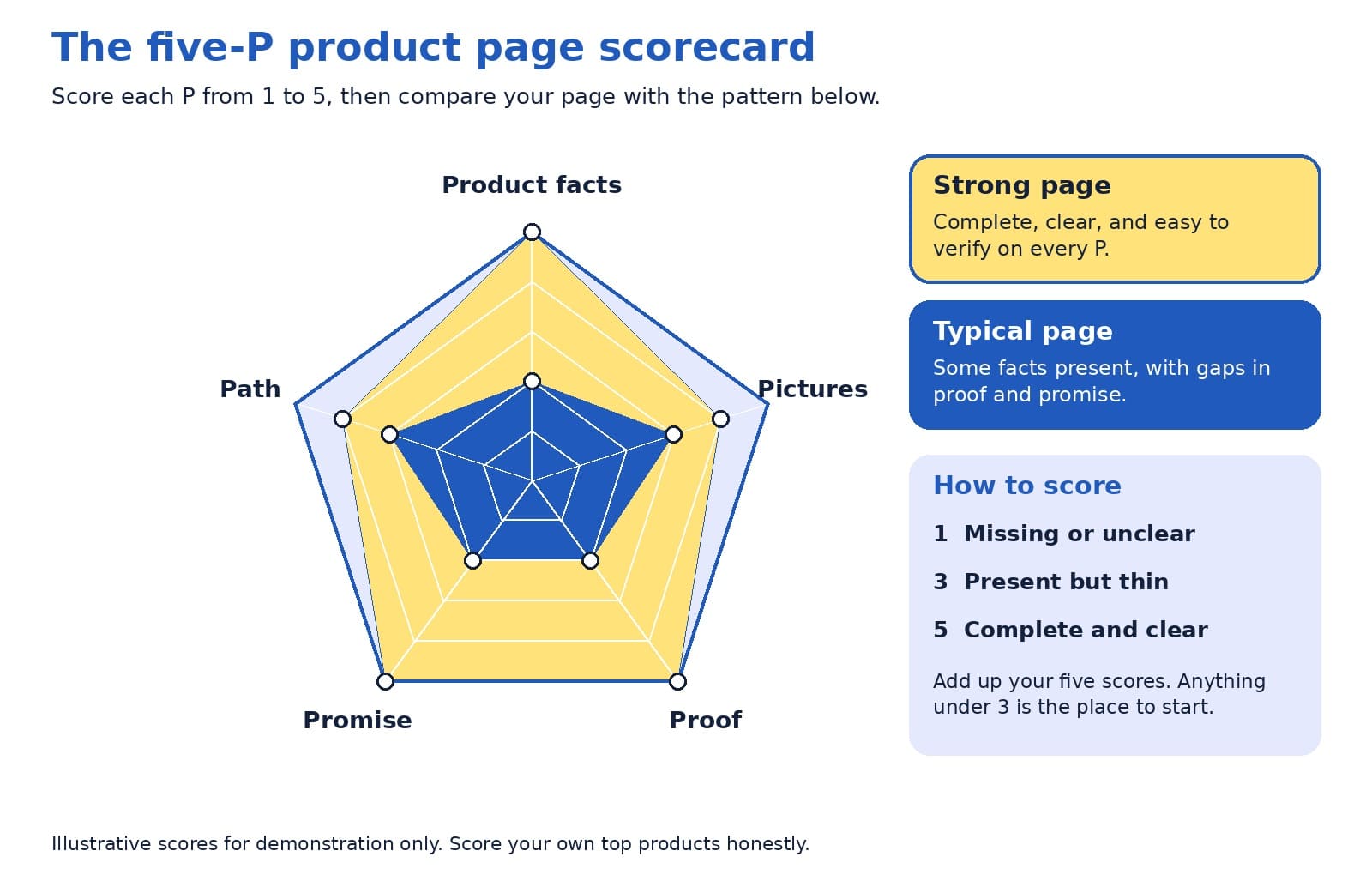
Look at the lowest point first, then at the pattern across your five pages. If the same P is low everywhere, such as proof or promise, the fix probably lives in your page template, and one change can lift every product at once.
On the page and behind the page
Shoppers read what is on the page. AI assistants and search engines also read the data behind it, through structured data and product feeds. The two should always match, since a mismatch creates doubt for people and for machines.
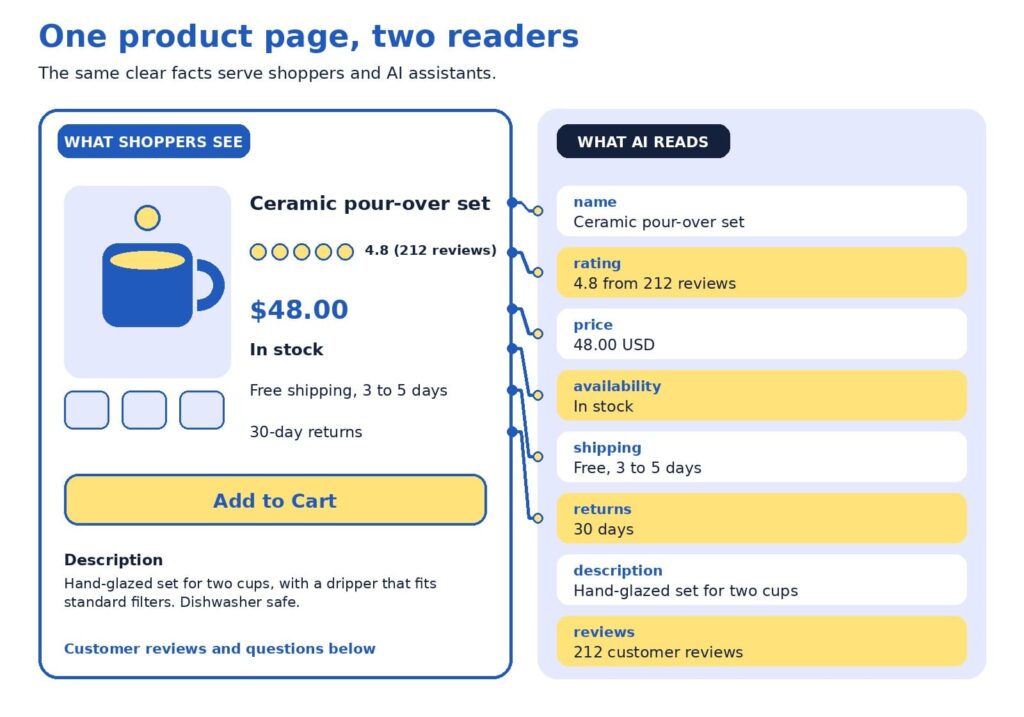
The example uses a fictional ceramic coffee set. Here is how to read it:
- The name is specific. “Ceramic pour-over set” says more than a code such as Set 02.
- The rating shows proof. A score with the number of reviews gives shoppers confidence.
- The price matches. The same number appears on the page and in the data.
- Stock status is current. Google lists availability among the details used for shopping results (Google Search Central, 2025b).
- Shipping is stated plainly. Delivery time and cost sit where shoppers decide.
- Returns are clear. A visible return window reduces hesitation.
Google’s guidance for structured data offers a helpful rule of thumb for this layer:
“as much rich product information as available”
Google Search Central (2025b)
A worked example
Here is how an audit might look for one product. The table shows a starting point and a stronger version of the same fictional coffee set.
| Page element | Starting point | Stronger version |
|---|---|---|
| Title | Set 02 | Ceramic pour-over coffee set for two, hand-glazed |
| Description | Great quality. Order today. | Size, materials, what is included, care instructions, and who it suits |
| Price and stock | Price appears at checkout | Price and stock status on the page, kept current automatically |
| Shipping and returns | See our policy page | Delivery time, cost, and return window near the buy button |
| Proof | No reviews yet | Reviews with ratings, plus answers to common questions |
Scored with the rubric, the starting page might receive 2 for product facts, 3 for pictures, 2 for proof, 2 for promise, and 3 for path. The lowest scores are proof and promise, so that is where to begin. Moving shipping and return details beside the buy button takes minutes, and inviting recent buyers to leave reviews builds proof steadily over the following weeks. After those two fixes, a clearer title and description lift the product facts score, and the page moves toward the strong pattern without a redesign.
The weakest-link rule
Here is a perspective that surprises some owners: your lowest score matters more than your average. A page with beautiful photos, a rich description, and no visible return policy may feel strong on paper, and a hesitant shopper still reads the gap. The same is true for machines, since one missing or conflicting fact, such as a price that differs between page and feed, can reduce confidence in everything else.
A product page is only as persuasive as its weakest P.
For that reason, we suggest raising your lowest P to a 3 on every top page before polishing any P to a 5. Once all five Ps reach at least a 3, tracking how assistants describe your products becomes a worthwhile next step, and our AI visibility and GEO services are designed for that stage. After that, AI-powered predictive analytics can help you decide which products to stock and promote.
Fix first: the impact and effort map
An audit usually produces a long list, so it helps to rank it. The map below sorts common fixes by impact and effort. Start with the top-left group, which delivers meaningful gains for modest work, then plan the top-right group as projects.
Placement on the map depends on your store. A shop with an automated feed may find that matching price and stock takes minutes, and a store with a custom checkout may find that mobile speed is a bigger project. Use the map as a conversation starter with your team, and move items to where they truly sit for you.
Technical checks behind the page
Structured data and product feeds
Google describes two kinds of product markup: product snippets for pages where people cannot buy directly, and merchant listings for pages where they can. It also recommends adding return policy information nested under your organization markup and marking up product variants, and it notes that providing both structured data and a Merchant Center feed maximizes eligibility (Google Search Central, 2025b).
ChatGPT’s commerce documentation describes product feeds in a similar way, as the route for sharing structured catalog data so products can be indexed and presented accurately (OpenAI, n.d.). Programs in this area change often, so check current documentation. Setup is usually a one-time job for a developer or a SEO company in Delhi.
Links, speed, and mobile
Search engines discover products by following links, so menus and category pages should link to products with standard links. Speed and mobile layout matter too, and Baymard’s 2026 benchmark shows the mobile bar is high, with 62% of mobile sites rated mediocre or worse for product pages (Scott, 2026). If app-like mobile shopping interests you, our guide to progressive web apps for ecommerce explains when they are worth the investment.
Modern storefronts
If your store runs on a headless setup, confirm that product details are visible when search engines load the page. Google suggests deploying a few pages with structured data and using the URL Inspection tool to see how Google views them (Google Search Central, 2025b). Our article on headless ecommerce explains when this approach suits smaller stores.
Trust and security
Trust includes a safe checkout. Secure connections, regular updates, and careful handling of payments protect customers and your reputation. For practical steps, read our guide to ecommerce security practices and our overview of AI-powered cybersecurity for ecommerce stores.
A 15-minute monthly habit
Product pages change as prices, stock, and policies change, so a short routine keeps them healthy. Once a month, set aside 15 minutes for these checks:
- Open your top five pages on a phone and confirm that price, stock, and shipping details are correct.
- Read the newest reviews and questions, and add answers to the page.
- Compare the page, feed, and checkout for any mismatch in price or availability.
- Re-score your lowest P and note whether it improved.
If you would like a second opinion, send us your top product pages. We will score them with the five-P rubric and return a short, ranked list of fixes.
Quick answers to common questions
How many pages should I audit? Five is enough to spot patterns without taking long. Include your best sellers and one product with plenty of visits and few sales, since that product often reveals what needs fixing.
How often should I re-run the audit? A full audit every quarter works well for many stores, with the 15-minute check each month. Re-run it after a redesign, a platform change, or a change to shipping or return policies.
Who should score the pages? Ideally, two people: someone who knows the product well, and someone who has never seen it. The newcomer’s questions often point straight at the thinnest P.
What if I have no reviews yet? Start by inviting recent buyers to share honest feedback, and answer the questions customers ask most on the page. A short, clear answers section builds proof while reviews grow.
What score is good enough? A 3 on every P is a solid foundation, and a 4 or 5 on the Ps that matter most to your customers is a strong goal. Apparel shoppers may care most about pictures and sizing, while buyers of technical products may care most about product facts.
Is this worth doing for a small store? Yes. A smaller catalog means you can bring every page up to a strong standard, and clear pages help shoppers and search tools alike.
One weak spot at a time
A product page audit turns a vague worry into a short, ranked to-do list. Score the five Ps, fix the lowest one first, match what is on the page with the data behind it, and repeat a small check every month. Each improvement helps shoppers decide and gives AI assistants and search engines clearer facts to work with.
Want help putting the scorecard to work? Our team handles ecommerce website design that builds the five Ps into every product page, and as a website design company in Delhi we create stores that are fast, clear, and easy to buy from. Our SEO company in Delhi specialists help those pages get found, and our AI visibility and GEO services help your products appear in AI answers.
References
Baymard Institute. (2026). Average documented online shopping cart abandonment rate. https://baymard.com/lists/cart-abandonment-rate
Google Search Central. (2025a, December 10). Help Google understand your ecommerce website structure. Google for Developers. https://developers.google.com/search/docs/specialty/ecommerce/help-google-understand-your-ecommerce-site-structure
Google Search Central. (2025b, December 10). Introduction to Product structured data. Google for Developers. https://developers.google.com/search/docs/appearance/structured-data/product
Google Search Central. (2026, July 10). Optimizing your website for generative AI features on Google Search. Google for Developers. https://developers.google.com/search/docs/fundamentals/ai-optimization-guide
OpenAI. (n.d.). Agentic commerce: Full documentation. https://developers.openai.com/commerce/llms-full.txt
Perez, S. (2026, April 16). AI traffic to US retailers rose 393% in Q1, and it’s boosting their revenue too. TechCrunch. https://techcrunch.com/2026/04/16/ai-traffic-to-us-retailers-rose-393-in-q1-and-its-boosting-their-revenue-too/
Scott, E. (2026). Product page UX 2026: 10 pitfalls and best practices. Baymard Institute. https://baymard.com/research-articles/current-state-ecommerce-product-page-ux


AI Can Recommend Your Product, but Only Your Product Page Can Sell It
Depending on which 2026 survey you read, somewhere between 34% and 77% of US shoppers have already used AI to help them buy something, yet the most common amount people said they would let an AI spend for them on its own was $0 (TechWyse, 2026; Supermarket News, 2026). Read that again, because it holds the whole opportunity: shoppers are happy to let AI build the shortlist, but they still want to see the product with their own eyes before they pay. That moment of looking is your product page, and it has quietly become the most valuable real estate in your store.
If you run an online store, this is good news. You do not need to chase every new AI feature to benefit from this shift. You need product pages that a machine can understand in a second and a human can trust in five, and that is a problem we know how to solve.
TL;DR
- AI assistants are now part of how people find products, but shoppers still make the final call on your product page.
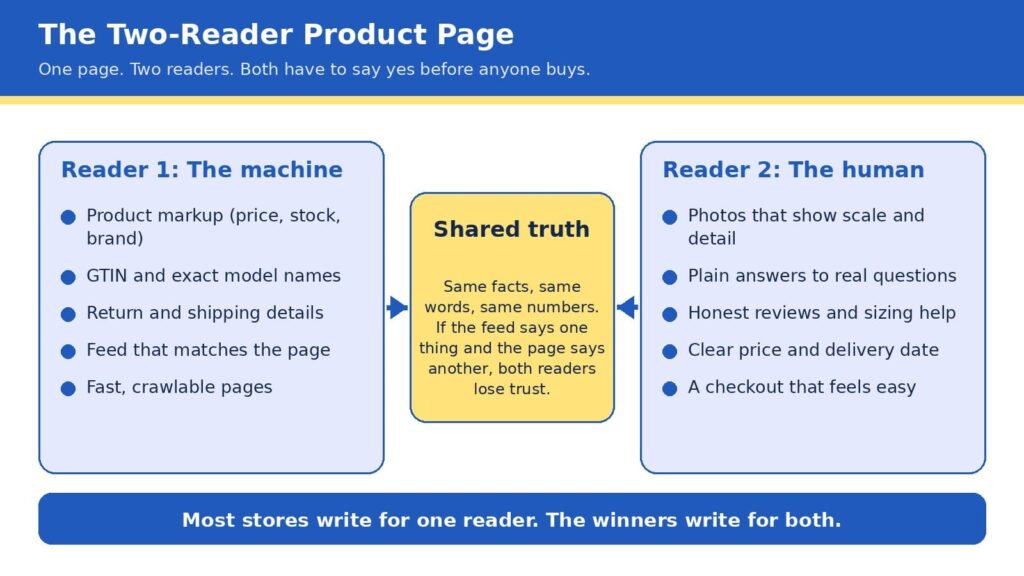
- Every product page has two readers: a machine that checks your facts and a person who decides whether to trust you.
- Strong basics (accurate product data, clear photos, honest answers, fast loading) beat clever tricks.
- Fix your product pages first, then spend on anything labeled “AI optimization.”
In this blog
- The comfortable truth about AI shopping
- How an AI shopping answer finds your product
- The Two-Reader Product Page
- Reader one: make the machine’s job easy
- Reader two: make the human’s decision easy
- The take few agencies will say out loud
- The ten-point scorecard
- The foundation under the page
- Freelancer, agency, or in-house team?
- A 30-day plan you can start this week
- Quick answers
The comfortable truth about AI shopping
It is easy to read the headlines and conclude that AI is about to swallow online shopping whole, with bots comparing prices, picking winners, and checking out without a human anywhere in sight. The data tells a calmer and, for store owners, a more encouraging story. A Semrush-owned research platform surveyed 1,009 US consumers and found that 77.6% had used AI to help with a shopping decision in the previous six months, while the most common spending limit they would authorize for fully autonomous AI purchases was zero dollars (TechWyse, 2026).
Forrester’s March 2026 community survey points the same direction: people who regularly use answer engines said that finishing a purchase inside the chat was their least-adopted use, far behind asking general questions and researching product rankings (TechWyse, 2026).
Trust is the reason, and it shows up in other studies too. McKinsey’s State of the Consumer 2026 report found that 26% of consumers use generative AI for shopping, which makes shopping the top use of the technology, yet shoppers still place more trust in personal recommendations, experts, traditional search engines, and online stores than in AI-generated answers (Modaes, 2026).
Acosta Group’s study found that only 22% of shoppers who use AI for shopping trust agents to make purchases for them (Supermarket News, 2026), and Omnisend reports that a significant share of consumers worry AI favors sponsored or paid products (Omnisend, 2026).
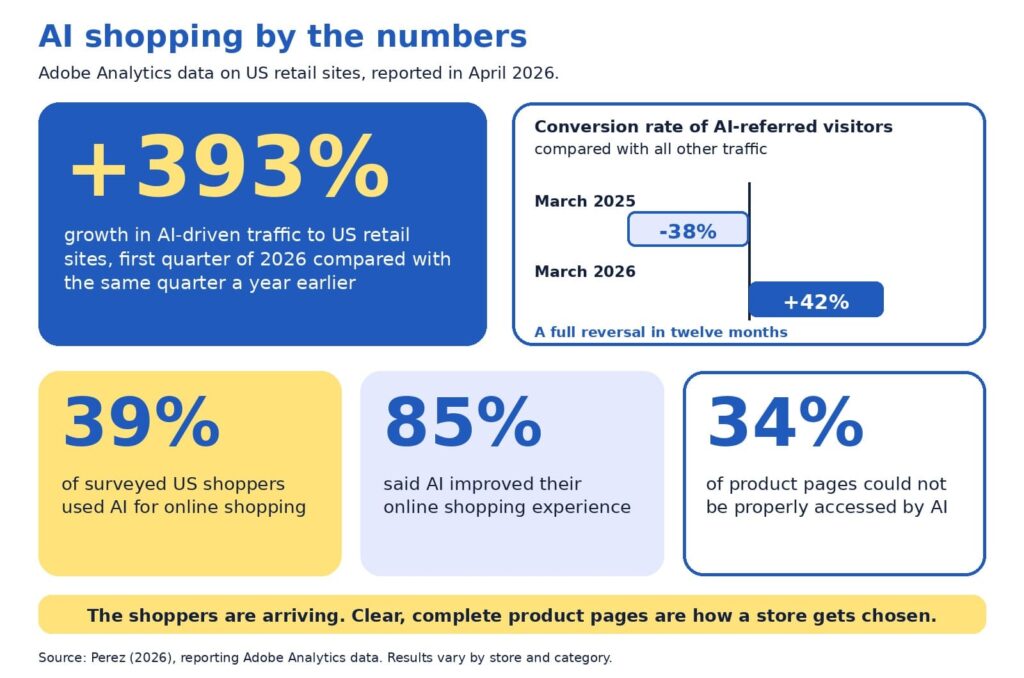
Put those findings side by side and a clear picture forms. AI is becoming the front door to product discovery, but people still walk through your door to buy, and when they arrive they are better informed and more demanding than a typical browser. Adobe’s numbers show how quickly that has changed. In early 2025, visitors arriving from generative AI sources were 9% less likely to convert than other traffic (Adobe, 2025).
By the 2025 holiday season, Adobe measured AI referrals converting 31% better than other sources, with visitors 33% less likely to leave right away, and traffic to retail sites from AI tools up 693% year over year (Pandya, n.d.). Those visitors arrive with a short list and a purpose, which means your page has less room for vague copy and more reason to shine.
How an AI shopping answer finds your product
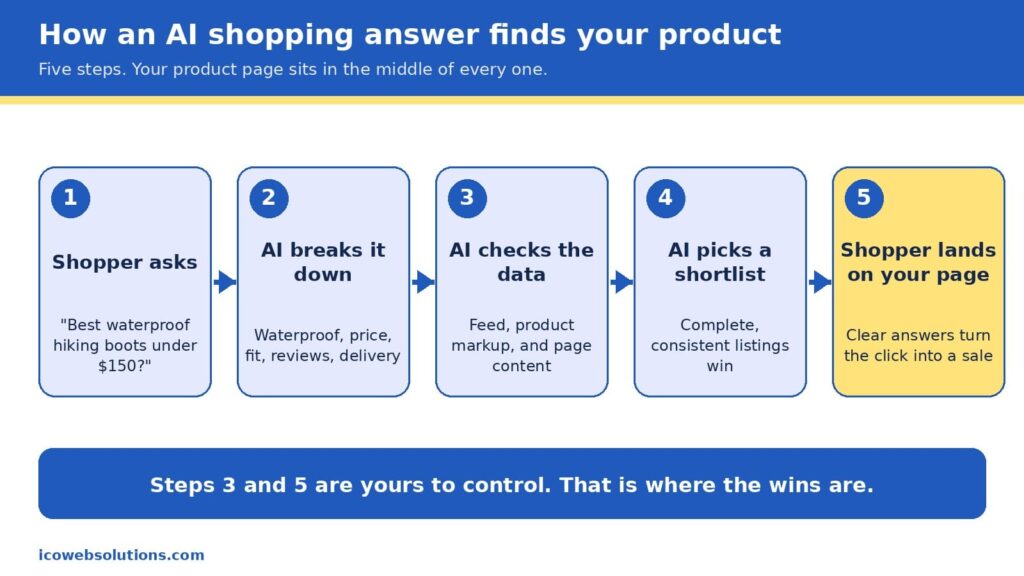
When a shopper types something like “best waterproof hiking boots under $150 that ship by Friday,” the assistant does not browse the web the way a person would. It breaks the request into pieces (waterproof, price ceiling, delivery date, fit, reviews), then looks for products whose data matches every piece. In Google’s case, that data comes from the Shopping Graph, a product database that, according to reporting on Google’s own figures, holds more than 50 billion listings, with about 2 billion updated every hour (Channable, n.d.). The graph is filled by the product feeds merchants submit and by the product markup on their pages, which is the hidden labeling that tells machines what a page is selling, what it costs, and whether it is in stock.
It is worth being precise here, because plenty of vendors are not. Google has not confirmed that Merchant Center data works as a direct ranking signal in AI Mode, but the product graph that feed data builds is shared infrastructure behind several of its shopping surfaces, so accurate and consistent data helps in both places (Alhena, n.d.). There is also no secret “AI schema” to install. The same product markup that has helped pages earn rich results for years is what machines read today, and the real difference is that AI systems tolerate gaps and contradictions far less than a human shopper skimming a page.
That is why the phrase “AI shopping is built on the basics” is more than a slogan. The assistant is choosing from what you have published, so the quality of your product title, price, availability, images, reviews, and return policy decides whether you make the shortlist at all. Once you do make it, the shopper clicks through and your page has to confirm what the assistant promised. In other words, the machine opens the door and the page closes the sale, which is exactly why we think of every product page as having two readers.
The Two-Reader Product Page
Here is the framework we use with ecommerce clients at ICO Web Solutions, and it is simple enough to remember in five seconds: every product page is read twice, once by a machine and once by a human, and it only sells when both say yes. The machine asks whether your facts are complete, consistent, and easy to verify. The human asks whether you are believable, whether the product fits their situation, and whether buying will be easy. Most stores are written for one of these readers. Some are crammed with keywords and markup but read like a spec sheet, while others are beautiful and persuasive but invisible to anything that cannot see the design.
The bridge between the two is what we call shared truth, meaning the same facts, the same words, and the same numbers everywhere they appear. If your feed says a jacket is in stock, your page says it ships in two weeks, and your reviews mention a different color, then a machine sees a conflict and a person feels a doubt, and both of them move on to the next listing. Shared truth is not glamorous work, but it is the closest thing to a free advantage in ecommerce right now, because most of your competitors have not done it.
Reader one: make the machine’s job easy
Machines are literal, patient, and unforgiving, so the best way to help them is to remove every reason to guess. Start with the basics a product page must state clearly: an exact product name that includes brand, model, and the attributes people search for, the current price and currency, availability, the barcode number (known as a GTIN) where one exists, and clear shipping and return terms. Then make sure those same details appear in your product markup, not just in the visible copy, because that markup is what many systems read first. Return policy information has also been required for Google merchant listings since 2025, so this is one of those details that has moved from nice to have into required territory (Xictron, 2026).
The next step is consistency across systems. Your store platform, your Merchant Center feed, your marketplace listings, and your on-page markup should all pull from a single source of truth, ideally a product information system or at least one carefully maintained spreadsheet that feeds everything else. A feed that disagrees with the page is one of the most common reasons good products underperform, and it is also one of the cheapest to fix. If you are rebuilding or replatforming, this is the ideal time to get it right, and our team handles it as part of ecommerce website design and development so that structured data is built into the templates rather than patched on later.
Finally, give machines something worth quoting. AI assistants tend to favor pages that answer real questions in plain language, so a short section covering what the product is best for, who it is not for, how it compares with the obvious alternative, and what customers most often ask will serve both readers at once. If you want help seeing how your catalog currently appears in AI answers,our AI visibility and GEO services can show you how your catalog appears today, and our SEO company in Delhi team makes sure the traditional search foundations are just as strong.
Reader two: make the human’s decision easy
People decide quickly, and they decide with their eyes first. In Baymard Institute’s large-scale product page testing, 56% of users began by exploring the product images, even in cases where reading the description would have been faster (Baymard Institute, n.d.-b). The same research found that 52% of sites do not add descriptive text or graphics to the images of their top-selling products, which leaves shoppers guessing about scale, weight, material, or fit. That gap is an opportunity, since a few well-chosen captions, a size comparison, or a close-up of the stitching can answer a question before it becomes a reason to leave.
Speed is the other half of the human experience, and it is more forgiving to fix than most owners expect. Google’s research found that as mobile page load time goes from one second to three seconds, the probability of a visitor bouncing rises by 32%, and from one second to ten seconds it rises by 123% (Think with Google, n.d.). Heavy images, bloated apps, and unnecessary scripts are the usual culprits, and trimming them tends to lift every other metric on the page. If your store feels slow on a phone, a fresh look from a website design company in Delhi that builds with performance in mind can pay for itself quickly.
Trust is the third piece. Honest reviews (including a few critical ones), clear sizing help, visible return terms, and a price and delivery date that never change between the search result and the cart all tell a shopper that you mean what you say. This matters even more now, because the shopper arriving from an AI answer has often already been told your product is a good fit and is simply looking for a reason to believe it. Baymard’s benchmark of leading US and European sites found that 44% had mediocre or worse product page experiences in one update (Baymard Institute, n.d.-a), so a store that gets these details right stands out quickly.
The take few agencies will say out loud
Here is the part that may make some of our own industry uncomfortable: if your product pages are thin, inconsistent, or slow, you should not buy an “AI optimization” package yet. Every month a new vendor promises to make your brand visible to chatbots, and some of them offer real value, but none of them can compensate for a catalog with missing sizes, mismatched prices, and photos that do not show the product. AI systems prioritize products with complete, structured data over products backed by bigger marketing budgets, and that rewards the patient work of cleaning up the basics over any shortcut (Xictron, 2026).
We say this as an agency that sells AI visibility work, and we say it because it is true and because it builds better long-term relationships. Acosta Group’s advisors reached a similar conclusion in their 2026 shopper study, recommending that brands begin with what they call the brilliant basics of retailer readiness before layering on AI discoverability and experiments (Supermarket News, 2026). The sequence matters: fix the page, align the data, then amplify. Reverse that order and you pay to send more visitors to a page that is not ready for them.
The ten-point scorecard
Before you spend another dollar, open your top five best-selling product pages and check each one against this list. Every yes is worth roughly a point, and anything under eight tells you where to start.
- The product title includes brand, model, and the one or two attributes shoppers actually search for.
- Price, currency, and availability match across your page, feed, and markup.
- Product markup is present and passes a rich results test.
- The barcode number (GTIN) and brand are filled in wherever they exist.
- Shipping time and return terms are visible without scrolling or clicking.
- Photos show scale, detail, and the product in use, with captions where words help.
- A short “best for, not for” section answers the top three customer questions.
- Reviews are visible, recent, and include honest critical feedback.
- The page loads in about three seconds or less on a mid-range phone.
- Checkout is reachable in two taps from the product page.
The foundation under the page
A great product page sits on top of technology, and three parts of that foundation deserve attention because they quietly shape both readers’ experience. The first is security. Shoppers who arrive from an AI recommendation are trusting someone else’s judgment, and one warning screen or suspicious checkout can undo that trust instantly. If you want a practical overview, our guides on how top brands keep their sites safe and AI-powered cybersecurity for ecommerce stores walk through the habits that protect revenue and reputation together.
The second is architecture. Flexible, fast storefronts make it far easier to keep data clean and pages light, which is one reason we have seen that headless ecommerce is no longer just for big brands, and why progressive web apps for ecommerce deserve a fair look if your shoppers are mostly on phones. Neither is right for every store, so the honest answer is to match the build to your catalog size, team, and budget rather than chase the trend.
The third is learning from your own numbers. Once the basics are in place, AI-powered predictive analytics can show you which products are about to trend, which pages leak the most visitors, and where a small fix would lift sales most. Used in that order (basics first, prediction second), the technology amplifies a strong page instead of masking a weak one.
Freelancer, agency, or in-house team?
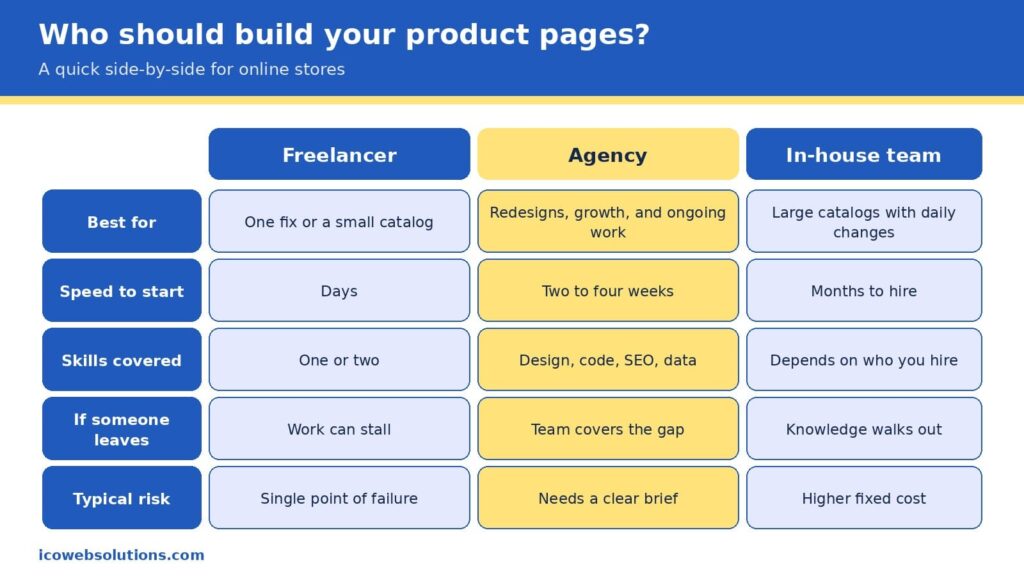
Once you know what your pages need, the practical question becomes who should do the work, and the honest answer depends on the size of the job and how long it will last. A freelancer is often the fastest and most affordable way to fix one specific problem, such as rewriting a batch of product descriptions or cleaning up markup on a small catalog, and a great one can be a joy to work with. The risk is concentration, since one person carries the design, code, search, and data knowledge in a single head, so a sick day, a new client, or a career change can stall your project right when it matters.
An in-house team gives you the deepest knowledge of your products and the tightest day-to-day control, which is ideal for large catalogs that change every day. It also brings the highest fixed cost, a hiring timeline measured in months, and the challenge of keeping specialists current in fields that change quickly. Many in-house teams do their best work when they have a partner to lend extra capacity and fresh perspective during redesigns and launches.
An agency sits in the middle by covering design, development, search, and data under one roof, so the work moves in parallel, and the knowledge does not live in one person. The trade-off is that you need to give a clear brief and choose a partner who understands ecommerce rather than websites in general. Our view is simple: pick the smallest option that can fully own the outcome. If you have a single contained fix, hire a freelancer. If you run a large operation with steady needs, build in-house. If you are redesigning, replatforming, or trying to grow visibility across search and AI at the same time, an agency usually gets you there faster and with fewer surprises.
Read more: Freelancer vs Agency vs In-House: How to Choose the Marketing Team That Fits Your Business Right Now
A 30-day plan you can start this week
You do not need a six-month roadmap to make progress, and a focused month can change how both readers experience your best products. In the first week, run the scorecard on your top five pages and write down every mismatch between your page, feed, and markup, because that list becomes your repair queue. In the second week, fix the facts: titles, prices, availability, barcode numbers, and return details, in the single source your systems share. In the third week, upgrade the human experience with better photos and captions, a short “best for, not for” section, and a speed pass that removes anything the page does not need.
In the final week, measure and expand. Compare conversion, bounce rate, and revenue per visit on the updated pages with the ones you have not touched yet, then roll the winning pattern to the rest of the catalog. By the end of the month you will have a repeatable template, evidence of what works for your customers, and a clean foundation that makes any later AI visibility work far more effective.
Quick answers
Do I need special markup for AI shopping?
No special AI-only markup exists. The standard product markup used for search and Google Shopping is what machines read, so the priority is making it complete, accurate, and consistent with your feed and page.
Will AI shopping replace my product pages?
The data suggests not soon. Shoppers are comfortable letting AI research and compare, but most are not ready to let it complete purchases, so your page remains the place where the decision is confirmed.
How long does it take to see results?
Fixes to speed, photos, and on-page answers can influence conversion within weeks, while changes to how search and AI systems understand your catalog tend to build over a longer period as the data is recrawled and refreshed.
Ready to make your product pages work for both readers?
If you would like a second set of eyes on your store, the ICO Web Solutions team can walk through your top product pages with you using the Two-Reader framework and help you turn the findings into a short, prioritized fix list, whether you build it with us or on your own. Start by telling us about your store on our ecommerce website design and development page and we will suggest clear next steps. Your shoppers are already asking AI for recommendations, and with the right product pages you can be the answer they click.
References
- Adobe. (2025, March 17). Adobe Analytics: Traffic to U.S. retail websites from generative AI sources jumps 1,200 percent. Adobe Blog. https://blog.adobe.com/en/publish/2025/03/17/adobe-analytics-traffic-to-us-retail-websites-from-generative-ai-sources-jumps-1200-percent
- Alhena. (n.d.). Two feeds, one shopper: How Google Shopping and AI visibility converge in 2026. https://alhena.ai/blog/google-shopping-ai-visibility-convergence/
- Baymard Institute. (n.d.-a). Product page UX. https://www.baymard.com/research/product-page
- Baymard Institute. (n.d.-b). Product page UX: Include descriptive text or graphics for some product images (52% don’t). https://baymard.com/research-articles/product-images-descriptive-text
- Channable. (n.d.). Google AI Mode for shopping: How it works and what merchants need to do. https://www.channable.com/blog/google-shopping-ai-mode
- Modaes. (2026). One in four consumers uses AI to shop, with Gen Z leading the way. https://www.modaes.com/global/markets/one-in-four-consumers-uses-ai-to-shop-gen-z-is-leading-the-way
- Omnisend. (2026). AI shopping report. https://www.omnisend.com/resources/reports/ai-shopping-report/
- Pandya, V. (n.d.). Adobe: AI-driven traffic surges across industries with retail experiencing biggest gains. Adobe for Business. https://business.adobe.com/blog/ai-driven-traffic-surges-across-industries
- Supermarket News. (2026, September 18). AI is becoming a shopping channel: Report. https://www.supermarketnews.com/grocery-technology/ai-is-becoming-a-shopping-channel-report
- Think with Google. (n.d.). Find out how you stack up to new industry benchmarks for mobile page speed. https://thinkwithgoogle.com/marketing-strategies/app-and-mobile/mobile-page-speed-new-industry-benchmarks/
- TechWyse. (2026). 77% of US consumers now use AI to shop, but most won’t let it spend their money. https://www.techwyse.com/news/ai-search/ai-shopping-adoption-consumer-distrust-autonomous-spending-2026
- Xictron. (2026). Product data AI optimization: Structured data 2026. https://www.xictron.com/en/blog/product-data-ai-optimization-structured-data-2026/
What to check before and after a website redesign?
A website redesign is one of the few marketing projects that can lower your traffic on the day it succeeds. The site launches on time, the design is approved, and the rankings it took years to build start slipping.
That outcome isn’t inevitable. It usually traces back to a handful of decisions made, or skipped, before and after launch. This guide covers what to check at each stage so a redesign improves performance instead of resetting it.
Whether you work with a website design company in Delhi or run the project in-house, the same logic applies: a redesign is an SEO event that happens to include design.
Why Redesigns Cost Rankings
Search engines don’t see a website the way visitors do. They see a set of URLs, each with content, links, signals and a history. When a redesign changes those URLs, rewrites the content or strips out the code that carried the signals, the search engine has to re-learn what each page is and whether it still deserves to rank.
Google’s site move documentation describes the process in those terms. The move happens on a per-URL basis, and Google says it isn’t complete until Googlebot has visited every URL on both the old and new site at least once. For a medium-sized website, Google estimates that most pages take a few weeks to move through its index, and larger sites can take longer.
The same documentation tells site owners to expect temporary ranking fluctuation during the move. It also offers some reassurance: Google states that 301 and other permanent redirects don’t cause a loss in PageRank
. The advice is old and unglamorous, which is probably why so many redesigns ignore it.
The usual damage comes from four places. URLs change without redirects. Content that was quietly ranking gets deleted in the name of a cleaner site. SEO elements such as titles, canonicals and schema fail to carry over. And the new design turns out to be slower than the old one. None of these is a design problem. All of them are planning problems.
The Redesign Roadmap
The pattern across redesigns that hold their rankings is a sequence of stages, with most of the protective work done before a single page is designed. A good website redesign service will show you this sequence up front rather than starting with mockups.
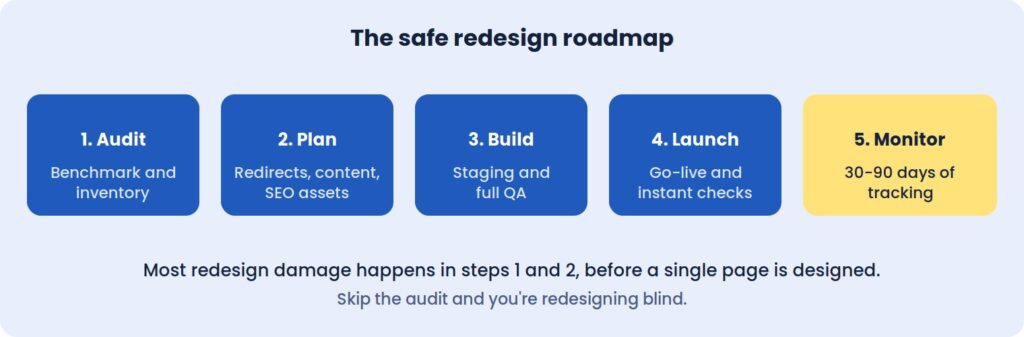 Most redesign damage happens in steps 1 and 2, before a single page is designed.
Skip the audit, and you’re redesigning blind.
Before The Redesign: Measure What You Can’t Afford To Lose
The first job is establishing a baseline. Without one, a redesign can’t be judged, and any drop in performance becomes an argument instead of a diagnosis.
Record twelve months of organic sessions and conversions, noting any seasonality. Pull your top twenty landing pages by traffic and by leads, since those are the pages the redesign must protect first. Capture rankings for the twenty or thirty keywords that matter most, along with Core Web Vitals, the number of pages Google has indexed, and the conversion rates of your forms, calls and checkout.
Keep it all in one spreadsheet. Three months after launch, this becomes the document that tells you whether the project worked.
Inventory every URL, including the forgotten ones
Crawl the live site and list every page, image, PDF and existing redirect. The pages that don’t appear in your menu are often the ones that matter, because old landing pages and forgotten blog posts tend to hold the strongest backlinks.
For each URL, note its status code, title, traffic and linking domains. This inventory becomes the foundation of the redirect plan, and it is the document teams most often wish they had started sooner.
Deciding What Stays, Merges Or Goes
A redesign is a natural moment to clear out weak content, but the decision should come from data. Pages that rank or convert should usually keep their URLs. Pages that rank on the second or third page, or that overlap with others, are candidates for strengthening or merging. Pages with no traffic and no links can go, as long as each one is redirected to its closest match.
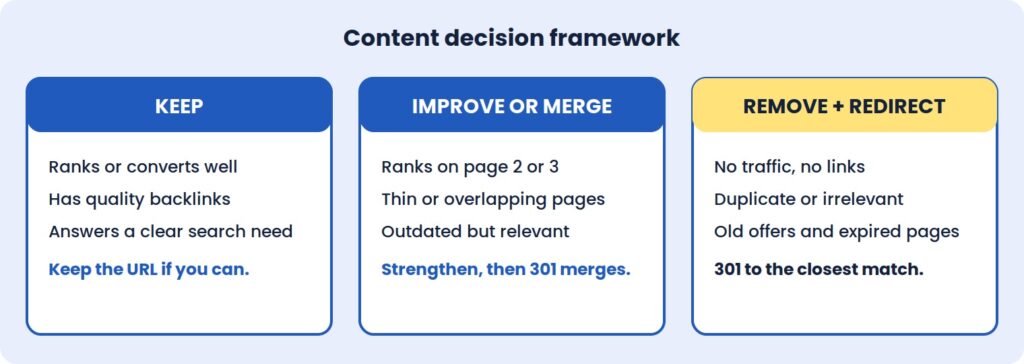 The mistake to avoid is deleting a page that has backlinks or steady traffic without a relevant redirect. Sending every retired URL to the homepage is a common shortcut, but search engines often treat it as a soft error, which means the page’s accumulated value is lost anyway.
The Redirect Map Is The Project
If a redesign changes any URLs, the redirect map is the single most important document in the whole project. It is a two-column sheet: old URL on the left, new equivalent on the right.
A few rules keep it effective. Use permanent 301 redirects rather than temporary 302s. Point each old URL straight to its final destination, so visitors and crawlers never pass through a chain. Cover images, PDFs and old blog categories, not just pages. And wherever a page doesn’t need a new address, leave the URL exactly as it was, because the best redirect is the one you never need. Google also recommends keeping redirects in place for at least a year after a move, so they shouldn’t be treated as a temporary fix to remove once rankings settle.
Test the full map on staging before launch. A few hundred correct redirects protect years of accumulated ranking history, and fixing a bad map after launch is slower and more expensive than building a good one beforehand.
SEO Assets And Tracking Don’t Migrate Themselves
Title tags, meta descriptions, heading structure, image alt text, schema markup and canonical tags are easy to lose in a rebuild, because they live in templates and plugins rather than on the visible page. A new theme can look identical to the old one while quietly dropping all of them.
Export these elements for your key pages before work starts, along with a note of how your most important pages link to one another. This is the point where an experienced SEO agency in Delhi earns its fee: involving search specialists at the planning stage costs far less than diagnosing lost rankings afterwards.
Tracking deserves the same attention. List every tool connected to the site, from analytics and Search Console to ad pixels, CRM forms, call tracking and payment gateways, then confirm each has a place in the new build. A conversion tag that goes missing for a week can distort reporting and ad optimisation for much longer than that.
A New Design Can Be A Slower One
Speed is the quiet casualty of many redesigns. Heavy sliders, large hero images, animation libraries and bloated page builders are common in modern templates, and each one adds weight that the previous, plainer site didn’t carry.
Agree speed targets before design starts. A Largest Contentful Paint under 2.5 seconds on mobile, with a stable layout that doesn’t shift as it loads, is a reasonable goal for most business sites. Alongside that, review how visitors use the current site through heatmaps, session recordings, and form drop-off. If people abandon a page for a reason, the redesign should fix it, not repeat it.
Finally, take a full backup of files and database, store a copy off the server, and agree a content freeze during the build so changes made to the live site aren’t overwritten at launch.
On Staging: Testing Before Anyone Sees It
The new site should be built and tested on a private staging URL, blocked from search engines. The block matters for the build, and removing it matters even more at launch.
Content and SEO checks come first. Test a sample of old URLs against the redirect map, with extra attention on high-traffic and high-backlink pages. Confirm that key pages kept their text, headings, images and internal links, and that titles, descriptions, canonicals and schema survived the move.
Next comes everything a visitor can do. Submit every form and confirm the notification arrives. Check layouts on real phones rather than a resized desktop browser, and run the site through Chrome, Safari, Firefox and Edge. For an online store, place a complete test order from cart to confirmation email.
Last, check the foundations: speed against the agreed targets, accessibility basics such as contrast and keyboard navigation, an active SSL certificate, current plugins, and secured admin accounts.
Launch Day: The First Hour Matters
Choose a low-traffic window and keep the old site backed up. The first move after going live is removing the noindex tag and any robots.txt block, because leaving them in place is the most common and most costly launch error.
From there, load the redirect map and test your top fifty old URLs, then submit the new XML sitemap in Search Console. Open real-time analytics to confirm that visits and conversions are being recorded, and place a live test enquiry or order. Once those pass, inform your team and key partners.
After The Redesign: What To Watch, And When
Launch is where real data begins. Search engines need time to recrawl and re-evaluate the new pages, so some ranking movement over the first few weeks is normal. The skill is telling that settling period apart from a genuine problem.
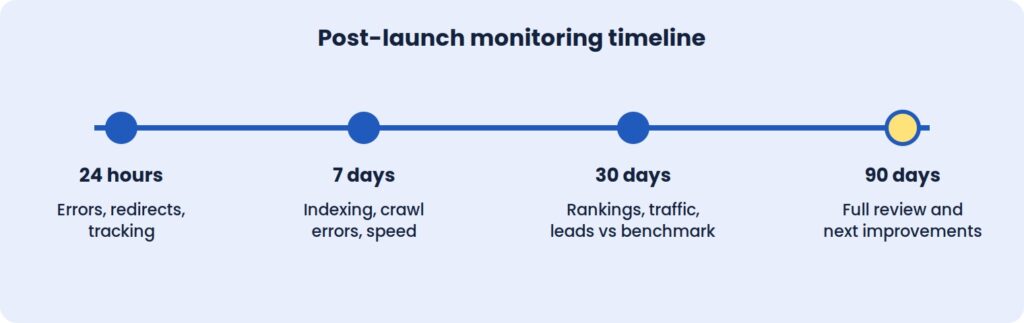
The first 24 hours
Re-test redirects and watch for 404 errors in server logs and Search Console. Confirm that tracking, forms and payments work on the live site, that pages load quickly under real traffic, and that robots.txt and meta robots tags allow crawling.
The first week
Search Console’s Pages and Crawl stats reports show how Google is handling the new site. Any 404 that appears with traffic or backlinks needs a redirect added straight away. Watch for redirect chains and loops, and review mobile usability and structured data warnings as they surface. Core Web Vitals field data also begins to accumulate here.
The first month
Compare organic traffic and conversions with the baseline using identical date ranges. Small dips in rankings are normal. Steep, sustained drops on specific pages point to a specific cause that can be traced: a missing redirect, a changed title, a removed section of content.
Review the top landing pages to see whether their rankings, titles and content survived. Study user behaviour for friction in the new layout, and update internal links that still point to old URLs so they don’t depend on redirects.
The first 90 days
By this point there’s enough data for a full technical SEO audit. Use it to refine calls to action, layouts and forms, and to refresh the content on pages that were merged, moved or shortened. Ask important referring sites to update links where the URL changed, then document what you learned and set a monthly maintenance routine.
Speed and conversion improvements can show within weeks. Rankings and organic traffic usually take longer to settle, often one to three months depending on the scale of the change.
Where Redesigns Usually Go Wrong
The most damaging mistake is also the simplest: launching with noindex still switched on. The second is redirecting everything to the homepage, which discards the relevance old pages built up.
Changing too much at once makes diagnosis nearly impossible. A new design, new URL structure, new copy, and new platform in a single release means that when something drops, nobody can say which change caused it. Google’s own guidance points the same way, advising site owners to plan changes one after the other rather than all at once. Staggering them keeps cause and effect visible.
Judging results too early is another trap. Rankings fluctuate in the first days, and a one-week verdict is rarely reliable. A 30-day and 90-day window gives a fairer picture. And finally, designing for looks rather than goals produces pages with no clear job. Each page should have one purpose and one obvious next step.
Takeaways
A Redesign Is An SEO Event
Changing URLs, content, and templates changes the signals search engines rely on. Treating the project as design-only is the root cause of most post-launch losses.
The Baseline Is Your Only Proof
Without twelve months of recorded traffic, rankings, and conversions, there is no objective way to say whether the new site performs better than the old one.
Redirects Do The Quiet Work
A complete, tested 301 map is what carries years of authority from the old site to the new one. It is the least visible part of the project and often the most valuable.
Launch Is The Start Of Monitoring
The first 90 days produce the data that shows what worked. Plan support and review time for that period, not just for launch day.
Also read: Website Redesign vs Rebuild
Questions To Ask Your Redesign Partner
A strong website redesign service should be able to show its process, not just its portfolio. Before signing, it’s worth asking:
- How will you protect our existing rankings, and who is responsible for the redirect map?
- How will success be measured, and over what period after launch?
The right company will welcome these questions and answer with specifics. Vague answers are a warning sign.
At ICO WebTech, we plan redesigns around exactly these checks. As a website design company in Delhi with technical SEO built into the process, we aim to launch new sites without losing the rankings and leads you’ve already earned. If you’d like an honest view of what a redesign would involve for your business, we’ll give you one before any work begins.

PHP Version Debt: Why Old Websites Fail the Moment Hosting Moves On
Websites rarely break because PHP changed. They break because years of skipped updates made them incompatible with anything newer.
A business owner logs in on Monday and finds a white screen. Nothing was edited. Nobody touched the site. The only thing that changed was a line in a hosting notice that never got read: the server had moved to a newer PHP version.
Agencies see this constantly, and the reaction is always the same. The owner blames the upgrade. But the upgrade did not break the website. It exposed a website that had been broken for years, waiting for a compatible environment to fail in.
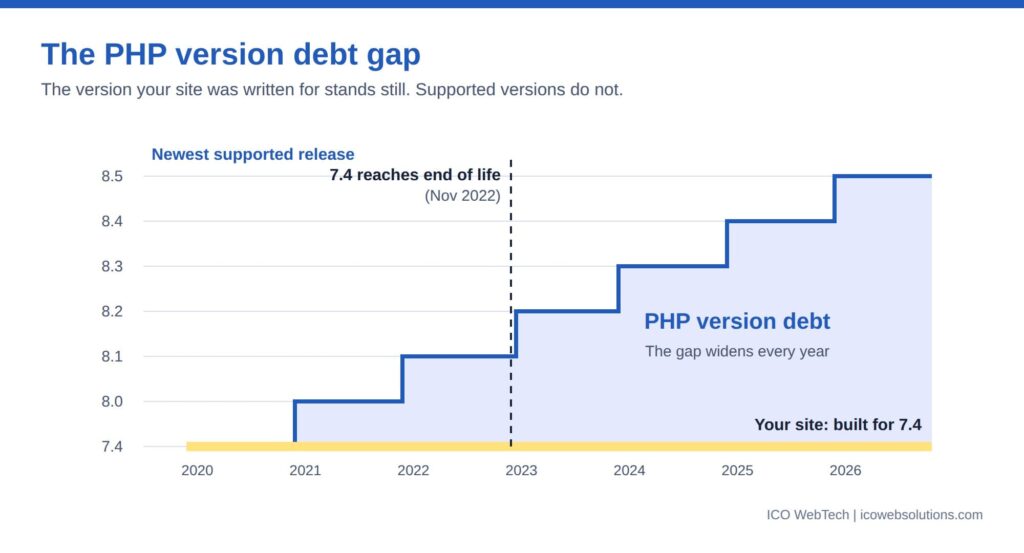
That is PHP version debt: the gap between the PHP version your website was written for and the versions hosts still support. Every skipped plugin update, every abandoned theme and every custom function written a decade ago adds to it. Hosting providers eventually collect.
This article covers why the failure feels sudden, where the debt comes from, what breaks and why, and how to weigh patching against replacing. The argument matters more than any single fix, because the right fix depends on how much debt a site carries.
What PHP version debt actually is
Technical debt is a familiar idea in software. Shortcuts taken today create work later, and the work grows the longer it waits. PHP version debt is the same idea applied to a live website.
A site carries this debt when its code, plugins or theme depend on behavior that current PHP versions removed or changed. The site keeps working only because its server still runs an old release. While that stays true, the debt is invisible. The moment the server moves on, it becomes a fault.
Three things separate it from an ordinary maintenance backlog.
It is imposed from outside. Nobody chooses when a PHP version reaches end of life, and few owners choose when their host retires it.
It compounds. A site one version behind is a small job. A site six versions behind may need several components replaced at once, and each replacement has its own dependencies.
It hides. Nothing on the website announces it. Pages load, forms submit, orders arrive. Then one day they do not.

The support clock nobody watches
PHP follows a published support schedule. Each release gets a bug-fix phase, then a security-only phase, then reaches end of life: no fixes of any kind, including security patches. The table shows where versions stand as of September 2026, using dates from the PHP project.
| PHP version | End of life | Status |
|---|---|---|
| 7.4 | 28 Nov 2022 | No longer supported |
| 8.0 | 26 Nov 2023 | No longer supported |
| 8.1 | 31 Dec 2025 | No longer supported |
| 8.2 | 31 Dec 2026 | Security fixes only |
| 8.3 | 31 Dec 2027 | Security fixes only |
| 8.4 | 31 Dec 2028 | Actively supported |
| 8.5 | 31 Dec 2029 | Actively supported |
Two points follow. Sites still running any of the first three rows are already outside support, which makes them a security problem before they are a compatibility problem. End of life does not stop a site from running. It means every newly discovered vulnerability in the engine stays open.
The second point is timing. The end-of-life date for PHP 8.2 is three months away. Hosting providers set their own retirement dates, and many force an upgrade once a version loses security support. A site that runs on 8.2 today but depends on code from the 8.1 era will meet the same problem that sites on older versions have already met.
Why the failure looks sudden
The site worked on Friday and failed on Monday. To the owner, the cause is whatever changed in between, and in practice that is one setting on the server.
Hosts change PHP versions in several ways. Some fold it into a scheduled server migration. Some retire a version and move accounts to the next one. Others let customers pick a version in a control panel and default to the newest after a plan change. In every case the website’s own files stay the same, which is why nobody connects the failure to years of neglect.
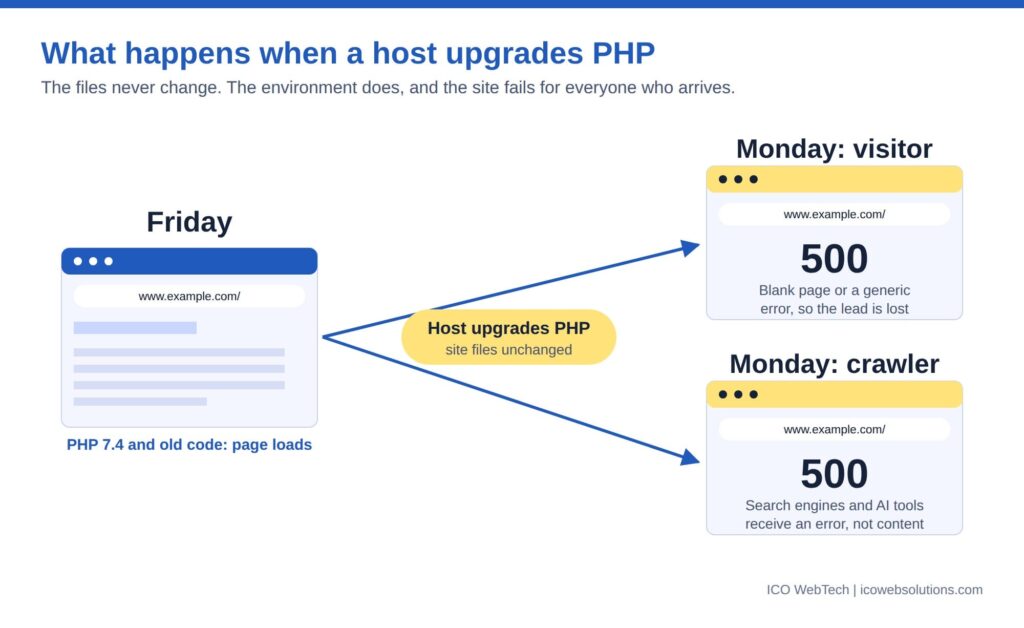
It is the same pattern covered in ICO WebTech’s post on why maintenance decides whether AI search can use your website: the most damaging problems are the ones the owner never sees. A PHP fatal error shows visitors a blank page or a generic 500 message. It shows crawlers the same thing. Search engines and AI tools that arrive during the outage receive an error where content should be, and repeated failures reduce how often they come back.
Monitoring is the gap. A basic ping or port check reports a site as up even when every page returns an error, because the server answered. Only a check that requests real pages and reads the response catches it.
Where the debt comes from
Four sources account for most of it.
Abandoned plugins and themes
A plugin that has not been updated in years was written against an older PHP release. Its author may have stopped supporting it. It works until the version it relied on disappears. Premium themes bundled with old page builders behave the same way. The site owner cannot fix these in place, because the code belongs to someone else.
Custom code written for older PHP
Bespoke functionality written a decade ago carries habits that later versions reject: functions that no longer exist, constructors named after the class, loose handling of null values. This is the debt agencies leave behind when they build and move on. A website designing agency in Delhi that delivers a site and never revisits its code hands the client a countdown, not a finished product.
Platforms pinned to the past
Every CMS, ecommerce platform and framework declares which PHP versions it supports. Upgrading PHP without upgrading the platform breaks the platform. Upgrading the platform can break every extension built for it. Heavily extended ecommerce and WordPress builds are typical cases, because each extension adds its own dependency.
Hosting on autopilot
Budget shared hosting often runs one PHP version for every customer on a server. The owner never opens the control panel. Nobody owns the question of which version the site runs on, and nobody is told when it changes.
What actually breaks
The breakage falls into predictable groups. The table explains why each one fails, not how to repair it, because the repair depends on the codebase.
| Change | Version | Why old code fails |
|---|---|---|
| mysql_* database functions removed | 7.0 | Sites written before mysqli or PDO call functions that no longer exist. Any call is a fatal error. |
| create_function() and each() removed | 8.0 | Both were common in older scripts and plugins. Calling either now stops the page. |
| Class-named constructors no longer recognized | 8.0 | Old-style constructors stop running as constructors, leaving objects uninitialized. |
| Non-static methods cannot be called statically | 8.0 | Older code that called methods this way throws errors. |
| match becomes a reserved keyword | 8.0 | Code that uses the name for its own functions or classes conflicts with the language. |
| Passing null to built-in parameters that reject it is deprecated | 8.1 | Old code passes null to string functions constantly. Notices appear, and the deprecation signals a future error. |
| Dynamic properties deprecated | 8.2 | Objects that gain undeclared properties raise notices. Common in older plugins and themes. |
Two behaviors matter more than the list. Removals produce fatal errors, which stop the page. Deprecations produce notices, which do not. That difference is where the debt hides.
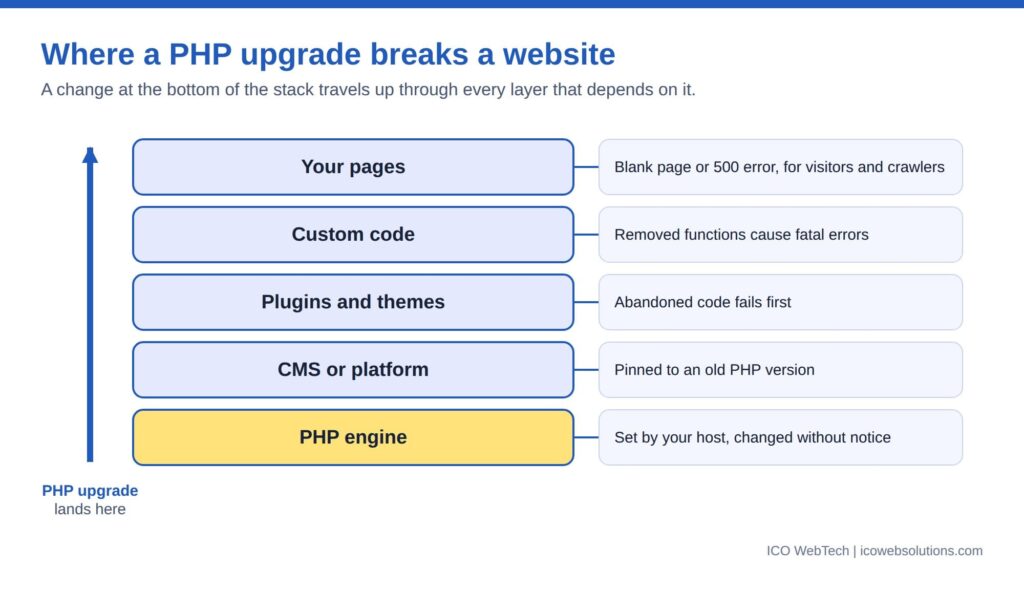

Deprecation notices are the warning nobody reads
A deprecation notice says that something works today and will not work in a future version. PHP writes it to the error log. On a production server, error display is normally switched off, so visitors see nothing and the log is rarely opened.
That creates a long period in which a site announces its own decline in a file nobody reads. A single outdated plugin can write a notice on every page load. Each one is a future failure with a date attached.
Reading that log is the earliest and cheapest form of compatibility checking. A site with a quiet log is in a different position from one whose log grows every hour, even when both look identical in a browser.
Fatal errors get fixed. Notices get ignored. The notices are the invoice arriving early.
The business cost: downtime is the cheap part
Owners price the problem as the cost of fixing a broken page. The real bill has more lines.
Lost enquiries. A blank page during business hours is a lost lead. Contact forms, checkout and booking flows fail first because they run the most custom code.
Search visibility. Server errors at crawl time reduce how reliably pages get fetched, and pages that keep failing can drop out of results until they recover. Speed shares the same root: older PHP releases generally run slower than current ones, which feeds the metrics covered in ICO WebTech’s post on the relationship between website speed and conversions.
Security exposure. After end of life, new vulnerabilities in the PHP engine stay unpatched. Sites that hold customer data or take payments sit an unpatched runtime under their own code.
Emergency pricing. Fixing a site during an outage costs more than fixing it on a calendar. Developers work under time pressure, testing gets skipped, and the fix often causes the next fault.
Forced rebuild. The last line item is the site itself. When enough components are incompatible, patching costs more than starting again, and businesses reach that decision in the worst possible week.
Set that against the cost of checking versions once a quarter. The gap explains why maintenance belongs in the budget as a running cost, not a rescue fee.
Patch, replace or rebuild: the economics
Every site with version debt faces the same three options.
Patch. Right when the debt is confined to a few components and the platform is current. It is the cheapest fix per incident, but each patch leaves the underlying dependency in place.
Replace components. Right when specific plugins or modules are abandoned and maintained alternatives exist. It costs more up front and lowers future risk.
Rebuild. Right when the platform is itself out of support, the custom code is undocumented, or the cost of the first two options approaches that of a fresh build. A workable test: if patching costs more than roughly half of a rebuild, the rebuild is the better spend, because the repairs buy nothing durable.
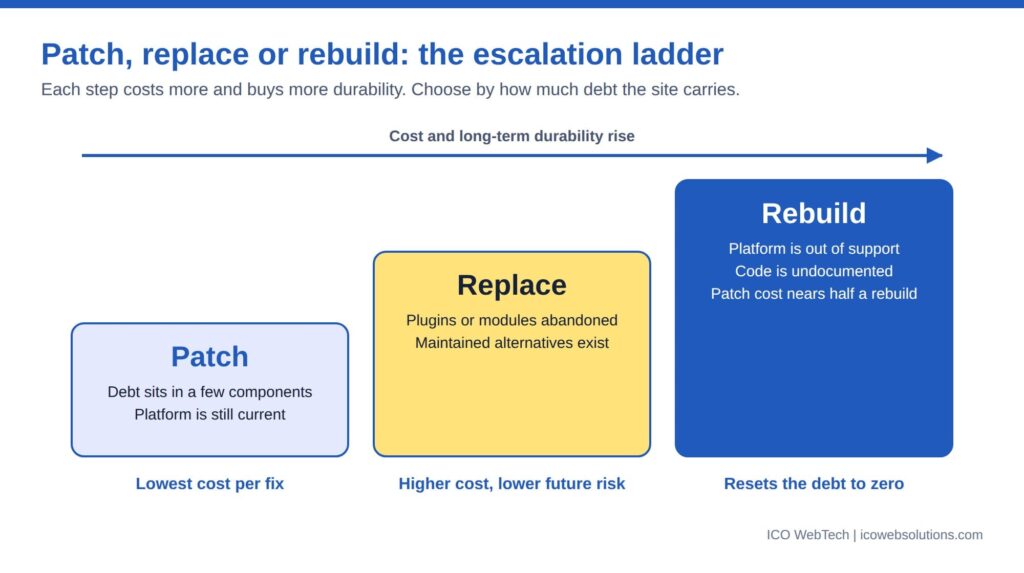

Rebuilding is not always the expensive answer. ICO WebTech’s website redesign work often starts from exactly this situation, and a rebuild is the point at which hosting, platform and code can finally be matched to each other. Hosted builders remove this class of problem because the vendor manages the runtime, at the price of flexibility, a trade-off covered in the post on choosing a website designing company or a DIY builder. A rebuild also changes URLs, which makes redirects and link hygiene part of the job; the internal linking guide covers the mechanics.
The ownership side of this problem is its own subject. Many sites carry debt because the person who built them left, a theme covered from the client’s side in the post on why business owners fire their website designer.
What a maintenance provider owes you
A plan that updates plugins and takes backups keeps a site running today. It does not manage PHP version debt. A website maintenance company in Delhi, or anywhere else, should be able to answer five questions:
- Which PHP version does each site run, and when does that version lose support?
- Is every plugin, theme and extension compatible with the next version up?
- Is there a staging copy where an upgrade gets tested before the live site changes?
- Who reads the error log, and how often?
- What is the plan when the host announces a retirement date?
These are the questions ICO WebTech’s maintenance service is built around, alongside the engineering handled by its PHP development company team. A provider that cannot answer them is maintaining a website, not the risk around it.
The same standard applies at the build stage. When comparing a website designing agency in Delhi, ask which PHP versions the finished site supports, how dependencies are documented, and who tracks compatibility after launch. An agency that answers with specifics has planned for the day the host moves on. One that changes the subject has not.
The bottom line
PHP version debt turns a routine hosting change into an emergency. The upgrade is never the cause. The cause is years of components that stopped being updated while the platform underneath kept moving.
Compatibility should be tracked on a schedule, with a named owner, before a host forces the question. The December 31, 2026 end-of-life date for PHP 8.2 is a natural deadline for that review.
Related: website maintenance, PHP development, website speed optimization and WordPress development.

Beyond Keywords: Mastering Topic Clustering for Absolute Search Authority
Search engine optimization has changed dramatically over the past decade. There was a time when SEO could be approached largely as a keyword exercise. Businesses would identify valuable search terms, place those terms in page titles and headings, create content around them, build links, and monitor rankings. While keywords remain important, that approach on its own is no longer enough for businesses that want to build lasting organic visibility.
Modern search engines are far better at understanding relationships between words, concepts, entities, questions, products, services, and topics. A page does not exist in isolation. It exists within a larger subject area, and the depth and consistency of a website’s coverage can influence how clearly search engines understand its expertise.
This is where topic clustering becomes increasingly important.
Topic clustering is the practice of organizing content around a central subject and connecting it with a group of closely related subtopics through a deliberate internal linking and information architecture strategy. Instead of publishing individual articles that each target an isolated keyword, a website builds a connected body of information designed to comprehensively address a broader area of user interest.
The difference may sound subtle, but strategically it is enormous.
Imagine a company trying to rank for a competitive term such as SEO company in Delhi. A traditional keyword-focused approach might create one service page optimized around that phrase and perhaps a few supporting blog posts. A topic-cluster approach asks a much larger set of questions. What does SEO involve? How does local SEO work in Delhi? What should businesses look for when selecting an SEO provider? How does technical SEO affect performance? How does content strategy contribute to rankings? What does ecommerce SEO involve? How should B2B companies approach SEO? How can businesses measure SEO results? What role does Google Search Console play? How do backlinks affect authority? How should businesses approach keyword research?
Each of these questions represents a related piece of the broader SEO topic.
When those pieces are researched, written, structured, internally linked, and maintained strategically, the website begins to demonstrate depth rather than simply repeating a keyword.
This is the real purpose of topic clustering.
It is not about producing more content for the sake of producing more content. It is about building a coherent knowledge structure that helps users and search engines understand a subject thoroughly.
For businesses competing in crowded search markets, topic clustering can become one of the most effective ways to move beyond individual keyword rankings and build genuine search authority.
What Is Topic Clustering?
At its simplest, topic clustering organizes website content around a central topic known as the pillar topic, with supporting content covering related subtopics.
The pillar page provides a broad and authoritative overview of the main subject. Supporting pages then explore specific aspects of that subject in greater detail.
These supporting pages are connected to the pillar page and, where relevant, to one another through contextual internal links.
For example, a digital marketing company might create a comprehensive pillar page about search engine optimization. Supporting pages could explore technical SEO, local SEO, ecommerce SEO, SEO content strategy, link building, keyword research, SEO audits, Core Web Vitals, international SEO, SEO reporting, and other closely related subjects.
The result is not simply a collection of articles. It is a structured topic ecosystem.
The user can start with a broad explanation and then move deeper into areas relevant to their needs. Search engines can also discover the relationships between these pages through internal links, consistent terminology, topical relevance, and the overall structure of the website.
Why Keywords Alone Are No Longer Enough
Keywords remain fundamental to SEO because they provide clues about what people search for. The problem arises when keywords become the entire strategy.
A keyword is a representation of a search query. It is not necessarily a complete representation of the user’s information need.
Consider someone searching for “SEO company in Delhi.” That phrase could represent several different intentions. The person might be looking for an agency, comparing service providers, researching SEO pricing, searching for local expertise, looking for a company specializing in a particular industry, or simply trying to understand what services are available.
If a website focuses exclusively on repeating the exact phrase “SEO company in Delhi,” it may fail to address many of the questions surrounding the decision.
A stronger website understands the broader topic.
It can explain SEO services, local search strategy, technical optimization, content marketing, link acquisition, analytics, reporting, industry-specific approaches, campaign processes, and expected outcomes. It can also demonstrate experience through case studies and explain how businesses should evaluate an SEO provider.
The keyword remains part of the strategy, but it is no longer the strategy itself.
Search Intent Is the Foundation of Topic Clustering
A successful topic cluster begins with search intent.
Before deciding which articles to create, a business should understand what users are trying to accomplish when they search for information related to the subject.
Some searches are informational. The user wants to understand something.
Some are navigational. The user wants to find a particular website, company, product, or resource.
Some are commercial. The user is researching options before making a decision.
Others are transactional. The user is ready to take an action such as purchasing, booking, requesting a quotation, or contacting a service provider.
A topic cluster should ideally accommodate multiple stages of this journey.
For an SEO company, informational content might explain how SEO works. Commercial content might compare SEO services or explain how to choose an agency. Transactional pages might focus on specific SEO services and encourage businesses to request a consultation.
This creates a natural progression from learning to evaluation to action.
The Pillar Page: The Center of the Cluster
The pillar page is the central resource around which the topic cluster is organized.
A good pillar page should provide a comprehensive overview of the primary subject without attempting to answer every possible question in exhaustive detail.
Its job is to establish the context and guide users toward deeper resources.
For example, a pillar page titled “Complete Guide to SEO” could explain the fundamentals of SEO, its major components, the importance of technical optimization, content, links, local search, measurement, and strategy.
Each major section could then link to a more detailed supporting article.
The supporting page about technical SEO might explore crawling, indexing, structured data, site architecture, page speed, JavaScript rendering, canonicalization, and other technical subjects.
The pillar page provides breadth. The supporting pages provide depth.
That relationship is central to topic clustering.
Supporting Content: Where Topical Depth Is Built
Supporting content should answer specific questions or explore specific subtopics that naturally belong within the larger subject.
The key word here is “naturally.”
Not every remotely related keyword deserves its own article.
Creating pages simply because a keyword tool produces a list of related phrases can lead to bloated websites containing repetitive or low-value content.
Supporting content should exist because users have a meaningful reason to consume it.
If a business is building an SEO cluster, an article explaining technical SEO makes sense. An article explaining local SEO makes sense. A guide to SEO audits makes sense. A page explaining SEO reporting makes sense.
An article about an unrelated marketing topic simply because it contains a keyword with the word “SEO” does not necessarily strengthen the cluster.
Topic Clusters Versus Keyword Clusters
It is useful to distinguish between topic clustering and keyword clustering.
Keyword clustering groups similar search terms based on semantic similarity or search-result overlap. This can help determine which keywords can be targeted by the same page.
Topic clustering goes further.
It considers the broader subject ecosystem and determines which distinct pages are needed to cover meaningful subtopics.
For example, several keywords such as “SEO agency Delhi,” “SEO company Delhi,” “SEO services Delhi,” and “SEO firm Delhi” might represent variations of the same underlying commercial intent. Creating a separate page for each phrase could create unnecessary duplication.
A stronger strategy may target the underlying intent with one authoritative service page while using supporting content to cover related questions.
The objective is not to maximize the number of URLs targeting similar keywords.
The objective is to maximize useful topical coverage.
Understanding Semantic Relationships
Modern search systems evaluate language in context.
When a website consistently discusses a subject using relevant terminology and connected concepts, it becomes easier for search engines to understand what the site is about.
For example, a comprehensive SEO resource might naturally discuss crawling, indexing, rankings, search intent, backlinks, internal linking, structured data, content quality, local search, analytics, conversions, and technical performance.
These concepts form a semantic network.
Writing naturally about the subject allows these relationships to emerge without forcing keywords into every paragraph.
This is one reason experienced SEO professionals increasingly focus on topical relevance instead of keyword repetition.
How Topic Authority Is Built
Topic authority is not a switch that can simply be turned on.
It develops through consistent, useful coverage of a subject.
A website demonstrates expertise by answering important questions, covering related concepts, providing original insights, maintaining accurate information, linking related resources, and demonstrating real-world experience.
This does not mean a website must publish hundreds of articles before it can rank.
Quality matters more than an arbitrary content count.
A smaller cluster with excellent content can be more valuable than a huge collection of shallow articles.
Mapping a Topic Before Creating Content
One of the most important stages of topic clustering happens before writing begins.
The SEO team needs to map the subject.
This involves identifying the main topic, related entities, subtopics, questions, user intents, commercial pages, supporting resources, and internal relationships.
For an SEO company in Delhi, the topic map might include SEO services, local SEO, technical SEO, ecommerce SEO, B2B SEO, enterprise SEO, content strategy, keyword research, link building, SEO audits, SEO reporting, SEO pricing, and industry-specific SEO.
Each subject can then be evaluated for relevance and business value.
Some topics may deserve dedicated service pages. Others may work better as educational articles. Some may belong inside a comprehensive guide. Some may not deserve a page at all.
This planning stage prevents content duplication and creates a logical architecture.
Keyword Research Still Matters
Moving beyond keywords does not mean abandoning keyword research.
Keyword research remains useful for understanding language, demand, competition, and user behavior.
The difference is how the information is interpreted.
Instead of asking only, “What keyword should this article rank for?” the strategist can ask, “What user need does this keyword represent, and how does that need fit into our broader topic architecture?”
This produces more meaningful content decisions.
Keyword research can reveal questions people ask, variations in terminology, commercial modifiers, geographic intent, comparison searches, and emerging areas of interest.
These insights can then be organized into a topic map.
Search Result Analysis for Topic Clustering
Search results themselves provide valuable information about how a topic is structured.
When several related searches consistently return similar types of pages, that can indicate that Google interprets them as having closely related intent.
Conversely, if different queries produce very different search results, they may represent distinct intents and deserve separate pages.
This is an important technique for avoiding keyword cannibalization.
Instead of automatically creating a page for every variation of a keyword, the SEO team can examine whether those searches genuinely require different experiences.
Keyword Cannibalization and Topic Clusters
Keyword cannibalization occurs when multiple pages on the same website compete for overlapping search intent.
This can happen when businesses publish several articles that are slightly different versions of the same topic.
For example, an SEO website might create separate pages titled “What Is SEO?”, “How Does SEO Work?”, “SEO Basics,” “SEO Guide,” and “Introduction to SEO,” with all five pages targeting almost the same intent.
Instead of strengthening authority, this can divide the website’s relevance across multiple URLs.
A topic cluster encourages clearer differentiation.
The pillar page can target the broad topic while supporting pages focus on genuinely distinct subtopics.
This makes the purpose of each URL clearer.
Internal Linking: The Connective Tissue
Internal linking is one of the most important elements of a topic-cluster strategy.
Without internal links, supporting content may remain isolated.
With thoughtful internal linking, pages become part of a connected information system.
The pillar page should link to important supporting resources. Supporting pages should link back to the pillar when contextually appropriate. Related supporting pages can also link to one another when doing so helps the reader.
The links should feel natural.
A sentence discussing local SEO can link to a detailed local SEO guide. A section discussing technical audits can link to a technical SEO audit resource. A paragraph about keyword research can reference a deeper keyword research guide.
This creates a useful journey for users and a clearer topical relationship among pages.
Anchor Text and Internal Links
Anchor text provides context about the page being linked to.
Instead of using generic phrases such as “click here,” descriptive anchor text can explain what the user will find.
For example, a sentence about optimizing a website for local searches could naturally link to a page about local SEO strategies.
However, internal linking should not become an exercise in stuffing exact-match keywords into every anchor.
Natural language is usually more useful for both readers and search engines.
Content Depth Versus Content Length
Topic authority is sometimes misunderstood as a word-count competition.
A 5,000-word article is not automatically more authoritative than a 1,500-word article.
What matters is whether the content adequately satisfies the intent.
Some subjects require extensive explanations, examples, definitions, and technical detail. Others can be answered effectively in a shorter format.
Content should therefore be as comprehensive as necessary, not as long as possible.
Artificially increasing word count can make articles harder to read and can dilute the most important information.
Creating Humanized Content for Topic Clusters
Topic clustering should never result in robotic writing.
Readers want explanations that sound natural, clear, and useful.
Humanized content uses examples, context, transitions, practical observations, and language appropriate to the audience.
For a business audience, that may mean explaining how SEO affects sales pipelines, procurement decisions, lead quality, or customer acquisition rather than simply defining technical terms.
For consumers, the same subject might be explained through simpler examples.
Understanding the audience allows the topic cluster to become more than a collection of optimized pages.
It becomes a knowledge resource.
Topic Clusters and the Customer Journey
A sophisticated topic cluster can support customers at multiple stages of their journey.
At the awareness stage, users may be looking for educational information.
During consideration, they may compare approaches, providers, technologies, or costs.
At the decision stage, they may want case studies, testimonials, service details, pricing information, or direct contact options.
A website that connects these stages can guide visitors naturally from learning to action.
For an SEO company in Delhi, this might mean connecting an educational article about SEO fundamentals to a deeper guide about local SEO, then to a service page explaining the agency’s SEO process, and finally to a case study demonstrating results.
That is a much stronger customer journey than sending every visitor directly to a generic contact page.
Topic Clustering for Local SEO
Local businesses can use topic clustering to build authority around their geographic markets without creating hundreds of thin location pages.
A business might create a central page explaining its services in a particular city and then develop supporting content around local customer needs, industry considerations, local search behavior, and relevant services.
The content should reflect genuine local expertise.
For an SEO company in Delhi, for example, useful supporting content might discuss local SEO for Delhi businesses, SEO considerations for businesses in different sectors, local search optimization, Google Business Profile strategy, local landing pages, and the challenges businesses face when competing in Delhi’s crowded market.
The location becomes part of the subject rather than merely a keyword inserted into page titles.
Topic Clustering for B2B Companies
B2B companies can benefit significantly from topic clustering because their buyers often require extensive information before making a decision.
A manufacturer might build a content cluster around a specific manufacturing technology.
The pillar page could explain the technology and its applications. Supporting pages could discuss materials, specifications, industries, maintenance, comparison with alternative technologies, implementation considerations, and common buyer questions.
This creates an information environment that can support technical buyers, procurement professionals, engineers, and decision-makers.
Topic Clustering for Ecommerce
Ecommerce websites can build topic clusters around product categories, applications, buyer needs, and product education.
For example, a website selling professional photography equipment might have a pillar category for studio lighting and supporting educational content about choosing lights, color temperature, lighting modifiers, studio setups, and maintenance.
The product pages then sit within this broader ecosystem.
This allows informational content to support commercial pages while helping visitors move from research toward purchasing decisions.
Topic Clustering for SaaS Companies
SaaS companies have extensive opportunities for topic clustering because their products often solve multiple problems for different audiences.
A software platform might create clusters around use cases, industries, integrations, workflows, implementation, security, and comparisons.
For example, a CRM platform could create a central CRM guide supported by content about lead management, sales automation, customer segmentation, reporting, CRM integrations, CRM implementation, and industry-specific CRM use cases.
These pages can support users throughout the buying journey.
Topic Clustering for Professional Services
Law firms, consulting companies, financial advisors, marketing agencies, IT companies, architects, and other professional service providers can also use topic clusters.
Professional services often involve high-consideration purchases, meaning potential customers may consume substantial educational content before contacting a provider.
A well-designed cluster allows the company to demonstrate expertise before the sales conversation begins.
That can make the eventual enquiry more informed and potentially more qualified.
Building an SEO Cluster Around “SEO Company in Delhi”
Consider a hypothetical website whose commercial objective is to attract businesses searching for an SEO company in Delhi.
The central commercial page would explain the company’s SEO services, approach, expertise, industries served, process, reporting, and conversion options.
Supporting content could address topics such as local SEO in Delhi, technical SEO, ecommerce SEO, B2B SEO, SEO audits, keyword research, content strategy, link building, SEO reporting, SEO pricing, common SEO mistakes, and selecting an SEO provider.
The cluster can also include case studies demonstrating how SEO strategies have been applied to specific businesses or industries.
These pages should not simply repeat the same sales pitch.
Each page should answer a distinct question and provide a logical pathway toward relevant commercial resources.
Why Industry-Specific Content Strengthens a Cluster
SEO strategies can vary substantially between industries.
A local restaurant, manufacturing company, ecommerce store, SaaS company, hospital, real-estate developer, and B2B distributor may all require different approaches.
Industry-specific supporting content can therefore demonstrate a deeper understanding of the subject.
For an SEO company targeting Delhi businesses, creating useful resources around industries served can make the overall website more commercially relevant.
Instead of saying that the agency “works with all industries,” the website can demonstrate what SEO considerations look like in different environments.
Entity-Based SEO and Topic Clusters
Entities are another important part of modern search.
An entity can be a person, company, place, product, organization, concept, or other identifiable subject.
Topic clusters often naturally connect multiple entities.
An SEO website might discuss Google Search Console, Google Analytics, WordPress, ecommerce platforms, search engines, content management systems, local business profiles, and various SEO concepts.
The relationships among these entities help establish context.
Well-structured content can explain how the entities relate to the central topic rather than simply mentioning them.
Topical Relevance and Backlinks
Backlinks remain an important part of SEO, but topical relevance can make link acquisition more meaningful.
When a website publishes genuinely useful resources, those resources may attract references from other websites.
A comprehensive guide can become a resource that journalists, bloggers, industry publications, educators, and businesses reference.
Supporting pages can also provide specific information that earns links independently.
This creates an additional benefit of topic clustering: a well-developed knowledge ecosystem creates more potential assets worthy of citation.
Topic Clusters and Link Building
Link-building campaigns can become more strategic when they are connected to topic clusters.
Instead of building links only to the homepage or one commercial service page, a business can develop authoritative resources that deserve external references.
These resources can then strengthen the broader topic ecosystem through internal linking.
The strategy becomes a combination of external authority and internal relevance.
Updating Existing Content
Building topic authority does not mean continuously creating new pages while ignoring existing ones.
Older content may become outdated, overlap with newer pages, or fail to address changes in user behavior.
Regular content audits can identify pages that need updating, merging, redirecting, expanding, or removing.
This process is particularly important for topic clusters because the relationships among pages can change as the website grows.
A cluster that was well organized two years ago may become fragmented after hundreds of new articles are published.
Content Pruning and Consolidation
Sometimes the best SEO action is not creating another article but consolidating several existing ones.
If five pages address almost the same search intent, combining them into one stronger resource may produce a better result.
The outdated or redundant URLs can then be redirected where appropriate.
This reduces duplication and concentrates relevance.
Content pruning should be based on evidence rather than deleting pages simply because they receive little traffic. Some pages may support the cluster, attract links, or serve users even if their direct organic traffic is modest.
Measuring Topic Cluster Performance
Topic clusters require a broader measurement approach than individual keyword tracking.
Businesses should look at the performance of the cluster as a whole.
Organic impressions across the topic, clicks, ranking distribution, traffic to pillar and supporting pages, internal-link engagement, conversions, assisted conversions, backlinks, and growth in relevant search visibility can all provide useful insights.
The most important metric will depend on the business.
A B2B company may care primarily about qualified leads. An ecommerce store may focus on revenue. A publisher may focus on organic sessions and engagement.
Rankings remain useful, but they should be treated as one signal rather than the final business objective.
Using Search Console to Find Cluster Opportunities
Search performance data can reveal queries that a website already appears for but does not fully address.
A page might receive impressions for several related questions even though its content focuses on only one of them.
This can reveal opportunities for new supporting pages or content improvements.
For example, an SEO agency might discover that its page targeting SEO services is receiving impressions for searches related to local SEO pricing, technical audits, ecommerce SEO, and SEO reporting.
Instead of forcing all of those topics into one page, the agency can evaluate whether separate resources would provide a better experience.
This makes search data a source of content strategy rather than simply a ranking report.
Using Customer Questions to Build Clusters
Some of the best topic ideas do not come from keyword tools.
They come from customers.
Sales teams hear questions during consultations. Support teams hear recurring problems. Account managers hear objections. Product teams hear feature requests.
These questions represent real information needs.
Turning them into useful content can make a topic cluster more practical and more human.
For example, potential SEO clients may repeatedly ask how long SEO takes, how SEO pricing works, whether businesses should hire an agency or an in-house team, how results are measured, or whether local SEO is necessary.
Each question can potentially become part of a broader educational ecosystem.
Using Competitor Research Carefully
Competitor analysis can help identify gaps in topical coverage.
If competing websites consistently address certain subjects that a business has ignored, those subjects may deserve investigation.
However, copying competitor content is not a strategy.
The goal is to understand the information landscape and identify opportunities to provide something better, clearer, more original, or more useful.
A competitor may have ten pages on a topic, while your business could create one exceptionally useful guide supported by carefully chosen resources.
Content Gaps Versus Content Opportunities
A content gap is not automatically an opportunity.
A competitor may rank for a topic that has little relevance to your customers.
Similarly, a keyword may have significant search volume but very little commercial value for your business.
Topic clustering should therefore prioritize relevance and business value rather than chasing every possible gap.
Creating a Logical Information Architecture
Topic clusters work best when the website’s navigation and hierarchy support them.
A user should be able to understand how content is organized.
Important commercial pages should connect naturally to relevant educational resources.
Educational resources should guide users toward related services where appropriate.
The hierarchy should not become so complicated that users cannot find what they need.
Good information architecture balances breadth, depth, and simplicity.
Categories, Tags, and Topic Clusters
CMS features such as categories and tags can help organize content, but they should not be confused with a complete topic-cluster strategy.
Creating a tag for every keyword can generate hundreds of thin archive pages.
Categories should represent meaningful content groups, while internal links should communicate specific contextual relationships.
The strategy should begin with information architecture rather than with whatever taxonomy options happen to exist in the CMS.
Topic Clusters and Programmatic SEO
Topic clustering can also work alongside programmatic SEO when a website has thousands of structured pages.
A marketplace, directory, or large B2B website may use programmatic pages to cover products, locations, industries, or categories while using editorial topic clusters to explain broader concepts.
For example, a real-estate website might have thousands of programmatically generated property and location pages supported by editorial guides about buying property, mortgage considerations, neighbourhood selection, property types, and investment strategies.
The programmatic layer captures specific search demand while the editorial layer establishes topical depth.
These approaches can complement each other when carefully designed.
Avoiding Thin Supporting Content
One of the biggest dangers of topic clustering is creating supporting pages that do not deserve to exist independently.
An article should not be created merely because the cluster has an empty slot.
Every page should have a clear purpose.
It should answer a distinct question, provide useful information, or serve a meaningful stage of the customer journey.
If two topics are too similar to justify separate pages, they may be better combined.
How Many Pages Should a Topic Cluster Have?
There is no universal number.
A simple topic may require only a handful of supporting resources.
A broad and commercially important subject may support dozens or even hundreds of pages.
The correct number is determined by the breadth of the topic, user demand, business relevance, and the ability of the company to produce genuinely valuable content.
Trying to reach a predetermined article count can encourage unnecessary content.
A better question is whether the important user needs have been adequately addressed.
Topic Clustering for Competitive Keywords
Highly competitive keywords often require more than a single optimized page.
Competition can be strong because many authoritative websites are addressing the same subject.
A topic cluster allows a business to demonstrate depth across related areas.
Instead of publishing one page and waiting for rankings, the business builds an ecosystem of resources that supports the broader subject.
This does not guarantee rankings, but it creates a much stronger strategic foundation.
Why Topical Authority Takes Time
Topic authority is built over time.
Search engines need to discover pages, process their content, understand their relationships, evaluate their usefulness, and observe how the website performs.
Users also need time to discover and trust the resources.
Businesses should therefore avoid expecting immediate results from a topic-cluster strategy.
The most sustainable approach is to build systematically and evaluate performance over time.
The Role of Experience in Topic Authority
Information alone does not always differentiate content.
Real-world experience can.
An SEO company discussing SEO strategy can strengthen its content by sharing practical observations, campaign lessons, implementation challenges, examples, and original insights.
A manufacturer can discuss its own engineering experience. A software company can explain implementation lessons. A consultant can discuss recurring client challenges.
Experience makes content more credible and less interchangeable.
Original Data as a Topic Authority Asset
Original research can be particularly valuable.
A company may have access to internal performance data, customer surveys, industry observations, product statistics, or other information that can support unique content.
Original data can make a page more useful and more likely to attract references from other websites.
For example, an SEO company could publish an anonymized analysis of search trends across a group of industries, provided the methodology and data are appropriate for public use.
This type of resource can become an authority asset within a cluster.
Topic Clustering and Brand Authority
Topical authority can also strengthen brand perception.
When a prospective customer repeatedly encounters useful resources from the same company while researching a subject, familiarity develops.
By the time the customer reaches a commercial page, the company may already be perceived as knowledgeable.
This is particularly valuable for professional services, where customers often buy expertise rather than a physical product.
Building Trust Through Consistency
Consistency matters across a topic cluster.
Definitions should not contradict one another. Terminology should be used consistently. Statistics should be accurate. Links should remain functional. Outdated claims should be corrected.
A cluster that contains contradictory information can undermine trust.
Content governance therefore becomes increasingly important as a website expands.
Topic Clusters and Conversion Paths
Educational content should not become disconnected from the commercial purpose of the website.
At appropriate points, supporting articles can link to relevant services, products, case studies, or contact pages.
The links should be contextually relevant.
A reader learning about technical SEO may reasonably be interested in an SEO audit service. Someone reading about ecommerce SEO may benefit from seeing an ecommerce SEO service page or relevant case study.
This creates a natural bridge between information and business value.
Calls to Action Within Educational Content
Calls to action should be subtle and appropriate to the reader’s stage.
A visitor reading a beginner’s guide may not be ready to request a proposal.
A softer CTA such as exploring related resources can be more appropriate.
Someone reading a detailed service comparison may be closer to a commercial decision and may respond better to an enquiry option.
Topic clusters make these journeys easier to design because the content itself provides context about user intent.
Topic Clustering and Local Competition
Local search can be extremely competitive in major business markets.
Companies competing for terms such as SEO company in Delhi need more than a location name on a homepage.
They need to demonstrate why they understand the market, the services, and the needs of local businesses.
A well-built topic cluster can help establish that depth.
Local SEO resources, industry-specific guides, case studies, service pages, technical resources, and practical educational content can all contribute to a stronger overall presence.
Creating a Cluster Strategy for an SEO Agency
An SEO agency can structure its website around several major content ecosystems.
The primary commercial topic might be SEO services. Supporting clusters could cover local SEO, technical SEO, ecommerce SEO, content marketing, link building, analytics, industry-specific SEO, and SEO strategy.
Each cluster can have a pillar resource and a carefully selected set of supporting pages.
Commercial pages can sit alongside educational resources without every page attempting to sell directly.
This allows the website to attract users at different stages of awareness.
Why the SEO Agency’s Own Website Matters
An agency that sells SEO should ideally demonstrate its expertise through its own website.
A potential client searching for an SEO company in Delhi is likely to examine not only the service page but also the quality of the website’s resources.
A website with thoughtful content, clear expertise, useful case studies, strong architecture, and a professional user experience can reinforce the company’s positioning.
The website becomes part of the pitch.
Using Case Studies Within Topic Clusters
Case studies provide an important bridge between educational content and proof.
An article might explain a particular SEO concept, while a case study demonstrates how that concept was applied in practice.
Internal links can connect the two.
This gives readers both theory and evidence.
For an SEO company, this can be especially persuasive because potential clients want to know whether the agency can apply its knowledge to real businesses.
Topic Clusters and Thought Leadership
Thought leadership should not simply mean expressing opinions.
Strong thought leadership combines expertise with evidence, experience, original observations, and useful analysis.
A topic cluster provides a natural environment for this.
The pillar page establishes the fundamentals. Supporting articles can explore emerging trends, practical lessons, industry changes, and original perspectives.
This can help differentiate the brand from websites that simply reproduce generic information.
Updating Clusters When Search Behavior Changes
Search behavior is not static.
New technologies emerge. Industries change. Regulations evolve. Products are introduced. Users adopt new terminology.
A good topic-cluster strategy should therefore be flexible.
New supporting pages may need to be created. Existing pages may need updates. Some content may become obsolete.
The cluster should evolve with the subject.
AI Search and Topic Clustering
The rise of AI-powered search makes structured topical knowledge even more relevant.
Users increasingly expect search systems to understand questions and provide synthesized answers rather than simply matching exact words.
Businesses cannot control exactly how AI systems discover or present information, but they can control the quality and structure of the information they publish.
Clear explanations, well-organized content, consistent terminology, trustworthy sources, structured information, and strong internal relationships create a better foundation for machine understanding.
This is another reason to think beyond isolated keywords.
Topic Clustering Is an Information Architecture Strategy
At a deeper level, topic clustering is not just a content-marketing tactic.
It is an information architecture strategy.
It determines how knowledge is organized, how pages relate to one another, how users navigate the website, and how search engines interpret the subject matter.
When approached this way, SEO becomes integrated into the design of the website rather than being something added after content has been published.
The Relationship Between Navigation and Clusters
Main navigation should expose the most important commercial areas of the website.
Not every supporting article needs to appear in the main navigation.
Internal links, related-resource sections, contextual references, breadcrumbs, and category pages can provide access to deeper content without making the primary navigation overwhelming.
This keeps the website usable while maintaining strong relationships between pages.
Breadcrumbs and Topic Relationships
Breadcrumbs can help users understand where a page sits within the website structure.
They are especially useful for larger websites containing multiple content levels.
A breadcrumb might show a visitor that they are reading an article within an SEO resources section or viewing a service within a broader digital marketing category.
This provides another layer of contextual information.
Topic Clusters and Structured Data
Structured data can support the technical understanding of pages where appropriate.
Depending on the content type, websites may use relevant schema markup to describe articles, organizations, products, services, breadcrumbs, and other entities.
Structured data does not replace good content or guarantee enhanced search visibility.
Its role is to help communicate what a page represents in a machine-readable format.
Content Templates and Consistency
Templates can help maintain consistency across supporting pages.
A template might include an introduction, key concepts, practical considerations, examples, related resources, FAQs, and a relevant CTA.
However, templates should not force every article into exactly the same shape.
The structure should adapt to the topic.
An article explaining a technical process may require diagrams and implementation details, while a comparison guide may benefit from side-by-side analysis.
Consistency should support quality rather than eliminate individuality.
Building Topic Clusters With Existing Content
Businesses do not always need to start from scratch.
Many websites already contain valuable content that is simply poorly organized.
An audit can identify existing pages that belong to the same topic.
These pages can then be grouped, internally linked, updated, consolidated, or reorganized around a pillar page.
This can sometimes produce significant improvements without requiring hundreds of new articles.
Finding Orphan Pages
An orphan page is a page that receives little or no internal linking from other parts of the website.
Large websites can accumulate orphan pages over time.
Topic-cluster audits should identify these pages and determine whether they should be integrated into relevant clusters.
If a page is valuable but isolated, adding appropriate internal links can make it easier for users and search engines to discover.
Cluster Health Audits
Topic clusters should be audited periodically.
The audit can examine whether every page has a clear purpose, whether internal links are logical, whether important pages receive sufficient internal authority, whether content overlaps, whether information remains accurate, and whether gaps remain.
The goal is not simply to count pages.
The goal is to assess whether the cluster still provides a coherent and useful experience.
Content Quality Signals
High-quality content typically demonstrates clarity, accuracy, relevance, useful detail, appropriate sourcing, and a strong understanding of the audience.
For businesses, original experience can strengthen the content further.
A topic cluster should therefore avoid generic articles that could have been written by any website.
The more a business can incorporate its genuine expertise, examples, processes, data, and observations, the more differentiated the content can become.
Why Generic AI Content Can Weaken Topic Clusters
AI can help content teams research, structure, draft, summarize, and improve material.
But publishing large volumes of generic AI-generated content can create a website where every page sounds similar.
This can weaken the perceived value of the cluster.
AI-generated drafts should therefore be reviewed, fact-checked, edited, and enriched with genuine expertise.
The goal should be to use technology to improve the publishing process rather than replacing editorial judgment.
Human Expertise as a Competitive Advantage
Human expertise becomes particularly valuable when many competitors have access to similar content-generation technologies.
If everyone can generate a generic article about technical SEO in seconds, generic technical SEO articles become less differentiating.
What cannot be easily replicated is genuine experience.
Specific examples, original research, expert interviews, campaign lessons, customer questions, proprietary processes, and practical insights can make content substantially more valuable.
Topic Clusters and Brand Voice
A large content ecosystem should still feel like it belongs to one company.
Brand voice can provide consistency across pages while allowing different subjects to have appropriate levels of technical depth.
An SEO agency can communicate with a professional but approachable tone. A technical manufacturer may use more specialized terminology. A consumer brand may use a more conversational style.
The voice should reflect the audience and the company’s positioning.
Making Complex Subjects Easy to Understand
Authority does not require unnecessary complexity.
In fact, one of the clearest signs of expertise is the ability to explain complicated concepts simply.
A topic-cluster strategy should therefore prioritize clarity.
Technical terms should be explained where necessary. Examples should be practical. Long explanations should have logical transitions.
The reader should never feel that complexity was added merely to make the article appear authoritative.
The Role of Visual Content
Images, diagrams, screenshots, charts, videos, and other visual resources can strengthen certain topic clusters.
Visual explanations can make technical concepts easier to understand and can give users a reason to stay engaged with a page.
For example, an SEO technical guide could use diagrams to explain crawling and indexing. An ecommerce resource could show product architecture. A local SEO guide could illustrate how local search results work.
Visual assets should support the content rather than exist merely for decoration.
Topic Clusters and Featured Search Experiences
Search engines increasingly present information through enhanced result formats and direct answers.
Well-structured content can make it easier for search systems to identify definitions, explanations, questions, and relationships.
There is no guarantee that a particular page will receive a featured result, but clear organization and direct answers can improve the usefulness of the content regardless.
Building Authority Without Keyword Stuffing
One of the most important benefits of topic clustering is that it reduces the temptation to repeat exact keywords excessively.
If a website genuinely covers a subject comprehensively, related terminology appears naturally.
A page targeting SEO company in Delhi does not need to repeat that exact phrase in every paragraph.
It can naturally discuss SEO services, search optimization, local search, organic visibility, technical optimization, content strategy, rankings, leads, conversions, and Delhi-based businesses.
This creates a more natural reading experience while still communicating the subject clearly.
Topic Clustering and Long-Tail Search
Long-tail searches often reveal highly specific user needs.
While individual long-tail queries may have lower search volume, collectively they can represent significant demand.
Supporting pages within a topic cluster can capture these specific searches.
For example, users researching SEO may search for questions about pricing, timelines, technical audits, local SEO, ecommerce SEO, or specific industry applications.
A well-designed cluster can address these needs without creating a separate page for every tiny variation.
How Topic Clusters Improve Content Efficiency
Topic clustering can actually reduce wasted content production.
Without a strategy, content teams may publish articles based on isolated keyword lists, only to discover later that several articles overlap.
A cluster map makes those relationships visible before writing begins.
This allows the team to combine overlapping topics, prioritize important gaps, and create content that serves a clear role.
The result can be fewer but stronger pages.
Building a Content Calendar Around Clusters
A content calendar can be organized around topic clusters rather than random keywords.
A team might spend a month developing the foundation of one major cluster and then move to another.
Alternatively, it may gradually build several clusters in parallel.
The approach depends on resources and business priorities.
The important part is that every new content piece has a defined relationship to the broader website strategy.
Prioritizing Commercially Valuable Topics
Not all topics have equal business value.
A topic may attract enormous traffic but generate no customers.
Another may have relatively low traffic but attract highly qualified decision-makers.
Businesses should therefore prioritize topics based on relevance, intent, competition, conversion potential, and strategic importance.
For an SEO company in Delhi, for example, content related to choosing an SEO provider may have stronger commercial value than a broad article about the history of search engines.
Building Clusters Around Customer Problems
A particularly effective approach is to organize clusters around problems rather than services alone.
Customers may not initially search for a company’s service. They may search for the problem they are experiencing.
A business might search for why its website is losing traffic, why product pages are not ranking, why local leads have declined, or why its website is not appearing for important searches.
Content that addresses these problems can introduce the business to potential customers earlier in their journey.
Connecting Problem-Based Content to Services
Once a problem-based article establishes the issue and explains possible solutions, it can naturally introduce relevant professional services.
A technical SEO problem guide might link to an SEO audit service.
A local visibility guide might link to local SEO services.
An ecommerce search problem might link to ecommerce SEO services.
This creates a natural transition from education to commercial intent.
Topic Clusters and Conversion Quality
Visitors arriving through supporting content may be earlier in the buying journey than visitors arriving directly at a service page.
That is not a weakness.
It is an opportunity to build familiarity and trust.
If the content is useful, visitors may return later, explore additional resources, subscribe to updates, or eventually contact the business.
Analytics should therefore consider assisted conversions rather than attributing every conversion solely to the last page visited.
Topic Clustering and Reputation
A website that consistently publishes high-quality resources can become associated with expertise in its field.
This reputation can extend beyond search engines.
Sales teams can use the content during conversations. Customers can share resources internally. Industry professionals can reference research. Prospective employees can evaluate the company’s expertise through its website.
A strong content ecosystem can therefore contribute to the broader brand.
Building Authority in a Competitive Market
Competitive markets require differentiation.
For an SEO company in Delhi, simply claiming to provide SEO services is unlikely to distinguish the business from dozens or hundreds of competitors.
A stronger approach is to demonstrate expertise across the areas that matter to prospective clients.
The website can explain methodology, discuss technical considerations, present case studies, address industry-specific challenges, explain reporting, discuss local search, and answer difficult questions honestly.
This creates evidence of expertise rather than relying solely on promotional language.
Topic Clusters and Trust Signals
Trust can be reinforced throughout the cluster.
Author information, company details, references, original data, case studies, client examples, transparent methodology, and accurate claims all contribute to credibility.
Commercial pages can then reinforce those signals with appropriate testimonials and proof of experience.
Maintaining a Consistent Internal Link Strategy
As a website grows, internal links can become inconsistent.
New articles may fail to link to older resources. Older articles may never link to new pages.
A regular internal-link audit can identify these gaps.
The goal is not to add links everywhere.
The goal is to ensure that important relationships between pages are reflected in the website architecture.
Cluster Depth and Website Structure
There is a balance between broad and deep content.
A website that covers hundreds of unrelated subjects may struggle to establish strong authority around any one of them.
A website that focuses too narrowly may miss important related searches.
Topic clustering helps create controlled depth.
The business chooses strategic subjects and builds enough supporting content to address meaningful subtopics without wandering into irrelevant areas.
Topic Clusters and Website Redesigns
Website redesigns provide an excellent opportunity to reorganize content around topic clusters.
Old URLs can be mapped to new structures. Overlapping pages can be consolidated. Internal links can be redesigned. Service pages can be strengthened. Supporting resources can be grouped more logically.
This can transform a website without necessarily requiring every piece of content to be replaced.
Technical Migration Considerations
When restructuring a website around topic clusters, URL changes should be handled carefully.
Relevant redirects should be implemented where URLs change. Internal links should be updated. XML sitemaps should reflect the new structure. Canonical tags should be reviewed. Important pages should remain accessible.
A strong content strategy can be undermined by a poorly executed migration.
Topic Clustering for Multi-Location Businesses
Businesses operating across multiple locations can combine topic clustering with carefully controlled local landing pages.
Instead of creating generic city pages, the website can develop location-specific resources that genuinely reflect services, markets, and customer needs.
These can be connected to broader service clusters.
For example, an SEO company might have a central SEO services page, a local SEO cluster, and location-specific pages that provide genuine local context.
The architecture should avoid creating repetitive pages solely to target geographic variations.
Topic Clusters and International SEO
International businesses can use similar principles across markets and languages.
Each market may have distinct search behavior, terminology, regulations, customer expectations, and competitive environments.
A simple translation of the same article may not provide sufficient local relevance.
Topic clusters should therefore account for market-specific intent where appropriate.
Content Localization
Localization involves more than changing a city or country name.
Useful localization can include regional terminology, examples, regulations, customer expectations, currencies, market data, and local case studies.
This creates a genuinely different experience for the target market.
Topic Clusters and Voice Search
Conversational searches often take the form of questions.
Topic clusters can naturally accommodate question-based content because supporting pages can answer specific user needs.
A page might address “How long does SEO take?” while another explains “How much does SEO cost?” and another discusses “What does an SEO audit include?”
These questions can be connected to the broader service topic.
The result is useful regardless of whether the user searches through text, voice, or another interface.
Creating Better FAQs
FAQs are most useful when they address real concerns.
They should not simply be generated to add keyword variations.
Questions can come from sales calls, support tickets, search data, customer interviews, and industry research.
Answers should be direct and honest.
This improves the content for users and gives the website additional opportunities to address specific information needs.
Topic Clustering and Evergreen Content
Evergreen resources can form the foundation of a cluster.
These are pages that remain useful over a long period with periodic updates.
Definitions, comprehensive guides, methodologies, educational resources, and foundational explanations often work well as evergreen content.
They can then be supported by more time-sensitive articles when the subject evolves.
Supporting Evergreen Pages With Fresh Content
Fresh content can keep a cluster active and relevant.
For example, an evergreen SEO guide might be supported by articles discussing changes in search behavior, emerging technologies, new SEO practices, or industry developments.
These newer pages can link back to the foundational resource while adding current context.
Topic Clusters and News Content
News should not be forced into every cluster.
However, industries that change rapidly can benefit from timely analysis connected to evergreen resources.
An SEO website might publish analysis of important search developments and link to its foundational guides explaining the underlying concepts.
This creates both freshness and depth.
How an SEO Agency Can Build Topic Authority for Clients
An experienced SEO agency should begin by understanding the client’s business rather than immediately producing a keyword list.
The agency needs to understand products, services, customers, sales cycles, industries, competitors, geographic markets, and commercial priorities.
Only then can it build a useful topic map.
The agency can identify pillar topics, supporting resources, commercial pages, content gaps, internal-link relationships, and conversion paths.
This approach creates a content strategy aligned with the business rather than a disconnected publishing calendar.
Auditing a Client’s Existing Topic Coverage
An SEO audit can identify where a website already has authority and where it lacks depth.
The agency can group existing URLs by topic, analyze search performance, identify overlap, evaluate internal links, and find important missing subjects.
This allows the strategy to build upon existing assets rather than starting from zero.
Topic Clustering and SEO Reporting
Clients often want to know whether content investments are producing results.
Reporting should therefore connect content activity to meaningful outcomes.
Instead of saying that twenty articles were published, an SEO agency can report how the relevant topic cluster’s impressions, clicks, rankings, leads, and conversions changed.
This makes the strategy easier for business stakeholders to understand.
Setting Realistic Expectations
Topic clustering is a long-term strategy.
It should not be sold as a guaranteed shortcut to rankings.
Competition, domain authority, content quality, technical performance, search intent, links, brand reputation, and many other factors influence organic visibility.
The value of topic clustering is that it creates a strong foundation for sustained growth rather than relying on isolated optimization tactics.
The Importance of Patience
Search authority compounds over time.
A useful article can attract traffic, links, internal engagement, and references for years.
As more high-quality resources are connected, the overall website can become increasingly valuable.
This compounding effect is one of the reasons businesses should view content as an asset rather than a monthly publishing expense.
Topic Clusters and Long-Term SEO Strategy
A long-term SEO strategy should evolve based on evidence.
Initial topic research provides the foundation, but search performance and customer feedback reveal where further opportunities exist.
A cluster that performs strongly can be expanded carefully.
A cluster that underperforms may need a different approach, consolidation, stronger content, better internal links, or a reconsideration of search intent.
The strategy should remain adaptable.
The Biggest Mistake: Publishing Without a Map
Many businesses produce content consistently but still struggle to build authority because every article exists independently.
There is no central resource. Internal links are inconsistent. Topics overlap. Important subtopics are missing. Commercial pages are disconnected from educational content.
The result is a website that contains information but lacks structure.
Topic clustering solves this by giving content a destination and a relationship.
The Second Biggest Mistake: Treating Every Keyword as a Page
Not every keyword requires a separate URL.
Similar queries can often be addressed by one strong page.
Creating too many pages around the same intent can weaken the website by introducing duplication and cannibalization.
The right question is whether the user would benefit from a separate page.
The Third Biggest Mistake: Ignoring Commercial Intent
Some content strategies focus entirely on informational traffic.
Traffic is useful, but businesses need revenue.
Educational content should connect naturally to relevant commercial pages.
A visitor should be able to move from learning about a problem to understanding possible solutions and, when ready, exploring the company’s services.
The Fourth Biggest Mistake: Ignoring Existing Content
Creating new articles is often easier than improving old ones, but old content may contain significant value.
Before publishing dozens of new pages, businesses should examine what they already have.
Updating, consolidating, and internally linking existing resources can sometimes produce faster improvements than continuously adding URLs.
The Fifth Biggest Mistake: Measuring Only Rankings
Rankings matter, but they do not represent the entire business outcome.
A page can rank well for a low-value query and generate little business.
Another page can rank moderately for a highly commercial search and generate valuable leads.
Topic-cluster reporting should therefore connect search visibility with user behavior and business outcomes.
A Practical Topic Cluster Framework
A practical framework begins with one commercially important subject.
The business then identifies the major questions and subtopics surrounding it.
Those subtopics are grouped according to search intent and distinctness.
A pillar page is created to establish the broad subject.
Supporting pages are developed for important subtopics.
Internal links connect the resources naturally.
Commercial pages are connected to relevant informational resources.
Performance is monitored and the cluster is refined over time.
The process is straightforward in principle, but the quality of the research and execution determines the result.
Building a Topic Map for SEO
A topic map can begin with the central subject and branch into related concepts.
For an SEO company in Delhi, the central topic might be SEO services.
Major branches could include local SEO, technical SEO, ecommerce SEO, B2B SEO, content SEO, link building, SEO audits, analytics, reporting, and industry-specific SEO.
Each branch can then be divided into specific questions and resources.
The map should also identify which pages are commercial and which are educational.
This makes the content strategy much easier to manage.
Prioritizing Topics by Opportunity
Once the topic map exists, priorities can be assigned.
High-priority subjects generally have strong relevance to the business, meaningful search demand, clear user intent, and reasonable potential for conversion or authority.
Lower-priority subjects can be addressed later.
This prevents content teams from spending their limited resources equally across topics that have very different commercial value.
Creating Content Briefs Around Search Intent
Each supporting page should have a clear brief.
The brief can identify the primary intent, important concepts, related questions, target audience, internal links, commercial connections, examples, evidence requirements, and desired outcome.
This gives writers a strategic framework without forcing them to produce unnatural keyword-heavy copy.
Editorial Quality Control
Every page should be reviewed before publication.
Editors should check accuracy, clarity, originality, intent alignment, internal links, headings, metadata, calls to action, and factual claims.
For technical or specialized subjects, subject-matter review may also be appropriate.
This is especially important when content is used to demonstrate professional expertise.
Refreshing the Pillar Page
The pillar page should be treated as a living resource.
As supporting content expands, the pillar page can be updated with new insights and links.
Sections can be improved based on user questions and search data.
This ensures that the central resource continues to represent the best overview of the subject.
Refreshing Supporting Pages
Supporting pages also need periodic reviews.
Information can become outdated. Search intent can shift. Competitors can publish better resources. New industry developments can create additional questions.
A regular refresh schedule can help maintain relevance.
Topic Clustering as a Compounding Strategy
The greatest advantage of topic clustering is its compounding nature.
A well-written page can remain useful for years. When it links to other useful pages, those relationships increase the value of the broader website.
As the cluster expands, the business develops a deeper library of resources that can attract new visitors, support existing customers, generate leads, earn links, and strengthen brand recognition.
This is much more sustainable than constantly chasing isolated keyword opportunities.
From Ranking for a Keyword to Owning a Topic
This is ultimately the shift that topic clustering represents.
The old mindset asks, “How do we rank for this keyword?”
The stronger question is, “How can we become one of the most useful sources of information about this subject?”
The first question is tactical.
The second is strategic.
A website that genuinely becomes a trusted resource around a topic can capture a much broader range of searches than it could by optimizing isolated pages.
Why This Matters for an SEO Company in Delhi
The market for SEO services is crowded, particularly in major business centers.
Businesses searching for an SEO company in Delhi can choose from numerous agencies, consultants, freelancers, and digital marketing firms.
A website needs to communicate more than availability.
It needs to demonstrate expertise.
Topic clustering provides a way to demonstrate that expertise through useful information.
A company can explain how it approaches technical SEO, local search, ecommerce SEO, content strategy, reporting, analytics, link acquisition, and industry-specific challenges.
When these resources are connected intelligently, the website itself becomes evidence of the company’s knowledge.
Search Authority Is Bigger Than Rankings
Search authority should not be interpreted simply as having the number-one position for one keyword.
A genuinely authoritative website may rank for hundreds or thousands of relevant queries across a subject.
It may attract visitors at different stages of the buying journey.
It may earn references from other websites.
It may become a resource that sales teams rely on.
It may receive branded searches because people remember the company after encountering its content.
These broader outcomes are what make topical authority valuable.
The Future of SEO Is Contextual
As search systems become better at understanding language, context, entities, and user intent, SEO strategies built around isolated keyword repetition become increasingly limited.
The future belongs to websites that can demonstrate expertise clearly and consistently.
Topic clustering is one of the most practical frameworks for building that kind of website.
It provides a way to organize information around how people actually learn and search.
Final Thoughts
SEO has moved far beyond the simple practice of placing keywords on webpages.
Keywords still matter. Search demand still matters. Rankings still matter. But sustainable organic visibility increasingly depends on how well a website understands and covers the broader subject behind those searches.
Topic clustering provides a framework for doing exactly that.
By creating strong pillar pages, developing genuinely useful supporting resources, organizing content around search intent, connecting pages through contextual internal links, demonstrating real expertise, and continuously improving the information ecosystem, businesses can build a website that is more useful to visitors and easier for search engines to understand.
The strategy is especially powerful for competitive commercial searches.
A company targeting SEO company in Delhi should not expect one service page to carry the entire weight of its organic strategy. The website can demonstrate expertise through related resources covering local SEO, technical optimization, ecommerce SEO, content strategy, link building, audits, reporting, industry-specific challenges, and practical SEO questions.
Each page serves a purpose. Together, they tell a much bigger story.
That story is one of expertise.
The goal is not to create the largest website in a particular industry. It is to create one of the most useful and trustworthy information ecosystems for the audience the business wants to serve.
When content is organized around real questions rather than arbitrary keyword lists, when internal links reflect genuine relationships rather than artificial optimization, and when pages demonstrate experience instead of repeating generic information, SEO becomes more than a ranking exercise.
It becomes a way of building digital authority.
That is the fundamental idea behind mastering topic clustering.
Instead of chasing one keyword at a time, businesses can build connected bodies of knowledge that address an entire subject. Instead of asking whether another article should be published, they can ask whether an important user need remains unanswered. Instead of measuring success solely through rankings, they can evaluate whether their website is becoming a trusted resource that attracts the right audience and supports real business outcomes.
In an increasingly competitive search environment, that shift in thinking can make a profound difference.
The companies that succeed over the long term will not necessarily be the ones that publish the most content or repeat the most keywords. They will be the ones that understand their audiences deeply, organize information intelligently, demonstrate genuine expertise, and build digital experiences that deserve to be discovered.
Topic clustering is the framework that brings these ideas together.
It transforms a collection of webpages into an interconnected knowledge system.
It turns keyword targeting into topic ownership.
And ultimately, it moves SEO beyond the question of how to rank for a phrase toward the much more valuable question of how to become an authority on the subject behind that phrase.

Website Designing Company or DIY Builder (Wix/WordPress)? An Honest Comparison From Someone Who Builds Both
We run a website designing company in Delhi, so you’d expect this post to end with “just hire us.” It won’t, at least not automatically. Plenty of businesses genuinely don’t need to hire anyone yet, and telling them otherwise just to close a deal is the kind of short-term thinking that gives this entire industry a bad name.
What we want to do instead is give you the same honest comparison we’d give a friend who asked us over coffee: when does a DIY builder like Wix or WordPress genuinely make sense, when does hiring a website designing company in Delhi pay for itself many times over, and how do you tell which situation you’re actually in.
We build both custom sites and have set up plenty of DIY builders for clients who later outgrew them, so this comes from having watched both paths play out, not just from a sales script.
Table of Contents
- The Quick Answer
- What “DIY Builder” Actually Means in 2026
- Cost Comparison: Real Numbers, Not Marketing Numbers
- Time Comparison: What Each Path Actually Costs You in Hours
- When DIY Genuinely Makes Sense
- When DIY Backfires
- A Special Case: Ecommerce Sites
- SEO and Growth: Where the Gap Widens Over Time
- The Cost Nobody Budgets For: Ongoing Maintenance
- A Real Pattern We See Often
- The Middle Path Nobody Talks About
- If You Do Go DIY, How to Pick the Right Platform
- A Quick Decision Checklist
- FAQs
- Final Thoughts
The Quick Answer
If you need something online this weekend, have a genuinely simple offering, and your website’s job is basically to exist rather than to actively sell or rank, a DIY builder is a completely reasonable choice.
If your website needs to generate leads, rank on Google against real competition, sell products at scale, or represent a brand you’re serious about growing, working with a website designing company will almost always pay for itself faster than the DIY route costs you in lost time, lost conversions, and eventual rebuild fees.
The rest of this post breaks down exactly why, with real numbers, so you can make the call based on your actual situation rather than on whichever option someone is trying to sell you.
What “DIY Builder” Actually Means in 2026
“DIY” isn’t one thing anymore, and lumping it all together is where a lot of these comparisons go wrong. There are three meaningfully different paths:
- Drag-and-drop builders (Wix, Squarespace, Shopify‘s basic tier): fully hosted, template-based, minimal technical skill required.
- Self-managed WordPress: more flexible and powerful, but you’re responsible for hosting, security updates, plugin conflicts, and backups yourself, or you’re paying someone else to.
- AI website generators: newer tools that generate a starting template from a prompt, which then still need the same ongoing editing and maintenance as any other builder.
Each of these has a genuinely different cost and skill profile, so when we say “DIY” in this post, we mean the general category: you (or someone on your team who isn’t a professional developer) building and maintaining the site yourselves, regardless of which specific tool you pick.
Cost Comparison: Real Numbers, Not Marketing Numbers
The sticker price of a DIY builder always looks like the obvious winner, because the comparison usually stops at the monthly plan fee. That’s not the full cost. Here’s a more complete picture for a typical small business website over the first year, based on common platform pricing and typical small-business project quotes in Delhi, not a single made-up figure:
The DIY builder’s plan fee is genuinely lower on paper, usually somewhere in the range of ₹1,000 to ₹2,500 a month depending on the platform and apps you add, which works out to roughly ₹14,000 to ₹36,000 a year once you factor in stock images, extra plugins, and the occasional paid app. What the sticker price leaves out is the 40 to 80 hours most business owners actually spend building, tweaking, and troubleshooting it themselves, plus the eventual redesign when the DIY site stops matching how the business has grown.
A web design company typically charges a fixed project fee once, and for a straightforward small-business site that fee commonly falls somewhere between ₹20,000 and ₹40,000, though it varies by scope, page count, and whether custom features are involved. That fee already includes design time, copywriting guidance, mobile optimization, and a launch-ready site, so the comparison isn’t really “cheap vs expensive.” It’s “spread across your own unpaid hours vs paid upfront to someone who does this daily.”
Time Comparison: What Each Path Actually Costs You in Hours
Time is the cost most DIY comparisons quietly skip, and it’s usually the bigger one. Based on projects we’ve seen or been brought in to fix, here’s a rough breakdown of where the hours actually go:
| Task | DIY (typical hours) | Agency-managed |
| Learning the platform | 8 to 15 hours | 0 (not your job) |
| Design and layout decisions | 15 to 25 hours | Handled by designer |
| Writing and formatting content | 10 to 20 hours | You provide input; they format |
| Fixing mobile/layout issues | 5 to 15 hours | Built correctly the first time |
| SEO basics setup | 5 to 10 hours (if done at all) | Included in build |
| Typical total | 43 to 85 hours | 2 to 5 hours of your input time |
If your time is worth even a modest hourly rate to your business, 60-plus hours of DIY work often costs more in opportunity cost alone than a straightforward project with a website designing company in Delhi would have cost in fees. That doesn’t make DIY a bad choice; it just means the “free” or “cheap” framing is usually incomplete.
When DIY Genuinely Makes Sense
We’d be lying if we said DIY never made sense, because it clearly does in specific situations:
- You’re validating an idea. If you’re not yet sure the business will work, spending weeks and a large budget on a custom site is premature. Get something live, test demand, and revisit once you have traction.
- Your site’s job is simply to exist. A single-page site with your name, services, and phone number, mainly so people can confirm you’re real when they Google you, doesn’t need custom development.
- You genuinely enjoy building and have the time. Some founders like the hands-on control and treat it as a skill worth learning. That’s a legitimate reason on its own.
- Budget is the hard constraint right now. A decent DIY site beats no site, and beats delaying launch for months to save up for a custom build.
When DIY Backfires
The pattern we see most often with clients who come to us after starting on a DIY builder isn’t that the builder was bad. It’s that the business outgrew it faster than expected, and the rebuild ends up costing more, in both money and lost time, than starting with a proper build would have.
- You depend on search traffic. DIY builders can technically support SEO, but templated structures, slower load times, and limited control over technical details put you at a real disadvantage against a professionally structured site, especially if you’re competing for a term like website designing company in Delhi or anything similarly competitive in your own industry.
- You need custom functionality. Booking systems with unusual rules, multi-step quote calculators, membership areas, and industry-specific integrations often hit a wall on drag-and-drop platforms.
- Your brand needs to look established. Investors, enterprise clients, and larger partners often subconsciously judge credibility from site quality. A template that a hundred other small businesses are also using undercuts that signal.
- You don’t actually have the time you think you do. Most business owners underestimate DIY hours by half, and the site ends up half-finished for months, which often costs more in lost business than any agency fee would have.
A Special Case: Ecommerce Sites
Ecommerce deserves its own section because it’s where the DIY-vs-agency gap widens the most. Platforms like Shopify or Wix’s store builder are genuinely capable for a small catalog with straightforward shipping. But once you need custom checkout logic, inventory syncing across multiple sales channels, bulk pricing tiers, or a storefront designed around real conversion data rather than a generic template, that’s exactly the kind of project an ecommerce website designing company in Delhi is built to handle well, and where a DIY build tends to plateau.
The cost of getting this wrong is also higher in ecommerce specifically, because every friction point in checkout, page speed, or mobile layout translates directly into lost sales, not just lost pageviews. If online sales are meant to be a serious revenue channel rather than a side experiment, this is usually the clearest case where paying for a proper build pays for itself.
SEO and Growth: Where the Gap Widens Over Time
Here’s a comparison that’s often skipped in DIY-vs-agency discussions: what happens to search visibility over the following 12 months, not just at launch. Based on patterns we’ve tracked across client rebuilds:
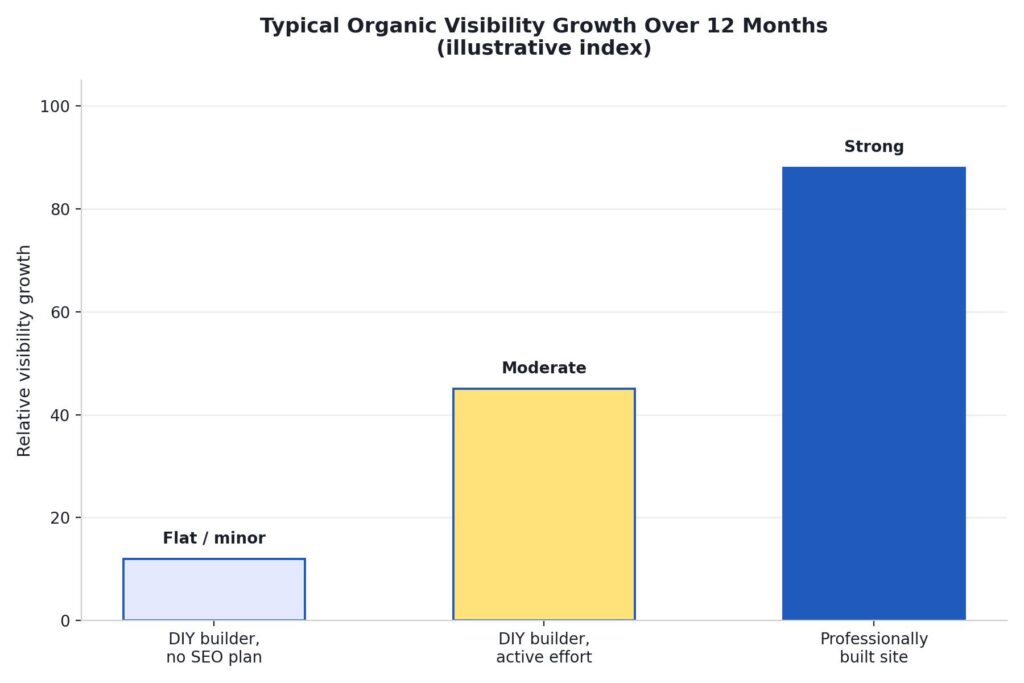
This isn’t a knock on DIY builders’ technical capability; modern platforms have improved a lot on this front. It’s more about what tends to actually get built. Professionally built sites are set up with clean structure, proper heading hierarchy, fast load times, and technical SEO fundamentals from day one, because that’s part of a website developer company in Delhi’s standard process rather than an optional extra you have to remember and configure yourself.
The Middle Path Nobody Talks About
Most comparisons frame this as a binary choice, but a lot of the smartest clients we’ve worked with actually split the difference: launch on a DIY builder to get moving fast and validate the idea, then bring in a website designing company in Delhi once there’s real traction and revenue to justify a proper build. This isn’t wasted effort. The content, product photos, and copy from the DIY phase usually carry over directly into the new build, so nothing is thrown away.
The one thing to watch with this approach: don’t wait so long that the DIY site is actively costing you business (slow load times turning away mobile visitors, a dated look turning away bigger clients) before making the switch. The right time to move is usually earlier than founders think.
The Cost Nobody Budgets For: Ongoing Maintenance
Most cost comparisons stop at launch day, which is misleading, because a website is never really “done.” Both paths carry ongoing costs; they just show up differently.
With a DIY builder, maintenance usually means you personally updating plugins, renewing apps, checking that a new browser update hasn’t broken your layout, and periodically rewriting content that’s gone stale. It’s rarely a large time cost in any single week, but it adds up over a year, and it’s easy to let slide when the business gets busy, which is exactly when a broken contact form or an outdated price list starts quietly costing you leads.
With a website designing company in Delhi, maintenance is usually either included in a support package or billed as occasional, predictable work: a content update here, a new page there, a security patch on the backend. The difference isn’t that one path has maintenance, and the other doesn’t. It’s that one path makes maintenance someone else’s job with a predictable cost, and the other makes it a recurring item on your own to-do list that competes with everything else you’re running.
A related cost worth naming honestly: platform lock-in. Moving a fully built Wix site to another platform later is rarely a clean export; it usually means rebuilding significant parts of the site from scratch. A professionally built WordPress or custom site tends to be easier to hand off, migrate, or extend later, because it isn’t tied to one proprietary builder’s ecosystem.
A Real Pattern We See Often
To make this less abstract, here’s a composite of a pattern we’ve seen repeat across several actual client conversations, details adjusted for privacy. A small business owner in Delhi launches on a drag-and-drop builder to get online quickly, spends around 50 hours over a few weekends getting it presentable, and it works fine for the first six to eight months. Sales come mostly from referrals and word of mouth, so search visibility isn’t yet a pressing concern.
Around month nine or ten, growth plateaus. The owner starts actively trying to bring in customers through Google rather than relying on referrals, and discovers the site isn’t ranking for anything meaningful. Competitors who invested in a proper build early are showing up above them for the exact searches that matter, including generic ones like website designing company in Delhi if that’s adjacent to their own industry’s competitive terms. At that point, they come to a website designing company in Delhi anyway, except now it’s a rebuild under time pressure, competing against established competitors, rather than a considered decision made at the start.
This isn’t every DIY story, and plenty of businesses on DIY builders never hit this wall because their situation genuinely doesn’t require it. But the pattern is common enough that it’s worth planning for honestly rather than assuming it won’t happen to you.
If You Do Go DIY, How to Pick the Right Platform
If you’ve read this far and DIY is still the right call for your stage, the platform choice itself matters more than most people assume. A few honest notes based on what we’ve seen work and not work for small Delhi businesses:
- Wix is the easiest starting point for non-technical founders, with the widest range of ready-made templates. It’s a reasonable pick for service businesses, portfolios, and simple informational sites. Its main downside is that heavily customized functionality and advanced SEO control are more limited than on WordPress.
- WordPress (self-hosted) gives you far more flexibility and a huge plugin ecosystem, which makes it a better long-term foundation if you expect to grow. The tradeoff is a steeper learning curve and genuine ongoing responsibility for hosting, security, and updates, which is exactly the maintenance burden discussed above.
- Shopify is worth a dedicated mention for anyone selling products, since it’s purpose-built for ecommerce in a way general site builders aren’t. For a small catalog with standard shipping needs, it’s often the most sensible DIY ecommerce starting point, though it hits the same ceiling as other builders once your catalog, pricing logic, or integrations get complex.
- AI website generators can produce a decent-looking first draft in minutes, which is genuinely useful for getting unstuck on a blank page. Treat the output as a starting template you’ll still need to edit and maintain, not a finished, hands-off solution.
Whichever you pick, resist the urge to install every available plugin or app “just in case.” Every added plugin is one more thing that can break, slow down your site, or create a security gap you’re now responsible for. Start minimal, and add functionality only when you actually need it.
A Quick Decision Checklist
- Choose DIY if: you’re pre-revenue or testing an idea, your site’s job is mainly informational, budget is the hard constraint right now, or you genuinely have the time and interest to build it yourself.
- Choose a website designing company in Delhi if: organic search traffic matters to your revenue, you need custom functionality a template can’t handle, your brand needs to read as established, or you’ve already tried DIY and it’s costing you more time than it’s saving.
- Choose an ecommerce website designing company in Delhi specifically if: you’re selling products online as a serious revenue channel, not a side experiment, and checkout friction or page speed is directly costing you sales.
FAQs
Can I start with Wix or WordPress and move to a professional site later without losing my content?
Yes. A competent website developer company in Delhi can migrate your existing pages, images, and written content into the new build, so switching later doesn’t mean starting from zero.
Is WordPress cheaper than hiring an agency long-term?
Only if you’re comfortable handling hosting, security updates, and plugin maintenance yourself, or you factor in what you’d pay someone else to do it. Self-managed WordPress has real ongoing responsibilities that a fixed-fee agency build doesn’t hand back to you.
How do I know if my business has outgrown a DIY builder?
Common signs: you’re spending more time fighting the platform than running your business, mobile visitors are bouncing due to speed or layout issues, you can’t add a feature customers are asking for, or competitors with professionally built sites are consistently outranking you.
Do website designing companies in Delhi ever recommend DIY builders to clients?
A genuinely honest one will, when it’s the right fit. If every conversation ends with “you need a custom build” regardless of your actual situation, that’s worth noticing.
What’s a realistic budget range if I do decide to hire a website designing company in Delhi?
It depends heavily on scope, but a straightforward small-business site typically costs meaningfully more upfront than a year of DIY builder fees, and meaningfully less than most owners expect once they account for their own DIY hours and an eventual rebuild. Ask any agency you’re considering for a specific range based on your actual requirements rather than a generic quote.
Will an agency-built site let me make small edits myself afterward?
A good website developer company in Delhi will hand over a site you can update yourself for routine changes like text, images, and prices, typically through WordPress’s standard editor, while keeping the technical foundation, hosting, and security in professional hands. If an agency builds you something you can’t touch at all without paying them for every small edit, ask about that upfront.
Final Thoughts
There’s no universally right answer between DIY and hiring a website designing company in Delhi; there’s only the right answer for where your business actually is right now. Early-stage and simple use cases genuinely favor DIY. Anything revenue-critical, search-dependent, or brand-sensitive tends to favor a professional build, usually by a wider margin than the upfront price difference suggests once you count your own time honestly.
The businesses that regret their choice most often aren’t the ones who picked DIY or the ones who hired an agency; they’re the ones who never revisited the decision as their situation changed. What was right at launch isn’t automatically right two years later, and it’s worth checking in on that honestly every so often rather than defaulting to whatever you set up on day one.
If you’re not sure which category you fall into, we’re happy to give you a straight answer, even if that answer is “you don’t need us yet.” Reach out to ICO WebTech and we’ll walk through your specific situation, whether that means a custom build, an ecommerce website designing company in Delhi conversation, or simply pointing you toward the right DIY setup for now.

Website vs. App: Which Does Your Small Business Actually Need First?
A data-backed guide for small business owners deciding where to put their first serious tech budget.
Why This Decision Trips Up So Many Small Business Owners
Apps feel modern. A website, by comparison, can feel almost old-fashioned — something every business “already has” in some form, so it doesn’t seem exciting to invest real money into. Meanwhile, an app feels like the thing that signals a business has “made it.”
That instinct is understandable, but it’s misleading. A website and an app solve fundamentally different problems, and for a small or early-growth business, choosing the wrong one first can waste months of runway and thousands of dollars that could have gone toward actually acquiring customers.
The scale of the underlying problem is bigger than most owners realise. Globally, an estimated 40% of small businesses still operate without any website at all, and in developing markets that figure climbs sharply — India specifically sits around 50–55% of small businesses without a website, compared to roughly 22–27% across the US, UK, Canada, and Australia.[1]
That’s not a small gap. It represents millions of active, revenue-generating businesses that are functionally invisible to anyone searching for them online.

For a business owner, this chart matters for a very practical reason: your competitors are disproportionately likely to be in that “invisible” bucket too. That’s either a warning sign because you might be one of them or a genuine opportunity, because being the business that does show up when a customer searches nearby can be a meaningful competitive edge on its own.
What Actually Happens When a Business Has No Website
This isn’t just a theoretical gap on a chart; it shows up directly as lost revenue, and the mechanism is fairly well understood. Research into consumer behaviour consistently finds that a large majority of shoppers, often cited as around 81%, research a business online before making a purchase decision, and a meaningful share specifically visit the company’s own website before buying in-store or picking up the phone.[2]
When that website doesn’t exist, the customer’s default reaction isn’t to call anyway out of loyalty many simply move on to the next name that does show up.
There’s a specific, measurable pattern here that digital marketing agencies sometimes call the “verification gap.” When someone receives a referral to a local business from a friend, a Google Maps listing, or word of mouth — they instinctively try to verify it online before actually reaching out.
Analysis of this behaviour suggests a business without a website loses roughly 20–35% of its referred customers right at this verification step.[3] It’s not that the business did anything wrong; it’s simply that the customer couldn’t confirm the business was real, active, and legitimate, and the psychological friction was enough to make them search for an alternative instead.
Think of it this way: a referral gets a customer to your door. A website is what convinces them to actually knock.
On the flip side, businesses that do invest in a website see a measurable payoff. One 2026 analysis found small businesses with websites growing at roughly double the rate of comparable businesses without one, and a separate dataset found website-owning businesses earning around 39% more revenue on average than businesses without a site.[4][5] Website adoption among small businesses has also climbed steadily over the past several years — from about 64% in 2018 to roughly 83% by 2025 — as more owners come to see a website as core infrastructure rather than a nice-to-have.[6]
Why Referrals and Social Media Alone Aren’t Enough
Many small business owners without a website lean heavily on referrals, word of mouth, or a social media page as their entire online presence. These channels are genuinely valuable — but they have real ceilings. A social media profile is rented space: the algorithm decides who sees your posts, the platform can change its rules overnight, and a customer has to already follow you to see anything at all. A referral, meanwhile, only travels as far as your existing customers’ social circles.
A website is the one asset in this list that a business actually owns outright, that works around the clock without needing to “post” anything, and that shows up specifically when a stranger — not just an existing contact — searches for exactly what you offer. That combination is very difficult to replace with any other channel.
Where an App Actually Fits In
None of this means apps are a bad investment — they’re simply a second-stage investment for the overwhelming majority of small businesses, not a starting point. The cost gap between the two options is significant enough that it should shape the decision on its own, and looking at real Indian market pricing makes the gap even clearer.
Website development costs in India typically break down like this:
- Basic Business / WordPress Site: ₹20,000 – ₹2,00,000 for informational pages and a standard setup.[8]
- Corporate / Professional Site: ₹1.2 lakh – ₹4.5 lakh for custom design and multi-page layouts.[9]
- Custom E-commerce Store: ₹1.8 lakh – ₹8 lakh for product catalogs, user accounts, and payment integration.[10]
- Web Application / SaaS MVP: ₹4 lakh – ₹25 lakh+ for custom backend logic and user dashboards.[11]
Mobile app development costs in India, by comparison, run considerably higher at every tier:
- Basic App / MVP: ₹3 lakh – ₹12 lakh for 5–10 screens, simple login, and cross-platform frameworks like Flutter or React Native.[12]
- Mid-Level App: ₹12 lakh – ₹35 lakh for 15–30 screens, a custom backend, secure authentication, and payment gateway integration.[13]
- Complex / Enterprise App: ₹35 lakh – ₹1 crore+ for heavy real-time data, multi-role dashboards, strict security compliance, and legacy system integration.[13]

Even at the entry level, a basic app can cost more than a fully custom corporate website — and by the time a business needs a mid-level app with a proper backend and secure payments, the budget required is often 3–5 times what a full-featured, professionally designed website would cost. This is before ongoing costs are added: once an app is live, it generally needs continued investment of roughly 15–30% of the original build cost every year, just to stay compatible with new operating system versions, pass app store review for updates, and keep functioning as phones and software evolve.
Compare that to a professional website, where even a corporate-grade site can often be delivered for a fraction of a mid-level app’s cost, and be live within weeks rather than months. There’s no app store approval process to clear, no separate iOS and Android codebases to maintain in parallel, and no forced update cycle just to keep the thing functioning for your customers.
Also read:
Micro-Influencer Marketing for Small Businesses: How to Grow Your Brand Authentically
When an App Genuinely Earns Its Cost Back
Apps make sense once a business has:
- A large, repeat customer base that already trusts the brand enough to install something and give up phone storage for it.
- A specific use case a website genuinely can’t deliver — offline functionality, push notifications, loyalty points, real-time order tracking, or hardware access like a camera or GPS used in a core workflow.
- The ongoing budget to maintain, update, and support the app for years, not just build it once and walk away.
- Evidence, not assumption, of demand — ideally from customers who have already told you, directly or through behaviour on your website, that they’d use an app if you built one.
Most small businesses, local shops, service providers, consultants, manufacturers, clinics, boutiques, simply don’t meet that bar yet, and that’s completely normal at an early stage. For them, the website is where the real return on investment currently sits.
Mobile Matters Either Way
One thing a website and an app genuinely have in common: your customers are overwhelmingly on mobile devices, and that’s true whether they’re browsing a site or using an installed app. Mobile devices now account for just over half of all global website traffic, and that share has been climbing steadily for years as more everyday browsing shifts away from desktops entirely.[9]
This is exactly why “just build a website” isn’t the full answer either; it has to be built mobile-first, fast-loading, and easy to navigate on a small screen, or you lose the same customers you were trying to capture in the first place. A slow, cluttered, desktop-only website can undo most of the benefit of having one at all.
This is where working with an experienced web development company in Delhi makes a genuine difference. Local teams understand not just design and code, but the search behaviour of customers in your specific market: what people across Delhi and the wider NCR region actually type into Google when they’re looking for a business like yours, and how to structure a site so it shows up when they do.
A Practical Decision Framework
For the vast majority of small businesses, the right sequence looks like this:

- Start with a fast, mobile-optimised, professionally designed website. Get discoverable on Google, build credibility with first-time visitors, and start converting traffic into actual enquiries and sales.
- Use that website to validate real demand. Track what pages people visit, what they search for to find you, and where they drop off. This data is far cheaper to gather through a website than through an app.
- Build a loyal, repeat customer base large enough that a dedicated app experience would genuinely add value rather than just novelty.
- Once you have that scale, invest in the app — with a clear, specific answer for what it does that the website cannot.
Skipping straight to an app before a business has an audience or a proven online presence is one of the most common and most expensive mistakes small business owners make. It’s easy to be seduced by the idea of “having an app,” but an app with no existing user base to draw from tends to sit unused on a handful of phones, quietly costing money in maintenance while delivering little in return.
Cost, Timeline, and Maintenance at a Glance
| Factor | Website | Mobile App |
|---|---|---|
| Typical starting cost | INR 10,000 – INR 40,000 | INR 2,00,000 – INR 10,00,000+ |
| Typical launch timeline | 2 – 6 weeks | 3 – 6 months |
| Annual maintenance | Relatively low — hosting, security, minor updates | 15% – 30% of original build cost, every year |
| Distribution | Instant — accessible via any browser or link | Requires download and install via app store |
| Platform requirements | One build works everywhere | Often separate builds for iOS and Android |
| Discoverability | Found directly through Google search | Found only if someone already knows to look for it |
Three Real-World Scenarios
Numbers and frameworks are useful, but decisions like this often become clearer when you picture them against an actual business. Here are three common situations small business owners in Delhi and Okhla find themselves in — and how the website-first framework applies to each.
Scenario 1: The Local Manufacturer Selling Only Through Word of Mouth
Picture a small manufacturing unit in Okhla Industrial Area that has built a decade of business almost entirely through referrals and trade contacts. Orders come in through phone calls and personal relationships, and the owner has never felt the need for a website. The risk here isn’t losing existing customers — it’s losing the next generation of buyers who don’t operate the way the current ones do.
A younger procurement manager at a new client company will almost certainly search online before picking up the phone, and if there’s nothing to find, the manufacturer never even makes it onto their shortlist. For a business like this, a straightforward, professional website — showcasing capabilities, certifications, and past work — closes that verification gap immediately. An app would do nothing for this business at this stage; there’s no repeat consumer behaviour to support one.
Scenario 2: The Growing Retail Brand With a Loyal Local Following
Now picture a retail brand with two or three physical stores across South Delhi and a genuinely loyal customer base that shops with them monthly. They already have a website that handles product browsing and basic enquiries well.
Here, the calculus starts to shift. If a meaningful share of their existing customers are asking for features like saved carts, loyalty points, or order tracking that a website can’t deliver as smoothly as a native app, that’s a real signal — not just a hunch — that app investment could pay off. The key difference from Scenario 1 is that the audience and repeat behaviour already exist; the app would be serving demand that’s already proven, not trying to create demand from nothing.
Scenario 3: The Service Provider Starting From Zero
Finally, picture a consultant or service provider just starting, with no existing digital presence at all and a limited budget. It might be tempting to think a slick app would help them look more established than they are. In practice, this is exactly the situation where a website earns its cost back fastest and an app would be pure overhead. A focused website clear services, credentials, contact details, and a handful of client results — it does the entire job of building initial trust and getting found in local search. There’s no customer base yet to justify the ongoing cost of maintaining an app that almost nobody would have a reason to download.
Across all three scenarios, the pattern holds: the website is either the immediate priority or has already done its job and created the conditions for an app to make sense. The order rarely reverses.
Also read:
How to Choose the Right Web Design Partner
Once you’ve decided a website is the right next step, the quality of the team building it matters just as much as the decision itself. A handful of questions tend to separate a good partner from a forgettable one:
- Do they ask about your customers before talking about design? A good team wants to understand who searches for you and what they’re trying to accomplish before opening a design tool.
- Can they explain their approach to mobile performance and page speed in plain language? If the answer is vague, that’s a warning sign, given how much of your traffic will be on mobile.
- Do they talk about search visibility, or only visual design? A beautiful website that nobody finds in search results isn’t doing its job.
- Will you actually own the website afterward? Make sure you retain access to hosting, domain, and content — some agencies quietly keep control, which becomes a costly problem later.
- Do they have examples of real businesses they’ve worked with? A team familiar with your specific market will understand local search behaviour in a way a generic template provider won’t.
Frequently Asked Questions
Can’t a Facebook or Instagram page just replace a website?
It can partially substitute for one in the very early days, but it comes with real limits. You don’t control the algorithm deciding who sees your posts, you can’t fully customise the experience, and a social page doesn’t rank in Google search results the way a proper website can. Most businesses eventually need both — social media for engagement, and a website as the trusted, owned home base that search engines and serious customers rely on.
What if my competitors already have an app?
It’s worth checking whether their app is actually being used, or whether it was built prematurely and now sits mostly dormant. A polished, fast, well-optimised website that consistently shows up in local search results will often outperform a rarely-opened competitor app in terms of actual customer acquisition.
Is a website builder good enough, or do I need a professional company?
DIY website builders can work for very simple, low-stakes sites. But for a business that depends on being found locally, ranking in search results, loading quickly on mobile, and converting visitors into paying customers, a professionally built site designed with local search behaviour in mind tends to pay for itself many times over compared to a generic template.
How do I know if my website is actually working?
Look at concrete numbers: how many visitors are you getting, where are they coming from, how many turn into enquiries or sales, and how long do they stay before leaving? A good web design partner should be able to set this tracking up for you and explain it in plain language, not just hand over a finished site and disappear.
Our Recommendation
If you’re a small business trying to decide where your first serious tech budget should go, the data points in one direction fairly clearly: build the website first, build it properly, and make sure it’s fast and mobile-friendly from day one. Get that foundation right, and you’ll have both the credibility and the customer data you need to make a much more confident decision about an app later — if and when it actually makes sense.
As a website designing company in Delhi, we’ve worked with businesses across the world to build websites that don’t just look good but actually bring in enquiries and sales. When your business has genuinely outgrown what a website can do on its own, we’re also happy to talk through whether an app makes sense for you and exactly what it would take to build one properly, without wasting your budget on features you don’t need yet.
Sources
- How Many Small Businesses Don’t Have a Website? 2026 Statistics & Data. B2B Lead Finder, 2026. b2bleadfinder.io
- The Complete Guide to Key Website Statistics for Small Businesses in 2025. Marketing Scoop, 2025. marketingscoop.com
- 27% of Small Businesses Have No Website in 2026. LeadsAgent Blog, 2026. leadsagent.io
- Small Business Website Statistics 2026: 92+ Stats & Insights. Marketing LTB, 2026. marketingltb.com
- Small Business Website Statistics 2026: 120+ Facts on Revenue & Online Presence. Rudys.AI, 2026. rudys.ai
- The State of Small Business Websites in 2025. Clutch.co, 2026. clutch.co
- Top 50+ Small Business Website Statistics You Need to Know. Network Solutions, 2026. networksolutions.com
- Website Development Cost in India. Secuodsoft, 2026. secuodsoft.com
- Custom Application Development Cost. BlueWhale Apps, 2026. bluewhaleapps.com
- Custom eCommerce Development Cost. Slashify Tech, 2026. slashifytech.com
- Website Development Cost in India 2026: Full Price Breakdown. Zethic, 2026. zethic.com
- Mobile App Development Cost in India. Ahex Technologies, 2026. ahex.co
- Mobile App Development Cost. Zethic, 2026. zethic.com

Is Your “About Us” Page Boring? Hooking Visitors with Brand Storytelling
Take a look at your website analytics right now. If your digital footprint matches global user behavior patterns, your “About Us” or “Company Profile” page is likely the second or third most visited URL on your entire domain. When prospects are on the verge of making a purchasing decision, signing a retainer, or partnering on an enterprise project, they click away from your features page and deliberately seek out your identity. They want to know who you are, what you stand for, and whether you can be trusted.
Yet, for the vast majority of corporate websites, this critical junction is where the relationship dies a quiet death. Instead of encountering an inspiring vision, visitors are greeted by a barren wasteland of dry corporate text, static stock imagery of people shaking hands in generic boardrooms, and a laundry list of technical milestones that read more like a legal compliance filing than a living, breathing organization. The result? Sky-high bounce rates, immediate drop-offs, and squandered conversion opportunities.
Your “About Us” page should not be an archival storage bin for corporate ego. It is a strategic sales enablement asset. By transitioning away from rigid, jargon-heavy descriptions and embracing the principles of strategic brand storytelling, you can transform this passive page into an active engine for emotional engagement and commercial conversion. Let’s explore how to dismantle boring corporate copy and build a narrative that hooks visitors from the very first paragraph.
The Corporate Ego Trap: Why Technical Jargon Kills Engagement
Why do so many brilliant, innovative companies end up with staggeringly dull corporate profiles? The root cause is almost always the “Corporate Ego Trap.” When writing about themselves, organizations instinctively default to self-defense mechanisms: institutional language, defensive credentialing, and over-indexing on technical jargon. They write to impress their competitors or their board of directors, completely forgetting the human being sitting on the other side of the screen.
Consider this standard piece of B2B corporate copy:
“We are a premier, vertically integrated provider of enterprise-grade, end-to-end technological paradigms. Leveraging our proprietary cutting-edge architectures and synergized operational methodologies, we optimize supply-chain efficiencies to drive robust ROI for global stakeholders.”
This paragraph says absolutely nothing. It is a collection of empty buzzwords engineered to mask a lack of clear identity. It creates immediate cognitive friction. When a reader encounters words like synergized, paradigms, or vertically integrated, their brain has to work harder to decode the meaning. In the digital space, cognitive friction equals an immediate bounce.
Human beings are biologically wired to reject institutional abstractions and embrace narratives. From an evolutionary perspective, our brains process stories differently than raw data or clinical descriptions. When reading data points, only the language processing parts of the brain (Broca’s and Wernicke’s areas) are activated. But when we read a compelling story, our sensory cortexes light up. We visualize the struggle, empathize with the characters, and internalize the message as if it were our own experience. If your page focuses solely on dry technical specifications, you are speaking exclusively to a rational brain that is looking for reasons to filter you out. When you tell a story, you speak to the emotional core where long-term trust is forged.
The Architecture of an Engaging Brand Narrative
To break free from the jargon trap, you must understand how to construct a proper corporate narrative arc. Every great story in human history—from ancient epics to modern cinematic blockbusters—follows a foundational structural rhythm. Your brand story should be no different. You are not writing an autobiography; you are mapping a purposeful journey where your customer ultimately wins.
A high-converting brand story requires four distinct phases:
- The Status Quo & Inciting Incident: Every story begins with a normal world that gets disrupted. What was the exact moment your company’s founders realized the existing market options were fundamentally broken? What was the frustration, the market gap, or the injustice that forced your company into existence?
- The Struggle (The Valley of Fire): A story without conflict is just a lecture. Share the early challenges. Did you build 14 failed prototypes in a garage? Did the industry tell you that your model was impossible? This vulnerability humanizes your organization and makes your eventual success feel earned rather than arrogant.
- The Breakthrough & Discovery: This is the moment where your unique methodology, proprietary technology, or core philosophy was born. It explains the “Eureka!” moment that sets your services apart from every other competitor offering similar deliverables.
- The Shared Future (The Guide and the Hero): This is the most crucial pivot. The climax of your story must transfer the spotlight from your company to your customer. You are not Luke Skywalker in this narrative; you are Obi-Wan Kenobi. Your role is that of the trusted, experienced guide who provides the tool, the strategy, or the software that empowers the customer (the true hero) to conquer their challenges.
Contrast in Action: From Functional to Emotional
Let’s see how a simple shift in copywriting perspective alters the entire emotional resonance of an organization’s profile:
| Before: Dry Institutional Copy | After: Humanized Storytelling |
|---|---|
| “Established in 2014, our cybersecurity firm specializes in network infrastructure vulnerability assessments and cloud-based threat mitigation protocols for mid-market logistics corporations.” | “In 2014, our founder watched a local family business collapse overnight after a single ransomware attack wiped out their logistics grid. We realized that enterprise-level security shouldn’t just belong to Fortune 500 giants. We built this firm to give growing businesses the ironclad digital defense they deserve.” |
Designing for the Digital Skimmer: Timelines & Scannable Layouts
Even the most brilliant brand story will fail if it is presented as an impenetrable wall of text. Modern internet users do not read web pages linearly; they skim them in an “F-shaped” pattern, hunting for visual anchors, bold headings, and bite-sized pieces of data before committing to a deep read. Your copy must work in perfect tandem with layout psychology.
When engineering an engaging “About Us” experience, your visual structure needs to break long-form history down into clean, digestible elements. One of the most effective ways to do this is by implementing a visually scannable timeline. Rather than forcing a reader to wade through paragraphs of historical context, a timeline allows them to scroll through your corporate evolution in a matter of seconds, absorbing key achievements effortlessly.
This is where technical execution meets creative design. If you look at how an elite website designing company in India approaches high-performing corporate profiles, they don’t just paste text onto a page. They map user journeys using micro-interactions, clean vertical or horizontal grid systems, and strategic typography that guides the eye naturally down the page. Balancing compelling narrative copy with optimized visual hierarchy ensures that both emotional readers and analytical skimmers find exactly what they need to build trust.
Anatomy of a High-Converting “About Us” Page Layout
To maximize dwell time and reduce bounce rates, consider structuring your page components using this proven layout sequence:
1. The Hook (Above the Fold)
A single, provocative headline that states your core belief or the massive problem you solve. Avoid saying “Welcome to Our Company Page.” Use an emotional statement.
2. The Narrative Core (The Story)
2 to 3 short, punchy paragraphs explaining your origin, the struggle, and the breakthrough. Keep paragraphs under four lines to maximize readability on mobile devices.
3. Interactive Milestones (The Timeline)
A clean, visual timeline tracking your growth. Highlight human milestones (e.g., “Moved into our first real office”) alongside commercial ones (e.g., “Served our 500th client”).
4. The Mission & Values (The Alignment)
A dedicated section illustrating what you stand for. Do not list generic values like “Integrity” or “Excellence”—specify how you live those values in daily operations.
5. The Human Elements (Faces & Voices)
High-quality, authentic photography of your leadership team and frontline staff. Include short, quirky quotes or bios that highlight their personalities beyond their job descriptions.
Case Study: How a B2B Consulting Firm Tripled Page Dwell Time
To understand the true commercial impact of converting a dry profile into a narrative powerhouse, let us look at Apex Vanguard (name changed for confidentiality), an boutique operational consulting firm specializing in mid-market manufacturing efficiency.
For five years, Apex Vanguard’s “Company Overview” page was a classic example of an academic boring page. It was written by senior partners with backgrounds in operational theory, and it read like a textbook. It focused heavily on their “Six Sigma implementation matrix” and “synergistic resource deployment models.” Despite getting thousands of clicks from targeted LinkedIn campaigns, the bounce rate on that page hovered at a devastating 78%. The average user spent a mere 22 seconds on the page before leaving, and consultation bookings originating from the profile page were virtually non-existent.
Recognizing the leak in their sales funnel, the firm underwent a comprehensive digital and copy transformation. They completely stripped out the academic posturing and re-anchored the page around a deeply humanized brand story.
The Strategic Redesign Strategy
- The New Headline: They replaced “About Apex Vanguard: Strategic Operational Partners” with a bold emotional hook: “We built our firm because we couldn’t stand watching brilliant factories close down over fixable supply bottlenecks.”
- The Origin Narrative: They highlighted a true story from the lead partner’s past: how his own family’s manufacturing business went under in the early 2000s because they didn’t have access to modern data tools. This instant vulnerability built immediate empathy with mid-market business owners facing similar pressures.
- The Structural Timeline: They collaborated with a professional digital agency to implement a clean, scannable timeline that balanced business milestones with cultural moments, proving they were a vibrant, evolving team rather than a stagnant corporate entity.
The Direct Business Outcomes
Within ninety days of launching the revised, story-driven page, the analytics data revealed a staggering transformation in user behavior:
Increase in Dwell Time (From 22s to 1m 11s)
Reduction in Page Bounce Rate
Surge in Direct Consultation Inquiries
By moving away from clinical, cold positioning and stepping boldly into their authentic story, Apex Vanguard stopped being a commoditized service provider and became an empathetic partner. Prospects weren’t just reading a resume; they were connecting with a mission they wanted to be a part of.
The Complete Blueprint: How to Rewrite Your “About Us” Page This Week
If you are ready to audit and revolutionize your own company profile, follow this practical, step-by-step rewrite guide to breathe life, emotion, and conversion power back into your brand copy.
Step 1: Conduct a Jargon Audit
Print out your current “About Us” page. Take a red pen and highlight every instance of the following words: industry-leading, premier, cutting-edge, synergy, optimized, paradigm, end-to-end, world-class, and innovative. Once highlighted, challenge yourself to delete or replace every single one of them. If you claim you are “innovative,” delete the word and write a sentence describing the exact invention or process that proves it.
Step 2: Answer the Three Core Origin Questions
Gather your leadership team or your founders and interview them using these three non-negotiable narrative prompts:
- “What made you so angry or frustrated about the current state of your industry that you risked your financial stability to build this company?” (This uncovers your Inciting Incident).
- “What was the single hardest moment in our first two years of operation, and how did we survive it?” (This uncovers your humanizing Struggle).
- “If our company ceased to exist tomorrow, what unique value would our clients lose that no one else in the market could replace?” (This isolates your Core Mission).
Step 3: Define Your Corporate Mission with Accountability
A mission statement is completely useless if it is just a string of pleasant moral concepts. Turn your mission into an active promise. Instead of writing, “Our mission is to provide exceptional customer satisfaction through quality engineering,” try writing, “We believe that no client should ever have to wait more than two hours for an emergency support ticket. Everything we build is designed to honor that timeline.” Specificity builds trust; platitudes invite skepticism.
Step 4: Execute a Scannability Check
Open your website on a mobile device and scroll through the page rapidly within five seconds. Can you instantly grasp what the company does, who they serve, and why they care? If your eye doesn’t land on clear headings, icon matrices, or a highly structured chronological timeline, your layout is failing your copy. Ensure your development team builds clean visual dividers, alternating background tones, and bold callout boxes to hold the attention of digital skimmers.
Stop Documenting. Start Connecting.
The internet does not suffer from a shortage of businesses offering functional services. Whatever your industry—whether you run an enterprise software firm, an operational consultancy, or a creative studio—there are thousands of competitors who can match your technical capabilities, feature for feature, price point for price point.
You cannot win a long-term competitive advantage purely on technical functionality or dry corporate credentials. You win by building a psychological moat around your brand. You win by making your target audience feel understood, valued, and safe. Your “About Us” page is the digital front door where that critical connection is forged. Stop treating it like a boring legal archive. Ditch the cold corporate jargon, lean into the vulnerable realities of your origin story, structure your content for the modern visual skim, and transform your company profile from a forgotten link into your most persuasive brand ambassador.

Edge Compute Optimization: Moving Dynamic B2B Price Matrixing to Cloudflare Workers to Bypass Database Latency
The Origin Bottleneck: The High Cost of Dynamic Latency in B2B E-Commerce
In the consumer-facing retail landscape, pricing is relatively straightforward. A shirt costs forty dollars, a pair of headphones costs one hundred dollars, and every single user who lands on the product page sees the exact same numbers. However, when you cross the border into complex, business-to-business (B2B) digital commerce, that simple model completely falls apart. B2B pricing is rarely a static field inside a product database; it is a highly fluid, multi-dimensional matrix calculated in real-time based on the specific identity, history, and arrangement of the corporate buyer.
When a procurement officer logs into an industrial enterprise portal, the system cannot simply display a standard MSRP. Instead, it must instantly calculate a custom price matrix that evaluates several variables simultaneously:
- The customer’s specific negotiated contract tier.
- Volume-tiered price breaks based on the exact quantity added to the cart.
- Real-time inventory levels across multiple geographical distribution warehouses.
- Historical order frequencies and pre-arranged credit line agreements.
Calculating this matrix requires executing complex database logic. In a traditional centralized cloud architecture, every single page view, cart update, or bulk quantity adjustment forces the browser to send a request across the globe to an origin server. The origin server must then run multiple heavy, relational database queries, calculate the pricing math, and pass the results back across thousands of miles to the user’s screen.
This process creates a massive performance problem: database latency. While a two-second page load might seem like a minor annoyance to a casual shopper, to an enterprise buyer handling large bulk orders containing hundreds of unique line items, that delay manifests as a slow, frustrating interface. Every millisecond of database processing time chips away at the user experience, driving down engagement, complicating procurement workflows, and leading to lost contract renewals. To survive in a highly competitive market, B2B brands must find a way to eliminate this origin dependency entirely and serve custom pricing data instantly.
The Edge Revolution: Shifting Logic from Origin to the Network’s Perimeter
To eliminate the performance issues caused by database lookups, engineering teams are completely rethinking where application logic lives. For years, the industry standard for speeding up web delivery was to deploy a traditional Content Delivery Network (CDN). CDNs are highly effective at caching static digital assets—such as product images, CSS style sheets, and raw HTML wrappers—and serving them from server locations physically closest to the end user. However, when it came to dynamic, personalized data like a custom B2B price matrix, standard CDNs were completely useless. Because the data changes constantly based on user sessions, the request had to bypass the cache and travel all the way back to the main database origin.
This is where modern edge computing platforms, such as Cloudflare Workers, are completely changing the game. Edge computing doesn’t just cache static files at the network perimeter; it allows developers to run actual, lightweight server-side code directly inside the global CDN routing network itself.
Cloudflare Workers operate on a highly efficient V8 JavaScript isolate architecture rather than heavy, resource-intensive virtual machines or standard container instances. This design allows them to spin up and execute complex code blocks globally in less than a millisecond, completely eliminating cold-start delays. By moving the dynamic price calculation logic to these edge nodes, you effectively bring the computing power right to the user’s doorstep. The edge worker intercepts the incoming browser request, evaluates the user’s session state, runs the matrix logic, and serves the personalized pricing information instantly—all without ever waking up or touching your main backend database origin.
Mathematically, the performance benefits of this architectural shift can be measured by looking at the total round-trip time (RTT) savings. In a traditional infrastructure, total request latency is a combination of network travel time and deep database processing:
$$\text{Latency}_{\text{Traditional}} = \text{RTT}_{\text{User to Origin}} + \text{Time}_{\text{Database Query}} + \text{Time}_{\text{Application Logic}}$$
By moving the computation to an edge worker infrastructure, you drastically simplify this equation, reducing network travel to a local loop and completely removing the database processing bottleneck:
$$\text{Latency}_{\text{Edge}} = \text{RTT}_{\text{User to Local Edge Node}} + \text{Time}_{\text{Worker Isolate Execution}}$$
Because the isolate execution step typically takes less than 5 milliseconds, the total time to serve data drops from seconds down to mere milliseconds, creating a hyper-responsive application experience.
—
The Architectural Blueprint: Structuring Edge-Based Pricing Systems
Transitioning an enterprise B2B pricing model to an edge worker infrastructure requires a highly structured approach to data synchronization and session validation. You cannot simply copy-paste a massive SQL database into an edge script. Instead, you must decouple your data layers and use key-value data stores designed specifically for edge deployment.
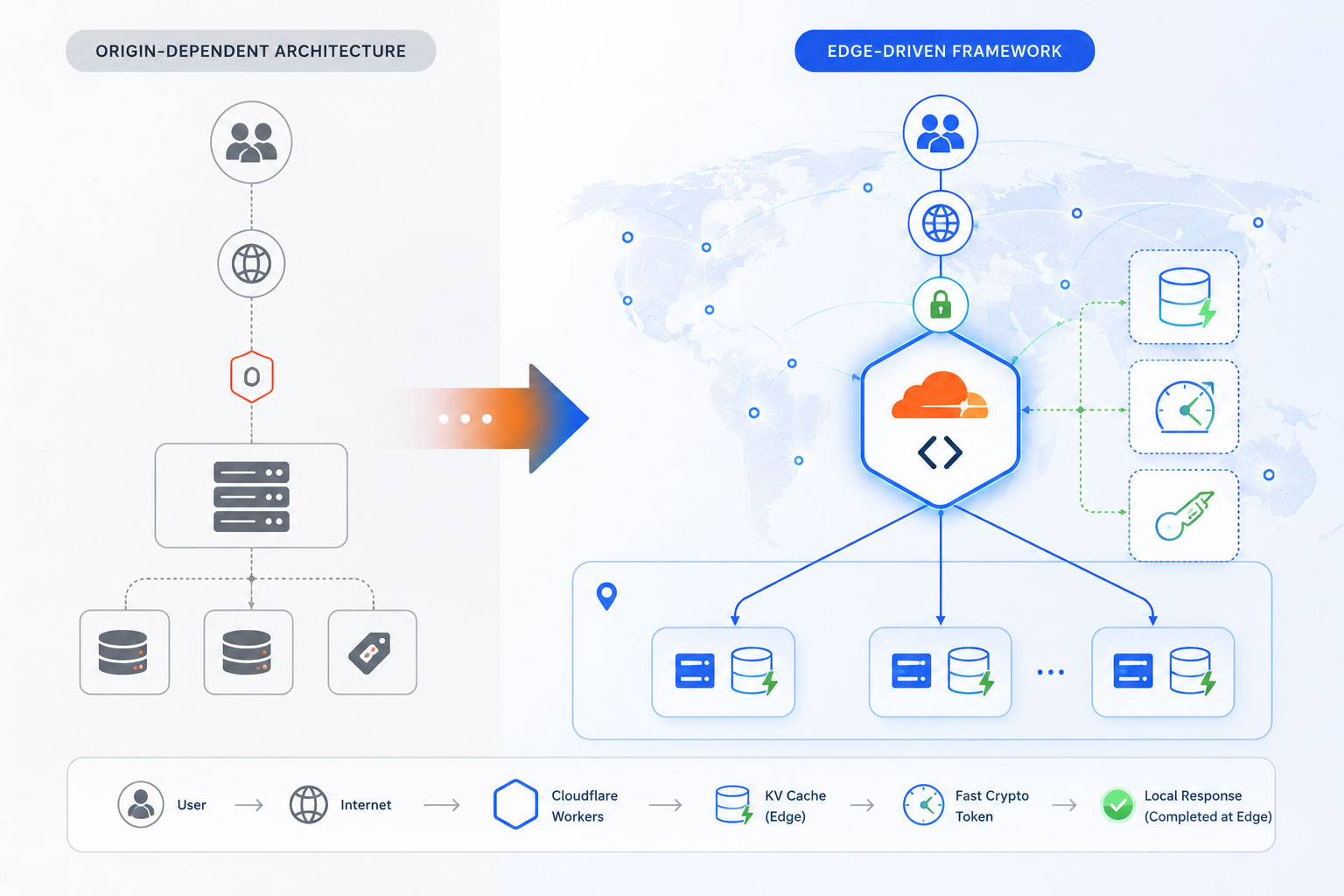
A technical map showcasing the transformation from an origin-dependent system to an Edge-Driven Framework, where requests are completely intercepted and processed within Cloudflare Workers using localized KV caches and high-speed cryptographic tokens.
1. Implementing Cryptographic Session Validation
Before an edge worker can calculate a customized price for a buyer, it must securely verify exactly who that buyer is. Forcing the worker to call the main origin server to check a user session would completely defeat the purpose of edge computing, reintroducing the exact latency bottleneck you are trying to fix.
To solve this, the architecture uses stateless JSON Web Tokens (JWT). When a B2B user logs into the portal, the primary origin identity system issues an encrypted JWT containing the user’s unique account ID, contract tier level, and company code. This token is securely saved in the user’s browser as an HttpOnly cookie. When the user browses product pages, the Cloudflare Worker intercepts the request, decodes the JWT locally using built-in Web Crypto APIs, and instantly extracts the user’s contract details—achieving secure verification at the edge without a single database call.
2. Leveraging Global KV and Hyper-Local Caching Stores
To serve pricing data at the edge, the worker needs immediate access to your price rules and volume matrices. This data is housed in globally distributed data stores like Cloudflare Workers KV or hyper-local caches like Hyperdrive.
Your core pricing matrices, discount structures, and product SKUs are periodically exported from your central ERP or PIM system and pushed directly into the edge KV store via automated sync APIs. Because Workers KV replicates data globally across hundreds of data centers simultaneously, the local edge worker can read the exact pricing rules for a specific SKU in less than a single millisecond, ensuring the necessary calculations happen instantly.
3. Real-Time Volume-Tier Calculation Mechanics
With the user’s contract profile decoded from the JWT and the master pricing matrices loaded from the local KV store, the edge worker can execute the volume-tier calculation logic instantly.
As the user adjusts ordering quantities on a bulk wholesale page, the client-side JavaScript fires a high-speed fetch request to an edge endpoint. The worker runs an optimized array-matching algorithm against the pricing rule matrix, pinpoints the correct volume discount tier for that specific quantity, applies the contract-specific percentage reduction, and returns a clean JSON response containing the final updated price. This entire operation completes in a fraction of a second, providing a completely smooth, interactive browsing experience for the procurement officer.
The Role of Enterprise Partners: Leveraging an Ecommerce Website Development Company in India
Migrating complex business logic from a traditional centralized server stack to a globally distributed edge computing network is an intricate technical challenge. It requires a complete redesign of how data flows through your platform, demanding expertise in asynchronous JavaScript engineering, Web Crypto standards, stateless token authentication, and advanced database synchronization routines. For global enterprises running expansive B2B setups with thousands of complex pricing variables, attempting this migration without specialized engineering talent can lead to system bugs, sync errors, or data security gaps.
To execute this digital transition smoothly, sophisticated international enterprises frequently partner with an established ecommerce website development company in India. The Indian tech landscape has evolved into a world-class hub for advanced cloud native engineering and serverless development talent. These specialized agencies bring the deep technical expertise needed to rewrite legacy database queries into lean edge scripts, design automated synchronization pipelines between internal ERP systems and Cloudflare KV stores, and thoroughly test edge applications for absolute reliability. Collaborating with an expert development partner allows brands to rapidly upgrade their platform infrastructure to cutting-edge speeds, while maintaining highly efficient capital allocation.
—
Comparative Strategy: Centralized Databases vs. Edge-Compute Architectures
To clearly see why moving your calculation logic to the perimeter of the network is the ultimate solution for building high-performance platforms, let’s contrast a standard database setup against an optimized, edge-compute architecture:
Case Study: Eliminating Database Latency for a Global Parts Distributor
To evaluate the clear, measurable operational returns of edge compute optimization, let’s look at the digital architecture turnaround executed by a massive multi-national industrial components distributor. This enterprise managed an active inventory of over 50,000 individual SKUs, serving contract procurement teams across North America, Europe, and Asia. Because every enterprise client operated under a uniquely negotiated contract with intricate volume tier variations, their platform layout was incredibly complex.
Every time a customer updated an ordering quantity grid, the front-end application had to fire complex nested database queries to an origin server cluster based in central Europe. As a result, users browsing from locations like Tokyo or New York faced severe latency issues, with page load times frequently stretching past three seconds during peak ordering hours. This lag caused a visible drop-off in user engagement, increased shopping cart abandonment, and placed a continuous, heavy processing load on the core database cluster.
To address this core operational bottleneck, the engineering team executed a complete migration to a serverless edge architecture:
- Decoupling the Logic: The team extracted the dynamic price-calculation logic from the primary application server, rewriting it into lean, optimized JavaScript modules built specifically for Cloudflare Workers.
- Stateless Authentication: They replaced old, server-dependent session cookies with high-security JWTs, allowing individual edge nodes to instantly identify and verify incoming corporate client profiles locally.
- Edge Synchronization: They built an automated database worker script that instantly synced any updates from the core ERP database directly into Cloudflare’s global Workers KV store within seconds of a change.
The Operational Results: The transformation was immediate and definitive. The time required to process and display customized B2B price matrices dropped from an average of 450 milliseconds down to just 8 milliseconds globally. Total page load speeds for international procurement teams improved by over 70%, resulting in an immediate, frictionless browsing experience.
By completely intercepting and handling these complex pricing queries at the network’s edge, the company reduced the processing load on its central origin databases by over 65%. This massive reduction in server strain allowed the business to scale down its expensive cloud server hosting configurations significantly, while ensuring the platform remained stable during high-traffic order periods. The final result was a major win for the enterprise: a fast, secure, and highly efficient application infrastructure built for global scale.
The Long-Game Advantage: Future-Proofing Global Enterprise Infrastructure
In a rapidly moving digital economy where speed is an absolute competitive differentiator, relying on centralized cloud server frameworks to handle complex, personalized data lookups is becoming a major operational bottleneck. B2B buyers have little tolerance for sluggish user interfaces or spinning loading wheels when navigating procurement workflows. Your digital experience is an integral part of your product offering; if your platform is slow, it reflects poorly on your operational capabilities.
Investing in a modern, edge-compute optimization strategy is the ultimate way to future-proof your digital storefront. By moving dynamic calculations to serverless networks like Cloudflare Workers, you create an incredibly scalable, hyper-responsive digital infrastructure that serves custom data instantly anywhere in the world. This approach protects your core database systems from traffic spikes, slashes your ongoing server costs, and ensures your customer experience remains completely flawless.
Stop letting legacy database latency compromise your business growth. Prioritize edge computing. Move your complex calculations away from your central origin, implement stateless validation models, and work with specialized engineering partners to turn your website architecture into a lightning-fast, high-conversion asset that drives long-term customer loyalty and sustainable enterprise growth.
Is Database Latency Quietly Draining Your B2B Sales Volume?
Slow processing speeds and delayed pricing matrices can subtly damage your digital customer experience and lead to lost procurement contracts. Our veteran cloud engineering and edge-compute development specialists can conduct a comprehensive performance audit of your web application stack, pinpointing exactly how to migrate your complex backend calculations to high-speed serverless frameworks.

Why 70% of Shoppers Leave Before Buying: Fixing E-commerce Cart Abandonment
Imagine running a physical, brick-and-mortar retail store in a bustling metropolitan district. Your storefront looks exceptional, your window displays pull in hundreds of eager shoppers every hour, and your aisles are filled with customers picking up items, reading labels, and filling their shopping baskets to the brim. But as they approach the cash register, something bizarre happens: seven out of every ten shoppers suddenly drop their baskets right on the floor, turn around, and walk out the door without saying a word.
In the physical world, this would be an operational emergency. Store managers would scramble, security would investigate, and the business would halt everything to figure out why the final transaction point was causing a mass exodus. Yet, in the digital realm of e-commerce, this exact scenario plays out every single second. Brand owners celebrate skyrocketing traffic numbers, high click-through rates on social ads, and healthy “Add to Cart” metrics, all while quietly tolerating a staggering, industry-wide average cart abandonment rate that hovers stubbornly around 70%.
This is the ultimate leaky bucket of digital retail. You have already won the hardest battles: you captured the user’s short attention span, convinced them of your product’s value, outcompeted alternative brands, and motivated them to take action. Losing them during the final checkout steps isn’t just a missed sales opportunity; it is an incredibly expensive drain on your marketing budget, drastically driving up your Customer Acquisition Cost (CAC) and eroding your net profit margins. To fix this leak, e-commerce brands must stop looking at checkout as a mere administrative formality and start treating it as a critical psychological gateway that requires elite user experience engineering.
The Psychology of the Exit: Why Digital Shoppers Flee at the Finish Line
To systematically eliminate checkout friction, we have to understand the emotional state of a shopper as they enter the final transaction phase. Up until the moment they click “Proceed to Checkout,” the buyer’s journey is driven largely by desire, inspiration, and dopamine. However, the second they face the checkout layout, their mental state shifts from emotional excitement to cold, analytical logic. They are no longer thinking about how wonderful the item will look; they are calculating their financial risk, evaluating the trustworthiness of your platform, and measuring the time commitment required to complete the forms.
Any unexpected element encountered during this psychological pivot acts as a massive point of cognitive friction. The primary triggers that cause an immediate exit include:
- Forced Account Creation: Forcing a user to create a username, verify an email address, and select a password before they can give you money is the digital equivalent of demanding a background check for a cash transaction. It breaks the momentum of the purchase.
- Surprise Costs: Nothing destroys conversion velocity faster than hidden fees, unexpected processing surcharges, or bloated shipping costs revealed only on the final screen. This shatters trust instantly.
- Complex Form Fields: A long, multi-column form asking for unnecessary data (such as an obligatory fax number or multiple phone fields) triggers immediate cognitive fatigue.
- System Slowdown and Visual Instability: If the checkout pages take more than two seconds to load, or if the layout shifts unexpectedly while a user is typing, their risk-aversion instincts spike, leading them to abandon the purchase out of caution.
Mathematically, the impact of this final-stage drop-off can be quantified by tracking the exact relationship between intent and final execution. E-commerce directors use the standard Abandonment Rate formula to evaluate this vulnerability:
$$\text{Cart Abandonment Rate} = \left(1 – \frac{\text{Completed Purchases}}{\text{Created Carts}}\right) \times 100$$
When this metric climbs above the 60% threshold, it is a definitive sign that your user interface is actively working against your business goals, alienating highly motivated buyers right when they are ready to buy.
Four Pillars of a High-Conversion Checkout Architecture
Fixing the leaky bucket demands a deliberate transition toward an intentional, hyper-optimized checkout architecture. Top-tier brands don’t rely on generic, out-of-the-box platform settings. They restructure the user journey around four specific UI/UX pillars designed to minimize cognitive load, streamline data entry, and instill unshakeable buyer confidence.
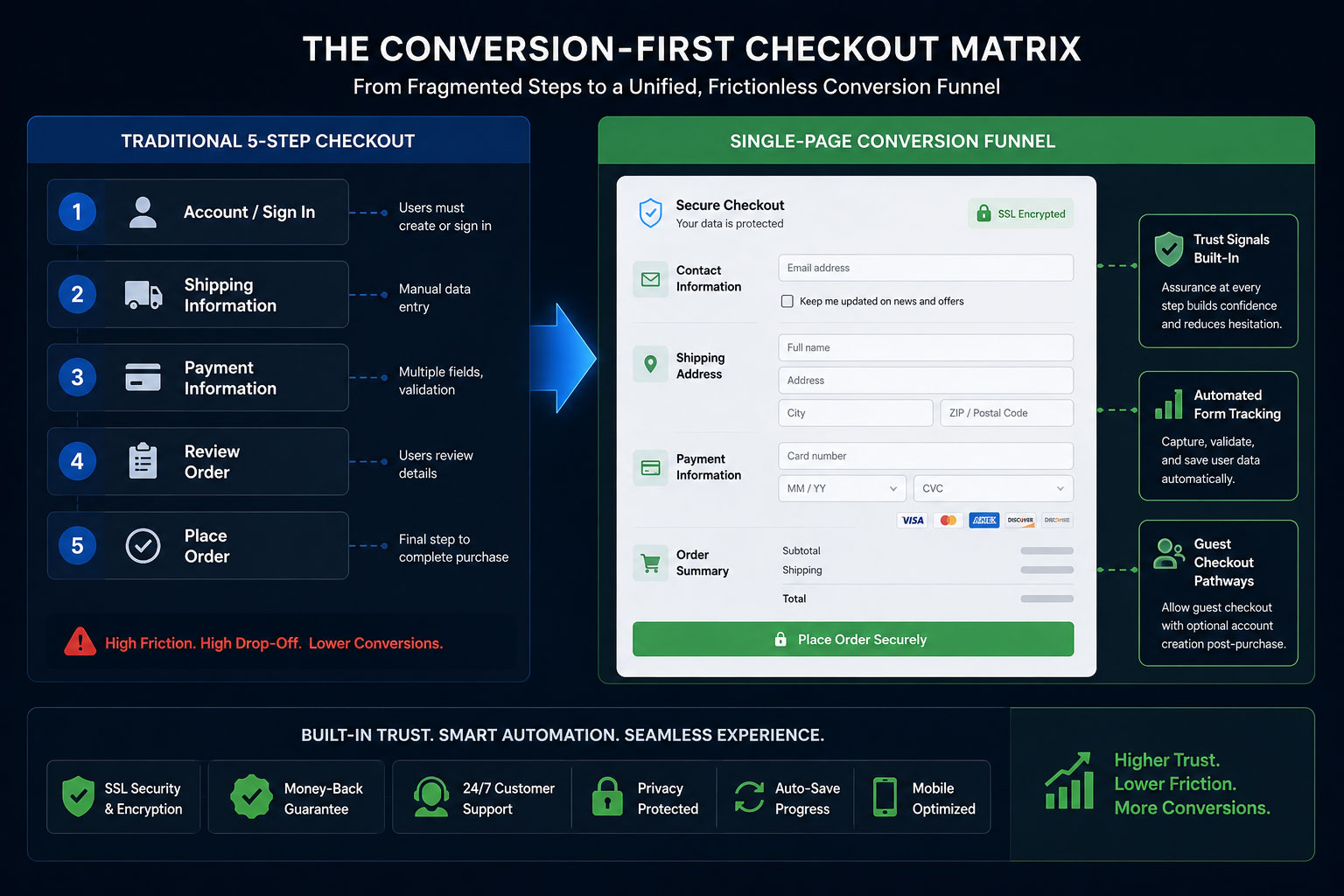
A structural map showcasing the transformation from a traditional 5-step checkout sequence into a unified, frictionless Single-Page Conversion Funnel where trust signals, automated form tracking, and guest pathways co-exist seamlessly.
1. Streamlined Single-Page Checkout Architectures
The traditional multi-step checkout—where a user must input data on page one, click next, fill in shipping details on page two, click next, choose a payment method on page three, and review on page four—is a relic of early web development. Every page load represents a point of failure where a connection can lag, a browser can crash, or a user can simply rethink their purchase decision.
Replacing this fragmented path with a clean, single-page checkout architecture changes the entire dynamic. By displaying all fields—shipping, billing, delivery options, and payment methods—on a single, intuitively organized layout, you remove the anxiety of the unknown. The shopper can clearly see the finish line from the moment they enter the checkout zone, eliminating the frustration of feeling trapped in an endless loop of form validation screens.
2. Persistent Guest Checkouts (Eliminating the Wall)
The numbers do not lie: mandatory account registration is consistently cited as one of the top reasons for cart abandonment worldwide. Consumers value their time and data privacy above all else. They do not want to become part of your database just to purchase a single commodity item.
A persistent guest checkout option serves as a wide-open doorway for your customers. By making the guest pathway the prominent, default choice, you remove a massive psychological barrier. The smart strategy is to flip the script: allow them to complete the purchase as an anonymous guest first, and then, on the final “Thank You” confirmation page, offer a one-click account creation button (“Save your details for faster tracking next time”). By delaying the ask until *after* value has been delivered, conversion rates jump dramatically.
3. Strategic Trust-Badge Placement and Security Affirmation
When a customer inputs credit card numbers or banking passwords into an online form, they are performing an act of significant digital trust. If your checkout environment looks visually inconsistent with the rest of your brand, lacks clear security iconography, or looks generic, the customer’s subconscious mind flags it as a high-risk scenario.
To overcome this, place recognized trust badges (such as SSL certification markers, payment processor logos, and data protection guarantees) exactly where the friction occurs: right next to the credit card input fields and directly underneath the primary “Complete Purchase” button. These visual security affirmations reassure the user’s subconscious exactly when they are making their final, high-stakes decision.
4. Micro-Copy Optimizations and Inline Field Validation
Micro-copy refers to the small pieces of explanatory text found inside form fields, on buttons, and within error messages. Standard, harsh micro-copy like “INVALID INPUT” or generic placeholders can frustrate users. Optimizing these small touchpoints with helpful, humanized text makes a major difference.
For example, instead of leaving a field label as “Billing Address,” add small sub-text that notes: *”Matches the address on your bank statement.”* Additionally, use inline validation—where a field turns green with a checkmark the moment a valid entry is completed, or displays a gentle, constructive tip instantly if a character is missed. This real-time feedback loop prevents the user from typing out an entire page only to be greeted by a frustrating page reload and a list of generic errors.
The Role of Technical Engineering: Choosing an Ecommerce Website Development Company in India
While the principles of UI/UX design can be easily sketched out on a whiteboard, executing them flawlessly within a live production environment requires deep technical expertise. A checkout page is a complex hub of real-world integrations, linking database logic, shipping calculator APIs, localized payment processors, tax engines, and tracking pixels simultaneously. If these integrations are poorly coded, they manifest as layout shifts, slow processing speeds, or security warnings that scare buyers away.
This is why sophisticated international brands don’t rely on amateur setups. Partnering with a specialized ecommerce website development company in India allows enterprises to access world-class engineering talent capable of building high-performance, custom checkout modules. These development firms specialize in trimming down heavy JavaScript code, optimizing server-side processing speeds, and ensuring absolute mobile responsiveness. In an environment where a mere 100-millisecond delay can slash conversion rates by 7%, working with technical experts ensures that your creative UX strategy is fully backed by powerful, robust web architecture.
Comparative Strategy: High-Friction Checkouts vs. Conversion-First Frameworks
To fully grasp why technical and visual optimization is the ultimate lever for recovering lost revenue, let’s contrast a standard checkout setup against an optimized, conversion-driven architecture:
Case Study: The 24% Recovery Matrix
To understand the massive revenue potential locked inside a broken checkout flow, we can analyze the real-world performance of a rapidly growing online apparel retailer. This brand was doing everything right on the marketing front: their social media campaigns were highly optimized, their product pages featured high-definition photography, and their unique value propositions drove high numbers of motivated buyers to click “Add to Cart.”
However, despite generating healthy traffic, their actual revenue numbers were lagging. An analytics review revealed a massive bottleneck: 74% of users who entered the checkout flow left before completing their transaction. The drop-offs peaked sharply at the shipping selection screen and the account registration wall.
The brand underwent a complete checkout redesign, executing a sequence of highly strategic UI/UX adjustments:
- The Registration Overhaul: The mandatory signup screen was removed entirely, replaced with a streamlined guest checkout option that reduced initial data-entry steps down to just an email address.
- Address Automation: They integrated the Google Maps Autofill API, allowing shoppers to simply start typing their street number and select their full address in one click, eliminating three separate input fields.
- Visual Transparency: They brought the shipping cost calculator forward into the cart drawer view, ensuring absolute transparency long before the final step.
The Operational Results: The impact was almost instantaneous. Within 30 days of deploying the optimized checkout architecture, the brand’s cart abandonment rate dropped by 24%. By simply making it incredibly easy for existing traffic to buy, the retailer captured an additional $15,000 in monthly sales almost immediately. This extra revenue was pure profit, secured without spending a single additional dollar on marketing, retargeting ads, or top-of-funnel acquisition campaigns.
The Long-Game Advantage: The Compounding Value of Frictionless Retail
In a hyper-competitive digital marketplace where ad costs rise year after year, brands cannot afford to treat their website architecture as a static brochure. Your checkout page is the engine room of your entire e-commerce enterprise. Every bit of friction you remove from this critical area doesn’t just recover a single sale; it sets off a positive chain reaction throughout your entire business model.
When you optimize your checkout flow, your Return on Ad Spend (ROAS) instantly climbs. Your marketing teams become more efficient because the traffic they generate actually converts into paying customers. Your customer support teams see fewer tickets regarding payment errors or broken forms. Most importantly, you create an exceptional first-purchase experience that builds trust, setting the stage for long-term customer loyalty and high repeat-purchase behavior.
Stop watching your hard-earned revenue slip away at the final hurdle. Prioritize your checkout UX. Streamline your forms, respect your users’ time with guest pathways, and back your design with elite engineering. When you build an effortless bridge between desire and ownership, your bottom line will naturally transform.
Is Your Checkout Process Silently Slaying Your Sales?
A single misplaced field or hidden fee can silently drain your digital storefront’s profits. Our specialized engineering and UI/UX design teams can conduct a deep-dive architecture audit to find and fix your checkout bottlenecks.