
5 Signs Your WordPress Website Needs Technical Attention
A WordPress site rarely breaks all at once. It drifts. A plugin update here, a new image library there, a payment gateway change nobody tested properly, and six months later the site is technically still running but quietly costing you traffic, leads, or sales.
The good news: most of these problems give off warning signs well before they become an emergency, if you know what to look for.
Below are the five signs we see most often when a client says something feels “off” with their site. For each one, you’ll find what usually causes it and a quick way to check it yourself before deciding whether you need outside help.
Quick overview:
- Sign 1: Pages suddenly became slow
- Sign 2: Plugins are causing errors
- Sign 3: Your website isn’t being indexed
- Sign 4: Strange redirects are appearing
- Sign 5: Checkout isn’t working properly
None of these signs is a reason to panic, and none mean you chose the wrong platform. WordPress powers a substantial share of the web because it’s flexible enough to run a small local business site and a high-volume online store on the same software.
That same flexibility is why ongoing technical attention matters. A platform built to support thousands of plugins, themes, and hosting setups needs periodic maintenance to keep every moving part working together.
Sign 1: Pages Suddenly Became Slow
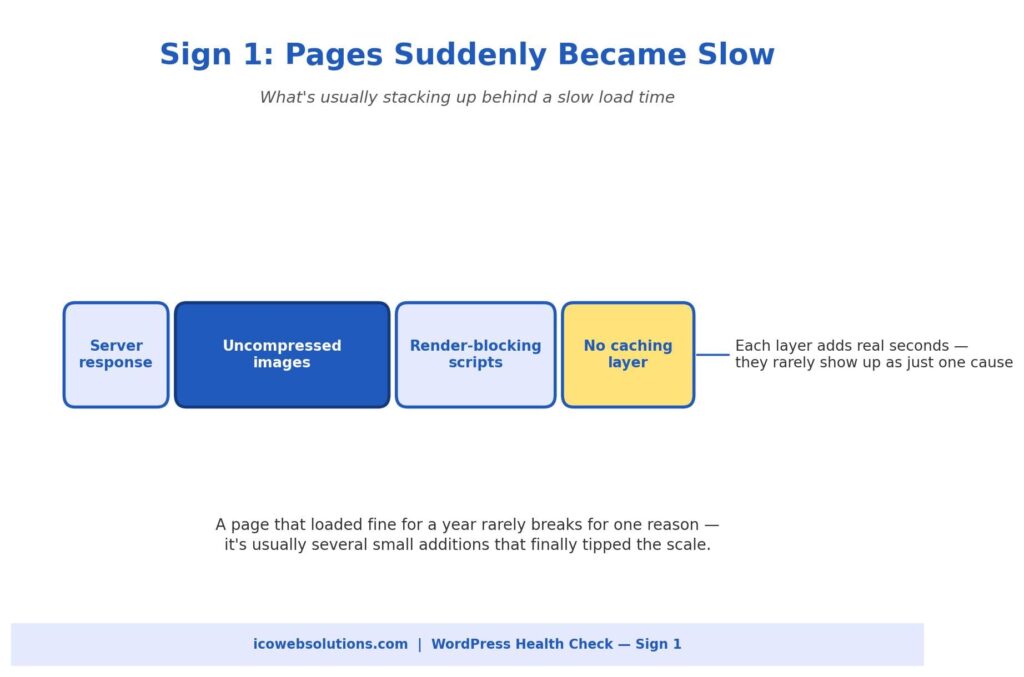
Site speed rarely collapses because of one dramatic failure. It’s almost always a slow build-up. A product page that loaded in under two seconds a year ago can creep past five or six seconds because of:
- Product images added without compression
- Plugins loading their own scripts on every page, needed or not
- A database weighed down by years of post revisions, spam comments, and old transaction logs
How to check it yourself
Run your homepage and one or two key inner pages through a free page speed testing tool. Look at what’s flagged as render-blocking or oversized rather than just the overall score.
A long list of unoptimized images, or a dozen scripts loading in the page header, is usually the real story, not a vague “server problem.” A general technical SEO check will also show whether slow load times are already affecting how search engines crawl and rank your pages, since speed has been a ranking factor for years.
DIY or get help?
Reasonable to tackle yourself (with moderate technical comfort): image compression, caching plugin setup, and deferring non-essential scripts.
Time to bring in help: your hosting plan is struggling under current traffic, or the database needs a careful, non-destructive cleanup. At that point, a website maintenance company in Delhi (or wherever your developer is based) is a safer choice than guessing your way through server changes on a live site.
Sign 2: Plugins Are Causing Errors
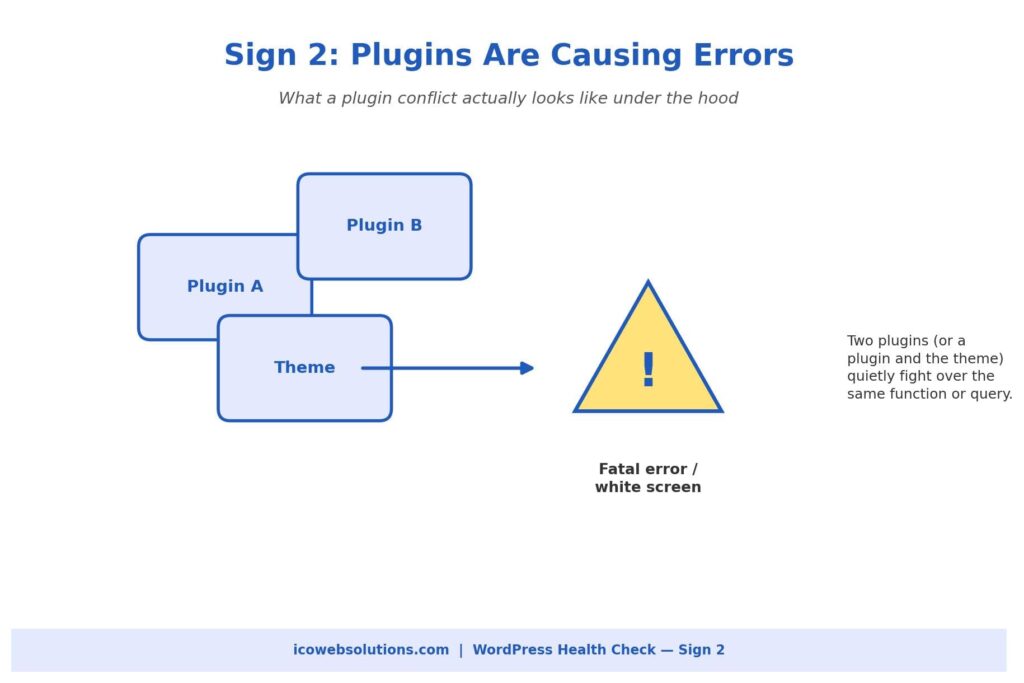
An occasional plugin notice is normal. These are not:
- A pattern of fatal errors
- A white screen after an update
- A plugin that works fine alone but breaks as soon as a second one is activated
Problems like these get worse the longer they’re ignored. Most conflicts happen because two plugins, or a plugin and your theme, use the same function name, hook into the same part of WordPress, or query the database in ways the other wasn’t built to expect.
How to check it yourself
Work on a staging copy of your site, not the live version.
- Deactivate plugins one at a time.
- Reload the page after each one.
- Stop when the error disappears. That’s the plugin involved.
- Check whether it has a recent update, and whether other users report the same conflict in its support forum.
This usually confirms the cause within a few minutes.
Why you shouldn’t ignore it
We’d caution against leaving a known conflict in place because the site “still works most of the time.” Intermittent fatal errors are inconsistent, which means they may be quietly affecting some visitors and not others, including search engine crawlers trying to render your pages.
A quick, deliberate fix now is almost always cheaper than a site-wide breakdown during a busy sales period.
Sign 3: Your Website Isn’t Being Indexed
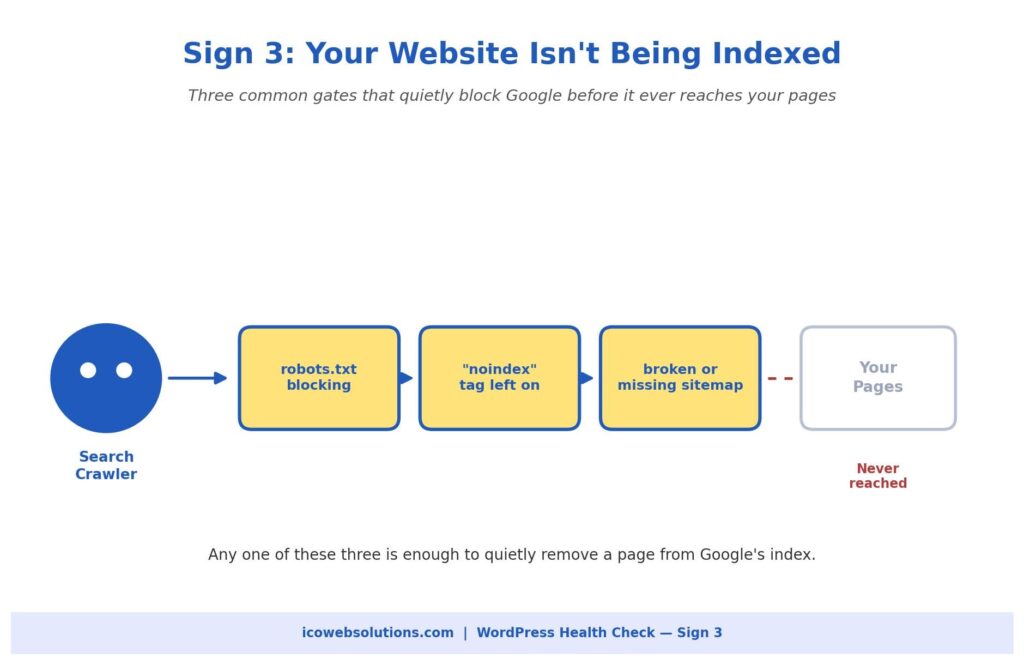
This one is easy to miss because the site looks completely normal to you and every other visitor. The problem only shows up in Google Search Console, where pages (sometimes an entire section) aren’t appearing in search results.
In our experience, it almost always comes down to one of three ordinary, fixable causes:
- A robots.txt file blocking crawler access to part of the site
- A “noindex” tag left on from development or staging
- A sitemap that has gone stale, broken, or stopped updating after a plugin change
How to check it yourself
- Open your robots.txt file directly in a browser.
- Search your pages for a stray noindex tag using a free SEO browser extension.
- Resubmit your sitemap in Search Console.
This usually surfaces the issue within minutes. The tricky part is that these settings can flip back on during a theme or plugin update, so a site that indexed fine for years can suddenly start disappearing from search without anyone touching anything on purpose.
When to get help
If this has been going on for more than a few weeks, have someone run a full technical SEO audit rather than fixing only the one setting you found. These issues tend to travel in small clusters.
Sign 4: Strange Redirects Are Appearing
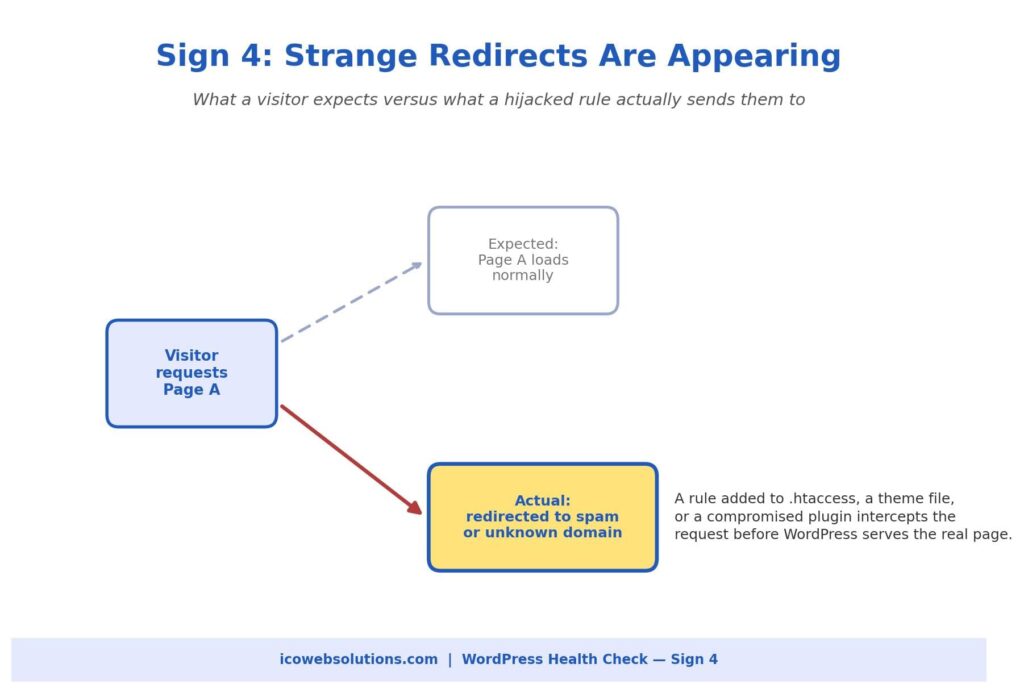
Unexpected redirects are one of the more alarming signs on this list, and for good reason. A visitor clicks a normal link on your site and lands on an unfamiliar domain pushing ads, fake software updates, or outright spam.
That’s rarely a simple misconfiguration. It usually points to a rule injected into your .htaccess file, your theme’s functions file, or a compromised plugin, typically as part of a broader security compromise.
What to do first
Speed matters more than thoroughness here. In this order:
- Change your WordPress admin and hosting passwords immediately.
- Check recently modified files in your hosting control panel for anything you don’t recognize.
- Run a reputable security scanner.
- Check Search Console for a Google security warning, since it affects whether new visitors can reach you safely.
When to get help
This is one of the signs where we recommend bringing in outside help sooner rather than later, even if you’re comfortable with WordPress. A redirect hijack usually means something got in, and finding every entry point it left behind, not just the one rule you noticed, takes a file-by-file review that’s easy to rush through on your own.
Sign 5: Checkout Isn’t Working Properly
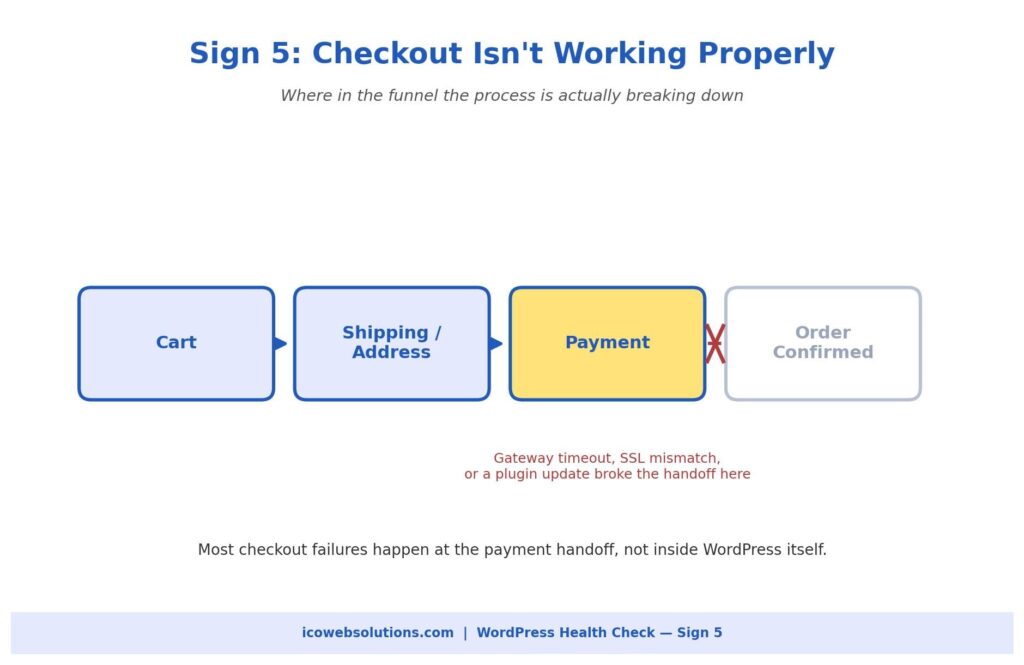
For any site running WooCommerce or a similar store, a broken checkout is the most expensive item on this list. Every hour it’s down, revenue walks away, often without you hearing about it unless a customer complains.
The most common pattern isn’t a complete failure but a partial one. The cart and shipping steps work, and the process breaks at the payment handoff, where your site communicates with an outside payment gateway.
Common causes
- An expired or misconfigured SSL certificate
- A payment gateway plugin that has fallen out of date with the gateway’s API requirements
- A recent WordPress or PHP update that the checkout plugin wasn’t fully compatible with
How to check it yourself
- Place a test purchase using the payment gateway’s official test card numbers.
- Check your SSL certificate’s expiration date.
- Review your error logs around the time customers started reporting problems.
Don’t wait on this one
Because it touches money and customer trust, “we’ll get to it this week” is too slow. A short period of downtime tends to cost more than the entire fix would have. Call in help the same day you notice something’s wrong.
What These Five Signs Usually Mean Together
These problems rarely show up in isolation:
- A site that’s slow from database bloat and too many plugins is also the most likely to start throwing plugin conflict errors.
- A site compromised enough to generate strange redirects often drops out of Google’s index around the same time, since search engines quickly deprioritize sites with security issues.
If you’re noticing two or three of these at once, that’s not a coincidence. It’s a sign the site has gone without real technical maintenance for a while.
None of this means panicking or rebuilding from scratch. It means:
- A proper audit
- A prioritized fix list based on actual risk and revenue impact
- A maintenance routine (regular updates, monitoring, and a real backup strategy) so problems get caught at the small, cheap stage
A 20-minute monthly checklist
Even if you manage everything yourself, set a recurring monthly check against this list:
- Run a page speed test on your two or three most important pages.
- Confirm plugins and themes are current, and that none have been abandoned by their developers. Unmaintained plugins are one of the most common entry points for the security issues behind strange redirects.
- Glance at Search Console for any sudden drop in indexed pages.
- If you run a store, place a real test order through your own checkout.
Together these take no more than twenty minutes, and catching a problem in a routine check is almost always cheaper and less stressful than learning about it from a customer or a search engine.
Need a Hand?
If you’re experiencing any of these five signs, or you’re not sure whether your site is overdue for a proper check, our team at ICO WebTech can diagnose and fix the issue.
We work as both a website design agency in Delhi building new sites and a WordPress website development company maintaining and troubleshooting existing ones. Whether the right fix is a quick technical repair or a more thorough rebuild, we’ll tell you honestly which one you need before any work begins.


10 Expert-Approved B2B Lead Generation Strategies That Actually Fill Your Pipeline
The Quick Take: Most B2B companies aren’t struggling to generate leads — they’re struggling to generate leads that actually turn into revenue. The ten strategies below, from account-based marketing to live chat to referral programs, are the ones backed by real 2025-2026 data for consistently producing leads sales teams actually want to talk to. Pick two or three that fit your sales cycle, do them well, and you’ll likely see more pipeline than trying to run all ten at once.
What’s Inside This Guide:
- 1. Account-Based Marketing (ABM)
- 2. LinkedIn Thought Leadership and Social Selling
- 3. SEO-Driven Content and Gated Lead Magnets
- 4. Personalized Email Nurture Sequences
- 5. Webinars and Virtual Events
- 6. Formal Referral and Partner Programs
- 7. Live Chat and Conversational Marketing
- 8. Video Marketing
- 9. Retargeting and Intent-Based Paid Ads
- 10. Sales Intelligence and Intent Data
- Bringing It All Together
Here’s a number worth sitting with before you spend another dollar on lead generation: 79% of marketing leads never turn into a sale, largely because of weak follow-up and nurturing, not because the leads were bad to begin with (Salesforce, as cited in G2, 2026). That statistic alone explains why so many B2B marketing teams feel like they’re constantly filling a bucket with a hole in the bottom.
Generating a name and an email address was never really the hard part. Turning that name into a qualified conversation with sales, and eventually into a closed deal, is where most strategies quietly fall apart.
The good news is that the B2B lead generation strategies actually working right now aren’t secret or complicated. They’re well documented, backed by solid research, and used by real companies generating real pipeline. What separates the teams getting results from the teams spinning their wheels usually isn’t the tactic itself, it’s how consistently and thoughtfully it gets executed. Below are ten strategies that consistently show up in current data as genuinely effective, along with what the research says about why each one works and how to put it to use.
1. Account-Based Marketing (ABM)
Account-based marketing flips the traditional funnel on its head. Instead of casting a wide net and hoping the right people notice, ABM starts by identifying a focused list of high-value target accounts and then builds personalized campaigns aimed specifically at the decision-makers inside those companies. It’s a slower, more deliberate approach, but for B2B companies selling complex or high-ticket products, it tends to outperform broader tactics by a wide margin.
The numbers back this up convincingly. Companies running ABM programs report boosting revenue by as much as 208% over three years, and 76% of marketers say ABM delivers a higher return than other marketing strategies they run (Saffron Edge, 2026). Personalized ABM campaigns also outperform generic ones according to 87% of B2B marketers, and companies with strong sales-and-marketing alignment, something ABM naturally forces, grow revenue 32% faster than those without it (Saffron Edge, 2026). If your average deal size is large enough to justify custom outreach, and your buying committee typically includes more than one decision-maker, this is very likely the single highest-leverage strategy on this list.
- Start with a short list of 20 to 50 dream accounts rather than trying to run ABM at scale immediately
- Involve sales in building the account list so marketing and sales agree on what a “good fit” actually looks like
- Personalize the message to the account’s specific industry and pain points, not just their first name
2. LinkedIn Thought Leadership and Social Selling
LinkedIn has become the closest thing B2B marketing has to a home turf, and the data leaves little room for debate. LinkedIn now drives 80% of all B2B social media leads, and 89% of B2B professionals use it specifically to generate business (Martal Group, as cited in SHNO, 2026). Leads from LinkedIn also convert at roughly double the rate of other social platforms, according to 2026 HubSpot research (Searchlab, 2026). That’s not a small edge. It suggests that time spent building a presence on LinkedIn is simply more productive than the same time spent almost anywhere else in social media.
The strategy that works best isn’t running LinkedIn ads in isolation, though those help too. It’s a combination of consistent thought leadership content from real people at your company, genuine engagement in the comments of your prospects’ posts, and a sales team that treats LinkedIn as a relationship-building tool rather than a place to blast cold pitches. Buyers can tell the difference between someone building credibility over months and someone trying to close a deal in a single DM, and they respond very differently to each.
3. SEO-Driven Content and Gated Lead Magnets
Content marketing remains one of the most reliable, compounding ways to generate B2B leads, and the research keeps confirming it. According to a 2025 study, content marketing generates roughly three times more leads than outbound marketing while costing 62% less to run (Demand Metric, as cited in SHNO, 2026). And 87% of B2B marketers say content marketing successfully generates leads for their business, an increase of eleven percentage points in just a couple of years (Email Vendor Selection, 2025, as cited in SHNO, 2026).
SEO deserves special mention here because of how differently it performs over time compared to paid channels. B2B companies that consistently invest in SEO see a 5.7 times higher return on investment after twelve months compared to running paid search alone (BrightEdge, as cited in Searchlab, 2026). Paid ads stop working the moment you stop paying for them. A well-ranked blog post or resource page keeps generating leads for years with no ongoing spend, which is exactly why SEO tends to be underrated by teams looking for quick wins and underrated no more once they see a year-two comparison. As an SEO agency in Delhi working with B2B clients across long sales cycles, this is consistently the pattern we see: businesses willing to be patient with SEO end up with the cheapest, most durable lead source on this list.
Gated content, meaning guides, templates, or reports that visitors trade an email address to access, still plays an important role here too, though it’s worth using selectively. Gated assets convert two to five times better than ungated ones, but ungated content drives roughly three times more traffic overall (Demand Gen Report, as cited in Searchlab, 2026).
A smart approach uses both: plenty of open, freely accessible content to build organic traffic and authority, with a smaller number of genuinely valuable gated resources reserved for your highest-intent visitors.
- Build content around the specific questions your sales team hears most often on discovery calls
- Reserve gating for your best assets, not every blog post, since over-gating quietly kills your organic traffic
- Treat SEO as a twelve-month investment, not a campaign you evaluate after six weeks
4. Personalized Email Nurture Sequences
Email still holds one of the best returns of any B2B marketing channel, with the average campaign delivering a striking 36 to 1 return on investment (Litmus, as cited in Searchlab, 2026). But the era of generic, one-size-fits-all newsletters blasted to an entire list is largely over. Personalized emails see a 14% improvement in click-through rates and a 10% lift in conversions compared to generic sends (Gartner research, as cited in Biteable, n.d.), and nurtured leads go on to make purchases that are 47% larger on average than leads that never received any nurturing at all (as cited in ReferralRock, n.d.).
The strategic shift worth making here is moving away from a single generic drip sequence and toward multiple nurture tracks based on where a lead actually is in their buying journey. A visitor who just downloaded an introductory guide needs a very different email than someone who’s already requested a demo and gone quiet. Segmenting your list this way takes more setup work upfront, but it’s a major part of why 79% of leads currently fail to convert. Most of them simply weren’t nurtured in a way that matched where they actually were.
5. Webinars and Virtual Events
Webinars have quietly become one of the highest-quality lead sources available to B2B marketers, and 73% of B2B marketers now call webinars their number one source of high-quality leads (ZoomInfo, as cited in Hubilo, 2025). The cost efficiency is hard to ignore too. Webinars generate leads at roughly $72 each, compared to over $800 for a trade show and around $198 for a conference (SHNO, 2026). Companies typically see 20% to 40% of webinar attendees enter the sales pipeline as genuinely qualified leads, and webinars with a clear, specific call to action can convert as much as 47% of attendees into leads (SHNO, 2026).
What makes webinars particularly valuable compared to a downloadable PDF or blog post is the built-in qualification. Someone willing to block out 30 to 45 minutes of their calendar to attend a live session on a specific topic has already told you a lot about how seriously they’re considering a solution like yours. That single behavioral signal, attendance itself, is often a stronger indicator of intent than a dozen anonymous page views.
- Pick topics narrow enough to attract genuinely interested prospects rather than a broad general audience
- Send the replay within 24 hours, since on-demand viewing can account for nearly half of total views
- End with one specific next step, not a vague “let us know if you have questions” close
6. Formal Referral and Partner Programs
If there’s one strategy on this list that’s dramatically underused relative to how well it performs, it’s referrals. Roughly 84% of B2B decision-makers start their buying process with a referral (Edelman Trust Barometer, as cited in GrowSurf, n.d.), and companies with formal referral programs report a 70% higher conversion rate on referral leads compared to leads sourced any other way (Heinz Marketing, as cited in GrowSurf, n.d.). Referred leads also close roughly 69% faster than non-referred leads, and companies with structured referral programs saw 86% revenue growth over two years, compared to 75% for companies without one (Heinz Marketing, as cited in ReferralRock, n.d.).
Despite results like these, only around 30% of B2B companies have a formal referral program in place at all (Influitive, as cited in ReferralRock, n.d.), which means most companies are leaving one of their highest-converting lead sources almost entirely up to chance. A referral program doesn’t need to be complicated to work. It needs a clear ask, an easy way for happy customers to make an introduction, and a reason for them to bother, whether that’s a financial incentive, early access to new features, or simply genuine appreciation delivered consistently.
7. Live Chat and Conversational Marketing
Adding live chat to a B2B website tends to produce results that surprise teams who assumed it was mainly a retail or customer-support tool. Website visitors who chat with a company in real time are 82% more likely to convert into customers, and they go on to spend 13% more than visitors who never chat at all (Intercom, n.d.). Even a modest exchange makes a measurable difference. Just one reply to a visitor’s message makes them 50% more likely to convert, and a short six-message conversation can make them up to 250% more likely to convert (Intercom, n.d.). Broader industry data backs this up too, with live chat linked to a 20% average increase in conversion rate and a reported 305% return on investment (American Marketing Association, as cited in SmartBug Media, 2017).
The reason this works is almost embarrassingly simple: speed. A prospect with a question who has to fill out a contact form and wait a day for a reply has plenty of time to lose interest, get distracted, or check out a competitor instead. A prospect who gets a helpful answer in under a minute is still standing at your door, so to speak, ready to keep the conversation going. For B2B sites with any meaningful traffic, live chat is one of the fastest and least expensive improvements you can make to your conversion rate.
8. Video Marketing
Video has moved from “nice to have” to genuinely essential in B2B marketing. 78% of businesses report increased website traffic after adding video to their content strategy, 69% generate more leads because of it, and 54% see increased sales as a direct result (as cited in SwellAI, n.d.). Perhaps most tellingly, B2B marketers who use video grow revenue 49% faster than those who don’t (as cited in SwellAI, n.d.), and landing pages that include video can see conversion increases of 86% or more (as cited in MediaPost, n.d.).
Personalized video, where a salesperson records a short, specific message for an individual prospect rather than sending a generic pitch, is proving especially effective in outbound efforts. Video email campaigns show five times higher open rates and eight times higher open-to-reply rates in prospecting compared to plain text emails (as cited in Sagefrog, n.d.). You don’t need studio-quality production for this to work. A well-lit laptop camera and a genuinely useful, specific message tends to outperform a polished but generic video every time, because the personalization is what actually earns the reply.
- Use short explainer videos on high-traffic landing pages where visitors are deciding whether to convert
- Have sales reps send brief personalized videos instead of another templated cold email
- Repurpose webinar recordings into shorter clips for social and email rather than letting them sit unused after the live event
9. Retargeting and Intent-Based Paid Ads
Most visitors to a B2B website will never convert on their first visit, no matter how good your page is, simply because B2B buying decisions usually involve multiple stakeholders and take weeks or months to finalize. Retargeting exists specifically to solve that problem by keeping your brand visible to people who’ve already shown interest. Retargeting through display ads has been shown to influence a striking 70% of website visitors toward eventually making a purchase (as cited in MediaPost, n.d.), and personalized exit-intent offers, shown right as a visitor is about to leave your site, can boost leads and conversions by as much as 200% (as cited in MediaPost, n.d.).
The key to making retargeting feel helpful rather than intrusive is relevance. Someone who read a blog post about your product’s pricing should see a different retargeting ad than someone who only viewed your careers page. Segmenting your retargeting audiences by the specific page or content they engaged with, rather than running one generic ad to everyone who’s ever visited your site, is usually the difference between retargeting that converts and retargeting that just feels like being followed around the internet.
10. Sales Intelligence and Intent Data
The final strategy worth building into your lead generation approach isn’t really a channel at all, it’s a layer of intelligence that makes every other channel work better. Intent data tracks the buying signals companies give off before they ever fill out a form, things like researching competitor comparisons, visiting review sites, or spending unusual amounts of time on certain topics. Combined with personalization, this kind of targeting has real financial impact. Gartner has projected that B2B companies using personalization in digital commerce can see revenue increases of up to 15% (as cited in SaleFuel, n.d.).
This strategy also directly addresses one of the biggest structural problems in B2B marketing right now: 85% of B2B marketers admit they struggle to connect their marketing performance to actual business outcomes (G2, 2026), and 41% report difficulty getting marketing-generated leads to meet sales’ expectations for quality (G2, 2026). Intent data helps close that gap by giving both teams a shared, objective signal for which leads are actually ready for a conversation, rather than relying on gut feeling or an arbitrary lead score that sales has learned to ignore.
Bringing It All Together
Reading through ten strategies at once can feel like a lot, and that’s exactly the trap worth avoiding. Trying to launch all ten simultaneously is a fast way to execute all of them poorly. The stronger approach is to look honestly at your sales cycle, your average deal size, and where your current pipeline is actually breaking down, then choose two or three strategies from this list that most directly address that specific gap. A company selling a $500 monthly subscription probably gets more out of SEO content and email nurturing than a full ABM program. A company selling $200,000 enterprise contracts almost certainly should be running ABM alongside LinkedIn thought leadership, with live chat catching the inbound interest both of those generate.
Whichever combination fits your business, the underlying principle stays the same across every strategy on this list: the leads that convert aren’t the ones you generated the most of, they’re the ones you followed up with the fastest, personalized the most thoughtfully, and nurtured with genuine relevance until they were actually ready to buy. That’s not a flashy insight, but it’s the one the data keeps confirming over and over again.
If your pipeline has been feeling unpredictable, or your marketing and sales teams keep disagreeing about what counts as a “good lead,” it might be less about needing a new tactic and more about needing the right systems, tracking, and website experience to support the strategies you’re already running. That’s exactly the kind of work our team handles at ICO WebTech, a website designing agency in Delhi that builds high-converting landing pages and sets up the live chat, tracking, and personalization infrastructure that turns these strategies from theory into a predictable pipeline.
Talk to ICO WebTech About Your Lead Generation Strategy
References
Biteable. (n.d.). Create next-level B2B marketing campaigns with personalized videos. https://biteable.com/blog/personalized-video-marketing-for-b2b/
G2. (2026). Lead generation statistics for 2026: Key marketing data. https://learn.g2.com/lead-generation-statistics
GrowSurf. (n.d.). B2B referral marketing statistics. https://growsurf.com/statistics/b2b-referral-marketing-statistics/
Hubilo. (2025). Webinar marketing statistics and benchmarks for 2025. https://www.hubilo.com/blog/webinar-marketing-statistics-benchmarks
Intercom. (n.d.). From first touch to qualified lead: How to use live chat for sales. https://www.intercom.com/blog/
MediaPost. (n.d.). Stats and snippets on B2B email: Why it’s the most valuable channel. https://www.mediapost.com/publications/article/346495/
ReferralRock. (n.d.). B2B referral marketing statistics. https://referralrock.com/blog/b2b-referral-marketing-statistics/
Saffron Edge. (2026). 45+ account-based marketing statistics for 2026 B2B marketing strategy. https://www.saffronedge.com/blog/account-based-marketing-statistics/
SaleFuel. (n.d.). B2B companies using personalization in digital commerce to see up to 15% increase in revenue. https://salesfuel.com/b2b-companies-using-personalization-digital-commerce-see-15-increase-revenue/
Sagefrog. (n.d.). Start more conversations with leads in 2020 with personalized video emails. https://www.sagefrog.com/blog/start-more-conversations-leads-2020-personalized-video-emails/
Searchlab. (2026). B2B marketing statistics 2026. https://searchlab.nl/en/statistics/b2b-marketing-statistics-2026
SHNO. (2026). B2B lead generation statistics for 2026: Channels, costs, conversion rates, and trends. https://www.shno.co/marketing-statistics/b2b-lead-generation-statistics
SHNO. (2026). Content-led lead generation statistics. https://www.shno.co/marketing-statistics/content-led-lead-generation-statistics
SHNO. (2026). Webinar marketing statistics for 2026. https://www.shno.co/marketing-statistics/webinar-marketing-statistics
SmartBug Media. (2017). 4 powerful ways live chat on your website improves B2B inbound sales. https://www.smartbugmedia.com/blog/live-chat-on-your-website-improves-b2b-inbound-sales
SwellAI. (n.d.). B2B video marketing statistics. https://www.swellai.com/blog/b2b-video-marketing-statistics

Captured by the Zero-Click Trend? How ICO Can Help You Win Google’s Featured Snippets
Search no longer sends the same traffic it used to. Here’s how to earn visibility and clicks even in a zero-click world.
If you’ve watched your organic traffic plateau or dip even as your rankings held steady, you’re not imagining it. Google’s search results page has quietly become a destination in itself — and for most searches, users never leave it. This is the zero-click era, and it’s rewriting the rules of SEO.
At ICO, we’ve spent the last few quarters helping brands adapt to exactly this shift — not by fighting the zero-click trend, but by getting inside it. The single most effective lever for doing that today is winning Featured Snippets, the answer boxes that sit at “Position Zero,” above even the #1 organic result. This guide breaks down the data, the mechanics, and a real optimization case study so you can see exactly how it’s done.
The Zero-Click Reality, By the Numbers
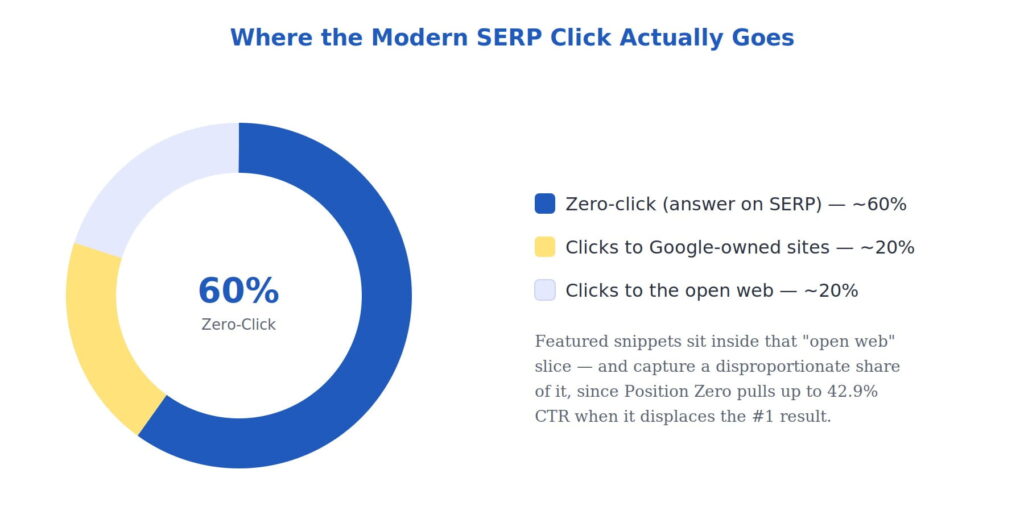
Multiple independent studies converge on the same uncomfortable truth: the majority of Google searches now end without a single click to any website. The exact figure varies by source and methodology, but the direction is unanimous.
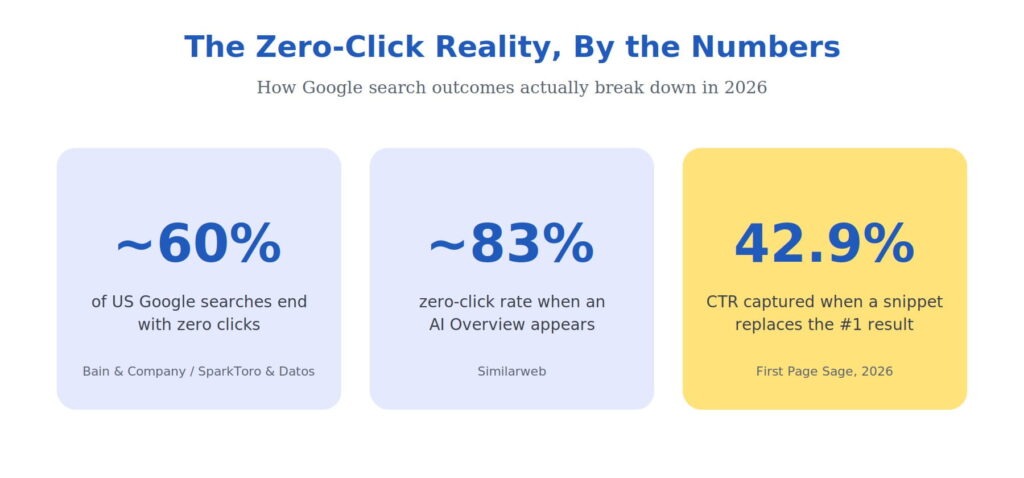
Bain & Company’s research found that 80% of consumers now rely on AI-generated results for at least 40% of their searches, with organic traffic declining an estimated 15–25% across many sectors as a direct result. The takeaway isn’t that SEO is dead. It’s that the destination has changed — if your brand is named and recommended inside the answer itself, you still reach the customer at the exact moment they decide.
Why this matters for you: Whether you run an e-commerce store, or a SaaS product competing for local visibility, the brands winning today aren’t just chasing blue links — they’re engineering their content to live inside Google’s answer boxes.
What Exactly Is a Featured Snippet?
A featured snippet is a short, extracted answer that Google pulls from a ranking page and displays in a highlighted box above the #1 organic result — hence the nickname “Position Zero.” It includes the answer text, the page title, and the URL, giving you a branded presence even when the user never clicks through.
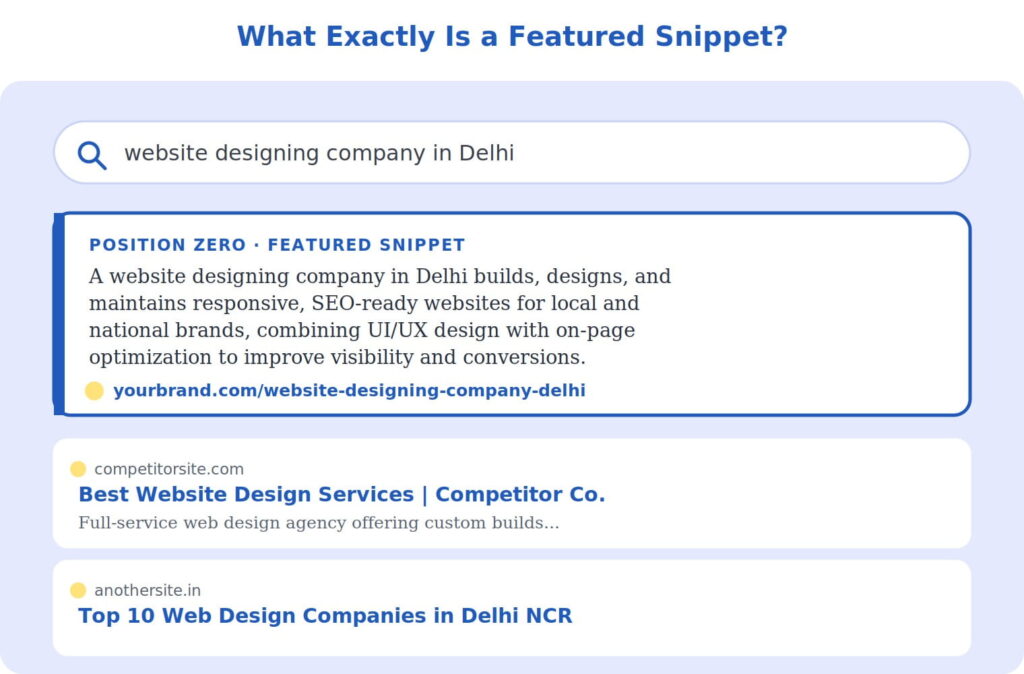
Illustrative mockup: a featured snippet occupies “Position Zero” — above the #1 organic result — complete with a highlighted answer box, source URL, and brand attribution.
The Four Core Snippet Types
Google displays four core featured snippet types as of 2026, each with different triggers, formats, and optimization requirements. Knowing which one your target query pulls determines exactly how you should structure your content.
| Snippet Type | Best For | Ideal Format | Share of Snippets |
|---|---|---|---|
| Paragraph | “What is,” “why,” definition queries | 40–60 word direct answer | ~60–65% |
| List | “How to,” step-by-step, ranked queries | Numbered/bulleted, 5–8 items | ~25–30% |
| Table | Comparisons, specs, pricing data | 3–5 columns, 5–6 rows | ~8% |
| Video | Tutorials, demos, repairs, recipes | Timestamped YouTube segment | ~5–8% |
Websites that consistently earn featured snippets report meaningful downstream gains: higher organic click-through rates, improved brand recognition, and stronger voice search visibility. That’s the real prize; snippets don’t just capture a click; they build the authority signals that compound over time.
Why Snippets Still Matter in the Age of AI Overviews
It’s tempting to assume AI Overviews have made traditional snippets irrelevant. The data says otherwise. Featured snippets now serve a dual purpose: they capture direct SERP real estate and simultaneously feed the AI Overview engine with citation-worthy signals, so content structured for one format typically earns visibility in the other.
The strategic nuance in 2026 is knowing which query types still trigger traditional snippets versus which have shifted almost entirely to AI Overviews — and redirecting optimization effort toward the how-to and commercial queries where snippets still appear reliably. This is precisely where a structured, ICO-led content audit pays off.
How ICO Approaches Featured Snippet Optimization
Winning Position Zero isn’t a lucky content accident — it’s a repeatable process. Here’s the exact framework ICO runs for every client, whether it’s a national e-commerce brand or a website designing company in Delhi trying to outrank larger competitors in local search.
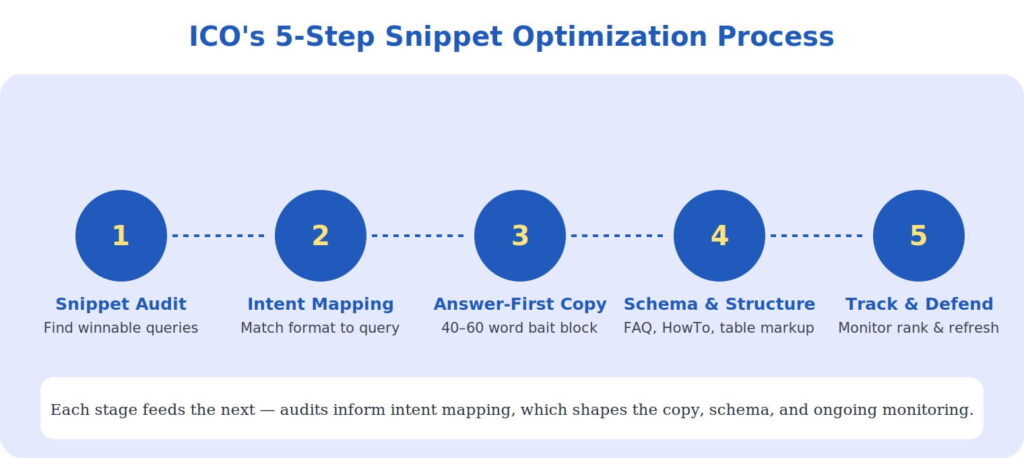
Step-by-step, in plain terms:
- Snippet audit: We audit all page-one rankings to identify queries where a competitor currently owns a snippet that we can plausibly displace — usually queries where the client already ranks in positions 2–10.
- Intent mapping: We classify each target query by the snippet type it’s most likely to trigger — paragraph, list, or table — since matching content format to query intent (definitions to paragraphs, procedures to numbered lists, comparisons to tables) is the foundation of an effective position-zero strategy.
- Answer-first copywriting: We rewrite the page so the direct answer sits immediately under the relevant heading, because Google’s extraction algorithm looks at the text immediately following headings — if the answer is buried in paragraph three, the snippet goes to whoever puts it in paragraph one.
- Schema and structure: We implement FAQ, HowTo, and table schema, and convert prose into scannable lists and tables where the query calls for it.
- Track and defend: Snippets shift ownership constantly. We monitor snippet volatility monthly and refresh content before a competitor can take the box back.
Case Study: How ICO Helped a Delhi-Based Web Agency Win Position Zero
Client Snapshot
Our client, a mid-sized website designing company in Delhi, was ranking on page one for several commercial keywords but was consistently losing the featured snippet — and the associated click share — to larger national competitors and directory sites.
The Challenge
Page-1 rankings for 40+ commercial queries but zero snippet ownership. Organic CTR was well below expected benchmarks for their ranking positions.
The Approach
ICO ran a full snippet audit, identified 34 winnable queries, restructured service pages with answer-first blocks under 60 words, converted process explanations into numbered lists, and added comparison tables for “custom vs template website design.”
Headline results from ICO’s 90-day featured snippet optimization engagement.Headline results from ICO’s 90-day featured snippet optimization engagement.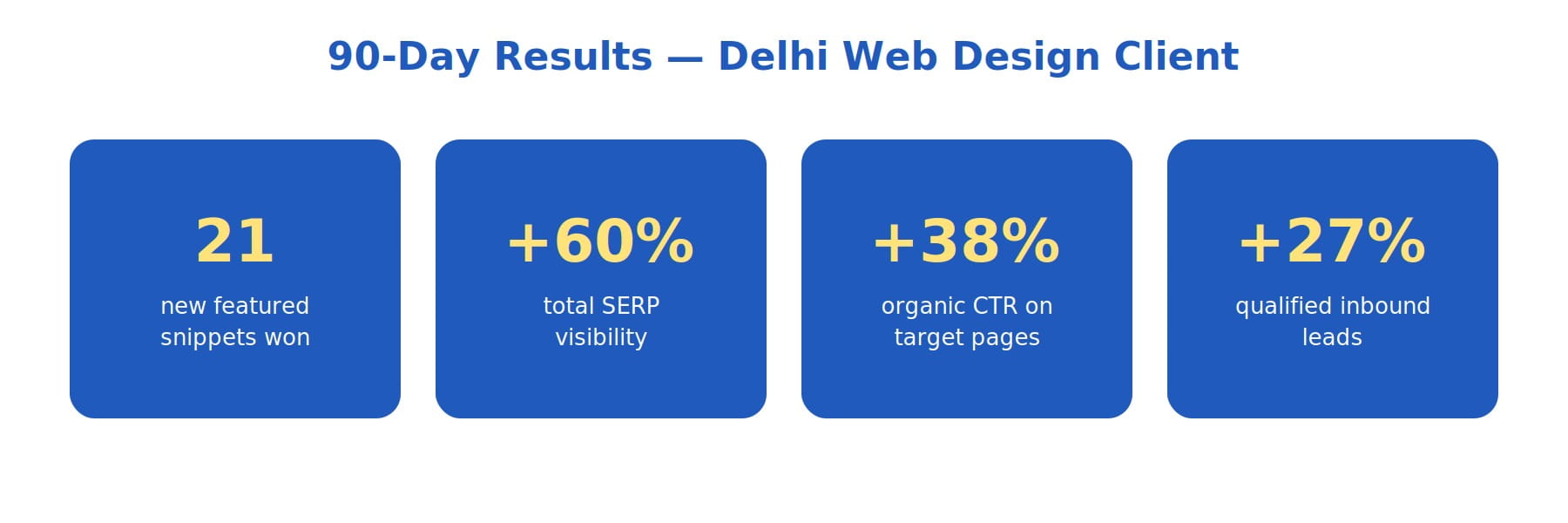
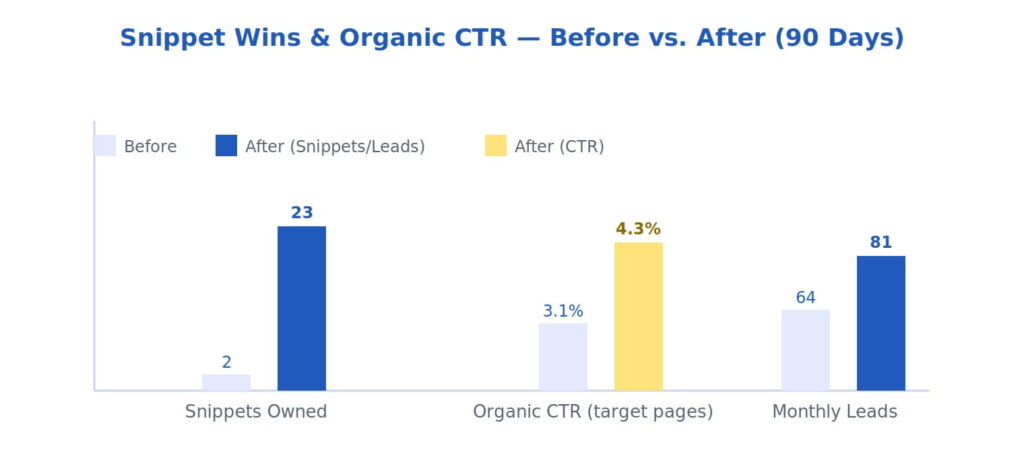 Before/after results from ICO’s 90-day featured snippet optimization engagement.
“We were already ranking well, but we were invisible in the box that actually gets clicked. ICO didn’t just chase rankings — they reformatted our content to win the answer itself.” — Client testimonial, paraphrased from project feedback
Commercial Queries Where This Strategy Pays Off Fastest
Snippet optimization isn’t equally valuable across every keyword. It compounds fastest on commercial and local-intent queries where buyers are actively comparing options — for example, terms like website designing company in Delhi, best SEO company in India, digital marketing agency near me, ecommerce website development services, SEO services for small business, and website redesign agency. These queries sit in exactly the zone where traditional snippets still appear reliably, rather than being displaced by AI Overviews.
Getting Started: A Quick Checklist
- Pull your Search Console data and filter for queries ranking positions 2–10 — these are your highest-probability snippet targets.
- Classify each query by intent: definition, process, or comparison.
- Rewrite the first 40–60 words after the relevant heading as a direct, self-contained answer.
- Add FAQ, HowTo, or Table schema markup where applicable.
- Track snippet ownership monthly — Position Zero is contested real estate, and it changes hands often.
Ready to Win Position Zero?
ICO helps brands turn the zero-click trend from a threat into a visibility advantage.
Sources referenced:
Data points, statistics, and optimization guidance referenced in this article were drawn from the following sources. Figures are aggregated industry estimates as of 2026 and may vary by methodology.
- Click Vision, 50+ Zero Click Search Statistics for 2026: Trends & Impact — click-vision.com/zero-click-search-statistics
- Arfadia, Zero-Click Search Statistics 2026: Sourced & Updated — arfadia.com/blog/zero-click-search-statistics-2026
- Digital Applied, Zero-Click Search Statistics 2026: Complete Data Guide — digitalapplied.com/blog/zero-click-search-statistics-2026-complete-data
- Strategyc, Zero Click Search Statistics 2026: The Complete Data Behind Search’s Biggest Shift — strategyc.io/blog/zero-click-search-statistics
- Omnibound, Zero-Click Search Statistics (2026): 52+ Data Points — omnibound.ai/blog/zero-click-search-statistics (citing Bain & Company, Goodbye Clicks, Hello AI, Feb 2025)
- Nightwatch, How to Optimize for Featured Snippets (+Examples & Tips) — nightwatch.io/blog/optimize-for-featured-snippets
- Stackmatix, Featured Snippet Optimization in 2026: How to Win Position Zero — stackmatix.com/blog/featured-snippets-optimization-2026
- SEOctopus, Featured Snippet Optimization — The Complete Guide to Position Zero (2026) — seoctopus.io/en/blog/featured-snippet-optimization-guide-2026
- Digital Applied, Featured Snippets in the AI Overview Era: 2026 Guide — digitalapplied.com/blog/featured-snippets-ai-overview-era-optimization-2026
- CodeX Guru, How To Get Featured Snippets In 2026 — codexguruu.com/how-to-get-featured-snippets-in-2026
- IT in DFW, Featured Snippets in 2026: The Ultimate Guide to Position 0 — itindfw.com/blog/featured-snippets
- Scale Growth Digital, How to Optimize for Featured Snippets (2026) — scalegrowth.digital/resources/seo/how-to-optimize-featured-snippets (citing First Page Sage, 2026)
- YoGrow Solutions, How to Win the Featured Snippet: The 2026 SEO Formatting Guide — yogrowsolutions.com/how-to-win-the-featured-snippet
- SERPexa, Featured Snippet Types & How to Win Each: Complete Guide [2026] — serpexa.com/featured-snippet-types-how-to-win-each-complete-guide-2026

Hey Google, Find My Business”: Is Your Site Ready for Voice Search?
Think about the last time you needed a quick answer while cooking, driving, or walking through a busy street. You didn’t pull out your phone, open a browser, type a fragmented phrase into a search bar, and patiently scroll through ten blue links. You simply raised your wrist, tapped your smart speaker, or spoke directly into your phone: “Hey Google, find an emergency mechanic near me that’s open right now.”
Within seconds, a calm, simulated voice gave you a single, definitive answer. No browsing, no reading, no filtering. Just a direct solution to an immediate problem.
This isn’t a futuristic luxury anymore; it is the default behavior of the modern consumer. Millions of people interact daily with voice-enabled AI assistants—Google Assistant, Apple Siri, and Amazon Alexa. Yet, while businesses spend thousands of dollars optimizing their websites for traditional desktop and mobile text searches, they are completely invisible to this massive wave of vocal consumers. If your digital asset is structured exclusively to catch short, fragmented typed keywords, you are bleeding high-intent leads who speak their needs into existence.
The Fragmented Keyword is Dead: Understanding Spoken Intent
To understand why your current search visibility might be failing in the era of smart speakers and mobile assistants, we have to look closely at the profound psychological and structural differences between how humans type and how they talk. Typed search is unnatural. It is a learned behavior where we compress our complex thoughts into rigid, robotic fragments to please a search engine algorithm.
When someone sits at a laptop looking for corporate accounting services, they might type: "B2B accounting firm tax compliance." But when that same professional is driving home and talking to their smartphone, the query transforms into a full sentence: "Hey Google, who is the best corporate accountant in the area who can help with an unexpected audit?"
The Contrast: Text Queries vs. Spoken Commands
Spoken queries are fundamentally longer, full of conversational nuances, and almost always phrased as direct questions containing who, what, where, why, or how.
| Traditional Text Search (The Past) | Conversational Voice Search (The Present) |
|---|---|
| “best Italian restaurant” | “Hey Google, what’s a highly-rated Italian place near me that has outdoor seating?” |
| “replace car battery cost” | “Siri, how much should I expect to pay to change a battery for a 2018 Honda Civic?” |
| “SEO strategies 2026” | “Alexa, what are the most critical updates I need to make to my website for search visibility this year?” |
When businesses partner with an experienced SEO company in India, the first conversation often revolves around changing keyword dynamics. Traditional optimization strategies that target cold, two-word phrases are no longer sufficient. Voice search requires a deep embrace of long-tail, natural-sounding phrases because voice engines do not rank a list of options—they select a single, clear snippet to read aloud to the user. If your content doesn’t match the conversational rhythm of the spoken question, you don’t just drop to page two; you cease to exist in that search universe entirely.
The Technical Pillar: Structuring Data for Virtual Assistants
Voice assistants are highly sophisticated, but they are also incredibly busy. They do not have the time or cognitive patience to read through your beautifully written 3000-word blog post to find your business hours, pricing patterns, or service locations. They rely on micro-data built directly into your website’s code to confirm that your business matches the user’s vocal criteria.
This machine-readable layer is called Schema Markup (structured data). Think of it as an explicit cheat sheet provided directly to search engine crawlers. While regular text on a page says “We are located in downtown Mumbai and open at 9 AM,” schema code explicitly translates that information into standardized values that tell Google’s voice algorithm: "latitude: 18.9226, longitude: 72.8343, openingHours: Mo-Fr 09:00."
To capture the voice search ecosystem, your site needs to deploy three critical variants of schema markup:
1. LocalBusiness Schema
Crucial for physical brick-and-mortar storefronts and regional service providers. It hardcodes your physical address, geocoordinates, precise operating hours, and localized service offerings directly into the page source code.
2. FAQ Schema
By mapping explicit question-and-answer pairs within your code, you tell search engines exactly which snippet of text answers a specific user inquiry, drastically increasing your chances of becoming a spoken featured snippet.
3. Speakable Schema (Beta/Evolving)
This advanced markup allows website administrators to explicitly flag specific sections of an article or webpage that are optimized for text-to-speech conversion, telling smart speakers exactly which lines are best suited to be read aloud.
Implementing these advanced, nested technical code blocks can quickly become overwhelming for internal marketing teams. Collaborating with a professional SEO company in India can bridge the gap between technical code and humanized search, ensuring your backend architecture is flawlessly formatted for search engine web crawlers while your frontend text remains beautifully engaging for real human visitors.
The Content Pillar: Engineering the Long-Tail FAQ Engine
Once your technical code layer is secure, you must address your content strategy. The most efficient and bulletproof method to align your website with voice queries is to build comprehensive, hyper-targeted Frequently Asked Questions (FAQ) frameworks across your entire domain.
Don’t fall into the trap of writing defensive, clinical FAQs that read like insurance policies. To win the voice search war, your FAQs must mirror real human conversations. This means structuring your questions using the exact phrases your target customers say out loud when they are stressed, curious, or ready to buy.
When engineering your content engine, use a strict three-part formula for every question and answer block you create:
- The Natural Question (The Trigger):
- Write the header using the exact conversational question format. Instead of
"Shipping Policies,"write"How long does it take to ship a custom couch to Chicago?" - The Spoken Punchline (The First 29 Words):
- Voice assistant responses are notoriously short. The average voice answer is roughly 29 words long. Your first sentence must answer the question directly, concisely, and cleanly. Avoid introductory filler like “That’s a wonderful question, let us explain…” Get straight to the answer so the voice algorithm can read it effortlessly.
- The Contextual Deep Dive (The Follow-up):
- Below your initial concise answer, provide the deeper context, secondary options, or a clear call-to-action for users who are reading the page traditionally on a desktop or mobile layout.
Real-World Execution: Transforming Static Text to Conversational Content
“Our regional plumbing enterprise provides leak detection and pipe restoration services across the greater metropolitan area utilizing premium sonic wave identification technology.”
Q: How do you find a hidden water leak inside a wall?
“We find hidden water leaks inside walls using specialized sonic wave detectors that listen for acoustic vibrations, allowing us to pinpoint the exact broken pipe without tearing down your drywall.”
Local Intent Optimization: Winning the “Near Me” Battleground
Over half of all voice search queries are deeply tied to local intent. When people speak to their devices, they are frequently hunting for immediate, physical solutions in their immediate geographic vicinity. They want a grocery store, a dental clinic, a digital marketing consultant, or a legal advisor within a 15-minute driving radius.
Any forward-thinking SEO company in India will tell you that local visibility is no longer just about static text links on a search page. Voice search engines pull local data directly from prominent directory ecosystems, most notably your Google Business Profile (formerly Google My Business), Apple Maps, and Bing Places. If your profiles across these directories are neglected, unverified, or display conflicting information, your website will be completely bypassed by voice assistants, regardless of how well-written your blog posts are.
To secure your local voice presence, follow this strict verification protocol:
Step 1: Enforce Absolute NAP ConsistencyYour Name, Address, and Phone number (NAP) must be identical across every corner of the internet. If your address is spelled “Suite 400” on your website but “Ste. 400” on your Google Profile or “Suite 4” on Yelp, the voice search algorithm views this minor discrepancy as an information conflict, drops your trust score, and looks for a clearer competitor.
Step 2: Dominate Conversational Local ReviewsVoice assistants frequently sort options by rating metrics. When a user asks for the “best” service provider, the algorithm filters out businesses with ratings below four stars. Encourage your loyal clients to write descriptive, keyword-rich reviews that use natural phrasing (e.g., “They fixed my leaky roof in Delhi within two hours”) rather than just leaving a silent five-star rating.
Step 3: Keep Real-Time Operating Data UpdatedIf a voice assistant routes a customer to your store on a national holiday only to find your doors locked because you forgot to update your seasonal hours, that user will leave a highly damaging one-star review. Constantly sync your operating calendars, holiday closures, and contact touchpoints across all platforms.
Case Study: How a Local Service Chain Generated a 110% Surge in Inbound Calls
Let’s analyze the tangible business impact of shifting a web asset from traditional text-only placement into a voice-optimized powerhouse. Consider the case of Radiant Home Services, a regional home repair and maintenance chain operating multiple locations across a busy metropolitan market.
Radiant Home Services possessed an established website that ranked decently for standard keywords like “HVAC repair” or “clogged drain solutions.” However, as consumer habits evolved, their analytics team noticed a troubling trend: mobile conversions were plateauing, and direct organic phone call volume from their web pages was slowly declining. When they dug into user behavior, they discovered that an increasing percentage of their target demographic—busy homeowners and working parents—were relying entirely on voice commands to find home assistance in real-time emergency situations.
The company rolled out an intensive four-month voice readiness optimization strategy across their entire digital presence.
The Strategic Blueprint Implemented
- Complete Schema Restructure: They integrated deeply descriptive LocalBusiness and structured FAQ schemas across every location page, explicitly defining service areas, geocoordinates, and phone numbers.
- Vocal FAQ Redesign: They completely redesigned their service descriptions, adding natural question-and-answer drop-downs that addressed immediate, panicky customer pain points using short, 25-word conversational answers.
- Directory Synchronization: They audited thousands of citations across the web to ensure their business details were perfectly uniform, and executed an automated review collection campaign focusing on descriptive, conversational feedback.
Four-Month Operational Results
The transformation was swift, proving that optimizing for vocal intent yields immediate, measurable commercial dividends:
Increase in Direct Inbound Calls from Voice Queries
Growth in Featured Snippet Spoken Placements
Drop in Page Exit Rates on Service Landing Pages
Radiant Home Services didn’t buy more advertising space or cut their prices. They simply changed the linguistic framework of their website to meet consumers exactly where they were already speaking. By providing direct, unbloated answers to urgent questions, they became the default recommendation chosen by Google Assistant and Siri across their entire service territory.
The Voice Readiness Checklist: Is Your Business Listening?
The transition toward conversational AI, smart devices, and spoken commands is accelerating. To ensure your company isn’t left behind in a silent corner of the web, execute this practical audit checklist over the coming week:
| Action Item | Implementation Strategy | Priority Level |
|---|---|---|
| Audit Spoken Phrases | Use tools to find questions starting with “How do I,” “Where is the closest,” or “How much does it cost to fix.” Build your content calendar around these natural phrases. | Critical |
| Deploy Schema Blocks | Inject error-free JSON-LD FAQ and LocalBusiness schema into your site’s header templates. Test using Google’s Rich Results Test tool. | Critical |
| Optimize Page Speeds | Voice search engines require rapid loading times. If your site takes longer than two seconds to load, voice engines will skip you to fetch a faster alternative. | High |
| Verify Your Listings | Claim, lock down, and audit your profiles on Google Business, Apple Maps, and Bing Places. Enforce absolute address formatting consistency. | Critical |
The Future belongs to Those Who Speak Human
For decades, businesses forced consumers to speak the language of machines. We built directories, memorized short keyword patterns, and spent our lives filtering through endless search links to discover small fragments of truth. But the technological tables have turned. Algorithms are finally smart enough to speak the language of humans.
Voice search optimization isn’t a fleeting trend or a niche trick for early adopters. It represents the permanent normalization of how humanity interacts with data. By shifting your digital asset away from rigid, robotic text blocks and embracing conversational schema, long-tail query structures, and flawless local citation profiles, you ensure your business remains visible, audible, and highly profitable in an increasingly hands-free world. Stop forcing your customers to type. Start optimizing your site to listen.

The Citations Race: How to Force Your Brand Into AI-Generated Search Summaries
The traditional SEO playbook is facing an evolutionary crisis. For over two decades, the objective of search engine optimization was clear: optimize for keywords, build domain authority, and secure a spot within the coveted “ten blue links” on the first page of search results. If you ranked in the top three organic slots, you were guaranteed a steady stream of click-through traffic. Strategy was measured in clicks, impressions, and keyword positions.
Today, that classic user pipeline is fragmenting. The rise of AI search engines, conversational answer engines, and LLM-driven platform overlays has introduced a new paradigm: the zero-click, synthesized search summary. Whether a user is querying Google’s AI Overviews, Perplexity, or OpenAI’s native search tools, they are increasingly greeted by a comprehensive, multi-paragraph response that answers their question directly on the interface. The user no longer needs to click through to three different blogs to piece together an answer; the machine does it for them.
Does this mean organic brand visibility is dead? Far from it. But the battlefield has shifted. The new gold standard of digital optimization is not merely ranking—it is securing the **in-text citation**. When an AI engine synthesizes a summary, it acts as an automated research assistant, backing up its factual assertions with hyperlinked footnotes and inline references. To survive this shift, brands must move past traditional ranking metrics and learn exactly how to force their content into the retrieval pipelines of modern AI engines. Winning the citation race requires a deep understanding of Retrieval-Augmented Generation (RAG), precise semantic data structuring, and programmatic entity authority.
1. Under the Hood: How AI Search Engines Choose Source Material
To trick or persuade an AI engine into citing your brand, you must first demystify how these platforms assemble responses in real time. Traditional search engines use inverted indexes to match keyword strings to web documents. AI answer engines, by contrast, rely on a architectural framework known as **Retrieval-Augmented Generation (RAG)**—a process that combines a static, pre-trained Large Language Model (LLM) with a real-time web retrieval system.
When a user types a complex query into an AI search engine, the system does not simply feed that prompt directly to the LLM. Instead, the process unfolds through a highly coordinated real-time pipeline:
- **Query Vectorization:** The user’s natural language prompt is translated into a vector embedding (a long string of numbers representing the mathematical definition and semantic intent of the words).
- **Live Web Retrieval:** The system runs a lightning-fast parallel search across the web to pull a cluster of highly relevant, topically fresh source documents based on vector similarity.
- **Chunking and Reranking:** The retrieval engine breaks those web pages down into smaller text fragments or “chunks” (usually 100 to 300 words each). A secondary machine learning model reranks these chunks based on factual density, contextual alignment, and source trustworthiness.
- **LLM Synthesis and Citation Footnoting:** The highest-scoring text chunks are injected directly into the LLM’s temporary operational memory (the context window). The LLM reads these web fragments, synthesizes a cohesive natural language summary, and automatically places a citation anchor back to the exact source chunk it used to formulate each sentence.
Understanding this pipeline reveals a critical truth: an AI engine will never cite a page simply because it has a high backlink count or contains a high density of exact-match keywords. It selects sources based on how neatly a specific text chunk answers a fragmented part of the user’s broader intent mapping.
2. Reverse-Engineering Semantic Phrasing for LLM Retrieval
Traditional web writing often relies on stylistic introductions, narrative filler, and corporate jargon designed to pad out word counts. While this might keep a human reading for an extra minute, it actively breaks the parsing capabilities of AI scraper bots. To force your content into the top tiers of a RAG reranking model, your writing style must adapt to meet the structural preferences of machine learning systems.
Embracing Subject-Predicate-Object (SPO) Triplets
AI models process data most efficiently when it is presented in clear, unambiguous semantic structures known as **Subject-Predicate-Object (SPO) triplets**. Instead of burying a core factual asset within a convoluted, poetic paragraph, state your insights using declarative, authoritative axioms. Consider the following structural evolution:
*Weak (Traditional Marketing Copy):* “When it comes to scaling enterprise software platforms, our innovative cloud management framework helps businesses unlock incredible cost efficiencies while simultaneously supercharging deployment velocities across global regions.”
*Strong (AI-Optimized Semantic Phrasing):* “Enterprise cloud software scaling requires three operational constraints: latency isolation, database sharding, and regional compute distribution. Our cloud management framework reduces global deployment latency by 42% by automating multi-region edge synchronization.”
The optimized variant provides an immediate, high-density factual chunk. It explicitly defines the constraints and delivers a quantifiable metrics statement. When an AI search engine is looking for a concise source chunk to back up a synthesized sentence about *enterprise cloud scaling challenges*, the second option is mathematically far more attractive to the reranking algorithm.
The Micro-Summary Optimization Technique
To maximize your citation capture rate across long-form guides or technical articles, implement an internal layout strategy called **Micro-Summary Clustering**. At the top of every major conceptual heading, include a standalone, visually isolated box containing a two-sentence, ultra-dense summary of the underlying section.
Structure the first sentence as a direct, definitive answer to the core question implied by the heading. Structure the second sentence as a data-anchored explanation of *why* or *how*. By providing these pre-chunked, hyper-focused text blocks, you make it incredibly easy for an AI crawler to extract your text and use it as an explicit, quoted reference node within its summary engine.
3. The Advanced Structured Data Blueprint for AI Bots
While semantic phrasing optimizes your visible text for the LLM synthesis phase, structured data markup optimizes your underlying code for the initial retrieval and entity-mapping phase. Basic Schema.org tags like `Article` or `Organization` are no longer sufficient to stand out. To anchor your brand within an AI search engine’s permanent knowledge base, you must deploy advanced structured data frameworks that explicitly define relationship models.
Leveraging SameAs Entity Bridging
AI search engines do not look at the web as a collection of isolated pages; they view it as a massive, interconnected **Knowledge Graph** composed of distinct real-world entities (people, places, concepts, organizations, and products). When an AI crawls your site, it wants to know exactly where your brand fits within that global web of established facts.
You can force these connections by using the `sameAs` property within your JSON-LD schema blocks. This tag tells the search engine’s entity parser that a concept or organization mentioned on your site is identical to an entity already validated on highly authoritative repositories like Wikidata, Wikipedia, or official industry registries. Below is an architectural blueprint for a deeply connected entity schema:
<script type="application/ld+json">
{
  "@context": "https://schema.org",
  "@type": "TechArticle",
  "headline": "The Citations Race: How to Force Your Brand Into AI-Generated Search Summaries",
  "about": [
    {
      "@type": "Thing",
      "name": "Retrieval-Augmented Generation",
      "sameAs": "https://en.wikipedia.org/wiki/Retrieval-augmented_generation"
    },
    {
      "@type": "Thing",
      "name": "Large Language Model",
      "sameAs": "https://en.wikipedia.org/wiki/Large_language_model"
    }
  ],
  "author": {
    "@type": "Organization",
    "name": "Enterprise Search Institute",
    "sameAs": "https://www.wikidata.org/wiki/Q11487"
  }
}
</script>
By explicitly linking your content nodes to verified Wikipedia or Wikidata entries via the `about` and `sameAs` properties, you eliminate any semantic ambiguity. The AI engine instantly understands the precise conceptual coordinates of your article, dramatically increasing the likelihood that your site will be pulled into the retrieval window when a user queries those specific entity structures.
4. Third-Party Validation: Engineering a Distributed Footprint
One of the most profound shifts in AI-driven search optimization is that your own website is no longer the sole source of truth regarding your brand’s authority. When an AI search engine evaluates whether to trust your data chunk enough to display it as a cited footnote, it cross-references its broader training dataset and real-time secondary indexes to see if *other* authoritative nodes validate your claims.
If your website makes bold claims about a proprietary technology or service methodology, but your brand name is completely absent from industry forums, independent repositories, open-source documentation, and public discussion spaces, the AI model’s trust score for your domain will drop. It will view your site as an isolated, unverified island of data.
Building Multi-Channel Semantic Mentions
To build a bulletproof entity footprint, your brand must be woven into the broader digital fabric where AI models look for community consensus and real-world validation:
- **Niche Discussions and Forums:** Platforms like Reddit, StackOverflow, Quora, and specialized industry sub-communities are heavily prioritized by AI search engines for real-world user perspective queries. Securing natural, un-spammed mentions of your proprietary insights, frameworks, or brand solutions within these discussions builds semantic validation.
- **Open-Source Data & Public Repositories:** If your brand operates within technical spaces, maintaining active contributions, public documentation sets, or data tables on platforms like GitHub or Hugging Face provides highly structured, clean data feeds that AI models frequently ingest during update cycles.
- **Digital PR and External Expert Citations:** Securing editorial references, case study reviews, and quotes across verified trade publications and regional business networks creates the external validation loop required to confirm your organization’s entity authority.
Orchestrating an advanced, distributed entity validation strategy across disparate digital channels requires a deep understanding of localized market variations and technical deployment scaling. For enterprise organizations looking to engineer a highly authoritative web presence across competitive global markets, collaborating with a progressive, technically sophisticated SEO company in India can provide the precise combination of scalable asset creation, semantic mapping expertise, and multi-channel distribution infrastructure needed to anchor a brand firmly within the retrieval grids of international search models.
5. The AI Citation Monitoring and Auditing Framework
You cannot optimize what you do not measure. Unfortunately, traditional tracking suites like Google Search Console or standard analytics platforms are poorly equipped to measure your visibility within conversational summaries. They record the raw click-through traffic if a user selects your footnote, but they offer zero native visibility into the thousands of impressions where your brand was read by an AI, integrated into a summary, but *not* clicked.
To maintain control over your digital visibility, optimization teams must build custom **AI Citation Auditing Frameworks**. This involves shifting your primary key performance indicators (KPIs) away from keyword rankings and toward **Share of Voice inside Summaries (SoVS)**.
| Metrics Tier | Traditional Metric (Legacy SEO) | AI Search Equivalence (Modern Metric) | Operational Optimization Strategy |
|---|---|---|---|
| Visibility Measurement | Keyword Ranking Position | Citation Share of Voice (SoVS) | Programmatically tracking how often your URL appears as a footnote across a seed list of 500 core conversational prompts. |
| Content Relevance | On-Page Keyword Density | Vector Semantic Alignment Score | Refining text blocks using Subject-Predicate-Object frameworks to maximize factual density scores during RAG chunking. |
| Authority Validation | Domain Authority / Backlinks | Entity Association Index | Using deep JSON-LD schema mappings and distributed third-party platform mentions to connect your brand to validated industry nodes. |
To execute this audit practically, optimization teams use programmatic script wrappers to query modern conversational APIs systematically. By running regular automated prompt checks across variations of your niche’s core transactional and informational queries, you can isolate exactly when your brand is being integrated as an authoritative reference, which specific text fragments are being pulled, and which competitor sites are stealing your citation market share.
Conclusion: The Ultimate Moat is Proprietary Truth
The transition from the classic blue-link index to the AI-driven citation economy is not a passing trend; it is a permanent architectural restructuring of the internet. As consumers grow increasingly accustomed to receiving immediate, synthesized answers to their daily inquiries, the traffic premium will flow exclusively to the brands that serve as the underlying factual source material for those summaries.
Forcing your brand into AI-generated search summaries requires walking away from the superficial optimization tricks of the past. You cannot keyword-stuff or backlink-manipulate your way into an LLM’s context window. To win the citation race, your digital footprint must be built on a foundation of undeniable, highly structured, and programmatically accessible truth. By transforming your web pages into high-density data utilities, styling your prose for seamless machine ingestion, and anchoring your digital presence within advanced relational schema graphs, you ensure that when the world’s most powerful AI models search the web for an answer they can trust, they cite your brand every single time.

Failing Google’s New INP Metric? How to Fix Laggy Mobile Interactions
We have all been there as mobile internet users. You are browsing a website on your smartphone, looking to expand a drop-down accordion menu, open a mobile navigation drawer, or click a “Buy Now” button. You tap the screen with your thumb. Nothing happens.
You wait a fraction of a second. Still, the screen is frozen. Frustrated, you tap the button three more times, thinking your initial touch wasn’t registered. Suddenly, the website jolts into motion all at once, registering every single tap in a chaotic, broken sequence of layout shifts. Annoyed and impatient, you hit the back button, leave the site, and head straight to a competitor’s platform.
For years, website owners assumed that if their pages loaded fast initially, their user experience was flawless. Google’s core metrics historically favored initial loading benchmarks like Largest Contentful Paint (LCP). However, the modern mobile web has evolved. Users don’t just consume static pages; they interact with complex, JavaScript-heavy applications directly inside their mobile browsers. When those interactions feel heavy, sluggish, or unresponsive, users leave.
Recognizing this shift, Google officially introduced a major ranking metric paradigm shift: Interaction to Next Paint (INP). INP has formally replaced First Input Delay (FID) as a core pillar of Core Web Vitals. The implications have been swift and uncompromising. Across the globe, websites with gorgeous visual layouts are experiencing sudden, severe drops in mobile search rankings. Why? Because while their sites look incredible, their user interface feedback is fundamentally sluggish under the hood.
If your business is currently watching its hard-earned mobile search traffic slip away due to poor interaction scores, you are not alone. Fortunately, fixing this issue doesn’t require stripping your site down to bare-bones text. By deploying advanced JavaScript optimizations, minimizing main-thread blocking, and streamlining your CSS rendering paths, you can transform your mobile experience into an instant, snappy asset. Whether you operate a high-volume e-commerce store or a massive corporate portal, understanding INP is critical to digital survival. Let’s unpack exactly how to diagnose, fix, and master this complex performance metric.
The Anatomy of INP: Why Your Old Performance Metrics Lied to You
To solve an interaction problem, you must first understand how Google measures it. For a long time, the industry relied heavily on First Input Delay (FID) to quantify site responsiveness. But FID possessed a massive technical loophole: it only measured the delay *before* the browser began processing the very first interaction on a page. It completely ignored the time it took to actually run the JavaScript event handlers, and it ignored every single subsequent tap, click, or scroll action a user performed during their entire session.
INP closes that loophole permanently. It observes *all* interactions that occur during the entire lifespan of a user’s visit. It measures the comprehensive duration from the exact millisecond a user touches the screen to the precise moment the mobile browser renders the very next visual frame on the display. This total duration is broken down into three distinct operational phases:
- Input Delay: The time elapsed between the user executing the physical interaction and the browser’s main thread being completely free to accept and begin processing that interaction. This is usually caused by long-running background scripts.
- Processing Time: The duration required to execute the active JavaScript event listeners attached to that specific button, link, or component.
- Presentation Delay: The time it takes for the browser to recalculate the visual layout, repaint the altered pixels on the screen, and visually display the new framework to the user.
Google classifies an INP score under **200 milliseconds** as “Good” or Excellent. Anything between 200ms and 500ms needs substantial improvement, and any score exceeding **500 milliseconds** is flagged as “Poor,” triggering direct ranking penalties within mobile search algorithms.
This means your site could have an incredible 1.5-second initial load speed, but if your mobile navigation menu takes 600ms to open when a user clicks it, Google views your page as broken. To achieve a modern, fully compliant digital framework, brands are increasingly seeking specialized assistance from a premium Website designing company in Delhi India to overhaul their code environments from the ground up.
Phase 1: Advanced JavaScript Optimization – Taming the Event Loop
JavaScript is almost always the prime suspect behind a failing INP score. Modern frameworks pack massive script packages down to mobile devices, forcing low-tier mobile processors to work overtime just to parse and execute code. When a user interacts with a page, their action is queued up behind whatever JavaScript is currently dominating the engine.
1. Yielding to the Main Thread via Tactical Code Splitting
The single most effective way to eliminate input delay is to ensure that your JavaScript functions never block the main thread for longer than 50 milliseconds at a time. Tasks that take longer than 50ms are classified by Google as “Long Tasks.” If a user taps a mobile menu while a 300ms long task is running, the browser cannot respond until that task finishes completely.
To combat this, developers must break massive, monolithic code blocks into small, asynchronous chunks. By shifting non-essential steps out of the immediate execution path and utilizing API methods like setTimeout() or the modern scheduler.yield() native function, you allow the browser to safely pause script execution, look at the user interaction queue, process the tap immediately, and then resume the background script right where it left off.
2. Throttling and Debouncing High-Frequency Events
Interactive features like real-time search auto-suggestions, dynamic filter sidebars, or endless scroll trackers can flood the browser’s execution engine with hundreds of event fires every single second. If your site attempts to recalculate layouts on every single micro-movement or keypress, your mobile processing time will skyrocket.
By implementing strict debouncing patterns, you guarantee that a resource-heavy script will only execute after a specific pause in action (for instance, waiting 250ms until a user stops typing their search query). Similarly, throttling ensures an event function fires only once per specific time interval, dramatically reducing total CPU strain and keeping your application light and responsive.
Phase 2: Eradicating Main-Thread Blocking Tasks
The browser’s main thread is a single-lane highway. It handles layout styling, HTML parsing, script execution, and user interaction handling all at the same time. If a massive pileup occurs on that highway, the entire mobile interface freezes completely.
1. Auditing and Offloading Third-Party Bloat
On many modern corporate websites, the heaviest blocking tasks do not come from internal code; they originate from third-party tracking scripts, advertising tags, marketing automation software, and heat-mapping analytics tools. When multiple platforms attempt to inject tracking events simultaneously upon a mobile click, interaction responsiveness collapses.
To fix this, execute a brutal tag audit inside Google Tag Manager. Defer all non-essential third-party scripts so they do not execute during the critical interactive windows of your site. If an analytics tracker does not directly contribute to the immediate visual experience of the user, wrap its initiation in a requestIdleCallback() block, ensuring it only populates when the mobile CPU is completely resting.
2. Leveraging Web Workers for Heavy Computations
If your website relies on complex data calculations, heavy filtering algorithms, or client-side data sorting (common in enterprise-grade web applications), you should never force the primary UI layer to process that data. Doing so causes immediate visual freezing.
Instead, look to offload those complex, data-heavy operations entirely to a **Web Worker**. Web Workers allow you to spin up a completely independent background thread separate from the primary UI stream. The worker processes the raw data silently in the background and shoots a clean message back to the main thread only when the final result is ready. This keeps the primary mobile user interface perfectly agile, maintaining an instantaneous 60fps frame rate regardless of what calculations are occurring under the hood.
Phase 3: Streamlining the CSS Rendering and Painting Path
Once your JavaScript executes quickly, you face the final hurdle: Presentation Delay. The browser must calculate how the visual structural tree changes, figure out exactly where the layout components fit, and physically paint the updated colors onto the glass display of the phone.
1. Eliminating Forced Synchronous Layouts (Layout Thrashing)
Layout thrashing occurs when your JavaScript event handlers read a visual layout property from the DOM (like checking an element’s offset height) and immediately turn around and write a style adjustment to the DOM, over and over in a tight loop. This forces the mobile browser to run full layout calculations prematurely inside the script loop, creating a massive rendering bottleneck.
To eliminate this presentation lag, always separate your DOM reads from your DOM writes. Read all necessary visual values collectively first, then perform your style modifications in batch phases. Better yet, wrap your visual rendering updates inside a requestAnimationFrame() loop to align your styling adjustments perfectly with the native refresh rate cycle of the mobile screen.
2. Utilizing CSS Hardware Acceleration
When creating interactive components like sliding mobile menus, modal popups, or expanding filters, how you write your CSS styles matters immensely. If you animate a mobile sidebar layout using the left or top directional styling properties, the browser is forced to trigger full geometric layout calculations across the entire DOM tree for every single pixel shift.
Instead, utilize hardware-accelerated CSS properties like transform: translateX() and opacity. These specific properties completely bypass the browser’s layout and paint phases. Instead, they hand the visual adjustments directly to the device’s GPU (Graphics Processing Unit). This ensures that complex visual animations slide, fade, and interact at a flawless, ultra-responsive pace even on older, budget-friendly smartphones.
The Operational Imperative: A Comprehensive Look at INP Metrics
When tracking your mobile user experience, optimization can quickly feel abstract. To bring absolute clarity to your development pipeline, it is essential to look at the concrete operational targets required to pass Google’s rigorous performance guidelines.
| INP Performance Tier | Latency Window | Google Core Ranking Impact | Primary Remediation Action Required |
|---|---|---|---|
| Excellent / Passed | < 200 Milliseconds | Maximum ranking benefit; perfect mobile health status. | Maintain consistent code hygiene; continuous monitoring via CrUX dashboard. |
| Needs Improvement | 200ms – 500ms | Volatile mobile visibility; early ranking degradation warnings. | De-bloat third-party scripts; introduce asynchronous JavaScript yielding blocks. |
| Poor / Failed | > 500 Milliseconds | Direct algorithm penalties; severe drop in global mobile search exposure. | Complete code architecture overhaul; move styling animations to GPU layers. |
By mapping out your current interaction metrics against this framework, your technical team can pinpoint exactly how aggressively your site is losing ground and establish clear sprint priorities to salvage your organic search traffic.
Real-World Case Study: Saving an Enterprise Media Portal from Mobile Extinction
To contextualize these principles, look at the dramatic recovery of a leading global enterprise media portal. Generating millions of monthly pageviews from breaking news, editorial features, and interactive multimedia, this media powerhouse relied on high-volume mobile search visibility for over 70% of its total digital advertising revenue.
Following a massive layout expansion featuring infinite scroll modules, live-updating financial tickers, and auto-refreshing comment sections, their technical health scores began to fall. While the desktop experience remained relatively stable, their mobile interaction latency skyrocketed. Their INP metrics surged into a highly dangerous zone, averaging an abysmal 680 milliseconds across entry-tier mobile devices.
The ranking consequences were immediate and catastrophic. Within eight weeks, their mobile organic search rankings fell by nearly 25% across key informational head terms. This structural drop-off triggered a severe decline in monthly advertising impressions, threatening their quarterly corporate bottom line.
They realized that their existing infrastructure was structurally broken. Rather than putting temporary patches over bad code, they invested in comprehensive website redesigning services designed specifically to re-architect their mobile rendering ecosystem.
The engineering team executed a strict performance optimization blueprint:
- They decoupled the live financial data widgets from the primary visual rendering flow, offloading the real-time websocket data parsing to background Web Workers.
- They completely restructured their event delegation patterns, removing thousands of redundant event listeners across the infinite scroll containers and replacing them with a single, highly efficient parent listener.
- They audited their third-party advertising partners, implementing strict execution block rules that prevented ads from initializing until the page achieved absolute interactive readiness.
- They leveraged advanced CSS properties like
content-visibility: auto, ensuring that elements far below the fold were completely skipped by the browser’s layout engine until the exact moment they approached the viewport.
The operational transformation was spectacular. Within weeks of rolling out the optimized code framework, their mobile Interaction to Next Paint metric plummeted from a failing 680ms down to a stunning, lightning-fast 140 milliseconds, earning an “Excellent” rating from Google’s testing clusters. As Google’s web crawlers re-indexed the optimized framework, the media portal fully restored its dropped mobile search rankings, reclaimed its top-tier positions, and grew its overall mobile ad monetization metrics by an unprecedented 18% quarter-over-quarter.
Why Core Technical Engineering Dictates Search Dominance
The days when digital design only encompassed selecting beautiful color palettes, arranging grids, and drafting slogans are completely over. In the modern, mobile-first ecosystem of 2026, real performance *is* design. A website cannot be considered truly well-designed if its code engine frustrates its visitors and actively alienates search algorithms.
Fixing complex core vitals like Interaction to Next Paint requires a deep, uncompromising marriage between forward-thinking creative visual arts and technical web engineering. This reality is why ambitious global brands turn away from generic freelance template builders and establish strategic partnerships with a high-caliber Website designing company in Delhi India that builds with technical compliance as an absolute prerequisite.
When you focus deeply on building optimized code pathways, clean database interactions, and streamlined client-side scripts, you naturally build a digital footprint that both your target audience and Google’s search bots adore. Do not wait for a devastating ranking penalty to highlight the hidden code flaws within your mobile layout. Prioritize interaction engineering today, modernize your framework with elite technical redesign services, and make sure every tap your customers make delivers an instant, satisfying response.

I asked AI to do keyword research, here’s what it got right and wrong
Keyword research has always been one of the most methodical parts of SEO. Traditionally, it meant opening multiple tools, exporting keyword lists, analyzing intent, grouping topics, and slowly building a content strategy.
Then AI entered the picture.
Today, many marketers ask a simple question: Can AI do keyword research for me?
I decided to test this properly. Instead of relying on traditional keyword tools alone, I asked AI to generate keyword ideas, analyze intent, and structure a potential content strategy.
The results were surprisingly useful in some areas—and clearly flawed in others.
If you plan to use AI in your SEO workflow, understanding where it helps and where it misleads is essential.
Let’s walk through what actually happened.
Why I tested AI for keyword research
The promise of AI in SEO is speed. Tasks that once required hours of research can now produce outputs in seconds. For keyword discovery especially, AI seems appealing because it can quickly generate long lists of related search queries.
But keyword research isn’t just about ideas. It involves understanding search intent, identifying realistic ranking opportunities, estimating search demand, and structuring topics around actual business goals.
So the real question wasn’t whether AI could produce keywords.
The question was whether those keywords were strategically useful. To test this, I gave AI a more structured prompt.
“Act as an SEO strategist. Generate 50 keyword ideas related to SEO for SaaS companies.
Group them by search intent (informational, commercial, and transactional).
Focus on realistic search queries rather than marketing language, and include long-tail keywords that SaaS companies might realistically target.”
Within seconds, I had a full list organized by intent. At first glance, it looked thoughtful and comprehensive.
But once I started evaluating the suggestions carefully, checking how closely they resembled real search behavior, a more nuanced picture emerged.
The first thing AI did well
The moment the results appeared, the list looked structured and surprisingly thoughtful.
AI had organized the keywords into three clear groups: informational, commercial, and transactional. At a glance, this mirrored how many SEO teams structure their content funnels.
For example, under informational intent, it suggested queries such as:
-
how SEO works for SaaS companies
-
SEO strategy for SaaS startups
-
how SaaS companies generate organic traffic
Under commercial intent, the suggestions shifted toward evaluation:
-
best SEO agencies for SaaS companies
-
SaaS SEO tools
-
SEO services for SaaS startups
And under transactional intent, the keywords became more action-oriented:
-
hire SaaS SEO agency
-
SaaS SEO consulting services
-
SaaS SEO pricing
At first glance, this looked like a solid starting point. The queries were clearly related to the topic, and the intent grouping resembled a usable content structure.
In fact, this is where AI immediately proves useful. It can turn a broad topic into a structured list of potential search queries in seconds. For marketers who are starting with a blank page, that alone can save time.
But once the initial impression faded and the list was examined more carefully, some limitations started to become obvious.
Where the list started to break down
The problems became visible the moment I started reviewing the keywords the way an SEO strategist normally would.
At first glance, the list looked credible. But when you read the keywords closely, some of them didn’t resemble real search behavior.
For example, AI suggested phrases like:
-
SaaS organic growth optimization framework
-
scalable SEO architecture for SaaS companies
-
SaaS traffic acceleration strategy
These phrases sound polished, but they read more like marketing language than actual search queries.
People searching on Google usually type much simpler phrases. They search for things like:
-
SaaS SEO strategy
-
how to do SEO for SaaS
-
SaaS SEO agency
Search behavior tends to be direct and problem-focused. AI, however, often generates language that resembles blog headlines or internal strategy documents, not raw search queries.
This happens because large language models are trained on massive amounts of written content—articles, guides, marketing materials, and documentation. As a result, they sometimes reproduce the language patterns of marketers rather than the language patterns of searchers.
The difference may seem subtle, but it matters.
Keyword research is not about identifying phrases that sound intelligent. It is about identifying phrases that real people actually type into search engines.
And that is where the next limitation of AI becomes even more significant.
The biggest limitation: AI doesn’t know search demand
The next issue appeared when I tried to evaluate the keywords the way any SEO team eventually must: by checking demand.
Good keyword research answers a simple question: are people actually searching for this?
AI, by itself, cannot answer that.
When a language model generates keyword ideas, it is predicting phrases that sound like searches, based on patterns it has seen in text. It does not have direct access to live search data, search volume estimates, or trends in user behavior.
That means some of the suggested keywords might exist in real search queries—but others might not be searched at all.
For example, a phrase like “SaaS SEO strategy” is likely to have measurable search demand. But something like “SaaS organic growth optimization framework” might never appear in real search logs.
Without external validation, there is no way to know.
This is where traditional SEO tools still play a critical role. Platforms such as keyword research databases, Google Search Console, and SERP analysis tools exist for a reason—they reveal whether a query actually appears in search behavior.
When I checked several AI-generated keywords against these tools, the pattern became clear. Some keywords aligned closely with real search demand. Others showed extremely low volume or none at all.
In other words, AI can produce plausible keyword ideas, but it cannot confirm whether those ideas correspond to meaningful search activity.
For keyword research, that distinction matters more than it might initially seem.
Another gap: AI doesn’t understand ranking difficulty
The next limitation became clear when I looked at the list from a competitive standpoint.
Keyword research isn’t only about identifying what people search for. It also involves evaluating whether you have a realistic chance of ranking.
AI does not perform that type of analysis.
For example, some of the keywords generated in the list included phrases like:
-
SaaS SEO
-
SaaS marketing strategy
-
SEO strategy
These topics certainly exist in search demand. But they are also extremely competitive.
If you look at the search results for keywords like these, you’ll often see large, established websites ranking at the top—major marketing blogs, well-known SaaS platforms, and high-authority publications.
For a newer website or a smaller SaaS company, competing for these keywords would be extremely difficult.
A human SEO strategist immediately considers factors such as:
-
domain authority of competing sites
-
backlink strength
-
content depth in the existing search results
-
whether niche opportunities exist within the topic
AI does not evaluate any of these elements. It generates keyword ideas without assessing the competitive landscape.
This means the output may include keywords that are theoretically relevant but practically unrealistic to target.
In real-world SEO work, that distinction matters a great deal. A keyword might be popular and relevant, but if the competition is overwhelmingly strong, it may not be the best place to focus effort.
What AI actually did well
Despite these limitations, the exercise revealed something useful.
AI may not be reliable for validating keywords, but it is surprisingly effective at expanding the topic space around a subject. When I reviewed the full list again, many of the suggestions pointed toward related subtopics that could easily become separate articles.
For example, the generated keywords naturally branched into areas such as:
-
SaaS link building
-
SaaS technical SEO
-
SEO for SaaS startups
-
SaaS content marketing and SEO
-
SaaS SEO tools
Instead of thinking only about one keyword, the list began to resemble a cluster of related topics.
This is where AI becomes genuinely helpful.
In traditional keyword research, marketers often start with a seed keyword and then explore related queries through tools, search suggestions, or competitor analysis. AI can accelerate that exploratory phase by generating many adjacent ideas quickly.
Even if some individual keywords are imperfect, the broader topic map can still be valuable.
In practice, this means AI works well as an ideation engine. It helps marketers move from one core topic to multiple supporting angles that could form part of a larger content strategy.
The important distinction is that these ideas still need to be validated with real data before they become part of an SEO plan.
The role AI should play in keyword research
After going through this exercise, the conclusion became fairly clear.
AI should not be treated as a replacement for keyword research tools. But it can be a useful assistant in the early stages of the process.
In practice, the most effective approach is to combine both.
AI works well when you want to quickly explore a topic. It can generate variations, identify adjacent themes, and suggest questions people might ask about a subject. That makes it helpful when you are trying to move from a single idea to a broader set of content possibilities.
However, once those ideas exist, they still need to be tested.
Search demand, ranking difficulty, and actual user intent must be validated using real search data. Tools that analyze search volume, competition, and existing search results remain essential for that part of the workflow.
A practical process might look like this:
First, use AI to expand a topic and generate potential keyword ideas.
Next, verify those ideas using keyword research tools and search data.
Then analyze the search results to understand what type of content Google is rewarding for those queries.
Finally, structure your content strategy around the opportunities that are both relevant and realistically achievable.
In other words, AI can help you move faster at the beginning, but strategic judgment and real data are still required to decide where to focus.

How to Make Your Website Look Like It Was Built by Tony Stark
Want a website that feels like it rolled off Stark Industries’ private build line — sleek, fast, intimidatingly clever, and secretly human? Good. Toss the boring templates, cancel the generic hero sliders, and prepare to think like an eccentric genius who drinks espresso with nanobots.
This is part design manifesto, part engineering playbook and part pep talk from someone who believes UI should hum, UX should whisper, and code should feel like it has a personality. Along the way we’ll drop practical tips a web development company in Delhi or a hungry web design agency can implement right now — and how your SEO, performance and lead generation will thank you for it.
1. Think Like Stark: Design with Intent, Not Decoration
Tony Stark’s tech never looks like it was assembled in a hurry. Every visual decision has purpose. Apply the same discipline:
- Minimal but meaningful UI: Remove everything that doesn’t signal value. A Stark-style site uses restraint — bold type, a precise color accent, and generous negative space.
- Signature element: Iron Man has a chest arc reactor; your site needs an identifying motif — a micro-animation, a distinctive cursor, or a bold geometric grid that repeats in icons and thumbnails.
- Micro-interactions as polish: Buttons press with micro-delays, images tilt slightly on hover, form fields glow when focused. These tiny cues make the interface feel alive.
Working with a seasoned website development company will help execute these details without wrecking accessibility or performance.
2. Build Like Stark: Architecture, Modularity & Component-Driven Dev
Tony wouldn’t patch a spaceship with duct tape. Your site needs a modular architecture that scales and evolves.
Key engineering principles
- Component library: Use a system like Storybook. Build buttons, cards, and forms as reusable, tested components.
- Progressive enhancement: Mobile-first CSS, then sprinkle advanced features for capable devices.
- API-driven backend: Headless CMS + microservices let your web development company in Delhi deploy new landing pages or lead magnets instantly.
Pro tip: treat your codebase like a factory — versioned, CI/CD deployed, and with rollback capability. Stark would not tolerate deployments at 3 a.m. without a safety net.
3. Make It Fast — Speed Is the New Sexy
Nothing kills the Stark vibe faster than sluggish pages. Speed is both aesthetic and functional.
- Critical rendering path: Prioritize above-the-fold CSS and lazy-load offscreen images.
- Optimized media: Deliver WebP/AVIF, adaptive images and content-aware compression.
- Edge & CDN: Serve assets from the edge to cut latency across continents.
Hiring a performance-savvy website development company in India or working with an SEO expert in India that knows Core Web Vitals will ensure your site doesn’t just look like Stark tech — it performs like it.
4. Make the Interface Talk Back — Intelligent, Helpful, Not Creepy
Jarvis isn’t annoying. It’s helpful. Your site should be the same: context-aware personalization, subtle suggestions, and assistance that anticipates user needs.
- Smart onboarding: Tailor the first visit experience based on query intent and UTM source.
- Contextual CTAs: Replace one-size-fits-all CTAs with dynamic CTAs: “Book a demo” for enterprise visitors, “Get pricing” for buyers, “See templates” for researchers.
- Conversational microcopy: Microcopy should feel witty but clear — like a polished assistant with a sense of humor.
Combine personalization with privacy — Stark would never sell secrets. Respect user data and be transparent about tracking and cookies.
5. Visual Effects — Use Them Like a Pro, Not a DJ With a Laser
Subtlety is the secret. Stark UI uses light, motion and depth sparingly to create a sense of premium engineering.
- Depth & layers: Use soft shadows and parallax sparingly to suggest physicality.
- Micro-animations: Lottie or SVG animations for icons and transitions — tiny file sizes, big perceived polish.
- Dark mode done right: Offer a high-contrast dark theme that highlights accent colors like a glowing HUD.
Always test for performance — animations should not block the main thread.
6. Security & Trust — Stark-Grade Fortifications
Stark tech trusts no one. Likewise, security is a core design principle, not an afterthought.
- HTTPS everywhere: HSTS, secure cookies, and perfect SSL/TLS configs.
- Content Security Policy: Prevent XSS and mixed content with a strict CSP.
- Authentication: Multi-factor for admin access; session hardening for users.
- Data hygiene: Minimal data retention, clear privacy, and GDPR/CCPA considerations where applicable.
Clients trust sites that are secure; a web design agency that can explain security to stakeholders gains serious credibility and improves lead generation outcomes.
7. SEO — Make the Bots Fall in Love
Looking like Stark is useless if search engines can’t find you. Integrate SEO early, not as a sticky note at launch.
- Semantic HTML: Proper headings, article/section tags, and structured data (schema.org).
- Technical SEO: XML sitemaps, canonicalization, hreflang for multilingual builds, and fast server response times.
- Content strategy: Topic clusters that map to user intent: awareness, comparison, purchase.
- Local signals: If you’re a web development company in Delhi or targeting India, optimize for local keywords and Google Business Profile.
An SEO expert in India can help align on keywords and schema so your Stark-like masterpiece actually appears in results when it matters.
8. Data & Analytics — The Arc Reactor of Decision Making
Design without measurement is decoration. Use analytics like an arc reactor: constant power and fine control.
- Event-driven analytics (GA4): Track engagements, not just pageviews.
- Heatmaps & recordings: Identify friction and hero moments.
- Attribution modeling: Understand which touchpoints actually drive conversions and optimize them.
Stark would A/B test the font weight if it affected conversion; do the same. Continuous measurement yields compound returns.
9. Accessibility — Even Genius Must Be Inclusive
Elegance without accessibility is arrogance. Make sure the genius UX is usable by everyone:
- Contrast ratios that meet WCAG AA or AAA where possible
- Keyboard navigation and skip links
- ARIA roles for dynamic content
- Transcripts and captions for video
An accessible site reaches more people and reduces legal risk — a win-win for any ambitious brand.
10. Launch & Post-Launch — Continuous Improvement, Not Final Delivery
Tony doesn’t “launch.” He iterates. Ship the Minimum Awesome Product (MAP) and keep improving.
- Phased rollouts: Feature flags to test new experiences with a subset of users.
- Monitoring: Uptime, error tracking (Sentry), and synthetic tests for critical flows.
- Roadmap cadence: Prioritize fixes, polish and growth experiments weekly.
Your chosen website development company or web design agency should provide a post-launch plan that includes conversion optimization and ongoing SEO so your site remains cutting-edge.
11. The Human Spark — Personality, Tone & Brand Voice
Finally, no amount of tech or polish replaces a compelling human voice. Stark’s charm is in the persona — clever, slightly cocky, and emotionally readable.
- Brand persona: Define voice guidelines — witty? authoritative? playful?
- Microcopy that delights: Error messages, empty states, and success confirmations should feel like a human interaction.
- Story-driven case studies: Replace dry client lists with short narratives that emphasize transformation.
When you combine brilliant tech with a thoughtful human voice, the experience feels effortless and memorable — exactly the Stark effect.
Conclusion — Build the Stark Experience, Ethically
Making a website that looks like it was built by Tony Stark is not about copying red and gold or dropping an arc reactor GIF on the homepage. It’s a mindset: ruthless attention to detail, systems thinking, relentless delivery, and a warm human center beneath the chrome.
If you’re partnering with a web development company in Delhi or hiring an SEO expert in India, insist on this blend: design that feels engineered, development that scales, SEO that finds, and copy that converts. That’s the recipe for a site that doesn’t just “look” futuristic — it performs like a blockbuster.
Build smart, test ruthlessly, secure your stack, and never stop polishing. Do that, and anyone who lands on your site will leave feeling like they just visited Stark Tower — impressed, a little intimidated, and eager to come back.

Squid Game of Web Design: Survive or Get Deleted
If you think web design is just picking fonts, adding sliders, and praying your client doesn’t ask for “just one more small change,” welcome to the arena.
Here, designers don’t get feedback — they get ultimatums. Developers don’t debug — they fight for survival. And UX strategists? They’re the philosophers who either predict user behavior… or die trying.
This is the Squid Game of Web Design — where one wrong UI decision can eliminate you faster than an unoptimized plugin on shared hosting.
Round 1: Red Light, Green Light — Load Time Edition
The giant animatronic doll isn’t saying “Red Light, Green Light.”
She’s saying:
“Load Fast, or I Will DELETE Your Entire Page.”
Visitors freeze the moment your page hesitates.
Three seconds of lag? Bang.
Uncompressed hero image? Bang.
Too many scripts fighting for the same millisecond? Bang, bang, bang.
The slow, lumbering websites fall first — images loading pixel by pixel like wounded soldiers.
The survivors?
They’re the ones using lightweight frameworks, optimized images, lazy loading, and enough caching to survive the apocalypse.
Lesson:
Speed is life. Lag is death. GTmetrix is the judge, jury, and executioner.
Round 2: Sugar Honeycomb — CSS Version
Instead of carving shapes out of candy, designers here carve layouts out of CSS grids.
A perfect circle made with border-radius? Easy.
A star using only CSS? Risky.
A responsive, fluid layout that doesn’t break on that one random Android phone from 2014?
Impossible.
One wrong flexbox property, and your layout collapses into an abstract modern art piece your client did NOT approve.
You look around:
- One designer got eliminated by
position:absolutepulling his header into oblivion. - Another lost because she used
!importantone too many times. - A third tried to center a div using margin auto… and was never seen again.
Lesson:
CSS isn’t a stylesheet. It’s a psychological experiment.
Round 3: Tug of War — UX vs. Aesthetics
On one side:
Designers who want full-screen videos, neon gradients, animated cursors, and buttons that sparkle when you hover.
On the other side:
UX strategists clutching their usability books, screaming:
“NO MORE CAROUSELS! USERS DON’T WANT SPINNY THINGS!”
It’s a brutal battle.
One side wants boldness, the other wants clarity.
One wants fireworks, the other wants form.
The rope?
Your homepage.
Sometimes aesthetics win and your site becomes a visual masterpiece… that converts at 0.2%.
Sometimes UX wins and your site looks like it was designed by an accountant from 1998.
The true winners are the ones who combine both:
Simple, clean UX with a little sparkle — enough enchantment to delight users, not overwhelm them.
Lesson:
Design is a tug-of-war. Good websites know how to balance the rope.
Round 4: Marbles — Client Meetings Edition
“You have 30 minutes to survive the client’s feedback. Good luck.”
You sit with your marbles (a.k.a your pride, sanity, and coffee).
Your client has theirs (a.k.a unrealistic expectations).
Client:
“I want the website to feel modern but classic. Futuristic but timeless. Elegant but funky. Minimal but dramatic.”
You:
“So… contradictory?”
Client:
“No. Creative.”
The clock ticks. You lose a marble every time you hear phrases like:
- “Can we make the logo bigger?”
- “I showed it to my cousin, he’s not a designer but he has thoughts.”
- “The blue looks too blue.”
- “I thought the changes would be free.”
Survive the meeting with your sanity intact, and you advance to the next round.
Lesson:
The real Squid Game isn’t on the screen. It’s in the conference room.
Round 5: The Glass Bridge — Plugin Edition
The path forward is two rows of identical glass panels.
Underneath one row: lightweight, well-coded plugins.
Under the other: bloated plugin disasters ready to crash your site.
Every step is a risk.
One path is:
- clean code
- regular updates
- high compatibility
- minimal conflicts
The other path is:
- 500 kb CSS files
- jQuery dependencies from 2009
- mysterious warnings
- support forums filled with crying emojis
Pick the wrong plugin… and your site plunges into a void of “Critical Error on Line 67.”
Lesson:
Not all plugins are your friends. Some want you dead.
Round 6: Squid Game — Final Client Review
You’ve survived every round.
Now you face the final challenge:
The client’s last review.
This is the stage where:
- all the copy they “loved” suddenly doesn’t feel right
- they want to add 6 new pages
- they remembered a color they saw once in a hotel lobby
- they decide they want a completely different layout AFTER approval
- they ask, “Why doesn’t it look like Apple’s website?”
You dodge each request like an action hero.
The final blow comes when they say:
“Actually… my nephew can do it cheaper.”
You pause.
Your soul leaves your body.
Time slows down.
But then — you survive.
Because real web designers don’t die.
They respawn with more sarcasm, more caffeine, and a rewritten contract.
Lesson:
Survival is not about skill alone. It’s about boundaries.
Bonus Round: Easter Eggs Hidden in Web Design
Like Squid Game, web design has secret rules that keep you alive:
- Never trust a client who says, “It’s a simple site.”
- If the brief says “just replicate this reference website,” run.
- If your developer says “it works on my machine,” cry.
- The number of browser tabs you have open is directly proportional to your stress level.
- Figma crashes only when you haven’t saved for 27 minutes.
Final Verdict: Will You Survive or Get Deleted?
Web design isn’t a profession — it’s a survival sport with:
- psychological traps
- emotional landmines
- unexpected sabotage
- and the constant threat of deadlines, bugs, and client edits
Every project is a test.
Every page is a battlefield.
Every designer is a competitor.
But the ones who survive aren’t the fastest or the flashiest — they’re the ones who embrace the chaos, adapt under pressure, and somehow still deliver brilliant, functional, user-focused experiences.
In the Squid Game of Web Design…
You win not by staying alive — but by keeping your website alive.
And that, my friend, is the ultimate prize.
The Hidden Power of Long-Tail Keywords for Global Reach
In the ever-evolving digital landscape, businesses are constantly searching for ways to expand their reach, attract high-intent buyers, and increase conversions globally. While short, generic keywords might seem like the obvious choice for visibility, the real hidden power often lies in long-tail keywords.
Long-tail keywords — longer, more specific phrases — may have lower search volume, but they come with higher purchase intent, less competition, and a better ability to connect with your target audience worldwide. This article dives deep into the long-tail keyword strategy, explores how to find and use them effectively, and provides actionable tips for attracting high-quality traffic across the globe.
-
Understanding Long-Tail Keywords
Before diving into strategies, let’s clarify what long-tail keywords are.
Definition: Long-tail keywords are specific keyword phrases, usually containing three or more words, that target niche search intent. Unlike broad keywords such as “shoes” or “SEO tools,” long-tail keywords are highly targeted, e.g., “best running shoes for flat feet men” or “affordable AI-powered SEO tools for small businesses.”
Why they matter:
- High Intent: Users searching with specific queries are usually closer to making a purchase or taking an action.
- Lower Competition: Long-tail keywords often have less competition than short, generic terms, making it easier to rank in search results.
- Better Targeting: They allow brands to address precise needs and questions, which improves user experience and conversion rates.
- Global Reach: Tailoring long-tail keywords for different regions, languages, and cultures can unlock international traffic without heavy ad spend.
Think of long-tail keywords as the micro-magnets that attract highly qualified prospects to your website — people who are not just browsing, but are ready to engage or buy.
-
The Global Advantage of Long-Tail Keywords
Expanding globally means you need to appeal to diverse audiences across different languages, cultures, and search behaviors. This is where long-tail keywords shine.
Benefits for global reach:
- Localized Targeting: Instead of competing for broad keywords globally, you can target country-specific searches, e.g., “affordable vegan shoes in Berlin” or “best SEO tools for e-commerce in India.”
- Cultural Relevance: Long-tail keywords allow you to integrate local slang, spelling variations, and region-specific terms.
- Voice Search Optimization: Many global users rely on voice search via smartphones or smart assistants. Voice queries are often long-tail in nature, e.g., “where can I buy sustainable running shoes near me?”
- Cost-Effective Global SEO: While bidding for competitive global keywords in ads can be expensive, long-tail keywords allow organic traffic growth without massive budgets.
By focusing on specific, intent-driven phrases, brands can reach the right audience in the right region at the right time — a winning strategy for global expansion.
-
How to Find Long-Tail Keywords for Your Business
Finding the right long-tail keywords is crucial for a successful strategy. Here’s a step-by-step approach:
Step 1: Understand Your Audience
- Identify the pain points, needs, and desires of your target audience.
- Use surveys, customer feedback, and social media insights to gather real-life queries.
- Example: If you sell eco-friendly skincare products, your audience might search for “best cruelty-free moisturizer for sensitive skin.”
Step 2: Use Keyword Research Tools
Several tools make long-tail keyword discovery easier:
- Google Keyword Planner: Provides keyword suggestions with search volume and competition insights.
- Ahrefs / SEMrush: Analyze competitor keywords and discover long-tail opportunities.
- AnswerThePublic: Generates question-based long-tail keywords based on search trends.
- Ubersuggest: Offers long-tail suggestions with difficulty and potential traffic estimates.
Step 3: Analyze Search Intent
Every long-tail keyword falls into one of three types of search intent:
- Informational: Users want to learn something. Example: “how to clean leather shoes naturally.”
- Navigational: Users are looking for a specific brand or website. Example: “Nike Air Zoom Pegasus official site.”
- Transactional/Commercial: Users are ready to purchase or take action. Example: “buy vegan leather running shoes online.”
Focus on transactional or high-intent informational keywords to attract buyers.
Step 4: Consider Global Variations
- Translate keywords for local markets, considering slang, regional spelling, and cultural nuances.
- Tools like Google Translate, SEMrush, and Ahrefs can help identify international search behavior.
- Example: “best SEO tools for small business” in the UK might be “top SEO tools for SMEs” or in French, “meilleurs outils SEO pour PME.”
Step 5: Check Competitor Keywords
- Analyze what keywords top-ranking competitors use in your target market.
- Look for gaps — long-tail phrases they haven’t optimized for.
- Targeting these gaps can give you a competitive advantage in global search results.
-
Long-Tail Keyword Strategy for Global Reach
Once you’ve identified your long-tail keywords, you need a strategy to implement them effectively.
-
Create High-Quality, Targeted Content
- Each long-tail keyword should have dedicated content — a blog, landing page, or product description.
- Provide in-depth answers that directly address the search intent.
- Include related keywords naturally to strengthen semantic relevance.
-
Optimize On-Page SEO
- Include the long-tail keyword in title tags, meta descriptions, headings, and URL slugs.
- Ensure readable, mobile-friendly formatting with bullet points, short paragraphs, and images.
- Example: For “affordable vegan shoes in Berlin,” use a blog title like:
“Affordable Vegan Shoes in Berlin: Top Brands & Where to Buy”
-
Use Schema Markup
- Structured data helps Google understand your content better.
- Mark up products, reviews, articles, and FAQs to increase visibility in rich snippets and AI overviews.
-
Build Backlinks Around Specific Topics
- Backlinks from industry-relevant sites signal authority.
- Focus on niche publications or local blogs in your target regions for higher impact.
-
Leverage Multilingual Content
- Translate content for global audiences while keeping keyword intent intact.
- Avoid literal translations; adapt for cultural relevance and search behavior.
-
Monitor Performance and Refine
- Track keyword performance using Google Search Console, Ahrefs, SEMrush, or other analytics tools.
- Identify which long-tail keywords drive traffic, leads, and conversions globally.
- Refine content and strategy based on real-world performance.
-
The Role of Long-Tail Keywords in Conversion Optimization
Long-tail keywords not only drive high-intent traffic, but also improve conversion rates.
Long-tail keywords are more than just tools for ranking — they are powerful levers for driving conversions. Because these keywords are highly specific, they naturally attract users who are closer to making a purchase or taking a desired action, making them invaluable for marketers looking to maximize ROI and global reach.
Here’s how long-tail keywords play a crucial role in conversion optimization:
-
Better Match With Buyer Intent
Long-tail keywords often capture precise user intent, especially transactional or high-value queries. Users searching with these keywords typically know what they want, reducing the gap between discovery and action.
Example:
- Generic keyword: “running shoes” → could include casual browsers, comparison shoppers, or people just exploring options.
- Long-tail keyword: “buy sustainable running shoes online Europe” → the user is ready to purchase, has a specific preference (sustainability), and is location-specific.
By targeting long-tail keywords, businesses can directly address the exact needs of potential buyers, improving the likelihood of conversion. Pages optimized for these queries often see higher engagement, more clicks on CTAs, and increased sales, simply because the content aligns perfectly with what the user is looking for.
-
Reduce Bounce Rates: Align Content With Expectations
One of the hidden benefits of long-tail keywords is that they set clear expectations for visitors. When your content matches what users are searching for, they are more likely to stay, explore, and engage.
Example:
If someone searches for “affordable vegan running shoes in Berlin” and lands on a page that offers only generic running shoes with no vegan options, they’ll leave immediately. This mismatch increases bounce rates and signals low relevance to search engines.
Optimizing pages for long-tail keywords ensures that visitors find exactly what they expect, keeping them on your site longer, reducing bounce, and improving SEO signals that contribute to higher rankings.
-
Higher ROI: Precision Over Volume
Unlike broad keywords, which often come with intense competition and high cost-per-click (CPC) in paid campaigns, long-tail keywords are cost-efficient and yield better returns.
- Lower competition means it’s easier to rank organically.
- Paid campaigns targeting long-tail keywords require less budget to reach a highly-qualified audience.
- The traffic that arrives via long-tail searches is more likely to convert, meaning each click has a higher chance of generating revenue.
Example:
A small e-commerce store selling eco-friendly shoes might spend $5 per click on a broad keyword like “running shoes” but only $1.50 per click on “best vegan marathon shoes for flat feet.” Not only is the cost lower, but the audience is far more likely to make a purchase.
-
Supports Funnel Strategy: Guiding Users From Awareness to Purchase
Long-tail keywords can strategically target users at different stages of the marketing funnel:
- Top of Funnel (Informational): “How to choose vegan running shoes for long-distance running” → Educates users and builds trust.
- Middle of Funnel (Consideration): “Best sustainable running shoes under $100 Europe” → Helps users evaluate options.
- Bottom of Funnel (Transactional): “Buy vegan marathon shoes with free shipping in Berlin” → Directs users to make a purchase.
By mapping long-tail keywords to buyer journey stages, marketers can create a content ecosystem that nurtures leads naturally, guiding them from curiosity to conversion.
-
Build Trust and Authority Through Specificity
Long-tail keywords also help establish brand authority. When you answer highly specific queries thoroughly, your audience perceives your brand as knowledgeable, credible, and solution-oriented.
Example:
A blog post targeting “how to clean vegan leather running shoes without damaging them” demonstrates expertise, attracting readers who may later convert into buyers. Over time, this builds loyalty and repeat engagement, which is critical for long-term growth in global markets.
-
The Bridge From Curiosity to Conversion
In essence, long-tail keywords act as bridges between discovery and action. They attract users who are genuinely interested, guide them with content tailored to their intent, and provide pathways to conversion — whether that’s making a purchase, signing up for a newsletter, or requesting a demo.
By integrating long-tail keywords strategically, businesses not only increase traffic quality but also enhance the entire user journey, creating a win-win scenario:
- Users find exactly what they need.
- Businesses see higher conversion rates and ROI.
- Search engines reward the alignment of content with intent, improving long-term visibility.
Pro Tip:
Track your long-tail keyword performance with analytics tools and tie each keyword to specific conversion goals. This allows you to refine your content strategy, double down on high-performing keywords, and ensure your SEO efforts are directly contributing to business growth.
-
Tools and Techniques for Finding Global Long-Tail Keywords
Here’s a list of tools and techniques to make your long-tail keyword research easier:
Keyword Tools
- Google Keyword Planner: Great for global search volume insights.
- Ahrefs: Track competitors, keyword difficulty, and search trends.
- SEMrush: Find region-specific long-tail opportunities.
- Ubersuggest: Suggests long-tail variations based on search patterns.
- AnswerThePublic: Generates questions and phrases users are searching for.
Techniques
- Autocomplete and “People Also Ask”: Google’s suggestions reveal real user queries.
- Forums and Communities: Platforms like Reddit, Quora, or local Facebook groups show niche questions.
- Social Media Trends: Hashtags, posts, and conversations indicate what people are actively searching for.
- Competitor Analysis: Identify gaps in their long-tail coverage and target underserved queries.
-
Case Study: Long-Tail Keywords Driving Global Success
Let’s illustrate with an example:
Brand: EcoRun, a sustainable running shoe company
Strategy:
- Focused on long-tail keywords like:
- “eco-friendly running shoes for women Europe”
- “sustainable marathon shoes under $100”
- “vegan running shoes with arch support”
Execution:
- Created region-specific landing pages and blogs targeting these queries.
- Used schema markup for products, reviews, and FAQs.
- Published multilingual content tailored for key markets.
Results (6 months):
- 40% increase in organic traffic from international markets
- 25% higher conversion rate for product pages
- Featured in rich snippets for multiple long-tail queries
This demonstrates that targeting precise, high-intent long-tail keywords can dramatically boost global reach and ROI.
-
Using Our Long-Tail Keyword Research Template
To simplify your long-tail keyword strategy, we’ve created a step-by-step keyword research template:
- Column A – Target Market / Region: Identify the country or city.
- Column B – Seed Keyword: Broad category or product type.
- Column C – Long-Tail Keyword: Specific query or phrase.
- Column D – Search Volume: Average monthly searches for the phrase.
- Column E – Keyword Difficulty / Competition: Evaluate ranking difficulty.
- Column F – Intent: Informational, navigational, or transactional.
- Column G – Current Page / Content: Where you plan to target the keyword.
- Column H – Notes / Opportunities: Ideas for blog posts, videos, or campaigns.
Tip: Use this template to track keywords across multiple countries, languages, and platforms for systematic global targeting.
-
Common Mistakes to Avoid with Long-Tail Keywords
While long-tail keywords are powerful tools for attracting high-intent, globally-targeted traffic, they’re not foolproof. Many businesses make mistakes that undermine their effectiveness — even with the best research. Let’s break down the most common pitfalls and how to avoid them.
-
Overstuffing Content: Quality Always Comes First
One of the most frequent mistakes is cramming long-tail keywords into every sentence. While it may seem like a good way to signal relevance to search engines, keyword stuffing actually harms your rankings and turns off readers.
Example:
“Buy vegan running shoes online. Vegan running shoes for men. Affordable vegan running shoes in Europe. Vegan running shoes for flat feet…”
Reading this feels unnatural and robotic. Users can quickly lose trust, and Google’s algorithms may penalize the page.
How to avoid it:
- Use your long-tail keywords organically, in places where they naturally fit.
- Sprinkle them in titles, headings, meta descriptions, and a few times in the body content without forcing repetition.
- Focus on writing for people first, search engines second — this is the core of modern SEO.
-
Ignoring Search Intent: Speak to the Right Audience
Another critical error is targeting keywords without considering why users are searching for them. Every long-tail keyword has an underlying intent: informational, navigational, or transactional. Missing this nuance means you might attract traffic that never converts.
Example:
If your keyword is “best vegan shoes for running,” but your page only lists products without buying options or detailed comparisons, visitors looking to purchase may bounce.How to avoid it:
- Analyze the search intent behind every keyword. Ask: Are users looking to learn, compare, or buy?
- Tailor your content accordingly. For transactional keywords, include product details, CTAs, and purchase options. For informational queries, provide guides, tips, and actionable insights.
-
Neglecting Localization: One Size Does Not Fit All
Long-tail keywords shine in global SEO because they can be adapted to local audiences, but many brands make the mistake of using a generic, one-size-fits-all approach.
Example:
Using “best running shoes for marathon training” may work in the U.S., but European or Asian audiences might phrase it differently, or have region-specific preferences in brands, price ranges, or materials.How to avoid it:
- Research local search behavior, regional spelling variations, and cultural nuances.
- Create region-specific pages or content optimized for localized long-tail keywords.
- Consider multilingual content that adapts both keywords and messaging for each target market.
-
Forgetting Technical SEO: Content Alone Isn’t Enough
Even the best long-tail content can fail if your site has technical issues. Slow loading speeds, poor mobile responsiveness, broken links, or missing structured data can prevent your content from ranking or being displayed properly in AI-powered search summaries.
Example:
A beautifully written guide on “affordable vegan shoes in Berlin” may never reach users if the page takes 10 seconds to load or isn’t mobile-friendly.How to avoid it:
- Optimize page speed and mobile usability.
- Use structured data and schema markup to help search engines understand your content contextually.
- Ensure proper indexing and crawlability with clean URL structures and internal linking.
-
Skipping Analytics: What Gets Measured, Gets Managed
Many marketers implement long-tail keyword strategies but never track performance, missing opportunities to refine and optimize their efforts.
Example:
You publish 20 region-specific blog posts targeting long-tail keywords but don’t check which ones drive traffic, engagement, or conversions. Without data, you may waste resources creating content that doesn’t perform.How to avoid it:
- Use tools like Google Analytics, Google Search Console, Ahrefs, or SEMrush to monitor traffic, impressions, click-through rates, and conversions.
- Identify which long-tail keywords bring high-intent traffic and double down on them.
- Continuously adjust your content strategy based on real performance metrics.
The Takeaway
Long-tail keywords are powerful, but only when used strategically and thoughtfully. Avoid overstuffing, respect search intent, localize for global audiences, maintain technical SEO, and track performance. When done right, long-tail keyword strategies attract qualified traffic, drive conversions, and expand your global reach.
Remember: it’s not about using more keywords — it’s about using the right ones, in the right way, for the right audience.
-
-
Future Trends in Long-Tail Keyword Strategy
The world of SEO is always evolving, and long-tail keywords are no exception. While they’ve always been valuable for targeting high-intent traffic, their importance is set to grow exponentially as new technologies and changing user behaviors reshape search. Here’s what the future looks like and how you can stay ahead:
-
Voice Search Growth: Conversations, Not Commands
With the rise of smart speakers, voice assistants, and mobile voice searches, people are typing less and speaking more naturally. This means queries are becoming longer, more conversational, and question-based.
For example, instead of typing:
“vegan shoes London”
Users might now ask:
“Where can I buy affordable vegan running shoes in London that ship internationally?”
This is a long-tail query in its purest form — highly specific and loaded with intent. By optimizing for natural language long-tail keywords, brands can capture this growing segment of users who are ready to act.
-
AI Summarization: Your Content Could Be Quoted Directly
AI-powered search and summarization tools are becoming more common. Platforms like Google’s AI-driven search snippets or chat-based assistants may pull your long-tail content directly into answers without the user ever clicking through.
This means your content needs to be clear, concise, and structured so AI can extract answers easily. For instance, a page optimized for a long-tail keyword like:
“best eco-friendly running shoes for flat feet”
could end up as a featured snippet or AI summary, showcasing your expertise directly to users worldwide.
-
Hyperlocal Targeting: Going Beyond Country-Level SEO
Global reach doesn’t just mean reaching multiple countries — it also means speaking the local language, using local terms, and understanding regional behaviors. Long-tail keywords let you create hyperlocal content for neighborhoods, cities, or even districts.
For example:
- “Vegan running shoes near Kreuzberg, Berlin”
- “Affordable AI SEO tools for startups in Bangalore”
These ultra-specific searches are growing, especially on mobile devices. By targeting these hyperlocal long-tail keywords, you not only capture traffic with high intent but also build trust with users who feel like you understand their local needs.
-
Intent-Focused Content: Micro-Moments Win
The future of SEO is about micro-intents — small, highly specific user needs that, when addressed, drive conversions. Long-tail keywords are perfect for this because they reveal exactly what a user wants.
For example, a person searching:
“how to clean vegan leather running shoes without damaging them”
is likely in the consideration phase and closer to making a purchase than someone searching for “vegan shoes.” By addressing these micro-intents with helpful guides, FAQs, or product recommendations, you can create content that ranks highly and drives meaningful engagement.
-
Why Investing in Long-Tail Keywords Now is a Smart Move
The common thread across all these trends — voice search, AI summarization, hyperlocal targeting, and micro-intent content — is precision. Brands that invest in long-tail keyword research today will be better positioned to capture qualified traffic tomorrow, regardless of where or how people search.
By creating content that is specific, relevant, and globally aware, you not only future-proof your SEO strategy but also establish authority and trust in your niche. In a world where generic content is drowned out, long-tail keywords will be your secret weapon for global visibility and lasting engagement.
Conclusion
Long-tail keywords may not have the highest search volume, but they are incredibly powerful for attracting high-intent buyers worldwide. By focusing on specific, actionable, and localized queries, businesses can:
- Increase conversion rates
- Reduce competition pressure
- Expand globally without massive ad spend
- Deliver meaningful content that aligns with user intent
A strong long-tail keyword strategy combined with high-quality content, structured SEO, and analytics monitoring ensures your brand can connect with the right audience, anywhere in the world.
Don’t overlook this hidden power — start your long-tail journey today, and watch your global reach grow exponentially.
Try our keyword research template to get started with a structured, scalable approach to finding high-intent long-tail keywords for your brand.