A website redesign is one of the few marketing projects that can lower your traffic on the day it succeeds. The site launches on time, the design is approved, and the rankings it took years to build start slipping.
That outcome isn’t inevitable. It usually traces back to a handful of decisions made, or skipped, before and after launch. This guide covers what to check at each stage so a redesign improves performance instead of resetting it.
Whether you work with a website design company in Delhi or run the project in-house, the same logic applies: a redesign is an SEO event that happens to include design.
Why Redesigns Cost Rankings
Search engines don’t see a website the way visitors do. They see a set of URLs, each with content, links, signals and a history. When a redesign changes those URLs, rewrites the content or strips out the code that carried the signals, the search engine has to re-learn what each page is and whether it still deserves to rank.
Google’s site move documentation describes the process in those terms. The move happens on a per-URL basis, and Google says it isn’t complete until Googlebot has visited every URL on both the old and new site at least once. For a medium-sized website, Google estimates that most pages take a few weeks to move through its index, and larger sites can take longer.
The same documentation tells site owners to expect temporary ranking fluctuation during the move. It also offers some reassurance: Google states that 301 and other permanent redirects don’t cause a loss in PageRank
. The advice is old and unglamorous, which is probably why so many redesigns ignore it.
The usual damage comes from four places. URLs change without redirects. Content that was quietly ranking gets deleted in the name of a cleaner site. SEO elements such as titles, canonicals and schema fail to carry over. And the new design turns out to be slower than the old one. None of these is a design problem. All of them are planning problems.
The Redesign Roadmap
The pattern across redesigns that hold their rankings is a sequence of stages, with most of the protective work done before a single page is designed. A good website redesign service will show you this sequence up front rather than starting with mockups.
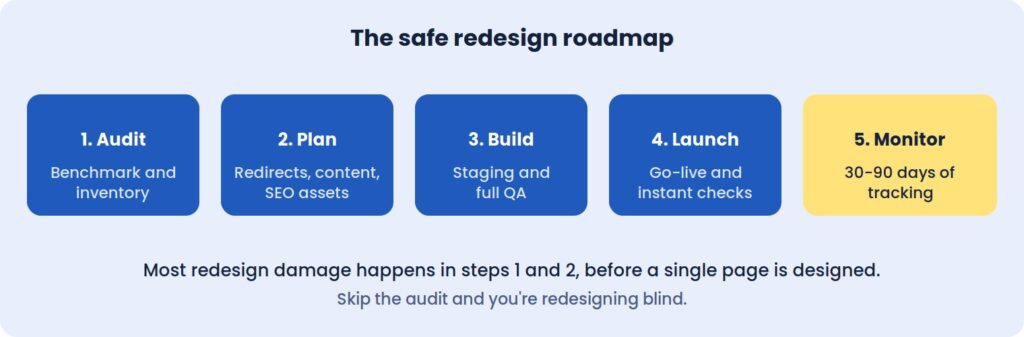 Most redesign damage happens in steps 1 and 2, before a single page is designed.
Skip the audit, and you’re redesigning blind.
Before The Redesign: Measure What You Can’t Afford To Lose
The first job is establishing a baseline. Without one, a redesign can’t be judged, and any drop in performance becomes an argument instead of a diagnosis.
Record twelve months of organic sessions and conversions, noting any seasonality. Pull your top twenty landing pages by traffic and by leads, since those are the pages the redesign must protect first. Capture rankings for the twenty or thirty keywords that matter most, along with Core Web Vitals, the number of pages Google has indexed, and the conversion rates of your forms, calls and checkout.
Keep it all in one spreadsheet. Three months after launch, this becomes the document that tells you whether the project worked.
Inventory every URL, including the forgotten ones
Crawl the live site and list every page, image, PDF and existing redirect. The pages that don’t appear in your menu are often the ones that matter, because old landing pages and forgotten blog posts tend to hold the strongest backlinks.
For each URL, note its status code, title, traffic and linking domains. This inventory becomes the foundation of the redirect plan, and it is the document teams most often wish they had started sooner.
Deciding What Stays, Merges Or Goes
A redesign is a natural moment to clear out weak content, but the decision should come from data. Pages that rank or convert should usually keep their URLs. Pages that rank on the second or third page, or that overlap with others, are candidates for strengthening or merging. Pages with no traffic and no links can go, as long as each one is redirected to its closest match.
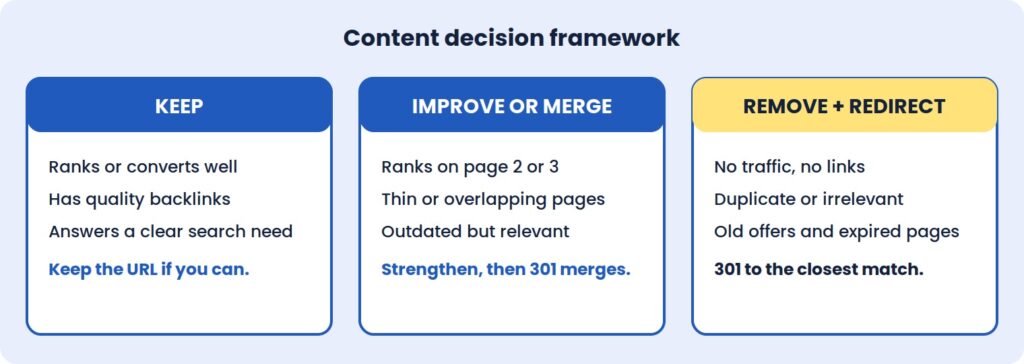 The mistake to avoid is deleting a page that has backlinks or steady traffic without a relevant redirect. Sending every retired URL to the homepage is a common shortcut, but search engines often treat it as a soft error, which means the page’s accumulated value is lost anyway.
The Redirect Map Is The Project
If a redesign changes any URLs, the redirect map is the single most important document in the whole project. It is a two-column sheet: old URL on the left, new equivalent on the right.
A few rules keep it effective. Use permanent 301 redirects rather than temporary 302s. Point each old URL straight to its final destination, so visitors and crawlers never pass through a chain. Cover images, PDFs and old blog categories, not just pages. And wherever a page doesn’t need a new address, leave the URL exactly as it was, because the best redirect is the one you never need. Google also recommends keeping redirects in place for at least a year after a move, so they shouldn’t be treated as a temporary fix to remove once rankings settle.
Test the full map on staging before launch. A few hundred correct redirects protect years of accumulated ranking history, and fixing a bad map after launch is slower and more expensive than building a good one beforehand.
SEO Assets And Tracking Don’t Migrate Themselves
Title tags, meta descriptions, heading structure, image alt text, schema markup and canonical tags are easy to lose in a rebuild, because they live in templates and plugins rather than on the visible page. A new theme can look identical to the old one while quietly dropping all of them.
Export these elements for your key pages before work starts, along with a note of how your most important pages link to one another. This is the point where an experienced SEO agency in Delhi earns its fee: involving search specialists at the planning stage costs far less than diagnosing lost rankings afterwards.
Tracking deserves the same attention. List every tool connected to the site, from analytics and Search Console to ad pixels, CRM forms, call tracking and payment gateways, then confirm each has a place in the new build. A conversion tag that goes missing for a week can distort reporting and ad optimisation for much longer than that.
A New Design Can Be A Slower One
Speed is the quiet casualty of many redesigns. Heavy sliders, large hero images, animation libraries and bloated page builders are common in modern templates, and each one adds weight that the previous, plainer site didn’t carry.
Agree speed targets before design starts. A Largest Contentful Paint under 2.5 seconds on mobile, with a stable layout that doesn’t shift as it loads, is a reasonable goal for most business sites. Alongside that, review how visitors use the current site through heatmaps, session recordings, and form drop-off. If people abandon a page for a reason, the redesign should fix it, not repeat it.
Finally, take a full backup of files and database, store a copy off the server, and agree a content freeze during the build so changes made to the live site aren’t overwritten at launch.
On Staging: Testing Before Anyone Sees It
The new site should be built and tested on a private staging URL, blocked from search engines. The block matters for the build, and removing it matters even more at launch.
Content and SEO checks come first. Test a sample of old URLs against the redirect map, with extra attention on high-traffic and high-backlink pages. Confirm that key pages kept their text, headings, images and internal links, and that titles, descriptions, canonicals and schema survived the move.
Next comes everything a visitor can do. Submit every form and confirm the notification arrives. Check layouts on real phones rather than a resized desktop browser, and run the site through Chrome, Safari, Firefox and Edge. For an online store, place a complete test order from cart to confirmation email.
Last, check the foundations: speed against the agreed targets, accessibility basics such as contrast and keyboard navigation, an active SSL certificate, current plugins, and secured admin accounts.
Launch Day: The First Hour Matters
Choose a low-traffic window and keep the old site backed up. The first move after going live is removing the noindex tag and any robots.txt block, because leaving them in place is the most common and most costly launch error.
From there, load the redirect map and test your top fifty old URLs, then submit the new XML sitemap in Search Console. Open real-time analytics to confirm that visits and conversions are being recorded, and place a live test enquiry or order. Once those pass, inform your team and key partners.
After The Redesign: What To Watch, And When
Launch is where real data begins. Search engines need time to recrawl and re-evaluate the new pages, so some ranking movement over the first few weeks is normal. The skill is telling that settling period apart from a genuine problem.
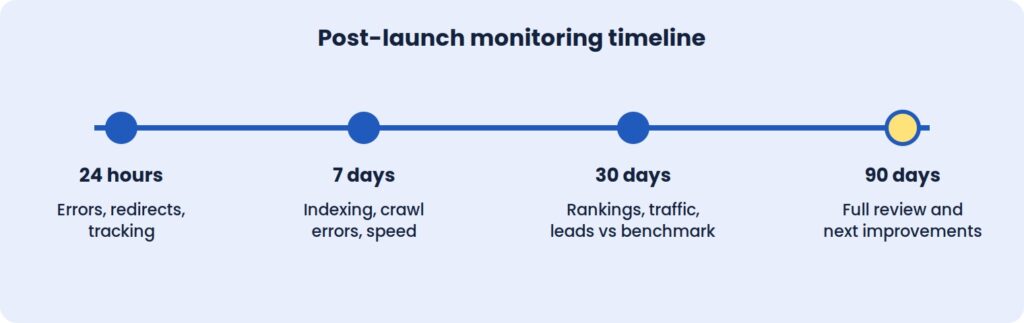
The first 24 hours
Re-test redirects and watch for 404 errors in server logs and Search Console. Confirm that tracking, forms and payments work on the live site, that pages load quickly under real traffic, and that robots.txt and meta robots tags allow crawling.
The first week
Search Console’s Pages and Crawl stats reports show how Google is handling the new site. Any 404 that appears with traffic or backlinks needs a redirect added straight away. Watch for redirect chains and loops, and review mobile usability and structured data warnings as they surface. Core Web Vitals field data also begins to accumulate here.
The first month
Compare organic traffic and conversions with the baseline using identical date ranges. Small dips in rankings are normal. Steep, sustained drops on specific pages point to a specific cause that can be traced: a missing redirect, a changed title, a removed section of content.
Review the top landing pages to see whether their rankings, titles and content survived. Study user behaviour for friction in the new layout, and update internal links that still point to old URLs so they don’t depend on redirects.
The first 90 days
By this point there’s enough data for a full technical SEO audit. Use it to refine calls to action, layouts and forms, and to refresh the content on pages that were merged, moved or shortened. Ask important referring sites to update links where the URL changed, then document what you learned and set a monthly maintenance routine.
Speed and conversion improvements can show within weeks. Rankings and organic traffic usually take longer to settle, often one to three months depending on the scale of the change.
Where Redesigns Usually Go Wrong
The most damaging mistake is also the simplest: launching with noindex still switched on. The second is redirecting everything to the homepage, which discards the relevance old pages built up.
Changing too much at once makes diagnosis nearly impossible. A new design, new URL structure, new copy, and new platform in a single release means that when something drops, nobody can say which change caused it. Google’s own guidance points the same way, advising site owners to plan changes one after the other rather than all at once. Staggering them keeps cause and effect visible.
Judging results too early is another trap. Rankings fluctuate in the first days, and a one-week verdict is rarely reliable. A 30-day and 90-day window gives a fairer picture. And finally, designing for looks rather than goals produces pages with no clear job. Each page should have one purpose and one obvious next step.
Takeaways
A Redesign Is An SEO Event
Changing URLs, content, and templates changes the signals search engines rely on. Treating the project as design-only is the root cause of most post-launch losses.
The Baseline Is Your Only Proof
Without twelve months of recorded traffic, rankings, and conversions, there is no objective way to say whether the new site performs better than the old one.
Redirects Do The Quiet Work
A complete, tested 301 map is what carries years of authority from the old site to the new one. It is the least visible part of the project and often the most valuable.
Launch Is The Start Of Monitoring
The first 90 days produce the data that shows what worked. Plan support and review time for that period, not just for launch day.
Also read: Website Redesign vs Rebuild
Questions To Ask Your Redesign Partner
A strong website redesign service should be able to show its process, not just its portfolio. Before signing, it’s worth asking:
- How will you protect our existing rankings, and who is responsible for the redirect map?
- How will success be measured, and over what period after launch?
The right company will welcome these questions and answer with specifics. Vague answers are a warning sign.
At ICO WebTech, we plan redesigns around exactly these checks. As a website design company in Delhi with technical SEO built into the process, we aim to launch new sites without losing the rankings and leads you’ve already earned. If you’d like an honest view of what a redesign would involve for your business, we’ll give you one before any work begins.



Related items

Baymard Institute’s 2026 benchmark found that 52% of desktop sites and 62% of mobile sites

Depending on which 2026 survey you read, somewhere between 34% and 77% of US shoppers have

Websites were built around a human operating the interface. A visitor reads the page, comp
