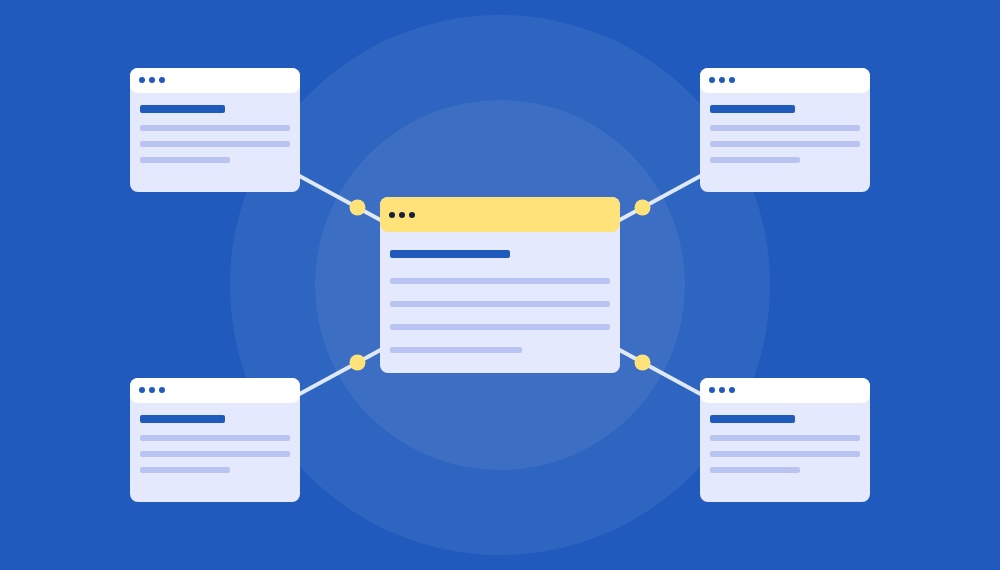
What internal links are, how to plan them, and how to find and fix the problems already on your site.
You can publish great pages and still watch them go unnoticed. Often the reason is simple: nothing on your own site points to them. Internal links are how you tell Google, AI tools and visitors which pages matter and how your content fits together.
This guide covers what internal links are, why they matter, how to build a linking plan, and how to audit the links you already have. The steps work on any site, with notes for WordPress and Shopify, the two platforms we build on most at ICO WebTech.
What are internal links?
An internal link is a hyperlink from one page of your website to another page on the same website. In code it looks like this:
<a href="/seo-company-in-delhi/">SEO services</a>
The clickable words are called anchor text. The page it points to is the target. Search engines follow these links to discover pages and to judge how pages relate to each other.
Internal links vs. external links
| Internal links | External links | |
|---|---|---|
| Points to | Another page on your domain | A page on a different domain |
| Main job | Navigation, crawling, passing authority between your pages | Citing sources, adding context, building trust |
| You control | Both the link and the anchor text | Only your outgoing links; backlinks come from others |
| Example | A blog post linking to your SEO service page | A post citing a Google documentation page |
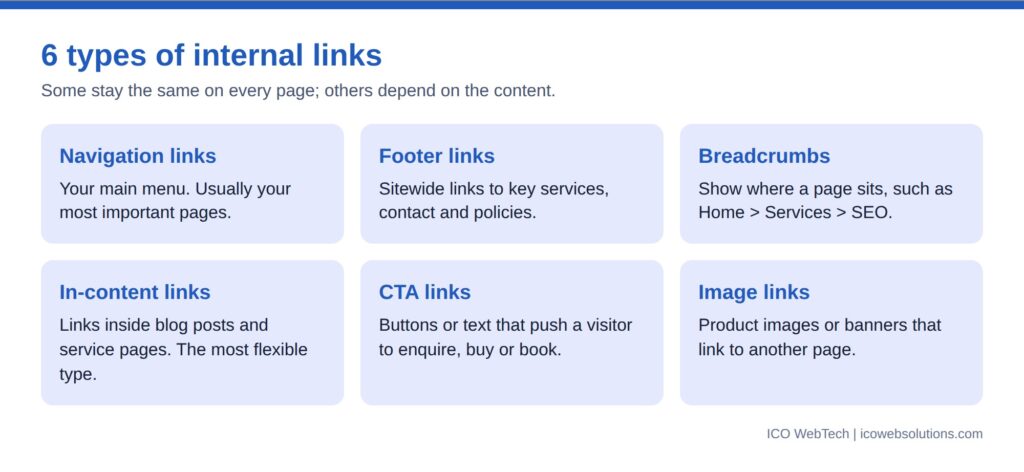
Types of internal links
Some links stay the same on every page. Others depend on the content of each page.
Why internal links matter
1. They help search engines find and understand your pages
Google discovers most pages by following links from pages it already knows. A page with no links pointing to it, often called an orphan page, is hard to find and often stays out of the index.
2. They pass authority to the pages that need it
Some pages on your site earn more backlinks than others. When those pages link to relevant pages that have fewer, some of that strength carries over. Only part of it passes on, and relevance matters, so link where it makes sense for the reader.

3. They keep visitors moving toward action
Someone reading about website redesign may want to see your portfolio or ask for a quote. A well-placed link answers the next question before they leave.
4. They help AI tools see your structure
AI search tools pull answers from pages they can read and connect. A clear cluster of related pages that all link to one main guide shows which page covers a topic in the most depth. It also helps if your menus are plain HTML links, because some crawlers may not run JavaScript.
How to build an internal linking strategy in 7 steps
Start with the shape of your site, then work down to individual links.
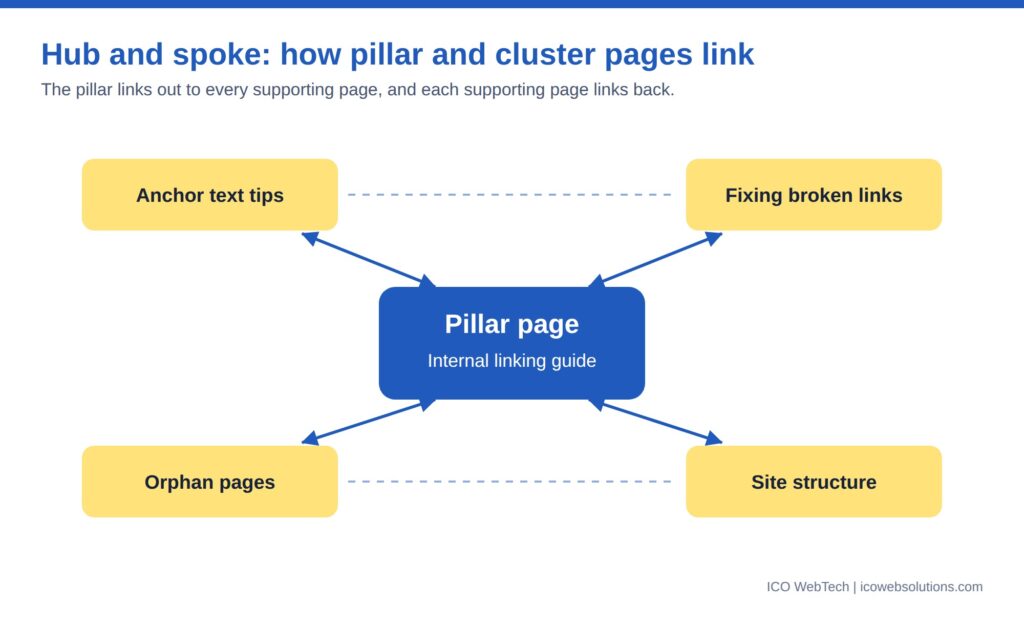
Hub and spoke: the pillar links out to each supporting page, and each supporting page links back to the pillar.
What a good site structure looks like
Picture your site as a tree. The homepage sits at the top, category pages branch off it, and detailed pages sit at the bottom. Every page should be reachable by following links down from the homepage.

How a topic cluster works
A pillar page covers a broad topic. Cluster pages cover related sub-topics in more detail. Each cluster page links to the pillar, and the pillar links back to each cluster.

Before you write anything, map your clusters in a simple table. Here is what one looks like for an SEO pillar:

The 7 steps
- Plan your site structure. Think in three levels: the homepage, main service or category pages, and detailed pages such as blog posts or products. Keep your key pages within two or three clicks of the homepage.
- Choose your pillar pages. A pillar is a broad, in-depth page on a topic you want to be known for, such as SEO or website design. Each service page is a natural pillar.
- Build topic clusters. Write supporting posts on narrower questions and link each one to its pillar. Link the pillar back to them, and link related posts to each other.
- Link from strong pages to weaker ones. Find the pages with the most backlinks in Google Search Console (Links report) and add relevant links from them to pages that need a boost.
- Support every new page. Before you publish, find two or three existing pages where a link would help the reader. Search Google for
site:yourdomain.com keywordto find them fast. - Write clear anchor text. Covered in the next section.
- Get your navigation right. Keep menus consistent, use real HTML links, and add breadcrumbs. On WordPress this is under Appearance > Menus, and on Shopify under Online Store > Navigation.
Pro tip: Aim for at least two or three internal links pointing to every new page. Add them on the day you publish, not “later”. Later rarely comes.
How to choose anchor text
Anchor text tells readers and search engines what to expect on the other side. Keep it short, descriptive and natural.

| Avoid | Use instead | Why |
|---|---|---|
| Click here | website redesign services | Says what the page is about |
| Read this post about how a company can improve its SEO in 2026 | SEO checklist | Short anchors are easier to scan |
| The same exact phrase on every link | Slight variations of the same topic | Repeating one phrase looks forced |
| Full raw URLs in the text | Descriptive words | Readable and more useful |
Keep internal links followed, which is the default. Use rel="nofollow" only for low-value utility pages such as carts or login pages.
In the code, the only difference is the rel attribute:

How to audit your existing internal links
An audit shows what is broken and which pages are underlinked. You can do a basic one with free tools:
- Crawl your site. Use Screaming Frog (free up to 500 URLs) or a similar crawler. Export the list of pages, their status codes, and their inbound links.
- Compare against your sitemap. Any page in the sitemap that the crawler did not reach through links is an orphan.
- Check Google Search Console. Open the Links report to see which pages have the most and fewest internal links. Check the Pages report for pages that were discovered but not indexed.
- Sort by importance. List your money pages first: services, top products, and best-converting posts. Make sure each has plenty of relevant links pointing to it.
Common internal linking mistakes and how to fix them
| Mistake | Why it hurts | Fix |
|---|---|---|
| Broken links (404) | Wastes crawl time and frustrates visitors | Update the link to a live page, or remove it |
| Orphan pages | Crawlers and users can’t find them | Link to them from a related page or your menu |
| Pages with only one link | Look less important | Add links from relevant posts and pillar pages |
| Pages buried too deep | Far from the homepage, so weaker signals | Link from top-level pages so they sit within about 3 clicks |
| Links to redirected URLs | Adds an extra hop on every click | Point the link straight to the final URL |
| Redirect chains and loops | Slow pages and lost signals | Redirect the old URL directly to the final one |
| Nofollow on internal links | Blocks authority from passing | Remove nofollow unless the page is low value |
| Vague anchor text | Gives no clue about the target page | Rewrite with short, descriptive anchors |
| HTTP links on HTTPS pages | Extra redirects and security warnings | Update every link to the HTTPS version |
| Menus built only in JavaScript | Some crawlers can’t see them | Check the menu appears in view-source; use plain HTML links |
| Too many links on a page | Dilutes focus and confuses readers | Keep links relevant and cut the rest |
WordPress tip: when you change a page URL, update old links in posts as well as adding the redirect. A plugin like Redirection can show broken links and 404s.
Shopify tip: Shopify creates a redirect when you change a handle, but links in your menus, blogs and collections still point to the old one until you edit them.
Orphan pages
An orphan page has no internal links pointing to it. Crawlers can’t reach it by following links, and visitors can’t find it either. The red boxes show two kinds: a single page, and a group of pages cut off from the rest of the site.

Link to each orphan from a page that is already part of your site, or add it to your menu if it is important. Make sure the page you link from is not an orphan too.
Internal links to redirected pages
When a page moves, the old URL is usually redirected (301) to the new one. If links on your site still point to the old URL, every click takes an extra step, which slows the page and wastes crawl time.

Update the link so it goes straight to the new page:

Redirect chains and loops
A redirect chain happens when one redirect leads to another. It often builds up after several redesigns or migrations. Each extra hop slows the page down.

A redirect loop is worse. Two pages redirect to each other, so the visitor never reaches a page and sees an error instead.

To fix a chain, redirect every old URL straight to the final page. To fix a loop, remove or correct one of the redirects so both pages end at one live URL.

Internal linking checklist
- Every important page is reachable within three clicks of the homepage
- Every service page has a supporting cluster of blog posts
- Every blog post links to its pillar page and to at least one related post
- Every new page gets 2 to 3 links from existing pages on publish day
- Anchor text is short, descriptive and varied
- No broken links, redirect chains or orphan pages
- Menus and breadcrumbs use plain HTML links
- Audit repeated every quarter
Frequently asked questions
Do internal links help SEO?
Yes. They help search engines find pages, understand how they relate and decide which are most important. They also send visitors to useful pages.
How many internal links should a page have?
There is no fixed number. Link where it helps the reader and skip links that add nothing. Pages packed with hundreds of links tend to be harder to use.
Should internal links open in a new tab?
Usually not. Keep visitors in the same tab so the back button works as expected.
How often should I audit my internal links?
Every three months is a good habit, and always after a redesign, migration or big content update.
Do internal links matter for AI search?
They help. A clear structure makes it easier for AI tools to find your best page on a topic, though no one can guarantee citations.
Also read:
How Topic Clusters Influence Google’s Search Algorithm in 2025
Beyond Keywords: Mastering Topic Clustering for Absolute Search Authority
Want a second pair of eyes on your site?
Our SEO team can audit your internal links, fix the broken ones, and build a linking plan around your key pages.
Related from ICO WebTech: SEO services, SEO link building, website designing, website maintenance, AI visibility (GEO) and how to rank on ChatGPT.



Related items
Baymard Institute’s 2026 benchmark found that 52% of desktop sites and 62% of mobile sites

Depending on which 2026 survey you read, somewhere between 34% and 77% of US shoppers have
Ahrefs studied one million random web pages and found that only 1.74% of newly published p