Core concept
WordPress now has environments that run 100% inside your browser using WebAssembly.
- No hosting
- No domain
- No installation
- No signup (in some cases)
You just open a URL → and WordPress is already running.
WordPress moves from setup to instant access
For nearly two decades, WordPress has been defined by a simple yet powerful idea: enable anyone to create and publish on the web with minimal friction. The well-known “five-minute install” embodied that philosophy for an earlier generation of the internet.
In 2026, WordPress extends this vision with a more progressive, browser-native experience.
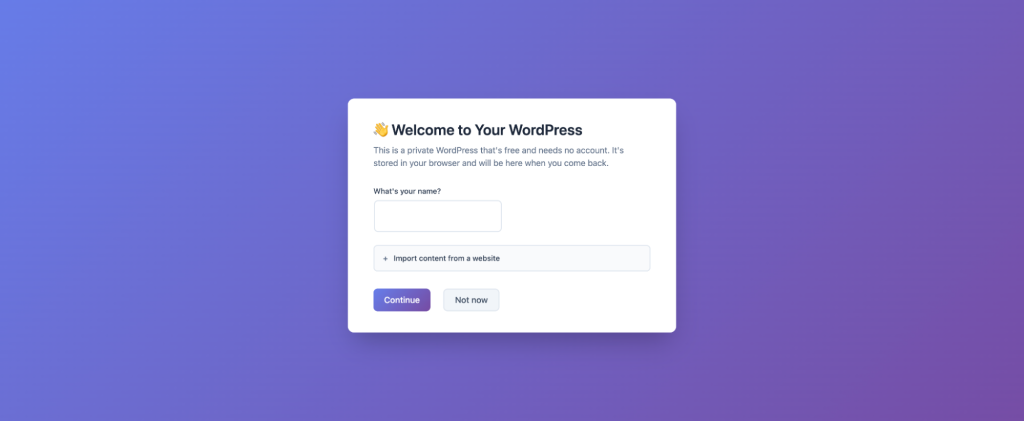
With my.WordPress.net, WordPress now runs entirely and persistently within the browser. There is no requirement for hosting configuration, domain selection, or initial setup decisions.
The environment opens instantly, placing users directly inside a fully operational WordPress instance that exists within their own device. This evolution is built on WordPress Playground, a modern architecture that enables PHP execution, data handling, and application logic directly in the browser. The result is not a simulated interface, but a complete and authentic WordPress environment—one that behaves consistently with its hosted counterpart.
What makes this development strategically important is not just the removal of infrastructure dependencies, but the shift in how WordPress is experienced. Instead of being something that must be provisioned before use, WordPress becomes a space you can enter immediately and shape over time.
- From setup to instant access: Users move directly into creation without intermediary steps
- From deployment-first to idea-first workflows: Concepts can be explored, refined, and structured before decisions around hosting or publishing
- From public-first to personal-first environments: WordPress evolves into a private workspace for drafting, organizing, and experimentation
As highlighted in the official announcement, this approach positions WordPress as something that “stays with you”—a persistent, personal environment rather than a temporary instance.
This shift also redefines the relationship between users and the platform itself.
As Alex Kirk notes, “this takes WordPress from being framed as something that is democratizing publishing to democratizing digital sovereignty.”
By removing early-stage decisions around hosting, visibility, and setup, WordPress allows users to focus entirely on creation. It evolves into a personal environment that offers greater control, continuity, and ownership in how digital experiences are built and managed.
What website developers need to understand about browser-based WordPress
Browser-based WordPress introduces a new layer within the development lifecycle. For web developers and WordPress development agencies, it reshapes how environments are created, tested, and transitioned into production.
This model functions as a front-layer environment, enabling rapid prototyping and validation before moving into hosted infrastructure.
Playground → Prototype → Export → Deploy
Accelerated experimentation
Developers can test plugins, themes, and configurations in a controlled environment, validating functionality before integrating into production systems.
Redefined client and agency workflows
This approach enables faster collaboration and iteration.
- Instant landing page prototypes
- Live demonstrations without staging infrastructure
- Faster feedback and approval cycles
AI-integrated development
AI can interact directly with the environment, enabling developers to modify plugins, generate features, and work with data dynamically within WordPress.
These capabilities position browser-based WordPress as a strategic acceleration layer within modern development workflows.
The technology behind browser-based WordPress
Browser-based WordPress is enabled by a set of modern web technologies that recreate a server-like environment directly in the browser.
WebAssembly for PHP execution
WordPress is built on PHP. Using WebAssembly, PHP is compiled to run directly inside the browser, allowing full application logic without a server.
SQLite as the database layer
Instead of MySQL, WordPress uses SQLite—a lightweight, file-based database that operates within the browser.
Service workers for server simulation
Service workers handle requests and simulate server behavior, maintaining consistency with traditional WordPress environments.
Local storage and file systems
Files, media, and configurations are stored locally using browser storage APIs, enabling persistence across sessions.
Recreated WordPress stack
- PHP execution via WebAssembly
- Database via SQLite
- Server behavior via service workers
- Storage via browser APIs
What to plan for with browser-based WordPress
While browser-based WordPress enables speed and flexibility, it operates within a distinct environment that requires specific planning considerations. Data is stored locally within the browser, with typical storage starting around 100 MB, making regular exports essential for continuity. Each instance is tied to a specific browser and device, meaning workspaces are not automatically shared across systems. These environments are private by default and are not accessible on the public internet, making them well-suited for internal use, drafts, and experimentation.
Performance depends on the capability of the device, with the initial load including environment setup. Most themes and plugins function as expected, while features that rely on external services or server-level configurations may require adaptation. Projects can be exported and deployed to hosted environments, where traditional infrastructure supports production use.
As environments are locally stored, maintaining a consistent backup process is essential to ensure long-term usability. For teams transitioning projects into production, ongoing updates, monitoring, and support become equally important—this is where a structured website maintenance approach ensures stability, performance, and continuity beyond the development phase.
These considerations position browser-based WordPress as a powerful starting layer within a broader, structured development lifecycle.
The future of WordPress: from CMS to personal digital workspace
Browser-based WordPress represents a meaningful evolution in how the platform is experienced and applied. It extends beyond its traditional role as a content management system into a continuous, personal workspace where users can draft content, organize knowledge, and build digital experiences in an ongoing, iterative manner.
With AI increasingly integrated into these environments, WordPress becomes more dynamic—capable of adapting, generating, and assisting in real time.
This shift also introduces a dual-environment model, where browser-based WordPress supports ideation and experimentation, while hosted environments continue to enable scale and public deployment.
Extending WordPress with pre-built applications and AI
One of the more significant advancements in browser-based WordPress is the introduction of an application layer through pre-configured experiences. Within my.WordPress.net, an App Catalog allows users to install fully functional setups with a single click, transforming WordPress from a content management system into a flexible application platform.
These applications demonstrate how WordPress can operate when it is private, persistent, and easy to experiment with. Instead of building from scratch, users can immediately work within structured environments tailored to specific needs.
Examples include personal CRM systems for managing relationships, private RSS readers that enable content consumption without algorithmic interference, and AI-powered workspaces that function as evolving knowledge bases. In these environments, data remains local, interactions are controlled, and workflows adapt to individual preferences.
The integration of AI further expands this capability. Users can modify plugins, generate new functionality, and interact with their data directly within WordPress. Over time, the environment becomes more than a workspace—it becomes a system that understands and evolves with how it is used.
These capabilities reduce the effort required to get started while expanding what WordPress can represent. It moves beyond a publishing tool into a modular, extensible platform where creation, organization, and interaction converge seamlessly.
Conclusion
Browser-based WordPress introduces a more immediate and flexible way to engage with the platform, enabling users to move directly from idea to execution within a self-contained environment. By bringing WordPress into the browser, it simplifies early-stage workflows, supports structured experimentation, and enhances how teams prototype and collaborate.
At the same time, it integrates seamlessly with traditional hosting models, ensuring continuity from development to deployment. As this approach continues to evolve, it strengthens WordPress as a comprehensive ecosystem—one that supports both creative exploration and scalable digital execution.



Related items

The Anatomy of “Micro-Friction” — Why Making Your Checkout Slower Can Sometimes Boost Cust


Every website designing company in Delhi will tell you about the clients they’ve kept for
We run a website designing company in Delhi, so you’d expect this post to end with “just h
