
15 Website Maintenance Checks Before Your Year-End Sale
Year-end sales are when your website earns the most and can lose the most. Traffic spikes, ad budgets are live, and one slow checkout page or one failed payment can wipe out a day of spend. Attackers know it too: security firm Monarx saw malicious file uploads nearly triple across November and December 2025, when high consumer traffic meets reduced IT staffing.[1] Speed matters just as much. Google’s published data shows that the probability of a visitor bouncing rises by 32% as a page’s load time goes from one second to three.[4]
The good news is that most peak-season disasters are preventable. They need a short, ordered checklist done two weeks early, not two hours before launch.
The Peak-Ready Scorecard
Give your site one point for each check it passes. Be honest: a check you have not tested counts as zero, because an untested backup or an untested checkout is a guess. The graphic below shows all 15, and the sections that follow explain how to pass each one.
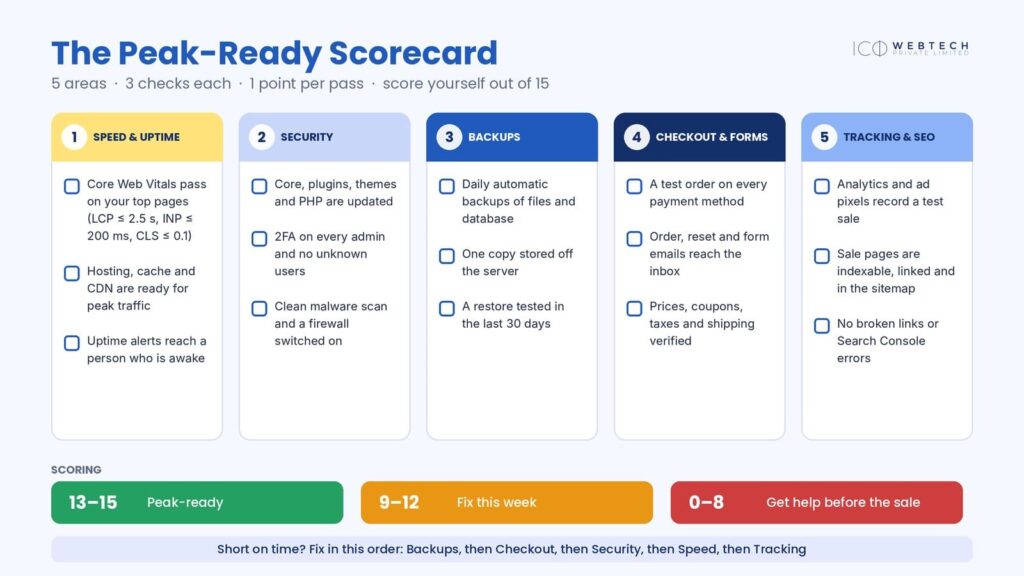
If you are short on time, fix things in this order: backups, checkout, security, speed, tracking. A fast site that cannot take payment, or that cannot be restored after an attack, helps nobody.
Area 1: Speed and uptime (checks 1–3)
Check 1: Core Web Vitals pass on your key pages. Google’s three Core Web Vitals have clear targets: Largest Contentful Paint (LCP) of 2.5 seconds or less, Interaction to Next Paint (INP) of 200 milliseconds or less, and Cumulative Layout Shift (CLS) of 0.1 or less.[2] A page passes when all three are good at the 75th percentile of real visits, meaning three out of four visitors get that experience or better.[3] Test your homepage, top category page, best-selling product page, cart and checkout, on mobile first. Search Console’s Core Web Vitals report shows real-visitor data, while a lab test is a useful early warning.
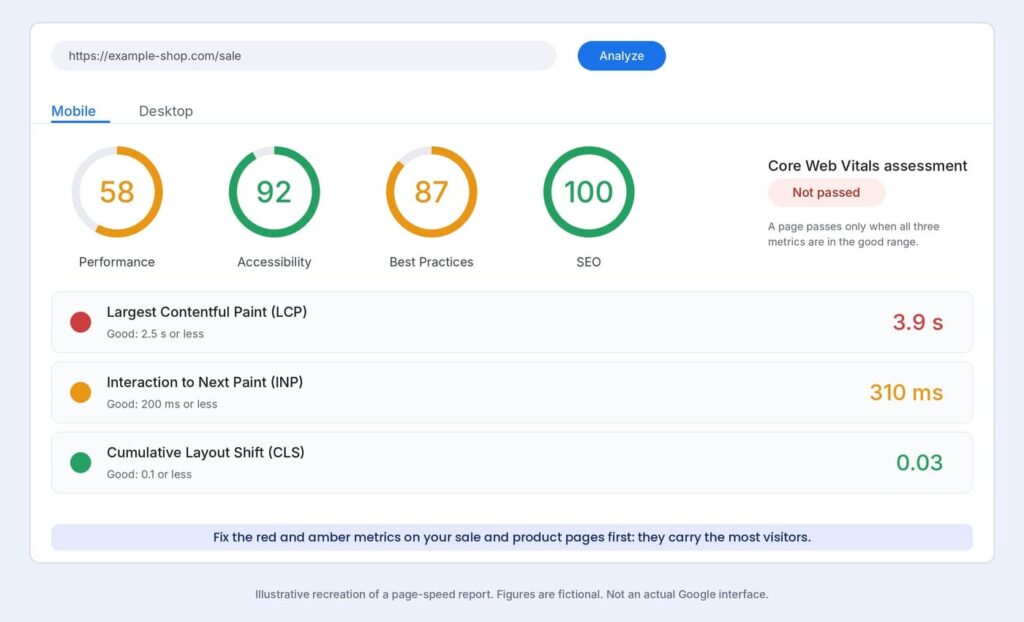
The usual fixes are resizing and compressing hero images, lazy-loading anything below the fold, enabling page caching (but never for cart and checkout), and removing third-party scripts you do not need. If the numbers stay red, our website speed optimization service handles the deeper work.
Check 2: Hosting, cache and CDN are ready. Ask your host about CPU, PHP workers and bandwidth limits, and know exactly how to upgrade before the sale, not during it. Serve images through a content delivery network, and test a staging copy with realistic numbers of simultaneous visitors. Caching is the cheapest way to survive a spike: a cached page is served without running PHP or querying the database, so the same server handles far more visitors. Exclude cart, checkout and account pages so no customer ever sees someone else’s basket. If your plan is outgrown, our web hosting team can advise.
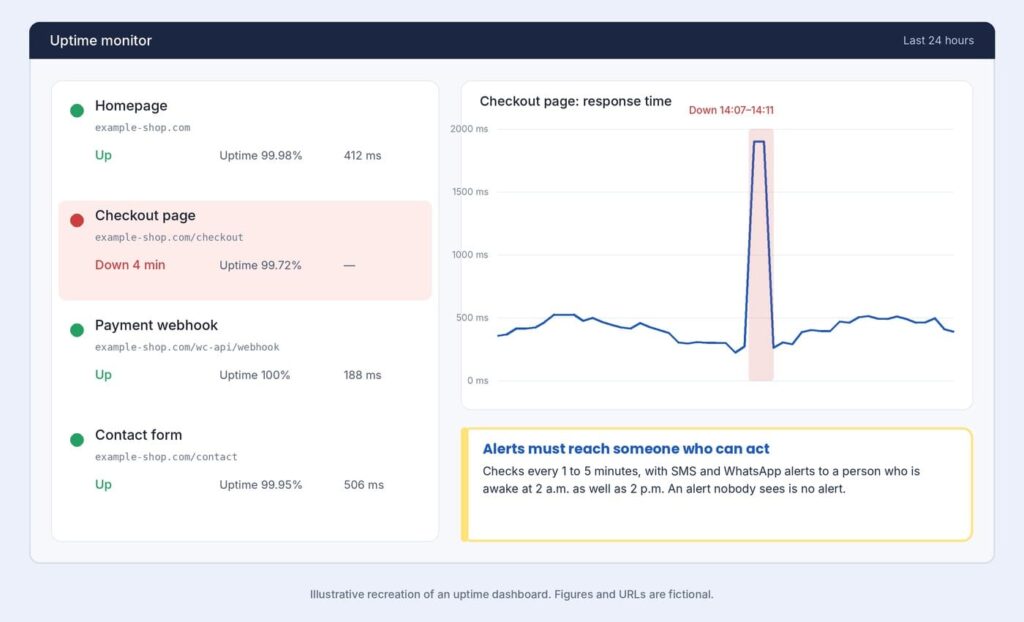
Check 3: Uptime alerts reach a person who is awake. Monitor the homepage, checkout, payment callback and contact form every one to five minutes. Send alerts by SMS and WhatsApp to someone who can act, whether it is 2 p.m. or 2 a.m. Watch the payment callback in particular: a checkout that loads but cannot confirm payments is still broken.
Area 2: Security (checks 4–6)
Check 4: Everything is updated, and the clutter is gone. In 2025, 91% of new WordPress-ecosystem vulnerabilities were in plugins, 46% had no developer fix when they were disclosed, and heavily exploited flaws were typically attacked within about five hours.[1] That is why you update early, not on sale day. Update WordPress, plugins, themes and PHP on a staging copy a week before, then on the live site. Delete plugins you do not use and replace abandoned ones.
Check 5: Access is locked down. Turn on two-factor authentication for every administrator, use long unique passwords, and review the Users list for anyone you do not recognise.[5] Remove access for former staff and agencies.
Check 6: A clean scan and a firewall. Scan from outside the site and from inside it, because each approach sees different things.[5] Add a web application firewall, and do not assume your host covers you: in Patchstack’s tests, common hosting defences blocked only 26% of vulnerability attacks.[1] If a scan turns up something suspicious, follow our 24-hour guide to a hacked WordPress site straight away.
Area 3: Backups (checks 7–9)
Check 7: Automatic backups run daily. A store’s database changes with every order, so a daily file backup alone can lose a day of sales. During the sale, back up the database more often, such as hourly.
Check 8: One copy lives off the server. The 3-2-1 rule keeps three copies of your data on two kinds of storage, with one copy offsite.[6] A backup stored only on the web server disappears with the server, or gets encrypted along with it.
Check 9: You have tested a restore in the last 30 days. Restore the latest backup to a staging site and time it. Check that orders, users and media came back, and that the site actually works. WordPress.org stresses regular backups of both database and files, and a restore you have never tried is only a hope.[5] Write down how long it took, because that number tells you how long you could be offline.
Area 4: Checkout and forms (checks 10–12)
Check 10: Test orders pass on every payment method. Place orders using UPI, cards, netbanking, wallets, cash on delivery and EMI, whichever you offer. Test failures and cancellations too, not just successes. If you use Razorpay, its documentation explains that test mode runs on separate test keys with simulated payments, that you must swap them for live keys before launch, and that webhooks set up in test mode do not carry over to live mode.[7][8]
Test cards and test UPI IDs also fail in live mode.[7] Deliver goods only after payment is captured, and check that your auto-capture settings match your refund policy.[8] Other gateways have similar rules, so read yours.
Use a simple matrix, so no scenario is skipped:
| Scenario | What to confirm |
|---|---|
| Successful payment | Order created, stock reduced, email and invoice sent, purchase recorded in analytics |
| Failed payment | Clear error message, cart preserved, no duplicate order |
| Customer closes the window | Order marked pending or cancelled correctly, stock released |
| Refund | Refund processes and the customer is notified |
| Mobile and desktop | Same result on both, and the payment app returns to your site |
| Coupon plus shipping | Discount, tax and totals calculate correctly |
Check 11: Emails reach the inbox. Order confirmations, invoices, password resets and form notifications must arrive in Gmail and Outlook, not the spam folder. Use a proper transactional email service, and make sure your domain’s SPF, DKIM and DMARC records are set.
Check 12: Prices, coupons, taxes and shipping are right. Test coupon stacking, GST on invoices, pincode serviceability and stock levels. Confirm that sale prices are scheduled to start and end at the correct Indian Standard Time, not server time.
Area 5: Tracking and SEO (checks 13–15)
Check 13: Analytics and ad pixels record a test sale. Place a test order and watch your real-time reports. If the purchase event does not fire, you will be paying for ads you cannot measure.
Check 14: Sale pages can be found. Make sure they are not blocked by a leftover noindex tag or password from staging, that they have clean canonical tags, and that they appear in your sitemap and your main menu. Inspect the URLs in Search Console.
Check 15: No broken links or errors. Crawl the site for 404s and redirect chains on sale pages, the header and the footer. Redirect expired offers to a relevant page, and clear any errors flagged in Search Console.
The countdown: when to do what
Work backwards from the sale date, so risky work happens early and quiet work happens late.
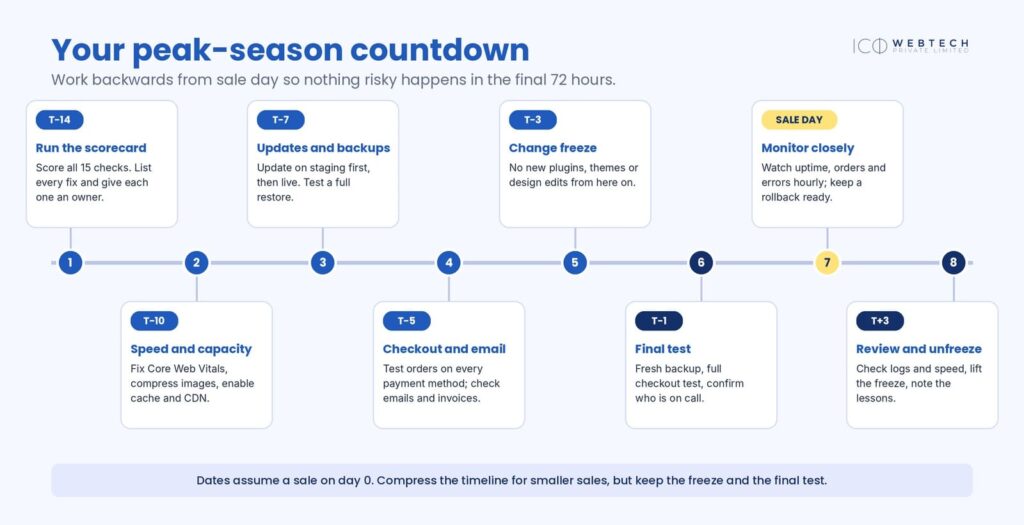
The most important rule is the change freeze: three days before launch, no new plugins, themes or design edits. Most self-inflicted outages come from last-minute changes. The only exception is an urgent security patch for a flaw that is being actively exploited, and even then you test it first.
On sale day, a five-minute hourly routine is enough: check your uptime alerts, load the homepage and a product page on mobile data, review one recent order, look for a spike in failed payments, and glance at the error log.
Between sales, keep a rhythm so the checklist stays short:
| How often | What to do |
|---|---|
| Automatic, daily | Backups, uptime monitoring, malware scans |
| Weekly | Review updates, check the Users list, place one test order, check 404s |
| Monthly | Speed test, restore test, Search Console review, remove unused plugins |
| Quarterly | Full audit: PHP version, hosting capacity, passwords, access, 2FA |
If something breaks on sale day
Even a well-prepared site can wobble. Decide in advance who does what, because decisions made under pressure are slower and worse.
- Check the money first. Can a customer still pay? Place a test order. If checkout is down, nothing else matters until it is back.
- Undo the last change. If anything changed in the past hour, roll it back before you hunt for a cause. Your tested backup and staging copy make this safe.
- Tell people. Put a short notice on the site, pause paid ads that send traffic to the broken page, and update customers if the problem lasts.
Keep a one-page on-call sheet with names, phone numbers, your host’s and payment gateway’s support contacts, and a rule such as “escalate to the next person after 15 minutes”.
Four pre-sale mistakes to avoid
- Updating everything the night before launch.
- Testing payments only in test mode and never with a live transaction.
- Trusting backups that nobody has restored.
- Sending paid traffic to pages that are slow or not yet indexed.
Score yourself and decide what to do next
Add up your points. With 13–15, you are peak-ready: keep monitoring. With 9–12, fix the gaps this week, starting with backups and checkout. With 0–8, get help before you spend on ads, because a sale that crashes costs more than the checklist ever would.
If you would rather hand this over, ICO WebTech’s website maintenance services cover updates, security, backups, and monitoring, with plans starting at ₹1,200 per month. Send your URL through our contact page for a free health check, and if you are planning a new store, see our ecommerce website development service.
Frequently asked questions
How early should I prepare for a big sale?
Start two weeks before launch. That leaves time to fix problems, test a restore and observe the site under the change freeze.
Should I update plugins before a sale?
Yes, about a week before, on a staging copy first. Freeze changes for the final 72 hours, except for urgent security patches.
What if I only have one day?
Check backups, run test orders on every payment method, set up uptime alerts and install pending security updates, in that order.
Final thought
A sale tests your website harder than any ordinary week. Score yourself early, fix the basics, freeze changes, and make sure someone is watching when the traffic arrives. Do that, and the busiest days of the year become the most profitable ones.
References
- ^ Patchstack; Monarx (2026). “State of WordPress Security in 2026”. Patchstack. 25 February 2026. Retrieved 18 November 2026. (Vendor-published research.)
- ^ “Web Vitals”. web.dev. Google. Retrieved 18 November 2026.
- ^ “How the Core Web Vitals metrics thresholds were defined”. web.dev. Google. Published 21 May 2020; updated 7 May 2025. Retrieved 18 November 2026.
- ^ “Page load time statistics”. Think with Google. Google. Retrieved 18 November 2026. (Data originally published in 2017.)
- ^ WordPress.org Documentation Team. “FAQ My site was hacked”. WordPress.org Documentation. Last updated 26 July 2026. Retrieved 18 November 2026.
- ^ “What Is the 3-2-1 Backup Strategy?”. SentinelOne Cybersecurity 101. Retrieved 18 November 2026.
- ^ “Test integration (server-to-server)”. Razorpay Docs. Razorpay. Retrieved 18 November 2026.
- ^ “Go-live checklist”. Razorpay Docs. Razorpay. Retrieved 18 November 2026.
The screenshots in this article are illustrative recreations made for this guide, and all figures in them are fictional. This article is general guidance, not professional advice.