
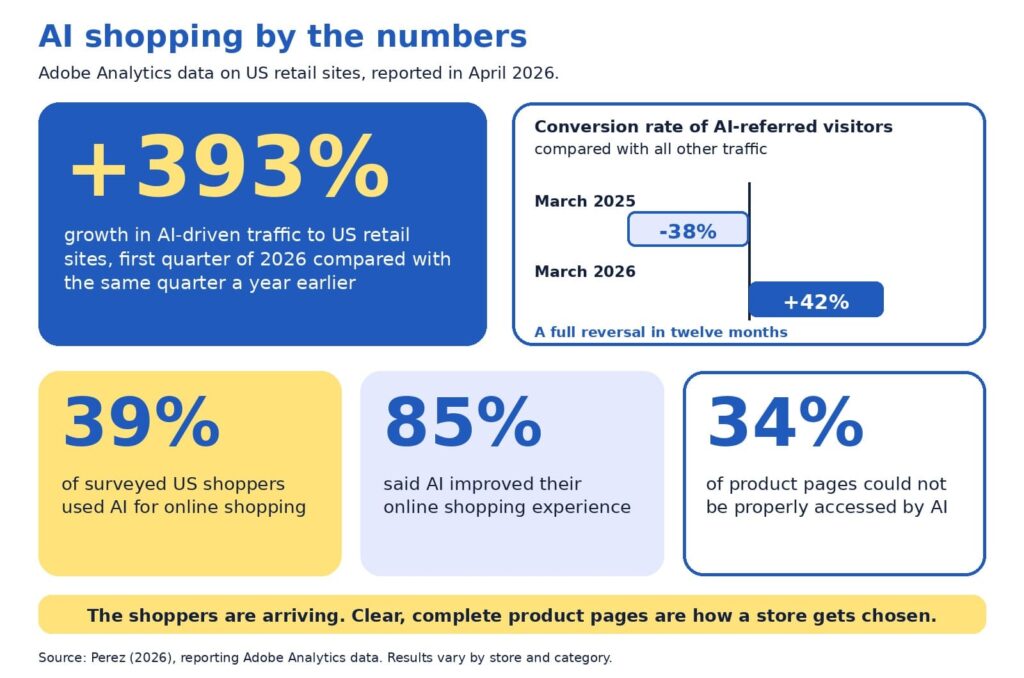
Baymard Institute’s 2026 benchmark found that 52% of desktop sites and 62% of mobile sites have product page experiences rated mediocre or worse (Scott, 2026). Adobe’s analysis of retail sites adds a second angle: about 34% of product pages could not be properly accessed by AI (Perez, 2026). Both findings describe one opportunity. Product pages are where stores win or lose, and most have room to improve.
Our companion guide, AI can recommend your product, but only your product page can sell it, explains why product pages matter so much in AI shopping. This guide is the hands-on follow-up. In about 30 minutes, you will score your own pages, find the weakest spot, and decide what to fix first.
You will get the five-P scorecard with a simple scoring rubric, an example that shows what is on the page and what sits behind it, a worked audit, an impact and effort map for choosing fixes, and a short monthly habit. Everything is written for owners and marketers who are new to this, so no technical background is needed.
A note on transparency: the scorecard is a self-assessment tool, and the example numbers are illustrative. AI shopping also changes quickly, so we point to Google’s documentation, Baymard’s research, and Adobe’s data, and we flag where details may change.
The quick version
Choose five product pages. Score each on five Ps: product facts, pictures, proof, promise, and path. Use the rubric to rate each P from 1 to 5, then fix the lowest score first, because a page is only as persuasive as its weakest P. Use the impact and effort map to pick quick wins before bigger projects, and repeat a short check every month.
What is in this guide
- Key terms in plain English
- Why an audit beats guessing
- The five-P checklist
- The scoring rubric
- How to run the audit, step by step
- Reading your scorecard
- On the page and behind the page
- A worked example
- The weakest-link rule
- Fix first: the impact and effort map
- Technical checks behind the page
- A 15-minute monthly habit
- Quick answers to common questions
Key terms in plain English
These words appear throughout the guide:
- Product page audit: a structured check of how clear, complete, and trustworthy a product page is.
- Product feed: a regularly updated file listing your products and their details for platforms such as Google.
- Structured data: hidden labels on a page, such as price and availability, that help machines read it accurately.
- Merchant Center: Google’s free tool for sharing product data across Google.
- Conversion rate: the share of visitors who buy. If 100 people visit and 3 buy, the rate is 3%.
Why an audit beats guessing
When sales feel slow, owners often reach for a redesign, a new app, or an AI tool. Those can all help, and each is easier to choose well once you know which part of the page is holding you back. An audit gives you a baseline, a ranked list of fixes, and a way to show progress.
The stakes are real. Baymard’s research puts the average documented cart abandonment rate at about 70%, which means roughly seven in ten shoppers who add something to a cart leave without buying (Baymard Institute, 2026). Product pages sit upstream of that moment, since shoppers decide whether they trust a product long before they reach checkout. TechCrunch’s report on the Adobe data describes the incentive for stores clearly:
“retailers are incentivized to make their sites AI-friendly”
Perez (2026)
The encouraging part is that the basics do most of the work. Google describes optimizing for its generative AI features as part of SEO, and it recommends keeping product and business details accurate through tools such as Merchant Center (Google Search Central, 2026). A careful audit puts exactly those basics in front of you.
The five-P checklist
Each P answers a question that shoppers and AI assistants both ask. For each one, here is what to look for on your page.
Product facts
Ask: what exactly is this? Look for a specific name that includes brand, model, and the one or two attributes people search for, plus a complete description with materials, sizes, variants, and what comes in the box. Selection should be easy too, and Baymard found that 57% of sites do not use buttons for size selection (Scott, 2026), so clear variant buttons are a simple upgrade.
Pictures
Ask: what does it look like in real life? Look for several angles, zoom, and at least one image that shows scale or the product in use. Short captions can answer questions that photos alone leave open, such as size, weight, or fit.
Proof
Ask: can I trust this? Look for genuine reviews and ratings, answers to common questions, and credentials such as certifications. Google lists review ratings among the details that can appear with product results (Google Search Central, 2025b), so visible, honest reviews help both shoppers and search.
Promise
Ask: what will I get, and when? Look for price, stock status, delivery time, shipping cost, and the return window, all near the buy button. Google notes that sharing shipping costs, especially free shipping, helps shoppers understand the total cost, and that return information can also appear in results (Google Search Central, 2025b).
Path
Ask: can people and machines reach this page easily? Look for standard links from menus and categories, a fast and mobile-friendly layout, structured data, and a smooth route to checkout. Google’s ecommerce guidance recommends linking menus to categories and categories to products, and it notes that Googlebot generally does not use a site’s search box (Google Search Central, 2025a).
The scoring rubric
Use this table to rate each P from 1 to 5. Score 1 means the information is missing or unclear, 3 means it is present but thin, and 5 means it is complete and clear. Pick the description that is closest to your page and avoid rounding up.
| The P | Score 1: missing or unclear | Score 3: present but thin | Score 5: complete and clear |
|---|---|---|---|
| Product facts | Code or vague name, short description | Clear name, basic description | Specific name, full details, variants, and what is included |
| Pictures | One small image | Several images, limited zoom | Multiple angles, zoom, scale, and captions |
| Proof | No reviews or questions answered | A few reviews, hard to find | Visible reviews and ratings with answers to common questions |
| Promise | Price or policies appear only at checkout | Policies linked from the footer | Price, stock, shipping, and returns beside the buy button |
| Path | Slow, hard to reach, or hard to read on a phone | Works, with some speed or link gaps | Fast, crawlable, structured data in place, smooth checkout |
How to run the audit, step by step
The whole audit fits in about 30 minutes. Set a timer, open a spreadsheet with one row per page, and follow these steps:
- Choose five pages (2 minutes). Pick your best sellers, plus one product that gets plenty of visits and few sales.
- View each page on a phone and a computer (5 minutes). Note anything slow, cramped, or confusing.
- Score the five Ps with the rubric (10 minutes). Write the number and one sentence of evidence for each.
- Check behind the page (8 minutes). Compare price and stock on the page with your product feed and checkout, and test the page with Google’s Rich Results Test or URL Inspection tool.
- Circle the lowest P on each page (3 minutes). That is your starting point.
- Rank the fixes (2 minutes). Use the impact and effort map later in this guide to pick quick wins first.
Be kind to yourself and honest at the same time. The goal is a clear picture of where each page stands today, since a realistic score is the most useful one.
Reading your scorecard
Plot your five scores on the radar chart below. A wide, even shape means your page is balanced, and a dent shows the P that needs attention. The chart compares an illustrative strong page with a typical page, so you can see how the shapes differ.
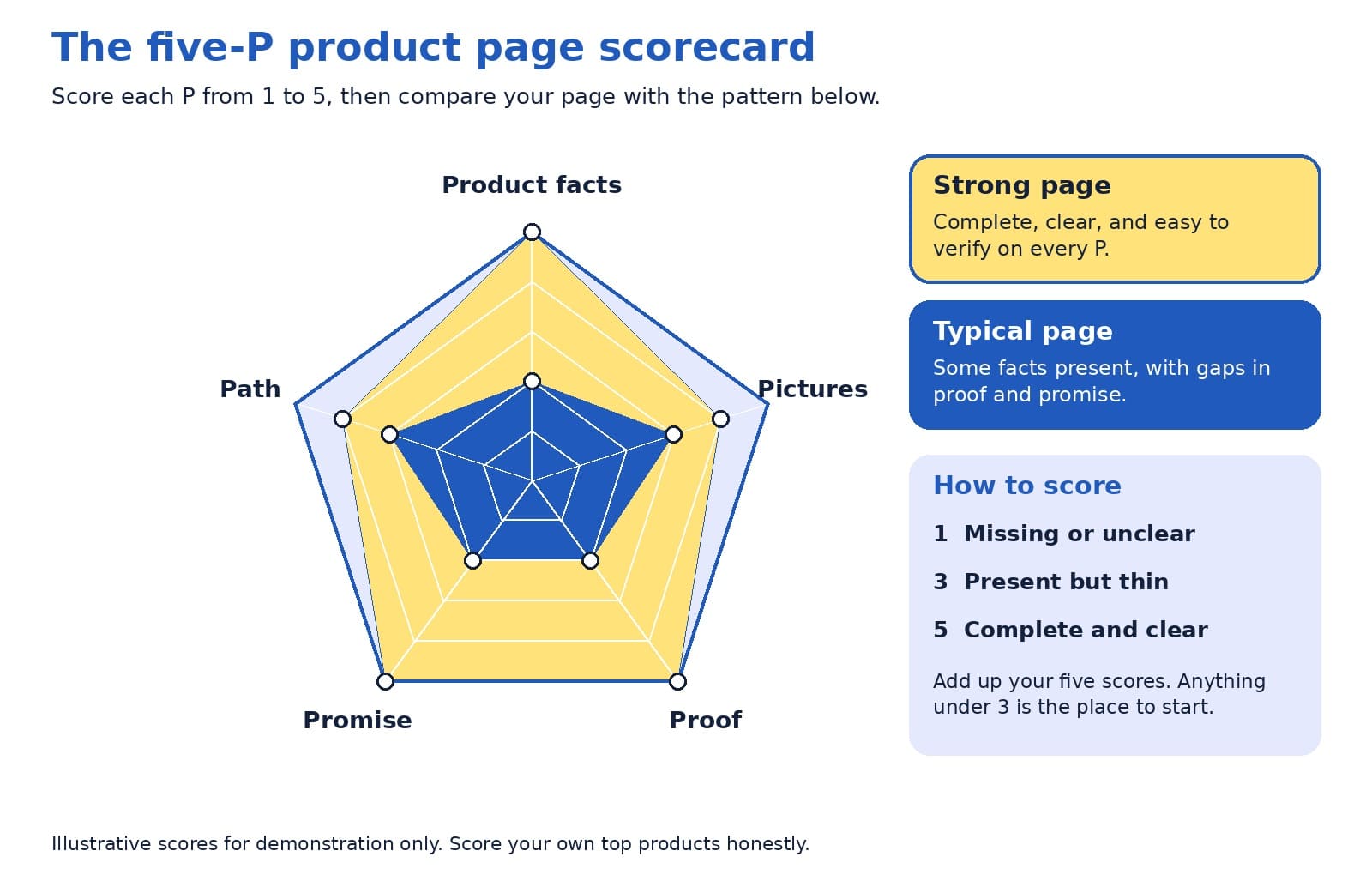
Look at the lowest point first, then at the pattern across your five pages. If the same P is low everywhere, such as proof or promise, the fix probably lives in your page template, and one change can lift every product at once.
On the page and behind the page
Shoppers read what is on the page. AI assistants and search engines also read the data behind it, through structured data and product feeds. The two should always match, since a mismatch creates doubt for people and for machines.
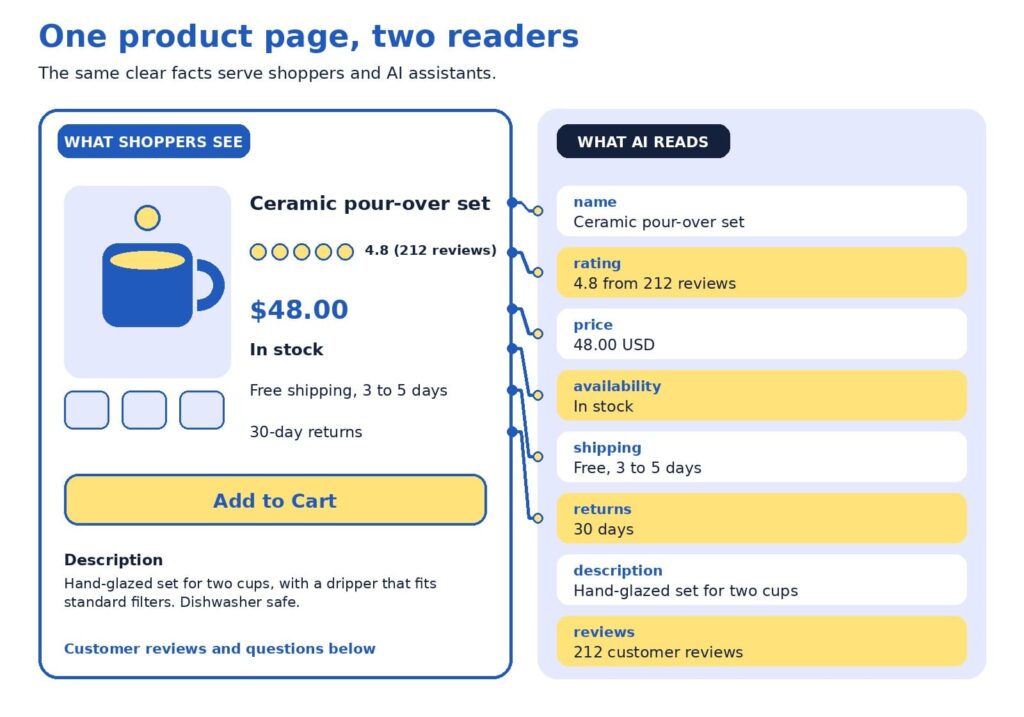
The example uses a fictional ceramic coffee set. Here is how to read it:
- The name is specific. “Ceramic pour-over set” says more than a code such as Set 02.
- The rating shows proof. A score with the number of reviews gives shoppers confidence.
- The price matches. The same number appears on the page and in the data.
- Stock status is current. Google lists availability among the details used for shopping results (Google Search Central, 2025b).
- Shipping is stated plainly. Delivery time and cost sit where shoppers decide.
- Returns are clear. A visible return window reduces hesitation.
Google’s guidance for structured data offers a helpful rule of thumb for this layer:
“as much rich product information as available”
Google Search Central (2025b)
A worked example
Here is how an audit might look for one product. The table shows a starting point and a stronger version of the same fictional coffee set.
| Page element | Starting point | Stronger version |
|---|---|---|
| Title | Set 02 | Ceramic pour-over coffee set for two, hand-glazed |
| Description | Great quality. Order today. | Size, materials, what is included, care instructions, and who it suits |
| Price and stock | Price appears at checkout | Price and stock status on the page, kept current automatically |
| Shipping and returns | See our policy page | Delivery time, cost, and return window near the buy button |
| Proof | No reviews yet | Reviews with ratings, plus answers to common questions |
Scored with the rubric, the starting page might receive 2 for product facts, 3 for pictures, 2 for proof, 2 for promise, and 3 for path. The lowest scores are proof and promise, so that is where to begin. Moving shipping and return details beside the buy button takes minutes, and inviting recent buyers to leave reviews builds proof steadily over the following weeks. After those two fixes, a clearer title and description lift the product facts score, and the page moves toward the strong pattern without a redesign.
The weakest-link rule
Here is a perspective that surprises some owners: your lowest score matters more than your average. A page with beautiful photos, a rich description, and no visible return policy may feel strong on paper, and a hesitant shopper still reads the gap. The same is true for machines, since one missing or conflicting fact, such as a price that differs between page and feed, can reduce confidence in everything else.
A product page is only as persuasive as its weakest P.
For that reason, we suggest raising your lowest P to a 3 on every top page before polishing any P to a 5. Once all five Ps reach at least a 3, tracking how assistants describe your products becomes a worthwhile next step, and our AI visibility and GEO services are designed for that stage. After that, AI-powered predictive analytics can help you decide which products to stock and promote.
Fix first: the impact and effort map
An audit usually produces a long list, so it helps to rank it. The map below sorts common fixes by impact and effort. Start with the top-left group, which delivers meaningful gains for modest work, then plan the top-right group as projects.
Placement on the map depends on your store. A shop with an automated feed may find that matching price and stock takes minutes, and a store with a custom checkout may find that mobile speed is a bigger project. Use the map as a conversation starter with your team, and move items to where they truly sit for you.
Technical checks behind the page
Structured data and product feeds
Google describes two kinds of product markup: product snippets for pages where people cannot buy directly, and merchant listings for pages where they can. It also recommends adding return policy information nested under your organization markup and marking up product variants, and it notes that providing both structured data and a Merchant Center feed maximizes eligibility (Google Search Central, 2025b).
ChatGPT’s commerce documentation describes product feeds in a similar way, as the route for sharing structured catalog data so products can be indexed and presented accurately (OpenAI, n.d.). Programs in this area change often, so check current documentation. Setup is usually a one-time job for a developer or a SEO company in Delhi.
Links, speed, and mobile
Search engines discover products by following links, so menus and category pages should link to products with standard links. Speed and mobile layout matter too, and Baymard’s 2026 benchmark shows the mobile bar is high, with 62% of mobile sites rated mediocre or worse for product pages (Scott, 2026). If app-like mobile shopping interests you, our guide to progressive web apps for ecommerce explains when they are worth the investment.
Modern storefronts
If your store runs on a headless setup, confirm that product details are visible when search engines load the page. Google suggests deploying a few pages with structured data and using the URL Inspection tool to see how Google views them (Google Search Central, 2025b). Our article on headless ecommerce explains when this approach suits smaller stores.
Trust and security
Trust includes a safe checkout. Secure connections, regular updates, and careful handling of payments protect customers and your reputation. For practical steps, read our guide to ecommerce security practices and our overview of AI-powered cybersecurity for ecommerce stores.
A 15-minute monthly habit
Product pages change as prices, stock, and policies change, so a short routine keeps them healthy. Once a month, set aside 15 minutes for these checks:
- Open your top five pages on a phone and confirm that price, stock, and shipping details are correct.
- Read the newest reviews and questions, and add answers to the page.
- Compare the page, feed, and checkout for any mismatch in price or availability.
- Re-score your lowest P and note whether it improved.
If you would like a second opinion, send us your top product pages. We will score them with the five-P rubric and return a short, ranked list of fixes.
Quick answers to common questions
How many pages should I audit? Five is enough to spot patterns without taking long. Include your best sellers and one product with plenty of visits and few sales, since that product often reveals what needs fixing.
How often should I re-run the audit? A full audit every quarter works well for many stores, with the 15-minute check each month. Re-run it after a redesign, a platform change, or a change to shipping or return policies.
Who should score the pages? Ideally, two people: someone who knows the product well, and someone who has never seen it. The newcomer’s questions often point straight at the thinnest P.
What if I have no reviews yet? Start by inviting recent buyers to share honest feedback, and answer the questions customers ask most on the page. A short, clear answers section builds proof while reviews grow.
What score is good enough? A 3 on every P is a solid foundation, and a 4 or 5 on the Ps that matter most to your customers is a strong goal. Apparel shoppers may care most about pictures and sizing, while buyers of technical products may care most about product facts.
Is this worth doing for a small store? Yes. A smaller catalog means you can bring every page up to a strong standard, and clear pages help shoppers and search tools alike.
One weak spot at a time
A product page audit turns a vague worry into a short, ranked to-do list. Score the five Ps, fix the lowest one first, match what is on the page with the data behind it, and repeat a small check every month. Each improvement helps shoppers decide and gives AI assistants and search engines clearer facts to work with.
Want help putting the scorecard to work? Our team handles ecommerce website design that builds the five Ps into every product page, and as a website design company in Delhi we create stores that are fast, clear, and easy to buy from. Our SEO company in Delhi specialists help those pages get found, and our AI visibility and GEO services help your products appear in AI answers.
References
Baymard Institute. (2026). Average documented online shopping cart abandonment rate. https://baymard.com/lists/cart-abandonment-rate
Google Search Central. (2025a, December 10). Help Google understand your ecommerce website structure. Google for Developers. https://developers.google.com/search/docs/specialty/ecommerce/help-google-understand-your-ecommerce-site-structure
Google Search Central. (2025b, December 10). Introduction to Product structured data. Google for Developers. https://developers.google.com/search/docs/appearance/structured-data/product
Google Search Central. (2026, July 10). Optimizing your website for generative AI features on Google Search. Google for Developers. https://developers.google.com/search/docs/fundamentals/ai-optimization-guide
OpenAI. (n.d.). Agentic commerce: Full documentation. https://developers.openai.com/commerce/llms-full.txt
Perez, S. (2026, April 16). AI traffic to US retailers rose 393% in Q1, and it’s boosting their revenue too. TechCrunch. https://techcrunch.com/2026/04/16/ai-traffic-to-us-retailers-rose-393-in-q1-and-its-boosting-their-revenue-too/
Scott, E. (2026). Product page UX 2026: 10 pitfalls and best practices. Baymard Institute. https://baymard.com/research-articles/current-state-ecommerce-product-page-ux


Related items

Depending on which 2026 survey you read, somewhere between 34% and 77% of US shoppers have

Ahrefs studied one million random web pages and found that only 1.74% of newly published p


Websites were built around a human operating the interface. A visitor reads the page, comp
