You open your website, and something is wrong. Strange redirects, a warning from Google, a customer asking why your shop is selling watches, or a host email saying your account is suspended. Your stomach drops, and the instinct is to start deleting things. Do not. A calm, ordered response recovers most sites, and a panicked one often makes the damage worse.
Speed does matter, though. Security firm Patchstack counted 11,334 new vulnerabilities in the WordPress ecosystem in 2025, 91% of them in plugins, and found that heavily exploited flaws were typically attacked within about five hours of disclosure.[2] Most hacks are automated and not personal. Your site was simply found, and the plan below is how you take it back.
Is your site really hacked? Check these signs first
WordPress’s own documentation calls the visible symptoms indicators of compromise: your site is blacklisted by Google or Bing, your host has disabled it, it is flagged for distributing malware, visitors report antivirus warnings, or you notice things you did not authorise, such as new users.[1] Before you panic, match what you see to the table below.
| What you see | What it often means | Check first |
|---|---|---|
| Google or browser “hacked” or “deceptive site” warning | Google has detected injected content or malware | Search Console → Security issues[3] |
| Redirects to spam or shops, only on mobile or from search | Malware that shows different content to different visitors | Open your site on mobile data, logged out |
| Unknown administrator in Users | Attacker created a backdoor account | Users → filter by Administrator |
| Host suspends the account or emails bounce | Site abused to send spam or attack others | Host abuse report; email blacklists[1] |
Spammy pages in site:yourdomain.com |
Content injection (SEO spam) | Search that query in Google |
One warning: modern malware is built to hide. Patchstack’s partner Monarx reports that leading campaigns use cloaking, showing search engines spam while sending real visitors to scams, so scanners and site owners often see a clean page.[2] If customers report problems you cannot see, believe them.
The 4C Recovery Clock: your 24-hour framework
Incident-response guidance, including NIST’s updated SP 800-61 Revision 3, treats response as a managed process and not a scramble.[5] We adapted the classic containment, analysis, eradication and recovery sequence into four time-boxed jobs that a small business can actually follow.
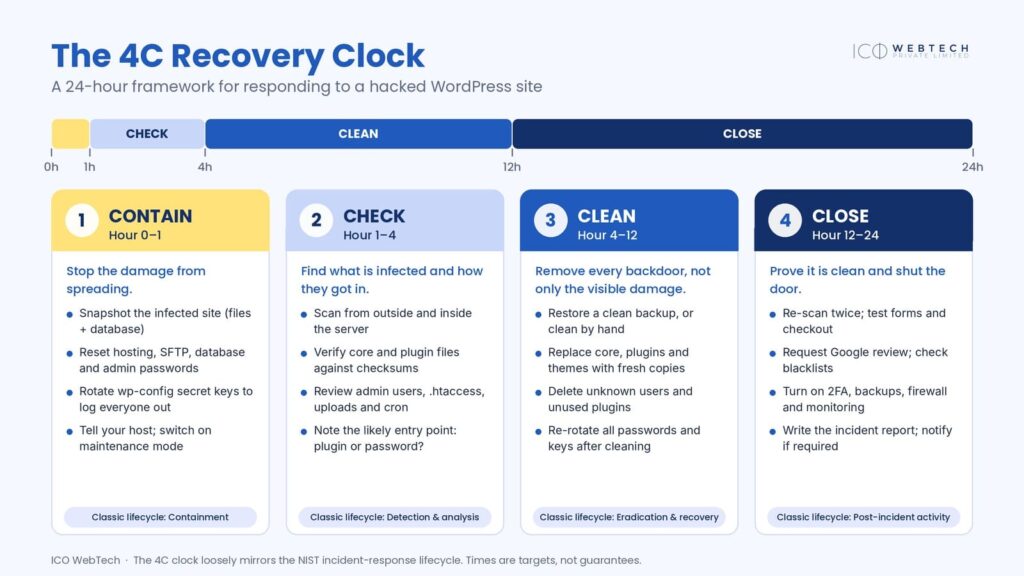
Hour 0–1: Contain
Goal: stop the damage spreading and preserve evidence.
- Start an incident log. Write down what you see, when you noticed it (with timezone) and what changed recently, such as a new plugin or theme edit. WordPress.org calls this the baseline of an incident report, and it is invaluable if you later hire help.[1] Answer five questions: What happened? When? What changed? Who has access? What have we done so far?
- Snapshot the infected site. Back up files and database now and label it “INFECTED”. It feels backwards, but if your clean-up goes wrong you still have something to refer to.[1]
- Limit exposure. Put the site in maintenance mode, or restrict access through your host. If visitors are being sent to malware or you take payments, take it offline.
- Call your host. On shared hosting, other sites on the account may be affected, and the host can confirm whether it is a hack or a service problem.[1]
- Reset every access point: WordPress admins, hosting panel, SFTP or SSH and the database. Use long, unique passwords from a password manager, then replace the secret keys in
wp-config.phpusing the official WordPress key generator, which logs everyone out.[1] - Scan your own computer. Attackers often start with a trojan on the site owner’s machine that steals logins.[1]
Hour 1–4: Check
Goal: find what is infected and how they got in.
Scan from two directions. Remote scanners (VirusTotal, Sucuri SiteCheck) and in-site scanners (Wordfence, Sucuri, Quttera, GOTMLS) see different things, and WordPress.org recommends using both.[1]
Verify the files. WP-CLI can compare your core and plugin files against WordPress.org’s published checksums.[6] Files that do not match, or that “should not exist” in core folders, are prime suspects. This covers only software hosted on WordPress.org, so compare premium plugins and themes against a fresh vendor download.
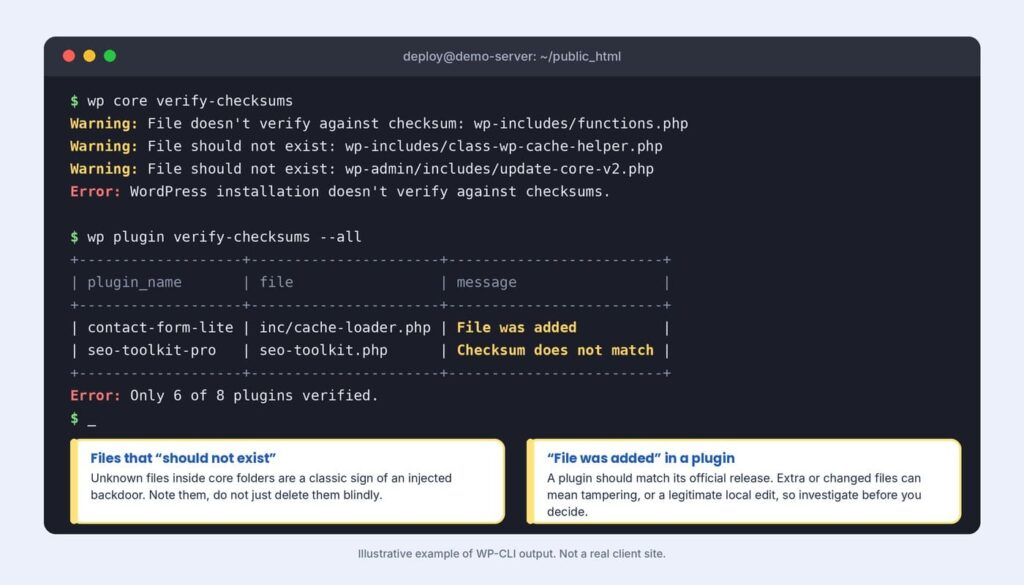
Review your users. An administrator you did not create, especially with no name and no posts, is a classic backdoor.
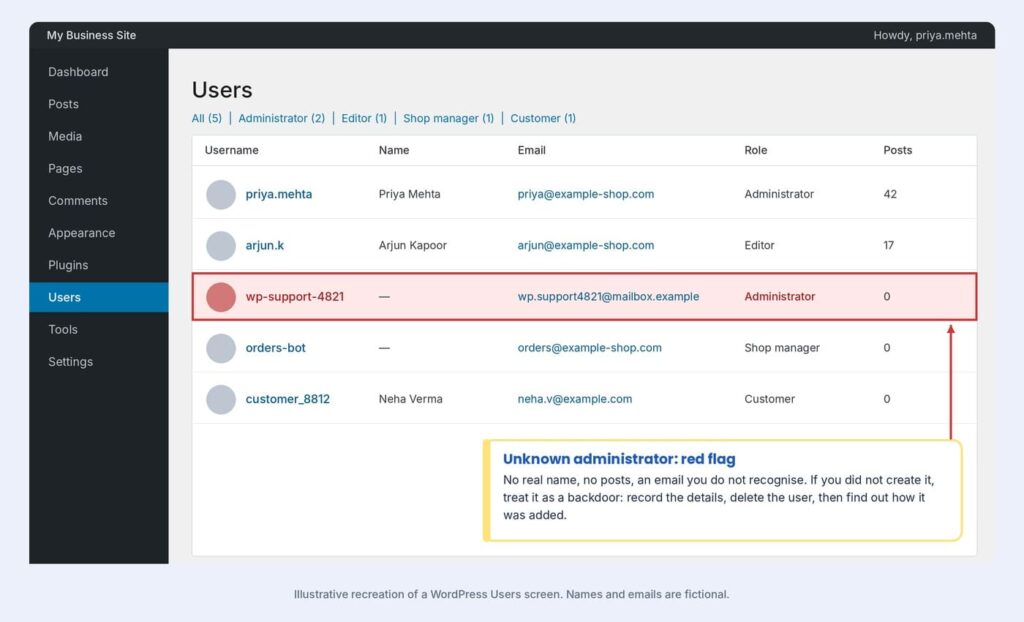
Inspect the usual hiding places. WordPress.org points to .htaccess as the file most often changed in attacks, and to index.php, header.php, footer.php and the theme’s functions.php because changes there affect every page request.[1] Also look at the mu-plugins folder, PHP files inside wp-content/uploads, and files modified in the last few days.
Find the likely door. Plugins are the usual entry point: 91% of 2025’s new vulnerabilities were in plugins, and 46% had no developer fix when they were disclosed.[2] List outdated, abandoned or pirated plugins and themes, and ask your host for logs around the time of the first changed file.
Watch for reinfection. Some malware lives in server memory and rewrites index.php and .htaccess the moment you restore them.[2] If a file keeps changing after you fix it, check hosting cron jobs and running processes, or escalate.
Triage: how bad is it, and restore or clean?
Before you clean, rate the incident. Severity decides how fast you move and who needs to know.
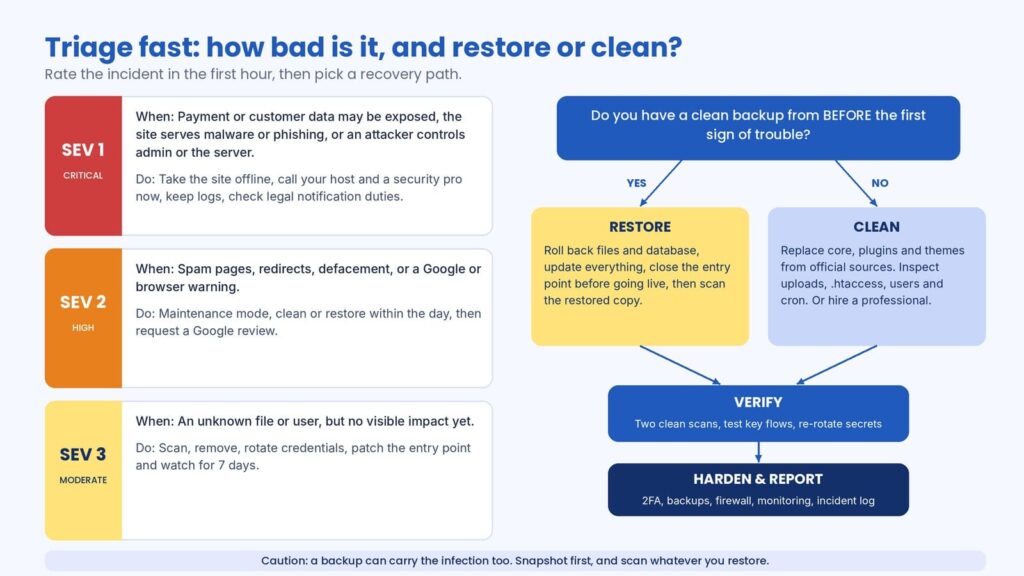
Severity 1 (critical) means payment or customer data may be exposed, the site is serving malware or phishing, or an attacker controls admin access or the server: go offline and bring in experts now.
Severity 2 (high) covers spam pages, redirects, defacement or a browser warning: clean or restore within the day.
Severity 3 (moderate) is an unknown file or user with no visible impact: remove it, rotate credentials and watch the site for a week. When in doubt, rate it one level higher. Caution costs little, and a wrong guess costs a lot.
Restore only if you have a backup from before the first sign of compromise, and patch the entry point before the site goes live again, because the same weakness will let the attacker straight back in. Remember that a backup can contain the infection too, so scan what you restore.
Clean if you have no trustworthy backup. Do not simply delete suspicious lines: Monarx found that many infections are snippets injected into legitimate core, plugin or theme files, which is why delete-only clean-ups fail.[2]
Do you have to tell anyone? India’s reporting rules
If you operate in India, check two obligations. CERT-In’s directions of 28 April 2022, effective 27 June 2022, require service providers, intermediaries, data centres, body corporates and government organisations to report listed incidents within six hours of noticing them. The list includes website defacement or intrusion with unauthorised changes such as injected malicious code or links.[7][8] Reports go to incident@cert-in.org.in or 1800-11-4949.[7]
The Digital Personal Data Protection Rules, notified on 13 November 2025, add breach duties: telling affected individuals without delay and sending the Data Protection Board a detailed report within 72 hours. Those provisions are scheduled to start in May 2027.[9][10] This is general information, not legal advice. If customer data may be involved, ask a lawyer and your payment provider early.
What to tell your customers and team
Silence feels safe but usually backfires. Once you know what happened, send a short, factual message: what occurred, what was and was not affected, what you have done, and what customers should do, such as resetting a password they reuse elsewhere. Avoid speculation and jargon, and do not promise that nothing was taken until you have evidence. Ask your team to stop logging in until credentials are reset, and pause paid ads and newsletters that send people to the site until it is clean.
Hour 4–12: Clean
Goal: remove every backdoor, not only the visible damage.
- Replace core files by hand. Delete
wp-adminandwp-includesover SFTP and upload fresh copies of the same WordPress version. Do not rely on the dashboard reinstall button, because installers mostly overwrite existing files while hacks add new ones.[1] - Rebuild plugins and themes from official or vendor sources, and delete anything unused or pirated.
- Remove unknown users and check the database for injected scripts or changed site URLs.
- Review
.htaccessandwp-config.phpagainst a known-good version. - Update everything, including WordPress, plugins, themes and your PHP version.[1]
- Change every password again, plus the database user and secret keys. Passwords changed before the clean-up may already be compromised.[1]
- Scan twice, then test logins, forms, checkout and email.
Hour 12–24: Close
Goal: prove the site is clean and shut the door.
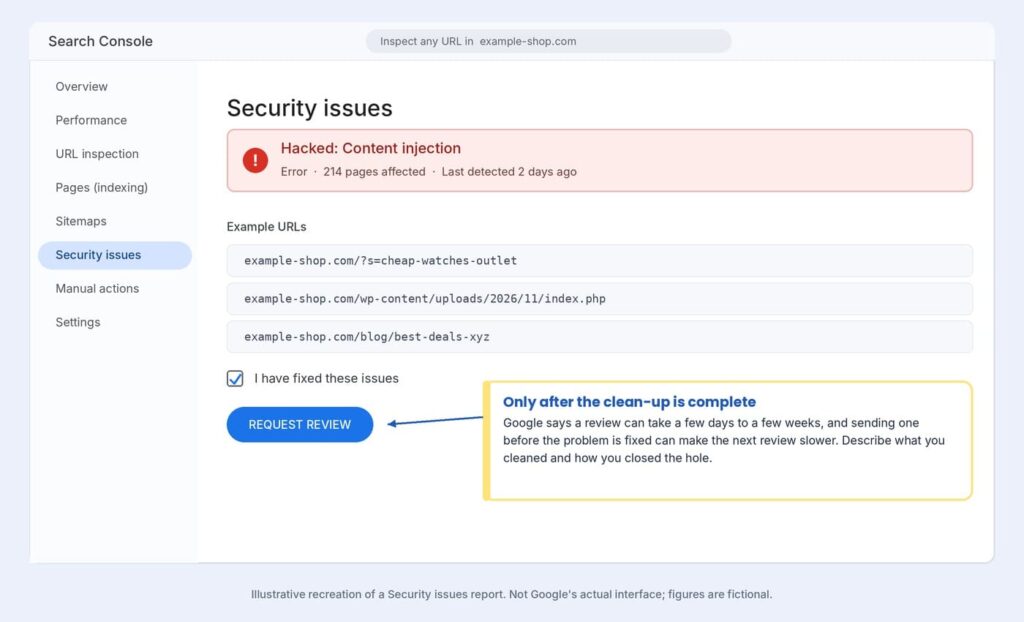
Ask Google to review. In Search Console, the Security issues report shows what Google found, and you request a review once everything is fixed. Describe what you cleaned and how you closed the hole.[3] Do not send it early: a review sent before the problem is fixed can slow the next one.[3] Malware reviews usually take a few days, while sites hacked with spam can wait several weeks.[4]
Check blacklists and email. Hacked sites are often blocklisted by security vendors and mail providers, so confirm with your host and register with Bing Webmaster Tools too.[1]
Harden. Turn on two-factor authentication for every admin, remove unused plugins, give each person only the access they need, enable security updates, and keep tested backups off the server. Do not rely on your host alone: in Patchstack’s tests, common hosting defences blocked only 26% of vulnerability attacks.[2] A managed website maintenance service covers these routine jobs.
Write it up. Record the timeline, root cause, changes made and who was notified. Post-incident learning is a core part of NIST’s guidance.[5] Then re-scan daily for two weeks.
Timing matters this season: Monarx saw malicious file uploads nearly triple across November and December 2025, when high traffic meets thin staffing.[2]
Also read:
Maintenance Decides Whether AI Search Can Use Your Website
5 Signs Your WordPress Website Needs Technical Attention
PHP Version Debt: Why Old Websites Fail the Moment Hosting Moves On
Five mistakes that make a hack worse
- Deleting files without a snapshot.[1]
- Changing passwords only at the start.
- Reinstalling from the dashboard and calling it done.
- Requesting a Google review before the site is clean.
- Ignoring your own computer and other sites on the same hosting account.
When to call a professional
Get expert help if payment or customer data may be exposed, you have no clean backup, malware keeps returning, or you cannot find the entry point. ICO WebTech’s emergency website support responds within 2 hours, and you can contact us with your URL for a free health check.
Frequently asked questions
How long does it take to fix a hacked WordPress site?
A simple infection can be contained and cleaned within a day. Google’s review can add days or, for spam hacks, weeks.[4]
Should I restore a backup or clean the site?
Restore if you have a backup from before the first sign of trouble, then patch the entry point. Otherwise, clean by hand or hire a professional.
Will a hack hurt my SEO?
It can. Google may label pages or show warnings until you clean the site and pass a review.[3] Fast clean-up limits the damage.
Final thought
A hack is stressful, but it is recoverable. Contain first, check before you clean, close the hole, and keep proof of what you did. Most infections trace back to an outdated plugin, a reused password or an abandoned theme, so the cheapest defence is the boring one: updates within days, fewer plugins, two-factor login and a backup you have actually tested. Then next time you only have to restore it.
Contact our website designing company in Delhi for any website-related queries.
References
- ^ WordPress.org Documentation Team. “FAQ My site was hacked”. WordPress.org Documentation. First published 27 October 2018; last updated 26 July 2026. Retrieved 16 November 2026.
- ^ Patchstack; Monarx (2026). “State of WordPress Security in 2026”. Patchstack. 25 February 2026. Retrieved 16 November 2026. (Vendor-published research.)
- ^ “Security issues report”. Search Console Help. Google. Retrieved 16 November 2026.
- ^ “Request a review”. web.dev. Google. Retrieved 16 November 2026.
- ^ Nelson, Alexander; Rekhi, Sanjay; Souppaya, Murugiah; Scarfone, Karen (April 2025). “Incident Response Recommendations and Considerations for Cybersecurity Risk Management: A CSF 2.0 Community Profile”. NIST Special Publication 800-61 Revision 3. National Institute of Standards and Technology. doi:10.6028/NIST.SP.800-61r3. Retrieved 16 November 2026.
- ^ “wp-cli/checksum-command: Verifies file integrity by comparing to published checksums”. GitHub. WP-CLI project. Retrieved 16 November 2026.
- ^ “New Cybersecurity Rules in India Impose Strict Reporting Requirements and Steep Penalties”. Alston & Bird Privacy, Cyber & Data Strategy Blog. Retrieved 16 November 2026.
- ^ “CERT-In’s Six-Hour Reporting Rule for Cyber Security Incidents: Statutory Interpretation and Analysis”. Argus Partners, via Legal 500. Retrieved 16 November 2026.
- ^ “DPDP Data Breach Notification in India: Timelines, Requirements and Key Compliance Considerations”. King Stubb & Kasiva. Retrieved 16 November 2026.
- ^ “8 Key Takeaways: The Digital Personal Data Protection Rules, 2025”. BTG Advaya, via Mondaq. 24 November 2025. Retrieved 16 November 2026.
The screenshots in this article are illustrative recreations made for this guide. This article is general guidance, not legal or professional security advice.


Related items
Baymard Institute’s 2026 benchmark found that 52% of desktop sites and 62% of mobile sites


Depending on which 2026 survey you read, somewhere between 34% and 77% of US shoppers have

Websites were built around a human operating the interface. A visitor reads the page, comp
