Quick honesty check: when’s the last time someone on your team tested your contact form on an actual phone, start to finish? Now compare that to the last time your team discussed adding an AI chatbot. If the second question came to mind faster than the first, you’re not alone, and you’re also, statistically, about to make an expensive mistake. 74% of companies that deployed an AI customer service chatbot have already pulled it offline or rolled it back [5], often after building it on top of a site that never had its basics sorted out in the first place.
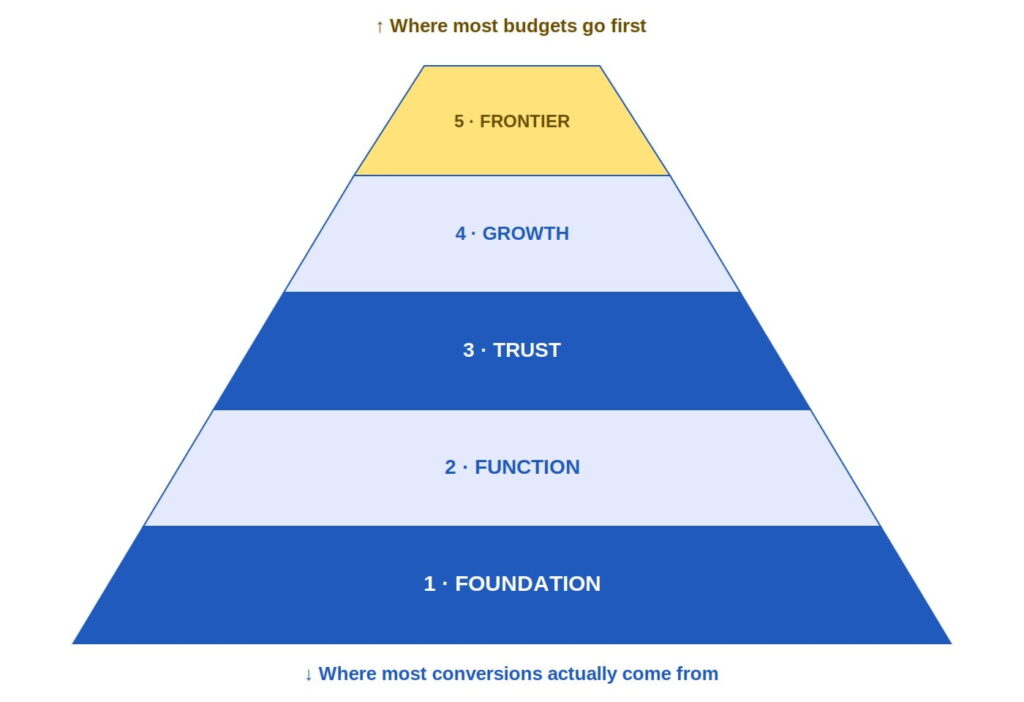
The 5-second verdict: Website features exist in a hierarchy, not a wish list. Foundation and function have to work before trust and growth features matter, and frontier features like AI chat only pay off once everything underneath them is solid. Most businesses build from the top down anyway, which is exactly why so many AI features get quietly switched off within a year. This post walks the hierarchy level by level, with the 2026 data behind each one, and shows you where to actually start.
Where we’re headed: we’re climbing the Website Feature Hierarchy, from the layer nobody notices when it’s working to the AI frontier everyone wants to skip straight to.
- Level 1 — Foundation: the stuff nobody notices when it’s working
- Level 2 — Function: can visitors actually do the thing
- Level 3 — Trust: why should anyone believe you
- Level 4 — Growth: features that compound over time
- Level 5 — Frontier: the shiny stuff everyone wants first
- The inversion problem
- Where to actually start
This is the fifth post in our website redesign series on icowebsolutions.com, and it’s a bit of a capstone. We’ve covered how to spot a struggling site, whether to redesign or rebuild it, how UX friction quietly costs leads, and what slow load times actually cost in revenue. This post organizes all of that into a single structure, because the question we hear most often from business owners isn’t any of the above individually.
It’s simpler: “what features does my site actually need?” The honest answer depends entirely on which level you’re standing on.
Level 1 — Foundation: the stuff nobody notices when it’s working
Foundation features share one trait: nobody compliments you for having them, and everybody notices the moment they fail. Page speed belongs here, and we’ve written a full breakdown of that relationship separately. Security basics belong here too. But the foundation issue most businesses are quietly exposed on right now is accessibility, and the numbers are genuinely startling.
WebAIM’s February 2026 audit of the top one million homepages found that 95.9% had at least one detectable accessibility failure, averaging 56 separate errors per page [1]. That translated into real legal exposure in 2025, with over 4,900 digital accessibility lawsuits filed in the US alone [1].
This isn’t a niche compliance issue for large companies. Nearly 70% of ADA web lawsuits target ecommerce specifically, and among the top 500 online retailers, more than a third were sued at least once in 2025 [1]. The failures driving most of this are mundane and fixable: low-contrast text, missing image descriptions, unlabeled form fields, and empty buttons account for the overwhelming majority of every audit finding [1]. None of it requires a rebuild. Most of it requires someone actually looking.
Level 2 — Function: can visitors actually do the thing
Function is where a website stops being a brochure and starts being a tool. Navigation that makes sense, forms that submit correctly, and search that actually finds things all live here, and site search in particular is dramatically underrated. Visitors who use on-site search convert at 4.63%, compared with 2.77% for visitors who don’t [3].
One large study spanning 609 million searches across 113 retail sites found that shoppers who use search make up only about 24% of visitors, yet generate roughly 44% of total revenue [2]. Walmart’s own conversion rate jumped from 1.1% to 2.9%, a 2.4x lift, simply among customers who used search instead of browsing [7].
Function problems are usually invisible to the business and glaring to the visitor. A search bar that returns zero results for common queries, a contact form that silently fails on mobile, a navigation menu that requires three guesses to find pricing- these all quietly filter out exactly the visitors who were ready to act. If Level 1 is about whether the site works at all, Level 2 is about whether it works for the person actually trying to buy something.
Level 3 — Trust: why should anyone believe you
Once a visitor can find what they need, the next question is whether they believe you’re worth acting on. This is where reviews, testimonials, case studies, and real contact information do their work, and the effect size here is larger than most marketing tactics achieve anywhere else on the site. 88% of consumers say they trust user reviews as much as a personal recommendation [4], and websites that feature user-generated content see conversion rates roughly 29% higher than those that don’t [4].
Format matters too. Video testimonials specifically have been shown to lift conversion rates by as much as 80% compared with plain text reviews [4], which is a strong argument for spending an afternoon filming three happy customers instead of another afternoon debating hero image copy. Trust features are also cheap relative to their impact, since most businesses already have the raw material (actual customers) and simply haven’t asked them for a quote or a two-minute video.
Also read:
State of B2B Websites: Survey Report
Level 4 — Growth: features that compound over time
Growth features don’t fix a broken experience; they make a working one more valuable over time. Analytics that actually get read, retargeting pixels that feed a real campaign, personalization that adjusts content based on where a visitor came from- all of this sits above trust because none of it matters if the visitor never trusted the site enough to convert in the first place.
This is also the layer where diminishing returns start creeping in if the layers below aren’t solid; a beautifully personalized homepage still won’t save a contact form that doesn’t submit.
The businesses that get real value from this layer tend to treat it as a compounding investment rather than a one-time install. A retargeting pixel installed on day one is worth more by month six, once there’s enough audience data to act on. That’s also exactly why this layer gets skipped or half-implemented so often: it doesn’t produce an immediate, demonstrable result the way a new chatbot does, even though its long-run payoff is often larger.
Level 5 — Frontier: the shiny stuff everyone wants first
This is the layer that gets pitched in every sales meeting and demanded in every planning session: AI chat assistants, predictive personalization, voice search optimization. It’s also the layer with the least forgiving failure rate of anything discussed here. As mentioned at the top of this post, 74% of organizations that deployed an AI customer service agent have already shut it down or rolled it back [5], and the pattern holds across every industry studied, from financial services to retail to healthcare.
The failures aren’t abstract either. Hallucinated answers account for 22% of AI failure incidents, and in 31% of cases the system disclosed a customer’s personal information during the interaction, turning a bad experience into a genuine legal exposure [5].
None of this means AI features are a bad bet. Businesses that implement them well, with clean underlying data and clear escalation paths to a human, report first-year returns as high as 340% for smaller companies [6]. The difference between those two outcomes almost never comes down to which AI vendor was chosen. It comes down to whether the four layers underneath were actually solid before the frontier feature went live.
The inversion problem
Here’s the pattern we see on a genuinely regular basis, and it’s the reason we built this hierarchy in the first place. Businesses budget top-down instead of bottom-up. The AI chatbot gets approved in a single meeting. The accessibility audit that’s been sitting in a project backlog for eight months doesn’t. Put the two headline numbers from this post side by side, and the inversion becomes hard to unsee.
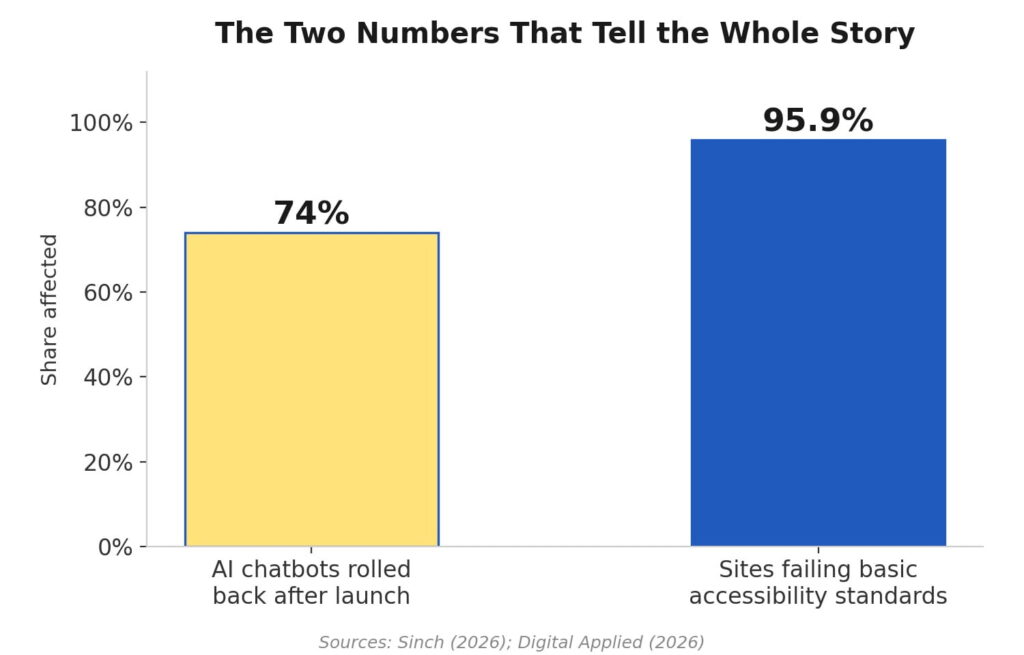
Nearly all businesses have a foundational problem serious enough to generate a lawsuit, and a majority of the businesses racing to add AI on top of that foundation are watching the AI feature fail within the year. These aren’t unrelated facts. A chatbot trained on a site with broken navigation and missing structure inherits every one of those problems, then adds a new one: it now confidently tells visitors things that aren’t true. Building the exciting feature before fixing the boring one doesn’t skip the boring problem. It just makes the boring problem harder to find and more expensive to fix later.
Where to actually start
The genuinely good news is that this hierarchy also works as a to-do list, in order. If you don’t know where your site currently stands, start at the bottom, not the top:
- Run a real accessibility scan (not just an overlay widget, which courts increasingly treat as no defense at all) and fix the handful of issues that cause most failures: contrast, alt text, form labels.
- Test your own contact form and site search on a phone, the way a real visitor would, not the way a developer who built it would.
- Ask three recent customers for a two-minute video testimonial before building anything else customer-facing.
- Confirm your analytics and retargeting are actually installed correctly, and someone is looking at them monthly.
- Only then, layer in the AI features, on top of a foundation that can actually support them.
None of this requires a full rebuild, and most of it doesn’t require new software spend at all, just attention pointed at the right layer. If you’re not sure which level your site is actually standing on, that’s exactly what our website designing company helps businesses figure out. Our team at ICO WebTech will walk your site through this hierarchy, level by level, and tell you honestly where to focus first. Book your free feature audit here and find out whether you need a website redesign or not.
References
- Digital Applied. (2026). Web accessibility statistics 2026: WCAG and lawsuit data. https://www.digitalapplied.com/blog/web-accessibility-statistics-2026-wcag-lawsuit-data
- Digital Applied. (2026). On-site search & merchandising: 2026 conversion play. https://www.digitalapplied.com/blog/ecommerce-on-site-search-merchandising-2026-conversion-playbook
- Hello Retail. (2026). Ecommerce site search statistics: 19 numbers that prove it converts. https://helloretail.com/en/blog/2026-02-24-ecommerce-search-statistics/
- Genesys Growth. (2026). Social proof impact on conversions: 10 statistics every marketing leader should know in 2026. https://genesysgrowth.com/blog/social-proof-conversion-stats-for-marketing-leaders
- Sinch. (2026). When AI chatbots fail in customer support: The true cost. https://sinch.com/blog/ai-chatbot-failures/
- GrowthBoss. (2026). AI customer service chatbot ROI in 2026. https://growthboss.co/blog/ai-customer-service-chatbot-roi-2026
- Opensend. (2025). 13 on-site search conversion rate statistics for eCommerce stores. https://www.opensend.com/post/on-site-search-conversion-rate-statistics-ecommerce



Related items
Baymard Institute’s 2026 benchmark found that 52% of desktop sites and 62% of mobile sites


Depending on which 2026 survey you read, somewhere between 34% and 77% of US shoppers have

Websites were built around a human operating the interface. A visitor reads the page, comp
