A visible consent banner proves only that a banner rendered. It does not prove that the page set the intended default, that the visitor’s choice reached the tag manager, or that network requests followed the resulting state.
A reliable acceptance test therefore follows one choice through four layers: the banner, the consent state, the tag decision and the browser request. The method below uses a controlled test site and synthetic interactions, so a team can diagnose the implementation without exposing customer data or claiming legal compliance.
Define the evidence chain before testing
Start with the implementation decision that already exists. Confirm whether the site uses basic or advanced consent mode, which consent categories it exposes, which regions receive the banner and which tags should react to each state. Google documents different tag behaviour for basic and advanced consent mode, so an observation that is correct in one design can be wrong in the other.
The test is not a search for any request with “analytics” in its name. It is a comparison between an expected state and four recorded observations. Write the expectation first, then capture what the page actually did.
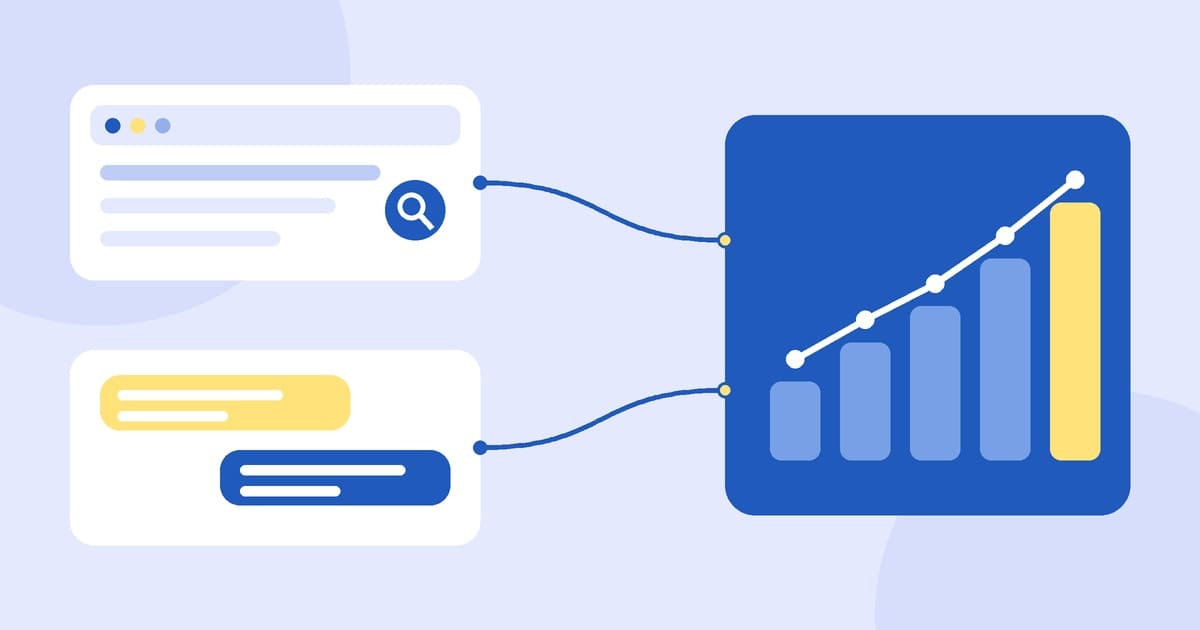
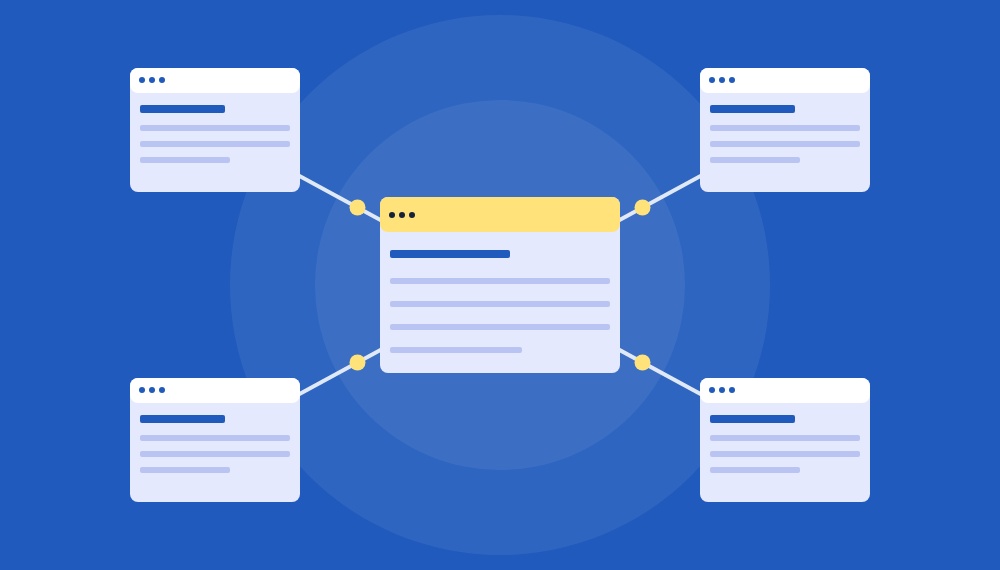
Figure 1 The acceptance trace connects the visitor choice to the final browser activity.
Use four questions for every scenario
What did the visitor select in the banner or preference centre?
Which default and updated consent values did the page record?
Which tags fired, remained blocked or changed their behaviour?
Which requests and storage changes appeared in the browser?
Build a small scenario matrix
A long checklist is less useful than a small set of states that can be repeated. Begin with a clean browser profile or an isolated test profile. Record the URL, build identifier, container version, region being simulated and test time so another person can reproduce the run.
The matrix below is illustrative. Replace the expected values with the organisation’s approved implementation rules. Do not infer legal requirements from the example.
Scenario
Banner
Consent state
Tag decision
Network evidence
First visit
No choice yet
Approved defaults
Only permitted pre-choice behaviour
Expected pre-choice requests only
Reject all
Rejected
Relevant values denied
Blocked or adapted as designed
No unexpected identifiers or requests
Partial choice
Analytics only
Mixed values
Each tag follows its own checks
Only requests allowed by that state
Accept all
Accepted
Relevant values granted
Expected tags run
Expected requests and storage appear
Revoke later
Changed to rejected
Update records denial
Later events obey the new state
No new disallowed activity after the change
Return visit
Saved choice shown
State restored correctly
Same rule after reload
No first-load race or stale choice
Run the trace in sequence
Capture the first page state
Open Tag Assistant before interacting with the banner. In the earliest Consent event, record the on-page defaults for the consent types used by the site. Google’s troubleshooting guide recommends checking the earliest event because defaults need to exist before later tags depend on them.
In Google Tag Manager, a consent-management template should normally use the Consent Initialization trigger. That trigger runs before other initialization triggers. If the default appears after a measurement or advertising tag has already acted, the banner may look correct while the sequence is already wrong.
Record the visitor action and the update
Choose one scenario and note the exact action: reject all, accept all or select a defined subset. Then inspect the most recent Consent event and compare every updated value with the matrix. Google advises that updates be tracked on the page where the interaction occurs and before a page transition, because the tag reacts to the update when it processes later events.
Do not treat a data-layer message as final evidence. It shows that one layer emitted an event. The tag may still have different built-in checks, additional consent checks or custom logic.
Inspect tag decisions
For each relevant tag, record whether Tag Assistant shows it as fired, blocked or affected by consent. Review the container’s Consent Overview as a configuration inventory, but use the actual preview trace to verify the tested page and event.
Pay special attention to custom HTML and legacy tags. A banner can update Google consent values correctly while a third-party script continues to load because it does not read those values or because its trigger ignores them. Document the observed behaviour and compare it with the approved design rather than assuming that every tag uses the same consent mechanism.
Inspect browser requests and storage
Keep the browser Network panel open with Preserve log enabled so redirects and page transitions do not erase evidence. Clear the log before each scenario, and use the same cache setting in every run. Chrome DevTools documents Preserve log and Disable cache as separate controls, so record both in the test notes.
Compare request timing, destination, query parameters, payload and response. Also check cookies or other storage only where the test plan calls for it. A request can exist without writing an identifier, and an identifier can remain from an earlier session, so request presence and storage state should be recorded separately.
Repeat after reload and route changes
Reload the page, navigate through one client-side route if the site uses a single-page application, and revisit the page in a new tab. The saved preference must be restored before later events use it. A result that passes only on the initial page but fails after a route change is still a failed acceptance test.
Diagnose disagreements between layers
The banner and the consent state disagree
The interface may display “rejected” while the earliest consent event shows a granted or unset default. Check when the CMP loads, whether region-specific defaults overlap and whether asynchronous loading lets another tag run first. For direct gtag.js implementations, Google states that the default command should precede commands that send measurement data.
The consent state and the tag decision disagree
If the state updates but a tag still fires unexpectedly, inspect its built-in and additional consent checks. Check whether a custom trigger bypasses the intended gate. For Tag Manager templates, use the consent APIs documented for templates rather than a custom HTML workaround that runs later than expected.
The tag decision and the network evidence disagree
A tag can appear blocked while another script sends a similar request, or a request can be replayed from a stale page state. Identify the initiator in DevTools, compare the timestamp with the consent events and repeat with a fresh profile. Do not assign the request to a tag based only on the endpoint name.
Keep a compact evidence record
A useful test record lets an engineer reproduce the run without reinterpreting screenshots. Save the matrix row, the expected state, the actual values and enough timestamps to establish order. Redact identifiers and do not copy production customer data into the evidence pack.
Evidence
Minimum record
Reason
Test context
URL, build, container version, region, time
Makes the run reproducible
Banner action
Screenshot or written action and visible state
Shows what the visitor selected
Consent trace
Earliest default and latest update values
Establishes state and order
Tag trace
Tag name, event and fired or blocked result
Connects state to execution
Network trace
Filtered HAR or request details with sensitive data removed
Shows the browser outcome
Result
Pass, fail or needs investigation with one reason
Prevents ambiguous sign-off
Set release criteria that can be retested
Approve the implementation only when every required scenario has a documented expectation and the four evidence layers agree. A missing screenshot is not automatically a product defect, but a missing default, unexplained tag execution or unexpected request must stay open until the team can explain and reproduce it.
Retest the matrix after a CMP change, container publication, analytics migration, consent-category rename or routing change. These releases can alter timing or tag ownership even when the banner design does not change.
The practical benefit of this framework is traceability. When a discrepancy appears, the team knows whether to investigate the interface, the stored state, the tag configuration or the network path instead of clearing cookies and hoping the problem disappears.
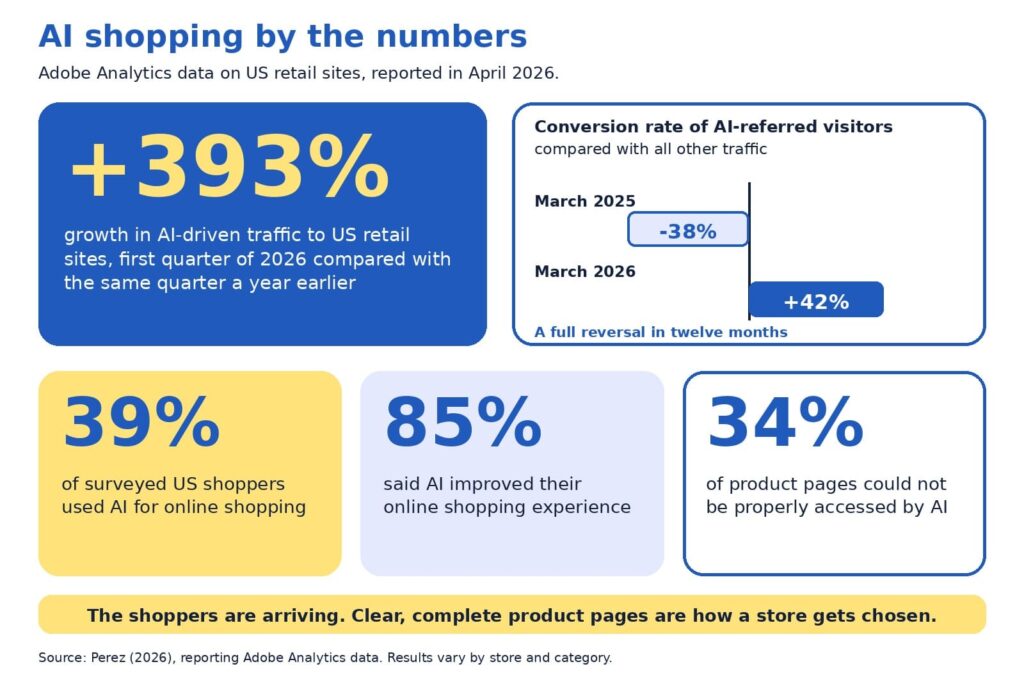
Baymard Institute’s 2026 benchmark found that 52% of desktop sites and 62% of mobile sites have product page experiences rated mediocre or worse (Scott, 2026). Adobe’s analysis of retail sites adds a second angle: about 34% of product pages could not be properly accessed by AI (Perez, 2026). Both findings describe one opportunity. Product pages are where stores win or lose, and most have room to improve.
Our companion guide, AI can recommend your product, but only your product page can sell it, explains why product pages matter so much in AI shopping. This guide is the hands-on follow-up. In about 30 minutes, you will score your own pages, find the weakest spot, and decide what to fix first.
You will get the five-P scorecard with a simple scoring rubric, an example that shows what is on the page and what sits behind it, a worked audit, an impact and effort map for choosing fixes, and a short monthly habit. Everything is written for owners and marketers who are new to this, so no technical background is needed.
A note on transparency: the scorecard is a self-assessment tool, and the example numbers are illustrative. AI shopping also changes quickly, so we point to Google’s documentation, Baymard’s research, and Adobe’s data, and we flag where details may change.
The quick version
Choose five product pages. Score each on five Ps: product facts, pictures, proof, promise, and path. Use the rubric to rate each P from 1 to 5, then fix the lowest score first, because a page is only as persuasive as its weakest P. Use the impact and effort map to pick quick wins before bigger projects, and repeat a short check every month.
Product page audit: a structured check of how clear, complete, and trustworthy a product page is.
Product feed: a regularly updated file listing your products and their details for platforms such as Google.
Structured data: hidden labels on a page, such as price and availability, that help machines read it accurately.
Merchant Center: Google’s free tool for sharing product data across Google.
Conversion rate: the share of visitors who buy. If 100 people visit and 3 buy, the rate is 3%.
Why an audit beats guessing
When sales feel slow, owners often reach for a redesign, a new app, or an AI tool. Those can all help, and each is easier to choose well once you know which part of the page is holding you back. An audit gives you a baseline, a ranked list of fixes, and a way to show progress.
The stakes are real. Baymard’s research puts the average documented cart abandonment rate at about 70%, which means roughly seven in ten shoppers who add something to a cart leave without buying (Baymard Institute, 2026). Product pages sit upstream of that moment, since shoppers decide whether they trust a product long before they reach checkout. TechCrunch’s report on the Adobe data describes the incentive for stores clearly:
“retailers are incentivized to make their sites AI-friendly”
Perez (2026)
The encouraging part is that the basics do most of the work. Google describes optimizing for its generative AI features as part of SEO, and it recommends keeping product and business details accurate through tools such as Merchant Center (Google Search Central, 2026). A careful audit puts exactly those basics in front of you.
The five-P checklist
Each P answers a question that shoppers and AI assistants both ask. For each one, here is what to look for on your page.
Product facts
Ask: what exactly is this? Look for a specific name that includes brand, model, and the one or two attributes people search for, plus a complete description with materials, sizes, variants, and what comes in the box. Selection should be easy too, and Baymard found that 57% of sites do not use buttons for size selection (Scott, 2026), so clear variant buttons are a simple upgrade.
Pictures
Ask: what does it look like in real life? Look for several angles, zoom, and at least one image that shows scale or the product in use. Short captions can answer questions that photos alone leave open, such as size, weight, or fit.
Proof
Ask: can I trust this? Look for genuine reviews and ratings, answers to common questions, and credentials such as certifications. Google lists review ratings among the details that can appear with product results (Google Search Central, 2025b), so visible, honest reviews help both shoppers and search.
Promise
Ask: what will I get, and when? Look for price, stock status, delivery time, shipping cost, and the return window, all near the buy button. Google notes that sharing shipping costs, especially free shipping, helps shoppers understand the total cost, and that return information can also appear in results (Google Search Central, 2025b).
Path
Ask: can people and machines reach this page easily? Look for standard links from menus and categories, a fast and mobile-friendly layout, structured data, and a smooth route to checkout. Google’s ecommerce guidance recommends linking menus to categories and categories to products, and it notes that Googlebot generally does not use a site’s search box (Google Search Central, 2025a).
The scoring rubric
Use this table to rate each P from 1 to 5. Score 1 means the information is missing or unclear, 3 means it is present but thin, and 5 means it is complete and clear. Pick the description that is closest to your page and avoid rounding up.
The P
Score 1: missing or unclear
Score 3: present but thin
Score 5: complete and clear
Product facts
Code or vague name, short description
Clear name, basic description
Specific name, full details, variants, and what is included
Pictures
One small image
Several images, limited zoom
Multiple angles, zoom, scale, and captions
Proof
No reviews or questions answered
A few reviews, hard to find
Visible reviews and ratings with answers to common questions
Promise
Price or policies appear only at checkout
Policies linked from the footer
Price, stock, shipping, and returns beside the buy button
Path
Slow, hard to reach, or hard to read on a phone
Works, with some speed or link gaps
Fast, crawlable, structured data in place, smooth checkout
How to run the audit, step by step
The whole audit fits in about 30 minutes. Set a timer, open a spreadsheet with one row per page, and follow these steps:
Choose five pages (2 minutes). Pick your best sellers, plus one product that gets plenty of visits and few sales.
View each page on a phone and a computer (5 minutes). Note anything slow, cramped, or confusing.
Score the five Ps with the rubric (10 minutes). Write the number and one sentence of evidence for each.
Check behind the page (8 minutes). Compare price and stock on the page with your product feed and checkout, and test the page with Google’s Rich Results Test or URL Inspection tool.
Circle the lowest P on each page (3 minutes). That is your starting point.
Rank the fixes (2 minutes). Use the impact and effort map later in this guide to pick quick wins first.
Be kind to yourself and honest at the same time. The goal is a clear picture of where each page stands today, since a realistic score is the most useful one.
Reading your scorecard
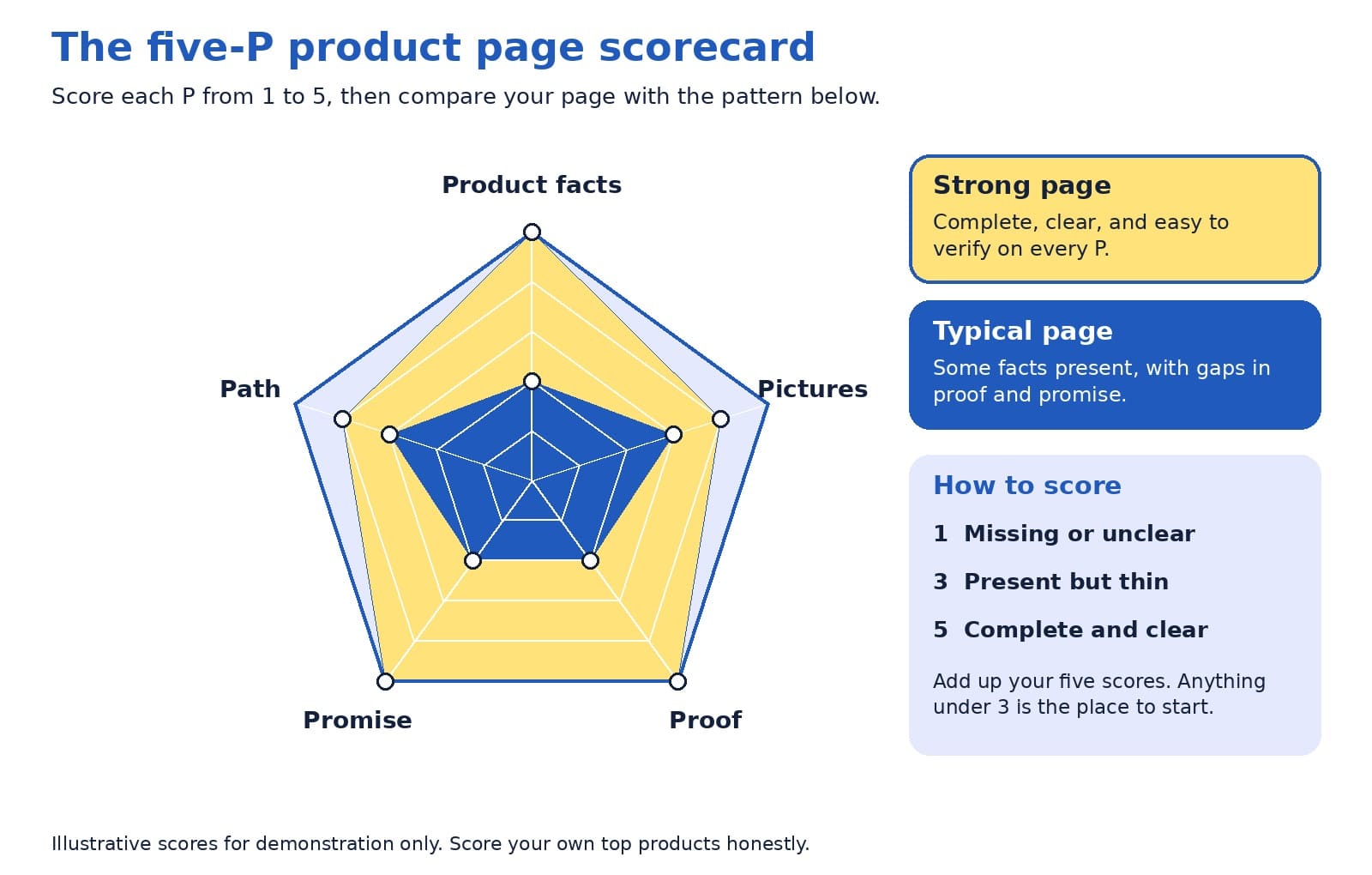
Plot your five scores on the radar chart below. A wide, even shape means your page is balanced, and a dent shows the P that needs attention. The chart compares an illustrative strong page with a typical page, so you can see how the shapes differ.
The five-P scorecard, with illustrative scores for a strong page and a typical page.
Look at the lowest point first, then at the pattern across your five pages. If the same P is low everywhere, such as proof or promise, the fix probably lives in your page template, and one change can lift every product at once.
On the page and behind the page
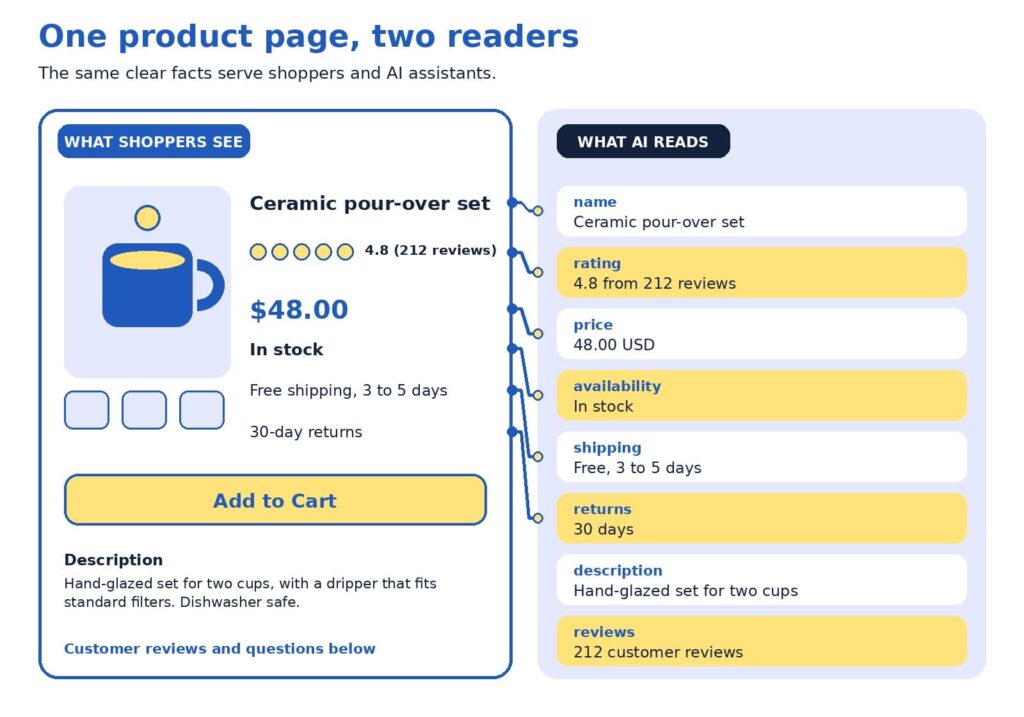
Shoppers read what is on the page. AI assistants and search engines also read the data behind it, through structured data and product feeds. The two should always match, since a mismatch creates doubt for people and for machines.
The same facts, shown on the page and stored in the data behind it.
The example uses a fictional ceramic coffee set. Here is how to read it:
The name is specific. “Ceramic pour-over set” says more than a code such as Set 02.
The rating shows proof. A score with the number of reviews gives shoppers confidence.
The price matches. The same number appears on the page and in the data.
Stock status is current. Google lists availability among the details used for shopping results (Google Search Central, 2025b).
Shipping is stated plainly. Delivery time and cost sit where shoppers decide.
Returns are clear. A visible return window reduces hesitation.
Google’s guidance for structured data offers a helpful rule of thumb for this layer:
“as much rich product information as available”
Google Search Central (2025b)
A worked example
Here is how an audit might look for one product. The table shows a starting point and a stronger version of the same fictional coffee set.
Page element
Starting point
Stronger version
Title
Set 02
Ceramic pour-over coffee set for two, hand-glazed
Description
Great quality. Order today.
Size, materials, what is included, care instructions, and who it suits
Price and stock
Price appears at checkout
Price and stock status on the page, kept current automatically
Shipping and returns
See our policy page
Delivery time, cost, and return window near the buy button
Proof
No reviews yet
Reviews with ratings, plus answers to common questions
Scored with the rubric, the starting page might receive 2 for product facts, 3 for pictures, 2 for proof, 2 for promise, and 3 for path. The lowest scores are proof and promise, so that is where to begin. Moving shipping and return details beside the buy button takes minutes, and inviting recent buyers to leave reviews builds proof steadily over the following weeks. After those two fixes, a clearer title and description lift the product facts score, and the page moves toward the strong pattern without a redesign.
The weakest-link rule
Here is a perspective that surprises some owners: your lowest score matters more than your average. A page with beautiful photos, a rich description, and no visible return policy may feel strong on paper, and a hesitant shopper still reads the gap. The same is true for machines, since one missing or conflicting fact, such as a price that differs between page and feed, can reduce confidence in everything else.
A product page is only as persuasive as its weakest P.
For that reason, we suggest raising your lowest P to a 3 on every top page before polishing any P to a 5. Once all five Ps reach at least a 3, tracking how assistants describe your products becomes a worthwhile next step, and our AI visibility and GEO services are designed for that stage. After that, AI-powered predictive analytics can help you decide which products to stock and promote.
Fix first: the impact and effort map
An audit usually produces a long list, so it helps to rank it. The map below sorts common fixes by impact and effort. Start with the top-left group, which delivers meaningful gains for modest work, then plan the top-right group as projects.
Common product page fixes sorted by impact and effort. Your store may differ.
Placement on the map depends on your store. A shop with an automated feed may find that matching price and stock takes minutes, and a store with a custom checkout may find that mobile speed is a bigger project. Use the map as a conversation starter with your team, and move items to where they truly sit for you.
Technical checks behind the page
Structured data and product feeds
Google describes two kinds of product markup: product snippets for pages where people cannot buy directly, and merchant listings for pages where they can. It also recommends adding return policy information nested under your organization markup and marking up product variants, and it notes that providing both structured data and a Merchant Center feed maximizes eligibility (Google Search Central, 2025b).
ChatGPT’s commerce documentation describes product feeds in a similar way, as the route for sharing structured catalog data so products can be indexed and presented accurately (OpenAI, n.d.). Programs in this area change often, so check current documentation. Setup is usually a one-time job for a developer or a SEO company in Delhi.
Links, speed, and mobile
Search engines discover products by following links, so menus and category pages should link to products with standard links. Speed and mobile layout matter too, and Baymard’s 2026 benchmark shows the mobile bar is high, with 62% of mobile sites rated mediocre or worse for product pages (Scott, 2026). If app-like mobile shopping interests you, our guide to progressive web apps for ecommerce explains when they are worth the investment.
Modern storefronts
If your store runs on a headless setup, confirm that product details are visible when search engines load the page. Google suggests deploying a few pages with structured data and using the URL Inspection tool to see how Google views them (Google Search Central, 2025b). Our article on headless ecommerce explains when this approach suits smaller stores.
Product pages change as prices, stock, and policies change, so a short routine keeps them healthy. Once a month, set aside 15 minutes for these checks:
Open your top five pages on a phone and confirm that price, stock, and shipping details are correct.
Read the newest reviews and questions, and add answers to the page.
Compare the page, feed, and checkout for any mismatch in price or availability.
Re-score your lowest P and note whether it improved.
If you would like a second opinion, send us your top product pages. We will score them with the five-P rubric and return a short, ranked list of fixes.
How many pages should I audit? Five is enough to spot patterns without taking long. Include your best sellers and one product with plenty of visits and few sales, since that product often reveals what needs fixing.
How often should I re-run the audit? A full audit every quarter works well for many stores, with the 15-minute check each month. Re-run it after a redesign, a platform change, or a change to shipping or return policies.
Who should score the pages? Ideally, two people: someone who knows the product well, and someone who has never seen it. The newcomer’s questions often point straight at the thinnest P.
What if I have no reviews yet? Start by inviting recent buyers to share honest feedback, and answer the questions customers ask most on the page. A short, clear answers section builds proof while reviews grow.
What score is good enough? A 3 on every P is a solid foundation, and a 4 or 5 on the Ps that matter most to your customers is a strong goal. Apparel shoppers may care most about pictures and sizing, while buyers of technical products may care most about product facts.
Is this worth doing for a small store? Yes. A smaller catalog means you can bring every page up to a strong standard, and clear pages help shoppers and search tools alike.
One weak spot at a time
A product page audit turns a vague worry into a short, ranked to-do list. Score the five Ps, fix the lowest one first, match what is on the page with the data behind it, and repeat a small check every month. Each improvement helps shoppers decide and gives AI assistants and search engines clearer facts to work with.
Baymard Institute. (2026). Average documented online shopping cart abandonment rate. https://baymard.com/lists/cart-abandonment-rate
Google Search Central. (2025a, December 10). Help Google understand your ecommerce website structure. Google for Developers. https://developers.google.com/search/docs/specialty/ecommerce/help-google-understand-your-ecommerce-site-structure
Google Search Central. (2025b, December 10). Introduction to Product structured data. Google for Developers. https://developers.google.com/search/docs/appearance/structured-data/product
Google Search Central. (2026, July 10). Optimizing your website for generative AI features on Google Search. Google for Developers. https://developers.google.com/search/docs/fundamentals/ai-optimization-guide
OpenAI. (n.d.). Agentic commerce: Full documentation. https://developers.openai.com/commerce/llms-full.txt
Perez, S. (2026, April 16). AI traffic to US retailers rose 393% in Q1, and it’s boosting their revenue too. TechCrunch. https://techcrunch.com/2026/04/16/ai-traffic-to-us-retailers-rose-393-in-q1-and-its-boosting-their-revenue-too/
Scott, E. (2026). Product page UX 2026: 10 pitfalls and best practices. Baymard Institute. https://baymard.com/research-articles/current-state-ecommerce-product-page-ux
Depending on which 2026 survey you read, somewhere between 34% and 77% of US shoppers have already used AI to help them buy something, yet the most common amount people said they would let an AI spend for them on its own was $0 (TechWyse, 2026; Supermarket News, 2026). Read that again, because it holds the whole opportunity: shoppers are happy to let AI build the shortlist, but they still want to see the product with their own eyes before they pay. That moment of looking is your product page, and it has quietly become the most valuable real estate in your store.
If you run an online store, this is good news. You do not need to chase every new AI feature to benefit from this shift. You need product pages that a machine can understand in a second and a human can trust in five, and that is a problem we know how to solve.
TL;DR
AI assistants are now part of how people find products, but shoppers still make the final call on your product page.
Every product page has two readers: a machine that checks your facts and a person who decides whether to trust you.
Strong basics (accurate product data, clear photos, honest answers, fast loading) beat clever tricks.
Fix your product pages first, then spend on anything labeled “AI optimization.”
It is easy to read the headlines and conclude that AI is about to swallow online shopping whole, with bots comparing prices, picking winners, and checking out without a human anywhere in sight. The data tells a calmer and, for store owners, a more encouraging story. A Semrush-owned research platform surveyed 1,009 US consumers and found that 77.6% had used AI to help with a shopping decision in the previous six months, while the most common spending limit they would authorize for fully autonomous AI purchases was zero dollars (TechWyse, 2026).
Forrester’s March 2026 community survey points the same direction: people who regularly use answer engines said that finishing a purchase inside the chat was their least-adopted use, far behind asking general questions and researching product rankings (TechWyse, 2026).
Trust is the reason, and it shows up in other studies too. McKinsey’s State of the Consumer 2026 report found that 26% of consumers use generative AI for shopping, which makes shopping the top use of the technology, yet shoppers still place more trust in personal recommendations, experts, traditional search engines, and online stores than in AI-generated answers (Modaes, 2026).
Acosta Group’s study found that only 22% of shoppers who use AI for shopping trust agents to make purchases for them (Supermarket News, 2026), and Omnisend reports that a significant share of consumers worry AI favors sponsored or paid products (Omnisend, 2026).
Put those findings side by side and a clear picture forms. AI is becoming the front door to product discovery, but people still walk through your door to buy, and when they arrive they are better informed and more demanding than a typical browser. Adobe’s numbers show how quickly that has changed. In early 2025, visitors arriving from generative AI sources were 9% less likely to convert than other traffic (Adobe, 2025).
By the 2025 holiday season, Adobe measured AI referrals converting 31% better than other sources, with visitors 33% less likely to leave right away, and traffic to retail sites from AI tools up 693% year over year (Pandya, n.d.). Those visitors arrive with a short list and a purpose, which means your page has less room for vague copy and more reason to shine.
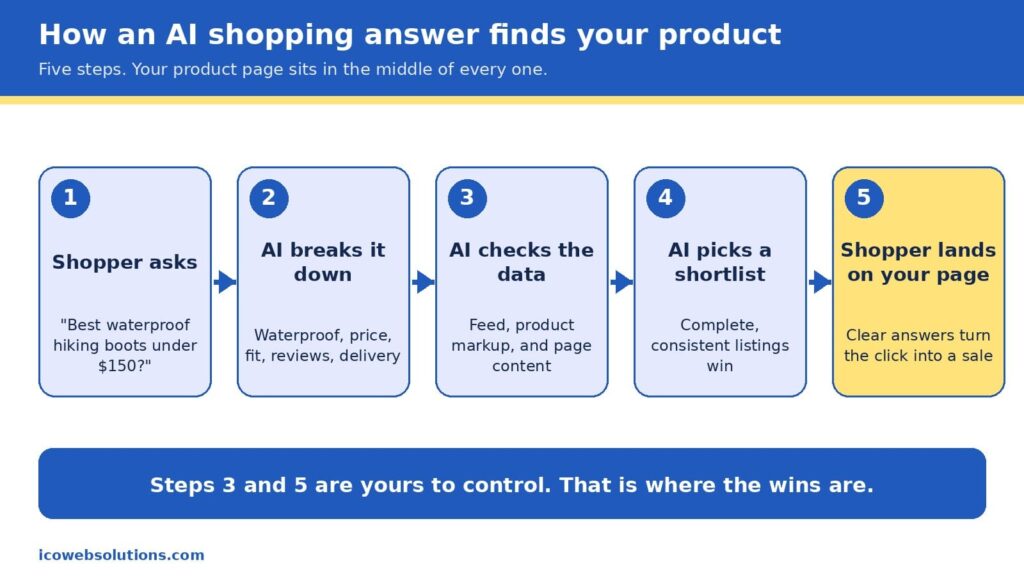
Two of the five steps in an AI shopping journey belong entirely to you.
How an AI shopping answer finds your product
When a shopper types something like “best waterproof hiking boots under $150 that ship by Friday,” the assistant does not browse the web the way a person would. It breaks the request into pieces (waterproof, price ceiling, delivery date, fit, reviews), then looks for products whose data matches every piece. In Google’s case, that data comes from the Shopping Graph, a product database that, according to reporting on Google’s own figures, holds more than 50 billion listings, with about 2 billion updated every hour (Channable, n.d.). The graph is filled by the product feeds merchants submit and by the product markup on their pages, which is the hidden labeling that tells machines what a page is selling, what it costs, and whether it is in stock.
It is worth being precise here, because plenty of vendors are not. Google has not confirmed that Merchant Center data works as a direct ranking signal in AI Mode, but the product graph that feed data builds is shared infrastructure behind several of its shopping surfaces, so accurate and consistent data helps in both places (Alhena, n.d.). There is also no secret “AI schema” to install. The same product markup that has helped pages earn rich results for years is what machines read today, and the real difference is that AI systems tolerate gaps and contradictions far less than a human shopper skimming a page.
That is why the phrase “AI shopping is built on the basics” is more than a slogan. The assistant is choosing from what you have published, so the quality of your product title, price, availability, images, reviews, and return policy decides whether you make the shortlist at all. Once you do make it, the shopper clicks through and your page has to confirm what the assistant promised. In other words, the machine opens the door and the page closes the sale, which is exactly why we think of every product page as having two readers.
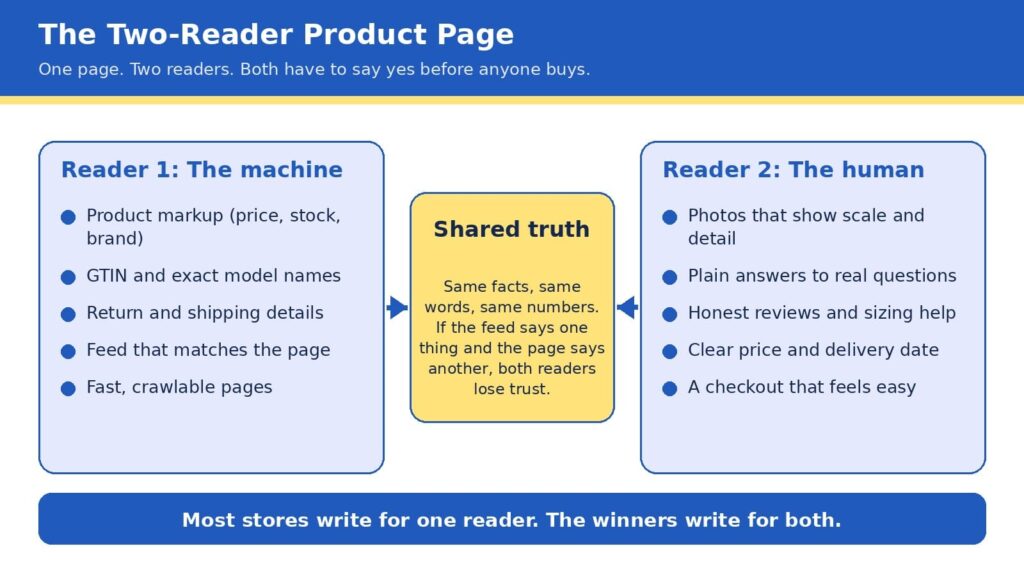
The Two-Reader Product Page
Here is the framework we use with ecommerce clients at ICO Web Solutions, and it is simple enough to remember in five seconds: every product page is read twice, once by a machine and once by a human, and it only sells when both say yes. The machine asks whether your facts are complete, consistent, and easy to verify. The human asks whether you are believable, whether the product fits their situation, and whether buying will be easy. Most stores are written for one of these readers. Some are crammed with keywords and markup but read like a spec sheet, while others are beautiful and persuasive but invisible to anything that cannot see the design.
The bridge between the two is what we call shared truth, meaning the same facts, the same words, and the same numbers everywhere they appear. If your feed says a jacket is in stock, your page says it ships in two weeks, and your reviews mention a different color, then a machine sees a conflict and a person feels a doubt, and both of them move on to the next listing. Shared truth is not glamorous work, but it is the closest thing to a free advantage in ecommerce right now, because most of your competitors have not done it.
The Two-Reader Product Page: one set of facts, written for a machine and a person at the same time.
Reader one: make the machine’s job easy
Machines are literal, patient, and unforgiving, so the best way to help them is to remove every reason to guess. Start with the basics a product page must state clearly: an exact product name that includes brand, model, and the attributes people search for, the current price and currency, availability, the barcode number (known as a GTIN) where one exists, and clear shipping and return terms. Then make sure those same details appear in your product markup, not just in the visible copy, because that markup is what many systems read first. Return policy information has also been required for Google merchant listings since 2025, so this is one of those details that has moved from nice to have into required territory (Xictron, 2026).
The next step is consistency across systems. Your store platform, your Merchant Center feed, your marketplace listings, and your on-page markup should all pull from a single source of truth, ideally a product information system or at least one carefully maintained spreadsheet that feeds everything else. A feed that disagrees with the page is one of the most common reasons good products underperform, and it is also one of the cheapest to fix. If you are rebuilding or replatforming, this is the ideal time to get it right, and our team handles it as part of ecommerce website design and development so that structured data is built into the templates rather than patched on later.
Finally, give machines something worth quoting. AI assistants tend to favor pages that answer real questions in plain language, so a short section covering what the product is best for, who it is not for, how it compares with the obvious alternative, and what customers most often ask will serve both readers at once. If you want help seeing how your catalog currently appears in AI answers,our AI visibility and GEO services can show you how your catalog appears today, and our SEO company in Delhi team makes sure the traditional search foundations are just as strong.
Reader two: make the human’s decision easy
People decide quickly, and they decide with their eyes first. In Baymard Institute’s large-scale product page testing, 56% of users began by exploring the product images, even in cases where reading the description would have been faster (Baymard Institute, n.d.-b). The same research found that 52% of sites do not add descriptive text or graphics to the images of their top-selling products, which leaves shoppers guessing about scale, weight, material, or fit. That gap is an opportunity, since a few well-chosen captions, a size comparison, or a close-up of the stitching can answer a question before it becomes a reason to leave.
Speed is the other half of the human experience, and it is more forgiving to fix than most owners expect. Google’s research found that as mobile page load time goes from one second to three seconds, the probability of a visitor bouncing rises by 32%, and from one second to ten seconds it rises by 123% (Think with Google, n.d.). Heavy images, bloated apps, and unnecessary scripts are the usual culprits, and trimming them tends to lift every other metric on the page. If your store feels slow on a phone, a fresh look from a website design company in Delhi that builds with performance in mind can pay for itself quickly.
Trust is the third piece. Honest reviews (including a few critical ones), clear sizing help, visible return terms, and a price and delivery date that never change between the search result and the cart all tell a shopper that you mean what you say. This matters even more now, because the shopper arriving from an AI answer has often already been told your product is a good fit and is simply looking for a reason to believe it. Baymard’s benchmark of leading US and European sites found that 44% had mediocre or worse product page experiences in one update (Baymard Institute, n.d.-a), so a store that gets these details right stands out quickly.
The take few agencies will say out loud
Here is the part that may make some of our own industry uncomfortable: if your product pages are thin, inconsistent, or slow, you should not buy an “AI optimization” package yet. Every month a new vendor promises to make your brand visible to chatbots, and some of them offer real value, but none of them can compensate for a catalog with missing sizes, mismatched prices, and photos that do not show the product. AI systems prioritize products with complete, structured data over products backed by bigger marketing budgets, and that rewards the patient work of cleaning up the basics over any shortcut (Xictron, 2026).
We say this as an agency that sells AI visibility work, and we say it because it is true and because it builds better long-term relationships. Acosta Group’s advisors reached a similar conclusion in their 2026 shopper study, recommending that brands begin with what they call the brilliant basics of retailer readiness before layering on AI discoverability and experiments (Supermarket News, 2026). The sequence matters: fix the page, align the data, then amplify. Reverse that order and you pay to send more visitors to a page that is not ready for them.
The ten-point scorecard
Before you spend another dollar, open your top five best-selling product pages and check each one against this list. Every yes is worth roughly a point, and anything under eight tells you where to start.
The product title includes brand, model, and the one or two attributes shoppers actually search for.
Price, currency, and availability match across your page, feed, and markup.
Product markup is present and passes a rich results test.
The barcode number (GTIN) and brand are filled in wherever they exist.
Shipping time and return terms are visible without scrolling or clicking.
Photos show scale, detail, and the product in use, with captions where words help.
A short “best for, not for” section answers the top three customer questions.
Reviews are visible, recent, and include honest critical feedback.
The page loads in about three seconds or less on a mid-range phone.
Checkout is reachable in two taps from the product page.
The foundation under the page
A great product page sits on top of technology, and three parts of that foundation deserve attention because they quietly shape both readers’ experience. The first is security. Shoppers who arrive from an AI recommendation are trusting someone else’s judgment, and one warning screen or suspicious checkout can undo that trust instantly. If you want a practical overview, our guides on how top brands keep their sites safe and AI-powered cybersecurity for ecommerce stores walk through the habits that protect revenue and reputation together.
The second is architecture. Flexible, fast storefronts make it far easier to keep data clean and pages light, which is one reason we have seen that headless ecommerce is no longer just for big brands, and why progressive web apps for ecommerce deserve a fair look if your shoppers are mostly on phones. Neither is right for every store, so the honest answer is to match the build to your catalog size, team, and budget rather than chase the trend.
The third is learning from your own numbers. Once the basics are in place, AI-powered predictive analytics can show you which products are about to trend, which pages leak the most visitors, and where a small fix would lift sales most. Used in that order (basics first, prediction second), the technology amplifies a strong page instead of masking a weak one.
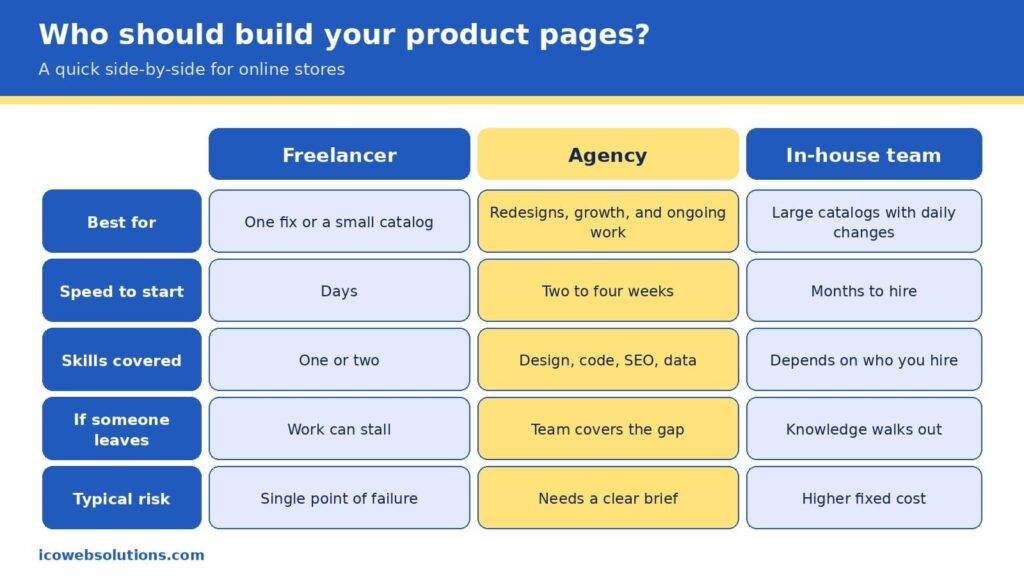
A fair side-by-side of the three common ways to build and maintain product pages.
Freelancer, agency, or in-house team?
Once you know what your pages need, the practical question becomes who should do the work, and the honest answer depends on the size of the job and how long it will last. A freelancer is often the fastest and most affordable way to fix one specific problem, such as rewriting a batch of product descriptions or cleaning up markup on a small catalog, and a great one can be a joy to work with. The risk is concentration, since one person carries the design, code, search, and data knowledge in a single head, so a sick day, a new client, or a career change can stall your project right when it matters.
An in-house team gives you the deepest knowledge of your products and the tightest day-to-day control, which is ideal for large catalogs that change every day. It also brings the highest fixed cost, a hiring timeline measured in months, and the challenge of keeping specialists current in fields that change quickly. Many in-house teams do their best work when they have a partner to lend extra capacity and fresh perspective during redesigns and launches.
An agency sits in the middle by covering design, development, search, and data under one roof, so the work moves in parallel, and the knowledge does not live in one person. The trade-off is that you need to give a clear brief and choose a partner who understands ecommerce rather than websites in general. Our view is simple: pick the smallest option that can fully own the outcome. If you have a single contained fix, hire a freelancer. If you run a large operation with steady needs, build in-house. If you are redesigning, replatforming, or trying to grow visibility across search and AI at the same time, an agency usually gets you there faster and with fewer surprises.
You do not need a six-month roadmap to make progress, and a focused month can change how both readers experience your best products. In the first week, run the scorecard on your top five pages and write down every mismatch between your page, feed, and markup, because that list becomes your repair queue. In the second week, fix the facts: titles, prices, availability, barcode numbers, and return details, in the single source your systems share. In the third week, upgrade the human experience with better photos and captions, a short “best for, not for” section, and a speed pass that removes anything the page does not need.
In the final week, measure and expand. Compare conversion, bounce rate, and revenue per visit on the updated pages with the ones you have not touched yet, then roll the winning pattern to the rest of the catalog. By the end of the month you will have a repeatable template, evidence of what works for your customers, and a clean foundation that makes any later AI visibility work far more effective.
Quick answers
Do I need special markup for AI shopping?
No special AI-only markup exists. The standard product markup used for search and Google Shopping is what machines read, so the priority is making it complete, accurate, and consistent with your feed and page.
Will AI shopping replace my product pages?
The data suggests not soon. Shoppers are comfortable letting AI research and compare, but most are not ready to let it complete purchases, so your page remains the place where the decision is confirmed.
How long does it take to see results?
Fixes to speed, photos, and on-page answers can influence conversion within weeks, while changes to how search and AI systems understand your catalog tend to build over a longer period as the data is recrawled and refreshed.
Ready to make your product pages work for both readers?
If you would like a second set of eyes on your store, the ICO Web Solutions team can walk through your top product pages with you using the Two-Reader framework and help you turn the findings into a short, prioritized fix list, whether you build it with us or on your own. Start by telling us about your store on our ecommerce website design and development page and we will suggest clear next steps. Your shoppers are already asking AI for recommendations, and with the right product pages you can be the answer they click.
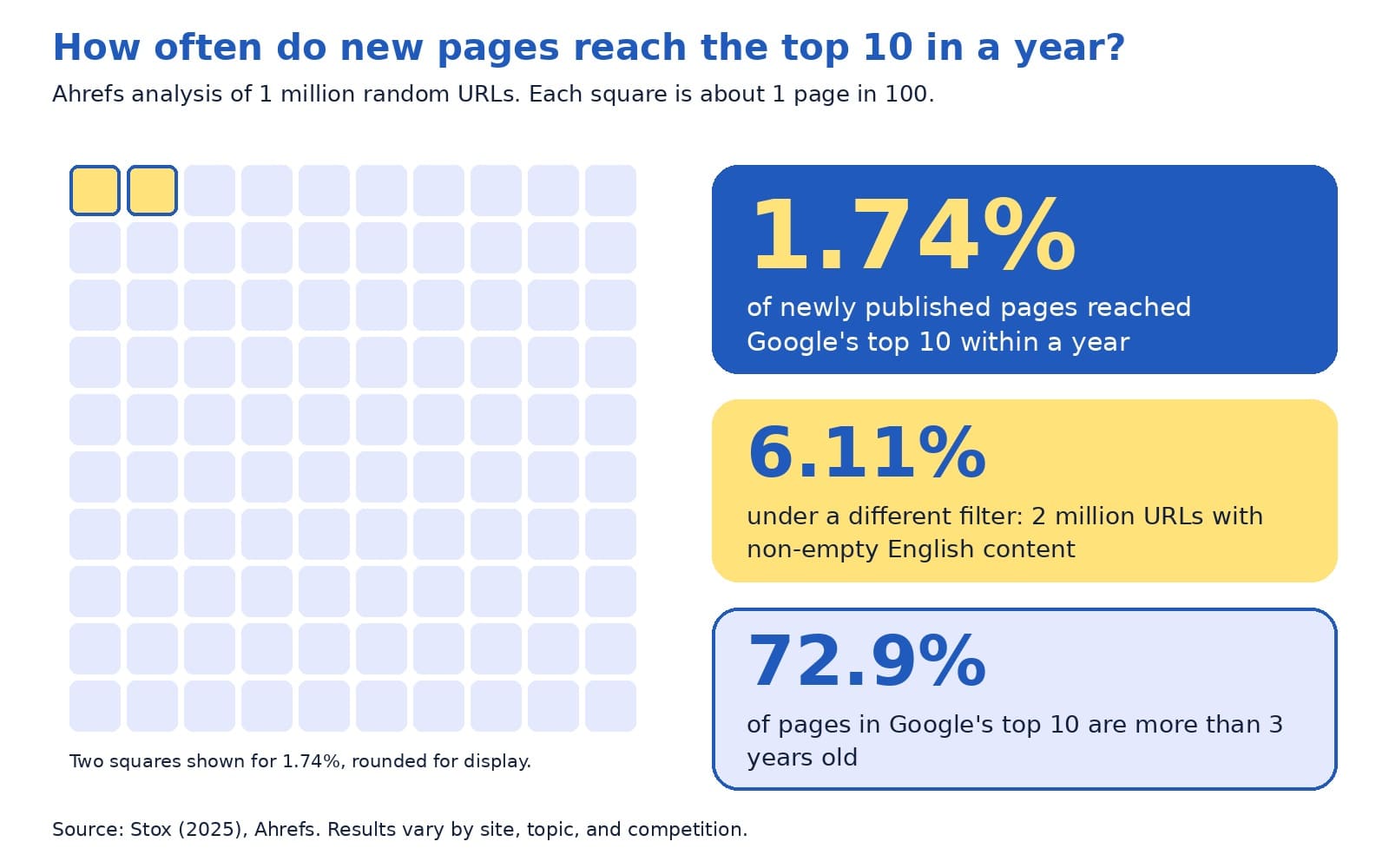
Ahrefs studied one million random web pages and found that only 1.74% of newly published pages reached Google’s top 10 within a year. Under a different filter, which looked at 2 million pages with non-empty English content, the figure was 6.11%. The same study found that 72.9% of pages in the top 10 were more than three years old (Stox, 2025).
Those numbers describe something owners often sense: search engine optimization, or SEO, rewards steady work over time. That is also why owners ask a very reasonable question once they start paying for SEO services: what exactly does the agency do each month, and how will I know it is working?
This guide answers both parts in plain English. You will see a month-by-month roadmap of what a good SEO agency typically does, an example of a clear monthly report, the questions Google itself suggests asking before you hire, and a few warning signs worth knowing. The schedule below reflects a common rhythm, and every site’s plan depends on its starting point, goals, and competition, so please treat it as a guide for your own conversations.
The quick answer
In month one, a good SEO agency audits your site, sets up measurement, and agrees on goals with you. Months two and three focus on fixing technical issues and improving your most important pages. From month four onward, the work shifts toward creating helpful content, earning trust signals such as reviews and links, and refining what the data shows. Every month you should receive a plain report with results, the work completed, and next month’s plan.
A few terms appear throughout this guide. Here is what they mean:
Organic traffic: visitors who arrive from unpaid search results.
SEO audit: a review of your site that finds what helps and what holds back your visibility in search.
Technical SEO: behind-the-scenes fixes, such as speed, mobile layout, and making pages easy for search engines to find.
On-page SEO: improving the content of each page, including titles, headings, and links to related pages.
Backlink: a link to your site from another website.
Search Console: a free Google tool that shows how your site appears in Google Search.
What SEO services usually include
It helps to know the full menu before you read a proposal. Google’s guidance on hiring an SEO lists the kinds of services providers commonly offer: reviewing your site’s content and structure, technical advice on topics such as hosting, redirects, and JavaScript, content development, keyword research, management of online business development campaigns, expertise in specific markets and regions, and optimizing for generative AI search (Google Search Central, 2026a).
We group these into four buckets, which makes monthly reports easier to read.
Foundation covers the technical health of your site.
Content covers the pages and articles that answer customer questions.
Authority covers the signals that show your business is trusted, such as reviews, mentions, and links earned the right way.
Measurement covers the tracking and reporting that tie it all to leads. A healthy plan touches each bucket, and the mix changes as the months go by.
The monthly SEO loop: check, fix, create, earn, report
Behind the month-by-month schedule sits a simple loop that repeats every month. We call it the monthly SEO loop, and it gives you a quick way to see whether your agency is doing the work that matters.
Check: review Search Console and analytics for changes in clicks, queries, and conversions, and scan for new technical issues.
Fix: resolve the highest-impact problems first, such as pages that are not indexed, slow pages, or broken links.
Create: publish or improve pages and articles that answer real customer questions.
Earn: build trust signals, including reviews, local listings, and mentions that come from useful work.
Report: explain what changed, why it matters, and what comes next.
The proportions shift over time. Early months lean toward check and fix, later months lean toward create and earn, and report appears every month without exception. If you ever wonder what your agency did last month, the loop gives you five specific questions to ask.
A six-month roadmap
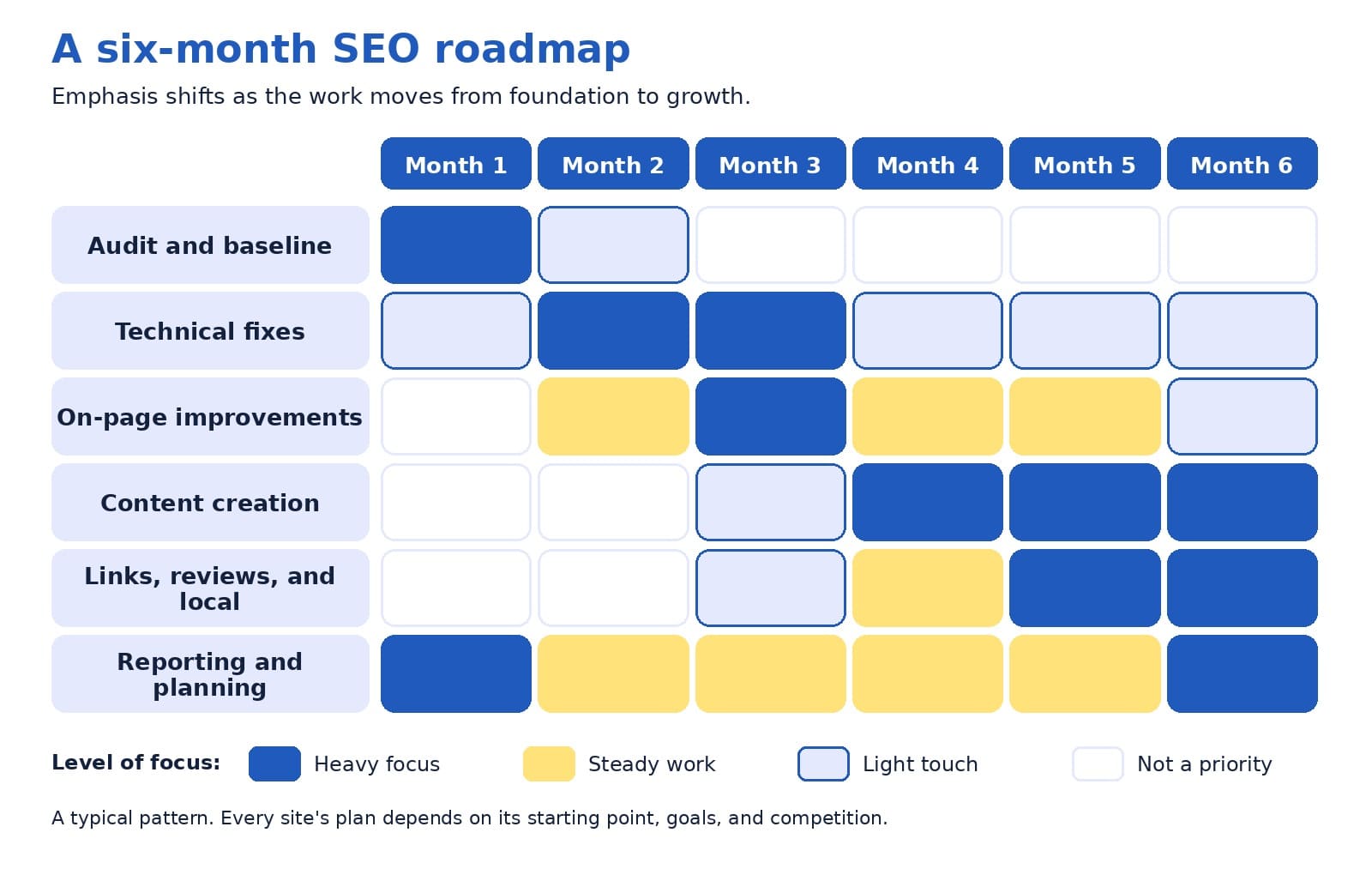
The grid below shows how emphasis typically moves from foundation to growth across the first six months. Darker blue means heavy focus, yellow means steady work, and light cells mean a light touch.
A typical six-month pattern, with emphasis moving from foundation work to content and authority.
Month 1: audit and baseline
The first month is about understanding where you stand. The agency reviews how your site is indexed, how pages are organized, which pages bring in visitors, and what competitors are doing.
It also sets up measurement, including Google Analytics tracking for the actions that matter to you, such as contact form submissions and phone calls. Google advises granting only read access to Search Console while an audit is being considered (Google Search Central, 2026a).
The month ends with a baseline report and an agreed set of goals, so you can measure progress against a clear starting point.
Months 2 and 3: fix and strengthen
With the audit complete, the agency works through the highest-impact fixes. Technical work might include improving page speed, repairing broken links, setting up redirects, and resolving pages that Google cannot index.
On-page work includes sharpening page titles and headings, strengthening internal links, and updating the pages closest to revenue, such as service pages. Local businesses also tidy up their business profile and listings. These months often feel quiet from the outside, yet they build the platform that later content depends on.
Months 4 and 5: create and earn
Once the foundation is steady, the work moves toward growth. The agency publishes or improves content that answers the questions your customers ask, such as guides, comparison pages, and service area pages with genuinely local detail. It also helps your business earn trust signals, including customer reviews, local citations, and mentions from relevant websites.
Ethical link building belongs here, and the section on warning signs explains what to avoid. Teams also begin watching Google’s generative AI performance reporting in Search Console, since optimizing for AI features builds on the same SEO fundamentals (Google Search Central, 2026b).
Month 6 and beyond: review and refine
By month six, there is enough data to make informed decisions. The agency compares results with the baseline, identifies which pages and topics are gaining traction, and decides where to invest next. Ahrefs suggests that after about six months, content that has not reached the top 10 may benefit from an update, because chances tend to decline unless something changes (Stox, 2025).
From here, the loop continues, with each quarter informed by the one before.
How the plan changes by type of business
The roadmap bends to fit the business. A local service company, such as a clinic or a contractor, usually puts extra weight on its business profile, customer reviews, and pages for the areas it serves. An online store tends to focus on category and product pages, site speed, and clear product information.
A business-to-business firm often leans on content that answers longer research questions, along with case studies that show how it solves problems. The loop stays the same, while the mix of tasks follows how your customers search and decide.
What to ask for in your monthly report
A good report is short enough to read in ten minutes and clear enough to share with a colleague. Google’s guidance on measuring search performance offers a useful starting point: Search Console shows how your site performs in Google Search, including clicks, impressions, and queries, while Google Analytics shows what visitors do after they arrive, including conversions such as lead generation form fills (Google Search Central, 2026c).
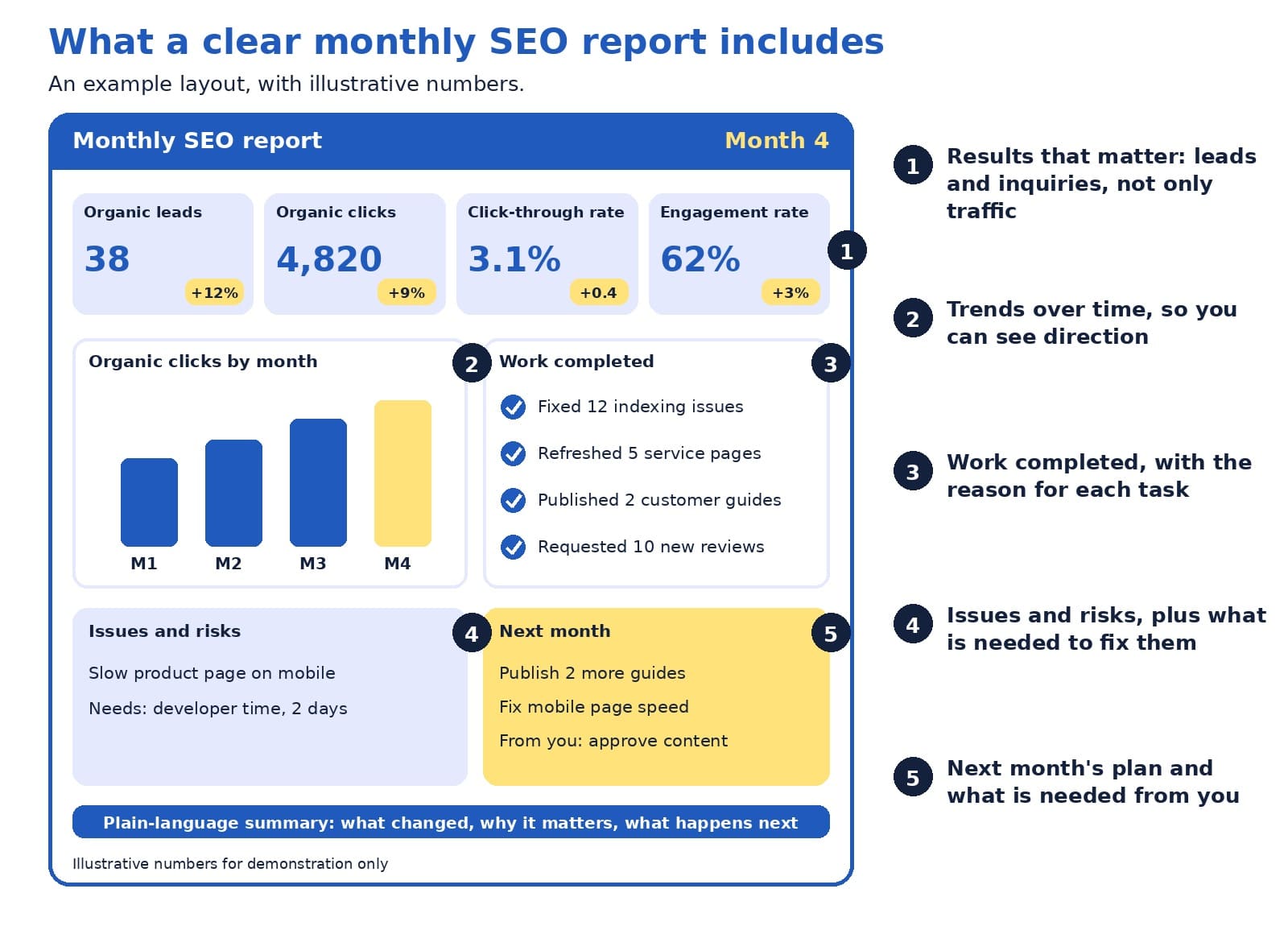
The two tools count things differently, so the numbers will never match exactly. Google suggests focusing on the overall pattern of trends, and it names Search Console as the source of truth for search performance and Google Analytics as the source of truth for behavior on your site (Google Search Central, 2026c). The example below shows one way to bring those views together, using illustrative numbers.
An example monthly SEO report, with illustrative numbers and five numbered parts.
Here is how to read the example, following the numbers:
Results that matter come first. Leads and inquiries from organic search sit beside clicks, click-through rate, and engagement rate, so you see business outcomes next to search activity.
A trend chart shows direction. One month can fluctuate, so a simple chart of several months tells you more.
The work completed list comes with reasons. Each item should explain why the task mattered, which fits Google’s suggestion to ask whether your SEO will share every change made along with the reasoning behind it (Google Search Central, 2026a).
Issues and risks are stated openly. A report that names problems, and what is needed to fix them, is easier to trust than one that shows only good news.
Next month’s plan includes what is needed from you. Approvals, photos, and customer stories often decide how quickly work moves.
A good monthly report explains what changed, why it matters, and what happens next.
Questions to ask before you hire
Google publishes a list of questions to ask any SEO provider, and they work equally well as a monthly check-in with an agency you already use (Google Search Central, 2026a). These are the most useful ones:
Can you show me examples of your previous work and share some success stories?
Do you follow Google Search Essentials?
What results do you expect to see, in what timeframe, and how do you measure success?
What is your experience in my industry and in my country or city?
How can I expect to communicate with you, and will you share every change you make along with your reasoning?
Do you cite official Google documentation for your recommendations?
Google adds two more suggestions that are easy to overlook. Ask past clients whether the provider was useful and easy to work with, and notice whether the provider asks about your business, your competitors, and how your customers find you. A provider who is curious about your business is usually one who will tailor the work to it (Google Search Central, 2026a).
Warning signs to know
Most agencies do honest work, and a few warning signs are worth knowing so you can spot the exceptions. Google’s guidance is direct on the most important one:
“No one can guarantee a #1 ranking on Google.”
Google Search Central (2026a)
The same guidance suggests being cautious about providers who claim a special relationship with Google, who are secretive about what they plan to do, who email you unprompted, or who talk about link popularity schemes. It also notes that you should never have to link to an SEO, and that you remain responsible for what companies you hire do on your site, because techniques that break Google’s spam policies can lead to a negative adjustment of your presence in search (Google Search Central, 2026a). A quick filter is this: if you cannot explain in a sentence what the agency is doing and why, ask until you can.
How long does SEO take?
The honest answer is that it varies with your competition, your site’s history, and the topics you want to be found for. The Ahrefs data gives a sense of scale. It also contains encouraging detail: among pages that did reach the top 10, 40.82% got there within a month, and ranking for lower-volume, more specific topics tends to happen sooner than ranking for high-volume terms (Stox, 2025). That is one reason agencies often start with specific, high-intent pages before aiming at the most competitive terms.
Ahrefs data on how often new pages reach the top 10 within a year, and how old top-ranking pages tend to be.
For your own monthly reviews, early signals matter as much as rankings. Google’s SEO Starter Guide suggests waiting a few weeks to see whether changes had a beneficial effect (Google Search Central, 2025). In the meantime, look for leading indicators such as more pages indexed, growing impressions, a wider set of queries bringing visitors, and improving engagement. Those signs often appear before leads grow, and a good agency will point them out.
A bolder view: judge your agency by decisions, not dashboards
Here is a perspective that a few providers may find uncomfortable, since it asks for more than a tidy dashboard: the most valuable part of a monthly SEO report is the decisions behind the numbers. Charts with rising lines are pleasant to look at, and they say little about whether the agency is choosing the right work.
Try treating the report as a short decision memo. What did we learn this month? What are we changing because of it? What did we decide not to do, and why? What do we need from the business? When an agency can answer those four questions clearly, you see judgment, and judgment is what you are paying for. Rankings and traffic are useful signals along the way, and leads and revenue are the reason the work exists, so it helps when every report connects the first group to the second.
What you can do each month to help
SEO works best as a partnership, and a few simple habits on your side can speed things up:
Share what your sales team hears from customers, since those questions often become the best content.
Approve drafts quickly, because waiting is one of the most common causes of delay.
Keep your address, hours, and services accurate everywhere they appear.
Reply to new inquiries promptly, since fast replies turn search visibility into customers. Our guide to the contact page explains how.
Quick answers to common questions
How much work happens each month? It depends on your plan and your site’s needs, so ask for a written list of deliverables and the hours or tasks it covers. A clear scope makes it easy to compare what you receive with what you were promised.
Should I hire an agency or do SEO myself? Google notes that if you run a small local business, you can probably do much of the work yourself, starting with its SEO Starter Guide, and that hiring a professional can help when you want extra expertise or time savings (Google Search Central, 2026a). Many owners start with the basics in-house and bring in an agency for the heavier technical and content work.
When is the best time to hire? Google suggests that a site redesign or a new site launch is a great moment, because the site can be built to be search engine-friendly from the start (Google Search Central, 2026a).
Do I need to give full access to my accounts? During an audit, Google advises read access to Search Console only (Google Search Central, 2026a). Later access depends on the work involved, and any provider should be willing to explain every change they make.
What about AI search? Google describes optimizing for generative AI features as part of SEO, and it suggests checking whether any AEO or GEO advice you receive lines up with its official guidance (Google Search Central, 2026a, 2026b). Our earlier guide to moving budget between SEO and GEO covers this in more detail.
What if results feel slow? Look at leading indicators first, such as indexed pages, impressions, and query variety, then ask your agency what they expect to change and when. If a few months pass without clear signals, a candid review of the plan is a healthy next step.
Are third-party SEO tools reliable? They can be useful, and Google notes that it does not evaluate or endorse them, so recommendations from any tool are worth checking against official guidance before you make big changes (Google Search Central, 2026a).
At the end of any month, a quick self-check shows whether the partnership is working. You should be able to say yes to each of these:
I know which tasks were completed and why they mattered.
I can see leads or inquiries from organic search, beyond traffic alone.
Problems and risks were stated openly.
I know what next month will focus on and what is needed from me.
I could explain the plan to a colleague in a minute.
If you would like to see how this schedule would apply to your own site, we are happy to review your current setup and outline a first three months of work with a sample report.
Good SEO services follow a rhythm: check, fix, create, earn, and report. The first months build the foundation, the middle months add content and trust, and every month ends with a clear report on what changed and what comes next. With the right questions, a plain-language report, and a realistic view of timing, you can judge your SEO agency by the progress that matters, which is more qualified leads for your business.
Google Search Central. (2025, December 10). Search engine optimization (SEO) starter guide. Google for Developers. https://developers.google.com/search/docs/fundamentals/seo-starter-guide
Google Search Central. (2026a, June 5). Do you need an SEO? Google for Developers. https://developers.google.com/search/docs/fundamentals/do-i-need-seo
Google Search Central. (2026b, July 10). Optimizing your website for generative AI features on Google Search. Google for Developers. https://developers.google.com/search/docs/fundamentals/ai-optimization-guide
Google Search Central. (2026c, January 7). Using Search Console and Google Analytics data for SEO. Google for Developers. https://developers.google.com/search/docs/monitor-debug/google-analytics-search-console
Stox, P. (2025, May 15). How long does it take to rank in Google? And how old are top ranking pages? Ahrefs. https://ahrefs.com/blog/how-long-does-it-take-to-rank-in-google-and-how-old-are-top-ranking-pages/
If you are new to websites, deciding how many pages to build can feel surprisingly high-stakes. Ask five web designers and you may hear five different numbers: five, ten, fifty, or the classic “it depends.” Each answer holds a grain of truth, and none of them tells you what to build first.
Here is why the answer matters now. A Clutch (2025) survey found that 83% of small businesses have a website, up from 64% in 2018. When most businesses are online, simply having a website no longer sets you apart. What sets a website apart is its structure: which pages it has, how they are organized, and how visitors move from one to the next.
This guide explains all of that in plain English. You will learn a starting page count for three common business types, two simple tools for choosing your pages, and what a well-organized site structure looks like, with a worked example you can adapt. The advice rests on Google’s own documentation and usability research.
One note on transparency: we found no official page-count target in the guidance we reviewed. The ranges below come from our planning experience at ICO WebTech, so please treat them as starting points that you adapt to your own customers.
The quick answer
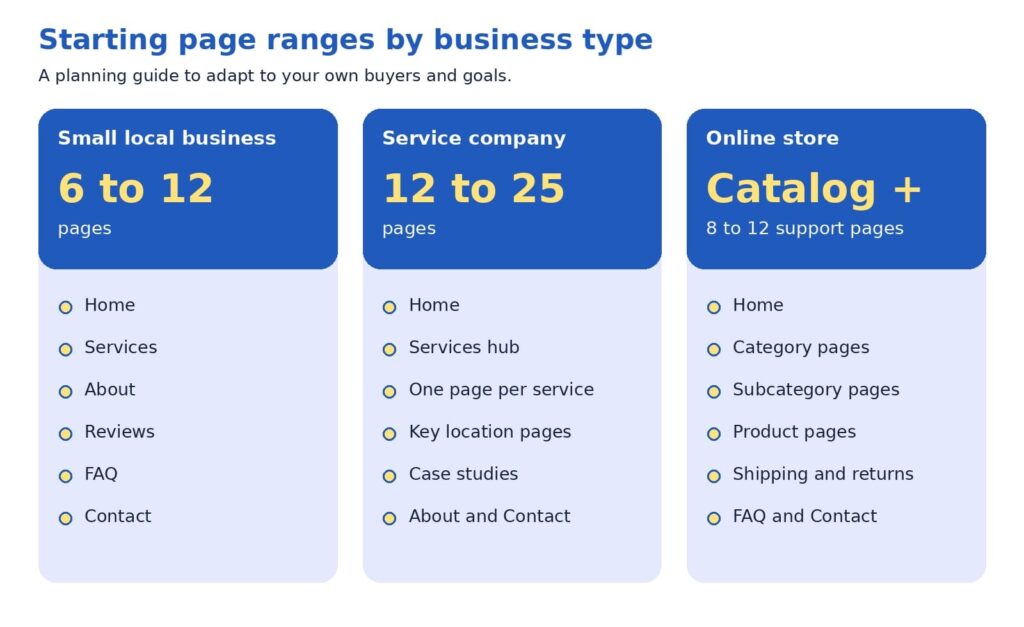
Most small local businesses start well with roughly 6 to 12 pages. A service company with several offerings and service areas often lands between 12 and 25. An online store builds around its catalog, plus about 8 to 12 supporting pages such as shipping, returns, and contact. The better question is which questions your customers ask before they call or buy, because every page should answer one of them clearly.
A few words come up again and again when people talk about website pages. Here is what they mean, so the rest of the guide feels comfortable.
Site structure: how your pages are organized and connected, like a table of contents for your business.
Navigation menu: the row of links near the top of a site that leads to the main sections.
Internal link: a link from one page of your site to another.
URL: the web address of a single page, such as example.com/services.
Breadcrumbs: small links such as Home > Services > Repair that show visitors where they are.
Hub page: a page that introduces a group of related pages and links to each.
Call to action: the next step you invite a visitor to take, such as requesting a quote.
Why the number feels hard to pin down
Most owners worry about two opposite outcomes. A site with only a few pages may look small to a new customer. A site with dozens of pages may feel heavy to build, costly to maintain, and hard to navigate. Both worries are reasonable, and both lead to the same answer: choose each page on purpose.
Advice about search engines adds another layer. A search engine is a tool like Google that finds and lists web pages, and many guides suggest that more pages bring more visitors. Google’s SEO Starter Guide takes a calmer view. It says creating compelling, useful content will likely influence your presence in search more than any other suggestion in the guide, and it adds that existing sites can improve their structure gradually, since search engines will likely understand your pages as they are today (Google Search Central, 2025b).
What Google and usability research say
Two kinds of evidence help here: how search engines read a website, and how real people use one.
On the search side, Google’s guidance favors clarity over volume. It recommends content that is unique, easy to read, and kept current, and it advises keeping each topic at one web address, because two pages with the same information can leave visitors wondering which one is correct (Google Search Central, 2025b). On the question of how long a page should be, the guide is direct:
“there’s no magical word count target, minimum or maximum”
Google Search Central (2025b)
That is good news for beginners. A page needs to be as long as it takes to answer the visitor’s question well.
On the usability side, the Nielsen Norman Group studied a popular belief called the three-click rule. It says visitors will give up if they cannot reach a page within three clicks of the home page. Laubheimer (2019) explains that no published study supports it, and he describes the rule this way:
“an arbitrary rule of thumb that is not backed by data”
Laubheimer (2019), on the three-click rule
The same article cites research by Joshua Porter showing that visitors did not abandon tasks more often, or feel less satisfied, when a task took more than three clicks. What helps instead are clear link labels, signs that show where visitors are, fast page loading, and hub pages that group related links.
For you, this means three things:
Useful, unique pages matter more than a high page count.
One topic belongs at one web address.
Clear labels help visitors more than counting clicks.
The core, proof, growth blueprint
If page count is a poor starting point, what is a better one? We suggest thinking in layers. The core, proof, growth blueprint sorts pages by the job each one does for a visitor.
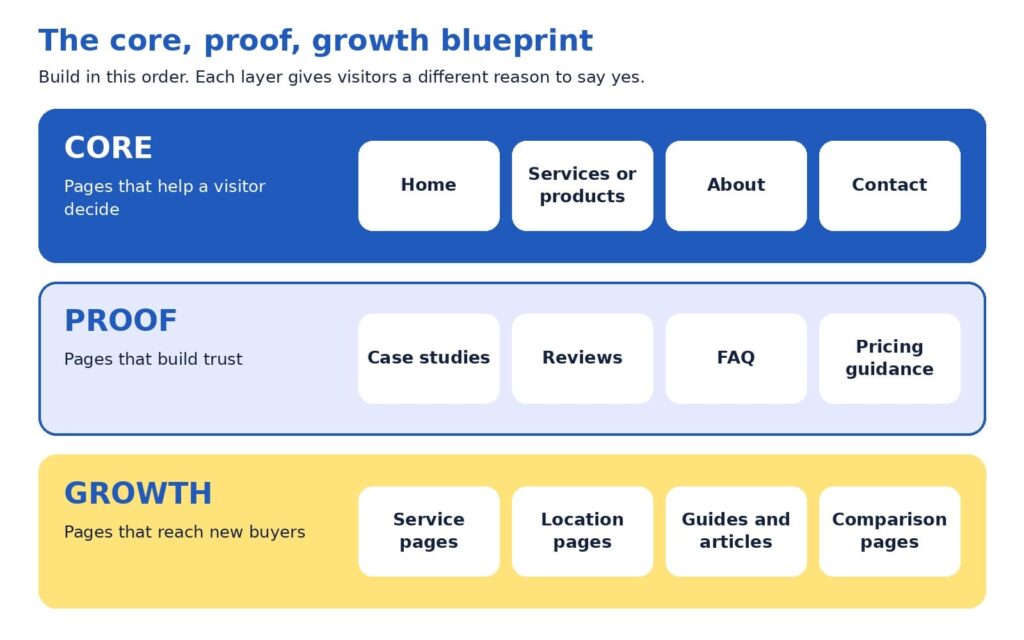
Core pages help a visitor decide. Home, services or products, about, and contact answer three basic questions: who you are, what you offer, and how to reach you. Every business needs them.
Proof pages build trust. Case studies, reviews, a frequently asked questions page (FAQ), and pricing guidance give visitors reasons to believe your claims. Many buyers look here before they pick up the phone.
Growth pages reach new buyers. Individual service pages, location pages, guides, and comparison pages meet people at the moment they search for something specific.
Build in that order. A site with strong core and proof pages can turn visitors into inquiries right away, and growth pages then widen the audience, since each one targets something different that people search for.
Build core first, add proof next, and expand with growth pages as results appear.
The page job test
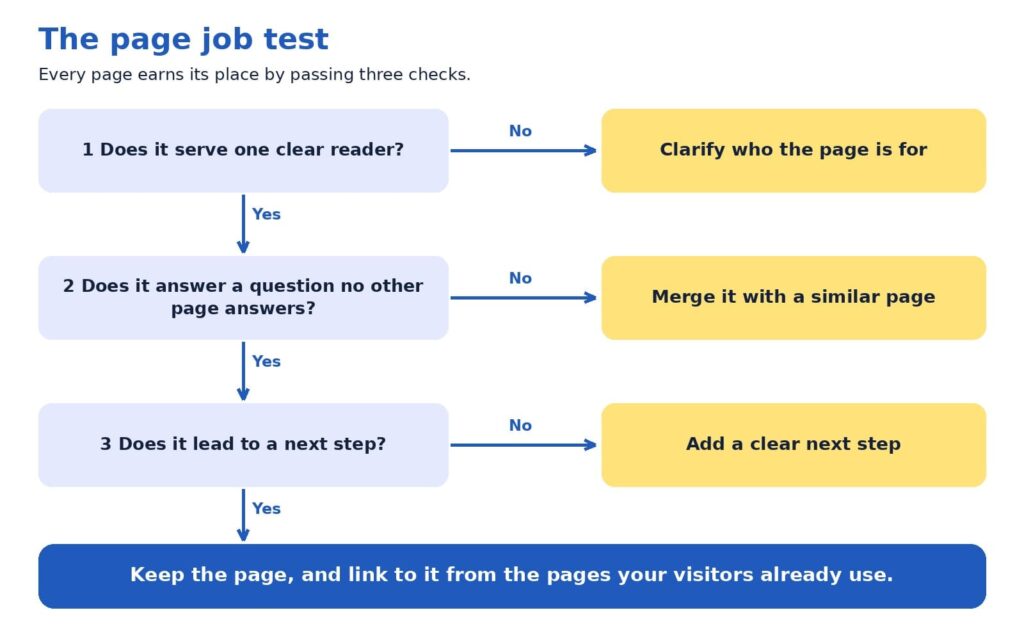
A page earns its place by doing a job. The page job test turns that idea into three checks, and each check has a simple fix.
One clear reader. Can you name who the page is for? When the answer is “everyone,” narrowing the focus usually sharpens the message, and the headline often writes itself.
A distinct question. Does the page answer something that no other page answers? When two pages cover the same ground, merging them tends to create one stronger page.
A next step. Does the page lead somewhere, such as a phone call, a form, a quote request, or a related page? A page with a next step keeps the visit moving.
Try it with a simple spreadsheet that lists your current pages. Many sites turn up a few pages to merge and some gaps where a customer’s question has no page at all. Those gaps often become the plan for the next quarter.
Each check has a simple fix, and pages that pass all three are worth keeping and linking.
What a good site structure looks like
So far we have talked about which pages to have. Site structure is about where those pages sit and how they connect. A clear structure helps visitors find things, and Google says organizing a site logically helps both people and search engines understand how pages relate to the rest of the site (Google Search Central, 2025b).
Good structures tend to follow five habits:
One home page, a handful of main sections, and supporting pages beneath them.
One obvious parent for every page, so a visitor always knows where a page belongs.
Plain names for sections, such as Services, About, and Contact.
Related pages grouped together, such as all services under one Services section.
Important pages linked from the home page, because Google uses links between pages to judge which ones matter most (Google Search Central, 2025a).
If a stranger can guess where a page lives before clicking, your structure is working.
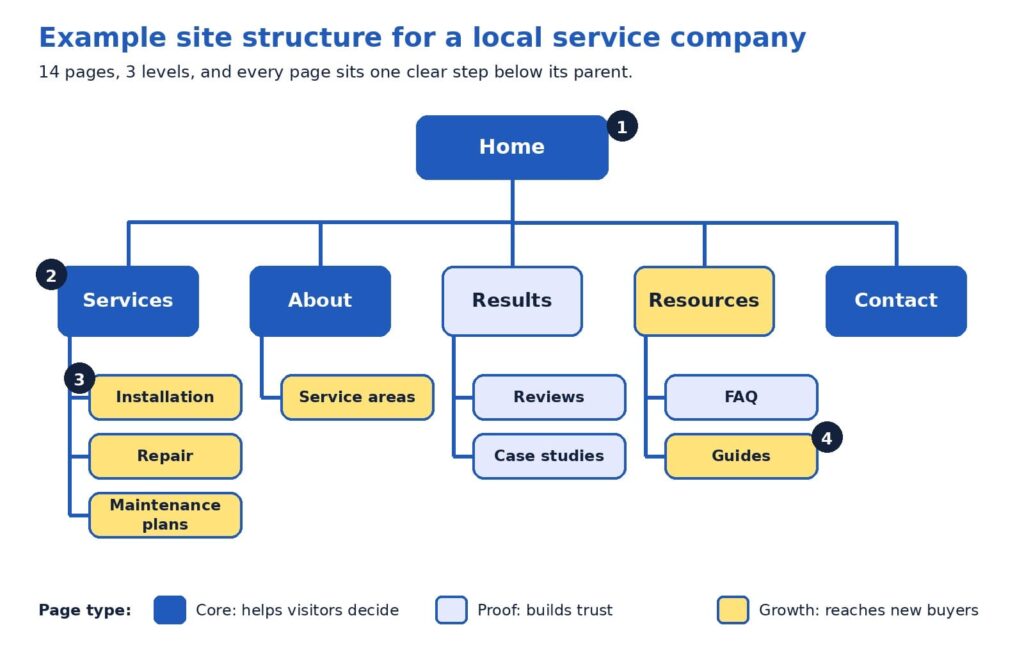
The diagram below shows these habits in action for a fictional local service company, such as a heating and cooling contractor. It has 14 pages and three levels. The colors match the blueprint you just learned: blue for core pages, light blue for proof pages, and yellow for growth pages.
A 14-page example with one home page, five main sections, and eight supporting pages, each with one clear parent.
Here is how to read the diagram, following the numbers:
The home page is the starting point. It links to every main section, so no important page is hidden. Think of it as the front door that points to every room.
Level one holds the main sections. Services, About, Results, Resources, and Contact use plain, familiar names, and together they usually form the navigation menu. Contact stays at this level so it is one click away from anywhere.
Level two pages each have one parent. Installation, Repair, and Maintenance plans sit under Services. A visitor who reads one can easily find the others, and the breadcrumbs read naturally: Home > Services > Repair.
Every page is within two clicks of the home page. The reason this works is clarity. Each label tells visitors what they will find, which Nielsen Norman Group calls strong information scent (Laubheimer, 2019).
Notice how the web addresses can mirror the structure. An address like example.com/services/repair tells a visitor where they are, and Google notes that descriptive URLs help people judge whether a result will be useful (Google Search Central, 2025b).
Picture a visitor named Maria who searches for “furnace repair” and lands on the Repair page. She reads about the process, spots the breadcrumbs, and clicks Services to see the company also offers maintenance plans. She opens Reviews, feels reassured, and requests a quote. Nobody had to explain the website to her, because the structure answered each question in turn. Larger businesses add more levels, and the same habits still apply.
Pages for each type of business
Small local business
For a small local business, a first website often works well with 6 to 12 pages. Picture a neighborhood physiotherapy clinic. Its core pages are Home, Services, About with team credentials, and Contact. Its proof pages are Reviews or Results, a FAQ that covers insurance and first-visit questions, and a short page on pricing and booking. That adds up to roughly eight pages, and each one answers a question a new patient asks before calling.
Growth can follow as the clinic learns what people search for. A page for sports injuries, another for post-surgery rehabilitation, and a short guide to choosing a physiotherapist would each serve a different need. A quick check for any small site is whether it answers three visitor questions: who are you and can I trust you, what do you offer and what will it cost, and what happens next.
Service company
A service company with several offerings and service areas has more questions to answer, so the count often lands between 12 and 25 pages. The example diagram above is a good model. Add a pricing page, more case studies, and pages for the cities that bring in the most calls, and the site grows while keeping the same shape.
The word to watch is distinct. A location page earns its place when it contains something specific to that area, such as local project examples, neighborhood details, and reviews from nearby customers. Six near-identical pages that swap only the city name repeat the same information six times, which can confuse visitors (Google Search Central, 2025b). A useful test: if you can write three honest, specific sentences that belong only to a location page, the page is likely worth building. Otherwise, a short section on the services page may serve that city well.
Service pages also benefit from a consistent layout: who the service helps, how the process works, proof such as a case study or review, answers to common questions, and a clear next step such as requesting a quote.
Online store
An online store follows a different logic, because the catalog sets the number of pages. Every product has a page, and products are grouped into categories, which are pages that list related products, such as Women’s shoes or Kitchen tools. Supporting pages such as shipping, returns, size guidance, FAQ, and contact reassure shoppers at the moment of decision. We suggest budgeting for roughly 8 to 12 supporting pages beyond the catalog.
Structure matters more as the catalog grows. Google’s guidance for online stores recommends linking menus to category pages, category pages to subcategory pages, and subcategory pages to every product, so that Google’s crawlers, the programs that visit pages so they can be listed in search, can reach everything by following links. It adds that Googlebot generally does not use a site’s search box, so products reachable only through search may be missed. It also suggests linking best-selling products from the home page (Google Search Central, 2025a).
Usability research points the same way. Baymard Institute’s 2025 benchmark found that 58% of desktop and 67% of mobile sites among leading US and European online stores had mediocre-to-poor homepage and category navigation. Baymard advises dividing categories into subcategories at about 10, and aiming for at least 10 products in the deepest categories (Baymard Institute, 2025). Clear categories can be a real advantage even for modest stores.
In practice, that means the menu links to every main category, each category page links to its products, best sellers appear on the home page, and support pages are reachable from the footer and from product pages.
The three business types at a glance
The summary below puts the starting ranges side by side. Every business has its own mix of customers, offers, and goals, so use it as a planning aid and let your customers’ questions shape the final list.
Starting ranges from our planning experience, intended as a guide and not a fixed rule.
A bolder view: let customer questions set the count
Here is a perspective some web teams may hesitate to share, since a larger site means a larger project: page count is an output, never a goal. The number of pages your site needs equals the number of distinct customer questions you can answer well, grouped sensibly.
Try this exercise. List every question your last twenty prospects asked on calls, emails, and chats, and add the questions customers ask after they buy. Group similar questions together. Each group becomes a page or a clearly labeled section. A group of two questions may fit inside a services page, while a group of ten, such as pricing for a complex offer, may deserve its own page. When you finish, the page count appears on its own, and each page has a reason to exist.
This approach tends to protect budgets and results at the same time. A five-page site that answers the right questions may generate more inquiries than a fifty-page site that repeats itself, because visitors find what they need faster. It also makes growth easy to plan, since each new customer question suggests a new page or an update.
Common questions from beginners
Do we need a blog? A blog is a growth format, so it fits best after your core and proof pages are in place. It earns its keep when each article answers a real customer question and links to the relevant service page, in line with Google’s call for helpful, people-first content (Google Search Central, 2025b).
Should every service have its own page? When a service has its own customers, process, and questions, a dedicated page usually serves visitors better than a paragraph on a general page. Smaller offers that share the same customer can share a page, with clear headings for each.
How often should we revisit our page count? Once a year works well for many businesses, and launching a new service or location is another natural moment. Google’s guide encourages updating published content as needed (Google Search Central, 2025b).
A 30-day page plan
You can put all of this to work in one month. The plan below fits most small teams:
Week 1, collect: gather customer questions from sales calls, emails, reviews, and the search queries report in Google Search Console, a free tool that shows how your site appears in Google.
Week 2, map: sort the questions into core, proof, and growth, and mark which ones already have a page.
Week 3, build or merge: apply the page job test, combine overlapping pages, and write the missing ones.
Week 4, connect: update menus, add internal links, check mobile speed, and set up inquiry tracking.
Then give the changes time to work. Google’s guide suggests waiting a few weeks to assess the effect (Google Search Central, 2025b). Track inquiries, calls, form submissions, and the pages visitors view before they reach out, since those numbers show which pages are pulling their weight.
Before the new structure goes live, check that:
Every page has a descriptive title and at least one link pointing to it.
Each page offers a clear next step and loads quickly on a phone.
Old addresses that were merged redirect to the new page.
Contact details match across the site.
If you would like a second set of eyes on your current structure, send us your page list. We will run the page job test with you and return a one-page map of what to keep, merge, and add.
The right number of pages is the number that answers your customers’ questions clearly, and the starting ranges simply give you a place to begin. Build core pages first, add proof pages to earn trust, and let growth pages widen your reach. Give every page one parent, a plain name, and a next step, then review the results after a few weeks.
Baymard Institute. (2025). Homepage and category navigation UX 2025: 67% of mobile sites have mediocre-to-poor performance. https://baymard.com/research-articles/ecommerce-navigation-best-practice
Clutch. (2025, August 21). Clutch report: No-code tools fuel website growth, yet 17% of small businesses are still offline [Press release]. Business Wire. https://www.businesswire.com/news/home/20250821848152/en/Clutch-Report-No-Code-Tools-Fuel-Website-Growth-Yet-17-of-Small-Businesses-are-Still-Offline
Google Search Central. (2025a, December 10). Help Google understand your ecommerce website structure. Google for Developers. https://developers.google.com/search/docs/specialty/ecommerce/help-google-understand-your-ecommerce-site-structure
Google Search Central. (2025b, December 10). Search engine optimization (SEO) starter guide. Google for Developers. https://developers.google.com/search/docs/fundamentals/seo-starter-guide
Laubheimer, P. (2019, August 11). The 3-click rule for navigation is false. Nielsen Norman Group. https://www.nngroup.com/articles/3-click-rule/
It is Monday morning, and a new proposal has landed in your inbox. It includes a fresh line item called GEO. A few paragraphs later, the SEO retainer is slightly smaller. Nobody planned a trick. The market moved quickly, and the paperwork followed.
The urgency behind that proposal is real. Pew Research Center (2025) found that Google users clicked a traditional search result in 8% of visits when an AI summary appeared, compared with 15% of visits when none appeared. Fewer clicks make any owner or marketing lead ask the same thing: should money move from SEO to generative engine optimization, or GEO?
Here is the short answer. Some of it may move, and the share is often smaller than a proposal first suggests, because a good portion of GEO is work that a healthy SEO plan already covers. The longer answer takes about fifteen minutes to read, and it ends with a five-minute method for reviewing any GEO line item you receive. We will also point out where the work is truly new, since that is where fresh budget earns its place.
In 60 Seconds
Google says optimizing for its AI features is part of SEO, and most marketers surveyed by Semrush agree. A smaller slice of GEO is new: measuring AI answers, building your reputation beyond your own website, and testing across AI platforms. The Keep, Extend, Add Test sorts each line item into shared work you pay for once, light adjustments that deserve a modest add-on, and new activities that deserve a pilot with a clear measure.
Three forces arrived at the same time. The first is behavior. AI summaries now answer many questions at the top of the results page, and Pew Research Center (2025) found that people clicked a link inside the summary itself in only 1% of visits. When fewer people reach your pages, every reporting dashboard feels different.
The second force is budget. Gartner’s 2025 CMO Spend Survey put marketing budgets at 7.7% of company revenue, flat for the year, and 59% of CMOs said their budgets could not fully support their strategy (Gartner, 2025). When the total stays level, a new priority has to be funded from an existing line. SEO is the most common donor.
The third force is momentum. In Digiday’s reporting on a Scribewise survey of 205 marketing leaders, 55% said they already had dollars set aside for GEO, and agency executives described moving part of existing SEO budgets in that direction (McCoy, 2026). That is a lot of activity around a term many teams met only recently, so a careful look before moving money is time well spent.
GEO in One Minute
SEO helps your pages appear when people search on Google, Bing, and similar engines. GEO helps your business appear inside answers written by AI systems such as Google’s AI Overviews and AI Mode, ChatGPT, and Perplexity. You may also see the term answer engine optimization, or AEO, used for the same idea. Both serve one business goal: the right buyer finds you at the moment of need, then calls, books, or buys.
Who needs it: businesses whose customers research with AI assistants as well as search engines.
How it works: AI systems retrieve pages and other sources, summarize them, and name the ones that look relevant and reliable.
Why it matters: a mention inside an answer can shape a buyer’s shortlist before anyone visits your website.
What Google Says, in Its Own Guide
Google Search Central published a dedicated guide in 2026, titled Optimizing your website for generative AI features on Google Search, and updated it in July. It describes how AI Overviews and AI Mode work. Google’s systems retrieve relevant pages from the search index to ground each answer, a technique called retrieval-augmented generation, and they run several related searches at once, a technique called query fan-out (Google Search Central, 2026). In other words, the AI layer sits on top of the same index and quality systems that SEO has always served.
The guide addresses the acronyms directly. From Google’s perspective, optimizing for generative AI search is still SEO (Google Search Central, 2026). It then lists tactics that are not required for Google’s AI features:
Rewriting pages in a special style for AI systems.
Collecting mentions that are not authentic.
Special schema markup, although structured data continues to help with rich results.
What does the guide recommend instead?
Original, helpful pages that offer a point of view readers cannot find everywhere else, a clear technical structure, a good page experience, and accurate business details in tools such as Merchant Center and Google Business Profiles. It even offers a one-line test for any page: would a visitor find this satisfying? You can already check your own results in the Generative AI performance report inside Search Console.
One caution keeps the picture honest. The guide describes Google. ChatGPT, Perplexity, and other assistants run their own retrieval systems, so a portion of GEO reaches beyond what Google covers. We will get to that portion shortly.
The shared area supports both search results and AI answers, so it can be planned once.
Do Marketers See It the Same Way?
Mostly, yes.
A Semrush survey of 481 marketers, business owners, and SEO professionals found that 77% describe AI search as part of SEO, while 15% treat it as a separate channel (Loktionova, 2026). The more interesting result concerns execution.
Only 22% of respondents ran SEO and AI search fully integrated across strategy, execution, and reporting. Teams that ran the two as one integrated effort were far more likely to report AI-driven traffic or leads: 81%, against 36% of teams working in separate tracks (Loktionova, 2026). Semrush sells search software, so it helps to read the survey as one informed perspective, and it points the same way as Google’s guide.
Digiday’s reporting adds some history.
SEO veterans quoted there compared GEO with earlier waves such as AMP and featured snippets, which were once presented as separate disciplines and later turned out to be extensions of familiar search logic.
One agency chief executive estimated that about 80% of GEO is fundamental SEO. Others pointed out that retrieval systems and presence across platforms are new territory, and one expert argued that AI search may eventually earn its own dedicated team, the way social media did (Guaglione, 2026). That 80% figure is a professional estimate, not a measured result, so treat it as a handy rule of thumb.
When you line these sources up, three points stand out:
Strong SEO foundations lift visibility in AI answers.
A real, smaller set of GEO activities is new.
Outcomes in AI platforms vary by prompt, so pilots with clear measures make sense.
The Keep, Extend, Add Test
Proposals tend to arrive as a single line that says GEO. The Keep, Extend, Add Test turns that one line into three honest groups, and each group gets its own budget logic.
Keep: shared fundamentals such as helpful content, technical health, site structure, and authority building. They support search results and AI answers alike, so you fund them once, inside the SEO plan.
Extend: SEO work adapted for AI answers, such as direct answers near the top of a page, richer FAQ sections, clearer service descriptions, and refreshed older content. These usually justify a modest add-on.
Add: new activities such as tracking your visibility in AI answers, earning reviews and mentions beyond your site, and testing how each AI platform describes you. These fit a pilot.
Here is Extend in action. Picture an accounting firm with a page about small business tax planning. The page already exists, so the team adds a short opening summary that says who the service helps, what it includes, and what a client can expect.
Then it answers the four questions prospects ask most, updates the details, and adds a clear next step. One edit helps searchers on Google and gives AI systems clean, relevant passages to draw from. Nobody built a new page, and nobody needed a new retainer.
Now picture the Add side. A regional home services company decides to pilot. It picks a short list of questions homeowners ask before hiring, such as how to choose a contractor and what a repair should cost. Each month, the team checks how the major AI assistants answer those questions, notes whether the company is named, and compares that with calls and form submissions.
At the same time, it asks recent customers for honest reviews. The pilot has a small budget, a named owner, and a review date, so the learning arrives before the larger spend does.
The test also gives owners and marketers a shared vocabulary. Owners see which parts of a proposal overlap with work already funded. Marketers show where fresh effort is required. Providers explain what is new with confidence, because the framework makes the case on its own.
Each GEO line item lands in one of three groups, and each group has its own budget approach.
Where the New Work Really Is
A fair review gives credit to the new parts of GEO, because that is where fresh budget has the best case. The Semrush survey and Digiday’s reporting point to four areas:
Your reputation beyond your website. AI answers draw on reviews, community discussions, video, and press coverage. Yet only 8% of surveyed marketers used digital PR for AI visibility, 9% managed online reviews, and 11% built mentions through communities and social platforms (Loktionova, 2026). That is an open field.
Access and readability for AI systems. Which AI crawlers may reach your content, and how easily they can read your pages, are decisions worth making on purpose.
Measurement. Answers vary by prompt and platform, and many tracking tools estimate results from simulated prompts instead of real user queries (Guaglione, 2026). In the Semrush survey, 49% of marketers named the effect of AI on pipeline or revenue as a leading measurement challenge, and 40% relied mainly on manual spot checks in ChatGPT.
Platform differences. Each assistant may retrieve and cite differently, so results from one platform may need confirming on another.
What about traffic? AI platforms currently send a small share of visits to many publishers. Similarweb data cited by Digiday showed less than 1% of overall traffic for the news outlets it examined, while one publisher reported a markedly higher subscription conversion rate among visitors arriving from AI platforms (Guaglione, 2026).
Small volume with strong intent is a classic reason to run a pilot first, measure leads and revenue, and scale what works.
Your Proposal Review in Five Minutes
Take the GEO proposal on your desk and read each line item against two questions. Is it already part of the current SEO scope? Does it adapt something you already have? Anything left over is new, and new work deserves a pilot with an owner, a measure, and a review date.
Two questions place any GEO line item in Keep, Extend, or Add.
Bring these questions to the conversation with any provider, whether an agency, a freelancer, or an internal teammate:
Which part of this work already sits inside our current SEO scope?
Which pages or technical items will change, and how will we confirm it?
What counts as success: qualified leads, calls, form submissions, revenue, or AI mentions?
How long does the pilot run, and when do we review it together?
What do we own at the end, including content, reports, and data?
Will SEO and GEO appear in one report with one baseline?
Good answers build trust quickly. They also give you a tidy summary to share with a colleague who missed the meeting.
Questions Owners Ask Before Moving Budget
Should we pause SEO to fund GEO? A pause removes the work that GEO builds on. Google’s guide ties AI feature eligibility to the same indexing and quality systems that SEO serves (Google Search Central, 2026), so most teams do better by keeping the foundation funded and adding a pilot on top.
How much should a GEO budget be? No universal figure exists. In the Scribewise survey reported by Digiday, 70% of marketers with GEO dollars said it made up 11 to 20% of that budget (McCoy, 2026). Treat that range as one data point from one survey. A pilot sized to what your team can measure and manage is a sound starting point.
How will we know it works? Set a baseline before anything changes. Track leads, conversion rate, and branded search alongside AI visibility, and use the Generative AI performance report in Search Console for Google’s features. When AI mentions rise and qualified leads follow, you have found a pattern worth funding.
A Bolder Idea: Fix the Foundation First
Here is a thought that rarely appears in budget meetings. For many businesses, the highest-return GEO investment is an SEO repair. Google’s guide states that a page must be indexed and eligible to appear in Search with a snippet before it can be shown in AI features (Google Search Central, 2026). A page that search systems struggle to find or understand has little to offer an AI answer, whatever name appears on the invoice.
So the order of spending matters. Start by confirming that your core pages are crawlable, indexed, and clear about who you serve and what you sell. Next, extend the strongest pages with direct answers and current details. Then fund a defined pilot for the new activities, drawn from a modest slice of the search line and expanded when the evidence supports it. We call this protect the base, pilot the extension.
Moving a large share of SEO budget before any pilot has produced results may weaken the very foundation that AI visibility relies on. A steadier path keeps leads flowing today and gives you your own data for tomorrow. Since AI visibility is still measured imperfectly across the industry, learning at a measured pace is a competitive advantage.
What Changes for B2B and B2C
The Keep, Extend, Add mix shifts with your audience. B2B buyers often research a purchase through many questions over several weeks, and an AI assistant may help build their shortlist along the way. Clear service pages, case studies, and consistent descriptions of your offer carry extra weight in that journey.
B2C and local businesses may find accurate business details matter most. Google notes that Merchant Center and Google Business Profiles help products and services appear in AI responses and other search results (Google Search Central, 2026).
Reviews and customer feedback add another layer, because AI answers can draw on them. In both cases, the first move is the same: learn the questions your best customers ask, answer them clearly on your own site, and keep your details accurate everywhere they appear. Those tasks live in Keep and Extend, which is why the Add budget may come out smaller than expected.
A 90-Day Starter Plan
You can run this plan inside most existing engagements, and each step produces something you can show your team:
Weeks 1 and 2, baseline: review indexing, site structure, your top pages by leads, and the Generative AI performance report in Search Console.
Weeks 3 to 6, extend: add direct answers, FAQ sections, current service details, customer proof, and accurate business profiles to priority pages.
Weeks 6 to 12, pilot: choose a focused list of customer questions, record how AI platforms answer them each month, and begin earning reviews and credible mentions.
End of quarter, decide: compare leads, conversion rate, and AI mentions with your baseline, then set the next budget.
By day ninety, you hold real evidence from your own business. That makes the next budget conversation shorter and a lot more confident.
AI search is a genuine opportunity, and exploring it is a smart move. The evidence from Google, Semrush, and Digiday tells one consistent story: most of GEO stands on SEO, and a smaller set of activities is new. Keep what is shared, extend what can be adapted, and pilot what is new. When you follow that order, each dollar has a clear job, and every stage aims at leads and sales you can count.
Ready to see where your own budget stands? Share your current SEO scope and any GEO proposal you have received, and we will map every line to Keep, Extend, or Add in a one-page summary for your team.
Gartner, Inc. (2025, May 12). Gartner 2025 CMO spend survey reveals marketing budgets have flatlined at 7.7% of overall company revenue [Press release]. https://www.gartner.com/en/newsroom/press-releases/2025-05-12-gartner-2025-cmo-spend-survey-reveals-marketing-budgets-have-flatlined-at-seven-percent-of-overall-company-revenue
Google Search Central. (2026, July 10). Optimizing your website for generative AI features on Google Search. Google for Developers. https://developers.google.com/search/docs/fundamentals/ai-optimization-guide
Guaglione, S. (2026, March 10). GEO hype busted: How it differs (and how it doesn’t) from SEO. Digiday. https://digiday.com/media/geo-hype-busted-experts-call-it-more-seo-than-new-discipline/
Loktionova, M. (2026, June 3). Only 22% of marketers have fully integrated AI search and SEO. They’re pulling ahead. [Study]. Semrush Blog. https://www.semrush.com/blog/the-operational-gap-ai-seo-study/
McCoy, K. (2026, March 25). Marketers shift growing shares of search spending to GEO. Digiday. https://digiday.com/marketing/marketers-shift-growing-shares-of-search-spending-to-geo/
Pew Research Center. (2025, July 22). Google users are less likely to click on links when an AI summary appears in the results. https://www.pewresearch.org/short-reads/2025/07/22/google-users-are-less-likely-to-click-on-links-when-an-ai-summary-appears-in-the-results/
Google’s fourth spam update of 2026 is live. The pattern across all four says more than the announcement does.
On September 24, Google’s Search Status Dashboard logged the release of the September 2026 spam update. The entry is brief: the update applies globally, covers every language, and may take up to two weeks to finish. Google’s own social post called it a normal spam update, and nothing more was disclosed.
That leaves site owners with the same question they face after every spam update: what changed, and does it affect my site? The announcement cannot answer it. The history of the year can help.
The four spam updates of 2026, at a glance
Update
Started
Rollout time
Google’s stated window
March 2026
March 24
About 19.5 hours
A few days
June 2026
June 24
About 2 days 1 hour
A few days
August 2026
August 18
About 2 days 16 hours
A few days
September 2026
September 24
In progress
Up to two weeks
Google’s four 2026 spam updates: rollouts got longer and the gaps got shorter.
Each rollout ran longer than the one before it. March finished in under a day. June took a little over two days, and August took more than two and a half. Google described all three as taking a few days. September is the first to carry a two-week allowance.
What Google has said, and what it hasn’t
Google describes spam updates as improvements to its automated spam-detection systems, including SpamBrain. Sites that violate its spam policies can rank lower or disappear from results. Google’s spam update documentation also says a site that changes course may recover, but only after those systems observe compliance over a period of months.
What Google has not said is more useful to know. The status dashboard entry names no policy, no tactic and no affected share of queries. The last time Google announced new spam categories alongside an update was March 2024, when scaled content abuse, expired domain abuse and site reputation abuse were introduced. None of the 2026 updates came with a policy announcement.
The gaps are shrinking
Counting from the dates above, 92 days passed between the March and June updates. Then 55 days passed before August, and 37 days before September. Momentic’s update tracker notes that 2025 produced a single spam update all year, and 2024 produced three. Four in the first nine months of 2026 is a different rhythm.
The implication is practical. Spam enforcement now arrives roughly every five to eight weeks, so compliance cannot be a once-a-year audit. A site that was clean in March can drift by September: a plugin goes unpatched, a page gets compromised, a link profile fills with paid or automated links. Each update re-tests the site as it stands that day.
A two-week window is a ceiling, not a forecast
Google’s estimate is the maximum time it expects, not a prediction. The earlier three updates finished well inside their few-day windows. Long rollouts do have precedent, though. PPC Land, citing DemandSphere’s tracking, reports that the August 2025 spam update ran for 27 days, from August 26 to September 22.
Counting from September 24, the two-week ceiling falls on October 8. As of September 28, no completion note had appeared on Google’s dashboard. Any ranking movement seen before completion is provisional, because the update is still being applied.
Where spam policy meets website maintenance
Google’s spam policies cover more than content tricks. They also include hacked content, meaning pages placed on a site through security holes, and sneaky redirects. Neglected sites are the easiest to compromise. An unpatched plugin, an unsupported PHP version or a forgotten admin account can let someone inject pages and links the owner never wrote.
Google has not said this update targets hacked sites, so this is about exposure, not diagnosis. But the exposure is real, and it is a maintenance problem. ICO WebTech’s post on PHP version debt explains how old code leaves sites unprotected, and the post on how maintenance decides whether AI search can use your website covers the same neglect from the visibility side. A website maintenance company in Delhi that monitors for injected content and unexpected redirects is doing spam-policy work, whether or not it uses that label.
What site owners should do during and after a rollout
Compare Search Console performance data against the rollout dates rather than the announcement date, and annotate changes so cause and effect stay separable. Avoid rewriting large parts of the site while the rollout is running, because it muddies the data. If traffic changed, review Google’s spam policies against the affected pages before changing anything.
Three areas deserve a look regardless of movement. First, security: check Search Console’s security issues report and search your own domain for pages you did not create. Second, links: paid, automated or manipulative links are a classic exposure, and toxic backlink removal exists for cleaning up a profile that has accumulated them. Earned links are the safer route, as ICO WebTech’s guide to white-hat link building strategies for 2026 outlines. Third, content: thin pages produced in bulk are the pattern spam systems were built to catch.
The bottom line
The September 2026 spam update tells site owners little on its own. The four updates together tell them plenty: enforcement is more frequent, rollouts are getting longer, and Google is not naming its targets. The safest position is a site that stays compliant all year, not one that reacts to each announcement.
What internal links are, how to plan them, and how to find and fix the problems already on your site.
You can publish great pages and still watch them go unnoticed. Often the reason is simple: nothing on your own site points to them. Internal links are how you tell Google, AI tools and visitors which pages matter and how your content fits together.
This guide covers what internal links are, why they matter, how to build a linking plan, and how to audit the links you already have. The steps work on any site, with notes for WordPress and Shopify, the two platforms we build on most at ICO WebTech.
What are internal links?
An internal link is a hyperlink from one page of your website to another page on the same website. In code it looks like this:
<a href="/seo-company-in-delhi/">SEO services</a>
The clickable words are called anchor text. The page it points to is the target. Search engines follow these links to discover pages and to judge how pages relate to each other.
Internal links vs. external links
Internal links
External links
Points to
Another page on your domain
A page on a different domain
Main job
Navigation, crawling, passing authority between your pages
Citing sources, adding context, building trust
You control
Both the link and the anchor text
Only your outgoing links; backlinks come from others
Example
A blog post linking to your SEO service page
A post citing a Google documentation page
Types of internal links
Some links stay the same on every page. Others depend on the content of each page.
Navigation links: Your main menu. Usually your most important pages.
Footer links: Sitewide links to key services, contact and policies.
Breadcrumbs: Show where a page sits, such as Home > Services > SEO.
In-content links: Links inside blog posts and service pages. The most flexible type.
CTA links: Buttons or text that push a visitor to enquire, buy or book.
Image links: Product images or banners that link to another page.
Why internal links matter
1. They help search engines find and understand your pages
Google discovers most pages by following links from pages it already knows. A page with no links pointing to it, often called an orphan page, is hard to find and often stays out of the index.
2. They pass authority to the pages that need it
Some pages on your site earn more backlinks than others. When those pages link to relevant pages that have fewer, some of that strength carries over. Only part of it passes on, and relevance matters, so link where it makes sense for the reader.
Internal links pass part of a page’s authority to the pages they link to.
3. They keep visitors moving toward action
Someone reading about website redesign may want to see your portfolio or ask for a quote. A well-placed link answers the next question before they leave.
4. They help AI tools see your structure
AI search tools pull answers from pages they can read and connect. A clear cluster of related pages that all link to one main guide shows which page covers a topic in the most depth. It also helps if your menus are plain HTML links, because some crawlers may not run JavaScript.
How to build an internal linking strategy in 7 steps
Start with the shape of your site, then work down to individual links.
Hub and spoke: the pillar links out to each supporting page, and each supporting page links back to the pillar.
What a good site structure looks like
Picture your site as a tree. The homepage sits at the top, category pages branch off it, and detailed pages sit at the bottom. Every page should be reachable by following links down from the homepage.
An ideal site structure: each level links to the next.
How a topic cluster works
A pillar page covers a broad topic. Cluster pages cover related sub-topics in more detail. Each cluster page links to the pillar, and the pillar links back to each cluster.
The topic cluster model.
Before you write anything, map your clusters in a simple table. Here is what one looks like for an SEO pillar:
A topic cluster planning template.
The 7 steps
Plan your site structure. Think in three levels: the homepage, main service or category pages, and detailed pages such as blog posts or products. Keep your key pages within two or three clicks of the homepage.
Choose your pillar pages. A pillar is a broad, in-depth page on a topic you want to be known for, such as SEO or website design. Each service page is a natural pillar.
Build topic clusters. Write supporting posts on narrower questions and link each one to its pillar. Link the pillar back to them, and link related posts to each other.
Link from strong pages to weaker ones. Find the pages with the most backlinks in Google Search Console (Links report) and add relevant links from them to pages that need a boost.
Support every new page. Before you publish, find two or three existing pages where a link would help the reader. Search Google for site:yourdomain.com keyword to find them fast.
Write clear anchor text. Covered in the next section.
Get your navigation right. Keep menus consistent, use real HTML links, and add breadcrumbs. On WordPress this is under Appearance > Menus, and on Shopify under Online Store > Navigation.
Pro tip: Aim for at least two or three internal links pointing to every new page. Add them on the day you publish, not “later”. Later rarely comes.
How to choose anchor text
Anchor text tells readers and search engines what to expect on the other side. Keep it short, descriptive and natural.
Anchor text is the clickable part of the link.
Avoid
Use instead
Why
Click here
website redesign services
Says what the page is about
Read this post about how a company can improve its SEO in 2026
SEO checklist
Short anchors are easier to scan
The same exact phrase on every link
Slight variations of the same topic
Repeating one phrase looks forced
Full raw URLs in the text
Descriptive words
Readable and more useful
Keep internal links followed, which is the default. Use rel="nofollow" only for low-value utility pages such as carts or login pages.
In the code, the only difference is the rel attribute:
A followed link and a nofollow link.
How to audit your existing internal links
An audit shows what is broken and which pages are underlinked. You can do a basic one with free tools:
Crawl your site. Use Screaming Frog (free up to 500 URLs) or a similar crawler. Export the list of pages, their status codes, and their inbound links.
Compare against your sitemap. Any page in the sitemap that the crawler did not reach through links is an orphan.
Check Google Search Console. Open the Links report to see which pages have the most and fewest internal links. Check the Pages report for pages that were discovered but not indexed.
Sort by importance. List your money pages first: services, top products, and best-converting posts. Make sure each has plenty of relevant links pointing to it.
Common internal linking mistakes and how to fix them
Mistake
Why it hurts
Fix
Broken links (404)
Wastes crawl time and frustrates visitors
Update the link to a live page, or remove it
Orphan pages
Crawlers and users can’t find them
Link to them from a related page or your menu
Pages with only one link
Look less important
Add links from relevant posts and pillar pages
Pages buried too deep
Far from the homepage, so weaker signals
Link from top-level pages so they sit within about 3 clicks
Links to redirected URLs
Adds an extra hop on every click
Point the link straight to the final URL
Redirect chains and loops
Slow pages and lost signals
Redirect the old URL directly to the final one
Nofollow on internal links
Blocks authority from passing
Remove nofollow unless the page is low value
Vague anchor text
Gives no clue about the target page
Rewrite with short, descriptive anchors
HTTP links on HTTPS pages
Extra redirects and security warnings
Update every link to the HTTPS version
Menus built only in JavaScript
Some crawlers can’t see them
Check the menu appears in view-source; use plain HTML links
Too many links on a page
Dilutes focus and confuses readers
Keep links relevant and cut the rest
WordPress tip: when you change a page URL, update old links in posts as well as adding the redirect. A plugin like Redirection can show broken links and 404s.
Shopify tip: Shopify creates a redirect when you change a handle, but links in your menus, blogs and collections still point to the old one until you edit them.
Orphan pages
An orphan page has no internal links pointing to it. Crawlers can’t reach it by following links, and visitors can’t find it either. The red boxes show two kinds: a single page, and a group of pages cut off from the rest of the site.
Orphan pages sit outside your linked site structure.
Link to each orphan from a page that is already part of your site, or add it to your menu if it is important. Make sure the page you link from is not an orphan too.
Internal links to redirected pages
When a page moves, the old URL is usually redirected (301) to the new one. If links on your site still point to the old URL, every click takes an extra step, which slows the page and wastes crawl time.
An internal link that points to a redirected page.
Update the link so it goes straight to the new page:
The fix: link directly to the live page.
Redirect chains and loops
A redirect chain happens when one redirect leads to another. It often builds up after several redesigns or migrations. Each extra hop slows the page down.
A redirect chain.
A redirect loop is worse. Two pages redirect to each other, so the visitor never reaches a page and sees an error instead.
A redirect loop.
To fix a chain, redirect every old URL straight to the final page. To fix a loop, remove or correct one of the redirects so both pages end at one live URL.
The fix: one redirect, straight to the final URL.
Internal linking checklist
Every important page is reachable within three clicks of the homepage
Every service page has a supporting cluster of blog posts
Every blog post links to its pillar page and to at least one related post
Every new page gets 2 to 3 links from existing pages on publish day
Anchor text is short, descriptive and varied
No broken links, redirect chains or orphan pages
Menus and breadcrumbs use plain HTML links
Audit repeated every quarter
Frequently asked questions
Do internal links help SEO?
Yes. They help search engines find pages, understand how they relate and decide which are most important. They also send visitors to useful pages.
How many internal links should a page have?
There is no fixed number. Link where it helps the reader and skip links that add nothing. Pages packed with hundreds of links tend to be harder to use.
Should internal links open in a new tab?
Usually not. Keep visitors in the same tab so the back button works as expected.
How often should I audit my internal links?
Every three months is a good habit, and always after a redesign, migration or big content update.
Do internal links matter for AI search?
They help. A clear structure makes it easier for AI tools to find your best page on a topic, though no one can guarantee citations.
The Quick Take: Most B2B companies aren’t struggling to generate leads — they’re struggling to generate leads that actually turn into revenue. The ten strategies below, from account-based marketing to live chat to referral programs, are the ones backed by real 2025-2026 data for consistently producing leads sales teams actually want to talk to. Pick two or three that fit your sales cycle, do them well, and you’ll likely see more pipeline than trying to run all ten at once.
Here’s a number worth sitting with before you spend another dollar on lead generation: 79% of marketing leads never turn into a sale, largely because of weak follow-up and nurturing, not because the leads were bad to begin with (Salesforce, as cited in G2, 2026). That statistic alone explains why so many B2B marketing teams feel like they’re constantly filling a bucket with a hole in the bottom.
Generating a name and an email address was never really the hard part. Turning that name into a qualified conversation with sales, and eventually into a closed deal, is where most strategies quietly fall apart.
The good news is that the B2B lead generation strategies actually working right now aren’t secret or complicated. They’re well documented, backed by solid research, and used by real companies generating real pipeline. What separates the teams getting results from the teams spinning their wheels usually isn’t the tactic itself, it’s how consistently and thoughtfully it gets executed. Below are ten strategies that consistently show up in current data as genuinely effective, along with what the research says about why each one works and how to put it to use.
1. Account-Based Marketing (ABM)
Account-based marketing flips the traditional funnel on its head. Instead of casting a wide net and hoping the right people notice, ABM starts by identifying a focused list of high-value target accounts and then builds personalized campaigns aimed specifically at the decision-makers inside those companies. It’s a slower, more deliberate approach, but for B2B companies selling complex or high-ticket products, it tends to outperform broader tactics by a wide margin.
The numbers back this up convincingly. Companies running ABM programs report boosting revenue by as much as 208% over three years, and 76% of marketers say ABM delivers a higher return than other marketing strategies they run (Saffron Edge, 2026). Personalized ABM campaigns also outperform generic ones according to 87% of B2B marketers, and companies with strong sales-and-marketing alignment, something ABM naturally forces, grow revenue 32% faster than those without it (Saffron Edge, 2026). If your average deal size is large enough to justify custom outreach, and your buying committee typically includes more than one decision-maker, this is very likely the single highest-leverage strategy on this list.
Start with a short list of 20 to 50 dream accounts rather than trying to run ABM at scale immediately
Involve sales in building the account list so marketing and sales agree on what a “good fit” actually looks like
Personalize the message to the account’s specific industry and pain points, not just their first name
2. LinkedIn Thought Leadership and Social Selling
LinkedIn has become the closest thing B2B marketing has to a home turf, and the data leaves little room for debate. LinkedIn now drives 80% of all B2B social media leads, and 89% of B2B professionals use it specifically to generate business (Martal Group, as cited in SHNO, 2026). Leads from LinkedIn also convert at roughly double the rate of other social platforms, according to 2026 HubSpot research (Searchlab, 2026). That’s not a small edge. It suggests that time spent building a presence on LinkedIn is simply more productive than the same time spent almost anywhere else in social media.
The strategy that works best isn’t running LinkedIn ads in isolation, though those help too. It’s a combination of consistent thought leadership content from real people at your company, genuine engagement in the comments of your prospects’ posts, and a sales team that treats LinkedIn as a relationship-building tool rather than a place to blast cold pitches. Buyers can tell the difference between someone building credibility over months and someone trying to close a deal in a single DM, and they respond very differently to each.
3. SEO-Driven Content and Gated Lead Magnets
Content marketing remains one of the most reliable, compounding ways to generate B2B leads, and the research keeps confirming it. According to a 2025 study, content marketing generates roughly three times more leads than outbound marketing while costing 62% less to run (Demand Metric, as cited in SHNO, 2026). And 87% of B2B marketers say content marketing successfully generates leads for their business, an increase of eleven percentage points in just a couple of years (Email Vendor Selection, 2025, as cited in SHNO, 2026).
SEO deserves special mention here because of how differently it performs over time compared to paid channels. B2B companies that consistently invest in SEO see a 5.7 times higher return on investment after twelve months compared to running paid search alone (BrightEdge, as cited in Searchlab, 2026). Paid ads stop working the moment you stop paying for them. A well-ranked blog post or resource page keeps generating leads for years with no ongoing spend, which is exactly why SEO tends to be underrated by teams looking for quick wins and underrated no more once they see a year-two comparison. As an SEO agency in Delhi working with B2B clients across long sales cycles, this is consistently the pattern we see: businesses willing to be patient with SEO end up with the cheapest, most durable lead source on this list.
Gated content, meaning guides, templates, or reports that visitors trade an email address to access, still plays an important role here too, though it’s worth using selectively. Gated assets convert two to five times better than ungated ones, but ungated content drives roughly three times more traffic overall (Demand Gen Report, as cited in Searchlab, 2026).
A smart approach uses both: plenty of open, freely accessible content to build organic traffic and authority, with a smaller number of genuinely valuable gated resources reserved for your highest-intent visitors.
Build content around the specific questions your sales team hears most often on discovery calls
Reserve gating for your best assets, not every blog post, since over-gating quietly kills your organic traffic
Treat SEO as a twelve-month investment, not a campaign you evaluate after six weeks
4. Personalized Email Nurture Sequences
Email still holds one of the best returns of any B2B marketing channel, with the average campaign delivering a striking 36 to 1 return on investment (Litmus, as cited in Searchlab, 2026). But the era of generic, one-size-fits-all newsletters blasted to an entire list is largely over. Personalized emails see a 14% improvement in click-through rates and a 10% lift in conversions compared to generic sends (Gartner research, as cited in Biteable, n.d.), and nurtured leads go on to make purchases that are 47% larger on average than leads that never received any nurturing at all (as cited in ReferralRock, n.d.).
The strategic shift worth making here is moving away from a single generic drip sequence and toward multiple nurture tracks based on where a lead actually is in their buying journey. A visitor who just downloaded an introductory guide needs a very different email than someone who’s already requested a demo and gone quiet. Segmenting your list this way takes more setup work upfront, but it’s a major part of why 79% of leads currently fail to convert. Most of them simply weren’t nurtured in a way that matched where they actually were.
5. Webinars and Virtual Events
Webinars have quietly become one of the highest-quality lead sources available to B2B marketers, and 73% of B2B marketers now call webinars their number one source of high-quality leads (ZoomInfo, as cited in Hubilo, 2025). The cost efficiency is hard to ignore too. Webinars generate leads at roughly $72 each, compared to over $800 for a trade show and around $198 for a conference (SHNO, 2026). Companies typically see 20% to 40% of webinar attendees enter the sales pipeline as genuinely qualified leads, and webinars with a clear, specific call to action can convert as much as 47% of attendees into leads (SHNO, 2026).
What makes webinars particularly valuable compared to a downloadable PDF or blog post is the built-in qualification. Someone willing to block out 30 to 45 minutes of their calendar to attend a live session on a specific topic has already told you a lot about how seriously they’re considering a solution like yours. That single behavioral signal, attendance itself, is often a stronger indicator of intent than a dozen anonymous page views.
Pick topics narrow enough to attract genuinely interested prospects rather than a broad general audience
Send the replay within 24 hours, since on-demand viewing can account for nearly half of total views
End with one specific next step, not a vague “let us know if you have questions” close
6. Formal Referral and Partner Programs
If there’s one strategy on this list that’s dramatically underused relative to how well it performs, it’s referrals. Roughly 84% of B2B decision-makers start their buying process with a referral (Edelman Trust Barometer, as cited in GrowSurf, n.d.), and companies with formal referral programs report a 70% higher conversion rate on referral leads compared to leads sourced any other way (Heinz Marketing, as cited in GrowSurf, n.d.). Referred leads also close roughly 69% faster than non-referred leads, and companies with structured referral programs saw 86% revenue growth over two years, compared to 75% for companies without one (Heinz Marketing, as cited in ReferralRock, n.d.).
Despite results like these, only around 30% of B2B companies have a formal referral program in place at all (Influitive, as cited in ReferralRock, n.d.), which means most companies are leaving one of their highest-converting lead sources almost entirely up to chance. A referral program doesn’t need to be complicated to work. It needs a clear ask, an easy way for happy customers to make an introduction, and a reason for them to bother, whether that’s a financial incentive, early access to new features, or simply genuine appreciation delivered consistently.
7. Live Chat and Conversational Marketing
Adding live chat to a B2B website tends to produce results that surprise teams who assumed it was mainly a retail or customer-support tool. Website visitors who chat with a company in real time are 82% more likely to convert into customers, and they go on to spend 13% more than visitors who never chat at all (Intercom, n.d.). Even a modest exchange makes a measurable difference. Just one reply to a visitor’s message makes them 50% more likely to convert, and a short six-message conversation can make them up to 250% more likely to convert (Intercom, n.d.). Broader industry data backs this up too, with live chat linked to a 20% average increase in conversion rate and a reported 305% return on investment (American Marketing Association, as cited in SmartBug Media, 2017).
The reason this works is almost embarrassingly simple: speed. A prospect with a question who has to fill out a contact form and wait a day for a reply has plenty of time to lose interest, get distracted, or check out a competitor instead. A prospect who gets a helpful answer in under a minute is still standing at your door, so to speak, ready to keep the conversation going. For B2B sites with any meaningful traffic, live chat is one of the fastest and least expensive improvements you can make to your conversion rate.
8. Video Marketing
Video has moved from “nice to have” to genuinely essential in B2B marketing. 78% of businesses report increased website traffic after adding video to their content strategy, 69% generate more leads because of it, and 54% see increased sales as a direct result (as cited in SwellAI, n.d.). Perhaps most tellingly, B2B marketers who use video grow revenue 49% faster than those who don’t (as cited in SwellAI, n.d.), and landing pages that include video can see conversion increases of 86% or more (as cited in MediaPost, n.d.).
Personalized video, where a salesperson records a short, specific message for an individual prospect rather than sending a generic pitch, is proving especially effective in outbound efforts. Video email campaigns show five times higher open rates and eight times higher open-to-reply rates in prospecting compared to plain text emails (as cited in Sagefrog, n.d.). You don’t need studio-quality production for this to work. A well-lit laptop camera and a genuinely useful, specific message tends to outperform a polished but generic video every time, because the personalization is what actually earns the reply.
Use short explainer videos on high-traffic landing pages where visitors are deciding whether to convert
Have sales reps send brief personalized videos instead of another templated cold email
Repurpose webinar recordings into shorter clips for social and email rather than letting them sit unused after the live event
9. Retargeting and Intent-Based Paid Ads
Most visitors to a B2B website will never convert on their first visit, no matter how good your page is, simply because B2B buying decisions usually involve multiple stakeholders and take weeks or months to finalize. Retargeting exists specifically to solve that problem by keeping your brand visible to people who’ve already shown interest. Retargeting through display ads has been shown to influence a striking 70% of website visitors toward eventually making a purchase (as cited in MediaPost, n.d.), and personalized exit-intent offers, shown right as a visitor is about to leave your site, can boost leads and conversions by as much as 200% (as cited in MediaPost, n.d.).
The key to making retargeting feel helpful rather than intrusive is relevance. Someone who read a blog post about your product’s pricing should see a different retargeting ad than someone who only viewed your careers page. Segmenting your retargeting audiences by the specific page or content they engaged with, rather than running one generic ad to everyone who’s ever visited your site, is usually the difference between retargeting that converts and retargeting that just feels like being followed around the internet.
10. Sales Intelligence and Intent Data
The final strategy worth building into your lead generation approach isn’t really a channel at all, it’s a layer of intelligence that makes every other channel work better. Intent data tracks the buying signals companies give off before they ever fill out a form, things like researching competitor comparisons, visiting review sites, or spending unusual amounts of time on certain topics. Combined with personalization, this kind of targeting has real financial impact. Gartner has projected that B2B companies using personalization in digital commerce can see revenue increases of up to 15% (as cited in SaleFuel, n.d.).
This strategy also directly addresses one of the biggest structural problems in B2B marketing right now: 85% of B2B marketers admit they struggle to connect their marketing performance to actual business outcomes (G2, 2026), and 41% report difficulty getting marketing-generated leads to meet sales’ expectations for quality (G2, 2026). Intent data helps close that gap by giving both teams a shared, objective signal for which leads are actually ready for a conversation, rather than relying on gut feeling or an arbitrary lead score that sales has learned to ignore.
Bringing It All Together
Reading through ten strategies at once can feel like a lot, and that’s exactly the trap worth avoiding. Trying to launch all ten simultaneously is a fast way to execute all of them poorly. The stronger approach is to look honestly at your sales cycle, your average deal size, and where your current pipeline is actually breaking down, then choose two or three strategies from this list that most directly address that specific gap. A company selling a $500 monthly subscription probably gets more out of SEO content and email nurturing than a full ABM program. A company selling $200,000 enterprise contracts almost certainly should be running ABM alongside LinkedIn thought leadership, with live chat catching the inbound interest both of those generate.
Whichever combination fits your business, the underlying principle stays the same across every strategy on this list: the leads that convert aren’t the ones you generated the most of, they’re the ones you followed up with the fastest, personalized the most thoughtfully, and nurtured with genuine relevance until they were actually ready to buy. That’s not a flashy insight, but it’s the one the data keeps confirming over and over again.
If your pipeline has been feeling unpredictable, or your marketing and sales teams keep disagreeing about what counts as a “good lead,” it might be less about needing a new tactic and more about needing the right systems, tracking, and website experience to support the strategies you’re already running. That’s exactly the kind of work our team handles at ICO WebTech, a website designing agency in Delhi that builds high-converting landing pages and sets up the live chat, tracking, and personalization infrastructure that turns these strategies from theory into a predictable pipeline.
SaleFuel. (n.d.). B2B companies using personalization in digital commerce to see up to 15% increase in revenue. https://salesfuel.com/b2b-companies-using-personalization-digital-commerce-see-15-increase-revenue/
Sagefrog. (n.d.). Start more conversations with leads in 2020 with personalized video emails. https://www.sagefrog.com/blog/start-more-conversations-leads-2020-personalized-video-emails/
SHNO. (2026). B2B lead generation statistics for 2026: Channels, costs, conversion rates, and trends. https://www.shno.co/marketing-statistics/b2b-lead-generation-statistics
SHNO. (2026). Content-led lead generation statistics. https://www.shno.co/marketing-statistics/content-led-lead-generation-statistics
SHNO. (2026). Webinar marketing statistics for 2026. https://www.shno.co/marketing-statistics/webinar-marketing-statistics
SmartBug Media. (2017). 4 powerful ways live chat on your website improves B2B inbound sales. https://www.smartbugmedia.com/blog/live-chat-on-your-website-improves-b2b-inbound-sales
SwellAI. (n.d.). B2B video marketing statistics. https://www.swellai.com/blog/b2b-video-marketing-statistics
You can have the best-looking website, the smoothest checkout, and a product worth buying — and still struggle to sell, if you’re talking to the wrong people. Most businesses don’t fail because their offer is bad. They fail because they’re marketing to “everyone,” which in practice means marketing to no one.
But here’s what most generic advice on this topic gets wrong: a brand-new startup and an established business are not solving the same problem. A startup has no customers yet, so “finding your audience” means building an educated hypothesis and testing it fast. An established business already has customers — its job is to stop guessing and start reading the data it’s already sitting on. Applying the same playbook to both is why so much of this advice feels vague and unusable.
So this guide splits every step two ways: what to do if you’re just starting out, and what to do if you’re already in the game. Pick the version that matches where you actually are.
Why “Everyone” Is Not an Audience
Before the steps, one reframe worth sitting with: the businesses that win aren’t the ones with the widest audience — they’re the ones who understand a narrower audience deeply enough to speak directly to them. A skincare brand for “everyone” competes with thousands of generic skincare brands. A skincare brand for “working women in Delhi NCR dealing with pollution-related skin issues” has an actual angle — for its messaging, its product positioning, and eventually, its website design and SEO strategy.
This matters more than most founders expect, because your target audience doesn’t just inform your ad targeting — it shapes your website structure, your product photography, your checkout flow, and the keywords you should be ranking for in search. Get the audience wrong, and every downstream decision compounds that mistake.
Step 1: Understand Who You’re Actually Selling To
If You’re a Startup (No Customers Yet)
Without existing customer data, you’re working from hypothesis, not history — and that’s fine, as long as you treat it as a hypothesis to test, not a fact to defend.
Start with these:
Study your closest competitors’ customers. Look at who’s engaging with their social posts, leaving Google reviews, or commenting on their content. If three competitors’ reviews all mention “fast delivery” and “affordable pricing,” that tells you something about what the market cares about — even before you have a single customer of your own.
Talk to 10-15 real people who fit your rough idea of a buyer. Not a formal survey — actual conversations. Ask what they currently use to solve the problem your product addresses, what frustrates them about it, and what would make them switch.
Use search behavior as a signal. Tools like Google Keyword Planner or even Google’s autocomplete will show you what real people are typing when they’re looking for something like what you sell. If people are searching “affordable ecommerce website design Delhi” far more than “custom enterprise ecommerce solutions,” that tells you where the actual demand sits — and that’s a market signal, not a guess.
Define a narrow starting segment, on purpose. Founders often resist narrowing because it feels like leaving money on the table. In reality, a startup that tries to serve “small businesses, D2C brands, and enterprises” from day one usually serves none of them well. Pick the narrowest group where you can realistically win first.
If You’re an Established Business
You have the one thing a startup doesn’t: real behavioral data. The mistake most established businesses make isn’t a lack of data — it’s never actually sitting down and looking at it.
Pull your order and customer data. Age range, location, order value, repeat purchase rate, product category preferences. Most ecommerce platforms and CRMs already have this — the data just hasn’t been looked at with fresh eyes.
Run a simple RFM analysis (Recency, Frequency, Monetary value) if you have enough order history. This separates your one-time bargain shoppers from your loyal repeat buyers — two very different audiences that usually need very different messaging.
Check your website analytics for behavioral patterns, not just totals. Which landing pages have the highest conversion rate? What device and time of day is your highest-value segment browsing on? Which traffic source — organic search, paid ads, direct — brings in customers who actually stick around?
Segment, don’t average. If you’re averaging “all customers” into one profile, you’re likely missing that you actually have two or three distinct buyer groups with different needs. A business selling home decor might have both budget-conscious first-time buyers and repeat premium buyers furnishing a whole home — treating them as one audience means your messaging under-serves both.
The core difference here: a startup is building a profile from assumptions and outside signals. An established business is refining a profile from its own transaction history. Neither should stop at guessing — one just has a head start.
Step 2: Build a Usable Customer Profile
Whichever stage you’re at, the next step is the same: turn scattered signals into a short, specific, working profile — not an elaborate persona document with a fake name and a stock photo, but a paragraph you can actually act on.
For Startups
Since you’re working from early signals, keep the profile flexible and mark it as a hypothesis:
“Our initial target customer is a 25-35 year old small business owner in Delhi NCR who currently manages orders manually or through WhatsApp, is price-sensitive but values reliability, and is likely to search for us using terms like ‘affordable website designing company in Delhi’ rather than more generic or enterprise-level search terms.”
Notice this profile is intentionally narrow and includes the language your audience actually uses to search — that detail matters later when you get into SEO and website copy.
For Established Businesses
Your profile should reflect the segments your data actually revealed, not a single blended average:
“Our core high-value segment is a 28-40 year old repeat buyer who purchases every 45-60 days, browses primarily on mobile in the evening, responds well to loyalty offers over discount codes, and came to us originally through organic search rather than paid ads. Our secondary segment is a one-time, price-driven buyer acquired mostly through festive-season sale campaigns, with a much lower repeat rate.”
Two segments, two different strategies — one profile for retention-focused messaging, one for acquisition-focused offers. This is the level of specificity a real customer profile needs; anything vaguer than this won’t actually change how you market or design for them.
Step 3: Test the Profile Against Real Behavior — Don’t Just Trust It
A customer profile, no matter how carefully built, is still a hypothesis until it’s been tested against actual behavior. This is the step almost everyone skips, and it’s the one that separates businesses that keep refining their targeting from ones that lock in a guess and never revisit it.
For Startups
Run two small ad sets with different messaging aimed at slightly different audience assumptions, and let actual click and conversion data — not opinions in a meeting — decide which one is closer to reality.
Launch a simple landing page before your full website is even built, and measure sign-ups or interest against the audience segment you targeted to reach it.
Track where your first 10-20 customers actually came from, and what they say when you ask them directly why they chose you. Early customers are your richest, most underused source of validation.
For Established Businesses
A/B test messaging across your identified segments, not just across generic “Version A vs Version B” — test whether your loyalty-focused messaging actually performs better with your repeat-buyer segment than a discount-led message does.
Watch conversion rate by segment, not just overall. An overall conversion rate can look fine while masking that one segment is converting poorly and dragging the average down.
Re-run this analysis every quarter. Buyer behavior shifts — especially around festive seasons, new competitor entries, or after a website redesign — and a profile built a year ago may no longer reflect who’s actually buying today.
Whatever you learn from testing, feed it back into Step 2. This isn’t a one-time exercise for either a startup or an established business — it’s a loop that should keep tightening the more real data you collect.
Common Mistakes Businesses Make at Both Stages
Confusing “who we want to sell to” with “who actually buys from us.” Founders in particular often build a profile around their ideal customer rather than the one showing up in the data or the early signals.
Treating the target audience as a one-time exercise. A profile defined at launch and never revisited becomes stale fast — especially for a business scaling quickly or entering a new city or category.
Building the website before the audience is defined. This is one of the most common and costly sequencing mistakes. A generic template built before you understand your buyer usually needs a costly rebuild later, once real data shows who’s actually converting and who isn’t.
Ignoring the language your audience actually searches with. Businesses often write website copy in the language they use internally, not the language customers use to search — a gap that quietly costs both conversions and search visibility.
Why This Matters Beyond Marketing
Knowing your target audience shouldn’t just shape your ad campaigns — it should directly shape your website and your search strategy, because that’s where most of your audience will actually meet your business for the first time.
A website built for a price-sensitive, deal-driven audience needs a fast, low-friction checkout, prominent offers, and trust signals like reviews right up front. A website built for a premium, trust-driven audience needs high-quality visuals, clear policies, and a slower, more considered browsing experience. If your site was built as a generic template rather than around how your specific audience actually browses and decides, that mismatch shows up directly in your conversion rate — no amount of ad spend fixes a website that doesn’t speak to the people landing on it.
The same logic applies to search visibility. Once you know the exact language your audience uses — “affordable,” “custom,” “near me,” “best,” “agency” — that vocabulary should show up in your website’s headings, page copy, and metadata. This is where a defined audience and a real SEO strategy start working together instead of pulling in different directions.
Two Worked Examples
Abstract advice is easy to nod along to and hard to apply. Here’s what this looks like in practice for each stage.
Startup Example
Imagine a founder launching a D2C brand selling organic skincare, with no customers yet. Following Step 1, they study three competitor brands’ Instagram comments and Google reviews, and notice a recurring theme: buyers repeatedly mention “sensitive skin” and “pollution damage” rather than generic beauty concerns. They also run a quick search on Google Keyword Planner and find that “organic skincare for pollution Delhi” gets meaningful search volume, while a broader term like “best skincare brand India” is dominated by large, established players they can’t realistically outrank yet.
Based on this, their Step 2 profile becomes: “Working women, 25-40, in Delhi NCR, dealing with visible skin damage from pollution and long commutes, currently using generic drugstore products, willing to pay a premium for a product that specifically addresses this problem.”
For Step 3, instead of building a full ecommerce site immediately, they launch a single landing page focused on this exact positioning, run two small ad sets — one emphasizing “organic ingredients,” the other emphasizing “pollution protection” — and let the data decide. The pollution-focused messaging converts nearly twice as well. That result doesn’t just inform the ad copy going forward — it tells them their entire website homepage, hero section, and even product naming should lead with pollution protection, not generic “organic” positioning.
Established Business Example
Now imagine a business that’s been selling home furnishings online for four years, with a decent customer base but flat growth. Following Step 1, they pull two years of order data and run a basic RFM analysis. It reveals something they hadn’t noticed: 60% of revenue comes from a relatively small group of repeat buyers who order every 2-3 months, while the much larger group of one-time buyers acquired through festive sales rarely returns.
Their Step 2 profile now splits into two: a high-value repeat segment that values curation and loyalty perks over discounts, and a low-retention, price-driven segment acquired mostly through sale campaigns. Previously, all of their marketing and website messaging had been built around discounts and sales — which was actively working against their most valuable segment.
For Step 3, they test loyalty-focused messaging and an early-access program specifically with the repeat-buyer segment, while keeping discount-led campaigns for new-customer acquisition. Within one quarter, repeat purchase rate among the loyalty segment increases measurably. The next logical step, which they hadn’t previously considered, is redesigning parts of their website — a dedicated loyalty program page, curated collections for repeat visitors — because the audience data revealed a segment the existing site wasn’t serving at all.
Both examples follow the same three steps. Neither one is a lucky guess — both come from treating the audience-finding process as something to build, test, and revise, not something to assume once and move on from.
Quick FAQ
How often should I revisit my target audience definition?
For a startup, revisit it after every major test or campaign in the first six months — your early data will shift quickly. For an established business, a quarterly review is usually enough, with a deeper look whenever you notice growth flattening or a new competitor entering your space.
Can a business have more than one target audience?
Yes, and most established businesses do — the mistake is treating multiple audiences as one blended average instead of building distinct messaging, and sometimes distinct website pages, for each meaningful segment.
What’s the biggest sign a business hasn’t actually defined its target audience?
Website copy and ad messaging that reads as generic — speaking to a broad category of buyer rather than a specific person with a specific problem. If your homepage could belong to almost any competitor in your space with a logo swap, that’s usually the clearest sign.
Bringing It Together: From Audience to Website to Visibility
Here’s how the three pieces connect in practice:
You define your audience (startup: hypothesis-driven; established business: data-driven).
Your website is designed and written around that specific audience — its language, its priorities, its buying behavior — not a generic template.
Your SEO strategy targets the exact terms that audience is searching, so the right people find that website in the first place.
Skip any one of these three, and the other two lose most of their effectiveness. A perfectly targeted ad campaign sending traffic to a generic website converts poorly. A beautifully designed website that isn’t optimized for the terms your audience searches never gets found. And a strong SEO strategy targeting the wrong keywords brings in visitors who were never your audience to begin with.
If you know your audience but your website wasn’t built with them in mind, that’s a design problem worth solving before spending another rupee on ads. As a website designing company in Delhi, we build sites around who’s actually going to buy from you — not a generic template retrofitted after the fact.
And if your website is right but the right people still aren’t finding it, that’s where the right SEO agency in Delhi comes in — making sure your site shows up for the exact searches your defined audience is already running.
Whether you’re validating your first customer segment as a startup, or refining years of buyer data as an established business, the goal is the same: stop guessing, start testing, and build everything downstream — website, content, and search strategy — around the audience the data actually points to.

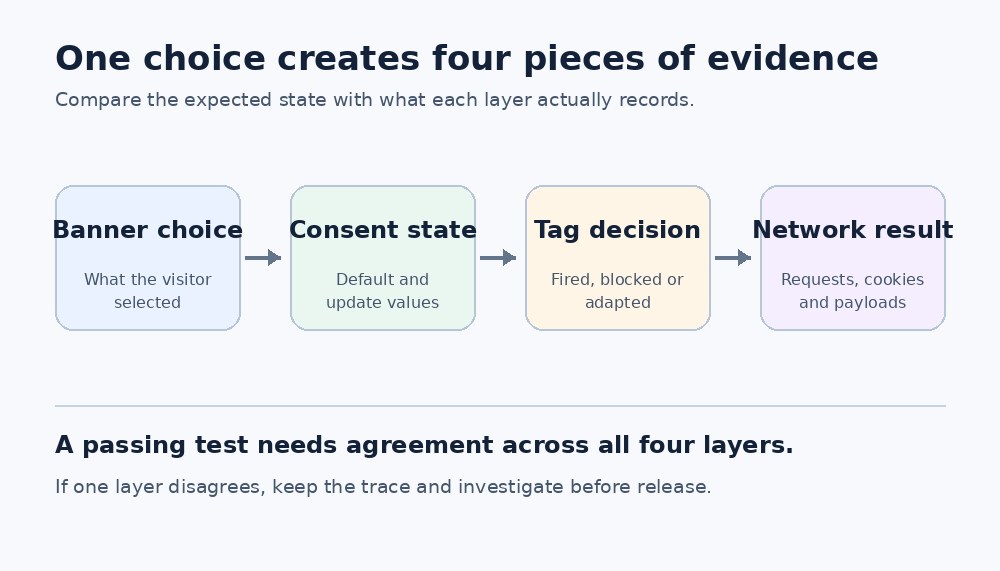 Figure 1 The acceptance trace connects the visitor choice to the final browser activity.